
Your sales team talks to buyers all day, and almost none of it reaches the systems your marketing and RevOps people actually use. A rep hears the real objection, the competitor name, the budget hint. Then the call ends, the recording lands in a folder, and the insight dies there.
That’s the part most teams get wrong about call analysis. They treat it as a recording problem, when it’s really a data problem. Audio is unstructured, and unstructured data doesn’t power reports, lead scoring or campaign messaging. This guide walks through how a MarTech or RevOps team can turn calls into structured CRM data, what to measure, and where the hype outruns the evidence.
What Sales Call Analysis Does for a RevOps Team
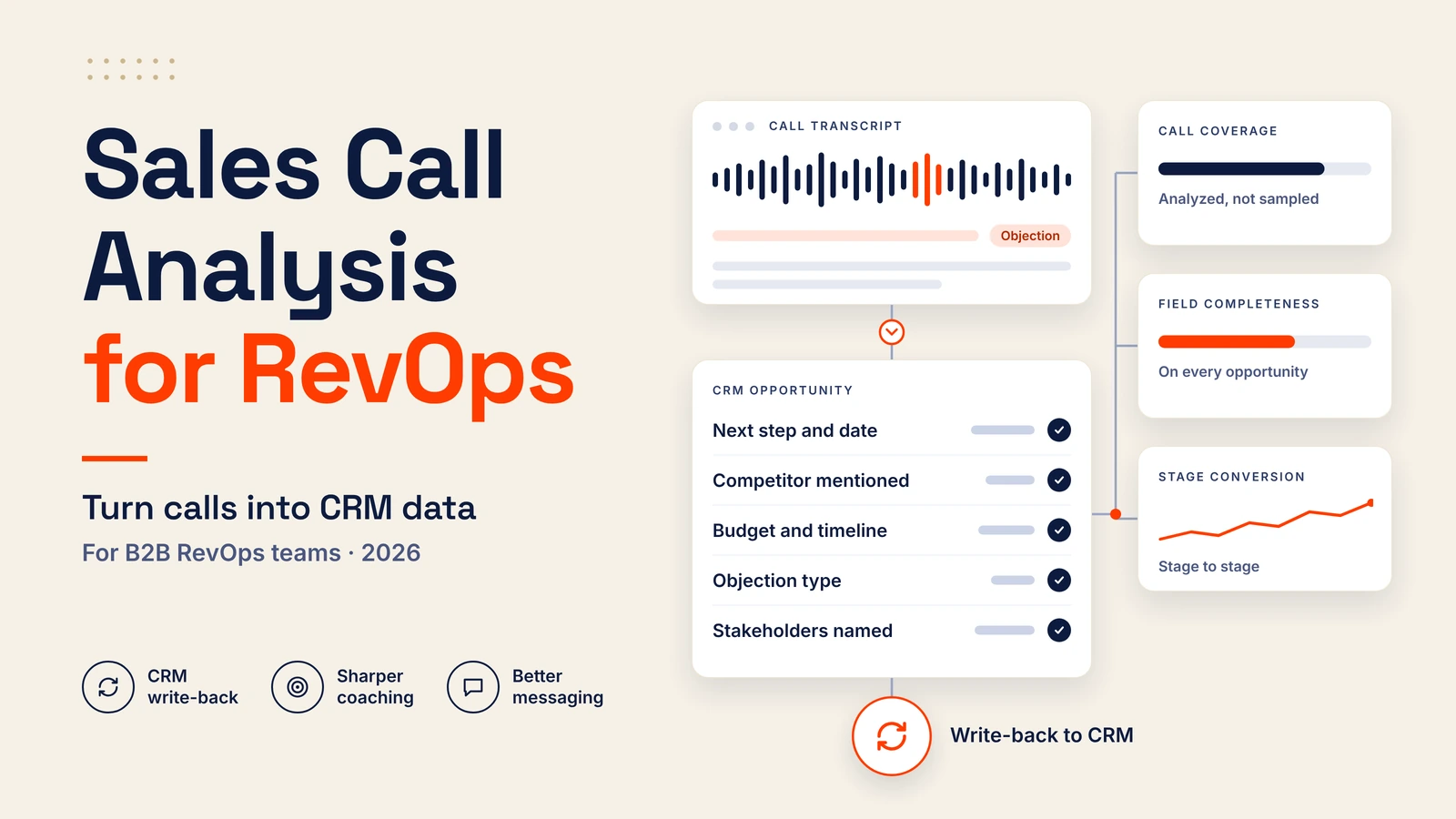
Call analysis means transcribing conversations, scoring them against a rubric, tagging topics and objections, and syncing the results to your CRM.
When teams shop for sales call analysis software, the first filter should be whether insights land back in the CRM. Dashboards look great in demos. But a beautiful scorecard that lives outside your system of record is one more silo, and your reps won’t open it twice.
A transcript or call summary is only useful if someone can act on it. RevOps needs the information in a format that supports pipeline reporting, while managers need clear next steps they can check against future calls. Leaving those details buried in a recording or separate dashboard creates more work instead of removing it.
So judge tools by write-back. Can the platform update fields, log next steps and tag competitors on the opportunity record without a rep touching anything? If not, you’re buying a recorder.
Why Most Calls Never Become Usable Data

Manual review is sampling. A manager listens to two calls a week out of hundreds, picks the ones that feel important, and builds coaching on a thin slice of reality. Everything else goes unheard.
Reps don’t have spare time to fill the gap. Salesforce’s 2026 State of Sales report found that nine in 10 sales teams use AI agents or expect to within two years, which tells you where the pressure to automate note-taking and admin is coming from. The reps still type the CRM updates by hand today, and they do it badly when they’re busy. Fields stay empty, or they hold a vague “interested, follow up.”
From Transcript to CRM: What to Capture
Don’t try to capture everything. Pick the fields that change a decision downstream:
- Agreed next step and date
- Competitor mentioned
- Budget and timeline signals
- Objection type (price, timing, risk, missing feature)
- Stakeholders named on the call
Five well-defined fields beat thirty loosely defined ones. Each needs a fixed set of values, so “pricing objection” means the same thing in March and in September.
This is also where AI agents can hurt you. They amplify whatever data they’re fed, which is why we argue in our guide to fixing CRM data before deploying agents that cleanup comes first. Auto-filling a field with a wrong value at scale is worse than leaving it blank.
Using Call Insights Outside Sales
Here’s the MarTech angle that vendor roundups skip. Calls are the best unfiltered source of how buyers describe their own problems.
Pull verbatim objections into landing page copy and ad tests. Mine competitor mentions to decide which comparison pages deserve a rewrite. Compare the topics that come up in won deals against your ICP definition and see where they disagree. Feed budget and timeline signals into lead scoring, so a form fill from a company that already said “next quarter” ranks above a cold download.
The mechanics depend on your stack. If you’re weighing platforms, how the major CRMs compare on AI matters here, because native call-data support differs more than the feature pages suggest.
Measuring Results Without Trusting Vendor Claims

Vendors love big numbers. Win-rate lifts of 20-plus percent show up in sales decks. Treat any lift without a named, dated study behind it as marketing, and plan around your own baseline instead.
Gartner’s November 2025 forecast is a useful cold shower: by 2028, AI agents will outnumber sellers ten to one, yet fewer than 40% of sellers will say the agents improved their productivity. The tech works. The rollout is where it goes sideways.
Track a handful of operational numbers rather than a single revenue claim:
- Call coverage: the share of calls analyzed, not sampled
- CRM field completeness on opportunities
- New-rep ramp time
- Stage-to-stage conversion
Coverage and completeness move within weeks. Win rate takes quarters and has a dozen other causes.
A 30-Day Rollout Plan
Start small. Pilot one team, not the whole org.
In week one, define the five CRM fields you want to capture and their allowed values. In week two, connect the tool and test whether call insights land in the right fields on a sample of opportunities. Weeks three and four are for weekly coaching reviews, where a manager and rep go through flagged calls together, and for checking the accuracy of what actually reached the CRM.
Look for missing fields, incorrect objection tags and next steps that don’t match what the buyer agreed to. Fix those problems before expanding to other teams. The goal isn’t just to analyze more calls. It’s to give reps better information for follow-ups and make the CRM more useful for everyone who relies on it.
Treat Calls as Shared Data
Buy for CRM write-back and coaching workflow; everything else is decoration. Recording without structured sync is wasted spend, however good the transcript looks. And once the data is clean, don’t leave it with sales. Sharing those insights across teams is part of building a stronger RevOps process. Marketing, RevOps and product all have a stake in what buyers say, and the teams that share it will write better copy, score leads more accurately and coach faster than the ones that keep it in a folder.