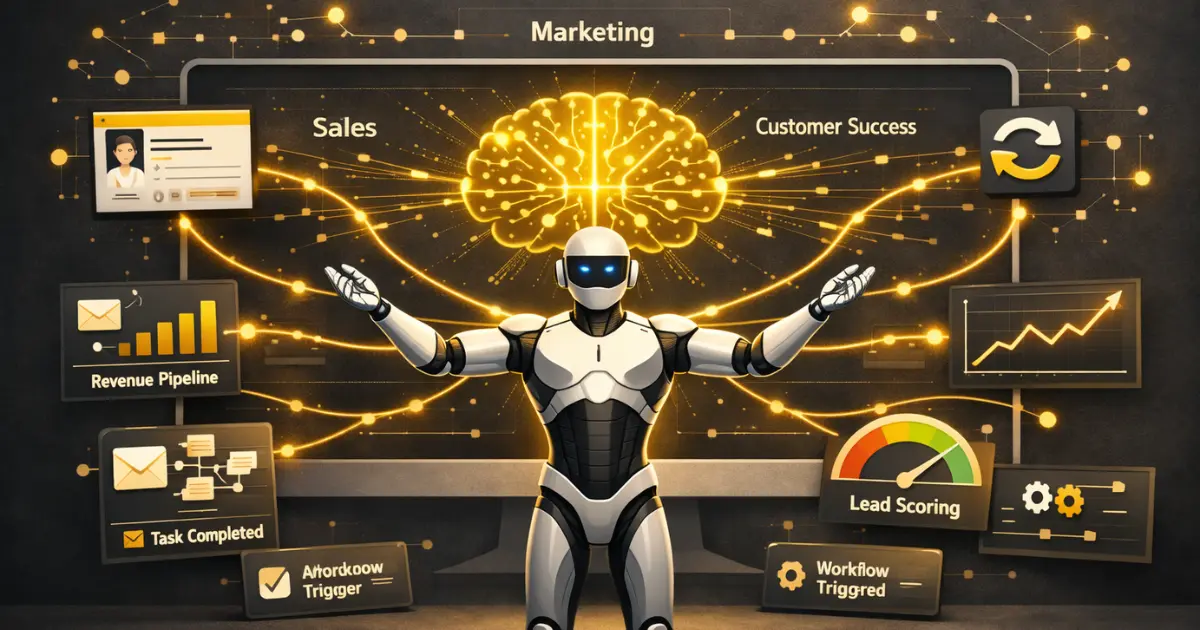
Your RevOps team spends 60% of its time on manual data entry, CRM hygiene, and reconciling reports across tools that refuse to talk to each other. Meanwhile, your pipeline forecast changes three times before Friday. AI agents and RevOps are converging to fix exactly this problem, and the companies adopting agentic AI right now are pulling ahead fast.
This isn’t another “AI will change everything” think piece. Below, you’ll find a practical breakdown of what AI agents actually do inside a RevOps workflow, which tools to evaluate, how to implement them without breaking your existing stack, and what realistic results look like after 90 days.
Key Takeaways
- AI agents go beyond chatbots and dashboards. They autonomously execute multi-step RevOps workflows across your CRM, marketing automation, and billing systems.
- The biggest ROI comes from three areas: CRM data hygiene, intelligent lead routing, and pipeline risk detection.
- Start with a “copilot” deployment where humans review agent actions before moving to autonomous mode.
- RevOps teams need clean, connected data before AI agents can deliver value. Skip the readiness step, and you’ll amplify your existing problems.
- Expect 30-50% reduction in manual data work and 15-25% improvement in forecast accuracy within the first quarter.
What Are AI Agents in RevOps?
AI agents in RevOps are autonomous software systems that observe data across your revenue stack, make decisions based on predefined rules and machine learning models, and execute actions without waiting for a human to click a button. They connect to your CRM, marketing automation platform, billing system, and customer success tools to manage workflows end-to-end.
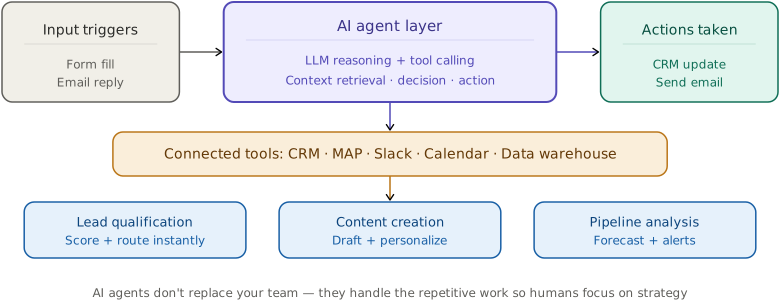
That definition matters because it separates AI agents from two things they’re often confused with. AI assistants (like a chatbot that answers questions) respond to requests but don’t take action. Traditional automation (like a Zapier workflow) executes predefined steps but can’t adapt when conditions change. AI agents sit above both: they evaluate multiple data inputs, decide what should happen next, and trigger the right workflows across your entire tech stack.
While this article focuses on AI agents in revenue operations, the same principles are transforming campaign execution. See our guide to agentic AI in marketing for six use cases that work today.
For example, an AI agent monitoring your pipeline might notice a high-value deal has gone silent for 10 days. Instead of just flagging it in a report, the agent checks the contact’s recent email engagement, reviews the last call notes from your conversation intelligence tool, identifies that the economic buyer hasn’t been involved since the demo, and then drafts a re-engagement email for the rep’s approval while updating the deal’s risk score in Salesforce. That chain of observe-decide-act is what makes agents different from every RevOps tool you’ve used before.
Why RevOps Teams Need AI Agents Now
RevOps was supposed to unify sales, marketing, and customer success around shared data and processes. And in theory, it did. In practice, most RevOps teams are drowning in tool complexity. Unlike traditional sales ops models, RevOps promised a single source of truth across go-to-market functions. But the average B2B company runs 12-24 tools across its go-to-market stack, and keeping those tools in sync is a full-time job for multiple people. Before layering AI agents on top, most teams benefit from consolidating the core stack first — our best RevOps software guide maps the 10 platforms that handle the foundational work AI agents will later orchestrate.
Choosing the right tools matters as much as connecting them. If your team is evaluating project management platforms alongside your RevOps stack, our ClickUp vs Asana comparison breaks down which fits B2B operations better.
Here’s what that looks like day-to-day. Reps spend about 70% of their time on non-selling activities like updating CRM fields, researching accounts, and scheduling follow-ups. Around 91% of CRM data is incomplete or inaccurate, which means your forecasts are built on shaky ground. Marketing passes leads to sales without real-time scoring, so SDRs waste hours chasing contacts who aren’t ready to buy. And when a customer churns, nobody finds out why until three retrospectives later.
AI agents attack these problems at the root. They don’t add another dashboard or report. They take over the repetitive, cross-system coordination work that bogs down your team, so your people can focus on the strategic decisions that actually move revenue. That choice starts in AI for strategic planning, where leaders separate decision support from execution work before RevOps buys another automation layer.
The Data Unification Problem
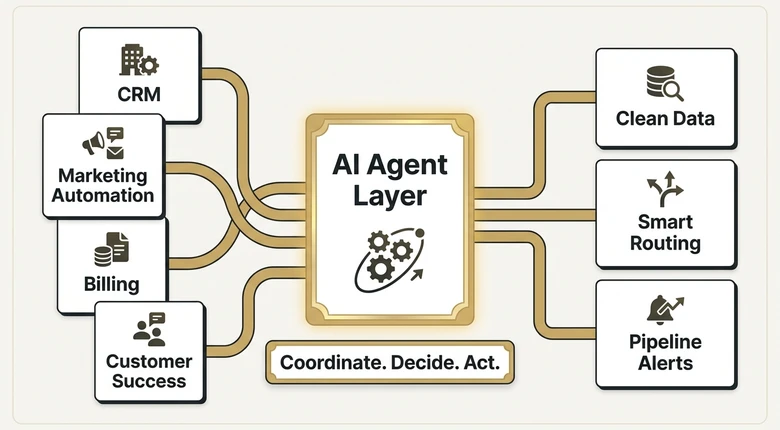
Most RevOps AI failures trace back to a single issue: fragmented data. Your CRM says one thing, your marketing platform says another, and your billing system has its own version of the truth. AI agents that operate across systems can continuously sync and reconcile this data, creating a single source of truth that updates in real time. But they need a minimum data quality baseline to work. More on that in the readiness section below. ChatGPT Data agent adds a second readiness test: once access is easier, RevOps still needs authoritative metric definitions and a validation path for the answer.
From Reactive Reporting to Proactive Execution
Traditional RevOps is reactive. Something goes wrong in the pipeline, someone pulls a report, a meeting happens, and eventually a fix gets implemented. AI agents flip this model. They monitor signals continuously, detect problems before they surface in quarterly reviews, and take corrective action immediately. A well-configured agent can catch a stalling deal, a disengaged customer, or a misrouted lead within hours instead of weeks.
6 High-Impact Use Cases for AI Agents in RevOps
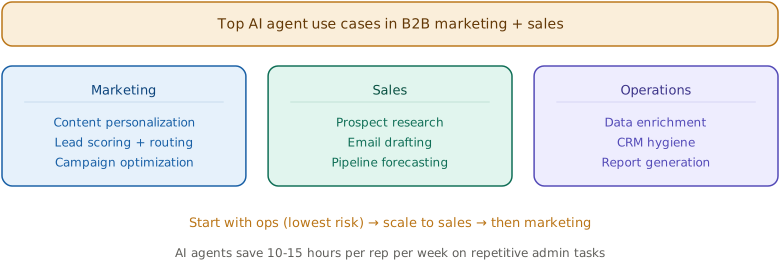
Not all AI agent deployments are equal. Some use cases deliver ROI in weeks while others take months to tune properly. Here are the six areas where RevOps teams are seeing the fastest returns, ranked by typical implementation difficulty. OpenAI’s April 2026 Workspace Agents launch added cross-app agentic workflows to the RevOps consideration set. OpenAI’s April 2026 Workspace Agents launch added cross-app agentic workflows to the RevOps consideration set. OpenAI’s April 2026 Workspace Agents launch added cross-app agentic workflows to the RevOps consideration set. OpenAI’s April 2026 Workspace Agents launch added cross-app agentic workflows to the RevOps consideration set.
1. CRM Data Hygiene and Enrichment
This is the lowest-hanging fruit and where most teams should start. An AI agent monitors your CRM records for missing fields, duplicate entries, and outdated information. It pulls enrichment data from sources like Clearbit, ZoomInfo, or Apollo to fill gaps automatically. It also listens to call recordings and email threads, extracting key details (next steps, decision-makers mentioned, budget signals) and suggesting CRM updates for reps to approve.
Results vary by team size, but expect your CRM completeness rate to jump from the typical 40-60% to above 85% within 60 days. That alone makes your forecasts significantly more reliable.
2. Intelligent Lead Scoring and Routing
Static lead scoring models break as your market evolves. AI agents analyze engagement patterns, firmographic data, intent signals, and historical conversion data to score leads dynamically. More importantly, they route leads to the right rep based on factors like territory, expertise, current workload, and past win rates with similar accounts. OpenAI Presence’s demand-generation workflow extends that model into a live voice or chat conversation, where qualification, enrichment, and routing can happen before the prospect leaves the interaction.
One industrial equipment company reported a 40% increase in conversion rates after deploying AI-powered lead scoring that prioritized accounts by wallet share and growth potential. The key difference: their scoring model updated daily based on real outcomes, not quarterly based on a marketing committee’s best guess.
3. Pipeline Risk Detection and Deal Coaching
This use case monitors every active deal for warning signs. The agent tracks engagement frequency, stakeholder involvement, email sentiment, and deal velocity against your historical benchmarks. When a deal starts showing risk patterns (for example, the champion goes quiet or a competitor enters the conversation), the agent alerts the rep and their manager with specific recommendations. Pairing this with strong lead scoring best practices ensures your pipeline quality stays high from top to bottom.
Some platforms go further, scoring sales calls against your chosen methodology (MEDDIC, MEDPICC, BANT) and providing coaching insights to managers. This turns your best reps’ behaviors into a repeatable playbook across the entire team.
4. Automated Outreach and Follow-Up Sequencing
AI agents manage email and SMS sequences by adjusting timing, content, and channel based on how each prospect interacts. If a contact opens three emails but never clicks, the agent shifts to a different message angle. If a prospect visits your pricing page after going silent, the agent triggers an immediate personalized follow-up from the assigned rep. Point that same sequencing logic at a named account list instead of inbound leads and it becomes the follow-up layer in AI-driven ABM, chasing a whole buying group rather than a single contact.
Before deploying agents, audit your current workflows with a business process automation assessment to identify where AI adds real leverage.
This goes beyond basic marketing automation. The agent is making judgment calls about timing and content that previously required a human SDR to notice patterns and act on them.
5. Customer Health Monitoring and Churn Prevention
Post-sale is where most RevOps teams have the biggest blind spot. AI agents track product usage, support ticket volume, NPS responses, and engagement with customer success touchpoints. They calculate a real-time health score for every account and trigger intervention workflows when scores drop.
A well-tuned customer health agent can identify at-risk accounts 30-60 days before traditional methods would catch them. It can also spot expansion opportunities by recognizing usage patterns that historically precede upsells.
6. Revenue Forecasting and Scenario Modeling
The most advanced use case. AI agents analyze historical win rates, current pipeline velocity, seasonal patterns, and macroeconomic signals to generate forecasts that update in real time. They don’t replace your judgment calls about specific deals, but they give you a much more accurate baseline to work from.
Companies using AI-powered forecasting report 15-25% improvement in forecast accuracy compared to rep-submitted estimates. The agent is especially valuable for identifying deals that reps are overly optimistic about, catching the “happy ears” problem before it hits your quarterly number.
PRO TIP
Don’t try to deploy all six use cases at once. Start with CRM hygiene (Use Case #1) because it creates the data foundation that every other use case depends on. Once your data quality is consistently above 80%, move to lead scoring and pipeline risk detection.
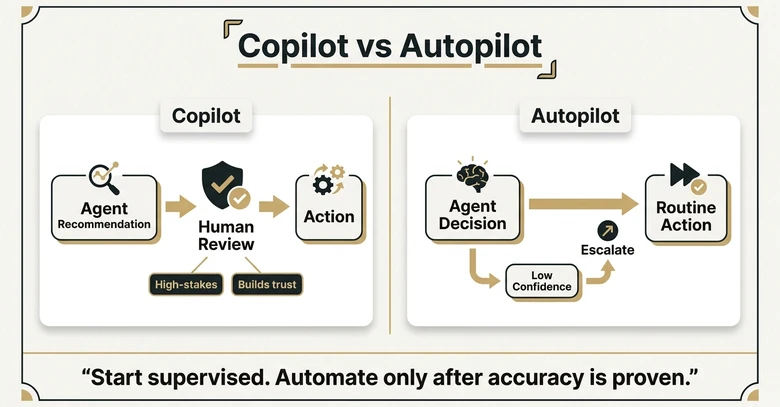
Copilot vs. Autopilot: Choosing Your Deployment Model
Every RevOps team deploying AI agents faces a fundamental choice: how much autonomy do you give the agent? The Salesforce in Claude rollout turns that choice into a skill-level policy question, because its 37 sales skills span analysis, recommendations, and actions that can write back to Salesforce.
Copilot Mode (Human-in-the-Loop)
The agent surfaces recommendations, drafts actions, and prepares updates, but a human must review and approve before anything executes. This is the right starting point for most teams because it builds trust, catches errors during the learning phase, and gives your team time to adjust their workflows.
Copilot mode works best for high-stakes actions like deal prioritization changes, customer escalation triggers, and forecast adjustments. Even mature AI deployments keep these actions in copilot mode.
Autopilot Mode (Autonomous Execution)
The agent decides and acts independently within defined boundaries. It escalates to a human only when confidence is low or the action falls outside its permitted scope. This mode delivers the biggest efficiency gains but requires a solid track record in copilot mode first.
Autopilot mode is safe for lower-stakes actions like CRM field updates, lead enrichment, meeting scheduling, and routine follow-up emails. According to Gartner’s RevOps research, 75% of high-growth companies will adopt RevOps models with autonomous agent components by late 2026.
The smart approach is a hybrid. Run new agent capabilities in copilot mode for 4-6 weeks, measure accuracy, and then graduate well-performing agents to autopilot for routine tasks while keeping strategic decisions in copilot.
How to Evaluate If Your RevOps Is Ready for AI Agents
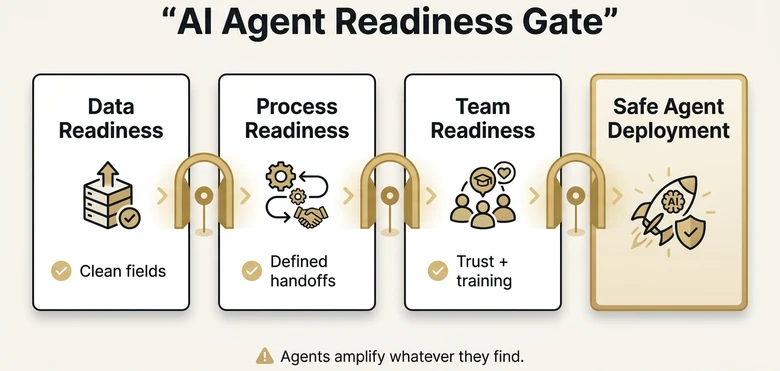
AI agents amplify whatever they find. If your data is clean and your processes are defined, agents make everything faster and more accurate. If your data is a mess and your processes are inconsistent, agents will amplify the chaos. Here’s a quick readiness checklist. Salesforce’s August 2026 survey adds a timeline to that readiness question: teams that unified the relevant data before deployment reported meaningful ROI in 7.3 months versus 8.8 months when they fixed data gaps later.
Data Readiness
Your CRM should have consistent field usage across at least 60% of records. You need a defined data model (what fields mean, what values are acceptable) even if compliance is imperfect. Your key systems (CRM, marketing automation, billing) should have existing integrations, even basic ones. If you’re still running major processes in spreadsheets, fix that first.
Process Readiness
You need documented lead lifecycle stages, deal stages, and handoff criteria between sales and marketing. They don’t need to be perfect, but they need to exist. AI agents need defined rules to operate within, and if those rules live only in people’s heads, the agent has nothing to work with.
Team Readiness
Your team needs to understand what the agent will do and, critically, what it won’t do. Change management is the most overlooked part of AI agent deployment. If reps don’t trust the agent’s lead scores, they’ll ignore them. If managers don’t understand the pipeline risk alerts, they’ll create workarounds. Build training into your rollout plan from day one. That readiness question also reaches the underlying model: the U.S. model-level cybersecurity tests aim to measure advanced hacking capability, but buyers still lack public metrics and result-reporting rules.
IMPORTANT
If you score below 60% on data readiness, invest in a 30-day data cleanup sprint before touching AI agents. A strong RevOps foundation with clean data and defined processes is what separates successful AI deployments from expensive failures.
Top AI Agent Platforms for RevOps Teams
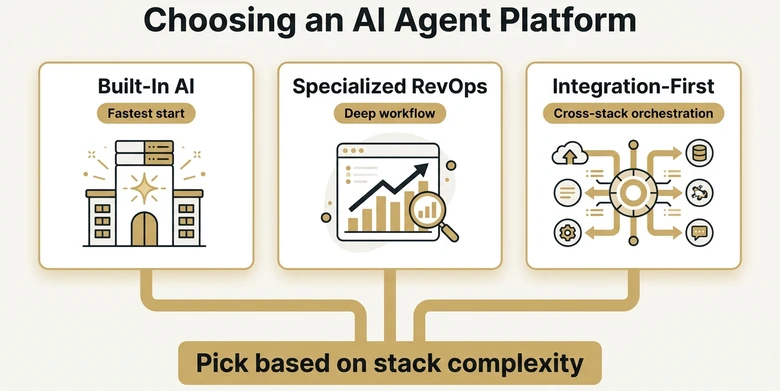
The market is moving fast, and new platforms launch monthly. Here’s how to think about the three main categories of AI agent tools for RevOps, with specific examples in each. Those categories are scoped to revenue operations; for the broader stack of content, SEO, outreach, ad, and intent tools, see the marketing-team-wide AI tools list.
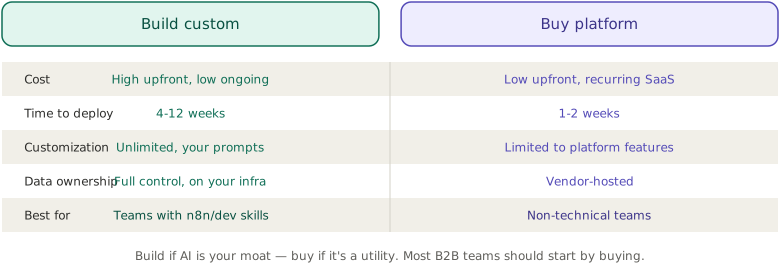
For hands-on teams, self-hosting n8n on Hostinger provides a cost-effective infrastructure for running these agent workflows.
Built-in AI Within Your Existing Stack
Salesforce Einstein, HubSpot Breeze AI, and Microsoft Copilot for Dynamics 365 embed agentic capabilities directly into the CRM you already use. The advantage is zero integration overhead. The limitation is that these agents operate primarily within their own ecosystem, which means they may not see the full picture across your entire stack. Adobe CX Enterprise Coworker shows the agentic pattern at B2B scale with native Marketo MCP, putting marketing automation in the same agent-callable category.
Best for: Teams heavily committed to one platform who want quick wins without new vendor contracts.
Specialized RevOps Agent Platforms
Tools like Clari, Gong, and 6sense focus on specific RevOps workflows (forecasting, conversation intelligence, and intent data, respectively) with increasingly agentic features. These platforms offer deep functionality in their domain but require integration work to connect across your full revenue cycle.
Best for: Teams that need best-in-class capability in one area (like forecasting accuracy or deal intelligence) and have the integration resources to connect it.
Integration-First Agent Platforms
Platforms like Celigo, Workato, and automation tools like n8n, Make, and Zapier take a different approach. They sit between your existing tools and orchestrate AI-powered workflows across systems. These platforms don’t replace your CRM or marketing tool. They connect everything and add an intelligence layer on top.
Best for: Teams with complex, multi-tool stacks that need agents to operate across systems rather than within a single platform.
5-Step Implementation Roadmap
Here’s the playbook that gets RevOps teams from “interested in AI agents” to “seeing measurable results” in 90 days. This sequence is based on what’s working for mid-market B2B teams running HubSpot, Salesforce, or similar stacks.
Step 1: Audit Your Data and Processes (Week 1-2)
Use a business process improvement framework before the agent build so the audit captures handoffs, owners, and failure points, not just tool fields.
Run a data quality audit on your CRM. Check field completeness rates, duplicate percentages, and last-updated timestamps across your opportunity, contact, and account records. Document your current lead-to-close process, including every handoff point and the systems involved. This audit becomes the baseline you’ll measure improvements against.
Step 2: Pick One High-Impact Use Case (Week 2-3)
Don’t boil the ocean. Choose one use case from the six above. CRM data hygiene is the safest starting point because it’s low-risk, delivers visible results fast, and improves the data quality that every other use case needs. If your data is already solid, go straight to lead scoring or pipeline risk detection.
Step 3: Deploy in Copilot Mode (Week 3-6)
Configure the agent for your chosen use case and run it in copilot mode. Every action the agent wants to take gets reviewed by a human first. Track two things during this phase: accuracy (how often is the agent’s recommended action correct?) and coverage (how many relevant events is the agent catching?). You want above 85% accuracy before moving to autopilot. For customer-facing agents, real-conversation synthetic personas can turn common requests and edge cases into a reusable regression set before the workflow graduates.
Step 4: Graduate to Autopilot for Routine Actions (Week 6-10)
Once accuracy is proven, let the agent run autonomously on low-stakes actions (CRM field updates, lead enrichment, routine notifications). Keep high-stakes actions (deal stage changes, customer escalations, forecast adjustments) in copilot mode. Set up a weekly review cadence where someone on your team spot-checks the agent’s autonomous actions.
Step 5: Expand to a Second Use Case (Week 10-12)
With one agent running smoothly and your data quality improved, deploy a second use case. Repeat the copilot-to-autopilot progression. Most teams can have three agents operating in parallel by the end of their second quarter.
What Realistic Results Look Like
Vendor case studies love to throw out huge numbers, and some of them are real. But here’s what a realistic 90-day trajectory looks like for a mid-market B2B company (50-200 employees, $10M-$100M ARR) deploying their first AI agent for RevOps.
In the first 30 days, you’ll see CRM data completeness improve by 20-30 percentage points as the agent fills gaps and flags inconsistencies. Manual data entry time drops by 30-50%. Your team will initially spend some time reviewing agent suggestions, which partially offsets the time savings.
By day 60, the agent’s accuracy should be high enough that routine actions move to autopilot. Net time savings stabilize around 10-15 hours per rep per week. Forecast accuracy starts improving as cleaner data feeds better predictions.
By day 90, you should see measurable pipeline improvements: faster lead response times, higher conversion rates on scored leads, and earlier detection of at-risk deals. Teams reporting after a full quarter typically cite 15-25% improvement in forecast accuracy and a measurable increase in pipeline velocity.
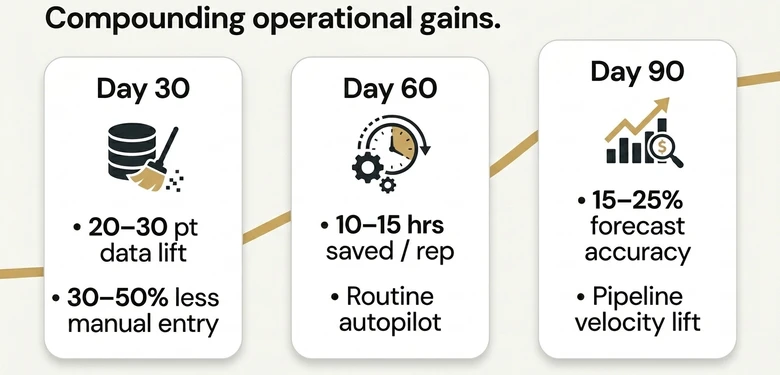
The compounding effect is what matters most. Each improvement feeds the next. Better data produces better scores, which produce better routing, which produces better conversion rates, which produces better data as more deals close and feed back into the system.
Common Pitfalls and How to Avoid Them
Most AI agent failures in RevOps aren’t technology problems. They’re implementation problems. Here are the patterns that trip teams up.
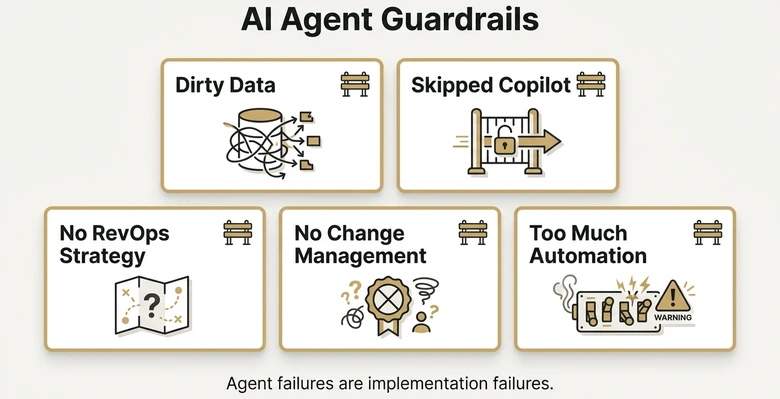
Deploying before data is ready. If less than 50% of your CRM records have complete key fields, fix that before spending money on AI agents. As Forrester has noted, AI amplifies existing processes, both good and bad.
Skipping the copilot phase. Going straight to autopilot feels faster, but agents need a supervised learning period to calibrate to your specific data patterns. Skip this, and you’ll spend more time fixing agent mistakes than the agent saves you.
Treating AI agents as a replacement for RevOps strategy. Agents execute, they don’t strategize. If your RevOps best practices aren’t defined (clear lead stages, documented handoff criteria, agreed-upon metrics), an agent has nothing to optimize. Fix the strategy first, then automate it.
Ignoring change management. Your reps and managers need to understand and trust what the agent does. Run a 30-minute training session before go-live, set up a Slack channel for agent-related questions, and share weekly “wins” where the agent caught something humans missed. Trust is built through transparency, not mandates.
Over-automating too fast. Not every RevOps task should be handled by an AI agent. High-judgment activities like negotiation strategy, key account planning, and cross-functional alignment still need human leadership. Automate the repetitive stuff so your people have more time for the work that actually requires experience and relationships.
The Future of AI Agents in Revenue Operations
The trajectory is clear. Today’s AI agents handle individual tasks within defined workflows. By late 2026, expect multi-agent systems where specialized agents (one for pipeline management, one for customer health, one for forecasting) collaborate and coordinate across your entire revenue cycle. Think of it as moving from individual contractors to a synchronized team.
Three trends worth watching. First, agent-to-agent communication protocols (like the Model Context Protocol and Agent2Agent Protocol) are maturing, which will let agents from different vendors work together without custom integration — Salesforce’s Headless 360 launch at TDX 2026 makes this concrete, exposing 100+ CRM tools and skills to external AI agents via MCP, API, and CLI and creating a governance question RevOps teams can’t avoid. Second, AI agents are moving from cloud-only to embedded, meaning they’ll operate directly inside your CRM and marketing tools rather than as separate platforms. Third, governance and observability tools are catching up, making it easier to audit what agents are doing and why. Gong’s Microsoft move adds a procurement layer to that architecture: Marketplace access plus live MCP support lets Copilot reach revenue context without a separate adoption path.
For RevOps leaders, the strategic question isn’t whether to adopt AI agents. It’s how fast you can build the data foundation and process maturity to deploy them effectively. The companies that start now, even with a single use case in copilot mode, will have a meaningful head start when multi-agent systems go mainstream.
FAQ
Traditional RevOps automation follows static, predefined rules: “When X happens, do Y.” AI agents evaluate multiple data inputs, use machine learning to decide what action is most appropriate, and adapt their behavior based on outcomes. An automation workflow can’t change its own logic. An AI agent adjusts its approach based on what’s working.
Costs vary significantly. Built-in AI features (Salesforce Einstein, HubSpot Breeze) are included in higher-tier plans ranging from $150-$300 per user per month. Specialized platforms like Clari or 6sense typically run $30,000-$100,000 annually depending on team size. Integration-first platforms range from $1,000-$10,000 per month based on volume and complexity.
Yes, but the depth of integration varies. Most AI agent platforms connect to major CRMs (Salesforce, HubSpot, Microsoft Dynamics) and marketing platforms out of the box. Complex stacks with ERP systems, custom billing tools, or legacy databases may need middleware or custom API work. Check integration availability before committing to any platform.
Most teams see measurable time savings within 30 days (reduced manual data entry, faster lead routing). Pipeline-level improvements like better conversion rates and forecast accuracy typically appear by day 60-90. Full ROI, where cost savings and revenue improvements exceed the investment, usually occurs within 4-6 months for mid-market teams.
Modern platforms are designed for RevOps professionals, not engineers. Configuration typically involves selecting data sources, defining rules and thresholds, and mapping workflows through visual interfaces. That said, complex deployments involving custom integrations or multi-agent orchestration may require support from a solutions engineer or technical RevOps specialist.