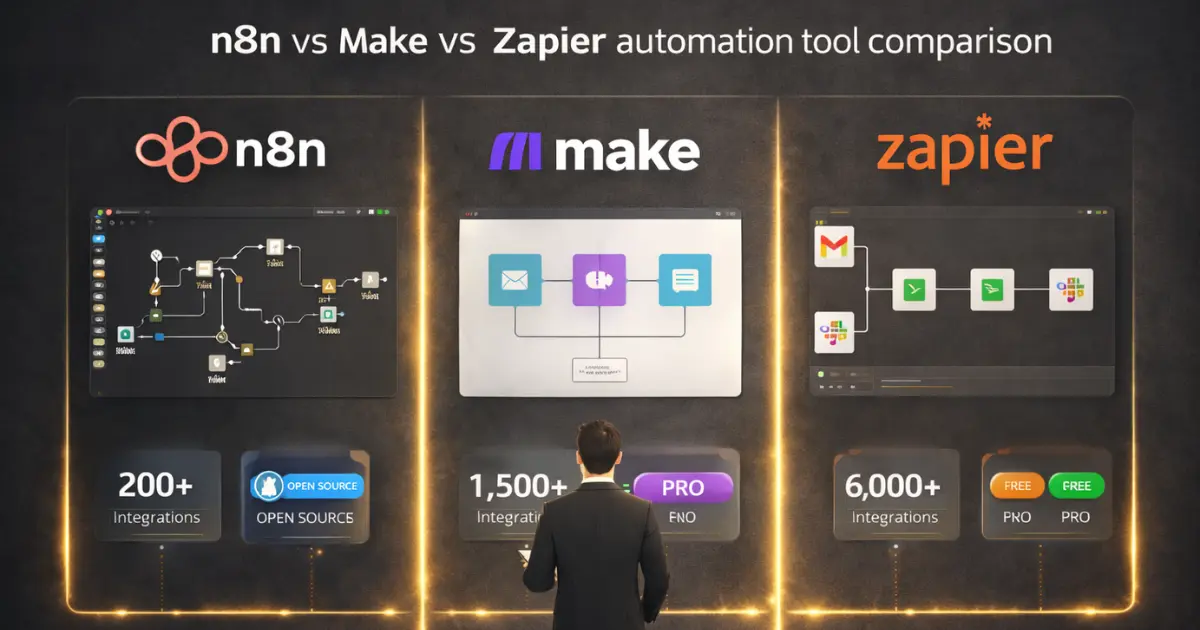
You need to automate workflows across your B2B stack, and you’ve narrowed it down to three platforms: n8n, Make, and Zapier. All three connect apps, trigger actions, and save your team hours of manual work. But they’re built for very different users, and picking the wrong one means paying too much for simplicity you don’t need, or wrestling with complexity that slows your team down.
After testing n8n vs Make vs Zapier across real B2B marketing and RevOps workflows, including lead routing, CRM syncs, reporting automations, and AI-powered data enrichment, the differences become clear fast. This comparison breaks down what each platform actually does well, where it falls short, and which one fits your team’s technical skills and budget. Automation tools are the implementation layer of a bigger discipline — see our full guide to business process improvement for how to decide which processes are worth automating in the first place.
Key Takeaways
- Zapier is the fastest to set up with 8,000+ integrations, but costs climb quickly at scale due to task-based pricing.
- Make offers the best balance of visual workflow building and affordability, with 10,000 operations per month at the $29 tier.
- n8n gives developers full control with self-hosting, custom code, and advanced AI capabilities, but requires technical skills to manage.
- For B2B teams running high-volume automations, n8n self-hosted costs a fraction of what Zapier charges for the same workload.
- Many teams start with Zapier or Make and graduate to n8n as their automation needs grow more complex.
What Are n8n, Make, and Zapier?
n8n, Make, and Zapier are workflow automation platforms that connect different software applications and automate repetitive tasks by passing data between them based on triggers and actions. Each platform lets you build automated workflows without writing code from scratch, though they differ significantly in how much technical control they offer.
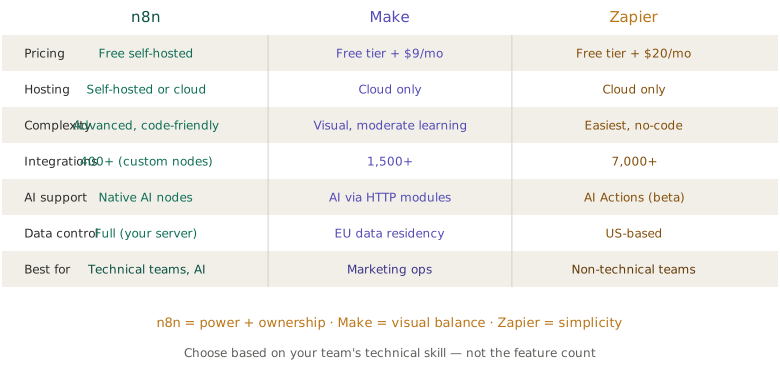
Zapier launched in 2011 and built the no-code automation category. It connects 8,000+ apps through a simple trigger-action model that anyone can learn in minutes. If you need to connect HubSpot to Slack to Google Sheets, Zapier probably has a pre-built template for it.
Make (formerly Integromat) takes a visual canvas approach. You build workflows by dragging and connecting modules on a diagram, which makes complex branching logic easier to understand than Zapier’s linear format. It currently supports around 2,000 app integrations.
n8n is an open-source, self-hostable automation platform aimed at developers and technical teams. With 1,000+ native integrations plus the ability to connect to any API through HTTP nodes and custom JavaScript, it offers the most flexibility of the three but demands the most technical skill.
All three platforms serve the same fundamental purpose, but they approach it from radically different philosophies. Zapier optimizes for speed and accessibility. Make optimizes for visual clarity and mid-tier power. n8n optimizes for developer control and cost efficiency. Understanding these philosophical differences shapes every feature comparison that follows.
n8n vs Make vs Zapier: Feature-by-Feature Comparison
Ease of Use and Learning Curve
This is the single biggest differentiator and where your decision likely starts.
Zapier is the clear winner for non-technical teams. Its step-by-step builder walks you through each workflow: pick a trigger, pick an action, map the data fields, and you’re done. Marketing managers, ops leads, and sales reps can build functional automations without calling engineering. The tradeoff is that this simplicity limits what you can build. Complex conditional logic, loops, and error handling are either unavailable or require workarounds. Whichever builder you pick, the sequence design decides the outcome, so it pays to plan how a marketing automation workflow should branch and exit before you drag the first module.
Make sits in the middle. Its visual canvas shows your entire workflow as a flowchart, which makes branching logic and data transformations more intuitive than Zapier’s linear approach. Expect to spend an afternoon learning the interface before you’re productive. It’s a good fit for marketing ops and RevOps teams who need more power than Zapier offers but don’t have dedicated developers.
n8n requires the most technical investment. The interface looks clean, but it quickly pulls you into expressions, variables, and JSON data structures. If you’re comfortable with JavaScript and APIs, n8n feels incredibly powerful. If you’re not, it feels overwhelming. Self-hosted n8n also means managing servers, Docker containers, and updates, which is a non-trivial ops commitment.
PRO TIP
Match the platform to whoever will actually maintain your automations day-to-day, not whoever sets them up initially. If your developer builds everything in n8n but leaves in six months, can your marketing team keep it running?
Automation tools are only one piece of the ops stack. If you are also evaluating project management platforms, our ClickUp vs Asana comparison covers the same build-vs-simplicity tradeoff for task management.
Integrations and App Ecosystem
Zapier dominates here with 8,000+ app integrations. If a SaaS tool exists, Zapier probably connects to it. This matters most for teams using niche industry tools or newer apps that haven’t built integrations with smaller platforms.
Make supports around 2,000 apps, which covers all major business tools: CRMs, email platforms, project management, accounting software, and marketing automation platforms. What Make lacks in breadth it makes up for in depth. Its integrations often expose more API endpoints than Zapier’s, giving you more granular control over what data you send and receive.
n8n has roughly 1,000 native integrations, the smallest catalog of the three. But this number is misleading. n8n’s HTTP Request node and custom code capabilities let you connect to literally any service with a public API. For developer-led teams, this means n8n technically has unlimited integration potential. For non-technical teams, the smaller native catalog is a real limitation.
Workflow Complexity and Logic
This is where the platforms diverge most dramatically.
Zapier handles linear workflows well: when X happens, do Y, then Z. Multi-step Zaps support sequential actions, and Paths let you add basic conditional branching. But building loops, error recovery, or complex data transformations pushes you against Zapier’s limits quickly. You’ll end up chaining multiple Zaps together, which gets messy and expensive. It helps to remember that a connector like this is only one layer of a larger B2B marketing automation stack; it moves data between tools, but it isn’t the platform that scores leads or runs the nurture tracks.
Make excels at complex logic. Its visual canvas naturally supports conditional branches (routers), iterators for processing arrays, aggregators for combining data, and sophisticated error handling with break and retry modules. If your automation needs to process a list of leads differently based on multiple criteria, Make handles this elegantly.
n8n treats automation as a development environment. Custom JavaScript in any node, webhook endpoints, sub-workflows, dedicated error workflows, and built-in retry logic give you capabilities that neither Zapier nor Make can match. For teams building AI agents and RevOps automations, n8n’s support for LangChain, self-hosted LLMs, and retrieval-augmented generation (RAG) makes it the strongest choice by a significant margin.
AI and LLM Capabilities
AI integration is the fastest-evolving differentiator across all three platforms in 2026.
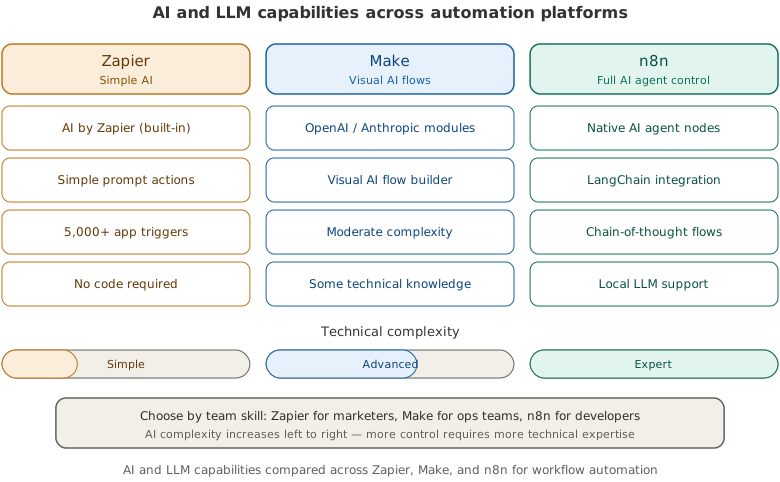
Zapier offers AI-powered workflow suggestions and basic AI actions like text summarization and classification through pre-built integrations with OpenAI. It’s designed to make AI accessible to non-technical users, which means simplicity over depth. Workflow automation is one job in a wider B2B AI stack; the content, SEO, outreach, ad, and intent picks sit in the full B2B AI marketing tools shortlist.
Make provides AI integrations through its module library, connecting to OpenAI, Anthropic, and other AI services. You can build multi-step AI workflows with data transformation between steps. Its agent builder (currently in beta) is expanding these capabilities.
n8n is the clear leader for AI-heavy use cases. Native LangChain integration, support for self-hosted LLMs, vector database connections, MCP server capabilities, and workflow evaluations for assessing model performance put it in a different category. If your team is building AI-driven automation systems rather than just adding AI to existing workflows, n8n is the only option that scales. Teams using DALL-E 3 nodes need to migrate to gpt-image-2 before May 12, 2026 — see the migration playbook.
Pricing Comparison: The Real Cost of Automation
Pricing is where theoretical comparisons meet reality. The sticker price tells you almost nothing. What matters is what you’ll actually pay for your workload.
How Each Platform Charges
Zapier charges per “task,” where each action step in a workflow counts as one task. A five-step workflow triggered 100 times uses 500 tasks. The free plan includes 100 tasks/month. Paid plans start at $29.99/month for 750 tasks, scaling up to $103.50/month for 2,000 tasks on the Professional plan.
Make charges per “operation,” but bundles steps more intelligently than Zapier. The free plan includes 1,000 operations/month. The Core plan at $10.59/month gets you 10,000 operations. The Pro plan at $18.82/month adds advanced features like custom variables and priority execution.
n8n offers a free self-hosted option with no execution limits. You pay only for your server (typically $5-15/month on a VPS). The cloud-hosted option starts at $24/month for 2,500 executions on the Starter plan, with scaling tiers above that.
What You’ll Actually Pay
Here’s a realistic scenario. You run 15 workflows processing a total of 5,000 actions per month across CRM syncs, lead routing, Slack notifications, and reporting.
On Zapier, that’s roughly 5,000 tasks, putting you on the Team plan at around $103.50/month, or $1,242/year. On Make, that same workload might translate to approximately 5,000 operations (Make bundles more efficiently), keeping you on the Core plan at around $127/year. On n8n self-hosted, your cost is the VPS fee of roughly $10/month, or $120/year.
The gap widens as your automation volume grows. Teams running 20,000+ monthly actions can spend $500+/month on Zapier while paying $10/month on self-hosted n8n for the same output.
Data Security and Compliance
For B2B companies handling customer data, especially in regulated industries, hosting and data residency are deal-breakers.
Zapier is cloud-only with data processed on US-based servers. There’s no self-hosting option and limited regional data residency. For teams with strict GDPR, SOC 2, or data sovereignty requirements, this can be a hard block.
Make offers cloud hosting with data centers in the US and EU, giving European companies a GDPR-compliant option. Still no self-hosting.
n8n is the only platform that supports full self-hosting. Your data stays on your infrastructure, processed entirely within your network. For companies in finance, healthcare, or enterprise B2B where data sovereignty is mandatory, this alone can make n8n the only viable option. Teams focused on RevOps best practices often favor n8n for this reason, as revenue data and customer PII never leave their environment.
Which Platform Should You Choose?
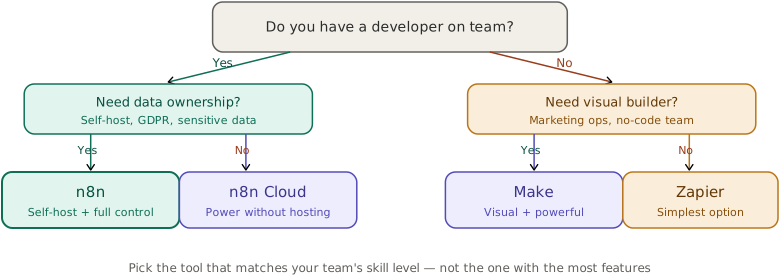
The best tool depends on who’s building, what you’re building, and how much you’re willing to spend.
Choose Zapier If…
Your team is non-technical and needs automations running within the hour. You use niche tools that only Zapier integrates with. Your workflow count and complexity are low to moderate. You value time-to-value over long-term cost optimization. Zapier is perfect for marketing teams connecting standard SaaS tools with straightforward logic.
Choose Make If…
You need more complex logic than Zapier allows, including conditional branching, loops, and data transformation. You want visual workflow building without writing code. You’re cost-conscious and running moderate-to-high volumes. Make is the sweet spot for marketing ops and RevOps teams who outgrow Zapier but don’t have dedicated developers.
Choose n8n If…
You have developers on your team (or are one). You need self-hosting for data security or compliance. You’re building AI-driven workflows that require LLM integration, custom code, or API-heavy processes. You’re running high-volume automations where Zapier’s per-task pricing becomes prohibitive. n8n is built for technical teams who want full control over their automation infrastructure.
PRO TIP
Many teams run a hybrid setup: Zapier or Make for quick, simple automations that non-technical team members maintain, and n8n for complex, high-volume workflows that developers build. This lets each team member use the right tool for their skill level.
Real-World B2B Automation Use Cases
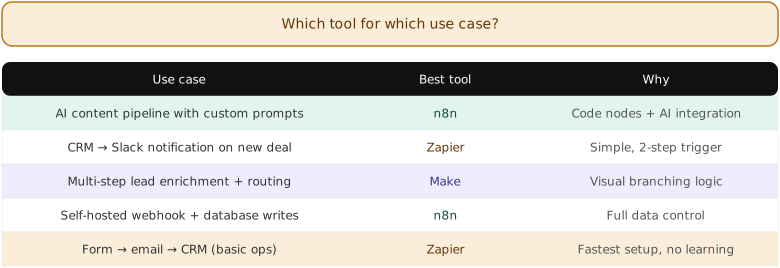
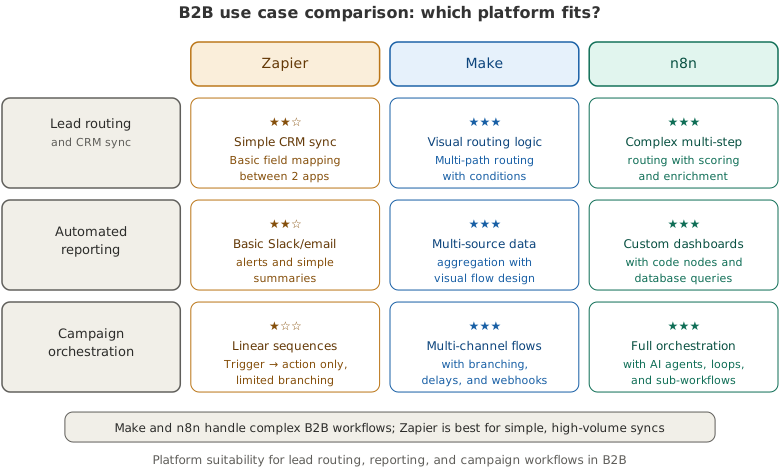
Abstract comparisons only get you so far. Here’s how each platform handles common B2B workflow scenarios that marketing and RevOps teams face daily.
Lead Routing and CRM Sync
When a new lead fills out a form, you need to enrich it, score it, assign it to the right rep, and create records in your CRM. All three platforms handle the basic version of this. Zapier makes it fast to set up: Typeform trigger, Clearbit enrichment, HubSpot create contact, Slack notification. Four steps, done in 15 minutes.
But if you need conditional routing, such as sending enterprise leads to one team and SMB leads to another based on company size, Make’s router module handles this more cleanly than Zapier’s Paths. And if you want to add AI-based lead scoring using a custom model before routing, n8n is the only platform where you can run that inference locally without paying for a third-party scoring API. For sales teams that want the sequencing, dialing, and CRM logging handled out of the box rather than wired together by hand, purpose-built sales automation tools get to value faster than a general-purpose builder on this exact workflow.
Reporting and Dashboard Automation
Pulling data from multiple sources into a weekly report is a classic automation use case. Zapier can handle simple aggregations: pull from Google Analytics, HubSpot, and Stripe, then push to Google Sheets. But if you need data transformation, such as calculating week-over-week percentage changes or merging data sets, you’ll hit Zapier’s limits fast.
Make’s built-in math and text functions handle mid-range transformations. n8n lets you write custom JavaScript to process data however you want, making it ideal for complex reporting workflows. According to research from McKinsey, automation in knowledge work can reclaim 60-70% of time spent on data collection and processing tasks.
Multi-Channel Campaign Orchestration
Coordinating email sequences, LinkedIn outreach, Slack alerts, and CRM updates across a campaign requires workflows that branch, loop, and handle errors gracefully. This is where Make and n8n pull far ahead of Zapier. Make’s visual canvas lets you see the entire campaign flow at a glance. n8n’s sub-workflow feature lets you build modular components that snap together across campaigns.
Migration Between Platforms
If you outgrow your current platform, switching isn’t painless, but it’s doable. Here are the common migration paths.
Zapier to Make: The most common upgrade path. Make’s visual builder will feel different but not foreign. Most Zapier integrations have Make equivalents. Plan one to two weeks for a mid-size migration (20-50 workflows).
Zapier/Make to n8n: This is a bigger jump. You’ll need to rethink some workflows around n8n’s node-based approach and JSON data handling. Budget three to four weeks and have a developer lead the migration. The upside is immediate cost savings and expanded capabilities.
n8n to Zapier/Make: Rare, but it happens when the developer who built everything leaves and the remaining team can’t maintain it. You’ll lose some workflow complexity in the process.
Frequently Asked Questions
The self-hosted version is free to use with a “fair-code” license that permits commercial use. You’ll pay for your own server hosting, which typically runs $5-15/month. n8n’s cloud-hosted plans start at $24/month with execution-based pricing.
n8n’s cloud version is more accessible than self-hosted, but the platform still assumes familiarity with concepts like webhooks, JSON, and API authentication. Non-developers can handle simple workflows, but complex automations typically require someone comfortable with JavaScript.
n8n leads significantly with native LangChain integration, self-hosted LLM support, vector databases, and MCP server capabilities. Make offers solid AI service integrations. Zapier provides the most beginner-friendly AI features but with less customization.
If your workflows are simple (trigger, then one to three actions) and you value speed of setup, choose Zapier. If you need conditional logic, data transformations, or want to pay less at scale, choose Make. Try both free tiers with your most common workflow to see which interface clicks.
The Bottom Line
There’s no single winner in the n8n vs Make vs Zapier comparison. There’s only the right tool for your team’s current situation.
Start by auditing your existing manual workflows. List the five most time-consuming repetitive tasks your team handles weekly. Then match each workflow to the platform that handles it best: Zapier for speed and simplicity, Make for visual complexity at reasonable cost, and n8n for technical power and cost control at scale.
If you’re unsure, start with Make’s free tier. It offers enough capability to validate whether automation will deliver ROI for your team, without locking you into Zapier’s pricing model or requiring n8n’s technical investment. Once you see results, you’ll know exactly where to scale.