Search “marketing automation workflow” and you will find a hundred lists of examples. The harder question, the one that decides whether automation helps or hurts, is how to actually build one that works. On marketing forums the most-repeated warning is blunt: most teams try to automate everything and end up automating chaos, because a bad process plus automation is just a faster bad process.
This is a build guide, not a gallery. It covers the anatomy every workflow shares, a six-step method to build one, the five workflows worth building first in B2B, a full worked blueprint you can copy, how to decide what to automate first, and the mistakes that quietly waste the effort. The goal is a workflow that moves the right people forward without a human touching it, using software to run marketing tasks on triggers and rules (what HubSpot and other platforms call marketing automation).
Direct answer – what is a marketing automation workflow?
A marketing automation workflow is an automated sequence that runs a marketing task on its own, built from four parts: a trigger (the event that starts it), conditions (if/then rules that branch the path), actions (send, update, alert), and wait steps between them. You add a goal and an exit so contacts leave the moment they convert. Build one by mapping the process first, then wiring trigger to conditions to actions. The workflow is the how; your CRM or platform is where it runs.
Key Takeaways
- A marketing automation workflow is a trigger, conditions, actions, and wait steps that run a marketing task on their own. A goal and an exit are what keep it from over-messaging people.
- Build it in six steps: map the process, choose the trigger, set the conditions, design the branch logic, add actions and an exit, then test and measure.
- Map and fix the process before you automate it. Automating a broken or data-poor process only scales the problem.
- The five workflows worth building first in B2B: welcome and onboarding, lead nurture, lead scoring, the MQL-to-SQL sales handoff, and re-engagement.
- Automate the high-volume, repetitive, rule-based work first. Keep the judgment-heavy steps human.
What a marketing automation workflow is
A marketing automation workflow is a set of automated steps that runs when a trigger fires and moves a contact through conditions and actions until they hit a goal or exit. Instead of one message sent to a whole list at once, a workflow reacts to each person’s behavior and runs on their schedule, not yours.
Every workflow, in any tool, is assembled from the same six parts. Vendor guides usually name the first four. The last two, the goal and the exit, are the ones that separate a workflow that helps from one that pesters people until they unsubscribe.
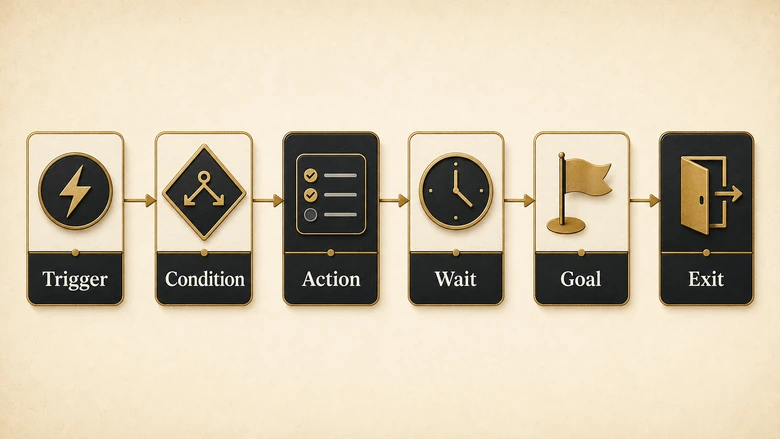
| Component | What it does | B2B example |
|---|---|---|
| Trigger | Starts the workflow when a specific event happens | A prospect downloads a pricing guide |
| Condition | Branches the path with if/then rules | Is the lead from a target account? |
| Action | The automated task the workflow performs | Send an email, update a field, alert sales |
| Wait step | Holds the contact before the next step | Wait two days before the follow-up |
| Goal | The outcome that defines success | Books a demo |
| Exit | Removes the contact when they convert or no longer qualify | Leaves the workflow after booking |
A workflow needs an engine to run on. That is usually your CRM, a dedicated marketing automation platform, or the two wired together. Which system owns the contact data and which one runs the logic is a real decision, and it is exactly the split between a CRM and a marketing automation platform. For a first workflow, the tool matters less than the design: a clear trigger, tight conditions, and an exit will beat a fancy platform running a vague sequence every time.
How to build a marketing automation workflow (step by step)
The build itself is short once the thinking is done. The order below puts the two steps most teams skip, mapping the process and setting an exit, where they belong: first and last. Follow it and a first workflow takes about an hour to assemble.
Workflow · about 1 hour
How to build a marketing automation workflow
Six steps to take a marketing task from a manual, repeated job to an automated sequence that runs on a trigger and stops when the contact converts.
Map the process before you automate it
Sketch the real process on paper first: the trigger, the decision points, and the outcome you want. Fix any broken or manual step now, because automating a broken process only scales the mess.
Choose the trigger
Pick the one event that starts the workflow: a form fill, a page view, a score change, a date, or a stage change in your CRM. One clear entry trigger per workflow keeps it predictable.
Set the entry conditions and segments
Add rules that decide who enters and which branch they take: lead source, lifecycle stage, region, or past behavior. Conditions are what make a workflow relevant instead of a blast.
Design the branch logic
Lay out the if/then paths. For each decision (opened the email, hit the score, replied), define the yes path and the no path so no contact reaches a dead end.
Add actions, wait steps, a goal, and an exit
Attach the actions (send, update, alert, task), space them with wait steps, and set a goal plus an exit so contacts leave the moment they convert. The exit is what stops over-messaging.
Test, launch, and measure
Run test contacts through every branch, launch to a small segment, then watch the goal metric. Adjust the timing and conditions before scaling to the full list.
Step one carries the most weight and gets the least attention. A workflow does exactly what you tell it, faster and forever, so any gap in the underlying process gets multiplied. That is where the “automating chaos” warning comes from, and the data backs it up: in Openprise’s 2025 survey of more than 600 revenue teams, 71% said poor data quality already hurts their go-to-market. Automate on top of messy data and you route the wrong people to the wrong messages at scale. Map and fix the process on paper first, the same discipline behind any business process improvement effort, then build.
Step five is where most of the workflow’s value hides. Actions are the visible part, but the wait steps set the pace and the exit sets the limit. Many actions also reach into other tools, sending a Slack alert, creating a task, or writing to a spreadsheet, which is where a connector earns its place. If your workflow has to move data between apps, it is worth knowing how n8n, Make, and Zapier compare before you pick one.
The core B2B marketing automation workflows to build
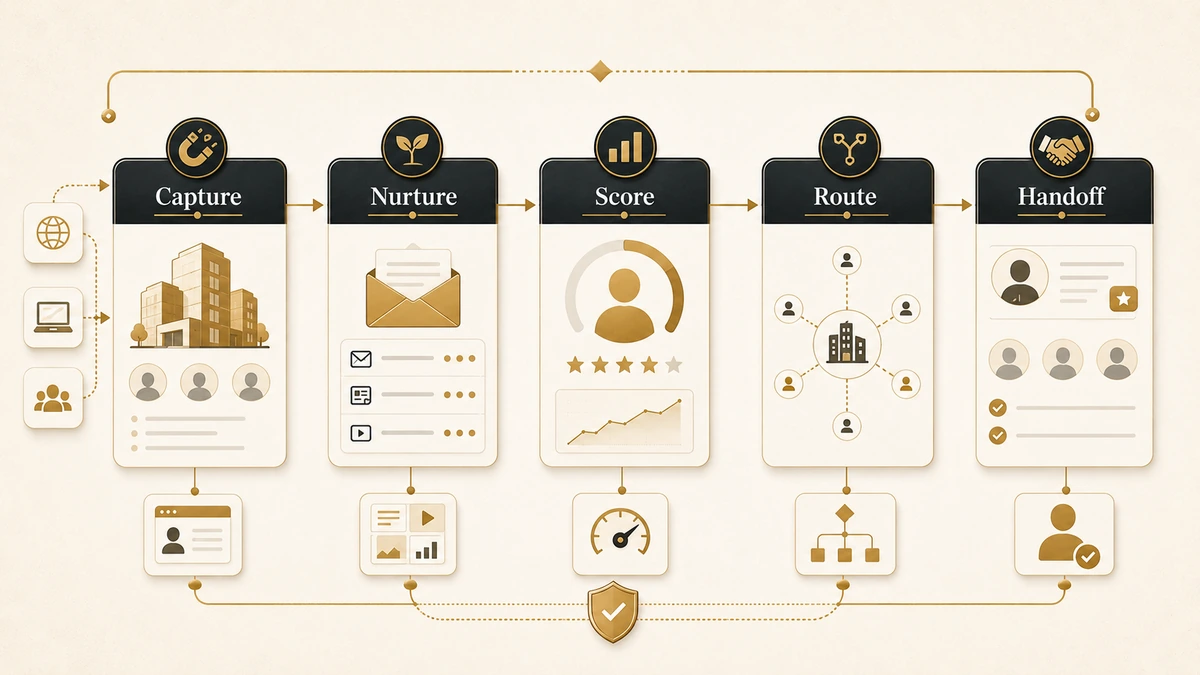
You do not need dozens of workflows. Five cover most of the pipeline, and they are the ones that carry the most weight in B2B marketing automation, where the job is not just to send email but to qualify and route pipeline. Each one below is defined by its trigger, its key condition, its actions, and the single metric that tells you it is working.
| Workflow | Trigger | Key condition | Actions | Success metric |
|---|---|---|---|---|
| Welcome / onboarding | New subscriber or signup | First touch, not yet engaged | Three or four orientation emails, set expectations | Activation or first key action |
| Lead nurture (drip) | Downloads content or joins a list | Not yet sales-ready | Educational sequence spaced by waits | MQL rate |
| Lead scoring | Any tracked behavior or fit change | Score crosses a threshold | Add or subtract points, tag, route | Percent reaching MQL threshold |
| MQL-to-SQL handoff | Score or fit hits the MQL bar | Fits the ICP and shows intent | Create task, alert the rep, log in CRM | MQL-to-SQL acceptance rate |
| Re-engagement / win-back | No activity for 60 to 90 days | Was engaged, now cold | Win-back offer, then suppress if silent | Reactivation rate |
The nurture workflow is where automation earns its keep, and the reason is timing. A workflow reaches people at the moment they act, not whenever the next campaign happens to go out. That gap is measurable: across 470 million automated sends in 2025, Omnisend found automated emails converting at 1.49% against 0.08% for one-off campaign blasts. Same list, same product, very different result, because the automated version arrives when it is relevant.
Scoring and the handoff are where B2B workflows differ from B2C. A scoring workflow watches behavior and firmographic fit and adjusts a number, so the rest of the system can act on it; the mechanics of scoring leads on fit and behavior decide how well the whole cluster runs. When that number crosses the line, the handoff fires.
The handoff is the moment an MQL becomes an SQL, and it should never depend on a human noticing. The workflow creates the task, alerts the rep, and stops the marketing emails, often through the same sales automation tools the rep already works in.
A worked example: lead nurture to sales handoff
Here is one full workflow, node by node, the kind you can rebuild in any platform. The trigger is a content download; the goal is a sales-ready lead handed to a rep. Notice how the conditions branch low-fit contacts out early, and how the exit fires the instant the lead qualifies, so nobody keeps getting nurture email after sales has picked them up.
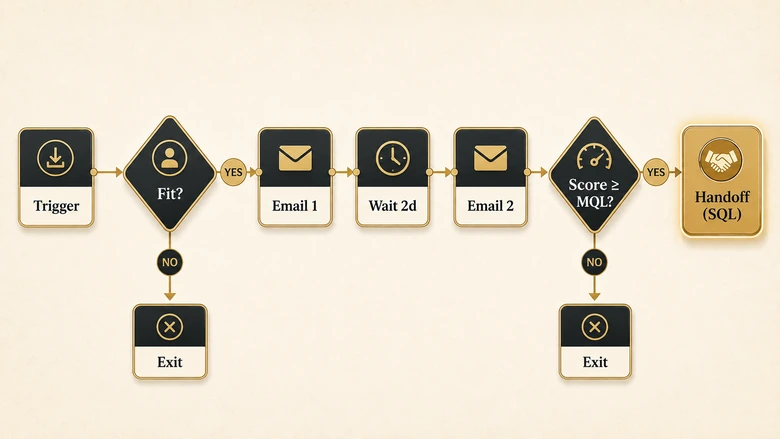
| Node | Type | What happens | Wait | Exit / branch |
|---|---|---|---|---|
| 1 | Trigger | Prospect downloads the ROI guide | None | None |
| 2 | Condition | Business email and target-account fit? | None | No: tag “low fit,” send one email, exit |
| 3 | Action | Send email 1: the guide plus one relevant case study | 2 days | None |
| 4 | Condition | Opened or clicked? | None | No: send a different angle, then continue |
| 5 | Action | Send email 2: a comparison or objection-handler | 3 days | None |
| 6 | Action | Add score points for each open and click | None | None |
| 7 | Condition | Score at or above the MQL threshold? | None | No: keep nurturing monthly |
| 8 | Action | Create CRM task, alert the rep, stop marketing emails | None | Exit: contact is now an SQL |
PRO TIP
Build the exit before the emails. Decide the two ways a contact should leave, they qualified or they went cold, and wire those exits first. It is the single change that turns an annoying drip into a workflow people do not unsubscribe from. Wiring the exit and proving the exit are separate jobs though, and watching one test record actually leave is the only version of that check anybody can trust once the campaign is live.
Read the table as a flow, not a list. Node 2 protects the sales team from junk by branching out anyone who is not a fit. Nodes 4 and 7 are decision points that change the path based on behavior. Node 8 is the payoff: a clean handoff that fires automatically, logs itself, and shuts off the marketing touches so the rep and the workflow are never messaging the same person at once.
What to automate first
Not every process deserves a workflow, and deciding which marketing processes to automate first is its own skill. The rule is simple: automate the work that is high-volume, repetitive, rule-based, and measurable. Those four traits are what make a task safe to hand to software. Skip anything that needs judgment on every instance, or that runs so rarely a workflow would cost more time to build than it saves.
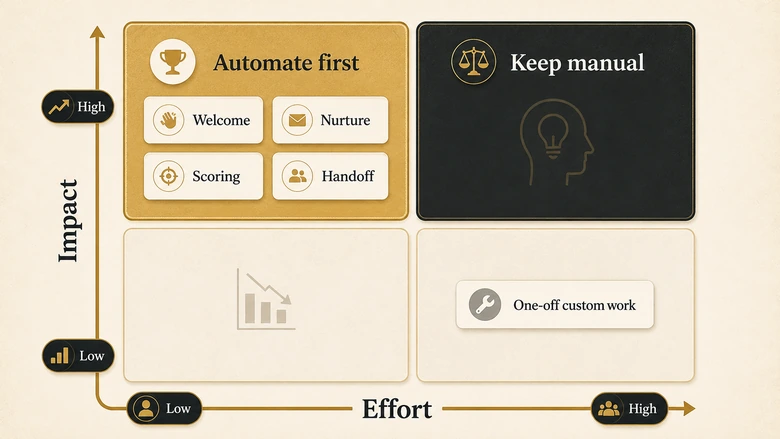
Run each candidate through four questions before you build:
- Is it repetitive? The same steps happen the same way, many times. A welcome email qualifies; a custom proposal does not.
- Is it rule-based? You can write the decision as if/then logic. “If the lead is from a target account, alert the rep” works. “Decide if this account is strategic” does not.
- Is it high-volume? Enough contacts flow through it that automation returns real hours. A trigger that fires twice a month rarely earns its build time.
- Can you measure it? There is a clear goal metric, so you can tell whether the workflow helps or quietly hurts.
Welcome sequences, lead nurture, scoring, and the sales handoff pass all four, which is why they come first. This is the same prioritization behind any business process automation effort: start where the work is repeatable and the payoff is countable, then expand. Automate the boring, countable work and keep your team on the parts that need a human.
Common marketing automation workflow mistakes
Most workflow failures are not technical. They are design choices that looked reasonable when the workflow had ten contacts in it and turned into a problem at ten thousand. These five cause the most damage.
IMPORTANT
The biggest mistake is automating a broken process. A workflow runs your process faster and forever, so any gap in the logic or the data gets multiplied across every contact. Fix the process by hand until it works, then automate it.
No exit condition. Without an exit, contacts keep receiving messages after they have converted, gone cold, or been picked up by sales. This is the top cause of unsubscribes and the “we are all messaging the same person” problem. Every workflow needs at least two exits: qualified, and disengaged. Two is a floor rather than a target once a workflow runs for months: long-running nurture tracks need suppression and content exhaustion as well, and exhaustion is the one that quietly leaves contacts idle in a stream nobody reviews.
No goal metric. If you cannot name the one number the workflow should move, you cannot tell whether it works. “Sends four emails” is an activity, not a goal. “Turns 8% of downloads into MQLs” is a goal you can improve.
Too many branches. A workflow with a dozen conditions becomes impossible to test or debug. Start with the two or three decisions that actually change the outcome, and add complexity only when the data asks for it. A workflow you cannot test is a workflow you cannot prove, and a launch decision that runs on evidence has nowhere to file an untestable branch except as an open risk somebody has to own.
Set and forget. Triggers break, links rot, and a segment that made sense last quarter drifts. Put a monthly check on every live workflow: are contacts entering, moving, and exiting the way you designed? A workflow is a system to maintain, not a project to finish.
Frequently Asked Questions
A welcome workflow is the classic example. It triggers when someone subscribes or signs up, waits a moment, then sends a short series of orientation emails over a few days. A condition can branch the path based on whether the person opened the first email or took a key action.
Welcome and lead nurture workflows are the most common, because almost every business needs to greet new contacts and stay useful until they are ready to buy. Cart abandonment is the most common in ecommerce, while lead nurture and lead scoring dominate in B2B.
Define the goal, choose the trigger, set the conditions that branch the path, add the actions and wait steps, then test and measure. Many teams add a step before all of these: map the process on paper first, so you automate something that already works.
Common automated workflows include welcome and onboarding sequences, lead nurture drips, lead scoring, MQL-to-SQL sales handoffs, re-engagement or win-back series, webinar and event follow-ups, and internal alerts that notify a rep when a target account shows buying intent.
A campaign is a one-time send to a segment at a set moment. A workflow is an always-on sequence triggered by individual behavior, so each contact moves through it on their own schedule. Workflows react to the person; campaigns push to the list.
You need somewhere to store contact data and run the logic, usually a CRM, a dedicated marketing automation platform, or the two connected. Simple email workflows can run in an email tool alone, but B2B scoring and sales handoffs need a CRM so the whole system acts on the same data.
A marketing automation workflow is only as good as the process underneath it. Map it, give it a goal and an exit, build the five that matter, and check them monthly. Do that and automation stops being a source of chaos and starts being the quiet engine that moves your best leads forward on its own.