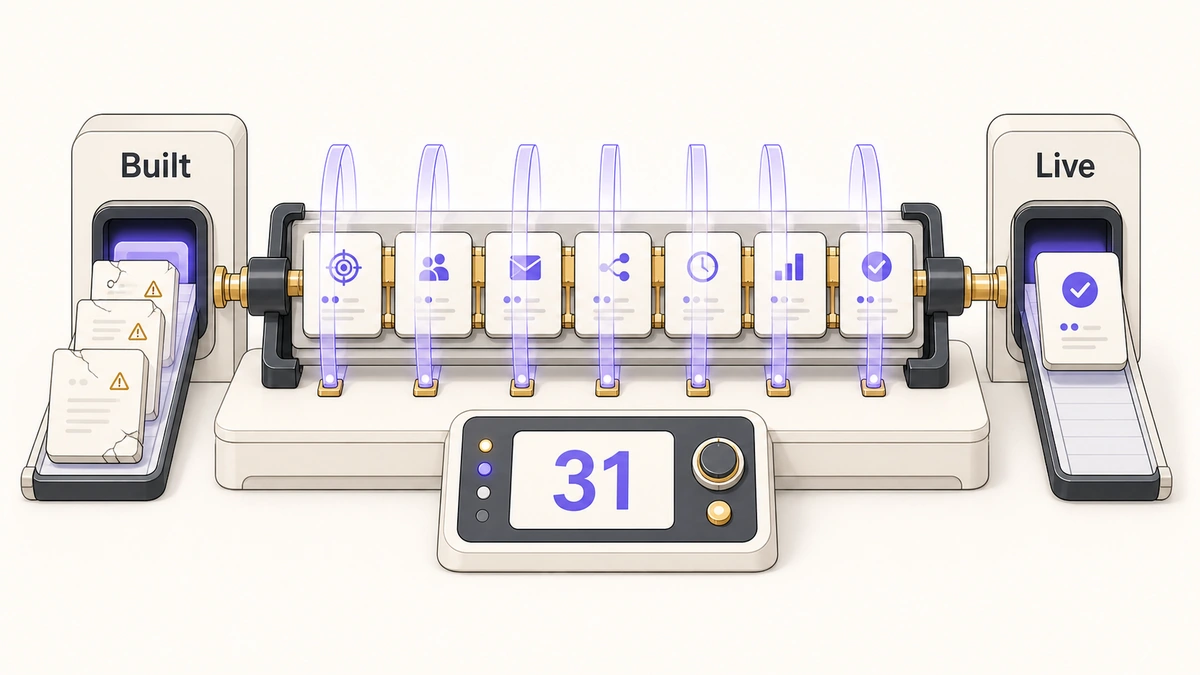
The campaign was built, reviewed and approved. Someone clicked Activate. Six weeks later the report says 41 people entered the program, out of an audience of 3,400, and nobody can explain the gap.
The explanation is usually the same one, and almost no marketing automation QA checklist in circulation asks about it. The program ran exactly once per person, because that is what the platform does unless you tell it otherwise, and the trigger everyone assumed would keep pulling people in had already fired for most of the list during testing.
That failure passed every review it was shown. The copy was approved, the audience looked right, the links worked. What nobody checked was a setting three clicks deep that decides whether the campaign you just switched on is a campaign or a one-off send with extra steps.
Direct answer — what is a marketing automation QA checklist?
A marketing automation QA checklist is a fixed set of checks run inside the automation platform before a campaign is activated, covering audience construction, enrolment and flow control, personalisation, rendering, destinations, timing and rollback. It differs from a platform audit, which reviews an entire instance periodically, and from a campaign go/no-go, which decides whether to launch. Activation QA produces the evidence that decision is made from.
Key Takeaways
- HubSpot, Marketo and Account Engagement all default to running a person through a campaign once. Repeat enrolment is opt-in on all three, and it is the single most common reason an automated program under-delivers without erroring.
- Activation QA and a platform audit answer different questions. An audit asks whether the instance is healthy once a quarter. Activation QA asks whether this campaign works, before this campaign ships.
- Litmus found 96% of emails contained content errors and 75% had broken links across more than five million previews and QA results, which is why “we read it twice” is not a check.
- Not every finding blocks. Silent and irreversible failures block activation. Visible, recoverable ones can ship with a named owner watching. Sorting findings into those buckets is what stops QA becoming a delay tactic.
- A check is only worth recording if it names the evidence that would satisfy it. “Tokens look fine” is a memory. “Rendered against a record with an empty company field” is a check.
What is a marketing automation QA checklist?
A marketing automation QA checklist is the set of checks you run inside the platform, on one specific campaign, in the window between “built” and “live”. It is scoped to a single campaign object and everything that campaign touches: the audience it draws from, the logic it walks, the assets it sends, the destinations it points at and the records it writes.
That scope is narrower than it first sounds, and the narrowness is the point. Campaign strategy sits upstream in how the automation programme is designed in the first place. The decision to launch sits downstream. Activation QA is the middle: the part where somebody opens the campaign and tries to break it before a customer does.
Activation QA is not a platform audit
Search for this and half of what comes back is an audit checklist: 49 points to review, covering data hygiene, integrations, reporting and every active automation in the instance. Those are useful documents. They are also answering a different question, on a different clock, for a different reader.
An audit is periodic and instance-wide. It asks whether the estate is healthy. It gets run quarterly or annually, usually by someone senior, often as the opening move of a cleanup project. Activation QA is per-campaign and runs the afternoon before launch, by the person who built the thing or the person sitting next to them.
Conflating them costs you both. Teams that only audit ship broken campaigns between audits. Teams that only QA at activation accumulate a decade of orphaned workflows nobody has looked at. You need the checklist below and a periodic audit, and they should not be the same document.
Activation QA also sits underneath a decision. Someone still has to say yes or no, and that call belongs to the launch gate that weighs findings against the classes that actually block. This page produces the evidence. That page decides what to do with it.
Three answers, not two
Every check here returns one of three things, and the middle one is where campaigns die. Verified means you observed the behaviour: a test record moved, a message rendered, a row appeared. Configured means the setting is set and you have not watched it work. Unknown means nobody looked.
Configured is the dangerous one because it reads as a pass on any binary checklist. The setting is there, the box gets ticked, and the distinction between “somebody typed a value into a field” and “the value produces the behaviour we want” disappears into a column of green. Treat configured as an open item with a name against it, not as done. The same distinction applies to CRM cutovers: AI-assisted migration with Dynamics 365 Activate can automate parts of migration, but a configured workflow is still not evidence that its trigger, branch and write behaviour survived the move.
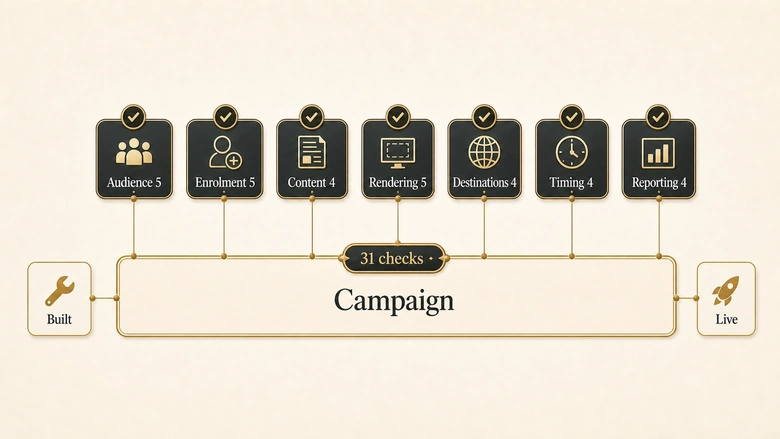
The 31-check activation QA checklist
Thirty-one checks in seven groups. Each one names the evidence that satisfies it, because a check without an evidence standard is a question you answer from memory. Run them in group order: audience problems change what the rest of the checks even mean.
Group 1: Audience construction
| # | Check | Evidence that satisfies it | Class |
|---|---|---|---|
| 1 | Audience size matches the forecast | Actual count within 10% of expected, or a written reason for the variance | Blocks |
| 2 | Ten records match the criteria by hand | Ten records opened individually and confirmed against every filter, not sampled from the top of the list | Blocks |
| 3 | Suppression and exclusion lists are attached to this campaign | Named lists visible on the campaign itself, not only in account settings | Blocks |
| 4 | List type matches intent | Confirmed dynamic where the audience should keep growing, static where it should be frozen at launch | Blocks |
| 5 | Internal and test records are excluded | Employee domains and seed records confirmed absent from the production audience | Fix before scale |
Check 4 is the one that quietly breaks reporting. A dynamic audience keeps adding people after activation, which is usually what you want for an evergreen programme and almost never what you want for a dated announcement. Freezing the wrong one, or failing to freeze the right one, produces a campaign whose denominator moves under the report.
Group 2: Enrolment and flow control
| # | Check | Evidence that satisfies it | Class |
|---|---|---|---|
| 6 | Repeat enrolment matches how often this should run per person | The qualification or re-enrolment setting opened and read, not assumed | Blocks |
| 7 | Every branch terminates somewhere | Each path traced to an end state; no branch leaves a record parked indefinitely | Blocks |
| 8 | Wait steps use the timezone you think they use | A test record observed advancing at the expected local time | Fix before scale |
| 9 | Exit criteria remove people who convert | A test record meeting the goal condition observed leaving the programme | Blocks |
| 10 | Records qualifying for two branches land where intended | One deliberately ambiguous test record run through and its path recorded | Fix before scale |
Check 6 deserves its own section, and it gets one below. Check 9 is the one that generates complaints: a programme that keeps emailing people after they have booked the demo is the fastest way to make an automated campaign look worse than no campaign. Both are cheap to verify and expensive to discover live. If the branch logic itself is what you are unsure about, the shape of a trigger, condition and action sequence that holds up under real data is worth settling before QA rather than during it.
Group 3: Personalisation and content
| # | Check | Evidence that satisfies it | Class |
|---|---|---|---|
| 11 | Every token has a fallback that reads as English | Each token opened and its default value read in the sentence around it | Blocks |
| 12 | A record with the field empty renders acceptably | Preview run against a deliberately incomplete record, not a complete one | Blocks |
| 13 | Sender name, from-address and reply-to reach a monitored inbox | A reply sent to the reply-to address and confirmed received by a human | Blocks |
| 14 | Subject line and preview text are the approved versions | Both compared against the signed-off copy document, character for character | Fix before scale |
Check 12 is where most personalisation failures actually live. Previewing against a complete record proves nothing, because complete records are the ones that were never going to break. HubSpot is explicit that a token with no default value renders blank for that contact, which is how “Hi ,” reaches four hundred people who all had a first name in the spreadsheet you imported from.
Group 4: Rendering and deliverability
| # | Check | Evidence that satisfies it | Class |
|---|---|---|---|
| 15 | Rendered in the clients your list actually uses | Render results reviewed for the top clients in your own engagement data | Fix before scale |
| 16 | Dark mode does not destroy the creative | Dark-mode render reviewed; no logo inverted into an unreadable block | Fix before scale |
| 17 | Images-off state still communicates the offer | Images disabled and the message still legible; alt text present on every image | Fix before scale |
| 18 | Plain-text part exists and matches the HTML | Plain-text version read end to end, links included | Note |
| 19 | Unsubscribe works and authentication is aligned | Unsubscribe clicked on a seed record and the opt-out confirmed; SPF, DKIM and DMARC checked for this sending domain | Blocks |
This group is the one Litmus quantified. Across more than five million previews and QA results, 96% of emails contained content errors and 75% had broken links. Those are not the numbers of an industry that reads its emails carefully. They are the numbers of an industry that reads its emails on one screen, in one client, in light mode. If you are choosing tooling for this group rather than doing it by hand, the platforms that handle seed testing and inbox placement cover most of it.
Group 5: Destinations and capture
| # | Check | Evidence that satisfies it | Class |
|---|---|---|---|
| 20 | Every link resolves to the intended page | Every link clicked from a rendered message; no staging URLs, no redirects to a 404 | Blocks |
| 21 | Link tracking does not break the destination | A tracked link followed end to end with its query string intact on arrival | Blocks |
| 22 | The UTM set passes your tracking rules | Every link run through the link gate before the campaign leaves the launch document | Blocks |
| 23 | A live test submission produces the right record | A real submission traced to a CRM record with campaign data intact | Blocks |
Checks 22 and 23 are deliberately thin here because both have more depth than a single row can carry. The full rule set for link parameters lives in the fourteen quality rules a campaign link has to survive, and the failure modes that strip campaign data between the browser and the record are catalogued in the seven ways a hidden field arrives empty. Run those as sub-gates and record the result as one row.
Check 23 has a second half worth naming. A record that lands is not the same as a record that lands correctly, and when the count on the far side does not match the count on this side, reconciling submissions against records is the procedure that finds the difference rather than arguing about it.
Group 6: Timing, throttling and volume
| # | Check | Evidence that satisfies it | Class |
|---|---|---|---|
| 24 | Scheduled date, time and timezone confirmed | The schedule read back against a calendar, with the timezone stated out loud | Blocks |
| 25 | Send lands inside the agreed window | Delivery time modelled for the recipient’s local time, not the sender’s | Fix before scale |
| 26 | Frequency caps will not silently drop the send | Communication limits checked against the number of other active campaigns targeting this audience | Blocks |
| 27 | Volume ramp is set for the sending domain | Throttle confirmed appropriate to the domain’s sending history | Fix before scale |
Check 26 is a silent-loss failure and belongs in the blocking column for that reason. A frequency cap does not error. It suppresses, quietly, and the campaign reports a smaller audience than you built with no indication why. On a busy instance this is one of the few failures that gets worse as the marketing team gets more productive.
Group 7: Reporting and rollback
| # | Check | Evidence that satisfies it | Class |
|---|---|---|---|
| 28 | Campaign association is set | A test record’s activity confirmed reporting under the intended campaign | Fix before scale |
| 29 | Attribution reaches the system of record | Campaign data confirmed present on the record in the CRM, not only in the automation platform | Blocks |
| 30 | You know what can be undone after activation | The platform’s cancellation behaviour read and written down before launch, not looked up during an incident | Blocks |
| 31 | A named person is watching the first hour | An owner named, with a specific trigger that would make them pull the campaign | Blocks |
Check 29 is the boundary between two systems that report different numbers to different people. Where the automation platform’s record ends and the CRM’s begins is a design decision, and if that boundary is unclear on your stack, the division of labour between the two systems is worth settling before you try to reconcile their reports. Check 31 is not busywork: an owner with no trigger is a person who will watch the campaign do something strange and wait to see whether it gets worse.
What your platform does by default
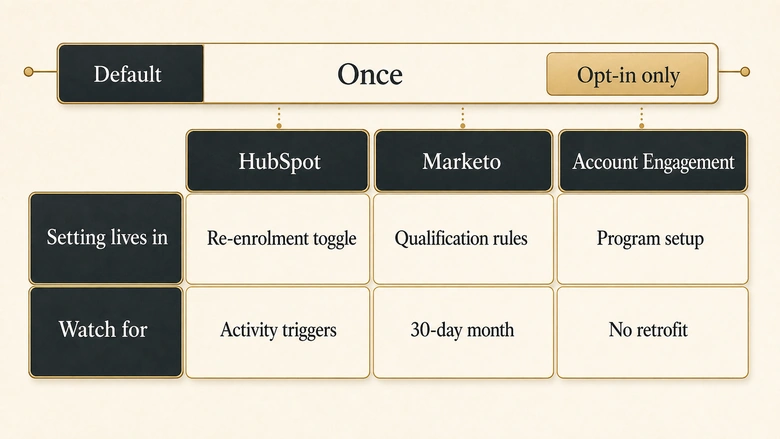
One check in the list changes shape depending on which platform you are in, and it is the one that causes the most damage. Every major automation platform defaults to running a person through a campaign once. Not once per trigger. Once, ever, unless you change it.
| Platform | Default behaviour | Where the setting lives | What to watch for |
|---|---|---|---|
| HubSpot | Records enrol only the first time they meet the enrolment triggers or are enrolled manually. Re-enrolment is off until you turn it on. | Re-enrolment toggle on the workflow’s enrolment triggers | Activities and activity properties can never be used as re-enrolment triggers. Records that already completed the workflow re-enrol only if they meet a selected re-enrolment trigger again after the toggle is switched on. |
| Marketo Engage | Even if someone triggers a smart campaign multiple times, they are sent through the flow once. | Schedule tab, then Edit Settings, under qualification rules | Options are only once, every time, or once every set number of days, weeks or months. Interval rules run from the moment of qualification, and a month counts as 30 days. |
| Account Engagement | Prospects run through an engagement program once. Repeating is a separate capability rather than the default. | Program settings, when the program is created | Repeat behaviour is set up front, so retrofitting it onto a live program is not a toggle you flip mid-flight. |
The sources are the vendors’ own documentation: HubSpot on which triggers can and cannot re-enrol a record, Adobe on smart campaign qualification rules, and Salesforce on letting prospects repeat engagement programs. None of these are bugs. All three vendors default to the conservative behaviour, which is correct, and all three make it easy to build a campaign that assumes the opposite.
Three more settings that differ by platform
Three of the checks above have platform-specific answers that are worth writing down for your own instance before you need them. First, whether your audience keeps updating after activation: HubSpot’s active lists add and remove records automatically as they qualify, while static lists do not add new records that meet the criteria later. Every platform has both types under different names, and the check is confirming which one this campaign is pointed at.
Second, what an empty personalisation field renders as, which HubSpot documents as blank when no default is set. Third, and the one to have written down before launch day: what can be stopped after activation. HubSpot’s answer is that a scheduled or still-processing email can be cancelled but a finished send cannot. Find your platform’s equivalent and record it as part of check 30, because the moment you need that answer is the worst possible moment to go looking for it.
IMPORTANT
Vendor defaults change between releases. Everything in this table was read from vendor documentation in August 2026. Re-read the linked pages before you rely on a specific behaviour, and treat any setting you have not opened yourself as configured rather than verified.
What blocks activation and what ships with a note
A checklist that treats all 31 findings as equally serious becomes a delay tactic, and the first time it holds a launch over a plain-text formatting issue, the team stops running it. Sorting findings is what keeps QA credible.
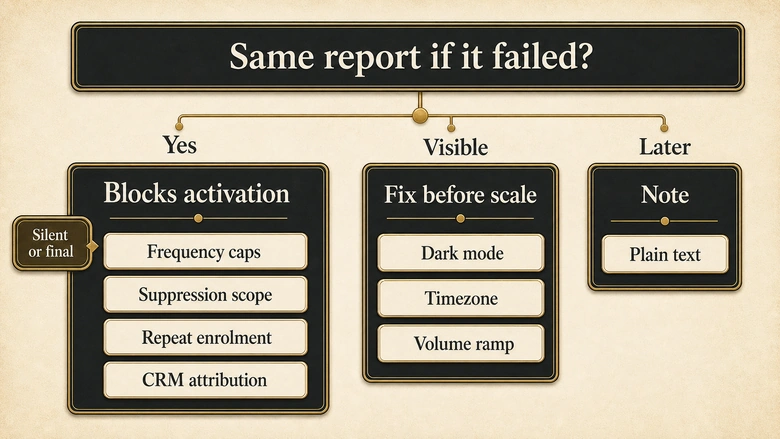
Three classes. Blocks activation covers failures that are silent or irreversible: the ones you cannot detect from the report afterwards, and the ones you cannot take back once the send completes. Fix before scale covers failures that are visible and recoverable, which can ship to a small audience with someone watching. Note covers everything measurable later without cost.
The test for silence is the useful one. Ask what the report would look like if this check failed. If the answer is “the same as if it succeeded”, the finding blocks, because you are about to lose something you will never know you lost. Frequency caps, suppression scope and repeat enrolment all fail that test, which is why they sit in the blocking column despite looking like configuration details.
There is a difference between a finding you have judged and decided to ship anyway, and a finding you never checked but recorded as fine. The first is a decision. The second is a gap wearing a decision’s clothes, and separating the risk you accepted from the risk you simply never verified is the vocabulary that keeps that distinction visible in a status meeting.
One boundary worth stating plainly: this pass runs before activation, so it cannot prove anything about behaviour that only exists at volume. Deliverability under real send volume, routing under real concurrency, and attribution across a full reporting cycle are all post-launch questions. When something has already gone wrong in production, tracing real submissions back through the handoffs is the diagnostic that finds it, and it is a different exercise from this one.
Run the pass in one sitting
The checklist works best as a single uninterrupted block of time rather than a thing you chip at across three days. Interrupted QA is where “I already checked that” comes from, and “I already checked that” is how configured findings get recorded as verified.
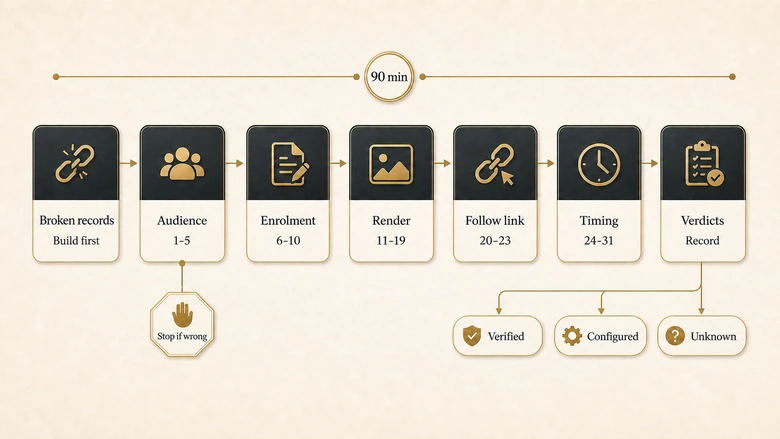
Workflow · 90 min
How to QA a marketing automation campaign before activation
Runs the 31 activation checks in dependency order, so audience and enrolment problems surface before you spend time on content that may be pointed at the wrong people.
Build the test set first
Create records that break things on purpose: one with an empty company field, one that qualifies for two branches, one already on the suppression list. Complete records prove nothing.
Clear the audience group
Run checks 1 to 5. Open ten records individually and confirm each against every filter. Stop here if the count is wrong, because nothing downstream is interpretable until it is right.
Open the enrolment setting and read it aloud
Run checks 6 to 10. Read the repeat-enrolment or qualification rule off the screen rather than recalling what you set. Trace every branch to an end state.
Render against the broken records
Run checks 11 to 19 using the incomplete test record, not a complete one. Check dark mode and images-off, then reply to the reply-to address and confirm a human receives it.
Follow one link all the way to the record
Run checks 20 to 23. Click through from a rendered message, submit the form, then open the record on the far side and confirm the campaign data survived the trip.
Settle timing and the exit plan
Run checks 24 to 31. State the timezone out loud, check frequency caps against other live campaigns, and write down what your platform can and cannot cancel after activation.
Record verdicts, not ticks
Mark each check verified, configured or unknown. Hand the blocking-class findings to whoever owns the launch decision, with the evidence reference attached.
Ninety minutes is the honest figure for a multi-step programme with branching. A single scheduled send is closer to thirty. If your estimate is ten minutes, you are planning to read things rather than test them.
PRO TIP
Keep the broken test records permanently and reuse them across campaigns. A record with an empty company field, a duplicate, and one sitting on the suppression list will catch more real failures than any number of clean test contacts, and rebuilding them each time is why step one gets skipped.
Download the activation QA checklist
The full 31 checks, their evidence standards and their classes are in the tables above and stay there, ungated, because a checklist you have to fill in a form to read is a checklist nobody cites. The downloads are the convenience layer: a workbook with the class and verdict columns already set up as dropdowns, and a one-page version for the launch folder.
Suggested citation: IVRIS Tech, Marketing Automation Activation QA Checklist (2026).
Frequently Asked Questions
Seven groups: audience construction, enrolment and flow control, personalisation and content, rendering and deliverability, destinations and capture, timing and throttling, and reporting and rollback. Each check should name the evidence that satisfies it and whether the finding blocks activation, because a checklist without evidence standards is a list of questions answered from memory.
Around 90 minutes for a multi-step programme with branching logic, and roughly 30 minutes for a single scheduled send. Building the broken test records takes most of the first pass, but those records are reusable, so subsequent campaigns run faster. An estimate under ten minutes means the plan is to read the campaign rather than test it.
A QA checklist runs per campaign, immediately before activation, and covers one campaign object and everything it touches. An audit checklist runs periodically across the whole instance and covers data hygiene, integrations, reporting and every active automation. They answer different questions on different clocks, and running one does not substitute for the other.
Because that is the default. HubSpot enrols records only the first time they meet the triggers, Marketo sends a person through a smart campaign flow once even if they qualify repeatedly, and Account Engagement treats repeating as a separate opt-in capability. Repeat behaviour has to be switched on deliberately on all three platforms.
The person who built the campaign runs the QA pass and records verdicts. A second person reviews the blocking-class findings, because the builder is the worst-placed reader of their own assumptions. Final sign-off belongs to one named owner, and that decision is separate from the QA evidence that informs it.
Methodology and sources
Platform behaviour described here was read from vendor documentation in August 2026. The HubSpot re-enrolment default, the trigger types excluded from re-enrolment, the personalisation-token fallback behaviour, the active-versus-static list distinction and the cancellation rules come from HubSpot’s knowledge base. The Marketo qualification-rule default and its interval options come from Adobe Experience League. The Account Engagement repeat behaviour is taken from Salesforce’s own documentation of repeating engagement programs; the finer limits on that feature were not verifiable from the rendered page, so no figures are quoted for it here. Vendors change defaults between releases, so re-read the linked pages before relying on any specific behaviour.
The email error figures are Litmus’s, drawn from more than five million previews and QA results over a one-year period and published in August 2024. They are quoted as evidence that unaided reading misses content and link errors at a high rate, not as a current-quarter benchmark.
The seven groups, the 31 checks, the evidence standards and the three severity classes are IVRIS constructions rather than a published standard. The verdict vocabulary of verified, configured and unknown is carried over deliberately from our campaign launch gate so that findings recorded here can be read without translation there. We looked for published data on how often marketing automation campaigns are activated with defects and found only vendor self-reports with no stated error criteria or sample methodology, so no such figure appears above.
The competitive observation that no page-one result for this query ships a downloadable checklist reflects a review of the ranking pages carried out in August 2026 and will date as those pages change.