The integration is connected. The form has a Salesforce campaign selected. The workflow shows 412 contacts enrolled. Somebody asks whether the handoff worked, and the answer comes back yes, because every screen anybody looked at was green.
Six weeks later the campaign ROI report shows 38 responses against a spend that assumed several hundred. Nothing errored. Nothing was flagged. The gap was there the whole time and no screen in either platform was built to show it.
That happens because a HubSpot to Salesforce campaign handoff gets verified in the wrong system, against the wrong object. Almost every guide on this subject explains how to configure the handoff. Very few explain how to prove it arrived, and none explain the part that decides whether Salesforce counts it.
Direct answer — how do you verify a HubSpot to Salesforce campaign handoff?
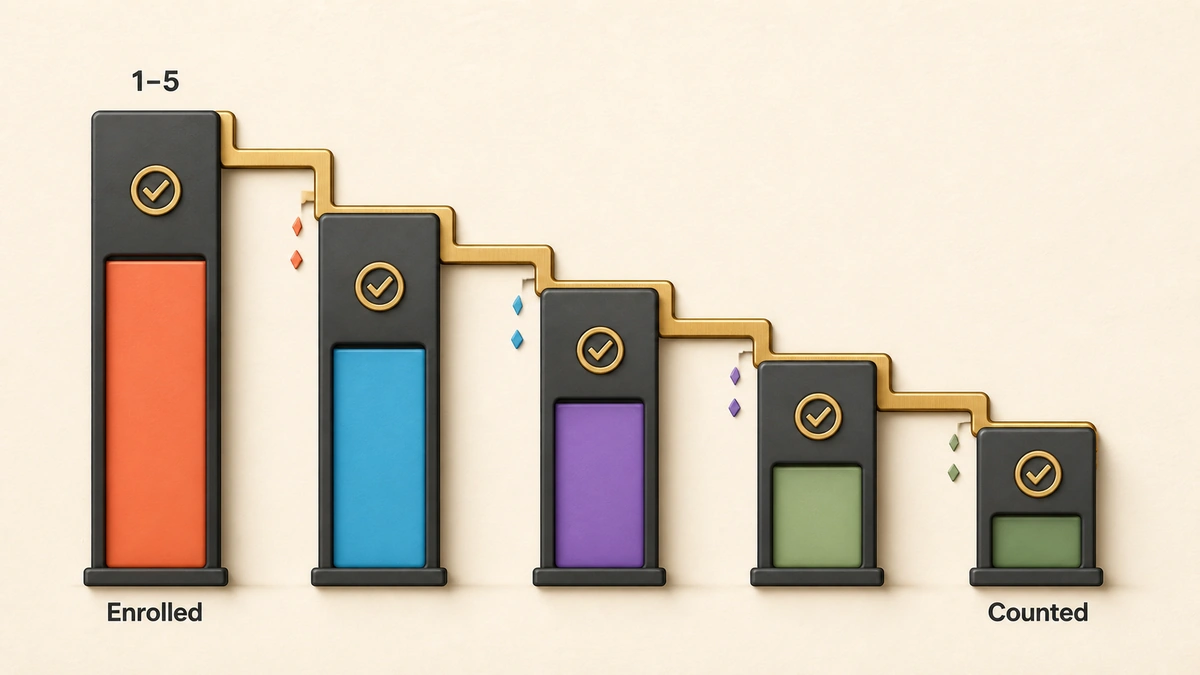
Verify a HubSpot to Salesforce campaign handoff on the Salesforce side, by counting CampaignMember records rather than checking configuration. Count one population at five checkpoints: enrolled in HubSpot, inside the sync scope, present as a Salesforce record, present as a campaign member, and holding a status Salesforce counts as a response. The handoff is verified only when checkpoint five reconciles with checkpoint one. HubSpot cannot confirm it, because member status never syncs back.
Key Takeaways
- HubSpot and Salesforce campaigns are different objects and do not sync. The handoff is a contact-level write creating a CampaignMember record, which is why campaign-level checks tell you nothing.
- You cannot verify this from HubSpot. Only the Salesforce Campaign ID comes back, and removals never trigger a sync, so HubSpot’s view drifts upward and over-reports.
- Arriving is not counting. Salesforce derives Total Responses only from members whose status has the Responded box ticked, so a member can land perfectly and register as zero.
- Five checkpoints, four gaps. Counting the same population at each one turns “the handoff is broken” into a number that points at a single cause.
- The native form association is the least verifiable of the three builds: it locks member status to Responded and the association cannot be removed.
What a HubSpot to Salesforce campaign handoff actually is
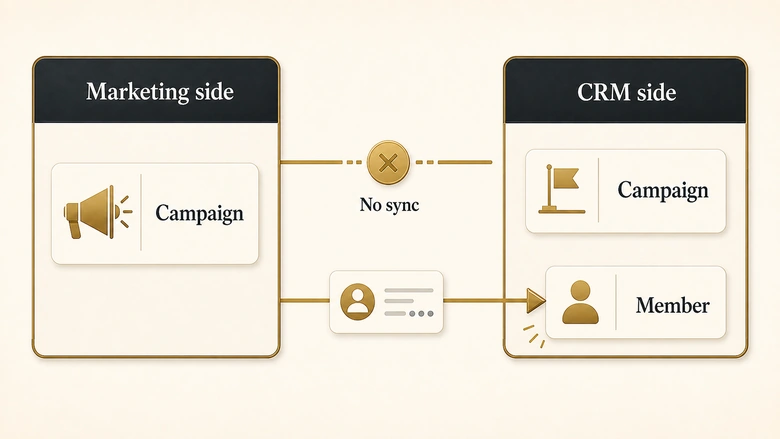
A HubSpot to Salesforce campaign handoff is a contact-level write that creates a CampaignMember record against a Salesforce campaign. It is not a campaign sync, and treating it as one is the root of most failed verifications.
HubSpot states the boundary plainly: “Although both HubSpot and Salesforce have campaigns, these two objects do not correspond to each other,” and “HubSpot campaigns cannot sync to Salesforce” (HubSpot Campaigns FAQ). Two campaign objects, no relationship between them. What crosses is a person, attached to a campaign that already exists in Salesforce.
| Object | Lives in | What it holds | Does it cross the boundary? |
|---|---|---|---|
| HubSpot campaign | HubSpot | Assets, budget, marketing-side influence and attribution | No. It has no Salesforce counterpart. |
| Salesforce campaign | Salesforce | Cost, response counts, ROI, opportunity influence | It can be imported into HubSpot for reference, but only while set to Active. |
| CampaignMember | Salesforce | One person’s membership of one campaign, plus a status | Yes. This is the record the handoff creates, and the only thing you can verify. |
| Salesforce Campaign ID | HubSpot contact property | The IDs of campaigns the record belongs to | Yes, but only inbound to HubSpot, and only the ID. |
Once you see it as a CampaignMember write, the verification question stops being “did the campaign sync” and becomes answerable: for this population, how many CampaignMember records exist on the far side, and do they carry a status Salesforce counts? Running both platforms at once makes that boundary a permanent feature rather than a migration problem, which is the practical half of choosing between HubSpot and Salesforce and of the CRM versus marketing automation split.
The three ways the handoff gets built, and what each one lets you verify
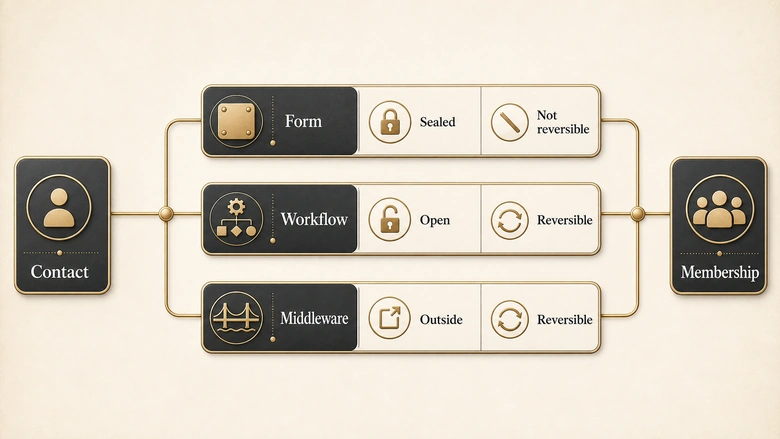
Three mechanisms create campaign membership from HubSpot. Pick the build before you design the check, because two of the three constrain what a check can even ask.
Native form association
Selecting a Salesforce campaign on a HubSpot form pushes each submitter into that campaign directly. Fastest to configure, most restrictive to verify. HubSpot documents two hard limits: “The campaign status will be set to Responded and cannot be edited,” and “The contact’s association with the Salesforce campaign cannot be removed” (HubSpot form-to-campaign documentation). Forms shared by link cannot be associated at all.
Workflow action
The Set Salesforce campaign workflow action does the same job from an enrollment rather than a submission. It gives you an enrollment count to reconcile against, it reaches populations that never touched a form, and HubSpot recommends it when the campaign status needs to stay editable. Membership and ownership stay separate writes, though: Salesforce assignment rules fire on some channels and not others, and the precedence logic behind that sits in the lead routing guide.
Middleware and iPaaS
A Tray, Workato or Zapier layer writes CampaignMember records through the Salesforce API rather than the native connector. That buys status control and multi-object logic, and costs you the connector’s error surface: failures land in the middleware log, not HubSpot’s sync health panel. Teams reach for it when native limits bite, then find their monitoring no longer covers the path.
| Build | Member status written | Status editable later | Reversible | Where failures surface |
|---|---|---|---|---|
| Native form association | Responded, fixed | No | No | HubSpot sync health |
| Set Salesforce campaign workflow | Configurable | Yes | Yes, in Salesforce | HubSpot sync health and workflow history |
| Middleware / iPaaS | Whatever you write | Yes | Yes | The middleware log only |
IMPORTANT
The native form association is irreversible. A contact added to the wrong campaign by a misconfigured form stays there, at status Responded. If that campaign feeds ROI reporting, fix the form before the next launch rather than planning to clean up after it.
Why the HubSpot side cannot confirm the handoff
HubSpot receives one field back from a Salesforce campaign, and it is not enough to verify anything. “If a Salesforce lead or contact is associated with a Salesforce campaign, the Salesforce Campaign ID field will sync to their HubSpot contact record.” That is the entire return path. Member status does not come with it.
Two consequences follow, and both break the checks people actually run. A HubSpot list of contacts holding a given Campaign ID tells you membership existed at some point, and nothing about whether it counts in Salesforce reporting. Worse, removal is invisible: “when a lead or contact is removed from an active Salesforce campaign this will not trigger a sync” (HubSpot sync triggers). Delete a hundred members in Salesforce and HubSpot keeps all hundred IDs indefinitely.
The HubSpot-side view therefore drifts one way only, upward, and looks most convincing on the campaigns running longest. It is the divergence that separates marketing-sourced numbers from CRM numbers across the B2B attribution chain, in miniature, with one field to blame.
Timing compounds it: HubSpot “checks for new or updated information across your HubSpot and Salesforce accounts approximately every 15 minutes,” so a run started two minutes after a workflow fires reports a gap that is not there.
The five checkpoints a campaign handoff has to survive
Verifying a handoff means counting the same population five times and comparing the numbers. Each drop between adjacent checkpoints has one small set of causes, which turns a vague failure into a diagnosis. Count distinct people, not rows, because deduplication rules and merge logic inflate the middle checkpoints without adding a response.
| # | Checkpoint | Counted in | What you count | If it stops here |
|---|---|---|---|---|
| 1 | Enrolled | HubSpot | Contacts the workflow enrolled, or form submissions, in a fixed time window | The handoff never started |
| 2 | In sync scope | HubSpot | Of those, how many sit inside the inclusion segment and hold a Salesforce ID | The inclusion segment excluded them, silently |
| 3 | Record present | Salesforce | Leads plus Contacts matching that population | Record creation was blocked or errored |
| 4 | Member present | Salesforce | CampaignMember rows on the target campaign | The membership write never fired |
| 5 | Counted as a response | Salesforce | Of those members, the ones whose status has the Responded box ticked | It is in the campaign and invisible to ROI reporting |
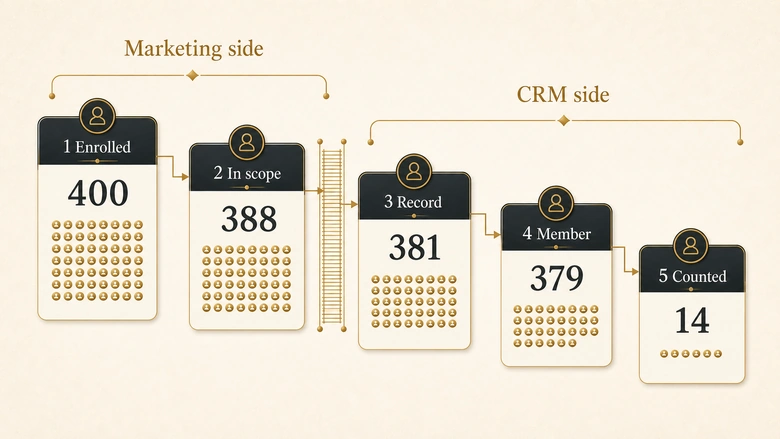
The single number worth reporting is the distance between the first and the last.
Handoff variance % = (Enrolled − Counted as a response) ÷ Enrolled × 100Then decompose it, because the total on its own is only an alarm. The scope gap is checkpoint 1 minus 2, the record gap 2 minus 3, the membership gap 3 minus 4, the response gap 4 minus 5. Four gaps, four owners, four fixes. A team reporting 31 percent variance argues about the integration; a team reporting a 29 percent response gap and a 2 percent record gap fixes a status mapping that afternoon.
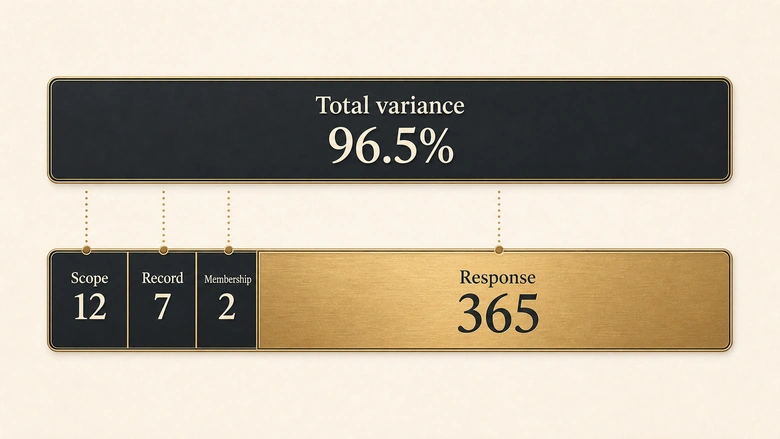
Checkpoint 5 is the one nobody builds, and it decides whether the campaign appears to have worked. Salesforce is explicit that “Total Responses on a campaign is a calculated field of all leads + contacts that have the member status ‘responded'” rather than Sent (Salesforce Help, Total Responses). Which statuses qualify is a per-campaign setting: you tick the Responded box beside the values you want counted in the Campaign Member Statuses related list (Salesforce Trailhead). Miss it on a new campaign and every member arrives correctly and counts for nothing.
The method is deliberately the same shape as the one for a form submission that produced no CRM record at all. That page counts across the browser-to-CRM path; this one picks the population up after the record exists.
How to verify a HubSpot to Salesforce campaign handoff
Run the five counts against one fixed population and one fixed time window. Freeze both first: a moving denominator produces a variance figure nobody else can reproduce. Run it before you launch and it becomes the platform row inside the nine-domain campaign go/no-go checklist, which expects a count rather than a screenshot.
Workflow · 45 min
How to verify a HubSpot to Salesforce campaign handoff: the five-count run
Count one fixed population at five checkpoints across both platforms, then attribute every drop to the gap it fell into.
Freeze the population and wait two sync cycles
Pick a closed time window and export the enrolled contacts from the workflow history or form submissions as a fixed list with email addresses. Wait at least 30 minutes from the last enrollment, since HubSpot checks for changes roughly every 15 minutes.
Count how many are inside the sync scope
In HubSpot, filter that list by membership of the Salesforce inclusion segment and by a non-empty Salesforce Lead ID or Contact ID. Records outside the segment never sync, so they can never reach a campaign.
Count matching records in Salesforce
Run a Leads and Contacts report filtered to the same email set. Missing records here mean creation was blocked, so open Sync Health next rather than guessing.
Count CampaignMember rows on the target campaign
Build a Campaigns with Campaign Members report scoped to the one campaign, and compare its row count to step 3. Check for duplicate rows on the same person while you are there, because duplicates inflate membership without adding responses.
Count the members Salesforce treats as responses
Open Campaign Member Statuses on that campaign, confirm which values have the Responded box ticked, then group the report by status. The count carrying a ticked status is checkpoint 5 and the only figure that reaches ROI reporting.
Run this on a real launch before trusting it on a reporting cycle. Deriving how many test cases a rule set needs is its own discipline, covered in the pre-launch routing test derivation, and the logic carries: five test contacts prove one path works, not that the handoff does.
Where the handoff breaks: causes mapped to checkpoint
Every documented failure lands at one of the four gaps, which is what the ledger buys you: a short list instead of the whole integration.
| Gap | Cause | What you see | Source of the behaviour |
|---|---|---|---|
| Scope (1→2) | Contact falls outside the Salesforce inclusion segment | Nothing at all. No error, no record, no alert. | “Records that aren’t in your segment won’t sync between HubSpot and Salesforce” |
| Scope (1→2) | Contact has no email address | Contact exists in HubSpot, never appears in Salesforce | HubSpot inclusion and sync rules |
| Record (2→3) | Salesforce duplicate rule blocks creation | Duplicates error card in Sync Health | HubSpot sync error category: Duplicates |
| Record (2→3) | Salesforce validation rule rejects the write | Custom code error card | Sync error category: Custom code |
| Record (2→3) | Integration user lacks field or object permission | Insufficient access or missing Salesforce record | Sync error category: Permissions |
| Record (2→3) | Picklist option missing, field too long, or type mismatch | Missing Salesforce picklist option, String too long, Type mismatch | Sync error categories: Picklists, Property values, Property mappings |
| Record (2→3) | Salesforce API call limit exceeded in a rolling 24-hour window | Integration suspended, writes queued or retried | HubSpot suspension documentation |
| Membership (3→4) | Target Salesforce campaign is not Active | Record syncs, membership does not appear | “To import a campaign, the campaign must be set to Active in Salesforce” |
| Membership (3→4) | Form shared by link rather than embedded | Submissions arrive, campaign association is absent | Link-shared forms cannot be campaign-associated |
| Membership (3→4) | Embed code updated on the form but not on the page | New submissions behave like the old configuration | Embed changes are not retroactive |
| Membership (3→4) | Duplicate CampaignMember rows written through the API | Member count inflates, response count does not | Salesforce Help, Total Responses, scenario 1 |
| Response (4→5) | Member status has no Responded box ticked | Members present, Total Responses reads zero | Total Responses counts only responded statuses |
| Response (4→5) | Statuses edited after members were imported | Counts stay stale until members are re-saved | “the Responded checkbox in Campaign Member records isn’t automatically recalculated” |
Every error in the middle band surfaces in one place nobody opens by habit: Settings, Integrations, Connected Apps, Salesforce, Data sync, Sync Health (HubSpot sync error documentation). Notifications are opt-in, so a team that never configured them is blind by default. Set them to Instantly when you build the handoff.
The scope gap has no error surface at all, which makes it the most expensive of the four. “Records that aren’t in your segment won’t sync between HubSpot and Salesforce” (HubSpot inclusion segments), and nothing is raised when a record is skipped. A segment written eighteen months ago for a different strategy will exclude a third of your launch and report nothing. It is the campaign-membership cousin of a HubSpot form quietly dropping its hidden field values.
PRO TIP
Before counting, check the campaign for duplicate CampaignMember rows on the same person. Salesforce documents that API-inserted duplicates inflate total members while responses stay flat, which reads exactly like a response-mapping failure and is not one.
What variance is normal, and when the gap is a bug
Take a launch that enrolled 400 contacts in an afternoon and ran the five counts next morning. Checkpoint 2 returns 388, twelve records having no email address. Checkpoint 3 returns 381, seven blocked by a duplicate rule. Checkpoint 4 returns 379. Checkpoint 5 returns 14.
Total variance is 96.5 percent, which sounds like a catastrophic integration failure and is not one. The scope gap is 12, the record gap 7, the membership gap 2, the response gap 365. Three gaps are small and explainable. The fourth is one unticked checkbox on a status list, a ten-minute fix no amount of integration troubleshooting would have found.
No published benchmark for acceptable handoff variance exists, and anyone quoting one is guessing. What can be said honestly is which gaps have a floor. Scope and record gaps do: contacts genuinely lack email addresses and duplicate rules genuinely fire, so a small persistent number there is data quality, not a defect. Membership and response gaps have no floor. Both should be zero, and anything else is a configuration fault with an owner.
Write that distinction into the launch gate. Integrate’s 2026 State of the Marketing Data Governance Gap report, surveying 245 marketing and revenue operations leaders, found 78 percent of high-growth organisations automate validation before data reaches the marketing automation platform or CRM, against 44 percent of slower-growing peers.
Timing changes what the exercise is. Run it before launch and it is a gate. Run it afterwards on leads already lost and you are doing something closer to a transaction-level routing audit, tracing individual submissions rather than reconciling a population.
Download the campaign handoff verification record
The ledger is worth more as a filled-in artefact than as a method, because the value lies in a record that outlives whoever ran it. The Campaign Handoff Verification Record is a one-sheet template holding the five counts, the four named gaps, the variance figure, the verdict, any named exception with its owner, and a sign-off line.
Filling it in takes about forty-five minutes on a campaign you have never checked, closer to ten once the reports are saved. Attach it to the launch record so the next person reproduces the number instead of re-litigating it. For the upstream half of the path, the free web form audit inspects what the form captures.
Save the five reports once and name them after the campaign, and the next run is a repeat rather than a rediscovery. A campaign member landing with no owner behaves exactly like one that never arrived, and the only way anyone finds out is that somebody counted.
Suggested citation: IVRIS Tech, “The Five-Checkpoint HubSpot to Salesforce Campaign Handoff Ledger,” ivristech.com/hubspot-salesforce-campaign-handoff/
Frequently Asked Questions
No. HubSpot states that HubSpot campaigns cannot sync to Salesforce and that the two campaign objects do not correspond to each other. What syncs is contact-level membership: a CampaignMember record created against a Salesforce campaign that already exists. Salesforce campaigns can be imported into HubSpot for reference while they are Active.
Check four things in order. The contact may sit outside your Salesforce inclusion segment, in which case it never syncs and raises no error. It may have no email address. The Salesforce campaign may not be Active. Or the record write itself may have failed, which shows in Sync Health under Duplicates, Permissions or Custom code.
No. HubSpot documents that a form-driven association sets the campaign status to Responded and that it cannot be edited, and that the contact’s association with the campaign cannot be removed. If you need an editable status, use the Set Salesforce campaign workflow action instead of associating the campaign on the form.
HubSpot checks both accounts for new or updated information approximately every 15 minutes and triggers a sync if needed. Certain events, including a form submission that adds a contact to an active Salesforce campaign, trigger a sync directly. Wait at least two cycles before counting, or you will measure a gap that closes itself.
Through the Salesforce Campaign ID contact property, which is the only campaign field that syncs back and can be used to segment. Treat it as indicative rather than authoritative: member status never syncs to HubSpot, and removing someone from a Salesforce campaign does not trigger a sync, so the property over-reports over time.