
Your CRM decision will shape how your revenue team operates for the next three to five years. Get it right, and you’ll have clean data, aligned teams, and a system that grows with you. Get it wrong, and you’ll spend 18 months migrating to the platform you should have picked in the first place. The hubspot vs salesforce question is where most B2B companies start, and for good reason: these are the two most deployed CRM platforms in the market. They’re not the only options worth considering though. Our roundup of CRM software examples covers the 12 platforms we see B2B teams actually use, from Pipedrive and Zoho to newer AI-native picks like Attio and Folk.
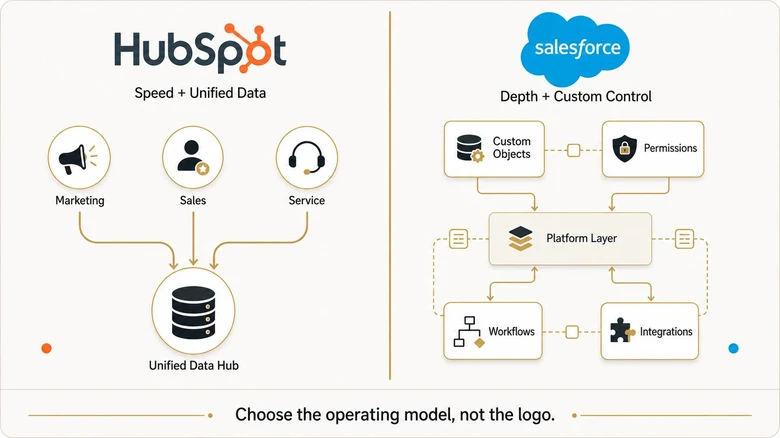
But they solve fundamentally different problems. HubSpot builds for speed and usability, bundling marketing, sales, and service into one system that non-technical teams can run without dedicated admins. Salesforce builds for depth and customization, offering enterprise-grade control over every workflow, object, and permission, at the cost of complexity and higher total ownership costs. The bundling pressure both vendors now apply to mid-market point tools is visible in chiefmartec’s 2026 landscape supergraphic, where 1,367 products exited in a single year and the 2010-2019 SaaS vintage carried 51.7% of those exits — the cohort competing most directly against HubSpot and Salesforce’s expanded suites.
This hubspot vs salesforce comparison covers what actually matters for the decision: real pricing (not just license fees), implementation timelines, feature depth across sales, marketing, and service, AI capabilities in 2026, and which platform fits which team. No vendor bias. Just the honest breakdown that helps you choose.
Direct answer – HubSpot vs Salesforce: which CRM should a B2B team choose?
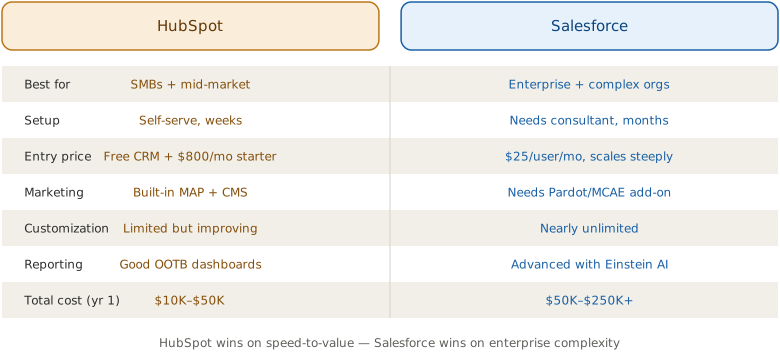
Choose HubSpot if you are a 10-500 employee team that wants marketing, sales, and service on one shared database, fast 2-6 week setup, and predictable costs with no dedicated admin. Choose Salesforce if you are a 500+ enterprise needing deep customization, CPQ, territory management, or regulated-industry compliance, and can staff an admin. Salesforce’s total cost of ownership typically runs 2-3x its license fee.
Key Takeaways
- HubSpot is the better choice for companies under 500 employees that want fast setup, built-in marketing tools, and minimal admin overhead.
- Salesforce is the better choice for enterprises with complex sales processes, regulatory requirements, and dedicated CRM administrators.
- HubSpot’s true advantage is unified data: marketing, sales, and service share one database with zero sync delays.
- Salesforce’s true advantage is unlimited customization: if you can imagine a workflow, Salesforce can build it.
- Total cost of ownership for Salesforce runs 2-3x the license fee when you factor in admins, consultants, and integrations.
HubSpot vs Salesforce at a Glance
| Dimension | HubSpot | Salesforce | Best for |
|---|---|---|---|
| Pricing model | Seats-based; Sales Hub $20/$100/$150 per seat/month (Starter/Pro/Enterprise) | Per user/month; Sales Cloud $25/$80/$165/$330 (Starter/Pro/Enterprise/Unlimited) | HubSpot for predictable, bundled costs |
| Ease of use | Intuitive; frontline teams operate independently in the first hour | Powerful but complex; needs ongoing expert management | HubSpot for non-technical teams |
| Implementation time | 2-6 weeks for most teams | 3-6 months for Enterprise | HubSpot for speed to value |
| Customization | Opinionated; ceilings on custom objects and complex approval chains | Unlimited; custom objects, Apex, CPQ, territory management | Salesforce for complex workflows |
| Marketing architecture | Marketing, sales, and service share one database | Marketing Cloud / Pardot are separate products (from $1,250/month) requiring sync | HubSpot for marketing-sales alignment |
| AI features (2026) | Breeze AI included in Professional and Enterprise at no extra per-user cost | Agentforce autonomous agents from the Enterprise tier ($165/user/month) | HubSpot for AI included; Salesforce for autonomous agents |
| Admin overhead | Managed by existing marketing or RevOps team | Dedicated admin recommended (median US salary ~$95,000) | HubSpot for lean teams |
| Best-fit team | Small to mid-market companies (10-500 employees) | Enterprises (500+ employees) and regulated industries | Match to team size and complexity |
Decision Framework: Which CRM Fits Your Team
- Choose HubSpot when you have 10-500 employees, want marketing, sales, and service on one database, need fast 2-6 week setup, and have no dedicated CRM admin. Your sales process is relatively straightforward and budget predictability matters.
- Choose Salesforce when you are a 500+ employee enterprise with complex sales processes, need deep customization (custom objects, approval chains, territory management, CPQ), operate in a regulated industry, and can staff or hire a dedicated admin.
- Avoid HubSpot when your workflows require deeply custom objects, complex multi-level approval chains, multi-division territory management, or enterprise-grade reporting depth that exceeds its customization ceiling.
- Avoid Salesforce when you lack a dedicated admin or RevOps resources, need fast time to value, want bundled marketing tools, or are a team under 50 people that would be paying for complexity you will not use.
HubSpot vs Salesforce: A Quick Overview
HubSpot vs Salesforce is a comparison between two CRM platforms that take fundamentally different approaches to managing customer relationships. HubSpot prioritizes ease of use, fast implementation, and all-in-one functionality with marketing, sales, and service sharing a single database. Salesforce prioritizes deep customization, enterprise-scale capabilities, and granular control over every workflow and permission in the system. That granularity extends to how Salesforce decides lead ownership, routing each new lead through one ordered rule until the first matching entry assigns it.
Salesforce holds approximately 21.7% of the global CRM market and generated over $37 billion in revenue in fiscal year 2025. Founded in 1999, it pioneered cloud-based CRM and has expanded into a modular ecosystem spanning Sales Cloud, Service Cloud, Marketing Cloud, and industry-specific solutions like Financial Services Cloud and Health Cloud.
HubSpot powers over 228,000 businesses and grew revenue to $2.6 billion in 2025, representing roughly 20% year-over-year growth. Founded in 2006, HubSpot pioneered inbound marketing and has evolved into a full CRM platform with Sales Hub, Marketing Hub, Service Hub, Content Hub, and Operations Hub, all built on a single shared database.
The competitive dynamics are shifting. Before 2022, the standard for B2B tech companies was HubSpot for marketing and Salesforce for sales. That’s changing as mid-market companies increasingly consolidate onto HubSpot for both functions, while Salesforce doubles down on enterprise and regulated industries.
Pricing: What You’ll Actually Pay
Pricing is where the hubspot vs salesforce comparison gets complicated, because license fees tell only part of the story.
HubSpot Pricing
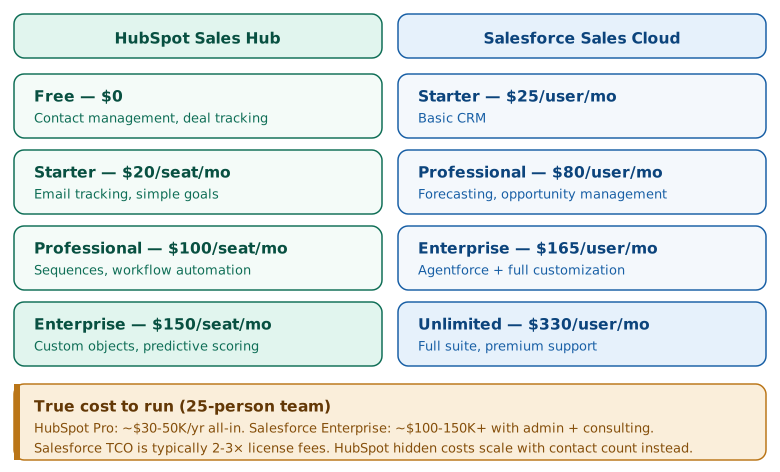
HubSpot uses a seats-based pricing model introduced in 2024. The free CRM includes contact management, deal tracking, and basic email tools for unlimited users.
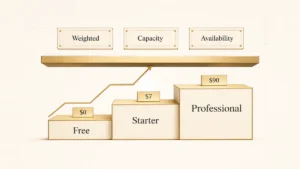
Paid plans for Sales Hub: Starter at $20/seat/month, Professional at $100/seat/month, and Enterprise at $150/seat/month. Marketing Hub follows a similar structure with pricing based on the number of marketing contacts. The key advantage is that HubSpot bundles functionality. Marketing automation, email, landing pages, and CRM all share one platform at every tier. That bundling is really an answer to the CRM versus marketing automation trade-off: buy the two jobs together instead of stitching separate tools into one pipeline.
Salesforce Pricing
Salesforce charges per user per month with annual billing. Sales Cloud: Starter at $25/user/month, Professional at $80/user/month, Enterprise at $165/user/month, and Unlimited at $330/user/month.
Here’s what the pricing page doesn’t emphasize: Marketing Cloud (email, automation, journeys) is a completely separate product starting at $1,250/month. Pardot (now Marketing Cloud Account Engagement) starts at $1,250/month as well. If you want marketing and sales on Salesforce, you’re buying two products with separate interfaces and data sync requirements.
Total Cost of Ownership
This is where the real difference lives. HubSpot’s Professional plan for a 25-person team runs approximately $30,000-$50,000 per year all-in, including implementation. Salesforce Enterprise for the same team size often lands at $100,000-$150,000+ per year when you add implementation consulting ($50K-$150K), a dedicated admin ($80K-$100K salary), third-party integrations, and add-on licenses.
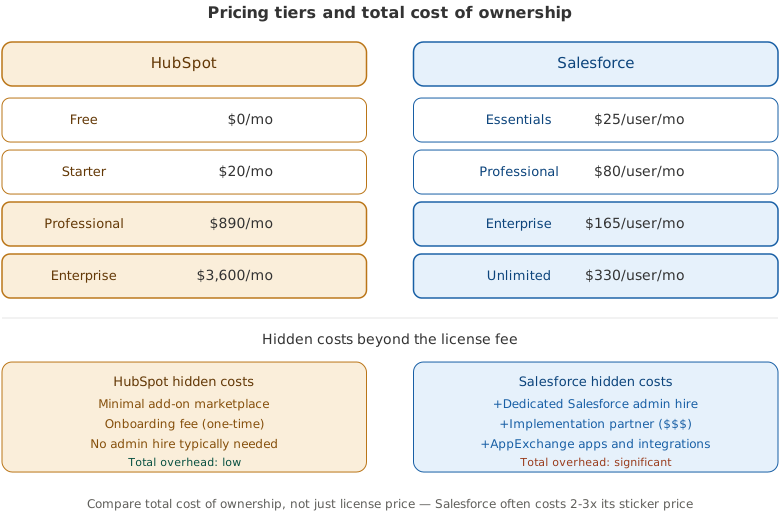
One independent analysis found that a 25-user Salesforce deployment carries a 3-year TCO roughly 3x higher than an equivalent HubSpot deployment, driven primarily by admin overhead, implementation costs, and add-ons that don’t appear on the initial pricing page.
PRO TIP
When budgeting for Salesforce, multiply the license cost by 2.5-3x to estimate your true annual spend. When budgeting for HubSpot, add 15-25% for onboarding and any premium integrations. These multipliers reflect real-world deployments, not vendor marketing.
Ease of Use and Implementation
This is HubSpot’s strongest advantage and the reason many mid-market teams choose it over Salesforce despite Salesforce’s deeper feature set.
HubSpot: Days to Productive, Not Months
HubSpot is designed so frontline teams can operate independently. A sales rep can build a sequence, enroll contacts, and log calls within the first hour. A marketing manager can create campaigns and automate follow-up without IT involvement. Implementation for most teams takes 2-6 weeks, not months. One early setup task exposes a real difference between them, because the two platforms count a round robin rotation differently: HubSpot balances each rotate action on its own count, while a Salesforce rotation depends on how you order and reset the assignment rule.
The tradeoff is constrained customization. HubSpot’s opinionated design prevents CRM sprawl and maintains data quality, but you’ll hit ceilings if your workflows require deeply custom objects, complex approval chains, or multi-level territory management. Design only slows decay, though; records still rot as people change jobs, so either platform eventually needs periodic CRM data cleansing to hold that quality in place.
Salesforce: Powerful, With a Price of Complexity
Salesforce can model virtually any business process. Custom objects, Apex triggers, Lightning Web Components, complex approval chains, territory management, and CPQ are all possible. But that flexibility creates complexity that requires ongoing expert management.
Implementation for Enterprise typically takes 3-6 months. Most organizations need a dedicated Salesforce administrator, and many hire external consultants for the initial build. Updating a pipeline stage can trigger changes to reports, automations, and permissions. Adding a custom object can require redesigning data relationships across the entire instance.
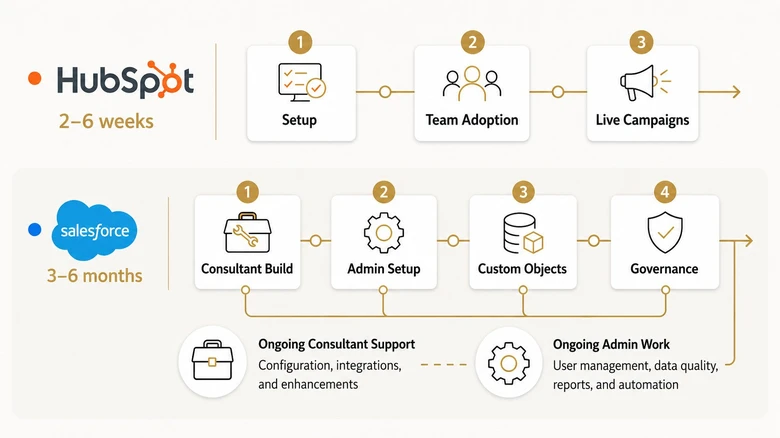
The average mid-market Salesforce implementation costs $75,000-$150,000, compared to $15,000-$30,000 for HubSpot. That’s not a criticism of Salesforce. It’s a reflection of the platform’s depth. You’re paying for capability that simpler CRMs can’t match.
Sales Features: Pipeline and Deal Management
Both platforms handle core sales functionality well, but they excel in different areas.
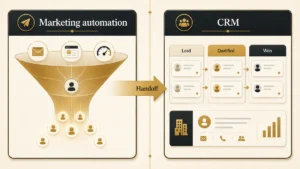
Both platforms handle MQL-to-SQL handoff differently — understanding these definitions is critical before choosing a CRM.
Where HubSpot Wins
HubSpot’s deal pipeline is visual, drag-and-drop, and intuitive out of the box. Sequences (automated email cadences) are built into Sales Hub without add-ons. Meeting scheduling, email tracking, and conversation intelligence all live natively in the platform. For straightforward B2B sales processes with standard pipeline stages, HubSpot handles 80% of use cases elegantly.
Where Salesforce Wins
Salesforce offers granular pipeline customization, advanced forecasting with AI-powered predictions, complex approval workflows, and Enterprise Territory Management. For multi-division companies with different sales processes per product line, complex deal structures, and dozens of pipeline stages with strict exit criteria, Salesforce has capabilities HubSpot simply doesn’t match.
If your sales cycle involves CPQ (configure, price, quote), multi-currency transactions, or partner channel management, Salesforce is the stronger platform. HubSpot’s CPQ exists but lacks the depth that enterprise procurement teams require.
Marketing Features: The Biggest Gap
This is where the architectural difference between HubSpot and Salesforce matters most for B2B marketing teams.
HubSpot’s Unified Marketing Advantage
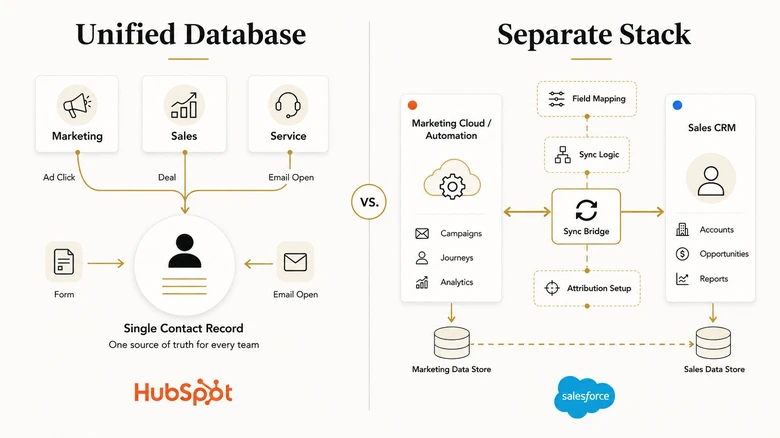
HubSpot was born as a marketing platform, and it shows. Email marketing, landing pages, social media management, blogging, SEO tools, ad management, and workflow automation are all built into Marketing Hub. More importantly, they share the same database as Sales Hub and Service Hub. That shared record is exactly what a working B2B marketing automation setup depends on, because scoring and routing break the moment marketing and sales read from two different databases.
This means a sales rep sees every ad click, page view, email open, and form submission on the same contact record as their deal activity. Attribution reports show true campaign-to-revenue impact. There are no sync delays, no integration middleware, and no mismatched data models. For marketing-sales alignment, this unified architecture is HubSpot’s biggest competitive advantage. The form-side step still has to fire cleanly for any of this to land — HubSpot’s form-side attribution breaks down when hidden fields fail to populate in seven specific places, and the unified-database benefit shows up only after that capture step succeeds.
Salesforce’s Separate Marketing Stack
Salesforce acquired its marketing capabilities (Marketing Cloud, Pardot/Marketing Cloud Account Engagement) separately. These are powerful tools, especially for enterprise-scale automation, sophisticated journey building, and complex segmentation. But they operate as separate systems from Sales Cloud.
This separation requires sync logic, field mapping, and governance to prevent misalignment between your marketing and sales databases. Lead records in Pardot don’t automatically match contact records in Sales Cloud without configuration. Campaign attribution requires deliberate setup across both systems. Budget for the monitoring too, because sync logic fails silently, so the count is the only witness when a record stops arriving on the Sales Cloud side.
For teams with dedicated marketing ops and Salesforce admins, this works fine. For teams without those resources, it creates ongoing friction that degrades data quality over time. Many B2B marketing framework implementations specifically account for this CRM integration challenge.
AI Capabilities in 2026
Both platforms are investing heavily in AI, but their approaches differ significantly.
HubSpot Breeze AI
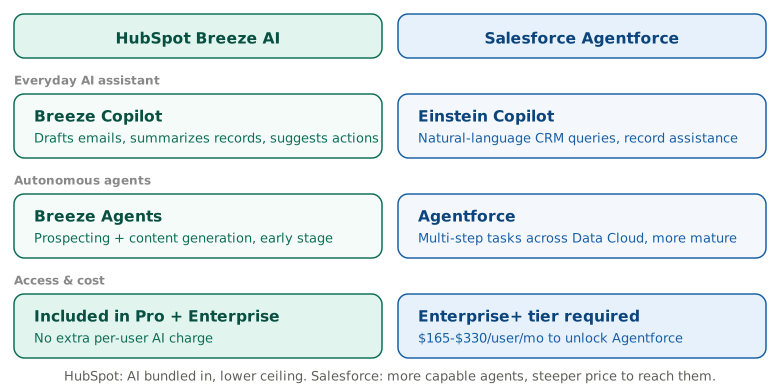
HubSpot consolidated its AI tools under the Breeze brand, which includes Breeze Copilot (an assistant that drafts emails, summarizes records, and suggests next actions), Breeze Agents (autonomous AI for prospecting and content creation), and predictive lead scoring at the Enterprise tier. All Breeze features are included in Professional and Enterprise plans at no additional per-user cost.
HubSpot claims 76% AI productivity gains and 36-day activation times for their Breeze Prospecting Agent, significantly faster than Salesforce’s implementation timeline.
Salesforce Agentforce
Salesforce’s AI strategy centers on Agentforce, autonomous AI agents that can execute multi-step sales tasks: researching accounts, updating opportunity fields, drafting proposals, scheduling follow-ups, and analyzing pipeline health. Agentforce represents a more ambitious AI vision than HubSpot’s, operating as a full autonomous agent layer rather than AI-assisted human workflows. The Headless 360 architecture announced at TDX 2026 extends this further, exposing 100+ Salesforce tools and skills to external AI agents via MCP, API, and CLI — changing what the Salesforce side of this comparison looks like going forward.
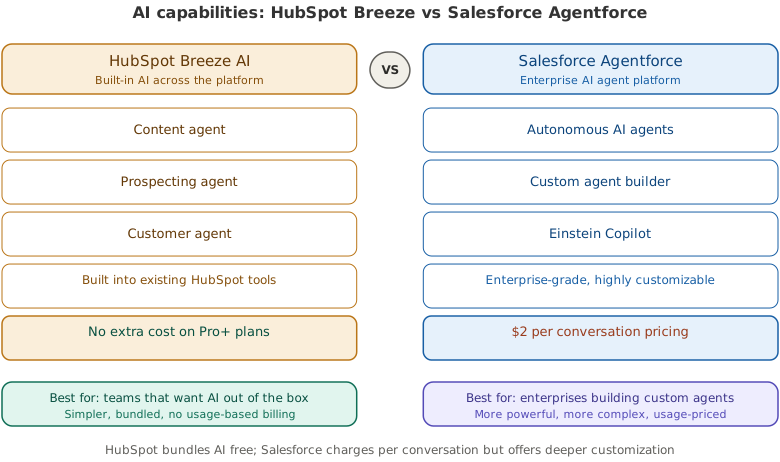
The catch is cost. Agentforce is available starting at the Enterprise tier ($165/user/month) and is fully available on the $330+/user/month Unlimited plan. For teams already on Salesforce Enterprise, this adds significant AI capability. For teams evaluating CRMs from scratch, the price of entry is steep.
Service and Support Tools
Customer support capability matters because retention directly drives SaaS economics. Both platforms offer service tools, but at different levels of sophistication. For the underlying churn math that makes retention a business metric, see our guide to SaaS churn rate benchmarks.
HubSpot Service Hub includes ticketing, a shared inbox, knowledge base, live chat, customer feedback surveys, and conversation intelligence. The ticket pipeline works like the deal pipeline, making it intuitive for teams already on HubSpot. Best for teams with straightforward support workflows (small team, email and chat tickets, self-service knowledge base).
Salesforce Service Cloud is built for large-scale service operations with advanced routing, omnichannel engagement (phone, chat, email, social), entitlements, SLA management, and complex case escalation logic. If you run a contact center or handle support across multiple geographies and product lines, Service Cloud has depth that HubSpot can’t match.
Integrations and Ecosystem
Salesforce’s AppExchange offers over 7,000 apps, including industry-specific solutions, advanced analytics tools, and enterprise integrations that don’t exist in HubSpot’s ecosystem. If you need a niche integration for healthcare compliance, financial services regulation, or manufacturing ERP systems, it’s almost certainly on AppExchange. For the broader lead generation tool stack that integrates with both CRMs, see our lead generation tools guide.
HubSpot’s App Marketplace has grown to over 2,000 apps and covers all major business tool categories. For most mid-market B2B companies, the HubSpot ecosystem has what you need. The gap shows up when you need specialized enterprise tools or deep integrations with legacy systems. Industry analysts like G2 consistently rank both platforms highly but note this ecosystem difference as a key selection factor. For B2B ecommerce platforms that integrate cleanly with both CRM systems, see our B2B ecommerce examples guide.
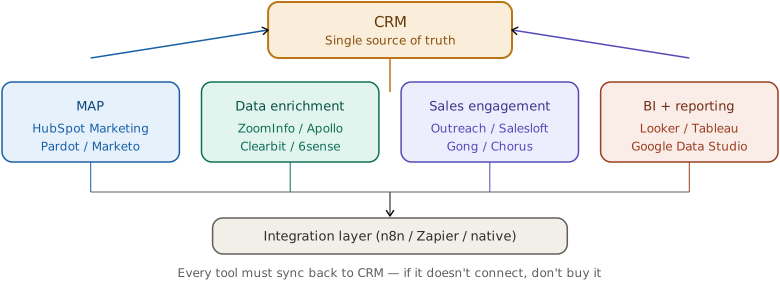
Both platforms integrate with each other through HubSpot’s native Salesforce connector, which supports bi-directional sync. Many companies run HubSpot for marketing and Salesforce for sales, though this dual-platform approach adds integration complexity. Teams running both systems should ensure their B2B SEO strategy and content assets feed into whichever platform owns the top of the funnel.
Where Does Zoho CRM Fit In?
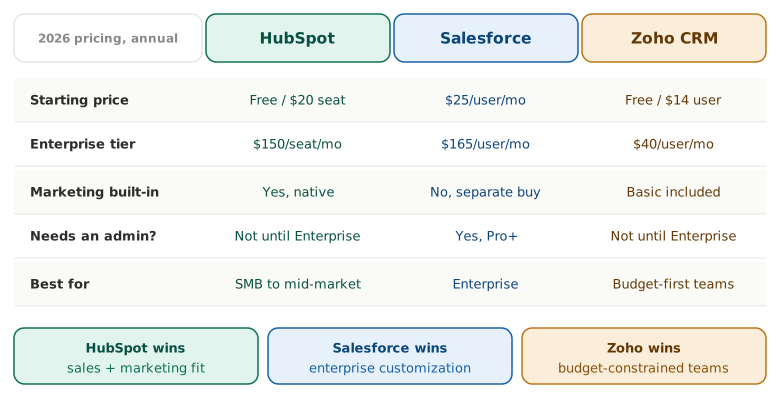
The “HubSpot vs Salesforce vs Zoho” search is one of the most common CRM comparisons, so it’s worth addressing directly. Zoho CRM occupies a different market position: it’s the budget leader with a genuine free tier and the lowest per-seat costs among the three.
Zoho CRM pricing (2026, annual billing): Free for up to 3 users. Standard at $14/user/month. Professional at $23/user/month. Enterprise at $40/user/month. Ultimate at $52/user/month. Compared to HubSpot’s $20/seat starting price and Salesforce’s $25/user starting price, Zoho is consistently cheaper at every tier.
Where Zoho wins: Price-to-feature ratio. Zoho includes workflow automation, multiple pipelines, and sales forecasting in its Standard plan. Features like these are locked behind Professional or Enterprise tiers on HubSpot and Salesforce. For teams under 20 people with straightforward sales processes and tight budgets, Zoho delivers strong value. The Zoho One bundle ($45/user/month for 50+ apps) is also hard to beat if you need CRM plus project management, email marketing, and helpdesk. And if you are an agency or service business rather than a product company, fit matters more than this two-horse race: the agency-focused CRM shortlist weighs HubSpot and Zoho against specialist tools built around client retainers and project billing.
Where Zoho falls short: The marketing automation capabilities are significantly weaker than HubSpot’s native Marketing Hub. The ecosystem is smaller. Enterprise-grade customization doesn’t match Salesforce’s depth. And the user interface, while improved, still feels less polished than either competitor. Teams that need deep reporting, complex multi-object relationships, or a large third-party integration library will find Zoho limiting. Zoho is only one option, though, and if HubSpot’s cost or complexity is what pushed you to look past it, our roundup of HubSpot alternatives grouped by use case and budget weighs eleven more replacements beyond this Salesforce head-to-head.
The decision rule: If budget is your primary constraint and your sales process is standard, evaluate Zoho. If marketing automation matters, HubSpot wins. If enterprise customization and ecosystem matter, Salesforce wins. Most mid-market B2B companies end up choosing between HubSpot and Salesforce because marketing and sales alignment, not CRM cost, is the bottleneck. For industry-specific CRM guidance, see our guide to the best CRM for construction businesses.
The Dual-Platform Strategy
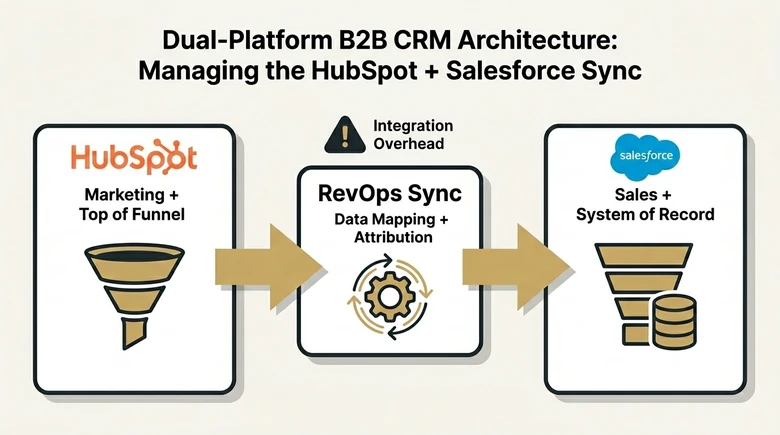
One of the fastest-growing CRM strategies in 2026 is running HubSpot for marketing and top-of-funnel engagement while using Salesforce as the system of record for sales, service, and compliance. This lets you use each platform’s strengths instead of forcing one platform to handle everything.
The tradeoff is integration overhead. You’ll need someone managing the data sync between systems, and attribution reporting becomes more complex when leads cross platforms. For teams with RevOps resources, this approach can work well. For smaller teams, the single-platform simplicity of HubSpot usually wins. Budget for the checking as well as the building: the two campaign objects do not correspond to each other, so proving a launch worked means counting the campaign members that actually landed on the Salesforce side.
Which CRM Should You Choose?
Choose HubSpot If…
You’re a small to mid-market company (10-500 employees). You want marketing, sales, and service in one platform without hiring a dedicated CRM admin. You prioritize speed to value and ease of adoption.
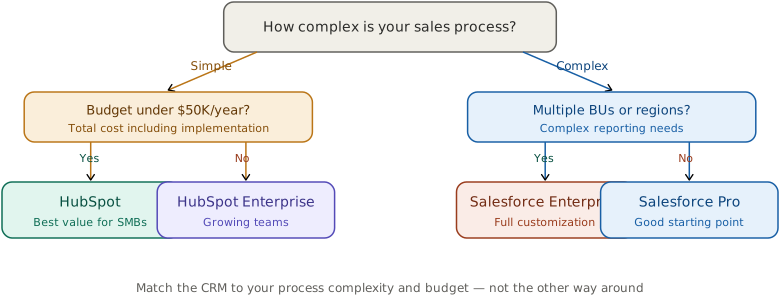
Your sales process is relatively straightforward. You want built-in marketing tools that share data natively with your CRM. Budget matters, and you need predictable costs without hidden add-ons.
Choose Salesforce If…
You’re an enterprise organization (500+ employees) with complex sales processes. You need deep customization: custom objects, complex approval chains, territory management, and CPQ. You operate in a regulated industry (financial services, healthcare) that requires specific compliance features.
You have (or will hire) a dedicated Salesforce administrator. You need the AppExchange ecosystem for industry-specific tools. You’re willing to invest in implementation and ongoing administration for maximum platform capability.
IMPORTANT
Neither platform is universally better. The right choice depends on your team’s size, technical resources, workflow complexity, and budget. Companies that choose based on what they need today AND what they’ll need in two years make the best decisions.
What Real Users Say: The Reddit and Forum Consensus
CRM comparison threads on Reddit (r/salesforce, r/hubspot, r/CRM) and Quora surface patterns that vendor marketing pages don’t show. Here’s what comes up repeatedly when real users compare the two platforms.
The most common HubSpot praise: “We were productive in weeks, not months.” Users consistently highlight the speed of onboarding and the fact that non-technical team members can build workflows, reports, and email sequences without help. The integrated marketing tools are the second most cited advantage.
The most common HubSpot complaint: “It gets expensive fast once you need Professional features.” Several users note that HubSpot’s free and Starter tiers are excellent, but the jump to Professional ($100/seat/month for Sales Hub) feels steep. Reporting limitations at lower tiers and the per-contact pricing model for Marketing Hub are frequent friction points.
The most common Salesforce praise: “Nothing else gives you this level of control.” Power users love the customization depth: custom objects, complex automation via Flow, and granular permission structures. Enterprise teams with multiple business units consistently choose Salesforce for this reason.
The most common Salesforce complaint: “You need a full-time admin just to keep it running.” The ongoing maintenance burden is the number one complaint. Users describe situations where simple changes (adding a field, modifying a report) require admin intervention, and where the platform feels over-engineered for teams under 50 people.
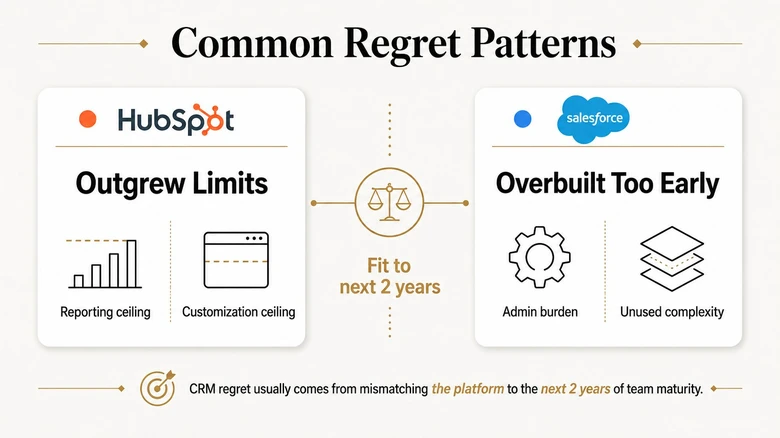
The pattern is consistent: teams that chose HubSpot and regret it usually outgrew the reporting or customization limits. Teams that chose Salesforce and regret it usually overbuilt for their actual needs and are now paying for complexity they don’t use.
Frequently Asked Questions
At the license level, HubSpot and Salesforce can be comparable for larger teams. The real cost difference is total ownership: HubSpot requires less implementation investment, no dedicated admin, and fewer third-party add-ons. Most analyses show Salesforce’s true cost runs 2-3x the license fee.
Yes, and many companies do. Salesforce-to-HubSpot migrations typically take 4-8 weeks for mid-market companies. HubSpot-to-Salesforce migrations take longer (2-4 months) due to Salesforce’s configuration complexity. Data migration, workflow recreation, and team retraining are the main challenges in either direction.
Salesforce offers more powerful and customizable reporting with cross-object reports, custom report types, and advanced dashboards. HubSpot’s reporting is simpler to set up and use but has less depth. For most mid-market teams, HubSpot’s reporting covers what you need. Enterprise teams with complex reporting requirements generally prefer Salesforce.
For anything beyond the basic Starter plan, yes. Even Professional-tier Salesforce deployments benefit from someone who understands flows, validation rules, and data architecture. Enterprise deployments require a dedicated admin (median US salary: $95,000). HubSpot Professional can typically be managed by your existing marketing or revenue ops team without a specialist.
The three most cited drawbacks: steep price jump from Starter to Professional ($20 to $100/seat/month for Sales Hub), limited reporting depth compared to Salesforce, and per-contact pricing for Marketing Hub that can get expensive as your database grows. Enterprise teams with complex multi-object data models or strict compliance requirements also find HubSpot’s customization ceiling restrictive compared to Salesforce.
Salesforce holds the largest global CRM market share at roughly 21-23%, so it is the “#1” by market share. HubSpot is the fastest-growing CRM in the mid-market, with over 228,000 customers. For B2B companies under 200 employees, HubSpot is usually the more practical choice; for enterprises above 500 employees, Salesforce is the default.
HubSpot is Salesforce’s most direct competitor in the B2B mid-market. Microsoft Dynamics 365 competes at the enterprise level, particularly in organizations already invested in the Microsoft ecosystem. Zoho competes on price for SMBs. In specific verticals, industry-specific CRMs like Veeva (life sciences) or ServiceNow (IT service management) also compete for Salesforce’s enterprise customers.
Neither is universally better; the fit depends on team size and complexity. HubSpot is better for B2B teams under 500 employees that want fast setup and unified marketing, sales, and service. Salesforce is better for enterprises with complex sales processes, regulated-industry needs, and a dedicated admin to manage deep customization.
Making the Decision: Start With Your Team
Don’t start with feature comparison spreadsheets. Start with your team. How many people will use the CRM daily? What’s their technical comfort level? Who will own system administration and ongoing optimization?
Companies also weigh how each CRM supports a RevOps vs Sales Ops model — Salesforce leans enterprise RevOps, while HubSpot works well for lean sales ops teams.
If your answer is “our marketing manager and sales director will handle it alongside their day jobs,” HubSpot is almost certainly the right call. If your answer is “we have a dedicated RevOps team with a Salesforce-certified admin,” Salesforce gives you more room to grow.
Then look at your sales process. If a deal moves through standard stages with one to three decision-makers, HubSpot handles it well. If your deals involve complex approval chains, multi-division buying committees, and procurement teams that need CPQ workflows, Salesforce is built for that complexity.
For field-service industries, we also evaluated the best CRM options for construction businesses — a use case neither platform addresses out of the box.
Whichever you choose, commit to it. The companies that struggle most are those that half-implement a CRM, get frustrated, and switch after 12 months. Pick the platform that fits your next two years, invest in proper setup, and build on it. Your lead scoring, pipeline management, and revenue operations all depend on getting this foundation right.