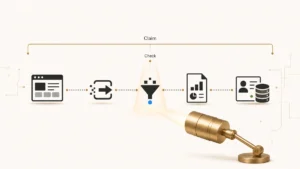
The prospect filled in the form. They saw the thank-you page. They are now waiting for the call your landing page promised. And there is no record of them anywhere in your CRM.
Nobody gets an alert for this. The form did not error. The connector did not turn red. Your submission count went up. Sales never knew a lead existed, so nobody chased it, so nobody complained. The failure is silent by construction, and it stays silent until somebody counts.
That counting is the job. Form-to-CRM reconciliation is not an integration project and it is not a tooling decision. It is the discipline of proving, checkpoint by checkpoint, that the submission a visitor made became a record a rep can work. Every guide ranking for this topic explains how to connect a form to a CRM. This one explains how to prove the connection held, and how to find the exact point where it did not.
Direct answer — What is form-to-CRM reconciliation?
Form-to-CRM reconciliation is the process of counting the same form submission at every checkpoint between the browser and the CRM, then proving which gap is real. It compares submit events, request payloads, form-tool logs, connector logs, and created CRM records so a missing lead is located rather than guessed at. It answers a missing record, not a missing field: an empty UTM value on a contact that exists is a capture problem, not a reconciliation gap.
Key Takeaways
- Reconciliation is a counting exercise, not a debugging exercise. Six checkpoints, six counts, and the gap between two adjacent counts tells you which system to open.
- A missing record and a missing field are different failures with different owners. Reconcile records here; audit field capture separately.
- Salesforce duplicate rules block Web-to-Lead submissions outright, even when the rule is set to “Allow”, because an automated submission cannot answer the duplicate alert dialog.
- Salesforce caps Web-to-Lead at 500 records per 24 hours. Overflow queues silently and releases after midnight UTC, which reads in reports as a delay rather than a loss.
- HubSpot spam filtering suppresses record creation completely: no CRM record, no automation, no analytics. The submission still exists, just not where anyone is looking.
- There is no credible published benchmark for acceptable form-to-CRM variance. Build your own 30-day baseline per checkpoint and alert on movement against it.
What form-to-CRM reconciliation is
Form-to-CRM reconciliation is the practice of comparing counts of the same form submission across every system it passes through, so that a lead which failed to arrive can be located at a specific checkpoint instead of being written off as a mystery. The output is not a fixed integration. The output is a number, per checkpoint, and a named cause for every gap between them.
The word “reconciliation” carries other meanings in adjacent fields, and that ambiguity is why the topic is so poorly served. Accounting reconciliation matches transactions to statements. Data-engineering reconciliation compares table row counts between a source and a warehouse. Neither one has anything to say about whether a demo request reached a sales rep. The table below separates them.
| Practice | What it compares | Unit of failure | Owner |
|---|---|---|---|
| Form-to-CRM reconciliation | One submission across browser, form tool, connector, and CRM | A missing lead record | Marketing ops / RevOps |
| Data reconciliation | Row counts and values between a source system and a warehouse | A missing or mismatched row | Data engineering |
| Pipeline reconciliation | CRM opportunity states against the forecast | A wrong stage or amount | RevOps / sales leadership |
| Attribution reconciliation | Channel-level lead counts across analytics, ad platforms, and CRM | A misattributed lead | Marketing analytics |
The distinction that matters most in practice is narrower than any of those. A form submission can fail in two ways, and they are not the same problem. Either the record exists but arrives incomplete, or the record does not exist at all. When a contact lands in HubSpot with a blank source field, that is a capture failure inside the form itself, and the seven hidden-field failure modes behind an empty UTM value are where that diagnosis belongs. Reconciliation is for the harder case: the submission happened and the record is absent. A click-to-message path creates an earlier handoff before either case exists; our Demand Gen messaging attribution checklist defines the evidence needed to connect the ad interaction and conversation to the CRM record that reconciliation can then test.
Treat that as the scope line. If you can open the contact, you have a field problem. If you cannot find the contact, you have a reconciliation problem, and the rest of this page is the procedure. The reporting-layer version of the same question, where attribution platforms reconcile channel counts after the fact, sits downstream of both and inherits whatever these two layers got wrong.
The six checkpoints a submission has to survive
To reconcile a form you need six counts, taken over the same window, for the same form. Each count comes from a different system, and each gap between two adjacent counts has a short list of possible causes. This is the instrument. The same counting discipline belongs in a CRM cutover: the control work around Dynamics 365 Activate still needs source-to-target record and association counts with agreed acceptance thresholds before the old CRM can be retired.
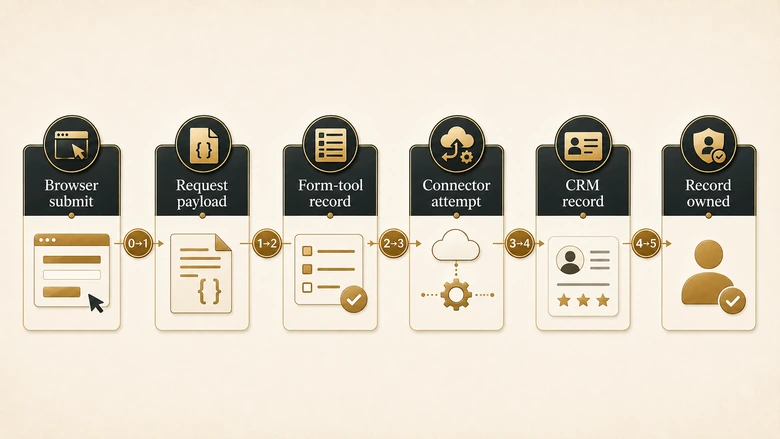
| # | Checkpoint | What it counts | Where the number comes from | A gap above this row means |
|---|---|---|---|---|
| 0 | Browser submit | Submit events fired in the visitor’s browser | Analytics event (a GA4 generate_lead or custom event), or a client-side handler log | Baseline. Everything downstream is measured against this. |
| 1 | Request payload | POST bodies that actually reached the form endpoint | Network panel on a test submit, server access log, or the form tool’s raw submission view | The submit never left the browser: a script error, a consent handler, or a validation block. |
| 2 | Form-tool record | Submissions the form tool accepted and stored | HubSpot form submissions table plus the spam submissions index; Marketo activity log. Salesforce Web-to-Lead has no queryable submission log. | The request arrived and was rejected or quarantined: bot filtering, a challenge, or a 4xx response. |
| 3 | Connector attempt | Submissions a connector tried to write to the CRM | Native integration sync log, middleware task history, Marketo-to-Salesforce sync errors | The form tool stored it but nothing tried to hand it over: a paused connector, a filter, or a mapping with no target. |
| 4 | CRM record created | Lead or Contact records that now exist | CRM report filtered on source plus created date, matched to the same window | The write was attempted and the CRM refused it. This is where most silent losses live. |
| 5 | Record owned | Records with a real owner and a running response clock | Assignment history, owner field not equal to the default queue or integration user | The record exists but no human owns it, so the lead is present and still unworked. |
Two things about this table are worth stating plainly, because they are the reason reconciliation is harder than it sounds.
First, checkpoint 1 is the one nobody measures. Analytics tells you a button was clicked. The CRM tells you a record exists. Almost no team holds evidence of what the request body actually contained in between, which is exactly why our own testing found what it did: across 20 forms with definitive results, a static page scanner detected only 8 of the 17 payload-confirmed captures, a sensitivity of 47% with a 95% Wilson interval of 26% to 69%. That set was deliberately chosen to be difficult, so it is not a market-wide rate. It is enough to show that inspecting the rendered page is not the same as inspecting the payload.
Second, checkpoint 5 is where reconciliation ends and routing begins. A record that exists with no owner is not a reconciliation gap, it is a routing gap, and the rule hierarchy and exception handling that decide ownership are a separate body of work. Reconciliation proves the record arrived. Routing decides who works it, and the clock that every response-time report is built on only starts once checkpoint 5 clears.
Why the record is missing: causes by checkpoint
Every cause below is documented by the platform vendor, mapped to the checkpoint where it breaks the chain, and paired with the artefact that proves it. Anything that could not be traced to a primary source is not in this table.
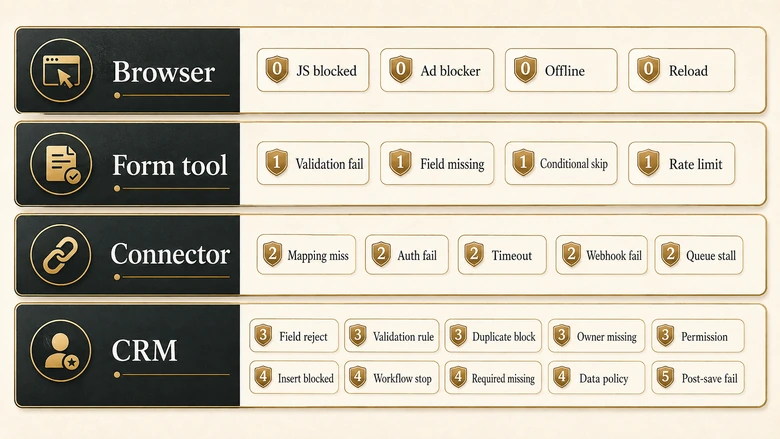
| Cause | Breaks at | Evidence that proves it | Platform |
|---|---|---|---|
| Consent or tag-manager script blocks the form handler | 0 → 1 | Submit event logged, no POST in the network panel | Any |
| Script execution order, or an SPA route change before submit | 0 → 1 | POST fires with a partial or empty body | Any |
| Bot and spam filtering quarantines the submission | 1 → 2 | Submission sits in the spam submissions index, not the main table | HubSpot |
| Referrer or IP on the exclusion list | 1 → 2 | Submission treated as spam despite being legitimate; can be released | HubSpot |
| Email field absent or not populated | 2 → 4 | Submission shows “No contact record” against it | HubSpot |
| Tracking cookie ties the submit to an existing contact | 2 → 4 | Submission count rises, contact count does not; the submission appears on an existing timeline | HubSpot |
| Contact deleted after submitting | 4 | Submission still counted, no contact to open | HubSpot |
| Connector paused, filtered, or the task errored | 2 → 3 | Middleware task history shows held or failed tasks | Any middleware |
| CRM daily API limit reached, sync blocked | 3 | Sync error “Daily API Limit Reached”; API Requests, Last 24 Hours in Setup confirms it | Marketo to Salesforce |
| Web-to-Lead 24-hour cap reached | 3 → 4 | Default Lead Creator received the limit notification; records appear in a batch after the reset | Salesforce |
| Pending request queue overflowed | 3 → 4 | Admin notified on the first five rejections; those submissions never arrive at all | Salesforce |
| Duplicate matching rule blocks creation | 4 | Visitor saw a duplicate-record error; blocked even when the rule is set to Allow | Salesforce |
| Validation rule or required field rejects the insert | 4 | A field the form never sends is required on the Lead object | Salesforce |
| Picklist value mismatch or field length overflow | 4 | Free-text value outside the picklist, or a value longer than the target field | Any CRM |
| Integration user lacks field-level permission | 4 | Connector log shows a write error on a restricted field such as owner or lead source | Any CRM |
HubSpot: the record was suppressed, not lost
HubSpot’s spam filtering is the most under-appreciated cause on the list, because it does not fail loudly anywhere. When a submission is flagged, HubSpot documents that “CRM records associated with the form submission will not be created or updated”, that form automation will not fire, and that traffic analytics will not update either. The submission is stored on a separate spam submissions index and auto-deleted after 90 days unless someone releases it. A legitimate lead can therefore sit in a queue nobody has ever opened, expire, and leave no trace in the CRM at all.
The other HubSpot causes are quieter still. If the Email field is not populated the platform shows a “No contact record” state against the submission. If the visitor submits from a browser carrying tracking cookies tied to an existing contact, HubSpot updates that contact rather than creating a new one, which is correct behaviour that still breaks your count. And a contact deleted after submitting still counts toward the submission total while no longer appearing as a contact. All three produce the same symptom from the outside: submissions up, contacts flat.
Salesforce: the two limits and the rule that ignores its own setting
Salesforce Web-to-Lead is capped at 500 records in a 24-hour period. What happens past that cap is the part that misleads reports. Salesforce does not discard the overflow. It holds it in a pending request queue shared with Web-to-Case, notifies the default lead creator, and submits the held requests when the limit refreshes at midnight UTC. The queue itself has a ceiling of 50,000 combined requests, beyond which additional requests “are rejected and not queued”, with the administrator emailed for only the first five rejections. A spam burst can therefore consume your daily cap, fill the queue, and silently discard genuine leads while your dashboards show a modest dip.
IMPORTANT
Salesforce documents that a Web-to-Lead submission matching a duplicate rule “is always blocked — even if the rule is set to ‘Allow.'” Web-to-Lead is an automated process and cannot display the duplicate alert dialog a human would answer, so the record is simply refused. Check this before you audit anything else: a rule you believe is only reporting duplicates may be destroying leads.
That duplicate behaviour is worth the emphasis because the setting reads as harmless. Salesforce’s own guidance on duplicate rules blocking Web-to-Lead offers three fixes: exclude the default Web-to-Lead creator from the rule, build a separate rule for Web-to-Lead set to “Allow and Report”, or use a Lightning record edit form instead. Which one is right depends on how much duplicate tolerance your database can absorb, and that trade-off belongs with your survivorship and merge rules rather than being decided at the form.
Marketo and middleware: the layer with no owner
When a marketing automation platform sits between the form and the CRM, the connector becomes its own checkpoint and its own failure surface. Adobe documents a Salesforce sync error raised when Marketo exceeds the org’s API allowance, and points at API Requests, Last 24 Hours in the Salesforce Setup menu as the place to confirm consumption against the limit. Sync-flow steps that push individual records burn a call each, so a heavy campaign can exhaust the allowance and stall the handoff without either platform reporting a form failure.
Generic middleware fails in a duller way: a task errors, the connector retries, the retry budget runs out, and the task sits in a history view that nobody has alerting on. This is the checkpoint most often owned by nobody. Marketing assumes the CRM team watches it. The CRM team assumes the connector is marketing’s tool. Ownership gets thinner still during a platform change, when re-pointing every integration is its own cutover workstream and a handler still aimed at the old endpoint keeps returning success to a system nobody reads any more.
How to run a form-to-CRM reconciliation
Run this once per form, over a window long enough to contain real volume. Thirty days is a reasonable default; a week is enough on a high-traffic form. Take all six counts before you form any theory about the cause, because a theory formed at checkpoint 4 will make you skip checkpoint 1.
Workflow · 1 hour
How to reconcile form submissions against CRM records
Take six counts of the same form over one window, then attribute every gap to a named cause with an evidence artefact behind it.
Fix the form and the window
Pick one form and one date range, and write both down. Use the same range for all six counts, in the same timezone, or every gap you find will be an artefact of the query.
Count browser submits and payloads
Pull the submit-event count from analytics for checkpoint 0. For checkpoint 1, submit the form yourself with a sentinel value in a text field and read the request body in the network panel to confirm what actually leaves the page.
Count stored submissions including quarantine
Read the form tool’s submission table for checkpoint 2, then open the spam or quarantine view separately and record that number too. Counting only the main table hides the whole spam-suppression failure mode.
Count connector attempts and errors
Open the native integration log or middleware task history for checkpoint 3. Record successes and failures as two separate numbers, and export the error text on the failures.
Count CRM records and owners
Report on Leads or Contacts created in the window with the matching source for checkpoint 4, then filter that same report to records whose owner is not the default queue or integration user for checkpoint 5.
Attribute every gap to a named cause
Work down the six counts and, for each gap, name the cause and the artefact that proves it. Any gap you cannot attribute stays open as a finding rather than being rounded away as noise.
PRO TIP
Put a sentinel value in a real text field on your test submit, something like recon-test-0731 in the company field. It survives every layer, it is searchable in the form tool, the connector log, and the CRM, and it turns “the lead vanished somewhere” into a single query per checkpoint.
A worked example
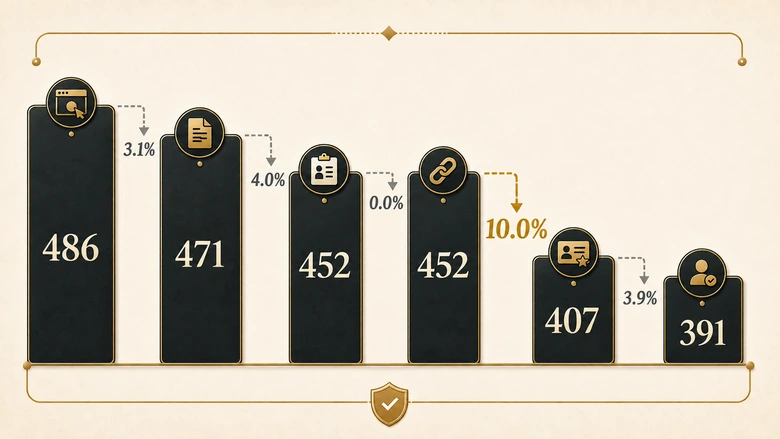
Here is the ledger filled in for one demo-request form over 30 days. The counts below are illustrative rather than measured, chosen to show how the arithmetic isolates a cause. Your own numbers will differ; the reading procedure will not.
| Checkpoint | Count | Gap from previous | Reading |
|---|---|---|---|
| 0 Browser submit | 486 | — | Baseline |
| 1 Request payload | 471 | 3.1% | Within the form’s normal range; consent script accounts for most of it |
| 2 Form-tool record | 452 | 4.0% | 19 submissions in the spam index, 3 of them legitimate on review |
| 3 Connector attempt | 452 | 0.0% | Clean. The connector tried everything it was given |
| 4 CRM record created | 407 | 10.0% | The real bug. 45 writes attempted, 45 records absent |
| 5 Record owned | 391 | 3.9% | 16 records sitting on the default queue with no owner |
The 10% gap at checkpoint 4 is the only one worth an investigation, and the connector’s error export names the causes: 31 submissions refused by a duplicate rule, 14 rejected because a required field on the Lead object was never on the form. Neither of those produced a red light anywhere. Both are one configuration change away from being fixed. That second cause is a form-design decision arriving as a connector error, and the way to stop it recurring is to work backwards from the fields your rules actually read before deciding what the form asks.
Notice what the arithmetic did. Before the ledger, the honest description of this form was “some leads seem to be going missing.” After it, the description is “45 records were refused at insert for two named reasons, and 16 more exist but are unowned.” That is the difference between a suspicion and a ticket. Running the same procedure across every intake path is what a structured routing audit with defined test cases does at scale.
What variance is normal, and when a gap is a bug
This is where most articles on the topic quote a tolerance band. You will see “a 5% to 15% gap is normal” repeated across vendor blogs. I am not going to adopt it, because I could not find a study behind it. No published research establishes an acceptable form-to-CRM variance across B2B sites, and a borrowed number would give you false confidence in exactly the range where real bugs hide.
Use your own baseline instead. Take the six counts weekly for a month, and the spread you observe becomes your tolerance for that form. The formula is trivial; the discipline of applying it per checkpoint rather than end to end is what makes it useful.
Checkpoint Variance % = (Count at Checkpoint N − Count at Checkpoint N+1) ÷ Count at Checkpoint N × 100Measured per checkpoint, an end-to-end loss of 20% resolves into five small numbers, and small numbers are diagnosable. Measured end to end, the same 20% is a single figure that tells you nothing about which system to open. Three rules make the baseline actionable: any checkpoint at 0% is suspicious rather than perfect, because it usually means the count is wrong; any gap that doubles against its own history is a bug regardless of absolute size; and any gap you cannot attribute to a named cause is an open finding, not an acceptable loss.
One caveat on the baseline itself. A form that has been quietly losing records for months will bake that loss into its own history, so the first reconciliation should be read against causes, not against precedent. Baselines are for detecting change, not for validating a state you have never checked.
Prevention: making the next silent failure loud
Reconciliation is detective work, and you should need less of it over time. The point of running it is to convert what you learn into an alert, because the underlying problem was never the failure itself. It was that the failure had no voice. An alert only changes behaviour once someone is accountable for answering it, which is why a lead volume commitment needs a named owner and a stated consequence, not just a threshold.
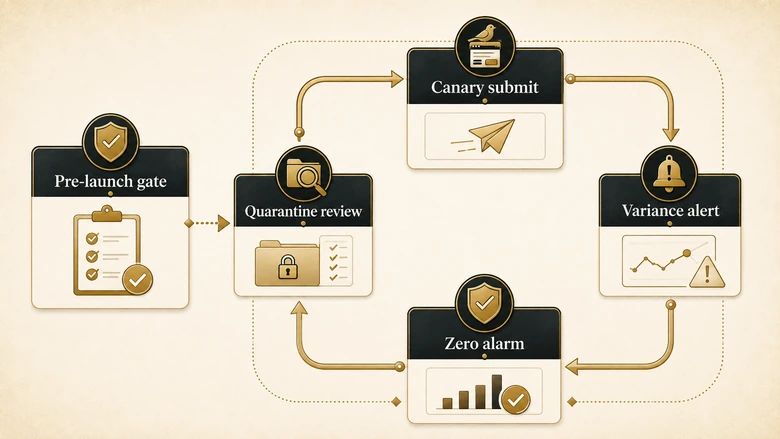
Four controls carry most of the weight. Run a scheduled canary submission through the real form and alert if the sentinel record does not appear in the CRM within a set window. Alarm on an absolute zero at checkpoint 4 over any period longer than your quietest normal gap, since zero is the one number a working form never produces. Alert on per-checkpoint variance breaching its baseline rather than on end-to-end totals. And review the quarantine view on a schedule, because a spam index nobody opens is a lead graveyard with a 90-day clock on it.
The cheapest control of all runs before anything ships. Most of the checkpoint 0 and 1 failures in the cause table are introduced at launch, by a new landing page, a re-tagged link, or a consent-banner change, and they are catchable in advance: the fourteen pre-launch rules that stop a campaign shipping broken exist for exactly that reason. Downstream, the same missing records quietly bias every response-time report you publish, which is why silent form failures distort speed-to-lead averages rather than showing up as a visible drop.
If you want a faster read on the form layer before committing to the full ledger, IVRIS runs a free Web Form Audit against a landing-page URL for HubSpot, Marketo, and Dynamics forms. It checks the rendered page rather than the payload, so treat it as a first pass that narrows where to look, not as a substitute for counting.
Frequently Asked Questions
The submission was blocked at one of six checkpoints between the browser and the CRM. The most common causes are spam filtering quarantining it, a duplicate rule refusing the insert, a required CRM field the form never sends, or a daily submission limit holding it in a queue. Counting each checkpoint locates which one.
Open the form’s submissions table and look for a “No contact record” state against the submission, then check the spam submissions index separately. HubSpot documents that spam-flagged submissions create no CRM record and trigger no automation, so a submission can exist with no contact behind it and no error anywhere.
Salesforce caps Web-to-Lead at 500 records per 24 hours. Overflow goes to a pending request queue shared with Web-to-Case and is submitted when the limit resets at midnight UTC. That queue holds 50,000 combined requests; past it, further submissions are rejected and never queued.
No. Data reconciliation compares row counts and values between a source system and a warehouse, and is owned by data engineering. Form-to-CRM reconciliation tracks a single form submission across the browser, form tool, connector, and CRM to prove a lead record was created. Different unit of failure, different owner.
No published study establishes an acceptable range, so treat quoted tolerance bands with suspicion. Measure your own per-checkpoint spread weekly for a month and use that as the baseline. A gap that doubles against its own history is a bug regardless of size, and any unattributed gap stays an open finding.