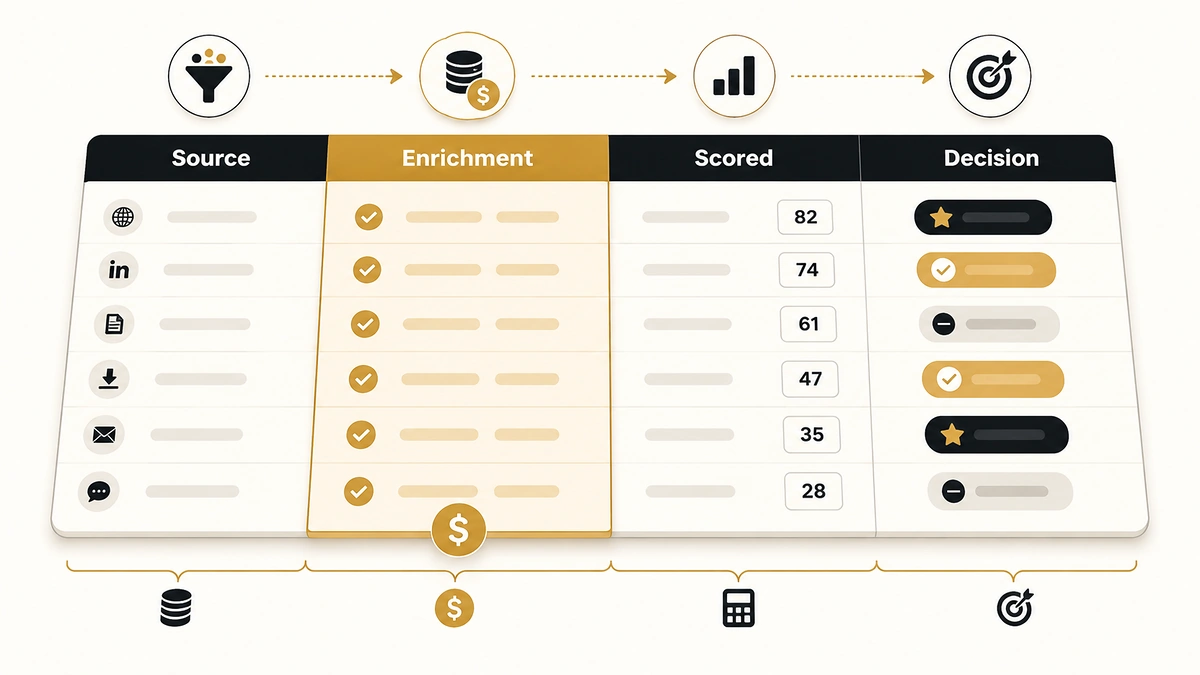
Clay’s template gallery has an entry called “Score leads based on several criteria.” Duplicate it and you get a table with tech stack, financials, recent news and headcount growth wired up. What you do not get is a scoring system: no point values, no weights, no thresholds, and nothing that tells a rep which row to call first.
That gap is where most Clay lead scoring templates stall. The enrichment runs, the columns fill, and then somebody has to decide that a 400-person fintech using Salesforce is worth 45 points and a 12-person agency is worth four. Clay will not decide that for you, and its documentation stops at “create a formula column.”
This page covers the part that is missing: the column architecture, the point values, the formulas that actually evaluate inside a Clay formula column, the threshold mapping, and a field table you can rebuild from scratch in about half an hour.
Direct answer — What is a Clay lead scoring template?
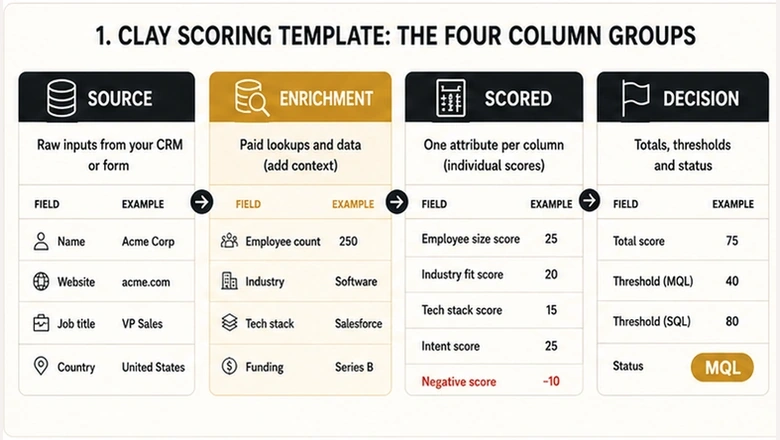
A Clay lead scoring template is a table layout that scores prospects using four column groups: source columns holding the raw list, enrichment columns that fetch firmographic and technographic data, scored columns that convert each attribute into points using a formula, and decision columns that sum the points and assign a status. Formula columns run JavaScript and cost nothing to execute. The enrichment feeding them is the entire bill.
Key Takeaways
- Clay’s own template ships criteria, not weights. The point values, thresholds and routing logic are yours to write.
- Formula columns are free. Clay’s documentation lists formulas and filters among the features that consume neither Actions nor Data Credits, so the cost of a scoring system is entirely the cost of the enrichment feeding it.
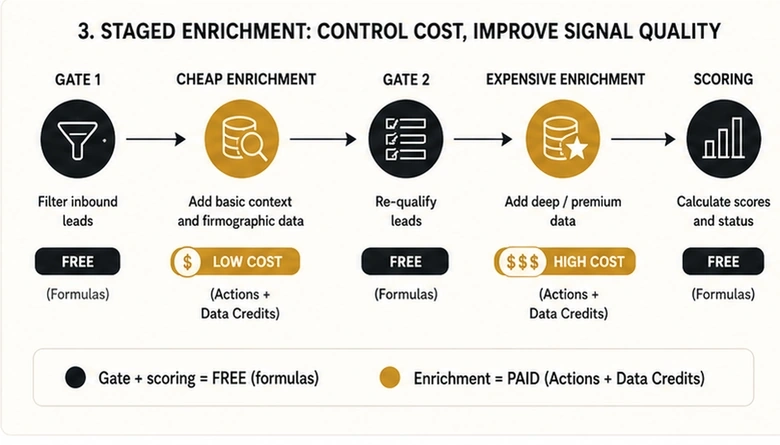
- Each enrichment costs exactly one Action plus variable Data Credits, which is why a cheap formula gate placed before your expensive enrichment columns is the single largest cost lever in the build.
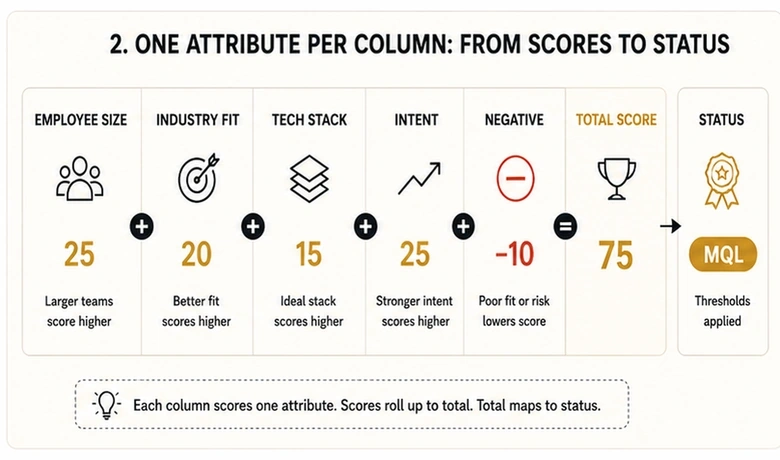
- Score one attribute per column, then sum. A single 40-line formula is unmaintainable and impossible to debug when a score looks wrong.
- Copied formulas usually fail for one reason: column references must be inserted with the
/key, not typed as text.
What a Clay lead scoring template actually contains
A Clay lead scoring template is a saved table structure, not a scoring model. It defines which columns exist and which enrichment providers fill them. Every judgment that turns data into a priority order sits outside the template and has to be authored per business.
Clay’s published scoring template carries roughly thirty words of explanation. Its lead scoring documentation names three approaches (number-based, grade-based and binary fit criteria) and three setup steps, with no example formula and no sample point values. Both are accurate. Neither is enough to build with.
So the working definition of a usable template is broader than the gallery version. It needs the column set, a point value attached to every scored attribute, a summing column, a status column that converts the total into MQL or SQL, and an enrichment order that keeps the credit bill sane.
The four column groups a scoring table needs
Every workable Clay scoring table sorts its columns into four groups that run in sequence. Getting the order right matters more than the point values, because the order is what determines cost.
| Group | What it holds | Cost per row | Example columns |
|---|---|---|---|
| 1. Source | The raw list as imported | Free | Company Domain, Job Title, LinkedIn URL |
| 2. Enrichment | Data fetched from providers | 1 Action + Data Credits | Employee Count, Industry, Tech Stack, Funding Stage |
| 3. Scored | One formula per attribute, returning points | Free | Headcount Score, Industry Score, Title Score |
| 4. Decision | Total, status and routing | Free (sync costs 1 Action) | Total Score, Status, Routed To |
Three of the four groups are free. Only group two carries a bill, which reframes the whole build: you are not optimising a scoring model, you are optimising how few rows reach group two. Everything downstream of enrichment is arithmetic Clay performs at no charge.
Groups one and three are also where a scoring table differs from a plain enrichment table. If you are still deciding which fields are worth appending at all, the field selection question is upstream of scoring and covered in the B2B data enrichment workflow; this page assumes the fields are chosen and starts at the point where they become points.
Which columns to score
Score the attributes that separate your closed-won accounts from your closed-lost ones, and ignore the rest. A column earns a place in group three only if changing its value would change what a rep does next.
Firmographic columns
Firmographic columns describe the company: headcount, revenue band, industry, geography and funding stage. These are the most stable inputs in the table, which is why they carry the heaviest weight in most models and rarely need re-running.
Headcount is the workhorse. Set the band that matches your actual customer base rather than the band you wish you sold to, and give the adjacent bands partial credit instead of zero, because a company one hire away from your sweet spot is not a bad lead. Revenue bands need the same treatment, and the allocation styles for turning a continuous range into discrete points are worked through in how to assign points to revenue ranges.
Technographic columns
Technographic columns record what a company already runs: CRM, marketing automation, cloud provider, or any tool that implies your product will slot in. In Clay these come from a tech-stack enrichment or from scraping job postings for tool names, and they are usually the highest-signal, lowest-cost columns in the table.
Weight a detected competitor differently from a detected complement. Salesforce present in the stack might be worth 15 points if you integrate with it and minus 20 if you replace it, and a single column cannot express both. Split them.
Intent and signal columns
Intent columns capture time-sensitive behaviour rather than stable attributes: a funding round, a relevant job posting, leadership change, pricing page visits or a demo request. They decay, which means they need a timestamp and a re-run cadence that firmographic columns do not.
Keep the intent set small. Four to six signals is enough, and each additional one usually costs another enrichment Action per row for a diminishing amount of discrimination.
Negative columns
Negative columns subtract points for disqualifying attributes: a free-mail domain, a student or intern title, a competitor domain, a company below your minimum viable size, or a geography you cannot service. Subtraction has to happen inside the same total as the positive points, or the routing rule will never see it.
The weighting question underneath all four groups is how much each pillar should be worth relative to the others, which is a calibration exercise rather than a Clay one. The four-pillar weighting method and its traffic-light tiers are set out in the ICP scoring rubric for B2B SaaS, and the point values below assume you have already run that calibration against closed-won data.
Writing the score formula in Clay
Clay formula columns evaluate JavaScript expressions, with columns referenced in double curly braces. That single fact resolves most of the confusion in third-party guides, several of which publish spreadsheet-style pseudo-code using IF(x, y, z) with AND, IN or CONTAINS keywords. Those patterns do not evaluate in a Clay formula column and have to be rewritten before they run.
The form that works is a chained ternary, tested in descending order so the first true condition wins:
{{Employee Count}} > 1000 ? 10 : {{Employee Count}} > 200 ? 20 : {{Employee Count}} > 50 ? 15 : 5Text matching uses .includes() rather than a CONTAINS keyword, and combines with && for AND and || for OR. Lower-case both sides before comparing, because enrichment providers do not agree on capitalisation:
{{Job Title}}.toLowerCase().includes("chief") || {{Job Title}}.toLowerCase().includes("founder") ? 30 : {{Job Title}}.toLowerCase().includes("vp") ? 25 : {{Job Title}}.toLowerCase().includes("director") ? 20 : 10Negative scoring is the same shape with a negative return value. Keep it in its own column so the deduction is visible when somebody asks why an otherwise perfect account scored 30:
{{Email}}.includes("gmail.com") || {{Email}}.includes("outlook.com") ? -25 : {{Employee Count}} < 10 ? -20 : 0Then sum. Wrap every input in Number(), because a formula column that returned nothing will contribute the string “undefined” and quietly poison the total:
Number({{Headcount Score}}) + Number({{Industry Score}}) + Number({{Title Score}}) + Number({{Tech Score}}) + Number({{Intent Score}}) + Number({{Negative Score}})IMPORTANT
Copied formulas usually fail because column references cannot be typed. Press / inside the formula editor and pick the column from the list; Clay swaps in an internal field ID behind the display name. A reference typed as plain text looks identical on screen and returns an error or a blank.
Use one column per attribute rather than one formula for everything. Six short formulas are debuggable when a score looks wrong; one long one means re-reading forty lines to find out which clause fired. The Formula Generator will draft any of these from a plain-English instruction if you would rather not write them by hand.
Mapping the score to MQL and SQL tiers
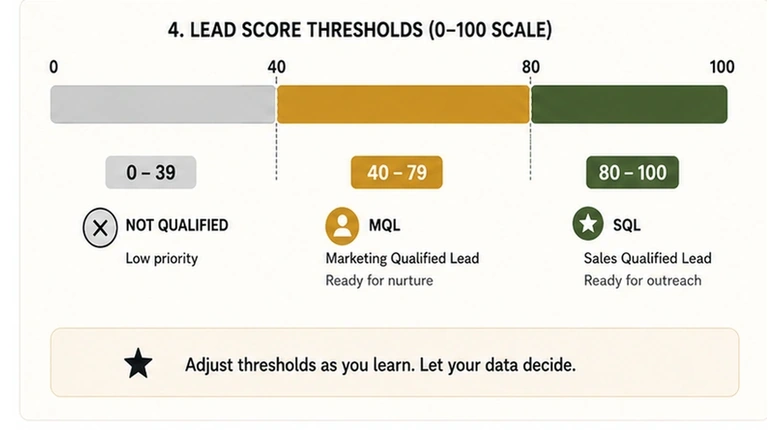
A total score is useless until a threshold converts it into an instruction. Two cut points do that work: one that moves a lead into marketing follow-up, and one that routes it to a rep.
Run the table on a 0 to 100 scale with the MQL cut at 40 and the SQL cut at 80. Those are the same numbers used across the rest of this site, and holding one scale everywhere is worth more than optimising each model separately; the reasoning behind those two cut points and the criteria that feed them is set out in the B2B lead scoring criteria. A status column turns the total into a label Clay can filter and route on:
Number({{Total Score}}) >= 80 ? "SQL" : Number({{Total Score}}) >= 40 ? "MQL" : "Marketing follow-up"Set that column’s data type to text so views and filters treat it as a label rather than a number. Then build a filtered view for Status = SQL, which becomes the queue reps actually work and the trigger for any downstream automation.
PRO TIP
Calibrate the cut points against fifty closed-won accounts before trusting them. Score the accounts you already won: if a third of them land below 40, the model is wrong rather than the deals, and the usual culprit is a headcount band drawn around aspiration instead of evidence.
What scoring costs, and why enrichment is the whole bill
Scoring in Clay is free and enrichment is not. Clay bills two separate meters: Actions, which measure orchestration at a few tenths of a penny each, and Data Credits, which buy data from third-party vendors in Clay’s marketplace at rates that vary by data type. Every enrichment costs exactly one Action regardless of provider, plus whatever credits that provider charges.
Formulas sit outside both meters. Clay lists formulas and filters among the operations that consume neither, which makes the cost of a scored row a function of enrichment alone:
Cost per scored row = Enrichment columns that run × (1 Action + that column's Data Credits)The lever in that equation is “columns that run,” not “columns that exist.” Put a free formula gate in front of the expensive enrichment columns and let it disqualify rows on data you already have. A list of 10,000 rows where a title and domain check kills 60% before enrichment fires costs 4,000 rows of credits, not 10,000, and the gate itself is free.
That gate has to be staged, because the first filter can only test fields the source list already carried. Filter on title and domain, enrich the single cheapest discriminating field, filter again, then run the expensive providers on what survives. Ordering the providers inside each of those steps is its own problem with its own arithmetic, worked through in waterfall enrichment sequencing, and which providers belong in the chain at all is a purchasing decision covered in the data enrichment tools comparison.
Clay’s free tier gives 500 actions and 100 data credits a month, with Launch from $167/month and Growth from $446/month, and Enterprise priced custom (as of Q3 2026). The free tier is enough to build and test the table on a sample. It is not enough to score a list.
Enrichment and intent data can come from Clay’s marketplace or from providers you already pay for, and connecting your own API keys removes the Data Credit charge while still costing the Action:
The field table you can rebuild
Rebuild the table from this field list rather than duplicating a gallery template, because the point values are the part that has to match your business. Every column below is either free or costs one Action, and the group number tells you what order to build in.
| Column name | Group | Type | Points | Notes |
|---|---|---|---|---|
| Company Domain | 1 | Text | n/a | Source list; the join key for everything downstream |
| Job Title | 1 | Text | n/a | Source list; used by the first free gate |
| Gate 1 | 3 | Formula | n/a | Free. Returns PASS or FAIL on title and domain alone |
| Employee Count | 2 | Enrichment | n/a | Cheapest discriminating field; run on Gate 1 PASS only |
| Gate 2 | 3 | Formula | n/a | Free. Kills rows outside the viable headcount range |
| Industry | 2 | Enrichment | n/a | Run on Gate 2 PASS only |
| Tech Stack | 2 | Enrichment | n/a | Split complements from competitors |
| Funding Stage | 2 | Enrichment | n/a | Optional; drop it if it does not separate your won deals |
| Headcount Score | 3 | Formula | 5–20 | Partial credit for adjacent bands |
| Industry Score | 3 | Formula | 0–25 | Highest weight if industry predicts your win rate |
| Title Score | 3 | Formula | 10–30 | Lower-case both sides before matching |
| Tech Score | 3 | Formula | 0–15 | Complement detected |
| Intent Score | 3 | Formula | 0–30 | Needs a timestamp and a decay cadence |
| Negative Score | 3 | Formula | −25–0 | Own column so the deduction stays visible |
| Total Score | 4 | Formula | 0–100 | Wrap every input in Number() |
| Status | 4 | Formula | n/a | Text type. SQL at 80, MQL at 40 |
| CRM Sync | 4 | Integration | n/a | 1 Action per row written |
Workflow · 30 min
How to build a Clay lead scoring table from scratch
Builds the table in cost order, so the free gates are in place before any enrichment column spends an Action.
Import the list and keep enrichments switched off
Create the table from your CSV or saved search and choose “Save and don’t run enrichments” so nothing fires while you are still building.
Add Gate 1 as a formula column
Write a ternary that returns PASS or FAIL on job title and email domain alone. Press
/to insert each column reference rather than typing it.Add the cheapest enrichment column and condition it on Gate 1
Add Employee Count and set its run condition to Gate 1 equals PASS, so failed rows never spend an Action.
Add Gate 2, then the remaining enrichment columns
Gate 2 filters on headcount. Condition Industry, Tech Stack and any intent columns on Gate 2 equals PASS.
Write one scored column per attribute
Add Headcount Score, Industry Score, Title Score, Tech Score, Intent Score and Negative Score as separate formula columns. Set each data type to number.
Sum into Total Score and label with Status
Add Total Score wrapping every input in
Number(), then a text-type Status column cutting at 80 for SQL and 40 for MQL.Run 50 closed-won accounts through it before going live
Score accounts you already closed. If more than a third fall below the MQL cut, adjust the bands and re-run before pointing the table at a live list.
Pushing the score into your CRM, and where this breaks
Write the score back to the CRM as two fields rather than one: the numeric total and the status label. Reps filter on the label and RevOps debugs on the number, and a single field forces one of those groups to do the other’s job. Each row written costs one Action.
Three failure modes account for most abandoned Clay scoring tables, and none of them are formula problems.
The first is a stale score. Clay recalculates a formula the moment its inputs change, but enrichment columns only refresh when you re-run them, so a table built in March is scoring on March’s headcount unless something re-triggers it. Intent columns are worse, because a signal that was decisive in one quarter is noise by the next.
The second is scoring rows nobody was ever going to sell to. This is a list problem wearing a scoring costume, and no threshold fixes it. If your MQL rate sits above 40%, the gate is too loose or the source list is wrong.
The third is running the score in Clay when it should live in the CRM. Clay is the right place to score a list you are building and enriching. It is the wrong place to score inbound leads that arrive continuously, hit your CRM first, and need a status within seconds of a form fill. That work belongs in the CRM’s own scoring engine, with Clay feeding it enrichment rather than owning the verdict.
Clay is a scoring engine for lists you build. It is not a scoring engine for leads that arrive.
Held to that boundary, the table earns its place: enrichment is gated, formulas cost nothing, and the only meter running is the one buying data you decided in advance was worth having.
Frequently Asked Questions
Clay publishes a free scoring template in its gallery, and the free tier includes 500 actions and 100 data credits a month (as of Q3 2026). The template supplies the column structure and enrichment wiring, but no point values or thresholds. Those are the parts you write, using the field table above.
No. Clay’s documentation lists formulas and filters among the operations that consume neither Actions nor Data Credits, and names scoring and normalisation specifically. Enrichment columns cost one Action each plus variable Data Credits, so the entire cost of a scoring table comes from the data feeding it, not the maths.
On a 0 to 100 scale, 40 is a workable MQL cut and 80 an SQL cut. Treat both as starting points and calibrate against fifty accounts you already closed. If a large share of your won deals score below the MQL line, the point values are wrong rather than the threshold.
Almost always because the column references were pasted as text. Clay stores an internal field ID behind each display name, so a reference has to be inserted by pressing the / key and picking the column. A typed reference looks correct on screen and returns an error or a blank cell.
For outbound lists you build and enrich, yes. For inbound leads that arrive continuously and need a status within seconds of a form fill, no. Clay scores in batches when you run a table, so real-time inbound qualification belongs in the CRM, with Clay supplying enrichment rather than the verdict.