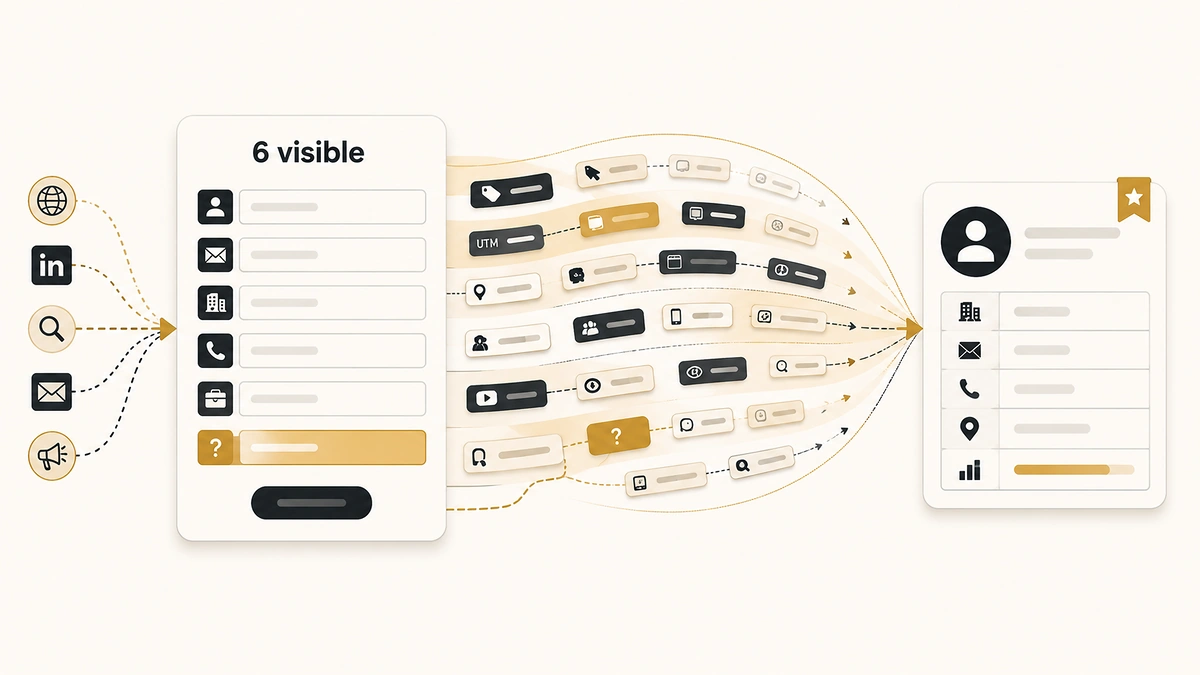
Progressive profiling gets pitched as the fix for a form that asks too much. The standard advice underneath it is simpler: cut fields. That advice arrives with such consistency that most teams never check whether their form is actually the problem. When we audited 150 public B2B demo, contact and trial forms in June 2026, the median form we could parse showed six visible fields. The bloated fifteen-field monster the advice is written for was not the common case.
Something else was. Of those 150 forms, 116 carried hidden inputs named for campaign parameters, and only 23 asked the visitor where they came from. Most B2B forms are quietly collecting the source data a tracking parameter can supply, and almost none are collecting the source data it cannot. That gap is what progressive profiling is actually for, and it is not the gap the field-count debate is arguing about.
Direct answer — What is progressive profiling?
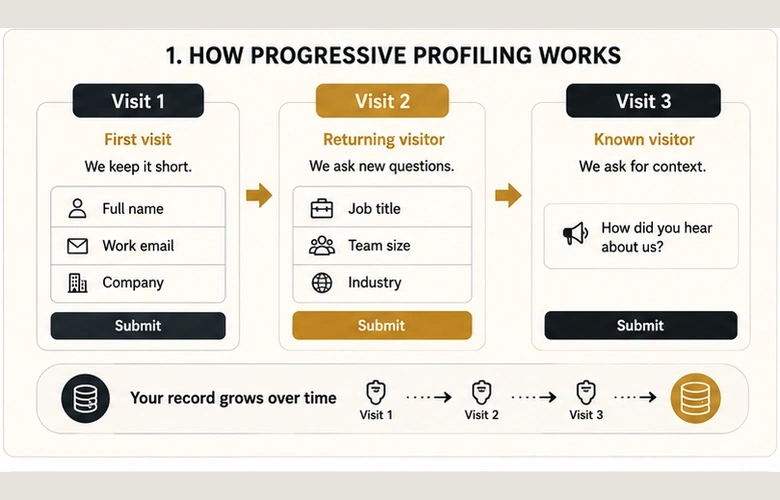
Progressive profiling is a form technique that asks a small number of fields on a visitor’s first submission, then swaps the questions they already answered for new ones on later visits. It needs a way to recognise a returning visitor, normally a first-party cookie or a known email address, so a first-time anonymous visitor still sees the full opening form. Against one long form, it spreads the same collection across several submissions rather than reducing what you ask in total.
Key Takeaways
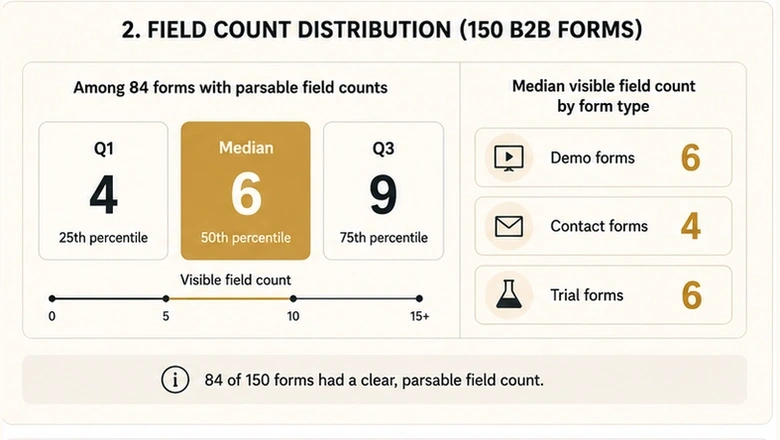
- Among the 84 forms in our 150-form audit with a parsable field count, the median showed six visible fields (quartiles 4 / 6 / 9). Demo forms ran to a median of six, contact forms four.
- 116 of 150 forms (77.3%) carried attribution-named hidden inputs. Only 23 of 150 (15.3%) asked how the visitor heard about them, and 29 of 150 did neither.
- Six of the ten forms that offered a source dropdown now list an AI assistant as an option, including ChatGPT, Claude and Perplexity by name.
- Not one of the 12 trial forms in the sample asked for a source. Demo forms asked in 11 of 58 cases, contact forms in 7 of 52.
- Field count is the wrong first question. Start from the fields your routing rules and scoring model actually read, then decide which of those a visitor has to type.
What progressive profiling is, and what it is not
Progressive profiling is a form configuration in which known fields are replaced by unasked ones on a returning visitor’s next submission. The visitor sees a short form each time. The record behind it grows across visits instead of arriving complete on the first exchange.
The mechanism is worth being precise about, because two different things get sold under the same name. Auth0 documents it as incremental collection tied to authentication, where the identity provider already knows who is returning. Marketing forms have no login to lean on, so they recognise returning visitors through a first-party cookie or a matched email address. That difference decides most of what works and what breaks.
| Approach | What it does | Use when | Avoid when |
|---|---|---|---|
| Progressive profiling | Shows a short form, swaps answered fields for new ones on return visits | Repeat visitors are common and you need more than five or six data points | Most conversions happen in a single session, or cookies are routinely cleared |
| One long form | Asks everything at the first submission | One-shot high-intent requests such as pricing or an RFP response | Top-of-funnel content where the exchange does not justify the ask |
| Enrichment | Infers firmographics from the business email domain after submission | Company size, industry, revenue band, technology stack | Intent, budget authority, timing, or how the visitor found you |
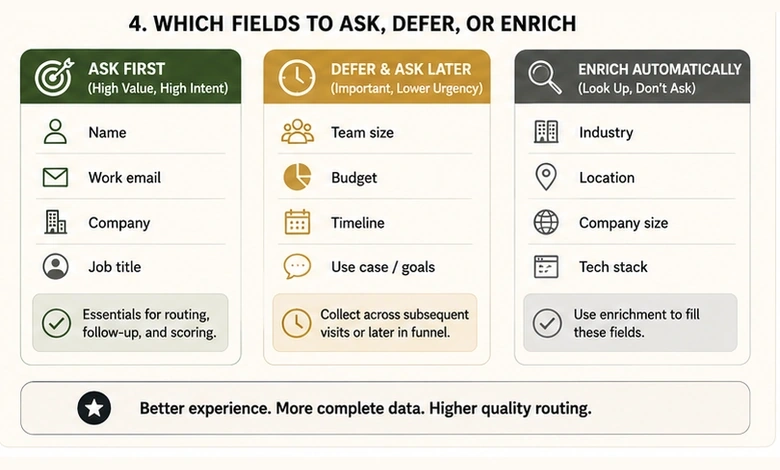
Those three are not alternatives to each other so much as three different answers to one question: which facts does a visitor have to type, and which can you get another way. Progressive profiling only earns its complexity for the facts that survive both of the other columns.
What 150 B2B forms actually ask
Our June 2026 audit of 150 public B2B forms recorded the visible field count wherever the page exposed a parsable form element. That produced counts for 84 of the 150. Among those 84 the median was seven fields. Excluding seven rows where the collector clearly counted more inputs than a person would ever see, the median across the remaining 77 was six, with quartiles at four and nine.
| Visible fields | Forms | Share of the 84 recorded |
|---|---|---|
| 1 to 3 | 17 | 20.2% |
| 4 to 5 | 10 | 11.9% |
| 6 to 7 | 25 | 29.8% |
| 8 to 10 | 12 | 14.3% |
| 11 or more | 20 | 23.8% |
Split by form type, demo forms ran to a median of six visible fields (n=35), contact forms four (n=18), and trial forms five and a half (n=8). Roughly half the forms with a recorded count showed six fields or fewer. About a third showed eight or more.
Two things follow. The first is that a team told to cut fields is often being told to cut a form that already sits at the sample median. The second is that the numbers usually quoted for what each cut is worth do not trace to a reproducible source, which is a separate argument we have already made in detail in our review of what published form conversion benchmarks actually measure.
IMPORTANT
Sixty-six of the 150 forms produced no field count at all, because the page had no server-rendered form element for the collector to read. Those are disproportionately JavaScript-rendered and iframe-embedded forms. Read every field-count figure here as covering the 84 forms we could parse, not the full 150.
The gap between what forms capture and what they ask
Field count turned out to be the least interesting column in the dataset. The interesting one was the split between what these forms collected silently and what they asked out loud.
| What the form did | Forms | Share of 150 |
|---|---|---|
| Carried attribution-named hidden inputs | 116 | 77.3% |
| Asked how the visitor heard about them | 23 | 15.3% |
| Did both | 19 | 12.7% |
| Did neither | 29 | 19.3% |
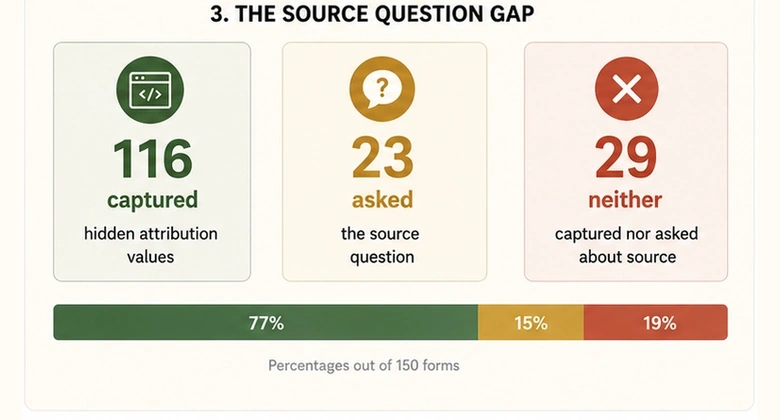
Read those two rows together and the field-strategy question changes shape. The campaign data most teams worry about losing is, in the majority of these forms, already being carried by inputs the visitor never sees and never has to fill in. The thing almost nobody collects is the one answer no hidden input can produce.
One caution on the hidden-field column, and it comes from our own study. A static read of the page is reliable when it finds something and unreliable when it does not: in the hand-validated subset, the static audit detected 8 of 17 payload-confirmed captures and missed 9. So the 116 is a floor. The 33 forms showing no attribution input are not 33 forms that drop the data, they are 33 forms where a page scan could not see it. Every figure in that table describes what the page exposes, not what reaches the lead record. What reaches the record is a different question, and a checkpoint-by-checkpoint reconciliation is the only thing that answers it.
The one question a UTM cannot answer
Twenty-three of the 150 forms asked some version of “how did you hear about us”. Twelve required an answer, nine made it optional, and on two the required attribute could not be read. Thirteen used a free-text box and ten used a dropdown.
The distribution by form type is sharper than the headline. Demo forms asked in 11 of 58 cases (19.0%), contact forms in 7 of 52 (13.5%), and trial forms in none of 12. The moment a form is optimised for self-serve signup, the source question is the first thing to go. Companies selling martech asked in 9 of 40 cases (22.5%) against 14 of 110 (12.7%) for everyone else, which is a small edge on small numbers rather than a real separation.
Six of the ten source dropdowns now list an AI assistant
The dropdown option lists are where the dataset stops being a form audit and starts being a record of how B2B discovery changed. Six of the ten forms offering a fixed list include an AI assistant among the choices: Northbeam (“ChatGPT (or other AI)”), Ortto (“AI (ChatGPT, Claude, etc.)”), Airbyte (“ChatGPT or Similar”), Pylon (“AI Search (ChatGPT, Claude, etc)”), Aptible (“AI / LLM”) and Productive.io (“AI Tool (ChatGPT, Perplexity, etc.)”).
This is the case for asking that survives every argument about field count. Google now recognises the traffic: GA4 carries an AI Assistant default channel, defined as visits arriving from sources like ChatGPT, Gemini, Deepseek, Copilot or Grok. Recognition at the analytics layer is not the same as a value on the lead record, and it does nothing for the visitor who read about you in an assistant, closed the tab, and typed your domain a day later. A source field catches that. A hidden input never will.
PRO TIP
If you add one source option this quarter, add an AI assistant option with named tools in the label. A generic “other” collects the answer without telling you anything, and free-text answers arrive as forty spellings of the same tool.
What routing and scoring actually need from the form
The trade-off in form design is not fields against conversion. It is fields against the specific data your downstream systems require to do their job, and each of those systems fails differently when a field is missing.
Routing fails loudly and immediately. A territory rule reading a country field, or a size rule reading employee count, has no answer when the field is absent, so the lead lands in a default queue and waits. Scoring fails quietly instead. A model missing an input does not error, it just scores from a thinner signal, and nobody sees the degradation because the number still looks like a number. That is the same reason a predictive model needs a data floor before it beats the rules it replaces.
The third failure mode is the one that catches teams who cut fields successfully. A CRM object with a required field the form never sends will refuse the insert outright, and the rejection lands in a connector log nobody reads rather than on a dashboard. The form gets shorter, conversion looks better, and the records stop arriving.
What enrichment can and cannot replace
Enrichment closes part of this gap and is honest about which part. Company size, industry, revenue band and technology stack are all inferable from a business email domain. Intent, timing, budget authority and how the visitor found you are not, because they are facts about a person’s situation rather than facts about a company. Split your required fields along that line before you cut anything.
Field type matters more than field count here, and there is good outside data on it. Zuko’s analysis of 1,362 forms found password fields abandoned at 10.50%, email at 6.41% and phone at 6.28%, against name at 5.27%. Dropping a phone field buys more than dropping a second name field, and asking for a source in a dropdown costs less than asking for it in a text box.
How to sequence the fields
Workflow · 45 min
How to build a progressive profiling sequence from your routing rules
Works backwards from the fields your systems read, so the form asks for what is used rather than what is conventional.
List every field your routing rules read
Open each active assignment rule and write down the field it evaluates. Include the fallback rule, since that is where leads land when a field is empty.
List every field your scoring model reads
Export the scoring criteria and record each input separately. Mark which ones come from form fills rather than behaviour, because only those depend on the form.
Remove what enrichment can infer from the email domain
Cross off company size, industry, revenue band and technology stack. Keep intent, timing, budget authority and discovery source, which no provider can infer.
Order the survivors across three submissions
Put identity fields first, qualification fields second, and the source question third. Cap each step at the median you are comfortable defending, which our sample puts at six.
Set the recognition method and pick the fallback
Choose cookie or email matching, then decide what an unrecognised visitor sees. Default to the full opening step rather than a blank form.
Test with a cleared cookie and a second submission
Submit once in a clean browser profile, then submit again without clearing state. Confirm the second form shows different fields and that both records carry the routing fields.
Where progressive profiling breaks
Progressive profiling assumes a returning, recognisable visitor. Three conditions in the audit data suggest that assumption deserves testing before you build on it.
The first is single-session conversion. If most of your form fills happen on a first visit, there is no second submission to collect step two, and you have built a mechanism that quietly collects less than the form it replaced. The second is recognition failure. Cookie clearing, cross-device journeys and privacy-mode browsing all present a returning visitor as a new one, and the fallback you chose in step five is what actually runs.
The third is the completion cost you did not budget for. Seventy-one of the 150 forms (47.3%) used managed bot protection: 56 reCAPTCHA, 13 Cloudflare Turnstile and 2 honeypots. Of those 71, 44 presented a visible challenge and 27 ran invisibly. A visible challenge is a completion step the visitor pays on every submission, which means a progressive design asking three times charges it three times. Turnstile documents managed, non-interactive and invisible widget modes, and the choice between them is worth as much as a field.
One more failure mode sits outside the form entirely. A submission that never becomes a record makes every field-strategy decision look better than it was, because the leads you lost are not in the denominator. That distortion is worth understanding before you judge a shorter form by its numbers, and we have traced how silent form failures flatter speed-to-lead reporting in the same way.
How we measured this
The figures on this page come from an automated read-only audit of 150 public B2B demo, contact, trial and signup forms, collected on 3 June 2026. The collector loaded each form carrying a test campaign tag and recorded what the rendered page exposed: visible field count, the presence and type of a source question, hidden inputs named for campaign parameters, bot protection and its visibility, and whether the tag survived to the form. The full dataset and per-vendor notes are published with the parent study.
Four limits that decide which numbers travel
Four limits apply, and they shape which numbers here are safe to reuse.
- Field counts cover 84 of 150 forms. The collector reads server-rendered form elements. The 66 blanks are pages with no parsable form, disproportionately JavaScript-rendered and third-party iframe embeds, so they are not a random subset.
- The field count is an upper bound. It returns the largest form on the page and excludes only inline-hidden inputs, not fields hidden by a stylesheet. Seven rows returned counts no visitor would see (Stripe 184, ServiceTitan 79, Sage Intacct 37, Lithic 29, Zapier 25, ShipStation 25, Productive.io 23) and sit outside the headline median.
- Hidden-field presence is a page observation, not proof of capture. Hand validation on a subset found the static audit detected 8 of 17 payload-confirmed captures and missed 9. Treat 116 as a floor and never read a null as a dropped value.
- Free-email blocking was not tested. The column exists in the collector output but was never populated, so this page makes no claim about how many B2B forms reject personal email addresses.
The source-question, bot-protection and tag-survival counts are direct page observations across all 150 rows and carry no sampling caveat beyond being a convenience sample of public B2B forms. They describe these 150 forms. They are not a market estimate, and the counts are printed beside every percentage so you can judge that for yourself.
One pairing worth taking away
The campaign tag survived the journey from a tagged entry to the form on 137 of 150 pages (91.3%). Twelve of the 13 failures also showed no hidden attribution input, so the same forms tend to lose the tag and have nowhere to put it. If you are deciding what a form should ask, that pairing is more useful than any benchmark, because it tells you which forms are asking their visitors to carry information the page has already dropped. Working out what the exchange is worth in the first place is a demand-side question the form cannot answer on its own.
Frequently Asked Questions
A visitor downloads a guide and gives name, work email and company. On their next visit those three fields are already known, so the form shows job title and team size instead. On a third visit it asks how they first heard about you. Each form stays short while the record grows.
Start from what your routing rules and scoring model read, not from a target number. For reference, among the 84 audited forms with a parsable count the median showed six visible fields, with demo forms at six and contact forms at four. Half sat at six or fewer.
Only partly. Without a first-party cookie the form has to match a known email address, which means the visitor has to type it before the form can decide what to show. Cleared cookies, private browsing and cross-device visits all present a returning person as new, so the fallback form is what runs.
Yes, because they answer different questions. A campaign tag records the last click before the form. The source question records the discovery that started the search, including AI assistants, podcasts and word of mouth, none of which arrive with a parameter attached. In our audit only 23 of 150 forms asked.
Usually not. It only pays back when repeat visits are common enough to reach step two, and low-traffic sites tend to convert in a single session. Below that threshold a single well-ordered form plus enrichment collects more per visitor than a sequence nobody completes.