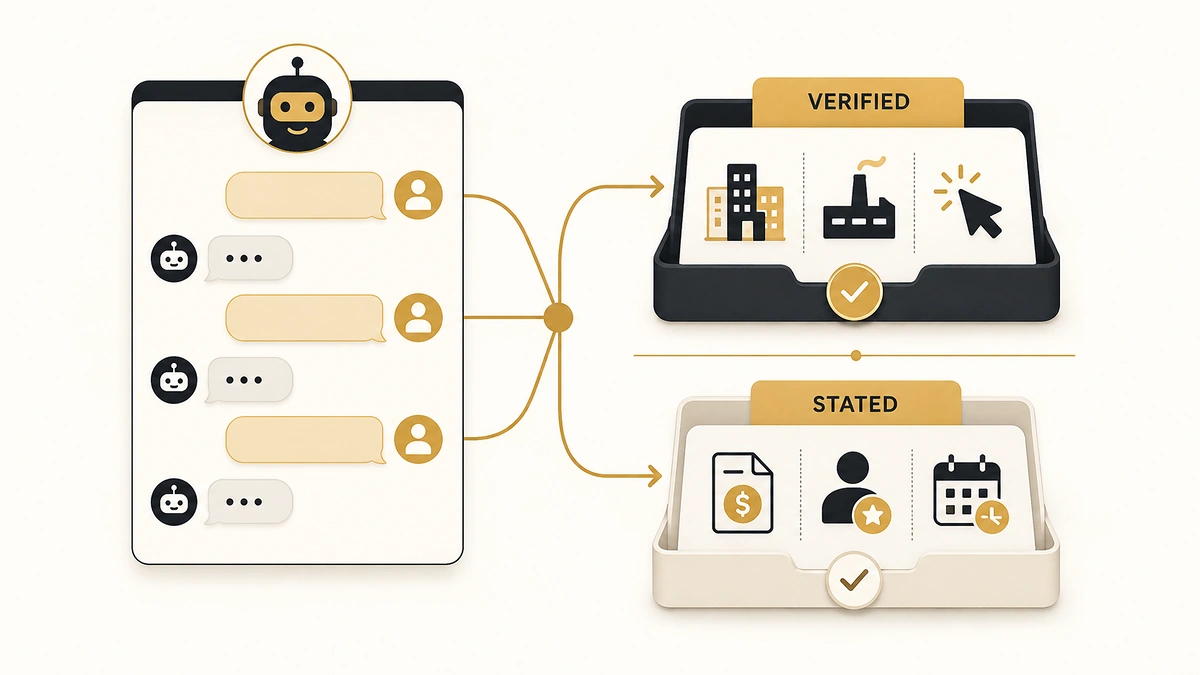
A chat widget can confirm a visitor’s company, industry and headcount before they finish typing their first sentence. It can also record “yes, I own the budget” from a 26-year-old analyst who was told to price three vendors by Friday, and write that answer into your CRM as fact.
Both things happen in the same 90-second conversation. Every page ranking for AI chatbot lead qualification explains the first one. Almost none of them explain the second, or what it costs you three weeks later when a rep opens the record and finds a qualified lead that was never qualified at all.
This is the design guide for the parts vendors skip: which answers a bot can stand behind, how many questions you actually get, where the conversation has to stop and hand over, and what breaks when the bot is the only door on the page.
Direct answer — What can an AI chatbot actually qualify a lead on?
An AI chatbot can qualify a lead reliably on two things: facts it looks up itself from the visitor’s email domain and page path, and low-stakes answers the visitor knows about their own situation, such as team size, current tool and use case. Budget, authority and timing are assertions a visitor types, not verified facts. Write those as stated claims, route on the verified fields, and escalate anything above your deal-size threshold to a human.
Key Takeaways
- A bot verifies firmographics and observes behaviour. Everything else in the conversation is a claim the visitor typed, and your CRM should store it under a name that says so.
- Every question you ask for something enrichment could have returned is a question you spent for nothing. Look up first, ask second.
- Set the escalation rule on deal size and confusion signals, not on a score. A score tells you how the bot felt; a rule tells the bot what to do.
- A bot compresses the gap between a lead arriving and something happening. It does not shorten the gap to a human conversation unless a human is actually available.
- 67% of B2B buyers say they want a rep-free experience, and 69% still come back to a rep to check what the AI told them. Both numbers describe the same buyer.
What a chatbot can verify, and what it only records
A lead qualification chatbot produces two categories of data that look identical in a CRM and mean completely different things. The first category is verified: the bot derived it from something outside the conversation. The second is stated: the visitor typed it, and nothing checked it.
The distinction matters because routing, scoring and rep trust all get built on top of these fields as though they were equally solid. They are not. Choosing BANT, MEDDIC or CHAMP settles which criteria you test, but every one of those frameworks assumes a human is doing the testing. Once a bot runs the test, some criteria survive the move and some quietly stop meaning anything.
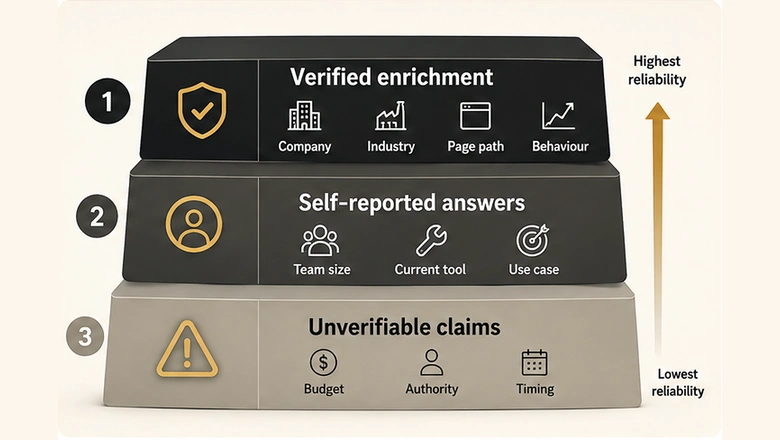
| Signal | How the bot gets it | Reliability | What to write to CRM |
|---|---|---|---|
| Company, industry, size | Enrichment on the email domain or reverse IP | Verified when the domain resolves | Standard firmographic fields |
| Intent and page context | Observed: page path, session depth, return visit | Verified, and the bot saw it directly | Behavioural score input |
| Use case, current tool | Visitor answers about their own stack | Reliable; low incentive to misreport | Picklist field |
| Team or seat count | Visitor answers | Reliable within a band | Numeric band, not an exact figure |
| Role and seniority | Visitor types it, or enrichment matches the person | Mixed; titles are inconsistent across companies | stated_title, plus enriched title if matched |
| Timing | Visitor answers “this quarter” | Assertion; often aspiration | timing_stated, never a forecast date |
| Budget | Visitor answers | Assertion, and the weakest one | budget_stated, never budget |
| Authority | Visitor answers “are you the decision maker?” | Structurally unanswerable in committee purchases | Routing tier only; do not store as fact |
Why authority is the question to stop asking
In a mid-market B2B purchase, no single person is the decision maker, so no single person can answer the question honestly. The champion who says yes is describing influence. The procurement lead who says no is describing a veto they will use later. Both answers are true and neither is the fact you wanted.
Ask it anyway and you get a field that is wrong often enough to be dangerous, because reps stop reading it and start assuming it. Replace it with something the visitor can answer: who else will be involved in evaluating this. That question produces a list, and a list is checkable.
Enrich before you ask: the questions you should never spend
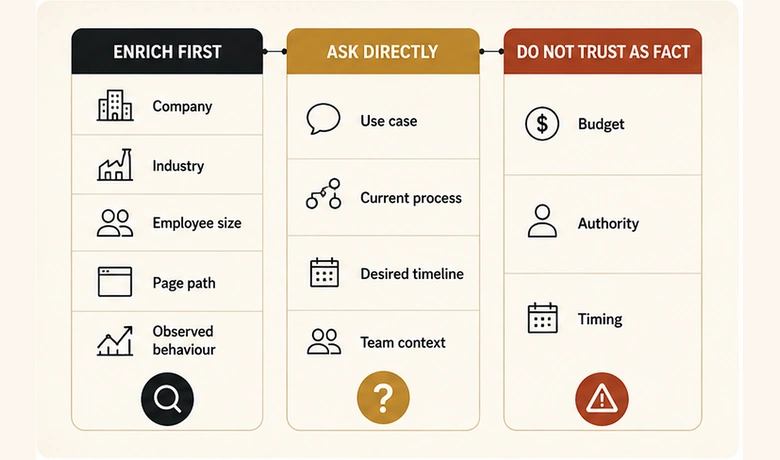
To design a bot conversation, start by subtracting. Write down every field you want filled, then remove every field enrichment can return from the email domain alone. What is left is your actual question list, and it is always shorter than the one you started with.
Questions you may ask = fields you need − fields enrichment already returnsCompany size, industry, region, funding stage, tech stack and headcount band are all derivable the moment a work email is entered. Asking for any of them burns a turn to learn something you already knew, and the visitor can tell. That is the same arithmetic that makes enrichment the fix for long forms rather than better form copy, and it applies to a chat window with more force, because a chat window has fewer turns than a form has fields.
The domain also decides whether the lead is worth a turn at all. The checks that confirm a lead is real, reachable and a genuine fit mostly run on data the bot already holds by the second message, which means the bot can fail a bad lead before it has cost anyone a question.
Two conditions break the enrichment path, and the bot needs a branch for each. A free email domain returns nothing useful, so the conversation has to ask what the domain would have told you. And a domain that resolves to a 40,000-person enterprise tells you the company but not the business unit, which is usually the thing that decides whether the deal is real.
Question design under a completion budget
Question design is the discipline of spending a fixed number of turns to reach a routing decision. Three to five questions is the working range most chat flows land on, and the reason to keep it there is not a benchmark table.
It is worth being precise about that, because the widely quoted figures showing conversion falling at each additional field do not survive sourcing. Tracing those field-count benchmarks back to the analysis they cite shows the finding that actually held was that field type mattered more than field count. Which is the more useful rule anyway: a question that is easy to answer costs you almost nothing, and a question that requires thought, disclosure or a lookup costs you the conversation.
Five rules that hold up in production
- Ask the disqualifying question first. If a free email domain, a student, or a region you do not sell to ends the conversation, find that out in turn one rather than turn five. Failing early is cheap and it respects the visitor’s time.
- Use closed sets wherever the answer has to be routable. Free text is how a bot fills your CRM with 40 spellings of “marketing operations”, and a governed picklist is the only thing that stops it. If a field drives routing or reporting, the bot offers options; it does not accept prose.
- Return something after every answer. A price band, a relevant doc, a filtered case study, a calendar slot. A conversation that only extracts is a form with a typing animation, and visitors treat it like one.
- Never open with budget. It is the highest-friction question and the least reliable answer, which is the worst trade in the flow. If you need a budget signal, infer it from company size and plan interest instead.
- Stop asking when you can route. The goal is a correct routing decision, not a complete record. Everything else is a field you can earn later.
PRO TIP
Write the routing rule before you write the questions. If a question’s answer cannot change which of your three exits the visitor takes, it does not belong in the conversation. Move it to the booking confirmation or a later touch.
Defer the questions you cut, do not delete them
The fields you cut are not lost, they are deferred. Asking a returning visitor one new question per visit collects the same record across three sessions without ever making a single conversation feel like an interrogation, which is the standard answer to a field list that outgrew its form. The same logic governs the chat widget: this session buys a routing decision, the next session buys a detail.
Three anti-patterns worth removing today
The interrogation opener asks three questions before saying anything useful. The fake human gives the bot a first name and a headshot and lets the visitor believe they are talking to staff, which converts slightly better and poisons the first real conversation. And the infinite qualifier keeps asking because the flow has no exit condition, so a visitor who answers everything correctly still never reaches a person.
Set the escalation threshold as a rule, not a score
An escalation threshold is the condition that ends the bot’s turn and starts a human’s. Most implementations express it as a score, which is the wrong shape: a score compresses several unrelated reasons for escalating into one number, and then nobody can explain why a given conversation escalated.
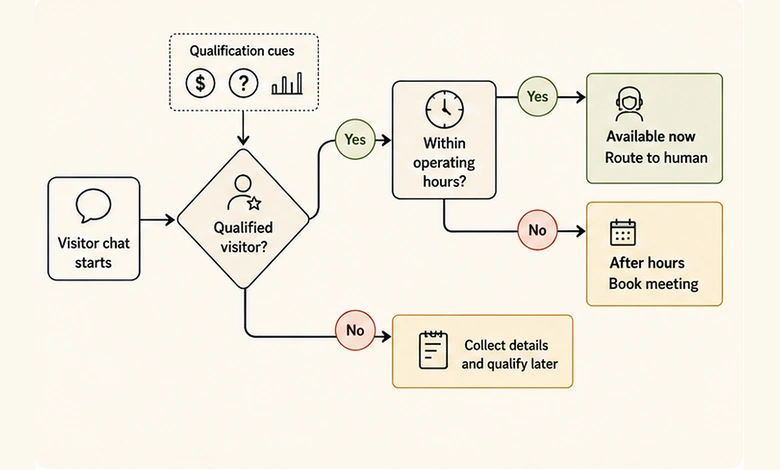
Write it as rules instead. A conversation has exactly three exits, and each one needs a condition a person could read aloud.
- Book now. Verified firmographics inside ICP, plus at least one stated need, plus a page path that shows evaluation rather than research. The bot offers a calendar, not a callback promise.
- Hold and follow up. Fit is there, trigger is not. The bot says so plainly, offers the most relevant asset, and does not book a meeting nobody wants to take.
- Escalate to a human now. Deal size above your threshold, an existing customer, a named target account, a compliance or security question, a pricing objection, or any two consecutive turns where the bot could not answer.
That last condition matters more than the others combined. A bot that cannot answer twice in a row has already lost the visitor’s confidence, and every further turn spends goodwill you will not get back.
Whatever the bot produces at the end of this is a marketing-qualified claim, not an accepted lead. Sales still decides whether to work it, and making that acceptance an explicit step with its own criteria is what stops a bot from silently inflating MQL volume while pipeline stays flat.
What a bot does to your four speed-to-lead clocks
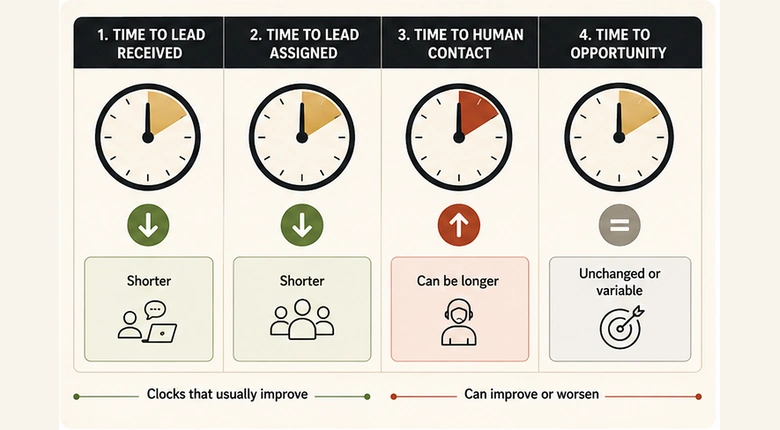
Speed to lead is four separate clocks, not one response time: received, assigned, first attempt, and contacted. A chatbot moves them very unevenly, and reporting that treats them as a single number will show an improvement that did not happen.
The bot genuinely collapses received and assigned to near zero. It engages on arrival and it routes the instant its rules fire, which removes the queue that manual review used to add. That is a real gain and it is the honest case for the whole exercise.
First attempt is where it gets interesting. If the bot books a slot, first attempt looks instant, but the visitor’s actual contact with a human happens whenever that slot is. Book four days out and your dashboard records a sub-minute response for a conversation that happens on Thursday. The fourth clock, contacted, is the one that predicts outcomes, and it is the one a bot can silently lengthen while the first three improve.
IMPORTANT
Instrument the gap between the chat ending and a human speaking to the lead, as its own metric. If you only measure bot response time, you have automated the measurement of a clock that was never the problem.
There is a second distortion worth watching. A bot that offers only next-week slots after hours will convert an urgent visitor into a scheduled one, and urgency does not survive the wait. Same-day availability is worth more than any question in the flow.
What breaks when the bot is the only path to a human
The failure mode nobody sells you is the dead end: a page where the chat widget replaced the form, the phone number, and the contact link, and a visitor who needs a person has nowhere to go. It is easy to build accidentally, because each individual decision looks like a simplification.
The buyer data says this is the wrong bet, and it says so in a way that is easy to misread. A Gartner survey of 646 B2B buyers, fielded across August and September 2025, found 67% prefer a rep-free experience and 45% used AI during a recent purchase. Read alone, that is an argument for removing humans from the funnel.
Read it next to the second release from the same survey wave and the picture changes. Gartner also reported that 69% of buyers turn to sales reps to validate AI-generated insights, and that 51% think they are more likely to meet misleading information from generative AI. Buyers want to research without a rep and then confirm what they found with one. A bot that removes the second step is not giving them what the first number asked for.
The five dead ends, and the fix for each
- The recursive handoff. “Talk to a human” opens another bot flow. One click, one human queue, or an honest message saying when a person is next available.
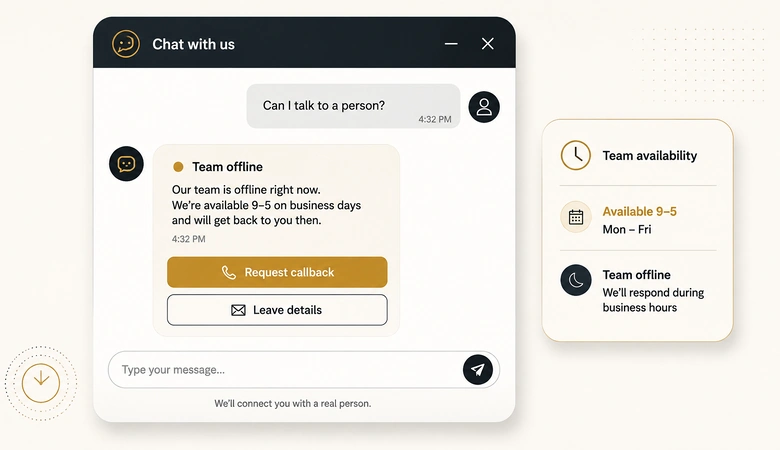
- The after-hours illusion. Handoff actions typically route to a team member only inside the bot’s operating hours, as HubSpot’s chatflow documentation spells out. Outside them the branch has to say so and capture a callback, not pretend someone is listening.
- The lost transcript. The rep opens the record and sees fields but not the conversation, so the first human question repeats what the visitor already answered. Attach the transcript to the record, every time.
- The removed alternative. Keep at least one non-chat path on high-intent pages. Chat is one more capture route inside the wider set of inbound paths that turn visitors into leads, not a replacement for them.
- The keyboard trap. A widget that cannot be dismissed or operated without a mouse silently excludes visitors, and they do not file a complaint. They leave.
It also helps to keep the vendor claims in proportion. Salesforce’s own 2026 State of Sales research, surveying more than 4,000 sales professionals, reports agents contacting 130,000 dormant leads in four months and producing 3,200 opportunities. That is roughly one opportunity per 40 leads contacted, disclosed by the party with every reason to present the best available figure. Volume and qualification are different achievements, and the adoption figures quoted alongside them rarely share a denominator, so check what each one counted before you plan around it.
Turn it on safely: the pre-launch sequence
Before the widget goes live, run six checks in order. Each one takes minutes and each one catches a failure that is expensive to find in production.
Workflow · 30 min
How to launch a lead qualification chatbot without breaking the handoff
Six pre-launch checks that catch the routing, data and escalation failures a chatbot creates quietly rather than loudly.
Name the disqualifier and put it first
Decide the single condition that ends a conversation, then make it turn one. Free email domain, unsupported region, or a competitor domain are the usual three.
Wire every routing answer to a closed-set field
Map each question to an existing CRM field with a governed picklist. Rename anything the visitor asserted so the field says stated, and keep free text out of reporting fields.
Write the three exit rules in plain language
State the conditions for book, hold and escalate as sentences a rep could read aloud. If you cannot say the rule without referring to a score, it is not finished.
Staff the escape hatch and set operating hours
Confirm who receives escalations and what happens outside their hours. Test the out-of-hours branch yourself and read what the visitor sees.
Instrument time to human contact separately
Add a metric for the gap between conversation end and a human speaking to the lead. Do not let bot response time stand in for it on any dashboard.
Read the first week of transcripts end to end
Read every conversation from week one, including abandoned ones. The turn where visitors leave tells you which question to cut before you tune anything else.
Frequently Asked Questions
A lead qualification AI bot is a chat tool that engages website visitors, enriches their company details from their email domain, asks a short set of routing questions, and then books, holds or escalates them based on rules you define. It produces a qualified claim for sales to accept or reject, not a finished sales-ready lead.
Three to five, and fewer if enrichment already covers the firmographics. The useful limit is not a fixed count but question difficulty: easy, closed-set questions cost almost nothing, while questions requiring disclosure or a lookup end conversations. Stop asking as soon as you can route the visitor correctly.
Use AI for the parts that are checkable: enrich the company from the email domain, read behavioural signals from the page path, and apply routing rules consistently at any hour. Keep human judgment for budget, authority, committee dynamics and anything above your deal-size threshold, where an unverified answer is expensive.
Avoid collecting anything you cannot verify and would act on as fact, plus anything you would not put in a form: payment details, passwords, health information, or contract specifics. Budget and authority answers can be stored, but name the fields so it is obvious they are claims rather than confirmed values.
ChatGPT can draft outreach, summarise transcripts and power a chat widget through the API, but it does not generate leads by itself. Lead generation still needs traffic, an offer, a capture path and routing into your CRM. The model handles language; the pipeline around it decides whether anything reaches a rep.