A CRM that stores USA, U.S.A., United States and us in the same country field does not have four spellings of one country. As far as every filter, report, routing rule and dashboard is concerned, it has four countries. The territory report splits, the EMEA rep gets a US account, and the segment you built for a campaign quietly drops a quarter of the people it was meant to reach.
CRM data standardization is the discipline that stops that happening, and it is mostly not a cleanup job. Cleanup fixes the records you already have. Standardization changes what the field will accept tomorrow. Teams that skip the second half end up running the first half forever, which is why so many CRM hygiene programmes feel like painting a bridge.
Direct answer — What is CRM data standardization?
CRM data standardization is the practice of forcing every value in a CRM field into one agreed format, vocabulary and unit, then enforcing that format at the point of entry. It covers country and state codes, phone numbers, dates, industry classification, company names and job titles. It differs from data cleansing, which corrects records that already exist. Standardization is preventive: it changes the field definition so that non-conforming values cannot be saved in the first place.
Key Takeaways
- Standardization is a field-definition decision, not a cleaning task. If the field still accepts free text after the project, the mess returns within a quarter.
- Adopt published standards rather than inventing house conventions: ISO 3166-1 alpha-2 for country, ISO 3166-2 for state and province, E.164 for phone, ISO 8601 for dates, NAICS for industry.
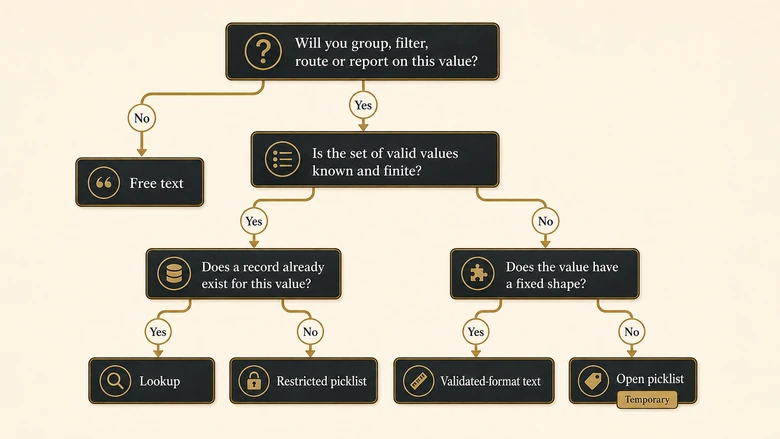
- The field type does more enforcement work than any validation rule. Choose between free text, restricted picklist, lookup and validated-format text before you write a single rule.
- A picklist that anyone can add values to is a free-text field with extra steps. Restrict it, or accept that it will drift.
- There are four entry points into a CRM: forms, humans, imports and integrations. A standard enforced at three of them is not enforced.
- Do not standardize a field nobody groups, filters, routes or reports on. Governance has a maintenance cost and it should buy something.
What CRM data standardization actually is
CRM data standardization is the process of defining one accepted format for each field and enforcing it at entry, so that every record expresses the same fact the same way. It applies to vocabulary, such as which industry values exist, and to shape, such as how a phone number is written.
The distinction that matters most in practice is between vocabulary and shape, because they need different enforcement. Vocabulary problems are solved with a closed list: there are 249 country codes in ISO 3166-1 and no legitimate reason for a 250th to appear in your CRM. Shape problems are solved with a format rule: a phone number can be any of billions of values, but it should always look the same.
Get that split right and most of the work becomes mechanical. Get it wrong and you end up building a 4,000-entry picklist for job titles, which is the classic failure mode.
Standardization, cleansing, deduplication and enrichment are four different jobs
These four get used interchangeably in vendor marketing, and the confusion is expensive because it leads teams to buy the wrong thing. Cleansing corrects values that are already wrong. Deduplication collapses records that describe the same entity. Enrichment adds values you never captured. Standardization does none of those: it constrains what a field can hold.
The sequencing matters more than the definitions. Standardizing before you deduplicate makes duplicate detection dramatically more accurate, because Acme Inc. and ACME, Inc only look like different companies until the name field is normalised. Running a merge pass on unstandardized records means your matching rules are working against noise you created yourself, and the survivorship decisions that come out the other side inherit that noise.
Backfilling the historical records is a separate project with a separate budget, and it is the one most likely to be outsourced. If the volume is large enough that a vendor-run cleansing engagement makes sense, run it after the standards are agreed, not before. Cleansing to a standard that changes next month is paid work thrown away.
Decide the field type before you decide the format
The field type is the strongest enforcement mechanism a CRM offers, and it is chosen once at creation and rarely revisited. Every validation rule you write afterwards is compensating for a field type you picked badly.
| Field type | What it guarantees | Use when | Avoid when |
|---|---|---|---|
| Free text | Nothing | The value is genuinely unbounded prose, such as a note | You will ever group, filter, route or report on it |
| Picklist (open) | A suggested set; users can still add values | The set is still forming and speed matters more than control | The list feeds routing, scoring or executive reporting |
| Restricted picklist | A closed set; new values need an admin change | The set is known, stable and small | The set legitimately changes weekly |
| Lookup or relationship | Referential integrity to a real record | The value is itself an entity, such as an account or product | The value is a simple attribute with no record behind it |
| Validated-format text | A shape, not a vocabulary | The value is unbounded but structured: phone, email, URL, postcode | The value should be one of a known set of options |
The row people get wrong is the second one. An open picklist feels like governance because it renders as a dropdown, but any user who types a new value creates one, and six months later the “dropdown” has 340 entries. If the field matters, restrict it. If restricting it would generate too many admin requests, that is a signal the field is modelling something a lookup should handle instead.
The standards worth adopting, field by field
Adopt a published standard for every field that has one, because a house convention is a standard nobody else implements. Your enrichment vendor, your billing system and your ads platform all already speak ISO and E.164. Inventing United States as your canonical country value means writing a translation layer at every integration boundary, forever.
This is the part almost every guide on this topic skips. The advice to “use consistent formats” is true and useless. Here is what consistent actually means, per field.
| Field | Standard | Stored form | What it prevents |
|---|---|---|---|
| Country | ISO 3166-1 alpha-2 | US, GB, DE | One country splitting into four spellings across reports |
| State or province | ISO 3166-2 subdivision code | US-CA, GB-ENG, CA-ON | Bare CA meaning California to one team and Canada to another |
| Phone | ITU-T E.164 | +14155550132 | Dial failures, and duplicate checks missing the same number twice |
| Date | ISO 8601 | 2026-08-13 | 03/04/2026 reading as March 4 in the US and 3 April everywhere else |
| Industry | NAICS, 6-digit | 541613 with a readable label | Fifty spellings of “Marketing” and no way to roll up to a sector |
| Company name | Canonical name, legal suffix in its own field | Acme + Inc. | IBM and International Business Machines scoring as two accounts |
| Job title | Raw title kept, plus derived seniority and function picklists | VP / Marketing | Lead scoring against several thousand unique title strings |
| Lowercased, trimmed | name@domain.com | Case-variant duplicates that exact-match dedupe never catches | |
| Website | Registrable domain in its own field | acme.com | http://, https:// and www. variants breaking account matching |
Country, state and date: the three that quietly corrupt reporting
Country is the highest-value field to standardize first, because it feeds territory assignment, tax logic, privacy handling and every geographic report you run. The United Nations M49 country and area listing publishes the canonical set alongside ISO codes, which makes it a usable reference when you build the picklist.
State is where the two-letter trap lives. CA is California in ISO 3166-2 as US-CA and Canada in ISO 3166-1 as a country. Storing bare two-letter subdivision codes without the country prefix guarantees that someone eventually builds a report that mixes them, and the error is close to undetectable because both values look correct in isolation.
Dates are the cheapest fix on the list. Store ISO 8601 and render whatever local format the user expects in the interface. The storage format and the display format are separate decisions, and conflating them is why so many CRMs hold dates as text.
Phone numbers: E.164 or nothing
E.164 is the international public telecommunication numbering plan, and its current revision has been in force at the ITU since February 2026. The format is a plus sign, a country calling code and the national number, with no spaces, dashes or brackets: +14155550132.
The reason to store E.164 rather than a pretty format is that it is unambiguous and comparable. (415) 555-0132, 415-555-0132 and +1 415 555 0132 are three strings and one phone number. Any duplicate check that compares them as text finds three people. Store the canonical form, display the friendly one.
PRO TIP
Keep the raw captured value in a separate read-only field when you normalise. When a normalisation rule turns out to be wrong, and one eventually will be, the original string is the only way to recover the correct value without going back to the source system.
Industry and company name: where standardization gets genuinely hard
Industry is the field most often left as free text, and it is the one that most rewards a real taxonomy. NAICS gives a 6-digit hierarchical code where each level rolls up cleanly, so 541613 is management consulting inside professional services inside sector 54. That roll-up is the point: it lets you segment at whatever grain the question needs without re-tagging anything.
The practical objection is that sales reps will not pick a 6-digit code from a list of over a thousand. They should not have to. Store the code as the canonical field, populate it from enrichment, and give reps a short picklist of 10 to 15 business-readable segments that maps onto it. The taxonomy is for the database; the picklist is for the human.
Company name resists closed lists entirely, because the set is unbounded. Normalisation is the only available tool: strip legal suffixes into their own field, fold case and punctuation, and remove the noise words that make two records of the same company look different. That normalised form is what your matching runs against, which is why company-name normalisation has to happen before any similarity scoring rather than as part of it.
Picklist governance: control who can create a value
Picklist governance is the set of rules deciding who may add a value to a list, what review it passes, and how often the list is pruned. Without it, every closed list opens itself over time.
Three controls do most of the work. Restrict the picklist so new values require an admin change rather than a keystroke. Use a shared value set where the same list appears on several objects, so lead and contact industry cannot drift apart. And put a named owner on each governed list, because an unowned list gets additions approved by whoever is least likely to say no.
The value to watch is “Other”. It looks harmless and it is where governance goes to die: once Other exists, it absorbs everything the list does not cover, and nobody ever audits it. If you keep an Other value, pair it with a required free-text field beside it and review that field quarterly. The entries in it are your backlog of missing picklist values.
Dependent picklists are worth the configuration cost wherever one field constrains another. Country to state is the obvious pair, and it removes an entire class of impossible records: nobody files a contact in US-CA under Germany if the interface will not offer it. The rule is cheaper than the report that eventually catches the error.
Validation at entry beats cleanup after
Validation at entry means rejecting a non-conforming value at the moment someone tries to save it, rather than correcting it in a later sweep. It is the difference between a standard and a preference.
The case for it is arithmetic rather than philosophical. Harvard Business Review’s research with Tadhg Nagle, Thomas Redman and David Sammon found that only 3% of company data met basic quality standards, with 47% of newly created records carrying at least one critical error. Newly created is the operative phrase. The defect rate is at creation, so remediation downstream is always working against a tap that is still running.
A standard that is enforced at three of the four entry points is not a standard. It is a preference with good intentions.
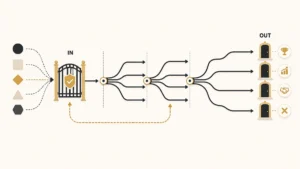
There are exactly four ways data enters a CRM, and each needs its own enforcement:
- Web forms. Constrain at the form, not just the CRM field. A dropdown on the form that writes to a restricted picklist is the only combination that holds.
- Human entry. Field type plus validation rule. Reps route around anything that blocks them without explaining why, so the error message has to name the expected format.
- Imports. The largest single source of standard-breaking values, because a spreadsheet bypasses the interface entirely. Gate imports through a staging object or a mapping template with the canonical values pre-loaded.
- Integrations. Every inbound API writes to your fields with its own vocabulary. The contract with each source system has to specify the canonical form, or the integration becomes a standing exception.
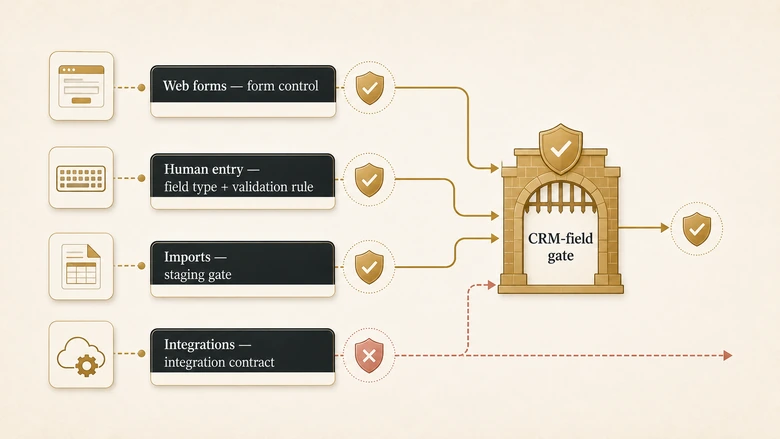
Imports deserve particular suspicion. A conference list of 3,000 records loaded by a marketer on a deadline will happily write United States into a field where every other record says US, and the CRM will accept it because import tools frequently bypass validation rules by design. Whether that gap exists in your platform is worth testing directly rather than assuming.
IMPORTANT
Test whether your validation rules actually fire on bulk import, API writes and automation-generated records. On several platforms they do not fire by default, which means the rule you believe is protecting the field is only protecting the manual-entry path that produces the least data.
How to migrate one free-text field to a governed picklist
Migrating a live field is the step most teams stall on, because changing a field type in place risks the reports built on it. The sequence below moves one field at a time and keeps reporting continuous.
Workflow · about 4 hours per field
How to migrate a free-text CRM field to a governed picklist
Converts one uncontrolled field into a restricted, standardised list without breaking the reports that already depend on it. Budget roughly half a day of admin work per field.
Export every distinct value with its record count
Group the field by value and sort by count descending. The distribution tells you the real shape of the problem: typically 15 values cover 90% of records and the long tail is typos.
Agree the canonical set against a published standard
Pick the standard first, then decide which of its values you actually use. Write the list down with an owner’s name on it before touching any configuration.
Map every existing variant to a canonical value
Build a two-column sheet of source value to target value covering all distinct values from step 1. Mark anything genuinely ambiguous for manual review rather than guessing.
Create the governed field beside the live one
Add a new restricted picklist rather than converting the existing field. The old field stays readable, so nothing that reads it breaks mid-migration.
Backfill, then reconcile the reports
Apply the mapping, then run every report that used the old field against both fields and compare totals. Investigate any variance before you retire the old field.
Close all four entry points
Repoint forms, imports and integrations at the new field, then make the old one read-only. Skipping this step means repeating the whole exercise next year.
Re-run the distinct-value count two weeks after the switch. If new values are appearing in a field you restricted, an entry point is still open, and it is almost always an integration writing through the API rather than a person typing.
A migration is also the single cheapest moment to fix field types, because the mapping work is already happening and no report is stable anyway. If a platform change is on the roadmap, fold the standards work into it: the marginal cost during a planned CRM migration is close to zero, and the alternative is doing the same mapping exercise twice.
When standardization is the wrong answer
Standardize a field only when something downstream consumes it. Governance has a permanent maintenance cost, and applying it to fields nobody queries buys administrative overhead and nothing else.
Use this as the decision rule:
- Standardize at entry when the field drives routing, scoring, segmentation, territory assignment or a report an executive reads. These fields fail loudly and expensively.
- Accept free text when the field is genuinely descriptive, read by humans one record at a time, and never aggregated. Notes and descriptions belong here.
- Defer to enrichment when the value is a fact about the world rather than about your relationship: industry, employee count, revenue band, headquarters location. A vendor maintains these better than your reps will, and a rep guessing at a firmographic value is worse than a blank.
- Leave it alone when the set legitimately changes faster than you can govern it. A weekly-changing product list is a lookup to a real record, not a picklist.
The enrichment case is the one teams resist and should not. Asking a rep to select an industry is asking them to guess at a firmographic they have no special knowledge of, and the guess then looks like data. Better to leave it blank and let an enrichment provider fill it, then standardise what comes back.
How to tell whether it worked
Measure distinct-value count per governed field, the share of records holding a canonical value, and the rate at which new non-conforming values appear. The first two go up once and stay there; the third is the one that tells you whether enforcement is holding.
Absolute targets are less useful than direction of travel, and published figures for CRM data quality vary enough that borrowing one as a goal is risky. Validity’s 2025 survey of 602 CRM users and administrators across the US, UK and Australia found 76% saying less than half their CRM data is accurate and complete, which is a useful indication of how common the problem is and a poor benchmark to manage against. Before you commit to a number, check what the published data quality benchmarks actually measure, because most of them are scoped far more narrowly than their headlines suggest.
Frequently Asked Questions
Data standardization is the process of converting values into one agreed format, vocabulary and unit so that every record expresses the same fact identically. In a CRM it covers country codes, phone formats, dates, industry classification and company names. It is enforced at the point of entry rather than corrected afterwards.
Cleansing corrects records that are already wrong; standardization changes what the field will accept next time. Cleansing is remedial and finite, standardization is preventive and permanent. Running cleansing without standardization means the same defects return, because the entry points that produced them are still open.
A restricted picklist, backed by a NAICS code stored separately. Free-text industry fields accumulate dozens of spellings of the same sector and cannot roll up for reporting. Give reps 10 to 15 readable segments in the dropdown and let enrichment populate the full 6-digit code behind it.
Create the governed picklist as a new field beside the live one, map every existing variant to an ISO 3166 code, backfill, then run each affected report against both fields and compare totals. Retire the old field only once the variance is explained. Never convert a field type in place.
Yes, substantially, because most duplicate detection compares field values as text. Once company names, emails and phone numbers hold one canonical form, matching rules stop treating formatting differences as different entities. Standardize before running a deduplication pass, not after, or the merge inherits the noise.