The import finishes on Sunday night. Record counts match on both sides. On Wednesday, three reps ask why their forecast is empty, marketing finds that half the contacts have no lifecycle stage, and the ops lead discovers that every account with a parent company got flattened into one tier.
Nothing failed. That is the uncomfortable part of a CRM migration: the thing that goes wrong is almost never the transfer. It is a set of decisions you made about your data model three weeks earlier, which the import then executed perfectly.
This article is about those decisions, in the order you have to make them, and about the one plan most teams skip until they need it.
Direct answer — What is a CRM migration?
CRM migration is the process of moving records, relationships, field definitions, historical activity, and process logic from one CRM into another. It spans four distinct layers: the object model, the field inventory, historical data, and automation. Most projects fail at the object-model layer rather than the transfer layer, because the two systems disagree about what a lead, an account, or a deal actually is. Settle the model first, then move the data.
Key Takeaways
- Reconcile the object model before any field mapping. Field work done on top of an unreconciled model produces a clean import and wrong reports.
- Deduplicate in the source system. Merging after cutover means merging records that already carry new-system activity.
- A migration is the cheapest moment you will ever get to delete fields. Map fewer than you have, not all of them.
- Bound historical activity to a window and archive the rest read-only. Activity volume is what blows the timeline.
- Stage the cutover: freeze, load, delta load, validate, open. Every gate needs a number agreed in advance.
- Rollback has an expiry date. Once users write to the new CRM, restoring the old one means losing everything since go-live.
What CRM migration is, and what actually breaks
CRM migration is the transfer of an organisation’s customer records and the logic around them from one platform to another. In practice it is four separate projects wearing one name, and they carry very different risk.
The object model is how each system represents people, companies, and revenue. The field inventory is every property attached to those objects. Historical data is the activity trail: emails, calls, tasks, stage changes. Automation is the workflows, assignment rules, and integrations that read and write those records.
Only the first two get planned properly on most projects. The transfer itself is a solved problem, which is exactly why it lulls teams into treating the whole thing as a technical task with a technical owner. It is a modelling task with an operational owner.
The automation layer is the one that ambushes people. Records can arrive perfectly and the system still behaves wrongly, because assignment rules fire on fields that now hold different values, lifecycle automation reprocesses ten thousand imported contacts as though they just arrived, and a webhook keeps posting to an endpoint that no longer exists. Every workflow in the target system should be switched off during the load and re-enabled deliberately, one at a time, with someone watching what each one touches. Microsoft’s Dynamics 365 Activate public preview makes that distinction more important: AI can accelerate discovery and migration execution, but the target system still needs observed proof that workflows, routing and integrations behave as intended.
The evidence that this goes badly is not hard to find. In Validity’s State of CRM Data Management survey of 602 CRM users and administrators across the US, UK, and Australia, 76% said less than half of their organisation’s CRM data is accurate and complete, and 37% reported losing revenue as a direct result of data quality. A migration inherits every one of those problems and then hard-codes them into a new system that nobody yet knows how to debug.
Four ways to move the data
Pick the transfer method after you have scoped the model, not before. The method constrains what transformations are possible mid-flight, and that is the only dimension that matters here.
| Approach | What it is | Use when | Avoid when |
|---|---|---|---|
| Native import | The target CRM’s built-in CSV or object importer | Standard objects, modest volume, a model that already lines up | You need transformation or association logic during the load |
| iPaaS / sync platform | An integration platform run in bulk mode | You already own one and need ongoing sync after cutover | It is a one-time move and you would be buying a platform for a single event |
| Dedicated migration tool | Purpose-built CRM-to-CRM movers with prebuilt object maps | Common platform pairs, standard objects, a tight timeline | Heavy custom objects or non-standard association models |
| Custom API or ETL | Scripts against both CRMs’ APIs, staged through a database | Complex model reconciliation, high volume, precise control | You have no engineering capacity to maintain or re-run it |
Most mid-market teams end up on a dedicated tool for the bulk objects and a handful of custom scripts for the awkward ones. That hybrid is normal and worth planning for rather than discovering.
Reconcile the object model before you map a single field
Object mapping is the exercise of deciding which entity in the new CRM represents each entity in the old one. Do this before field mapping, because a field map built on the wrong parent object is wasted work you will not notice until reporting breaks.
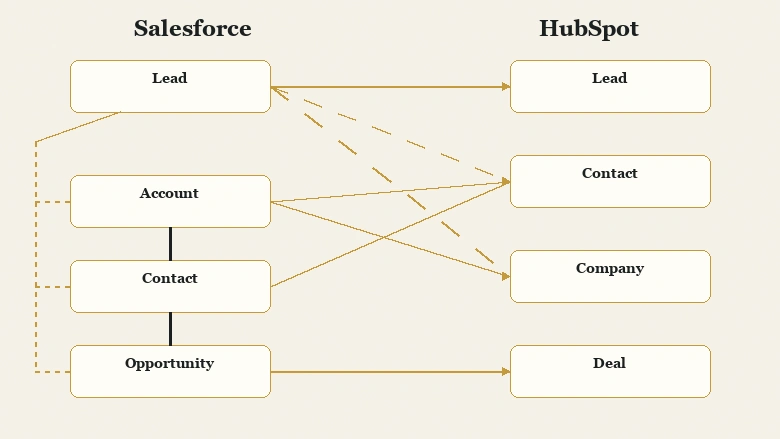
Take the most common migration pair, Salesforce to HubSpot. In Salesforce, a person who has not been qualified is a Lead: a standalone record with no Account attached. When they qualify, the convertLead call splits that single record into an Account, a Contact, and usually an Opportunity. One row becomes three, and the pre-conversion history sits on a record that is now closed.
HubSpot models this differently. Its CRM object reference lists Contacts as object type 0-1 and Companies as 0-2, with a separate Lead object at 0-136 representing people who have shown interest but are not yet worked. So you have a genuine choice, and it is not a technical one.
| Source concept | Plausible target | The decision nobody documents |
|---|---|---|
| Unconverted Lead | Contact, or the separate Lead object | Collapsing everything into Contact erases the qualification boundary your funnel reporting depends on |
| Converted Lead | Contact + Company + Deal | Whether pre-conversion activity follows the Contact or is left behind entirely |
| Account hierarchy | Company with a parent association | How many tiers survive, and which tier owns the commercial relationship |
| Opportunity | Deal | Stage names, probability, and close-date semantics almost never line up one to one |
| Custom object | Custom object | Association cardinality is the risk, not the fields |
The principle generalises past this one pair. Every CRM encodes an opinion about when a person becomes a company’s problem and when interest becomes revenue. Two systems rarely hold the same opinion, and the migration is where the disagreement surfaces.
Write the object decisions down as prose before anyone opens a mapping spreadsheet. If you cannot explain in a sentence why an unconverted lead becomes what it becomes, the field map underneath it is guesswork.
Custom objects and association cardinality
Custom objects look like the hard part and usually are not. Their fields copy across without much argument. What breaks is cardinality: how many records on one side may attach to how many on the other.
A source system that lets a subscription record attach to exactly one account, migrated into a system where the equivalent object attaches to many, will import without a single error and quietly produce revenue reporting that double-counts. The reverse case is worse: a many-to-many relationship collapsing into one-to-many silently drops every association past the first, and row counts still reconcile because the records themselves all arrived.
List every custom object with its association type on both sides before the load, and validate associations separately from records. Counting rows tells you the objects landed. Only counting associations tells you the model landed.
Deduplicate in the source system, not after cutover
Deduplication before a migration means resolving duplicate records in the CRM you are leaving, while it is still the only system anyone writes to. This ordering matters more than the matching logic itself.
Merge after cutover and you are merging records that have already accumulated new activity: a call logged Tuesday, an email thread started by a rep who did not know a second record existed, a deal attached to the wrong contact. The merge now has to decide which of two live histories survives. Merge before, and you are resolving records that only carry the past.
The second reason is that survivorship rules differ between platforms. The old system’s idea of which value wins on a merge is not portable, so a duplicate pair you leave for the new CRM to resolve will be resolved by rules you have not tested.
Choosing survivorship rules
Survivorship deserves its own decision, made once and written down. For each field, which record’s value wins: the most recently modified, the most complete, the one from a verified source, or the one on the record with the open deal? Those four rules disagree constantly, and picking per-field is the difference between a merge that improves the data and one that averages it into something nobody recognises. The account owner and the email address usually want different rules, and defaulting both to “most recent” is how a live opportunity ends up assigned to someone who left.
Run the matching pass and the merge as a distinct project phase with its own sign-off. The mechanics of choosing match keys and deciding which record survives a merge deserve more room than a migration plan usually gives them, and getting the survivorship rules wrong quietly destroys data that the import will then faithfully carry forward.
If the source is Salesforce, the choice between native duplicate management and a paid tool changes what is realistic in the time you have. Native rules catch exact and near-exact matches on standard fields, while the dedicated Salesforce deduplication tools handle fuzzy matching and bulk merge at volume, which is the difference between a two-week cleanup and a two-month one.
Volume is also where teams misjudge capacity. A cleanup that looks like a fortnight of admin work often is not, and it competes directly with the migration build. Deciding early whether to bring in outside help for the cleansing pass or absorb it internally keeps that from becoming the reason the cutover date slips.
IMPORTANT
Freeze the duplicate rules in the source system once the merge pass completes. Any new duplicates created between the merge and the cutover arrive in the new CRM unresolved, and by then you are back to merging live records.
Cut the field inventory instead of mapping it one to one
A field audit is the review of every property on every object to decide whether it moves, merges into another field, or dies. Run it as a deletion exercise, not a mapping exercise, because the default of mapping everything is what carries a decade of accumulated mess into a system that was supposed to be clean.
Three questions settle almost every field:
- What is the fill rate? A field populated on 4% of records is not a field, it is a note somebody once took.
- When was it last written to? Not last read, last written. A property that has not been updated in eighteen months is describing a process nobody runs.
- Who consumes it? Name the report, the workflow, or the person. If nobody can, it does not move.
This is the one moment when deleting a field is politically cheap. Nobody defends a field during a migration the way they defend it during a normal cleanup, because the framing has changed from “we are taking something away” to “we are choosing what to bring.”
A migration that maps every field one to one has not migrated anything. It has relocated the problem and reset the clock on fixing it.
PRO TIP
Export the field list with fill rate and last-modified date before you invite anyone to the mapping meeting. Arriving with the data changes the conversation from opinion to arithmetic, and it usually removes a third of the inventory in one session.
Surviving fields still need a shape. Picklist values, country and state formats, job titles, and phone formats all arrive from the old system in whatever variety accumulated there, and the load is the last easy moment to impose a single convention. Settling the naming and normalisation rules each field will follow before the mapping is signed off keeps the new CRM from inheriting six spellings of the same industry value.
Set a historical activity window before you scope the load
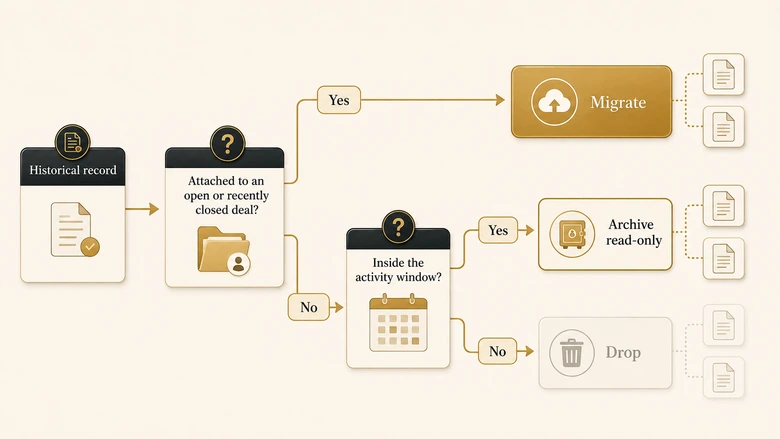
Historical activity is the log of emails, calls, meetings, tasks, and stage changes attached to your records. It is almost always the largest object by row count and the smallest by read rate, which makes it the single most useful thing to scope down.
The instinct is to bring everything, on the reasoning that storage is cheap and someone might need it. Storage is cheap. Migration time is not, validation time is not, and a new CRM whose activity timeline is 80% noise trains reps to stop reading timelines at all.
| Data | Default call | Reasoning |
|---|---|---|
| Open deals and active pipeline | Migrate with full history | Reps need the context to work them on Monday |
| Closed-won accounts, last 24 months | Migrate | Renewal and expansion motions read this constantly |
| Closed-lost, last 24 months | Migrate the record, summarise the activity | The outcome and reason matter; the email thread rarely does |
| Emails and calls older than 24 months | Archive read-only | Highest volume, lowest read rate, retrievable if ever needed |
| Tasks or events with no owner or no linked record | Drop | They are already invisible in the source system |
| Marketing sends and opens | Leave in the marketing platform | Duplicating them in the CRM inflates storage and adds nothing |
Twenty-four months is a starting position, not a rule. Match it to your actual sales cycle: if deals routinely take fourteen months, a twelve-month window cuts the history of live opportunities in half.
There is also a legal argument for the archive route rather than the migrate-everything route. GDPR Article 5 requires personal data to be “adequate, relevant and limited to what is necessary” and kept no longer than the purpose requires. Copying nine years of contact activity into a new system because it was easier than deciding is difficult to defend as either. A migration is a good moment to give that data a retention period instead of a new home.
Sequence the cutover in stages with gates you can measure
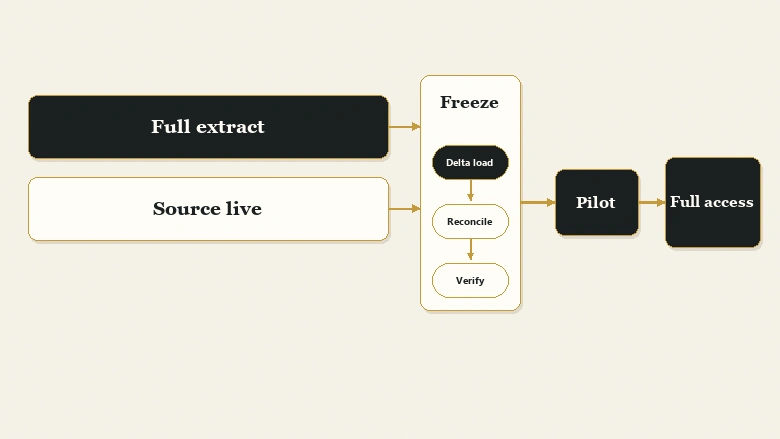
A staged cutover is a migration run in phases with a defined freeze, a bulk load, a catch-up load, and validation gates between each, rather than a single overnight switch. Stage it because a big-bang cutover gives you no point at which you can stop and still be safe.
The freeze window
The freeze is the period when the source CRM becomes read-only. It exists so that the data you extract is the data you load, and its length is the real constraint on the whole project: every hour of freeze is an hour reps cannot log activity.
Announce the freeze twice, enforce it with permissions rather than goodwill, and give reps a written place to park anything urgent. A freeze that depends on people remembering not to type is not a freeze.
The delta load
The delta load catches whatever changed between the last full extract and the freeze. Run the full extract days ahead so the bulk of the volume moves while the system is still live, then move only the changed records during the freeze itself. This is what turns a 40-hour outage into a 6-hour one.
Integrations and permissions
Integrations are the part of the cutover with the widest blast radius, because they touch systems outside the project’s control. Build an inventory before the freeze: every tool that reads from or writes to the CRM, what it does, who owns it, and what happens if it silently stops for a day.
The failure mode is rarely a loud error. It is a form handler still posting to the old CRM’s endpoint for two weeks while marketing wonders why lead volume dropped, or a billing sync writing to record IDs that no longer resolve. Record IDs almost never survive a migration, so anything that stores a CRM ID on its own side needs re-keying, not just re-authenticating.
Permissions need the same treatment and usually get less. Role hierarchies, territory rules, field-level security, and sharing settings do not translate between platforms, and the safe default of granting broad access “for now” tends to become permanent. Rebuild the permission model from what each role actually needs, and audit it a week after go-live rather than at the end of the project when everyone has moved on.
Validation gates
Validation is comparing what arrived against what should have arrived, using thresholds agreed before the load rather than judgement on the night. Count records per object, then check relationships, then spot-check values.
Record variance = (Target count − Eligible source count) ÷ Eligible source countThe word doing the work there is eligible. If you excluded ownerless tasks and pre-2024 activity, the source number in that calculation is the filtered count, not the raw one. Teams that compare against raw totals spend cutover night investigating a variance they created deliberately three weeks earlier.
Agree the acceptable variance per object in advance, and set it against a defensible target rather than a number invented at 2am. Deciding what completeness and duplicate rates are actually achievable before the load gives the go/no-go call something to reference.
Workflow · 8 hours
How to run a CRM cutover window: the six steps in order
The sequence for the cutover window itself, after the full extract has already been loaded into the target system and validated in staging.
Freeze writes in the source CRM
Remove edit permissions rather than asking people to stop. Record the exact timestamp; every count you check later is measured against it.
Extract and load the delta
Pull only records created or modified since the full extract, then load them in the same object order used in staging.
Reconcile counts against the eligible baseline
Compare per-object totals to the filtered source counts, not the raw ones. Investigate any object outside the variance threshold before continuing.
Verify relationships, not just rows
Sample records at each level: contact to company, deal to contact, child account to parent. Row counts can be perfect while every association is missing.
Re-point integrations and test one live record end to end
Submit a real form, watch it create the record, route to an owner, and appear in reporting. Do this before anyone else has access.
Open to a pilot group before the full team
Give five or six users access for a few hours. They find in one morning what a validation script cannot: the fields that are technically present and practically wrong.
That final step is the one teams cut when the schedule tightens, and it is the one that catches the errors validation scripts are structurally unable to see.
Write the rollback plan first, and know when it expires
A rollback plan is the documented procedure for returning to the source CRM as the system of record, including what gets lost when you use it. Write it before the first import, because writing it forces you to discover how narrow the window really is.
Here is the part that surprises people. Rollback is not a technical capability you either have or lack. It is a time-limited one, and the clock starts the moment a user creates or edits a record in the new CRM. Restore the old system after that and every one of those writes is gone, because they never existed in the source.
IMPORTANT
Rollback stops being an option the moment new-system writes are not replicated back to the source. For most teams that is the end of the first business day, not the end of the first week. Decide before go-live whether you are keeping a write-back path open, and for how long.
That gives you three postures, and the plan should name which one applies at each point in the schedule:
- Roll back when a structural defect affects most records across an object, and it was caught before users started writing. Example: every parent-child account association is missing.
- Fix forward when the defect is bounded to one field or object and can be re-loaded in place. Example: one picklist mapped to the wrong values. This is the right answer far more often than teams expect.
- Neither once meaningful new-system activity exists. At that point you are repairing in place, and the plan should say so out loud rather than implying a safety net that is already gone.
The rollback document itself is short. Who declares it, what the criteria are, who re-enables write access in the source system, what happens to anything created in the new CRM in the meantime, and who tells the sales team. Four hours of writing, and it is the only artefact in the project that is worth having and never using.
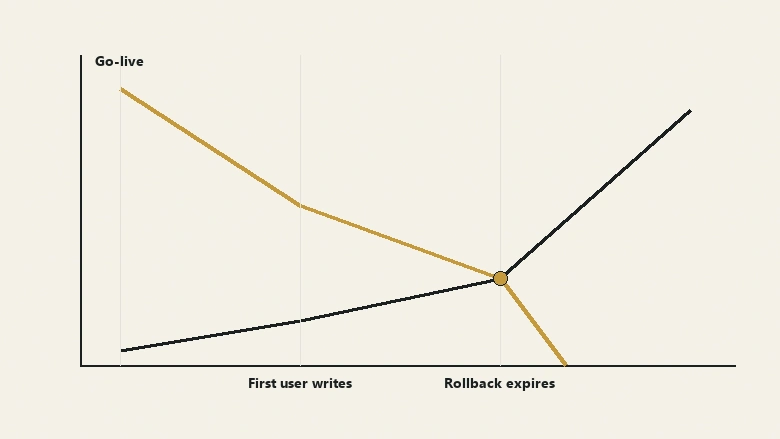
Set the expiry date in the plan as a date, not a feeling. “Rollback available until Thursday 18:00” is a decision the team can act on. “We could probably roll back if we had to” is not.
The first two weeks after go-live
What follows the expiry is the part worth staffing properly. For the first two weeks the migration team stays assigned to the migration, with a single named channel where users report what looks wrong and someone triages within the hour. Most of what arrives will not be data defects at all: it will be reps looking for a view that moved, or a report whose filter now references a field that was deliberately cut. Those are training issues wearing the costume of data issues, and the only way to tell the difference quickly is to have the people who made the mapping decisions still in the room.
Keep the source CRM in read-only mode for a quarter rather than decommissioning it at go-live. It costs one more billing cycle and it settles arguments that would otherwise be unresolvable, because the question “was this wrong before we moved, or did we break it?” comes up more than anyone expects.
Frequently Asked Questions
Most mid-market CRM migrations run eight to sixteen weeks end to end. The transfer itself takes days. What consumes the schedule is object-model reconciliation, deduplication in the source system, the field audit, and validation. Complex custom objects, multiple integrations, or a large historical activity volume push it past sixteen weeks.
The four commonly named types are storage migration, database migration, application migration, and business process migration. A CRM migration is usually a combination of the last two: you move the application’s data and, unavoidably, the processes encoded around it. Treating it as a pure database migration is what produces clean imports and broken reporting.
Migrate closed records from roughly the last 24 months, and archive older activity read-only rather than loading it. Closed-won history drives renewal and expansion work, so it earns its place. Email and call logs beyond your sales cycle length are high volume and low read rate, and they make new timelines harder to scan.
You cannot reach true zero downtime, but you can shrink the freeze to hours. Run the full extract and load days ahead while the source stays live, then move only changed records during a short freeze window. Validate, re-point integrations, open to a pilot group, then release to everyone.
Implementation is configuring a CRM to support how your team sells: objects, fields, stages, automation, permissions. Migration is moving existing records and history into that configuration. Implementation comes first and defines the target model. A migration run before implementation decisions are settled has nothing stable to map into.