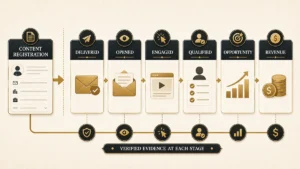
Every page ranking for salesforce deduplication tools today is published by a company that sells one. That is not a complaint about their honesty. It is a description of the evidence available to a buyer: eleven of the twelve results on the first page are vendor blogs, vendor listings, or a review of a single vendor, and the one exception is a Reddit thread. Nobody on that page publishes the criteria they scored against before they named a winner.
So this page starts with the criteria, publishes them before any product is named, and then scores against them. It also answers the question the vendor pages skip, because answering it honestly costs them a sale: Salesforce ships duplicate management for free, and for a lot of orgs that is genuinely the right answer.
Direct answer — What are Salesforce deduplication tools, and when do you need one?
Salesforce deduplication tools find, merge and prevent duplicate Leads, Contacts and Accounts beyond what native Duplicate Management covers. Native rules catch duplicates as records are created and edited, and flag them on standard objects. You need a paid tool when duplicates arrive through imports and integrations, when you need field-level survivorship rather than one winning record, when custom objects are involved, or when a merge has to be reversible and auditable.
Key Takeaways
- “Native” means three different things in this category, and only one of them affects where your data lives. Vendors use the word without saying which they mean.
- Salesforce’s own duplicate management is free and sufficient for a real share of orgs. The honest trigger to buy is a specific failure mode, not record count.
- A merge is destructive. Reversibility varies from none, to a short window, to a stored snapshot, and it is the least-documented capability in the category.
- Field-level survivorship is the capability that separates tools. Record-level winners are common; choosing a winner per field is not.
- Take your own survivorship policy into a vendor trial and try to configure it. Whatever the tool cannot express is your real gap.
What Salesforce deduplication software actually does
Salesforce deduplication software is tooling that identifies records representing the same person or company, decides which values survive when those records are combined, and prevents new duplicates from being created. Those are three separate jobs, and most buying mistakes come from assuming one product does all three equally well.
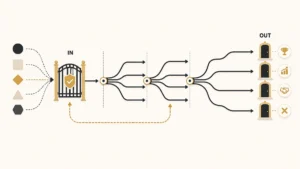
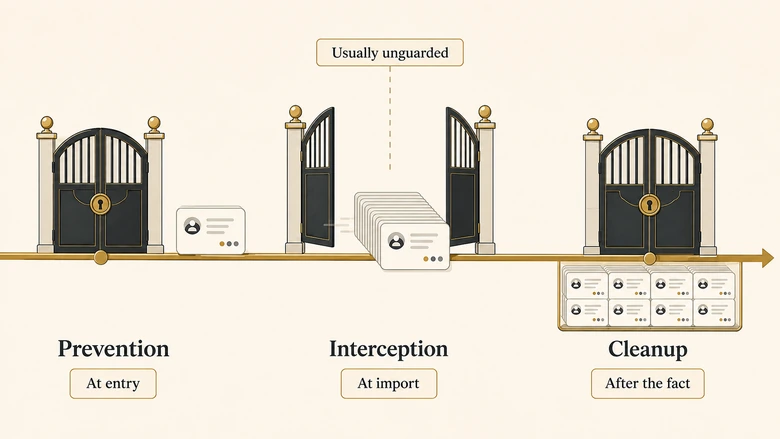
The three jobs run at different moments. Prevention happens at the point a record is created or edited. Interception happens when records arrive in bulk through an import file or an integration. Cleanup happens on the duplicates already sitting in your org, which is the job most people are thinking of when they start shopping.
A tool that is excellent at cleanup and absent at interception will have you running the same cleanup job every quarter forever. That is the most common expensive outcome in this category, and it is invisible during a trial because a trial only ever demonstrates cleanup.
The matching question, which rules decide that two records are the same, is a genuinely separate discipline. We treat it separately in our guide to fuzzy string matching for company names. This page is about the products, not the rules.
“Native” means three different things
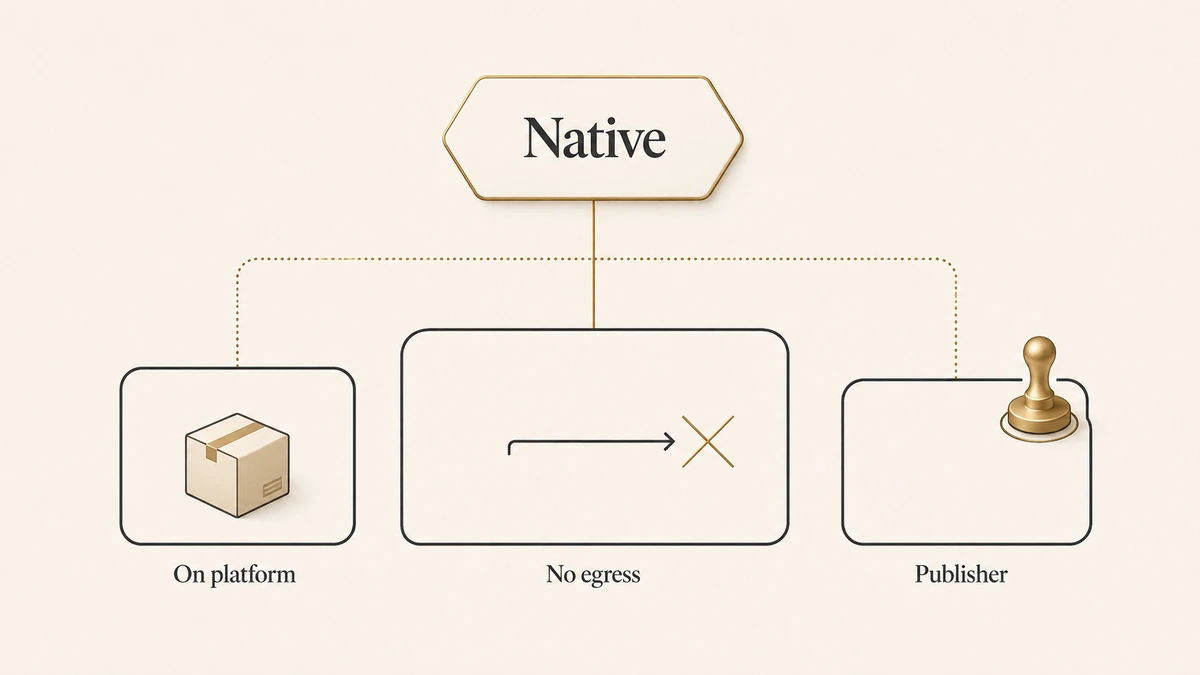
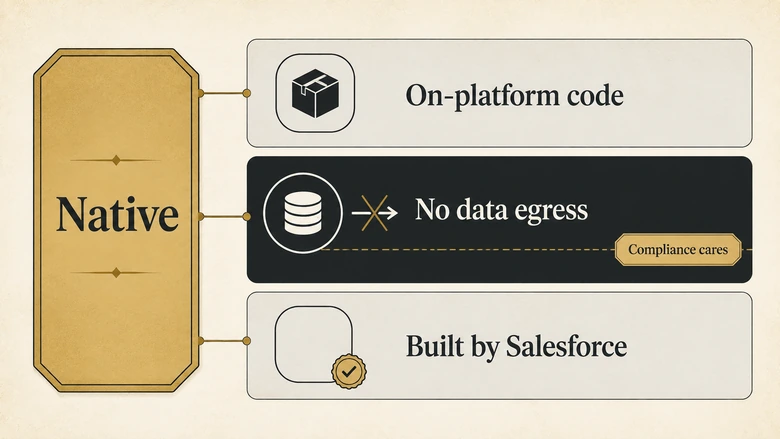
Native, in this category, is used to mean three distinct things, and vendors rarely say which one they are claiming. Google’s own AI Overview for this keyword describes one product as “a fully native Salesforce application” without defining the term at all, and AppExchange listings print NATIVE as a bare badge.
Here are the three meanings, separated:
| Claim | What it actually means | What it buys you | What it does not buy you |
|---|---|---|---|
| Native 1: on-platform code | A managed package whose logic runs on the Salesforce platform | Installs from AppExchange, inherits your org’s profiles and permissions, passes Salesforce security review | Says nothing about whether record data is sent anywhere during processing |
| Native 2: no data egress | Record data never leaves your Salesforce org at any point in the workflow | The only meaning that matters for data residency, sub-processor disclosure and most compliance reviews | Can constrain matching sophistication, because heavy fuzzy matching is easier off-platform |
| Native 3: built by Salesforce | Salesforce itself is the publisher | One vendor, one support path, no incremental licence | Rarely claimed accurately; almost no dedupe product on this SERP is a Salesforce product |
A vendor can truthfully advertise Native 1 while failing Native 2. The managed package is real, the security review is real, and record data still leaves the org to be processed. Nothing about that is deceptive. It is simply a different claim than the one a compliance reviewer is reading it as.
IMPORTANT
If data residency matters to you, do not accept “native” as an answer. Ask directly: does any record data leave my org during matching, merging, or reporting, and if so, to which sub-processor and in which region? Get it in writing before the security review, not during it.
Where Salesforce’s native duplicate management stops
Salesforce includes duplicate management at no extra cost, built from matching rules that define sameness and duplicate rules that define what happens when sameness is detected. For a meaningful share of orgs this is the correct and complete answer, and no vendor page will tell you so.
UNVERIFIED — pending primary-source check. The specific limits that define where native duplicate management stops (supported objects, custom-object support, active rule limits, which entry paths rules actually fire on, the edition gating and record ceiling on bulk duplicate jobs, and the per-operation merge limit) are being verified against Salesforce’s own documentation before publication. No figure appears in this section until it carries a linked primary source.
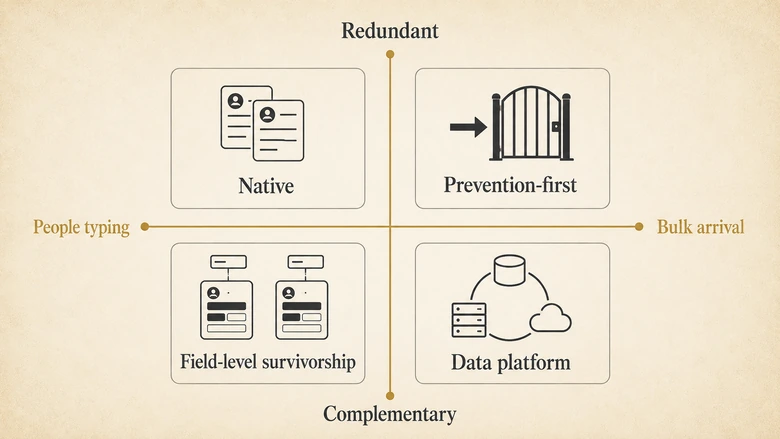
The structural point survives whatever the current numbers are. Native duplicate management is built around a person typing into a form. The duplicates that hurt most arrive somewhere else: a list import before an event, a form-fill that skips the deduplication path, an integration writing records on a schedule. If your duplicates arrive in bulk, the free tool is watching the wrong door.
Why capability claims in this category are unfalsifiable
Almost every claim made about deduplication accuracy is written so it cannot be checked. “99% accuracy” is the standard example: accurate against which duplicate set, scored by whom, with what definition of a duplicate, and what happened to the records the tool declined to judge?
None of that is usually stated, which means the number is not a measurement. It is a shape. Two vendors quoting the same figure may have measured populations with nothing in common.
The same problem appears in the reverse direction with data-decay statistics, where figures measured over different periods and populations get quoted interchangeably. We unpicked that specific confusion in our analysis of CRM data decay statistics, and the discipline is identical here: ask what the denominator was before you believe the percentage.
This is why the scorecard below records capability, not accuracy. Capability is checkable against documentation. Accuracy, as this category reports it, is not.
How we evaluated these tools
To keep this honest, the criteria were fixed before any product was scored, and each is scored from published vendor documentation with the source and check date recorded in the cell. Eleven criteria, in the order they usually matter to a buyer:
- Deployment model. Managed package, external service, or hybrid.
- What “native” actually buys. Does record data leave the org, and to which sub-processor.
- Prevention at entry. Does it block duplicates as records are created and edited.
- Import-time dedup. Does it intercept bulk paths, not just the user interface.
- Cleanup-after. Mass identification and merging of duplicates already present.
- Survivorship configurability. Record-level winner only, or field-level winners.
- Merge reversibility. Whether undo exists, for how long, and what it restores.
- Cross-object and custom-object support.
- Record-volume ceiling.
- Scheduling and automation.
- Published-pricing transparency. Published, partial, or contact-sales only.
Two criteria deserve a note on why they are separated. Prevention and interception are listed apart because a product can do one without the other, and the gap between them is where recurring cleanup bills come from. Reversibility is listed apart from auditability because knowing a merge happened is not the same as being able to undo it.
This scorecard measures what happens after you have decided two records are the same. Whether the right records were paired in the first place is a matching question, and we score that separately in our comparison of lead-to-account matching software. The two scorecards deliberately share no rows.
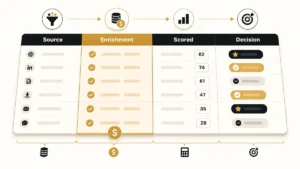
The dedupe tooling scorecard
Twelve products scored against the eleven criteria above, with Salesforce’s native duplicate management included as the baseline rather than excluded as the incumbent.
UNVERIFIED — the scored table is being built from vendor documentation and is not yet published. The full grid ships with an evidence source and a check date in every cell. Where a vendor does not publish a capability, the cell records “Not published” rather than a guess, because silence about merge reversibility or data egress is itself information a buyer should have.
Match your failure mode to a product class
Choose by the failure you actually have, not by feature count. Four patterns cover most of the buying in this category.
Use native duplicate management when
Your duplicates are created by people typing, on standard objects, at a volume your team can review by hand. Adding a paid tool here buys you configuration work and a licence, and solves a problem you do not have.
Use a prevention-first tool when
Duplicates keep coming back after you clean them. Recurring cleanup is not a data problem, it is an interception problem, and buying more cleanup capacity treats the symptom.
Use a field-level survivorship tool when
Your records are complementary rather than redundant: one has the phone number, the other has the consent record. A record-level winner throws away half your data by design, and no amount of careful matching prevents that.
Use a data-platform tool when
Salesforce is not the only system holding the duplicate. If the same contact exists in your CRM, your marketing automation and your billing system, a Salesforce-only tool fixes one third of the problem and lets the other two write it back.
PRO TIP
Before any trial, write down the last three duplicate incidents that actually cost you something. Route each to one of the four patterns above. If all three land in the same box, you have your product class and can ignore most of the feature comparison.
Bring your own survivorship policy to the trial
The fastest way to test a deduplication tool is to arrive with your own field-by-field survivorship rules and try to configure them exactly. Whatever the tool cannot express is your real gap, and you will find it in an afternoon rather than in month three.
Three rules are worth deciding before you shop, because they are the ones tools most often cannot express and the ones that cause real damage when they are wrong.
Consent and opt-out fields must use most-restrictive-wins, never most-recent-wins. If a record with “do not call” set to true loses to a more recently modified record with it set to false, the merge has silently re-enabled contact with somebody who opted out. That is regulatory exposure created by a default setting.
First-touch fields must use oldest-wins. Lead source and original campaign fields exist to record what happened first. A recency rule overwrites them and breaks attribution in a way no report will flag, because the field is still populated and still looks correct.
Address must be treated as one unit. Field-level survivorship applied to street, city and postal code independently produces an address assembled from two different records. It is undeliverable and it validates.
The template below has these already set, with the reasoning attached, so you can argue with the defaults rather than start from a blank sheet. The theory behind choosing a winner, and the governance around reviewing merges, is covered in the lead deduplication playbook; this is the artefact you fill in.
What it costs, and which vendors do not say
UNVERIFIED — pricing is being checked on each vendor’s own pricing page and will carry an “(as of Q3 2026)” tag per figure. Vendors that publish no pricing at all are recorded as such, with the page and date checked, because a category where list prices are hidden is a category where comparison is deliberately hard.
Also ranking for this keyword
For completeness, and because you will meet them while researching, these are the pages currently competing for this term. Every one is published by a company selling deduplication software or by a marketplace listing it.
UNVERIFIED — competitor characterisations pending full-page fetch. Each will be described by what it covers well and what it leaves out, with its publisher’s commercial interest stated plainly.
Download the survivorship policy template
The IVRIS Survivorship Policy Template is free, ungated and reusable with attribution. It contains 25 fields with a recommended winner rule, a tie-breaker, blank-handling and the risk if the rule is set wrong; a 15-item merge pre-flight checklist; and the scorecard grid with its evidence sources.
Thirteen of the 25 rows are marked protected, meaning you should not override the recommendation without a named owner signing off. Three of those carry genuine regulatory exposure.
UNVERIFIED — download link pending upload.
Frequently Asked Questions
Deduping in Salesforce means defining matching rules that decide when two records are the same, activating duplicate rules that act on those matches, then merging the records that survive review. Native tools handle records as they are created and edited. Duplicates already in the org, or arriving through imports and integrations, usually need a third-party tool.
Salesforce detects duplicates using matching rules, which compare selected fields with exact or fuzzy methods and score the result against a threshold. A duplicate rule then decides whether to allow the save, block it, or allow it with an alert. UNVERIFIED: exact supported objects and default behaviour pending primary-source check.
A merge is destructive, and undo behaviour is the least consistently documented capability in this category. Some tools store a pre-merge snapshot and restore it within a retention window; others offer no reversal at all. Confirm the window, and confirm whether it restores related records as well as field values, before you run anything in production.
Reports do not deduplicate records, they display what exists, so filtering hides the symptom rather than fixing it. The practical approach is to flag duplicates on the record with a field your duplicate tooling maintains, then filter the report on that flag. Treat any report-level workaround as temporary.
Often, yes. It is usually enough when duplicates are created by people typing on standard objects at a reviewable volume. It stops being enough when duplicates arrive through imports or integrations, when you need field-level survivorship instead of one winning record, when custom objects are involved, or when merges must be reversible and auditable.
Methodology, sources and revision history
Criteria were fixed and published before any product was scored. Every scorecard cell is filled from published vendor documentation, with the source URL and check date recorded. Where a vendor does not publish a capability, the cell records “Not published” rather than an inference.
IVRIS sells no deduplication software and has no commercial relationship with any product named here. We have not run a controlled test of these products and do not claim to have done so; this is a documentation-based capability comparison, which is a different and narrower thing than a benchmark.
UNVERIFIED — full source list appended after verification pass.