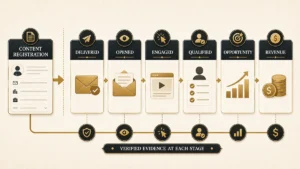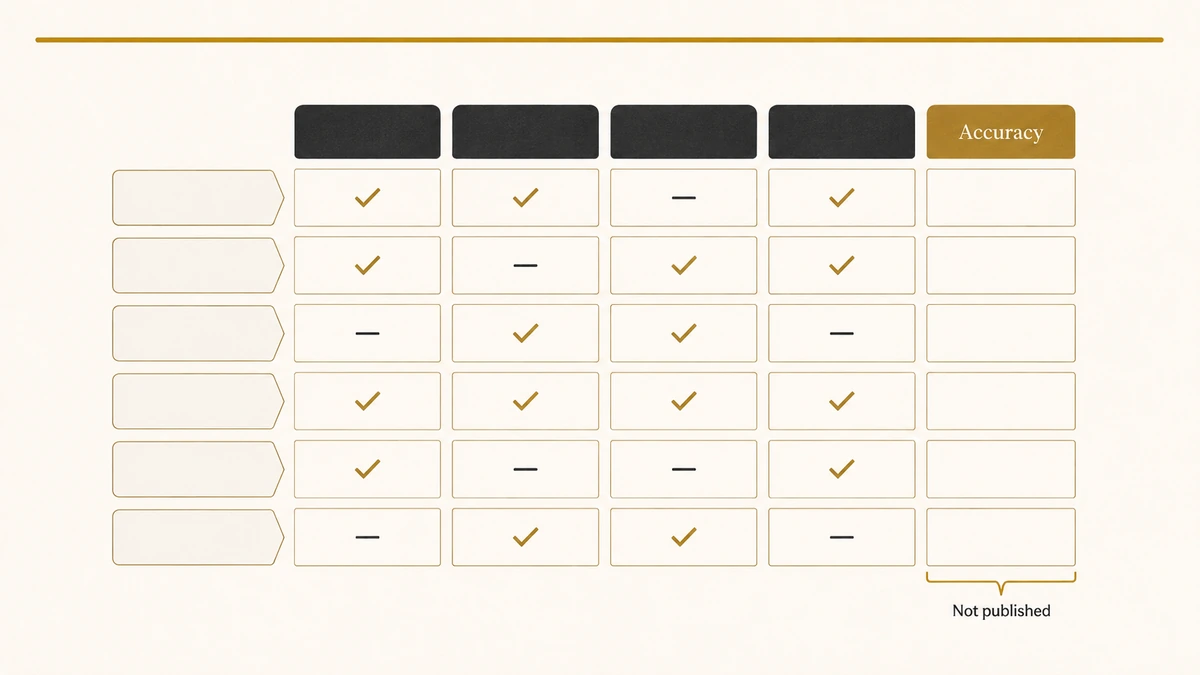
Every vendor in this category publishes an accuracy number. LeadAngel’s homepage says it matches leads to accounts with 99.7% accuracy. Its Salesforce product page, on the same site, says 98%+. Neither figure carries a sample size, a time period, a definition of what counted as a match, or a method you could repeat.
That is not a criticism of one vendor. It is the condition of the whole category. We read the published documentation of ten matching products and could not find a single accuracy claim anywhere with a denominator attached to it. A third-party listicle then picks up the 98% figure and reprints it as though it were a comparative measurement, and the number acquires a credibility nobody ever earned.
So this guide does two things instead. It grades each product on what its own documentation actually says, marking the fields where nothing is published rather than scoring them zero. And it publishes a free test set of 59 lead-to-account pairs so you can measure your own match quality, in your own org, against a denominator you can see.
Direct answer — What is the best lead-to-account matching software?
No product wins outright, because matching failures come in kinds. Choose by the failure you have. LeanData and Traction Complete handle account hierarchy and parent-child rollup. LeadAngel documents the widest set of match types, including M&A and stock-code logic. Insycle gives the strongest preview and audit trail. ZoomInfo Operations suits identity-led motions. Salesforce and HubSpot native matching is adequate only when leads arrive with clean firmographic data.
Key Takeaways
- Salesforce’s native lead-to-account matching rule contains no email-domain branch. Every clause of its matching equation needs a street, city, ZIP, phone or website value that a typical web form never collects.
- Native lead-to-account matching is not included in base Salesforce. The standard rule activates with Account Engagement Advanced or Premium.
- Salesforce fuzzy matching supports Latin characters only, and a rule cannot combine fuzzy and exact methods. Both limits are documented, and both are silent in production.
- Not one of the ten products reviewed publishes a false-positive rate. Accuracy claims in this category are marketing figures, not measurements.
- A wrong match costs more than a missed one. It hands a lead to the wrong owner and writes bad history onto a real account, and almost no product documents how to reverse it.
- Our 59-case test set is free and ungated, so you can measure your real match rate instead of accepting a vendor’s.
What lead-to-account matching software actually does
Lead-to-account matching software decides whether an incoming lead already belongs to a company record in your CRM, and links the two when it does. It compares the lead’s company name, email domain and firmographic fields against existing accounts, scores the candidates, and either writes the account reference onto the lead or holds the case for a human.
That single job sits between two neighbours it is easy to confuse it with. Routing decides who owns a lead once the account is known, and the products that do that job well are compared separately in our guide to lead routing software. Deduplication collapses two records that describe the same thing into one, which is a destructive operation covered in lead deduplication. Matching is neither. It is non-destructive, it is one-to-many, and its consequence is ownership rather than data hygiene.
This page compares products. It does not re-explain the mechanics, because the exact, domain and fuzzy methods are already set out in lead-to-account matching, and the algorithm-level detail behind name comparison lives in fuzzy string matching for company names. If you are still deciding whether you need a product at all, read those first.
Where native Salesforce matching actually breaks
Most guides in this category assert that Salesforce cannot match leads to accounts. That is false, and the truth is more useful. Salesforce documents a standard matching rule for leads on accounts, and reading its specification tells you exactly which leads it will fail on.
It is a paid add-on, not a default
Salesforce documents that the standard matching rule for leads on accounts “is activated with the purchase of Account Engagement Advanced or Premium edition”. It populates the Matched Leads component. Teams on Sales Cloud without that Account Engagement tier do not have native lead-to-account matching at all, which is why so many orgs end up building the logic by hand in Flow.
The matching equation has no email-domain branch
This is the finding that matters most, and it is visible in Salesforce’s own published specification. The matching equation is:
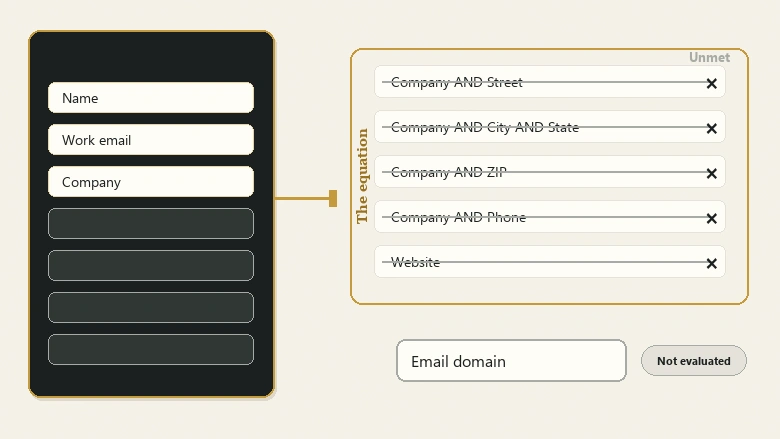
Read what every clause requires. Four of the five need a street, a city and state, a ZIP code or a phone number alongside the company name. The fifth needs a value in the lead’s Website field. Salesforce states the rule “works best on accounts with values in the Website field or the Account Name, Phone, Address, and City fields”.
Now picture a normal inbound lead. A web form captured a name, a work email and a company. No street. No city. No ZIP. No phone. The Website field on the lead is empty, because visitors do not type their employer’s URL into forms. Every branch of the equation fails, and the lead arrives unmatched next to an account that has been in your CRM for three years.
IMPORTANT
The single strongest signal on a B2B web lead is the email domain, and native Salesforce lead-to-account matching does not evaluate it. That one gap explains most of this product category. Nearly every vendor leads with domain matching, and nearly every do-it-yourself tutorial builds a formula field to extract the domain and a Flow to compare it, because the standard rule will not.
What native does handle well
Two things, and they are worth crediting. The Account Name comparison runs three algorithms together, Acronym, Edit Distance and Exact, takes the maximum score and applies a threshold of 70. And Salesforce normalises company names before comparing, documenting that it “removes words such as Inc and Corp before comparing fields” and that “1st National Bank is normalized to First National Bank”.
So the legal-suffix problem that fills most vendor marketing is largely handled natively. Acme Corp against Acme Corporation is not the case that breaks Salesforce.
The algorithms Salesforce actually runs
Salesforce publishes the individual algorithms behind its fuzzy methods, with worked examples and scores. Almost no comparison in this category reproduces them, which is a shame, because reading the list tells you precisely which name variants native matching will and will not survive.
| Algorithm | Salesforce’s own example | Score |
|---|---|---|
| Exact | salesforce.com against Salesforce | 0 |
| Acronym | Advanced Micro Devices against AMD | 100 |
| Edit Distance | VP Sales against VP of Sales | 73 |
| Jaro-Winkler Distance | Johnny against Johny | 97 |
| Kullback Liebler Distance | Director of Engineering against Engineering Director | 65 |
| Metaphone 3 | Joseph against Josef | 100 |
| Name Variant | Bob against Robert | 100 |
| Syllable Alignment | Department of Energy against Department of Labor | 59 |
The first row is the one to sit with. Salesforce chose its own name to illustrate exact matching, and the result is a score of zero. Two strings any human reads as the same company are, under exact matching, unrelated. That is the argument for a fuzzy layer, made by the platform vendor.
The rest of the list explains the threshold. Company matching runs Acronym, Edit Distance and Exact together and takes the highest score, needing 70 to pass. Edit Distance gave VP Sales against VP of Sales only 73, which clears 70 by three points. Move one more token and a pair most humans would accept drops below the line. Syllable Alignment, which Salesforce says “works well for company names”, scored two genuinely different government departments at 59, so the margin between a real match and a near miss is narrower than the marketing in this category suggests.
Fuzzy matching is Latin-only, and cannot be mixed with exact
Two documented constraints bite quietly. Salesforce states that matching rules using fuzzy methods “support only Latin characters” and recommends exact matching for international data. If your pipeline carries leads typed in Cyrillic, Japanese, Korean or Han characters, fuzzy matching does not degrade on them, it does not apply.
The second is blunter: “Use either fuzzy or exact matching. Duplicates aren’t detected if you include both matching types in one rule.” A rule that mixes methods stops detecting, and nothing warns you.
There is a third that is worse because it is invisible. When a rule’s filter logic uses OR across segments that repeat a fuzzy field, Salesforce “evaluates only the filter segment closest to the end, and ignores the others”. A rule written as (1 AND 2) OR (1 AND 3) OR (1 AND 4) runs only the last clause. The rule saves, activates and reports no error, while two-thirds of your logic never executes.
The limits nobody reads until they hit one
Salesforce publishes hard ceilings: five active matching rules per object, twenty-five active in total, one hundred rules overall, and one lookup relationship field per rule. The matching service “searches for match candidates until they find all matches or up to 200 matches”, dropping to 100 candidates when Shield Platform Encryption is on. In a large org, the 201st candidate account is invisible to the rule.
One more, from the same page, matters for anyone using phone as a signal. Salesforce’s own worked example compares 1-415-555-1234 with 1-415-555-5678, scores them 90 because only the last four digits differ, and calls it a match. Two different people at the same switchboard match each other. That is not a bug, it is a documented weighting, and it is exactly the kind of behaviour a test set surfaces before it reaches production.
HubSpot native works differently, and fails differently
HubSpot takes the opposite approach: it matches on domain and only on domain, automatically associating contacts with companies “by matching the domain in the Email value of a contact with the Company domain name value of a company”. There is no company-name comparison and no fuzzy layer.
HubSpot documents the free-email case honestly. When a contact has a freemail address, HubSpot looks at the contact’s Website URL property instead, and if that is empty, no association happens. It also documents a consequence most teams discover late: “a company record will be created for each unique domain, including subdomains”, so an address at info.example.com produces a second company record separate from example.com. Where several companies share a domain, contacts associate with only one of them and you cannot choose which.
If your assignment logic then runs on top of that association, the errors compound downstream into assignment rules that look correct and fire on the wrong record.
Why every accuracy number in this category is unfalsifiable
Match accuracy is the one metric buyers ask about and the one metric nobody defines. Consider what a number would need before it meant anything: how many lead-account pairs were tested, how the correct answer was established, what counted as a match, how many pairs were genuinely unmatchable, and how many wrong links the system made while achieving its rate.
None of the ten products reviewed here publishes any of that. LeadAngel’s homepage claims 99.7% accuracy while its Salesforce page claims 98%+, alongside 95% hierarchy accuracy, 85% fewer duplicates and a 90% reduction in admin time. All of these are presented without a baseline. LeanData describes its matching method in useful detail and publishes no accuracy figure at all, which is arguably the more honest position.
An accuracy percentage without a denominator is not a measurement. It is a claim shaped like one.
The distortion happens at the next step. A third-party comparison ranking fourth for this keyword presents the same 98%+ figure as evidence that LeadAngel leads the category on matching accuracy. We could not open that page directly — it returned an automated-access block — so this is drawn from its search-result summary rather than from the article text, and we have not quoted it. The pattern is still legible: a vendor’s own unverified figure has been converted into a comparative ranking against products that never published a figure to be ranked against.
What a credible accuracy claim would contain
This is not an unreasonable standard, and any vendor could meet it this quarter. Five disclosures turn a marketing figure into a measurement:
- The test set. How many lead-account pairs, and published so others can run them.
- The ground truth. Who decided the correct answer for each pair, and on what basis.
- The definition of a match. Whether matching a subsidiary when the parent was expected counts as correct.
- Both error types. Missed matches and wrong matches reported separately, never merged into one percentage.
- The configuration. The threshold and rule set used, because accuracy at a permissive threshold is a different number from accuracy at a strict one.
Until a vendor publishes those five, treat any percentage on a product page as positioning. The test set at the end of this article supplies the first four for you, which means you can hold every shortlisted product to the same standard even when none of them will do it voluntarily.
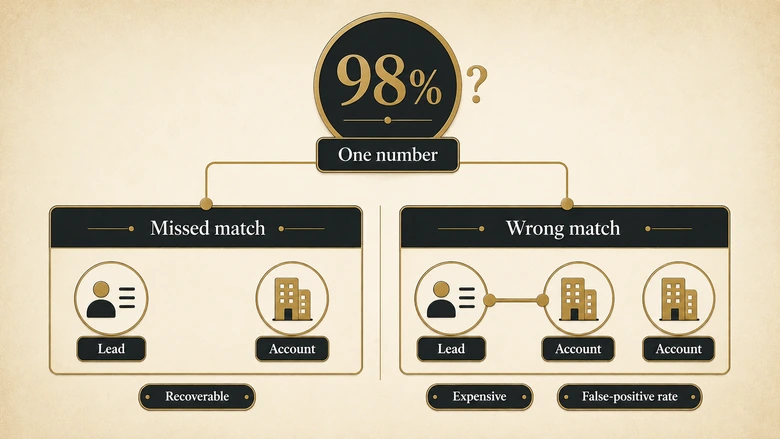
The deeper problem is that a single accuracy number cannot describe matching, because matching has two failure modes with very different costs. A missed match makes a known customer look net new: embarrassing, recoverable. A wrong match assigns a lead to the wrong account owner, writes activity onto another company’s timeline, and corrupts the account history that your account-based programmes read from. One number cannot carry both, and the one everybody omits is the false-positive rate.
How we evaluated these tools
We published the criteria before scoring anything, and we score published documentation rather than product capability. Every grade answers one question: on the check date, what could a buyer verify without talking to sales?
| Criterion | What we looked for | Why it decides purchases |
|---|---|---|
| Match-type coverage | Exact, email domain, normalised name, fuzzy, and hierarchy-aware matching named individually | A product that only does domain matching cannot help a lead with a freemail address |
| Account hierarchy | Parent-child and ultimate-parent resolution, and whether the tree is maintained | Enterprise leads arrive at subsidiaries and must roll to the buying entity |
| Multi-object matching | Lead to account, contact to account, and custom objects | Matching only leads leaves your contact base unresolved |
| Audit trail and reversibility | A readable record of why a match happened, and a documented way to undo one | The only defence against a false positive is finding and reversing it |
| False-positive controls | Configurable thresholds, exclusion rules, tie-breakers, review queues | Determines whether the tool guesses or asks |
| Write-back behaviour | What is written to which field, and what happens on re-match | Silent overwrites are how matching corrupts a CRM |
| Volume ceilings | Published limits on candidates, records or throughput | Ceilings surface at the worst possible moment |
| Published pricing | A real number on a public page | Price opacity is itself a procurement signal |
Three grades are used. Documented means the vendor publishes specifics. Partial means the capability is named without operational detail. Not documented means we found nothing public on the check date, which is a statement about disclosure and never a claim that the capability is missing.
The match-capability scorecard
Checked 2 August 2026 against each vendor’s own public pages. Chili Piper is excluded from the table because its documentation returned an automated-access block, and we do not grade what we could not read.
| Product | Match types | Hierarchy | Multi-object | Audit and reversal | False-positive controls | Volume ceiling | Public price |
|---|---|---|---|---|---|---|---|
| Salesforce native | Exact, Acronym, Edit Distance; names normalised; no domain branch | Not documented | Partial | Partial | Thresholds 70 and 80, fixed | 200 candidates, 100 with Shield | Needs Account Engagement Advanced or Premium |
| HubSpot native | Email domain only, freemail falls back to Website URL | Not documented | Partial | Not documented | Freemail excluded | Association limits by tier | Bundled in CRM tiers |
| LeanData | Deterministic plus AI fuzzy, any standard or custom field | Documented | Documented | Partial | Filters and tie-breakers | Not documented | Not documented |
| LeadAngel | Domain, clean name, fuzzy, geo expansion, M&A logic, industry, stock code | Partial | Documented | Not documented | Adjustable confidence, always and never rules | Not documented | Contact Sales |
| Traction Complete | Not documented | Documented | Partial | Not documented | Not documented | Not documented | Not documented |
| ZoomInfo Operations | Hierarchies and domain intelligence, no detail | Partial | Not documented | Not documented | Not documented | Not documented | Contact sales |
| Insycle | Exact and similar, one-character tolerance | Not documented | Documented | Documented | Selection rules, create-new toggle | Not documented | Not documented |
| Syncari | Configurable rules, types unspecified | Partial | Partial | Not documented | Field-level winning criteria | Not documented | Not documented |
| RevenueHero | Ten fuzzy parameters listed, mechanics absent | Not documented | Not documented | Not documented | Not documented | Not documented | Published, on-page and ungated (from $20 per user per month, as of Q3 2026) |
Read the columns rather than the rows. Nine products, and the audit-and-reversal column contains exactly one Documented grade. The volume-ceiling column contains none outside the two native platforms. Not one publishes a false-positive rate. These are the columns that decide whether a bad match can be found and undone, and they are the emptiest part of the category.
Native CRM matching, and when it is genuinely enough
Salesforce standard matching rule for leads on accounts
Best for teams whose leads arrive with firmographic data already attached, typically from a data provider or an enriched form. It runs inside the platform with no integration, normalises company names sensibly, and costs nothing beyond the Account Engagement tier that activates it. It fails on bare web-form leads, on non-Latin company names, and anywhere the answer depends on hierarchy. Full specification in the Salesforce documentation.
HubSpot automatic association
Best for teams working entirely inside HubSpot whose leads use corporate email addresses. Setup is a single toggle and the domain logic is reliable within its scope. It has no company-name matching, no fuzzy layer, no hierarchy, and it creates a separate company per subdomain. HubSpot’s association documentation states the limits plainly, which is more than most paid products manage.
Salesforce-native matching specialists
LeanData
Best for enterprise Salesforce teams whose matching decisions must feed routing in one flow. LeanData documents deterministic field comparison alongside AI fuzzy logic, any standard or custom field as a match input, parent and ultimate-parent matching, segment-aware logic, and cross-object expansion to contacts and opportunities. It writes account lookups and copies attributes onto the lead as part of the same flow.
Its strongest documented feature is explanation. LeanData states it “provides clear, human readable summaries that explain why a match occurred”, and names transparency as something buyers should demand: “admins should be able to see why a match occurred”. We agree, which is why it is a scored criterion here. No pricing and no accuracy figure are published.
Traction Complete
Best for organisations whose real problem is the account hierarchy rather than the match itself. Its hierarchy product builds the corporate family as a native Salesforce structure on a dedicated object, supports multiple saved views such as legal, partner and go-to-market, and maintains parent-child links as company structures change. The company publishes a candid list of native hierarchy limits, including that roll-up summary fields do not aggregate across a hierarchy and that custom Apex validation risks CPU time limits under load.
Matching mechanics themselves are thinly documented, which is why the match-types column is empty. Buy this for hierarchy, and ask separately about matching.
LeadAngel
Best for teams whose failures cluster in edge cases, and the only product here documenting match types specific enough to evaluate: domain matching, clean and exact name matching, geo expansion, M&A logic, industry-based rules, stock-code matching and fuzzy matching across spelling variations, abbreviations, whitespace and suffixes. It also documents adjustable match confidence, always-match and never-match overrides, tie-breakers, and a view of alternative probable matches, which is the closest thing in this category to a review queue.
The accuracy marketing is the weak point, not the product. Both pricing tiers say Contact Sales, with the note that “prices are for planning purposes only”.
Cross-CRM and data-platform matching
Insycle
Best for teams who want to see the outcome before committing it. Insycle documents exact matching and similar matching with a one-character tolerance, multi-field and related match fields, and selection rules when several accounts qualify. It is the only product reviewed that documents a genuine preview: a CSV report of every intended change before anything is written, and per-record result columns showing Added, Failed or Unmodified with an explanatory message.
That is the audit trail everyone else describes and few implement. No hierarchy support and no volume limits are documented.
ZoomInfo Operations
Best for teams whose matching problem is really an identity and enrichment problem. The product page documents matching “using company hierarchies and domain intelligence” and stops there. The underlying data asset is the reason to buy it; the matching specification is not published, and pricing is contact-sales.
Syncari
Best for teams treating matching as one step in a wider data-synchronisation pipeline. It documents configurable match rules covering parent-child hierarchies and field-level winning-record criteria, without specifying which match types are available. Evaluate it as data infrastructure rather than as a matching engine.
Match your failure mode to a product
Diagnose before you shortlist. Run the test set below, find which class of case breaks, then use this table.
| The failure you have | What to demand in the demo | Where to look |
|---|---|---|
| Web-form leads never match, though the account exists | Email-domain matching with a documented freemail exclusion list | Any specialist; native Salesforce will not do this |
| Leads match the subsidiary, revenue reports to the parent | Ultimate-parent resolution and a maintained hierarchy object | Traction Complete, LeanData |
| Wrong matches reach reps and nobody notices for weeks | A per-record reason log and a documented reversal path | Insycle, then LeanData for match explanations |
| Non-Latin company names fail entirely | A named transliteration or normalisation step, tested live | Ask directly; nobody documents this |
| Renamed and acquired companies sit as separate accounts | M&A and alias handling with a maintained alias source | LeadAngel, ZoomInfo Operations |
| Contacts are unresolved even though leads match | Multi-object matching across contact and custom objects | LeanData, LeadAngel, Insycle |
Measure your own match rate
Every number above describes what vendors publish. This one describes your org, and it is the only figure that should decide a purchase.
The IVRIS Lead-to-Account Match Test Set is 59 lead-and-account pairs across the eight classes where matching fails: legal suffixes, trade names and acronyms, subsidiaries, punctuation and diacritics, non-Latin transliteration, free email domains, rebrands and acquisitions, and homographs where two unrelated companies share a name. Every case carries an expected verdict, which is the denominator the category is missing.
| Failure class | Cases | What it exposes |
|---|---|---|
| Legal suffix and entity form | 8 | Whether the suffix list reaches past Inc and Corp to GmbH, B.V., Pty Ltd and Aktiengesellschaft |
| Trade name, DBA and acronym | 7 | Brand against registered entity, and initialisms with no shared characters |
| Subsidiary and parent-child | 8 | Whether a hierarchy exists at all, and whether the tool decides policy silently |
| Punctuation and diacritics | 7 | Curly apostrophes, ampersands, double spaces, accented characters |
| Non-Latin transliteration | 6 | Cyrillic, Japanese, Korean and Han names against Latin account records |
| Free email domains | 7 | Whether freemail leads are excluded, queued, or matched to whatever fits |
| Rebrand and acquisition | 8 | Alias handling for renames such as Twitter to X Corp and Square to Block |
| Homographs | 8 | False-positive traps where two unrelated companies share a name |
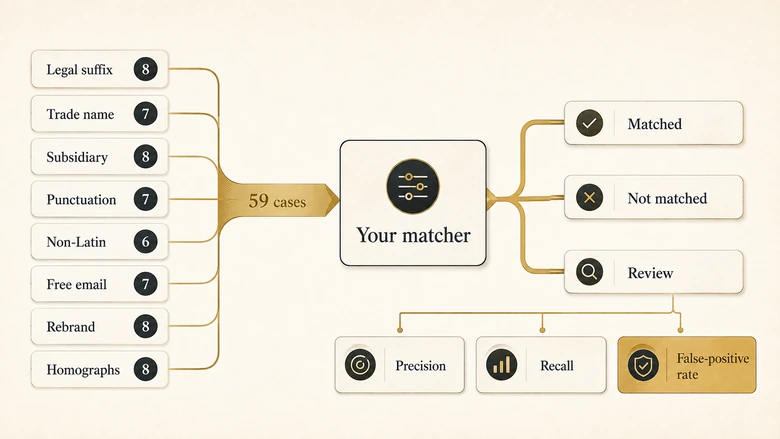
Load the accounts into a sandbox, load the leads, run your matcher exactly as configured in production, and record what it did. The workbook computes precision, recall and, most importantly, your false-positive rate.
Verdicts come in three kinds. MATCH cases any correct matcher should link. NO-MATCH cases must never be linked, and include deliberate traps such as Delta Air Lines against Delta Faucet, and Siemens Energy against Siemens AG, which was spun off in 2020 and is a separate listed company. REVIEW cases are genuinely policy-dependent, usually a subsidiary against its parent, and the correct behaviour is to surface the case rather than decide it silently. Scoring those separately produces a figure no vendor reports: how often the tool made a hierarchy policy decision on your behalf without telling you.
PRO TIP
Fifty-nine adversarial cases is a diagnostic, not a sample of your lead flow. It over-represents hard cases on purpose, so your production match rate will be higher than your score here. Use it to find which class breaks, then measure that class against your real volume. Pair it with a lead routing audit if the downstream assignment is also suspect.
What it costs, and what the feature tables leave out
Six of the nine graded products publish no price. Two name tiers without numbers, and only RevenueHero publishes a full ungated price list. The pattern we found across routing tools repeats here: the products that publish prices tend to be the cheaper ones, and opacity correlates with enterprise positioning rather than with capability.
Three things the comparison tables in this category never carry, and all three cost real money.
Reversal. When a match is wrong, what undoes it? Does the account lookup clear, does copied firmographic data revert, does the activity written to the wrong account timeline get removed? Only Insycle documents a preview step that prevents the problem. Nobody documents the cure.
Review-queue economics. A tool tuned to avoid false positives sends more cases to a human. Ask what share of leads landed in review at the configured threshold for a customer of your size and data quality. That headcount is part of the price.
Re-match behaviour. Leads get enriched and edited after creation. Does the product re-evaluate, and if the answer changes, does it overwrite the existing link silently? Silent overwrites are how a matching engine quietly rewrites account history.
Also ranking for this keyword
Two of the top results are review aggregators, G2 and TrustRadius. They rank on category-page authority and user ratings, and are useful for reading unfiltered complaints. They do not evaluate matching capability, because star ratings measure satisfaction rather than accuracy.
ZoomInfo’s Pipeline blog runs the most thorough editorial comparison in this SERP, roughly 6,800 words across ten platforms with a capability table, last updated in July 2026. It is genuinely useful and worth reading, with the caveat that it is published by a vendor listed in its own comparison, and it does not cover audit trail, reversibility, false-positive controls or volume ceilings.
Kubaru and Guideflow both rank with lead-routing lists that treat matching as one feature among many, which is a reasonable framing for a routing buyer and the wrong framing if matching is your actual problem.
Download the match test set
The IVRIS Lead-to-Account Match Test Set v1.0 ships as a CSV of the 59 cases and an Excel workbook containing the same cases, a scoring sheet that computes precision, recall and false-positive rate from your results, and the full capability scorecard with evidence sources and check dates.
It is free, ungated, and reusable with attribution. If you want the measurement run against your own org rather than done in-house, talk to us.
Suggested citation. IVRIS. “Best Lead-to-Account Matching Software.” Updated August 2026. Analysis based on published vendor documentation. Original data sources are listed within this article.
DOWNLOAD THE TEST SET
Measure your own match rate rather than trusting a vendor figure: IVRIS Lead-to-Account Match Test Set v1.0 (XLSX) or CSV. Fifty-nine adversarial cases across eight failure classes, each with an expected verdict. Free, ungated, reusable with attribution.
Suggested citation: IVRIS Tech. “Lead-to-Account Match Test Set.” ivristech.com, 2026. https://ivristech.com/best-lead-to-account-matching-software/
Frequently Asked Questions
Yes, but it is not included by default. The standard matching rule for leads on accounts activates with Account Engagement Advanced or Premium and populates the Matched Leads component. Its matching equation requires a street, city, ZIP, phone or website value alongside the company name, so it cannot match a typical web-form lead.
Not through the standard matching rule, which contains no email-domain clause. Teams add it themselves with a formula field that strips the domain from the email address and a record-triggered Flow that compares it to a domain field on the account. That gap is the main reason specialist matching products exist.
There is no credible published benchmark, because no vendor discloses how its rate was measured. Rather than chasing a number, measure two things in your own org: the share of leads matched, and the share of matches that were wrong. The second matters more, and almost nobody tracks it.
No. Matching links a lead to an account it belongs to, one-to-many and non-destructive, and the consequence is ownership. Deduplication collapses two records describing the same thing into one, which is destructive and needs merge and survivorship rules. Many vendors sell both, so confirm which one a demo is showing you.
Give every vendor the same fixed set of hard cases and compare the outputs. Use the free test set on this page, load it into a sandbox, and score each product on identical data. A demo built from a vendor’s own examples tells you the tool works on cases it already handles.
Methodology, sources and revision history
How this was compiled. Every grade comes from the vendor’s own public documentation, retrieved and read on 2 August 2026. Where a page could not be retrieved, the product is marked ungraded rather than scored from secondary sources. No vendor was contacted, no product was given preferential placement, and IVRIS has no commercial relationship with any product named here.
Primary sources. Salesforce Help, Standard Matching Rule for Leads on Accounts; Salesforce Help, Things to Know Before You Customize Matching Rules; Salesforce Help, Matching Algorithms Used with Matching Methods; HubSpot Knowledge Base, automatically create and associate companies with contacts; and the current public product and pricing pages of LeanData, LeadAngel, Traction Complete, ZoomInfo Operations, Insycle, Syncari and RevenueHero.
Known gaps. Chili Piper’s documentation returned an automated-access block and is ungraded. Openprise could not be retrieved and is excluded rather than guessed at. Grades describe disclosure on the check date, not product capability, and a Not documented grade is an invitation to correct us.
Update triggers. Rechecked quarterly, and immediately on any pricing or packaging change, acquisition or rebrand, or a vendor correction supported by primary evidence.
Revision history. 2 August 2026, first publication with test set v1.0. Corrections supported by an official public source are welcome and are logged here rather than negotiated.