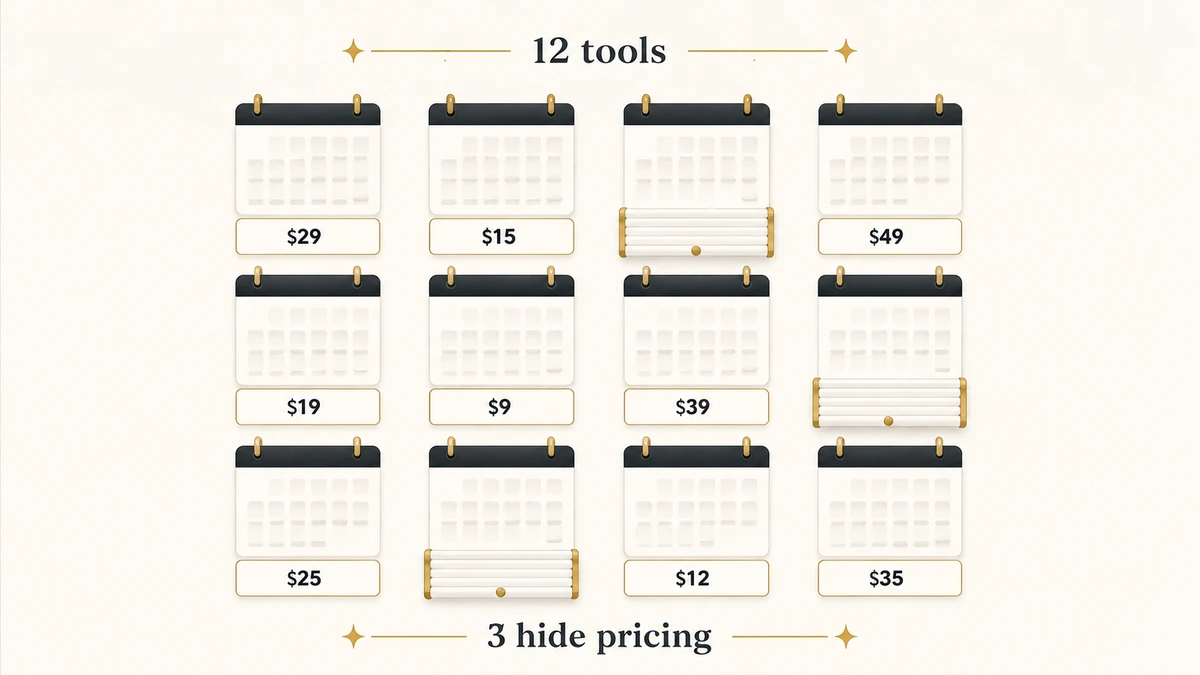
Search meeting scheduling software and Google hands you Calendly’s homepage, Doodle’s homepage, When2meet, and two listicles. One of those listicles was written by the founder of a scheduling company that ranks itself first. The other picks ten tools without naming a single one a B2B revenue team would deploy.
That is the whole problem with this category. The pages ranking for it are either vendors describing themselves or general-purpose roundups aimed at freelancers booking discovery calls. Neither answers the question a revenue operations lead actually has, which is not “which booking link is prettiest” but “at what point does my calendar tool need to know who owns this account.”
So we did the work differently. We published the criteria before we scored anything, coded every cell by whether a current public vendor source supports it, and left the cells we could not verify visibly empty rather than filling them with guesses. Twelve products, ten criteria, every price re-checked on the vendor’s own pricing page on 1 August 2026. Here is what that turned up, including one finding that contradicts almost every article written about this category.
Direct answer — What is the best meeting scheduling software for B2B revenue teams?
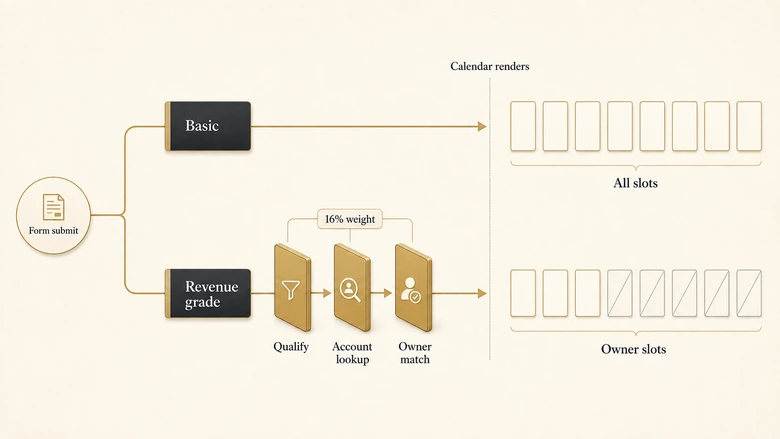
Meeting scheduling software lets prospects book time directly on a rep’s calendar instead of trading emails. For B2B revenue teams the deciding feature is not the booking page but qualification and ownership: whether the tool can screen a lead and check CRM ownership before it offers a slot. Chili Piper, RevenueHero and Calendly Teams do this. Microsoft Bookings, Google appointment schedules and SavvyCal do not, and cost far less for that reason.
Key Takeaways
- The real dividing line is qualification before a slot is offered. Tools that show the calendar first cannot un-book an unqualified meeting.
- Chili Piper now publishes full pricing, including a 200-seat minimum on ChiliCal that no roundup mentions. LeanData, Salesforce Scheduler and Zoho Bookings publish none.
- Three of twelve vendors do not publish a scheduling price at all, and two of those used to.
- Native CRM scheduling is genuinely enough when routing rules are stable and one rep owns each account. Most teams buying a dedicated scheduler have a routing problem, not a calendar problem.
- If the tool you need has to resolve conflicting ownership across objects, you are shopping for a router, not a scheduler.
What counts as meeting scheduling software
Meeting scheduling software is a tool that publishes a person’s or team’s real-time availability as a bookable page, so an invitee picks a slot and the event writes itself into both calendars. That is the floor. Every product in this comparison clears it, including the free ones.
What separates a $10 seat from a $15,000 annual contract is everything that happens in the two seconds before the calendar renders. A basic scheduler shows all open slots to anyone with the link. A revenue-grade scheduler first asks who this person is, checks whether they already exist in the CRM, decides which rep should own the conversation, and only then draws a calendar containing that rep’s availability.
Where scheduling ends and routing begins
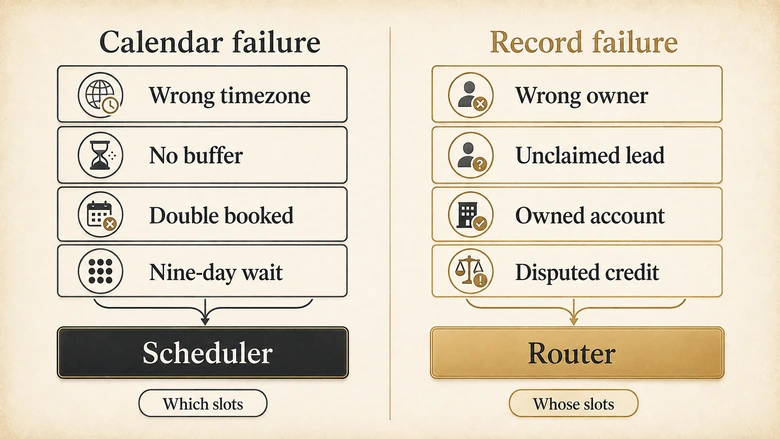
Scheduling answers “when.” Routing answers “who.” The categories blur because the two most visible products in this space, Chili Piper and RevenueHero, do both, and because Calendly bolted routing onto a scheduler rather than the reverse.
A workable test: if your rules are about calendars, you have a scheduling problem. If your rules are about records, you have a routing problem. “Offer slots in the prospect’s timezone, not mine” is scheduling. “This inbound demo request matches an account already owned by an enterprise rep in EMEA, so it must not go to the SMB round-robin” is routing that happens to end in a booking. We keep those separate deliberately, and the boundary between them gets its own section further down, because getting it wrong is the most expensive mistake in this category.
Why every list ranking for this term is written by a vendor
This is not a complaint about competitors. It is a structural fact about the SERP that changes how you should read every other article you find on this keyword, including the ones ranking above this one.
The highest-ranking editorial result for “meeting scheduling software” is an 8,500-word piece titled “8 Best Meeting Scheduler Software in 2026 (All Tested).” It ranks Zencal first. It was written by Zencal’s founder and CEO, which the page discloses at the bottom. The disclosure is honest. The ranking is still the author’s own product in position one.
The second is RevenueHero’s “Best Meeting Scheduling Software for Sales Teams in 2026,” which ranks RevenueHero first, devotes roughly a sixth of its body to RevenueHero, and carries a byline with no stated credentials. It also carries a 2026 title on a page published in April 2025, and its pricing figures for all ten tools have no check date attached.
The third is Zapier’s roundup, which is genuinely independent and genuinely tested. Its ten picks are Calendly, Calendar, SavvyCal, zcal, Clara, Reclaim, Sidekick, Cal.com, Zeeg and lemcal. Not one of them routes an inbound lead to an account owner. It is a good article aimed at somebody who is not you.
IMPORTANT
Vendor conversion claims in this category are almost never sourced. Chili Piper’s Form Concierge page advertises “200% more inbound leads” and a “92% average show rate” with no methodology, sample or date. Treat every such figure as marketing until a denominator appears.
When a native CRM scheduler is genuinely enough
Most teams shopping for a dedicated scheduler already own one. Before spending, check whether the tool in your CRM clears your actual requirement, because for a meaningful number of teams it does.
Native scheduling is enough when three things are true at once: one rep clearly owns each account, your routing rules change less than once a quarter, and inbound volume is low enough that a misrouted meeting is an annoyance rather than a leak. Under those conditions the incremental value of a dedicated scheduler is a nicer booking page, and a nicer booking page does not justify a five-figure contract.
HubSpot includes personal and team meeting links with round-robin from the Starter tier. Lead form routing, the part that decides who gets the meeting, requires Professional at $100 per seat per month billed annually plus a $1,500 one-time onboarding fee. That gap between Starter and Professional is where most HubSpot teams discover their scheduling problem is a licensing problem.
Salesforce Scheduler is an add-on available only on Enterprise and Unlimited editions, with published capacity limits of 12,000 service appointments per year per organisation and 350 to 400 appointments per month per license depending on edition. Salesforce does not publish a price for it.
Microsoft Bookings is included at no extra cost in Microsoft 365 Business Basic, Standard and Premium, plus E1, E3, E5 and several frontline and government plans. It stores everything in a shared Exchange Online mailbox and inherits Microsoft 365 compliance policies, which is the cleanest governance story of any product here. Microsoft’s own documentation does not describe round-robin distribution or CRM write-back, because it is not built for that job.
Google Calendar appointment schedules require Business Standard or above for the premium features. Google documents buffer times, custom questions, maximum bookings per day, conflict detection across multiple calendars, email reminders, booking-email verification and Stripe payments. It documents no pooled distribution, no CRM write-back and no qualification logic.
How we evaluated these tools
The criteria and weights below were fixed before any product was scored, and they are published here so you can disagree with them precisely rather than vaguely.
Evidence standard. A criterion is credited only where the vendor’s own current public documentation, pricing page or product page supports it. Review-platform posts, third-party pricing aggregators and competitor comparison pages were read for context and never used as proof that a feature exists. Where a competitor’s blog was the only available source for a vendor’s capability, that capability was left uncredited.
Three-state coding. Every cell is Y, P or NV. Y means a current official public source directly supports it. P means partial, or edition-dependent, or documented in outline without the detail the criterion asks for. NV means not verified publicly. It does not mean the feature is absent. Several products almost certainly do things their public documentation never states, and a sales engineer will happily show you. NV is a statement about the vendor’s published evidence, not about the software.
Evidence coverage % = Σ(criterion weight × factor) ÷ 100, where Y = 1.0, P = 0.5, NV = 0The ten criteria and their weights: qualification gating before a slot is offered 16%, availability and timezone handling 14%, reschedule and no-show handling 13%, CRM-native write-back 13%, round-robin and weighted and capacity rules 12%, ownership-conflict behaviour 10%, routing depth as it affects scheduling 8%, buyer-side booking experience 6%, security and governance 5%, pricing transparency 3%.
Two of those deserve a word of justification. Reschedule and no-show handling earns 13% because a booked meeting that never happens is not a conversion, and the published no-show figures move enormously depending on what the denominator counts, which makes the tool’s own handling of cancellations the part you can actually control. Ownership-conflict behaviour earns 10% despite being the criterion vendors document least, because it is the one that generates internal disputes rather than merely lost meetings.
The weights are scheduling-first on purpose. Routing depth sits at only 8% here because a full routing evaluation, weighted the other way round, already exists as a separate piece of work and duplicating it would produce two pages competing to answer the same question badly.
What the coverage percentage does not measure
It does not measure product quality, reliability, support, speed or whether your team will like using it. A vendor with meticulous documentation and a mediocre product will outscore a strong product with a thin website. That is a known and accepted property of the method, and it is why the number is called evidence coverage rather than a rating.
What we did not do. We did not run hands-on trials, measure booking-page load times, test failover when a rep’s calendar API is down, audit security posture, or talk to customers. This page therefore carries no star ratings and no “winner,” because we did not do the work that would justify either.
The meeting scheduling scorecard
Eleven scored products, one unassessed. Grouped by category, and deliberately not ranked across categories, because a $10 personal scheduler and a $15,000 platform are not competing for the same budget.
| Product | Category | Qualify before slot | Round-robin | CRM write-back | Ownership conflict | No-show handling | Pricing published | Evidence coverage |
|---|---|---|---|---|---|---|---|---|
| Chili Piper | Dedicated B2B | Y | Y | Y | Y | Y | Y | 85.0% |
| RevenueHero | Dedicated B2B | P | Y | Y | Y | P | Y | 73.0% |
| Calendly | Dedicated B2B | Y | P | Y | Y | P | P | 71.0% |
| OnceHub | Dedicated B2B | Y | Y | Y | NV | P | P | 69.5% |
| LeanData BookIt | Dedicated B2B | Not assessed — public documentation unreachable at check date | — | |||||
| HubSpot Meetings | CRM-native | P | P | Y | P | P | Y | 55.5% |
| Salesforce Scheduler | CRM-native | NV | P | P | NV | NV | NV | 25.0% |
| Microsoft Bookings | CRM-native | NV | NV | NV | NV | P | P | 23.0% |
| Cal.com | Independent | P | Y | P | NV | P | P | 51.0% |
| Zoho Bookings | Independent | P | Y | P | NV | P | NV | 47.0% |
| Google appointment schedules | Independent | P | NV | NV | NV | P | P | 33.0% |
| SavvyCal | Independent | NV | Y | NV | NV | P | Y | 31.5% |
Comparison based on publicly verifiable official vendor documentation and pricing pages, checked 1 August 2026. NV means not verified publicly, not absent. The table shows six of ten scored criteria for width; coverage percentages are IVRIS calculations across all ten using the formula above, and measure evidence transparency rather than product quality.
Check the primary sources yourself rather than taking the table on trust:
🎯 RevenueHero pricing
🔧 Calendly pricing
🔧 OnceHub pricing
🔧 Cal.com pricing
🔧 SavvyCal pricing
📊 HubSpot Sales Hub pricing
🔧 Zoho Bookings pricing
Best dedicated B2B schedulers
These four are built for inbound revenue motions, where the meeting is the conversion event and the wrong owner on the invite costs real money.
Chili Piper: best for form-to-calendar at scale
85.0% evidence coverage, high confidence. Chili Piper documents the full chain this category is supposed to solve. Its Form Concierge product page describes real-time qualification before slots are offered, routing on geography, company size, industry and custom CRM fields, account-owner matching against existing CRM records, multi-round-robin, automatic write-back to Salesforce and HubSpot, and tracking of no-shows and cancellations with rescheduling automation.
Its router documentation is unusually specific about the case that breaks other tools: when an ownership rule matches, the assigned owner is selected by default and can be overridden to a round-robin or a named individual. That is the ownership-conflict behaviour most vendors leave undescribed.
The pricing surprise is that there is no surprise. Chili Piper publishes everything: Routing & Scheduling at $1,250 per month, or $15,000 per year, including 15 seats, with additional seats at $45 per seat per month. Experiences runs $3,500 per month, or $42,000 per year, including 30 seats at $50 per additional seat. ChiliCal standalone is $12 per user per month with a 200-seat minimum. Annual billing only, with stackable multi-year discounts of 15% to 40% (all as of Q3 2026).
That 200-seat floor is the number to notice. It means the cheap-looking ChiliCal line item starts at roughly $28,800 a year, which reframes it from “affordable Calendly alternative” to “enterprise commitment.” No roundup we found mentions it.
Not publicly verified: granular timezone and capacity-rule behaviour, and security certifications, are not described on the pages we could reach.
RevenueHero: best for transparent entry pricing
73.0% evidence coverage, high confidence. RevenueHero publishes the most legible price list in the category, on-page and ungated. Inbound Essentials is a $79 monthly platform fee plus $25 per user per month on annual billing, rising to $99 plus $35 on monthly billing. Inbound Enterprise is $79 plus $35 annually, or $99 plus $45 monthly. Outbound Essentials is $20 per user per month annually, and a Lite tier sits at $15 (all as of Q3 2026).
The tier boundary is where the buying decision lives. Essentials covers instant scheduling, web-form booking, round-robin, domain-based matching and native HubSpot and Salesforce integration. Enterprise adds fuzzy matching, collective round-robin, custom property matching, dynamic scheduling, webhooks, white-labelling and Okta SSO. If your accounts are cleanly identified by email domain, Essentials is genuinely sufficient. If you need fuzzy matching because your CRM contains “Acme”, “Acme Inc” and “ACME Corporation” as separate accounts, you are buying Enterprise, and you should read that as a data-quality signal rather than a feature win.
Not publicly verified: no-show recovery behaviour and reschedule handling are not documented on the pricing page, which was the only source we could reach.
Calendly: best for teams already standardised on Calendly
71.0% evidence coverage, high confidence. Calendly is the default answer to this keyword and, for a large share of teams, a correct one. Its Routing documentation describes qualification through Calendly, HubSpot, Marketo or Pardot forms before booking, real-time lookup against Salesforce and HubSpot to match known leads to their assigned account owners, enrichment-driven routing via Clearbit or ZoomInfo, and filtering on Salesforce fields such as deal stage.
The catch is the plan wall. Routing forms and round-robin both require Teams at $16 per seat per month on annual billing. Standard at $10 gets HubSpot integration and workflows but no routing and no round-robin. Enterprise “starts at $15,000 per year” and is otherwise quoted (all as of Q3 2026). Calendly is the only vendor here that publishes a floor for enterprise without publishing the structure above it, which is why its pricing-transparency cell is P rather than Y.
If you are searching for Calendly alternatives because routing sits behind the Teams tier, price the upgrade before you price a migration. Moving fifty seats from Standard to Teams costs $3,600 a year more. Moving them to a dedicated platform starts around four times that.
Not publicly verified: weighted distribution and capacity caps, and security and governance controls, are not described in the sources we could reach.
OnceHub: best for buying routing without a platform contract
69.5% evidence coverage, high confidence. OnceHub is the most underrated product in this comparison and the only one that sells routing and qualification at a per-seat price with no platform fee. Its tiers are Basic free, Schedule at $10 per seat per month, Route at $19, and Engage at $39, with Enterprise quoted (all as of Q3 2026).
Salesforce and HubSpot integration start at Schedule. Round-robin distribution, team pooled availability, routing forms and qualification forms all appear together at Route. That means a twenty-person team gets documented qualification-before-booking plus CRM write-back for $4,560 a year, against $15,000 as Chili Piper’s floor. For mid-market teams whose ownership rules are simple, that is the value pick of the category.
Not publicly verified: ownership-conflict behaviour when the booker is not the record owner is not documented, which is the single gap that would push a complex team toward Chili Piper.
LeanData BookIt: not assessed
LeanData’s site returned HTTP 403 to every automated check we ran on 1 August 2026, including the BookIt product page and the LeanData blog post that ranks first for “enterprise scheduling software.” We could not read a single primary LeanData source, so BookIt carries no score and no coded cells.
We are stating that rather than scoring it from competitor write-ups, because a comparison that grades one vendor on rivals’ descriptions of it is not a comparison. LeanData also no longer publishes pricing, having previously done so. If you are evaluating BookIt, take the criteria list from this page into the vendor call and make them answer it on the record.
Best independent and open-source schedulers
These four are competent schedulers that mostly do not attempt revenue routing, and are priced accordingly. Reading them as cheap versions of the platforms above is the wrong frame. Three of them have deliberately declined to compete on routing, and one of them offers something no platform vendor here does.
Cal.com: best for teams that need to own the data path
51.0% evidence coverage, medium confidence. Cal.com is the open-source entry, self-hostable from its public repository under a source-available licence, with Teams at $12 per user per month and Organizations at $28 on annual billing (as of Q3 2026). Round-robin and routing forms both arrive at the Teams tier, and Salesforce and HubSpot integrations are listed from the free tier, which is unusually generous.
Self-hosting is the genuine differentiator and the reason to shortlist it. Every other product here requires that your prospects’ names, emails and meeting metadata pass through a third-party SaaS. For teams in regulated sectors, or with a data-residency requirement their scheduler currently violates, running the booking layer on your own infrastructure resolves a compliance problem that no amount of vendor SOC 2 paperwork fully closes.
Not publicly verified: ownership-conflict behaviour, and the depth of the CRM integrations beyond their existence, are not documented in the sources we could reach.
Zoho Bookings: best for teams already inside Zoho
47.0% evidence coverage, medium confidence. Zoho Bookings documents round-robin distribution from its entry Basic tier, which is earlier than most, plus routing forms and workflow automation over email and SMS. CRM write-back covers Zoho CRM and Bigin.
It lists no Salesforce or HubSpot integration, which decides the matter: this is a fit for organisations standardised on Zoho and nobody else. It has also stopped publishing prices, showing contact-sales on Basic, Premium and Flex, with only the free tier priced. A product whose historic advantage was single-digit per-user pricing removing that pricing from public view is a meaningful signal.
Not publicly verified: current pricing at any tier, ownership-conflict behaviour, and security and governance controls.
SavvyCal: best for the invitee experience
31.5% evidence coverage, high confidence. SavvyCal has the best-designed booking experience in this comparison and is the clearest of any vendor here about what it is not. Basic is $10 and Premium $17 per user per month, both including round-robin and team scheduling, and neither including CRM integration or any routing or qualification capability (as of Q3 2026).
Its low score is a scoring artefact worth explaining, because it is the clearest illustration of what these numbers do and do not mean. SavvyCal loses points on criteria it has deliberately chosen not to build. It is not a weak product. It is a strong product being measured against a rubric written for a different buyer, and if your requirement is a personal or small-team scheduler that invitees actually enjoy using, its 31.5% should not put you off.
Not publicly verified: nothing material. SavvyCal’s documentation is unusually candid about scope.
Google Calendar appointment schedules: best for solo Workspace users
33.0% evidence coverage, high confidence. Google documents buffer times, preferred start and end dates, custom questions, maximum bookings per day, conflict detection across multiple calendars, automated email reminders, booking-email verification to reduce spam bookings, and Stripe-connected payments. Premium features require Workspace Business Standard or above, with a single limited booking page on personal accounts.
What it does not document is pooled distribution, CRM write-back, or any logic that decides who receives a booking. For an individual already paying for Workspace, it is free and sufficient. For a team, the absence of pooled availability means every rep hands out their own link, which is the condition the rest of this page exists to fix.
Not publicly verified: round-robin, CRM write-back and ownership handling are not described, and we read that as scope rather than omission.
Availability and timezone handling, the criterion nobody demos
Availability handling carries the second-heaviest weight here at 14%, and it is the criterion buyers most often discover only after signing. Vendor demos use a clean single-rep calendar in one timezone. Production does not look like that.
Four behaviours separate the products once real calendars are attached. Whose timezone renders decides whether a prospect in Singapore sees your Chicago rep’s 9am as a reasonable evening slot or an impossible one. Buffer and daily-cap enforcement decides whether a rep with eight consecutive demos can be booked for a ninth. Multi-calendar conflict detection decides whether a rep’s personal calendar blocks a work slot, which matters enormously to the reps and not at all to the person buying the tool. Pooled availability decides whether the calendar shown is one rep’s or the team’s union.
Only the last of those four is reliably documented across vendors, which is why most products here score P rather than Y on this criterion. Google documents buffers, caps and cross-calendar conflict detection explicitly, and scores Y as a result, despite being one of the least capable products here on every revenue criterion. That inversion is the method working correctly: it is rewarding published clarity, not capability.
PRO TIP
Before any demo, ask the vendor to book a meeting into a rep calendar that already has a personal appointment, a declined invite and a tentative hold on the same afternoon. What the booking page shows in that state is the product you are actually buying.
Also ranking for this keyword, and why they sit outside the matrix
Several products rank on page one for this term and are not scored above, because they are solving a different problem and grading them on revenue criteria would be a category error.
Doodle and When2meet are group-polling tools. They find a time that works across many people’s calendars, which is a genuinely different job from publishing one person’s availability. Reclaim and Clockwise are calendar-defragmentation tools that protect focus time and move flexible internal meetings. They do not exist to book strangers. Zencal is a scheduler in the SavvyCal mould with a strong content operation behind it.
One more boundary worth drawing. Everything scored above assumes the meeting is inbound, meaning the prospect arrived and asked. Outbound motions book meetings too, but the tool doing the work there is a sequencer that happens to embed a booking link, and it is bought against completely different criteria: deliverability, sequence logic, dialler quality and activity capture. Those products are surveyed separately in our breakdown of which sales automation tools do which job, and only two names appear on both lists.
If you arrived here from a search for the best scheduling system generally, and you are a two-person team booking discovery calls, one of these or a free tier is very likely the right answer, and the rest of this page is over-specified for you.
What meeting scheduling software actually costs
Every figure below was read off the vendor’s own pricing page on 1 August 2026. Where a cell says not published, that is the finding.
| Product | Entry paid tier | Routing/qualification tier | Enterprise | Source |
|---|---|---|---|---|
| Chili Piper | ChiliCal $12/user/mo, 200-seat min | $1,250/mo ($15,000/yr), 15 seats | Experiences $3,500/mo ($42,000/yr) | Pricing page |
| RevenueHero | Lite $15/user/mo | $79/mo + $25/user/mo (annual) | $79/mo + $35/user/mo (annual) | Pricing page |
| Calendly | Standard $10/seat/mo | Teams $16/seat/mo | From $15,000/yr, structure not published | Pricing page |
| OnceHub | Schedule $10/seat/mo | Route $19/seat/mo | Not published | Pricing page |
| HubSpot Sales Hub | Starter $20/seat/mo | Professional $100/seat/mo + $1,500 onboarding | $150/seat/mo + $3,500 onboarding | Pricing page |
| Cal.com | Teams $12/user/mo | Teams $12/user/mo | Custom | Pricing page |
| SavvyCal | Basic $10/user/mo | Not offered | Not offered | Pricing page |
| Microsoft Bookings | Included in M365 Business Basic+ | Not offered | Included in E1/E3/E5 | Microsoft Learn |
| Google appointment schedules | Workspace Business Standard+ | Not offered | Included in Enterprise editions | Google Workspace |
| Zoho Bookings | Not published | Not published | Not published | Pricing page |
| Salesforce Scheduler | Not published | Not published | Not published | Salesforce Help |
| LeanData BookIt | Not published | Not published | Not published | Site unreachable at check date |
All prices in the table above were read from each vendor’s own public pricing page on 1 August 2026 (as of Q3 2026). “Not published” means no dollar figure appeared on that vendor’s public pricing page at the check date, not that the product is unavailable. Seat minimums, onboarding fees and annual-only billing terms are stated where the vendor states them.
The vendors who publish prices are not the cheap ones
Conventional wisdom says transparent pricing signals a self-serve, low-cost product and opaque pricing signals enterprise. This category inverts that. The most expensive product here, Chili Piper at a $15,000 annual floor, publishes its full price structure including seat overages, minimums and multi-year discount tiers. Zoho Bookings, whose paid tiers historically ran in single-digit dollars per user, now publishes nothing.
Three of twelve vendors publish no scheduling price at all: LeanData, Salesforce Scheduler and Zoho Bookings. Two of those three used to. That is a movement away from transparency in a category where the loudest marketing claim is that booking should be frictionless.
PRO TIP
When a vendor will not publish a price, ask for the price at your seat count, the price at 1.5× your seat count, and the renewal uplift cap, in writing, in the same email. The spread between those three answers tells you more than the first number does.
Where scheduling and routing overlap
This is the section the rest of the internet skips, and it is where most bad purchases in this category are made.
A team notices that inbound demo requests are landing with the wrong rep, or sitting unclaimed, or getting double-booked against an owned account. Somebody proposes buying a better scheduler. But nothing in that list of symptoms is a calendar failure. They are all assignment failures that happen to become visible at the moment of booking, and a scheduler will only make the wrong assignment happen faster.
The distinction that matters: a scheduler decides which slots to show. A router decides whose slots they are. Every product in this comparison can show slots. Only Chili Piper, RevenueHero, Calendly Teams and OnceHub Route document deciding whose.
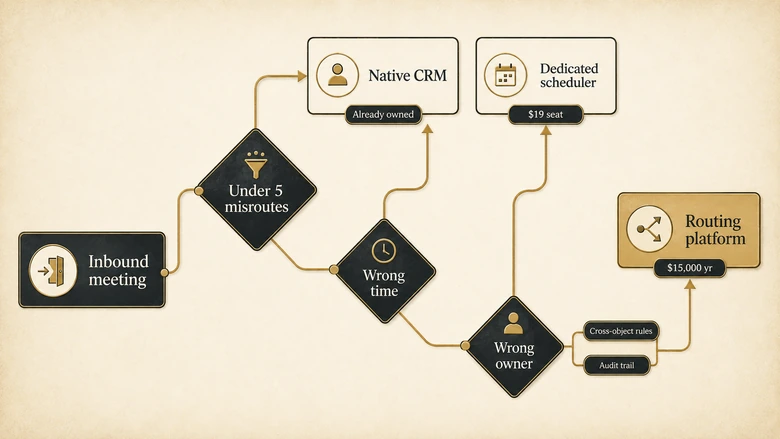
Three questions separate the cases cleanly. If you answer yes to any of them, you are shopping for a router that books meetings, not a scheduler that routes.
- Do you need to match an inbound lead to an existing account rather than a contact, including when the email domain does not match?
- Do your assignment rules need to consult more than one CRM object, for example account owner plus open-opportunity owner plus territory?
- Does a routing mistake need an audit trail because somebody will dispute the commission?
Those are routing requirements, and they are graded on routing-weighted criteria in our separate evaluation of how the specialist platforms handle matching, hierarchy and audit logging, where LeanData, Traction Complete and Distribution Engine are scored alongside the three names that appear on both lists. We do not restate those scores here, because the weightings differ and a number lifted between two rubrics means nothing.
How to shortlist without a vendor doing it for you
The scorecard narrows the field. This narrows it further, using your own data rather than anyone’s feature list.
Workflow · 2 hours
How to shortlist meeting scheduling software: a two-hour evidence-led pass
Replaces a month of demos with one afternoon of your own data, and produces a defensible shortlist of two or three products.
Count last quarter’s misrouted meetings
Pull every inbound meeting booked in the last 90 days and flag the ones reassigned, cancelled or disputed after booking. If the count is under five, stop here and keep your native scheduler.
Classify each failure as calendar or record
Sort the flagged meetings into wrong-time failures and wrong-owner failures. A majority of wrong-owner failures means your budget belongs in routing, not scheduling.
Price your incumbent’s next tier first
Calculate the annual cost of upgrading the tool you already own to the tier that includes routing. That figure is the budget any new vendor has to beat, not zero.
Test domain matching against your real CRM
Export 200 recent inbound emails and check what share resolve to the correct account on domain alone. Below roughly 80% means you need fuzzy matching, which changes the tier you must buy.
Send the criteria list before the demo
Email the ten criteria from this page and ask for a written Y, P or NV against each. Vendors who answer in writing are the shortlist; vendors who insist on a call first are not.
Price the renewal, not the first year
Ask for year-two and year-three pricing at your projected seat count, and check every seat minimum. A 200-seat floor turns a $12 line item into a five-figure commitment.
What the feature tables leave out
Three things decide whether a scheduling deployment works, and none of them appears in any comparison table including this one.
What happens when nobody is available. Every vendor shows you the happy path where a qualified lead sees three slots this week. Almost none document the fallback when the matched owner has no availability for nine days. The answer is either a longer wait, a silent reassignment or an empty calendar, and each of those has a very different revenue cost. Ask specifically.
Whether the meeting actually happens. Booking is not the outcome. A tool that books more meetings while holding a smaller share of them has made things worse, and no comparison table in this category records hold rate. Ask every vendor the same question: when an invitee cancels four hours out, does the slot reopen automatically, is the rep told, and does the record still count as a meeting in the dashboard they are selling you? The three answers are rarely consistent with each other.
What the booking rate was before you started. Teams routinely buy a scheduler without knowing their current lead-to-meeting rate, then cannot tell whether the tool worked. Establishing that baseline against conversion figures that are comparable across sources before the contract starts is the cheapest thing on this entire page, and once the meeting is held, the conversion problem moves downstream into the demo itself.
Download the scheduling scorecard
The full workbook behind this page is free, ungated and editable. No email wall, no form, no follow-up sequence.
It contains the ten criteria with their weights, the vendor-by-criterion scores with the Y, P or NV code and the source location for every cell, a source ledger with direct URLs and check dates, the decision tree as a worksheet, and a sheet of RFP questions phrased so a vendor has to answer them on the record rather than in a demo.
Change the weights. That is the point. If reschedule handling matters more to you than qualification gating, move the numbers and watch the ranking reorder. A scorecard you cannot argue with is marketing, not analysis. If you would rather have someone else run the evaluation and the implementation, that work is something we do.
DOWNLOAD THE SCORECARD
The full scorecard as an editable workbook: IVRIS Meeting Scheduling Vendor Scorecard v1.0 (XLSX). Editable criteria weights that recalculate coverage, every vendor score with its evidence location and check date, the published-pricing table, the native-versus-dedicated-versus-router decision tree, and one RFP question per criterion. No gate, no email wall.
Suggested citation: IVRIS Tech. “Meeting Scheduling Vendor Scorecard.” ivristech.com, 2026. https://ivristech.com/best-meeting-scheduling-software/
Frequently Asked Questions
There is no single best tool, because the category splits by job. For personal and small-team booking, SavvyCal and Cal.com score well on experience and price. For B2B revenue teams that must qualify and route before offering a slot, Chili Piper scored highest on published evidence at 85%, with RevenueHero and Calendly Teams close behind.
Calendly has a permanently free tier, but it excludes the features B2B teams need. Routing forms, round-robin distribution and Salesforce integration all require the Teams plan at $16 per seat per month on annual billing. The free tier suits one person booking one meeting type (as of Q3 2026).
Yes. Microsoft Bookings is included at no extra cost in Microsoft 365 Business Basic, Standard and Premium, plus E1, E3, E5 and several frontline plans. It offers personal and shared booking pages with Teams and Outlook integration. Microsoft’s documentation does not describe round-robin distribution or CRM write-back.
Yes. Google Calendar appointment schedules are available on personal accounts with limits, and on Workspace Business Standard and above for the premium features. Google documents buffer times, custom questions, daily booking caps, cross-calendar conflict detection, reminders and Stripe payments. It documents no pooled distribution or CRM integration.
OnceHub Route at $19 per seat per month is the closest like-for-like upgrade, adding qualification forms and round-robin without a platform fee. RevenueHero starts at $79 per month plus $25 per user annually. Chili Piper is the enterprise option at a $15,000 annual floor (as of Q3 2026).
Methodology, sources and revision history
Twelve products were selected from the live SERP for the target keyword, its mapped commercial variants, and the vendor sets used by the three highest-ranking editorial competitors. Eleven were scored against ten weighted criteria fixed before scoring began, using only current official vendor documentation, pricing pages and product pages. All pricing was read from vendor pricing pages on 1 August 2026.
Limitations. Evidence coverage measures published transparency, not product quality. No hands-on testing, performance measurement, security audit or customer interviewing was carried out, which is why no star ratings or overall winner appear. A vendor may support a feature it does not document, and several almost certainly do. LeanData BookIt is unscored because leandata.com returned HTTP 403 to every automated request on the check date, and grading a vendor from competitors’ descriptions of it would not be a comparison.
Update triggers. Any published price change, any tier restructure, any vendor moving pricing behind a contact form or publishing it for the first time, and any acquisition affecting the vendor set. This page is on a 60-day refresh cycle because vendor pricing in this category moves quickly.
Suggested citation. IVRIS, Best Meeting Scheduling Software for B2B Revenue Teams, public-source comparison checked 1 August 2026.
Revision history. 1 August 2026, first publication. Corrections supported by an official public source are welcome and are logged here rather than negotiated.