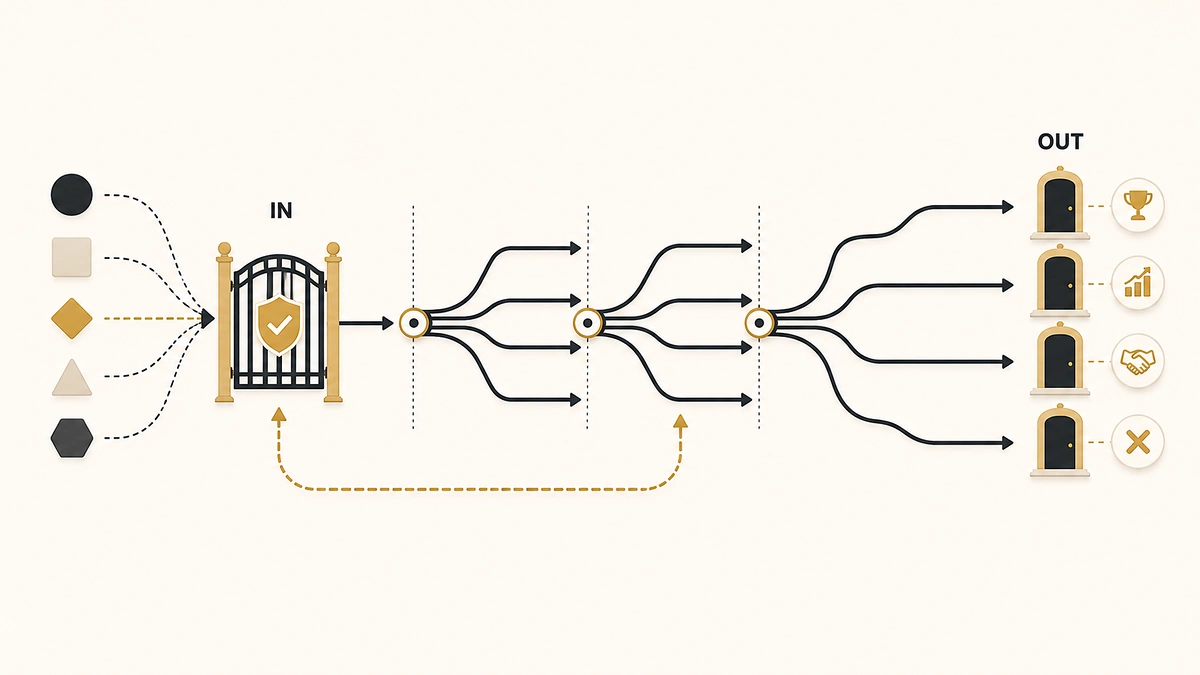
Search “lead nurturing” and Google puts a Reddit thread on page one. The title is a question: does anyone have a lead nurturing process that actually works. It sits directly beneath Oracle, IBM, Salesforce and Adobe, all four of which have published a definition, a benefits list, and a set of channels. None of them answers the question the thread is asking.
That gap is the whole problem. The concept is easy to describe and hard to operate. Send relevant content. Stay in touch. Build trust. Every ranking page agrees, and none of them tells you what actually starts a track, what changes when the contact’s stage changes, what happens to the leads sales handed back, or how anyone gets out. Almost nobody puts the last question in print at all: when is a nurture track the wrong response entirely?
This is the operating layer under the definition. Enrollment triggers, stage branching, the recycled-MQL track, four exits, and the four situations where you should route, disqualify, suppress, or fix the offer instead.
Direct answer — What is lead nurturing?
Lead nurturing is the automated marketing program that keeps a lead engaged until they are ready to talk to sales, or until it’s clear they never will be. Each track is triggered by a specific event, branches on the record’s lifecycle stage rather than on content topic, and ends through one of four exits: the lead qualifies, is disqualified, unsubscribes, or runs out of content. It is not a sales cadence and not a newsletter.
Key Takeaways
- Enrollment is a decision, not a default. A form submission is an event; it is not by itself a reason to start a track.
- Branch on lifecycle stage, not on content topic. The stage is the only field that tells you what the contact still has to decide.
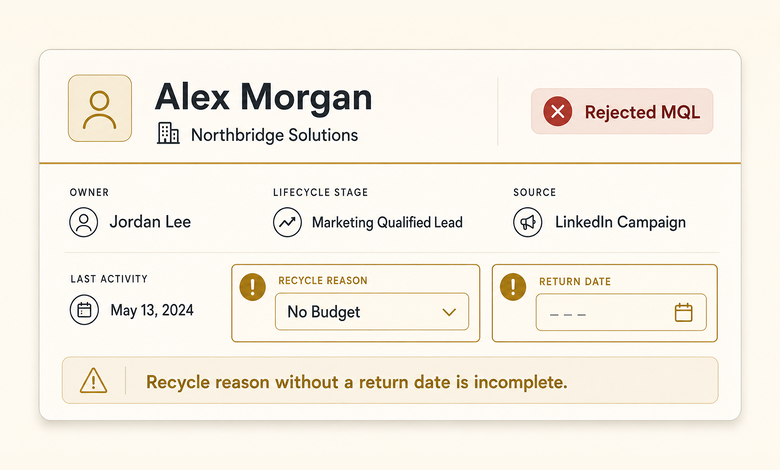
- Rejected MQLs need a track chosen by the rejection reason code, plus a scheduled return date. Storage without a review date is not recycling.
- Build all four exits before writing the emails. HubSpot unenrolls a contact automatically the moment they meet the workflow goal; Marketo labels a contact who has received every asset in a stream “Exhausted.”
- A high-intent, good-fit lead should be routed, not enrolled. In a March 2026 study of 114 B2B companies, over 99% failed to answer a demo request inside five minutes.
What lead nurturing is, and the two things it isn’t
Lead nurturing is a set of automated marketing touches that keeps a lead engaged through a buying cycle they are not ready to start, until either a qualifying signal appears or the record is removed from the program. It runs on marketing’s list rather than a rep’s task queue, and a single track can run for months.
Two other things get called nurture and behave nothing like it. Confusing them is why so many programs feel busy and convert nothing.
| Lead nurturing | Sales cadence | Email newsletter | |
|---|---|---|---|
| What it is | Automated marketing track tied to a lifecycle stage | Finite outreach sequence aimed at one named prospect | Recurring broadcast to everyone who opted in |
| Who runs it | Marketing automation, no human in the loop | A rep, executing most touches personally | Marketing, on a calendar |
| Who is enrolled | Records that met a specific entry trigger | Accounts a rep has decided to work | The whole subscribed list |
| How long | Weeks to months, stage-dependent | Days to a few weeks, fixed touch count | Indefinite |
| How it ends | Goal met, disqualified, unsubscribed, or content exhausted | Any reply, or the touch count runs out | Unsubscribe only |
The distinction that matters operationally is the exit. A cadence ends because a person decided it ended or the touches ran out, which is why touch count and spacing are derived from segment reply data rather than copied from a template. A nurture track ends because a condition became true. If your nurture track has no condition that ends it, you have built a newsletter with extra steps and given it a name that promises pipeline.
What should trigger a nurture enrollment
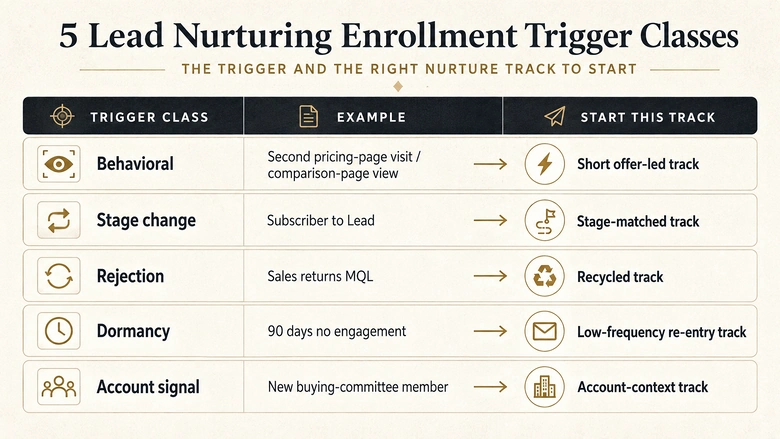
A nurture enrollment should be triggered by an event that changes what the record needs next, not by the fact that a form was submitted. Every form fill is an event. Only some of them are reasons.
The default in most instances is one giant track fed by every gated download, which produces a program where a procurement analyst comparing three vendors and a student writing a dissertation receive the same nine emails. Five trigger classes cover almost every defensible enrollment.
| Trigger class | Example | What it tells you | Track it should start |
|---|---|---|---|
| Behavioral | Second pricing-page visit in 14 days, comparison-page view | Active evaluation, no request made yet | Short, offer-led, fast exit to sales |
| Stage change | Record moves from Subscriber to Lead | The contact just became something different | The track that matches the new stage |
| Rejection | Sales returns an MQL with a reason code | Exactly one named thing has to change | Recycled track keyed to that reason |
| Dormancy | 90 days with no engagement on an in-ICP record | Fit is intact, attention is gone | Low-frequency re-entry track |
| Account signal | New buying-committee member appears at a target account | The account is moving, this person is new | Account-context track, not a restart |
Why a download is not a trigger
Notice what is missing: “downloaded an ebook.” A download tells you a topic was interesting to somebody at an unknown level of seriousness. It belongs at the top of the funnel, where the job is capture rather than qualification, which is where the four-stage inbound process separates high-intent form fills from blog subscribers. Enrollment is the moment you decide the record deserves months of automated attention. Make it a decision.
The platform layer matters here too, because a trigger you cannot express in your tool is a trigger you do not have. Behavioral and account-signal triggers need scoring and enrichment already running, which is one reason automating weak targeting simply produces weak outreach faster. Get the entry conditions right before you build the emails behind them.
Branch on lifecycle stage, not on content topic
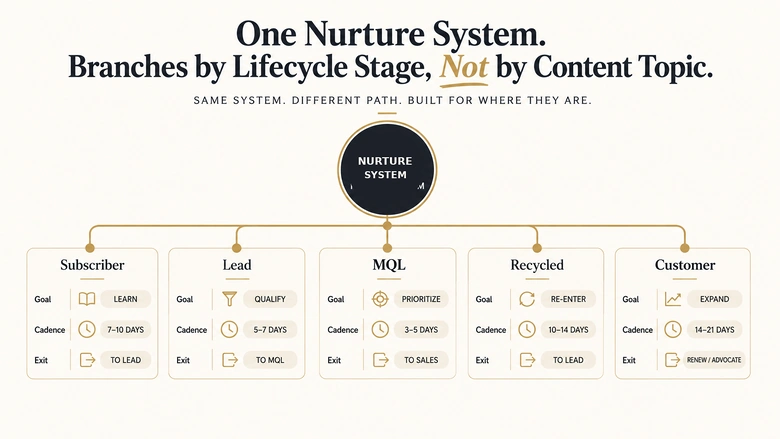
Branch a nurture track on the contact’s lifecycle stage, because the stage is the only field that tells you what the contact still has to decide. Topic branching answers a different and much weaker question: what were they reading.
Topic branching is the common design. Someone downloads the security guide, so they get the security track. It feels personalized and it fails quietly, because two people reading the same asset can be eleven months apart in their buying cycle. Stage branching puts them in different tracks, which is what they needed.
| Stage | What they still have to decide | Track goal | Cadence | Exit signal |
|---|---|---|---|---|
| Subscriber | Whether this problem is worth their time | Establish the problem | Monthly | First high-intent action |
| Lead | Whether a solution category applies to them | Frame the category and the tradeoffs | Every 10 to 14 days | Score crosses the MQL threshold |
| MQL awaiting acceptance | Nothing. Sales owns the next move | Hold, do not add touches | Paused | Accepted or returned |
| Recycled | Whatever the rejection reason named | Change that one condition | Every 3 to 4 weeks | Return date or re-engagement |
| Customer | Whether to expand or renew | Adoption, then expansion | Product-usage led | Expansion opportunity opens |
Pause the track at the handoff
The third row is the one teams skip, and it costs them acceptance rates. While an MQL is sitting in the acceptance queue, marketing touches and sales touches collide in the same inbox, and the prospect reads it as one disorganised company. Pause the track at handoff and resume only on a rejection.
None of this works if your stage definitions are informal. Each stage needs a written entry rule, a written exit rule, and one owner before a track can key off it, which is the job that the nine-stage lifecycle model with entry and exit rules does before any of this becomes buildable. Stage branching is only as reliable as the field it reads.
Enterprise platforms treat this as first-class design rather than a workaround. In Adobe Marketo Engage, multi-stream engagement programs move people between streams through transition rules that are always defined on the stream you want to pull people into, not on the one they are leaving. That direction is deliberate. Each stream owns the conditions for who belongs in it, which is exactly how stage-based branching should be reasoned about even on platforms that do not use the word “stream.”
The MQLs sales rejected are a track, not a graveyard
Rejected MQLs belong in a track chosen by the rejection reason, because the reason names the single thing that has to change before the lead is worth sending again. A generic re-engagement drip ignores the most useful data point you have.
Rejection reasons cluster into a small number of shapes, and each one implies a different program. Keep the list short enough that reps will actually use the picklist.
Match the track to the reason code
| Rejection reason | What has to change | Track | Return trigger |
|---|---|---|---|
| No budget this cycle | The calendar | Quarterly value touch, low volume | Date-based, tied to their fiscal year |
| Wrong contact, right account | Who you are talking to | Account-level track aimed at the real buyer | A new contact at the account engages |
| No stated problem yet | Their awareness of the problem | Problem-education track | Engagement with a solution-stage asset |
| Bad or missing data | The record itself | No nurture. Enrich, verify, then re-route | Data completeness restored |
| Outside ICP, competitor, no authority path | Nothing that will change | No nurture. Disqualify and suppress | None, by design |
Two of those five rows send the lead somewhere other than a nurture track, which is the point. Recycling is not a place to put everything sales said no to.
Reason codes only exist if someone agreed to collect them. Rejection reporting is a clause in the handoff agreement, not a field you add later, and the SLA clause most teams skip is the one that makes sales record why a lead came back. Without it, every returned MQL looks identical and the entire table above collapses into one generic track.
Leave the lifecycle stage alone
There is a technical trap here worth designing around. HubSpot’s default lifecycle stage property only moves forward through automated tools, so “roll the record back to Lead” is not available to a workflow without first clearing the value, and clearing it takes the stage-entry timestamps with it. Article 150 covers what that does to velocity reporting. The practical consequence for nurture design is narrower: key your recycled track off a separate recycle-reason field and a return date, and leave the lifecycle stage alone. The track needs to know why the lead came back and when to look again, and neither of those belongs in the stage field.
PRO TIP
Put the return date on the record at the moment of rejection, not later. A reason code with no date produces a bucket nobody reviews, and reps stop trusting the recycle option the first time they see a lead sit there for a year.
Acceptance is the gate that produces all of this. A lead only becomes “recycled” because sales formally reviewed it and declined, which is why the five acceptance criteria and the SLA window behind them determine how much recycled volume you will be handling in the first place. Tighten acceptance and the recycled track gets smaller and better.
Exit criteria: build the way out before the emails
Define the exits before writing a single email, because a track with no exit keeps sending to people who already bought, already said no, or already have a rep in the conversation. There are four ways out, and most programs wire one.
The two exits every program already has
Goal met. The contact did the thing the track existed to cause. HubSpot treats this as automatic: when a contact is active in a workflow and meets the goal criteria, they’ll be automatically unenrolled. Name the goal event first; it defines what the track is for.
Unsubscribed. Handled by the platform, but worth auditing: a rising unsubscribe rate inside one track is usually a frequency problem or an enrollment problem, not a copy problem.
The two exits most programs skip
Suppressed. Competitors, current customers, employees, and anyone in an active sales conversation. A suppression segment removes an enrolled contact immediately and blocks future enrollment, which makes it the right mechanism for permanent exclusions rather than a filter you remember to apply.
Exhausted. The one almost nobody plans for. In Marketo Engage, a person who has received every piece of content in a stream “has exhausted all possibilities and will wait idle until more is added”. Idle is a state, not an exit. Decide in advance what happens to those records: transition to a lower-frequency stream, hand to sales for a human look, or mark dormant and stop.
Workflow · 30 min
How to define exit criteria for a nurture track
Wire all four exits before any email is written, so no contact can stay in the track after the reason for sending has gone.
Name the single goal event
Write the one action that means this track worked: demo requested, score crossed the MQL threshold, opportunity created. One event, not a list.
Set the goal as an automatic unenrollment
Configure the goal in the workflow itself so the platform removes the contact before the next action fires. Do not rely on a separate cleanup workflow.
Build the suppression segment
List every category that must never receive this track: competitors, employees, current customers, open opportunities. Attach it to the workflow, not to each send.
Decide the exhaustion end state
Choose what happens when a contact has received every asset: transition to a slower stream, alert a rep, or mark dormant. Write it down before the last email exists.
Test all four exits with one record
Push a test contact through each exit path and confirm it actually leaves. Watch the workflow history, not the email log.
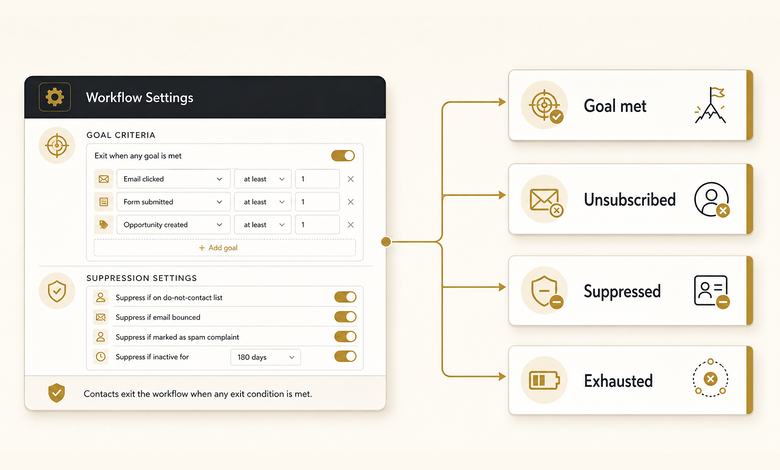
Proving an exit fires is a separate job
Wiring an exit and proving it fires are separate jobs, and the proving happens at the node level. Each exit is a condition attached to a specific point in the flow, so it helps to have already worked through how trigger, condition, action and wait nodes hand off to each other before you start attaching exit logic to them.
IMPORTANT
The most damaging failure is not a missing unsubscribe. It is a rep working a lead while the nurture track keeps sending. The prospect gets a personal email about their renewal and an automated one about “getting started” in the same afternoon, and the rep loses the thread they were building.
When lead nurturing is the wrong answer
Lead nurturing is the wrong answer when the lead’s problem is not a shortage of information. Nurture solves exactly one thing: a buyer who is not ready. It does nothing for a buyer who is ready, a record that will never qualify, or an offer nobody wants.
Four alternatives cover the cases where enrollment is the lazy choice.
| Situation | What the signal means | Do this instead | Why nurture fails here |
|---|---|---|---|
| Good fit, high intent, explicit request | They are in market now | Route to a rep immediately | Every hour of drip is an hour a competitor is talking to them |
| Structurally outside ICP, competitor, no authority path | The reason will never expire | Disqualify and suppress from scoring | Points keep accruing on a record no one will work |
| Bad data, hard bounce, no consent | You cannot legally or technically reach them | Suppress, then enrich or delete | Sending damages deliverability for everyone else |
| Whole segment ignores every track | The offer is wrong, not the timing | Fix the offer or drop the segment | More emails against a bad offer produce more unsubscribes |
What it costs to nurture a lead who is ready
The first row is where real money leaks, and there is now current evidence for how badly. Workato submitted demo requests to 114 B2B companies and published the results in March 2026: over 99% failed to respond within five minutes, average email response time was 11 hours and 54 minutes, and nearly 20% never replied by email at all. Companies using lead routing tools averaged 3 hours 32 minutes against nearly 13 hours for those without. A demo request is not a nurture trigger. It is a routing event, and the difference between those two decisions is measured in hours you do not get back.
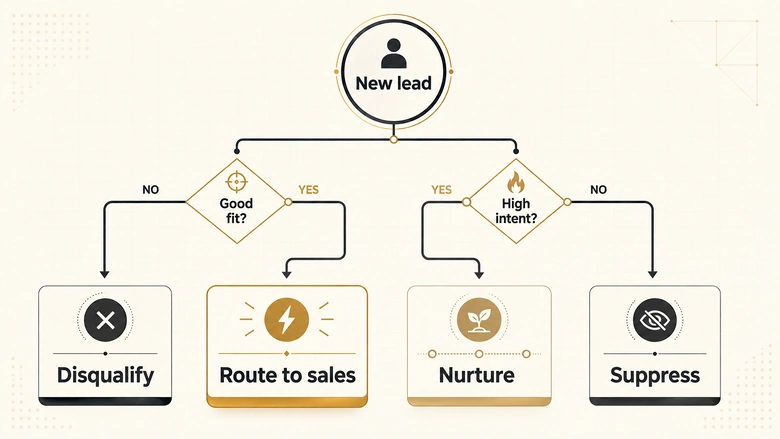
If a lead has told you they are ready, the most sophisticated nurture program you can build is still a slower version of picking up the phone.
Routing and nurture are one decision, not two
Getting the routing right is its own discipline once volume grows, and the mechanics of ownership, territory and assignment sit in the routing process that decides who owns a lead the moment it qualifies. Nurture and routing are not competing programs. They are two branches of the same decision, and the branch you take should be set by the score, not by whichever workflow happened to fire first.
Deciding which records are worth months of automated attention is a scoring question, and it is worth knowing what your model can actually support before you trust it to make that call. Rules-based gates stay explainable and can hard-stop students and competitors, while ranked models need training volume most mid-market instances do not have, a constraint covered in the published data minimums every scoring platform sets before it will score at all.
Start with two tracks, not ten
Build two tracks first, prove they exit correctly, then add more. The programs that collapse are the ones that launched with a track per persona per stage per product and no way to tell which of the twenty is doing anything.
Start with the stage-change track for new Leads and the recycled track for returned MQLs. Between them they cover the two moments where a record’s needs change most sharply, and they exercise every mechanism the rest of the program will use: entry trigger, stage branch, suppression, goal exit.
Then measure the things that describe the track rather than the email. Open rate tells you about a subject line. These four tell you whether the program works.
Enrollment accuracy = Contacts exiting on goal ÷ Total contacts enrolledEnrollment accuracy is the honest headline number. If most contacts leave through exhaustion rather than the goal, your entry trigger is enrolling records the track was never designed for. Alongside it, track recycled return rate (recycled leads that come back and reach acceptance), time in track before exit, and suppression coverage (the share of active opportunities correctly excluded). All four are stable enough to review monthly and specific enough to act on.
Nurture is not the thing that convinces people to buy. It is the thing that keeps a good-fit lead reachable, informed and correctly staged until the moment they decide to move, and then gets out of the way fast enough that a human can take over. Everything in this article serves that one job.
Frequently Asked Questions
Lead nurturing means running automated marketing touches that keep a lead engaged until they are ready for a sales conversation. It applies to leads who fit your target profile but have not shown buying intent yet, and it ends when the lead qualifies, is disqualified, unsubscribes, or has received all available content.
Common activities include stage-based email tracks, retargeting aimed at named accounts, invitations to webinars or product sessions, and low-frequency check-ins for recycled leads. Each activity should belong to a track with a written entry trigger and a defined exit, rather than running as a standing broadcast to the whole list.
In B2B, lead nurturing spans long cycles and buying committees, so tracks branch on lifecycle stage rather than content topic and often run for months. B2B programs also need a recycled track for MQLs sales returned, because rejection is common and each rejection reason implies a different path back.
Salesforce runs nurture through Account Engagement (formerly Pardot) Engagement Studio rather than core CRM. Tracks are built as branching programs on Prospect records, and lead status plus campaign membership carry the state. Note that converting a Lead creates Account and Contact records, so post-conversion nurture targets a different object.