Seven pages currently rank on page one for “sales cadence.” Between them they prescribe cadences of five, six, seven, ten, twelve and sixteen touches, running anywhere from ten days to forty-five. Google’s AI Overview adds an eighth: five touches over ten days. Each one is presented as the structure that high performers actually use.
They cannot all be right. The more useful observation is that they are not really in conflict either. A ten-day, five-touch cadence and a forty-five-day, sixteen-touch cadence are answers to different questions about different buyers. The pages just never say which question they answered. You get the output without the working.
Watch what Google’s AI Overview does immediately after printing its own template. It asks you two questions: is your outreach inbound or cold outbound, and which channels do you want to use? That is a quiet admission. The template it produced a moment earlier cannot be applied until you answer them.
This page gives you the working. A sales cadence is five decisions, and every template you have been handed is somebody else’s answers to those five.
Direct answer — What is a sales cadence?
A sales cadence is a defined sequence of outreach attempts to one prospect across channels such as email, phone and LinkedIn, with a set number of touches, planned gaps between them, and written rules for when the prospect exits. It differs from a marketing drip because a person executes most touches and any reply ends the sequence. No universal length is correct: touch count and spacing are derived from segment and reply data, not copied.
Key Takeaways
- The eight ranking sources for this term prescribe between 5 and 16 touches across 10 to 45 days. The spread is not noise, it is unstated segment assumptions.
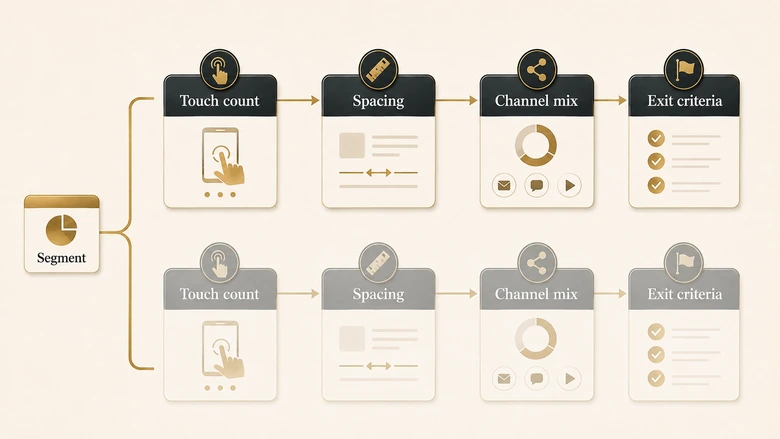
- A cadence is five decisions: total touches, spacing, channel mix, exit criteria, and which of those change by segment.
- Published touch-count benchmarks are unusable until you know what counts as a touch. A dial plus a voicemail is one touch on some platforms and two on others.
- Exit criteria matter more than entry criteria. Five different exits exist, they route to different places, and only one of them is a reply.
- Deliverability sets a hard ceiling on cadence volume that no template mentions: Google asks bulk senders to keep spam complaints below 0.1% and never to reach 0.3%.
What a sales cadence is
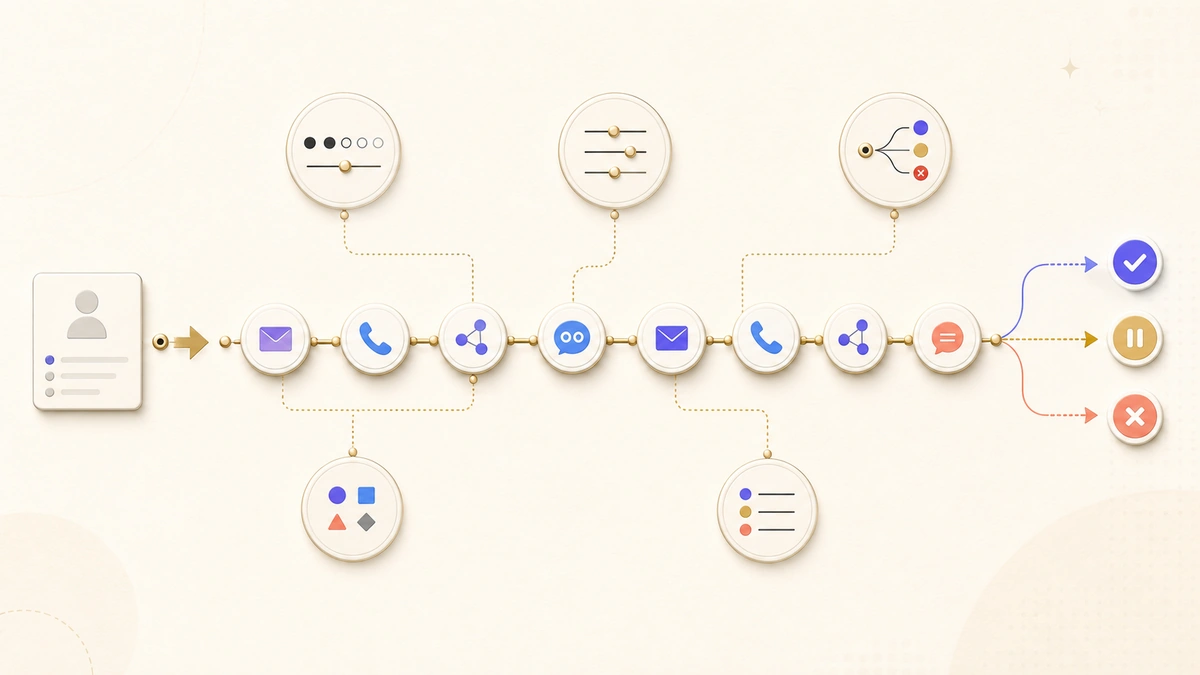
A sales cadence is a planned sequence of outreach attempts to a single prospect across more than one channel, with a defined number of touches, defined gaps between them, and explicit rules for when the prospect leaves. The word “cadence” carries the spacing: it is the rhythm of the attempts, not just the count.
Three things separate it from the adjacent objects it gets confused with. A person executes most of the touches. Any reply terminates it. And it targets one named prospect rather than a list segment. Those three properties are why a cadence cannot be designed with drip-campaign logic.
| Object | What it is | Who executes | What ends it |
|---|---|---|---|
| Sales cadence | Timed multi-channel attempts on one prospect | A rep, partly assisted | Any reply, or the last touch |
| Sales sequence | Same object. Vendor vocabulary differs | A rep, partly assisted | Any reply, or the last touch |
| Email drip | Scheduled emails to a list segment | Fully automated | A date, or a behavioural trigger |
| Nurture track | Long-cycle content to unready buyers | Marketing automation | A scoring threshold |
| Automation workflow | Branching if/then record actions | The platform | A branch exit condition |
One scope note, because the search term is crowded. Salesforce and Zoho both ship features literally named Cadences, and a good share of the traffic on this keyword is people looking for those product docs. This page is about designing the sequence. It is not a walkthrough of any one vendor’s cadence builder.
The five decisions behind every sales cadence
To design a cadence rather than copy one, answer five questions in order. Every published template is a set of answers to these, usually with the reasoning removed.
- Total touches. How many attempts before you stop.
- Spacing. How the gaps between those attempts are distributed.
- Channel mix. Which channel carries which touch, and which channel is load-bearing.
- Exit criteria. Every way a prospect can leave, and where each exit sends them.
- Segment variation. Which of the four decisions above change when the segment changes.
The order matters. Spacing is meaningless until you know the touch count, channel mix is constrained by spacing, and exits are what keep the whole thing legal and deliverable. Segment comes last because it is the multiplier on everything before it.
Decision one: how many touches
To set a touch count, stop looking for the published number and work out what your own attempts return. The published numbers do not agree, and the disagreement is structural rather than accidental.
What the ranking pages actually prescribe
Here is what the sources ranking for this term actually prescribe. Every row was read directly from the live page on 13 August 2026.
| Source | Touches | Span | First touch |
|---|---|---|---|
| Google AI Overview | 5 | 10 days | Email plus call, same day |
| Pipedrive (hybrid example) | 7 | 14 days | Cold email |
| Yesware, cited by Pipedrive | 6 | ~21 days | Not stated |
| Highspot | 10 | ~14–21 days | Personalised email |
| Cognism | 10 | 21 days | LinkedIn connection |
| Revenue Grid | 10 | 17–21 days | Personalised email |
| Salesloft, as cited by Revenue Grid | 8–12 | 14–21 days | Not stated |
| Salesloft, as cited elsewhere | 16 | 30 days | Call plus email, day one |
Two of those rows attribute different numbers to the same vendor. That alone should end the search for the correct count, but the deeper problem is definitional: nobody says what a touch is. A dial that goes to voicemail is one touch on some platforms and two on others. A LinkedIn profile view is a touch in several of these templates and invisible in the rest. Until the unit is fixed, the counts are not comparable.
The genre has form here. The most-quoted persistence statistic in B2B sales, the claim that most sales need five follow-ups, traces back to a survey run in 1942, and we walked the whole chain in our audit of where sales follow-up statistics actually come from. The pattern repeats with cadence lengths: a number gets published, gets recited without its scope, and hardens into a benchmark nobody can source.
IMPORTANT
Before adopting any published touch count, write down your own definition of a touch and apply it to the source. Most benchmarks change by 30% or more once you normalise dials, voicemails and social views to a single unit.
How to derive your own touch count
What replaces the benchmark is your own reach-by-attempt curve. Run the current cadence to its end without truncating it, then plot replies by attempt number rather than in aggregate. The count you want is the attempt at which the marginal return stops paying for the time.
Marginal reply rate at touch N = Replies first arriving at touch N ÷ Prospects still active entering touch NThe denominator is the part teams get wrong. Dividing by the full starting list flatters late touches, because the list has been shrinking through every earlier exit. Use prospects still active at that touch. Most B2B curves flatten somewhere between the sixth and the tenth attempt, but yours may not, and that is the entire point of measuring it.
Decision two: how to space the touches
Spacing distributes a fixed touch budget across time, and the distribution changes results more than the count does. Three patterns are in common use.
Front-loaded. Most touches land in the first week, then the gaps widen. This suits a prospect who has just done something, such as filling in a form, attending a webinar, or appearing in an intent feed. Relevance decays fast, so the attempts should too.
Even. Equal gaps throughout, typically two to three days. Easiest to staff and to reason about, which is why most published templates use it. It is also the weakest fit for genuinely cold outreach, where the first touch has no relevance advantage to spend.
Back-weighted. A light opening, then wider gaps and a longer tail. This suits long-cycle enterprise deals where the trigger you are waiting for has not happened yet and being present in month three matters more than being insistent in week one.
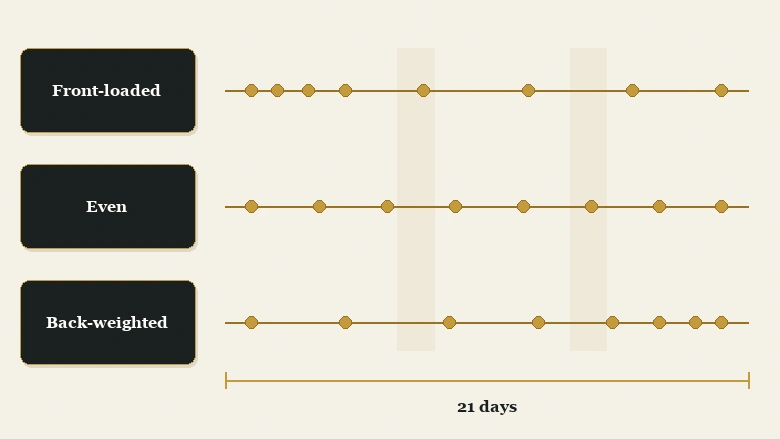
Then there is the trap that no template on page one mentions. Templates are written in calendar days, and platforms usually execute in calendar days by default. A 21-day cadence beginning on a Thursday puts roughly a third of its touches on weekends, where B2B connect rates collapse and emails sit unread until Monday, arriving in a fuller inbox than they would have on Tuesday.
PRO TIP
Build the cadence in business days, then check what the platform actually does with a start date of Thursday and of Friday. Two cadences with identical day numbers can differ by three effective touches depending on the day of the week a prospect enters.
Decision three: which channels carry which touches
Channel mix is the decision to make explicitly, because every channel is good at a different job and templates treat them as interchangeable slots. Assign each channel the work it is actually good at.
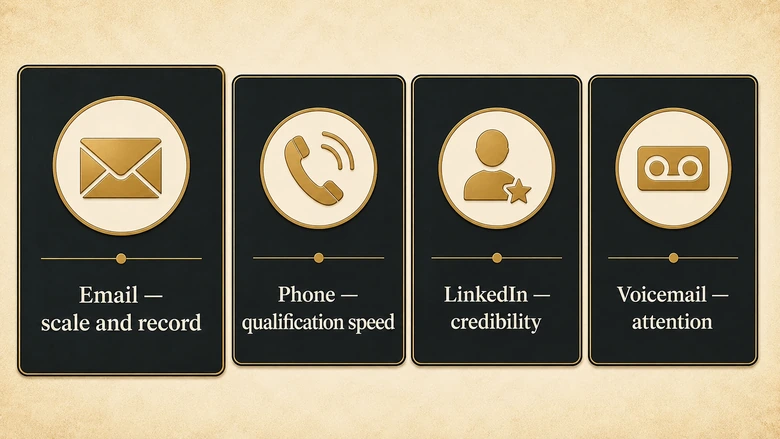
- Email scales, leaves a written record the prospect can forward internally, and is the only channel a buying group can circulate without you present.
- Phone qualifies faster than anything else. One connect resolves in ninety seconds what six emails cannot, which is fit.
- LinkedIn supplies credibility and context. It works best before or alongside a cold email, not as a replacement for one.
- Voicemail buys attention rather than response. Treat it as a modifier on a dial, not as its own touch, and be consistent about that in your counting.
Which channel is load-bearing
One channel in every cadence is load-bearing: remove it and the sequence stops producing meetings. For most B2B teams that channel is email, which makes the cadence’s real ceiling a deliverability question rather than a copywriting one. A sequence that never reaches the inbox has no touch count at all, and the infrastructure work behind that sits in our stage-by-stage cold email setup checklist.
If the cadence is genuinely cold rather than a follow-up on inbound interest, that load-bearing channel needs its own sending infrastructure. Running cold sequences from the domain that carries your invoices and password resets puts both at risk, which is the case for keeping a separate cold email domain away from your primary.
Within the email touches, two decisions sit below cadence design and are worth treating separately. What the opening line has to achieve is a different craft from what the fourth message has to achieve, covered in our work on subject lines that survive a crowded inbox and on what a follow-up email should say once the first one is ignored. This page sets how many of those emails exist and when they fire; those two set what goes inside them.
Decision four: how prospects leave the cadence
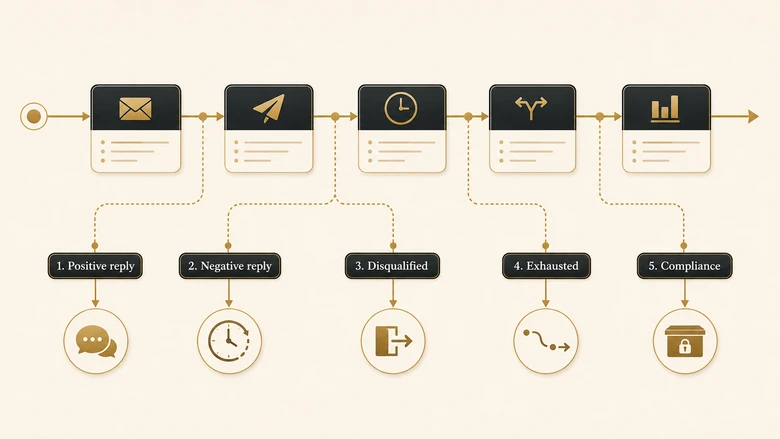
Exit criteria are the rules that remove a prospect from the sequence, and there are five of them rather than one. Most templates name only the reply and let the other four happen by accident.
| Exit | Trigger | Where they go |
|---|---|---|
| Positive reply | Interest, question, or a meeting booked | Rep-owned conversation, cadence stops immediately |
| Negative reply | An explicit no | Suppressed for a defined window, then reviewable |
| Disqualified | Wrong role, wrong fit, company out of scope | Removed from the segment, not just the cadence |
| Exhausted | Last touch sent, no response at all | Lead nurturing, not deletion and not a silent re-run |
| Compliance | Hard bounce, unsubscribe, or spam complaint | Permanent suppression list, immediately |
The exhausted exit is where most pipeline is quietly destroyed. A prospect who ignored eight touches is not a prospect who said no; they are a prospect whose timing was wrong, and the correct destination is a low-frequency lead nurturing track that keeps them reachable until something changes. Deleting them wastes the acquisition cost. Re-running the same cadence in ninety days without changing anything is worse, because it teaches the mailbox provider that your sending is repetitive.
The deliverability ceiling on cadence volume
The compliance exit is the one with an external referee. Google’s published guidance for bulk senders asks that you keep your spam rate below 0.1% and prevent it from ever reaching 0.3%, and classifies anyone sending close to 5,000 messages a day to personal Gmail accounts as a bulk sender permanently once they cross that line even once. That is a hard ceiling on cadence volume, and it is set outside your company.
There is a strategic reason to take exits seriously beyond hygiene. In 6sense’s 2025 B2B Buyer Experience Report, drawn from roughly 4,000 responses, 94% of buying groups had already put their shortlist in order of preference before engaging any seller, and the vendor contacted first won eight deals in ten. Buyers initiated 79% of engagements themselves. A cadence is rarely the thing that changes a mind mid-sequence. It is the thing that makes you the name they contact first, which is an argument for staying reachable after the sequence ends rather than for adding a ninth touch inside it.
Decision five: what changes by segment
Segment changes the answers to the first four decisions, and it is the variable that explains why the published templates disagree. Three axes do most of the work.
| Segment | Touches | Spacing | Load-bearing channel | Exhausted exit |
|---|---|---|---|---|
| Inbound, high intent | Fewer, 4–6 | Front-loaded, hours not days | Phone | Back to lead nurturing fast |
| Cold outbound, mid-market | Middle, 8–12 | Even to lightly front-loaded | Quarterly re-approach, new angle | |
| Cold outbound, enterprise | More, 12–16 | Back-weighted, longer tail | LinkedIn plus email | Account stays open, contact rotates |
| Expansion or renewal | Fewest, 3–5 | Tied to the renewal date | Existing relationship | Owner keeps it, no suppression |
The first axis is intent recency. An inbound lead that requested a demo an hour ago and a cold contact who has never heard of you are not the same problem, and giving them the same fourteen-day cadence wastes the first and rushes the second.
The second is committee size. Enterprise deals are decided by groups, not individuals, so an enterprise cadence has to hold several contacts at one account without any of them receiving what looks like the same message their colleague just forwarded. That is a design constraint on copy, not just on scheduling, and it is the main reason enterprise cadences run longer and lighter.
The third is what happens on exhaustion. In high-volume mid-market outbound, exhausting a contact is routine and they cycle back. In enterprise, the account is not exhausted when the contact is; you rotate to a different person and the account clock keeps running.
How to build and test your own cadence
To build a cadence from the five decisions rather than a template, work through the sequence below once per segment. Budget about ninety minutes for the first one.
Workflow · 90 min
How to design a sales cadence for one segment
Produces a defensible touch count, spacing pattern, channel assignment and exit map for a single named segment, derived from your own reply data rather than a published template.
Define the touch unit in writing
State whether a dial plus voicemail counts as one touch or two, and whether social views count at all. Put the definition in the cadence description field so every later number means the same thing.
Pull replies by attempt number
Export the last two completed quarters from your sequencing tool. Divide replies first arriving at each touch by prospects still active entering that touch, not by the starting list.
Cut the cadence where the curve flattens
Find the attempt where marginal reply rate stops covering rep time. Set the touch count there. If the curve has not flattened by the last touch, the current cadence is too short.
Pick the spacing pattern from intent recency
Use front-loaded for a recent trigger, even for standard cold outbound, back-weighted for long enterprise cycles. Build it in business days and test a Thursday and a Friday start.
Assign channels to the work they do
Name the load-bearing channel first, then place phone touches where qualification speed matters and social touches where credibility has to arrive before an ask.
Write all five exits before launch
Configure positive reply, negative reply, disqualified, exhausted and compliance exits, and name the destination for each. Confirm suppression fires on bounce and complaint automatically.
Choose a tool that can execute the design
Whether you can execute this depends on what the tool allows. Business-day scheduling, per-touch reply reporting and automatic suppression are the three capabilities that decide whether a designed cadence survives contact with the platform, and they vary more than pricing pages suggest across the tools that actually run these sequences.
Measure the cadence with the right denominator
Then measure it honestly, which is harder than it sounds. Salesloft’s own community documentation publishes cadence benchmarks of 18–24% open rates, 3–6% reply rates and 12–15% call connect rates without stating a sample size, a data source, or a methodology anywhere on the page. Those figures are not wrong so much as unusable: you cannot tell whether a reply rate is a percentage of prospects, of emails delivered, or of emails sent.
That distinction is not pedantry. The same campaign can report six very different reply rates depending only on which denominator the tool picked, which we demonstrated line by line when we audited the nine published cold email reply rate benchmarks. Fix your denominators before you compare your cadence to anyone’s number, including your own from last quarter.
One last stance, because the SERP is unanimous in the other direction. The instinct when a cadence underperforms is to add touches. It is almost always the wrong first move. Adding touches raises complaint risk against a fixed deliverability ceiling and lowers the average quality of every message, while the segment definition, the load-bearing channel and the exhausted exit all sit untouched. Change those three first. Add the ninth touch only after the curve says the eighth was still paying.
Frequently Asked Questions
A sales cadence is a planned sequence of outreach attempts to one prospect across channels such as email, phone and LinkedIn, with a fixed touch count, defined gaps between touches, and written exit rules. A person executes most touches, and any reply ends the sequence immediately.
Published guidance ranges from 5 to 16 touches, which tells you the question has no single answer. Derive it instead: plot replies first arriving at each attempt over prospects still active at that attempt, and stop where the marginal return no longer covers rep time.
A two-week cadence runs all its touches inside a fourteen-day window, usually 6 to 10 attempts. Check whether those are calendar days or business days: fourteen calendar days from a Thursday start places several touches on weekends, when B2B connect and reply rates drop sharply.
In business generally, cadence means the fixed rhythm of a recurring activity, such as a weekly forecast call or a monthly review. In sales specifically it narrows to the timed sequence of outreach attempts made to a prospect, where the spacing is part of the design.
A common cold outbound example runs ten touches over 21 business days: email and call on day one, LinkedIn on day three, call and voicemail on day five, then alternating email and call touches at widening gaps, closing with a short breakup email. Treat it as one segment’s answer, not a default.