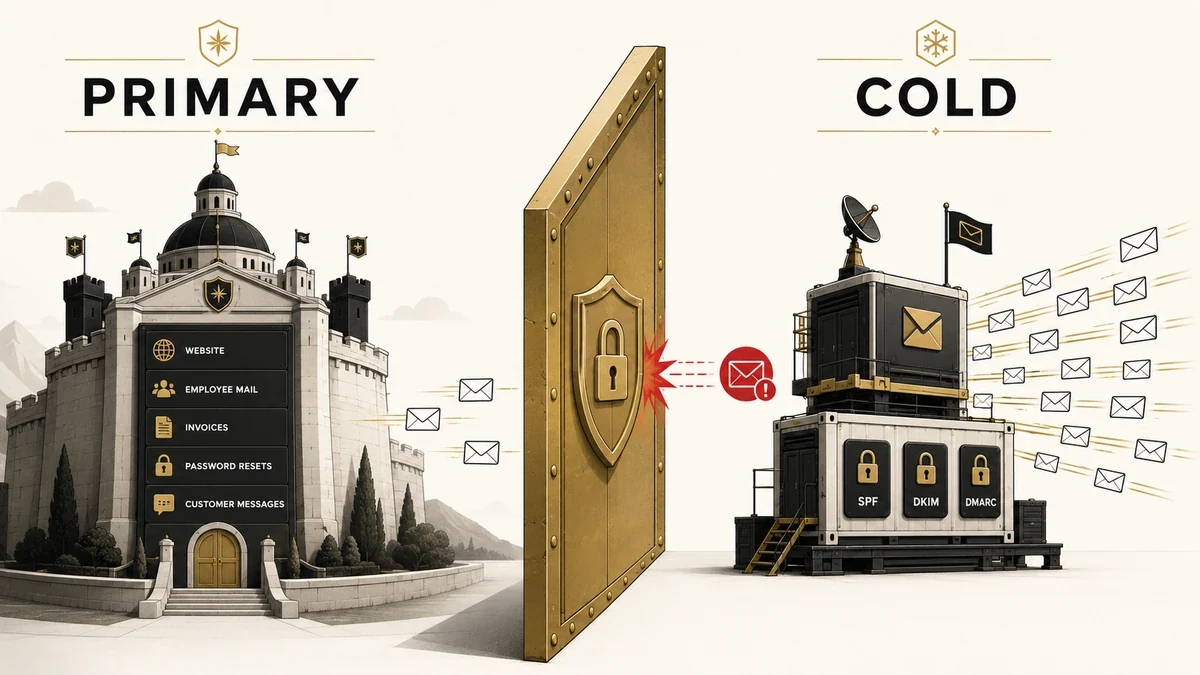
The fastest way to lose the ability to email your own customers is to run a cold outreach campaign from your main company domain. One flagged sequence, a few hundred spam complaints, and the domain that carries your invoices, password resets, and renewal notices starts dropping into junk folders.
That risk is what the choice between your primary domain vs cold email domain is really about. It is not a style preference or a deliverability nicety. It is the one decision that keeps cold outreach quarantined from the mail your business cannot afford to lose.
This guide covers why the two domains must stay separate, how to pick a secondary domain (a lookalike or a subdomain), and how to configure and warm it before the first send. For the line-by-line record checks with dig and nslookup, the full cold email setup and verification walkthrough handles that; here the focus is the strategy decision.
Direct answer – should you send cold email from your primary domain?
No. The primary domain vs cold email domain answer is to always send cold email from a separate, dedicated domain, never the primary domain your business runs on. A cold campaign that triggers spam complaints can blacklist the sending domain, and because mailbox providers track reputation per domain, that damage spreads to your invoices and marketing mail. Buy a lookalike domain, authenticate it with SPF, DKIM, and DMARC, warm it for two to four weeks, then send. Transactional and opt-in marketing email stays on your primary domain.
Key Takeaways
- Never send cold email from your primary domain. One blacklisting event can sink invoices, password resets, and newsletters along with your outreach.
- Use a dedicated lookalike domain (getyourbrand.com, tryyourbrand.com) on a .com, each with its own SPF, DKIM, and DMARC records.
- A subdomain inherits your root domain’s reputation, so it shields your brand name but not your deliverability. A separately registered domain isolates the risk fully.
- Warm every new sending domain for two to four weeks, ramping from about 10 emails a day, and cap each mailbox near 30 to 50 cold sends daily.
- Keep transactional and opt-in marketing email on your primary domain, the one place its long, clean history is an asset.
Should You Send Cold Email From Your Primary Domain?
No. You should not send cold email from your primary domain, because a single flagged campaign can damage the reputation of every message your company sends. Cold outreach goes to people who never asked to hear from you, so complaints and bounces are inevitable, and they attach to the sending domain.
Your primary domain is the root domain your business runs on: yourcompany.com, where your website, your team’s daily email, contracts, and password resets live. A cold email domain is a separate domain registered specifically for outbound prospecting, so any reputation damage from cold sending stays contained on a domain you can afford to burn.
The asymmetry is the whole argument. Your primary domain took years to build a clean sending history. A cold email domain is cheap to buy, quick to replace, and expected to take a beating. Putting cold volume on the first to save the cost of the second is a bad trade that you only notice once the damage is done.
Primary Domain vs Cold Email Domain: The Key Differences
The core difference is purpose and risk tolerance: a primary domain is a reputation asset you protect, while a cold email domain is an expendable sending tool you can swap out. The table below maps the contrast across the dimensions that actually affect deliverability.
| Dimension | Primary domain | Dedicated cold-email domain | Recommendation |
|---|---|---|---|
| Main purpose | Website, team email, invoices, transactional mail | Outbound cold prospecting only | Keep the two jobs on separate domains |
| Reputation risk if flagged | Severe: all company mail can land in spam | Contained: only outreach is affected | Isolate the risk on the cold domain |
| Typical daily volume | Low and human, per person | 30–50 cold emails per mailbox | Never push cold volume through the primary |
| Authentication (SPF/DKIM/DMARC) | Already set, rarely touched | Configured fresh on each domain | Authenticate every sending domain |
| Warmup required | No, the history already exists | Yes, 2–4 weeks before real sends | Warm the cold domain first |
| If blacklisted | Business-critical outage | Buy and warm a replacement | Treat cold domains as disposable |
| Best used for | Customers, partners, opt-in marketing | Strangers you are emailing cold | Match the domain to the audience |
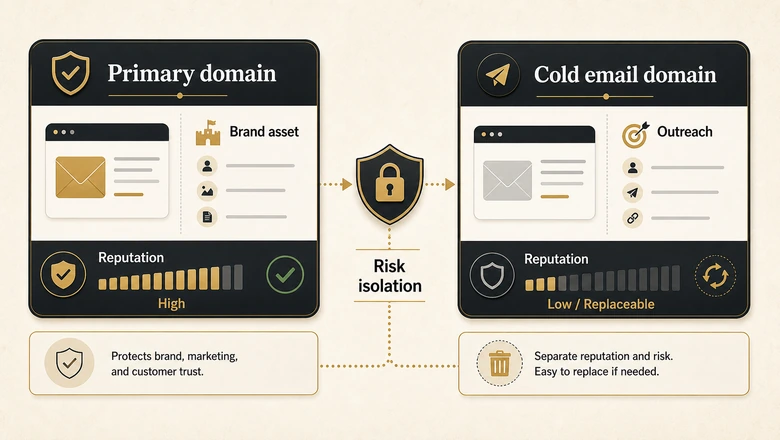
Read the table as a single rule with many faces: anything that touches money, customers, or recovery time belongs on the primary domain, and anything high-volume, unsolicited, and replaceable belongs on a dedicated one. The cold domain exists so that the worst case is a cheap restart, not a company-wide email outage.
Why a Flagged Cold Campaign Tanks Your Primary Domain
Mailbox providers assign reputation at the domain level, so spam complaints from cold outreach attach to the domain that sent them, not just to the campaign. Once Gmail or Outlook decides your domain sends unwanted mail, every message from it inherits the penalty. Demonstrating that discipline is table stakes for any vendor you hire, so the outbound agencies that handle this domain discipline for you should be able to show separate sending domains and warmup before they touch your list.
Google’s sender guidelines ask senders to keep spam complaint rates below 0.3%, and since February 2024 they require SPF, DKIM, and DMARC on domains sending bulk volume. Cold outreach is the fastest way to cross that 0.3% line, because you are emailing people with no relationship to your brand and a low bar for hitting “report spam.”
The damage does not stop at one campaign. A burned domain can land on public blacklists, and spam-trap hits or a wave of complaints drag the whole domain’s placement down. Your sales emails, your support replies, and the password-reset link a customer needs at 2am all start routing to junk at the same time.
Recovery is slow and never guaranteed. Rebuilding a domain’s reputation can take weeks of careful, low-volume sending, and some domains never fully recover. Catching the slide early is the only cheap save, which is why teams watch sender reputation with a dedicated email deliverability tool that runs inbox-placement tests and reputation alerts instead of waiting for replies to dry up. Prevention through a separate sending domain costs a few dollars, while the cure costs you the channel your business already trusts.
IMPORTANT
Domain reputation is shared across every mailbox on that domain. A blacklisting triggered by one cold inbox can send your CEO’s email and your billing notices to spam at the same moment.
Engagement is part of reputation too, which is why cold copy quality matters as much as volume. Weak targeting and subject lines that chase opens instead of replies drive the complaints and instant deletes that teach a provider your mail is unwanted, accelerating the slide on any domain you send from.
How to Choose Your Cold Email Domain: Lookalike vs Subdomain
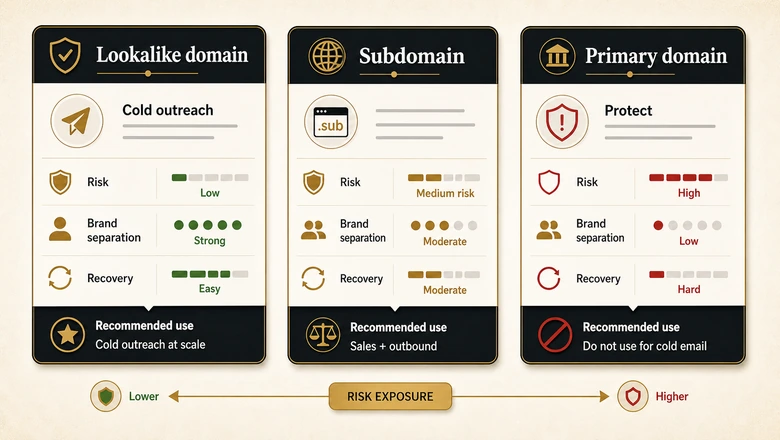
To choose a cold email domain, register a close variant of your brand name on a .com and keep it fully separate from your primary domain’s DNS and reputation. You have two structural options: a separate lookalike domain or a subdomain of your existing domain. They protect you very differently.
Lookalike domains: the default choice
A lookalike domain is a newly registered domain that echoes your brand: getyourbrand.com, tryyourbrand.com, yourbrandhq.com, or yourbrand-mail.com. It is a completely separate entity, so its reputation rises and falls on its own. If it burns, your primary domain never feels it.
Stay on a .com when you can, since it carries the most trust, with .co and .io as acceptable fallbacks. Avoid cheap TLDs like .biz, .info, and .xyz, which spam filters treat with suspicion. Then point a simple redirect from the lookalike back to your main site, so a prospect who types the domain into a browser sees a real business rather than a parked page.
When a subdomain makes sense
A subdomain such as go.yourcompany.com or mail.yourcompany.com sits under your root domain. It needs its own authentication records, and Microsoft notes that subdomains do not inherit the parent domain’s SPF record. The reputation linkage, though, runs the other way: trouble on a subdomain can still color how providers view the root.
That makes a subdomain a reasonable home for high-volume opt-in marketing or product notifications, where recipients already know you, but a poor shield for true cold outreach. For cold sending to strangers, the clean separation of a registered lookalike wins every time.
Use a separate lookalike domain when you are sending genuine cold email to strangers, running real volume, or want a burned domain to be a cheap, isolated loss rather than a crisis.
A subdomain fits when the recipients have opted in, the mail is marketing or transactional, and you want brand consistency without exposing the root domain to cold-sending risk.
Stay on your primary domain only when volume is tiny, under roughly 20 emails a day to warm or semi-warm contacts, where the reputation risk is negligible.
PRO TIP
Buy two or three lookalike domains at once. Rotating sends across several domains spreads volume, lowers the load on any single reputation, and gives you a warm backup ready if one domain ever stalls.
How to Set Up Your Cold Email Domain (DNS + Warmup)
To set up a cold email domain, register the domain, create two or three mailboxes, publish SPF, DKIM, and DMARC records, add a branded tracking domain, then warm the domain before real outreach. The workflow below is the strategy-level version. It takes about 30 minutes of hands-on configuration, followed by a few weeks of automated warmup that runs on its own.
Workflow · 30 min setup
How to set up a cold email domain: from registration to warmup
Stand up a separate, authenticated sending domain that protects your primary domain’s reputation, then warm it before the first real send.
Register a lookalike domain
Buy a close brand variant on a .com (getyourbrand.com, tryyourbrand.com) from a registrar such as Cloudflare, and point a redirect to your primary site so the domain looks legitimate.
Create two or three mailboxes
Set up two to three inboxes on the new domain in Google Workspace or Microsoft 365, which also configures the MX records. More than three mailboxes per domain raises risk.
Publish an SPF record
Add a TXT record that authorizes your sending platform’s servers. SPF tells receiving servers which sources may send mail for the domain.
Add a DKIM key
Add the DKIM record your email provider gives you so every message is cryptographically signed and cannot be altered in transit without detection.
Set a DMARC policy
Publish a DMARC TXT record at p=none with a reporting address to start, then tighten it to quarantine after two to four weeks of clean sending.
Add a custom tracking domain
Point a branded CNAME for open and click tracking instead of your platform’s shared tracker, which may already sit on a blacklist from other senders.
Warm the domain, then monitor
Run automated warmup for two to four weeks, ramping from about 10 sends a day, before any real outreach. Then track spam rate and reputation in Google Postmaster Tools as you scale.
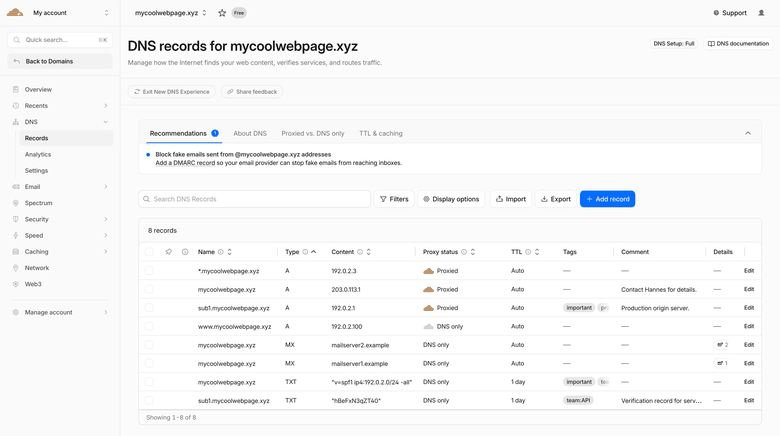
That workflow maps to a specific set of DNS records. The checklist below breaks down each record and action, and why it matters for inbox placement.
| Step | Record / action | Why it matters |
|---|---|---|
| Register lookalike domain | Buy getyourbrand.com or tryyourbrand.com on a .com | Keeps spam complaints off your primary brand domain |
| Create mailboxes | 2–3 inboxes per domain in Workspace or Microsoft 365 | Spreads volume; more than three per domain raises risk |
| SPF | TXT record authorizing your platform’s servers | Tells receivers which servers may send for the domain |
| DKIM | TXT or CNAME signing key from your provider | Signs each message so it cannot be silently altered |
| DMARC | TXT record, p=none then quarantine | Sets the policy for failed checks and turns on reporting |
| Custom tracking domain | Branded CNAME for open and click tracking | Avoids shared trackers that may already be blacklisted |
| MX | Point to your mailbox host | Routes replies and bounce notifications back to you |
| Warm up | 2–4 weeks, ramp from about 10 a day | Builds domain reputation gradually before real volume |
| Monitor | Google Postmaster Tools and Microsoft SNDS | Catches reputation and spam-rate drops early |
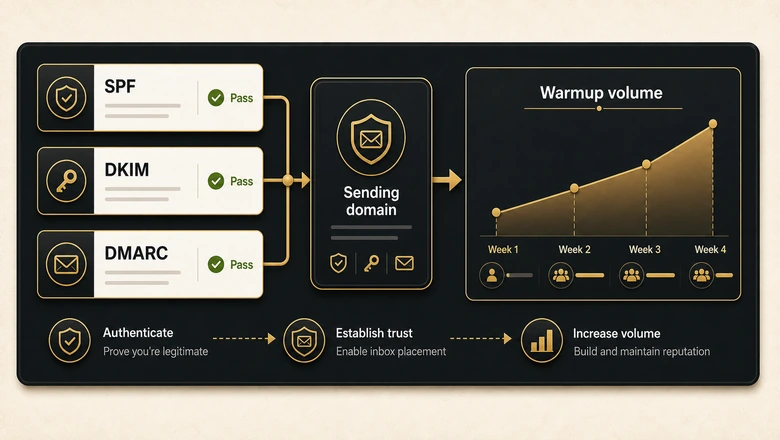
Configuring a record and confirming it actually resolved are two different things. Once the records are live, the setup guide verifies every record from the command line with dig and nslookup, so you can prove the domain is authenticated before the first send instead of discovering a typo after a campaign quietly fails.
Warmup is the step teams rush and regret. Run automated warmup for two to four weeks, ramping from about 10 sends a day, before any real prospect sees a message. Then enrol the domain in Google Postmaster Tools and Microsoft SNDS to watch spam rate and reputation as you scale.
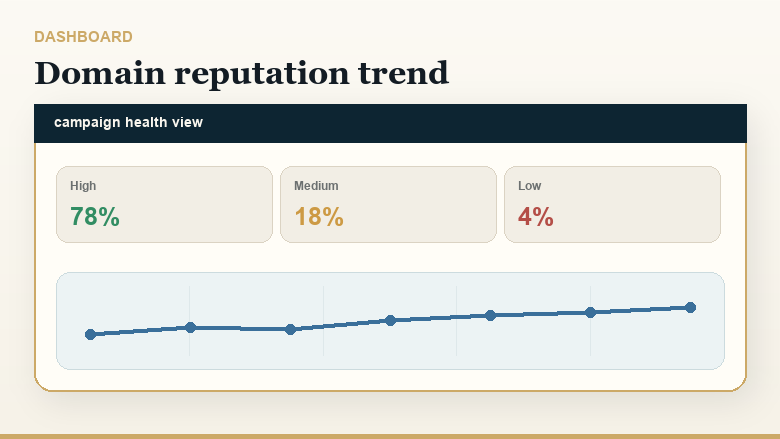
Monitoring is ongoing, not a one-time launch task. Automated warmup, inbox-placement tests, and reputation alerts are what surface a slipping domain on a dashboard rather than in a falling reply rate, so trouble shows up before your prospects ever notice.
None of this matters if the messages themselves are weak. Once the domain is warm, your sequence and follow-up cadence decide how many replies that hard-won reputation actually converts into pipeline.
How Many Domains and Inboxes Do You Need?
Plan one sending domain for every 100 to 150 cold emails a day, with two or three mailboxes per domain and a cap near 30 to 50 sends per mailbox. Stacking more inboxes onto fewer domains is the shortcut that gets domains flagged. That daily figure is not a given either, since touch count and cadence length are what generate that number, and sizing the domain pool before the sequence is designed usually means buying for the wrong volume.
The math scales predictably. Around 100 emails a day needs one or two domains; 300 a day needs three or four; 1,000 a day needs roughly seven to ten domains and 20 to 30 mailboxes. Each Google Workspace mailbox runs about $6 a month (as of Q2 2026), so infrastructure cost climbs with volume and belongs in your outreach budget from the start.
Buy the domains a few weeks before you need them. A domain that has existed for 30 days carries a little more trust than one registered yesterday, and the gap lets you warm several domains in parallel so capacity is ready when a campaign launches. Treat the cold-domain pool as a renewable resource: age a new batch quietly while the current set carries the load, and you never have to choose between pausing outreach and sending from a cold-started domain.
At that scale you are managing rotation, warmup, and inbox health across many mailboxes, which is exactly what dedicated cold email software handles through domain rotation and per-inbox sending caps. Running a ten-domain setup from a single inbox view is how reputations slip away unnoticed.
What Stays on Your Primary Domain
Keep transactional email, opt-in marketing, and your team’s everyday correspondence on your primary domain, where its long, clean sending history is an advantage rather than a liability. These messages go to people who expect them, so complaint rates stay low and reputation stays intact.
Transactional mail like receipts, password resets, and shipping notices depends on near-perfect inbox placement, and your primary domain’s established trust is exactly what delivers it. Moving that mail to an unwarmed cold domain would be the same mistake in reverse. The principle is symmetrical: known, wanted mail on the trusted domain, and unknown, unsolicited mail on the disposable one.
Match the domain to the audience. Customers and opt-in subscribers belong on the domain you have spent years protecting; strangers belong on one you can replace next week.
Is cold email legal? B2B email rules by region (2026)
Cold B2B email is broadly permitted in the US, conditional in the UK and Australia, and consent-first (and riskier) in Canada and much of the EU. The rules below govern marketing email to business contacts. Confirm the current statute for the market you send into before you press send.
| Region | Consent model | Core rules for B2B email | Penalty exposure |
|---|---|---|---|
| United States (CAN-SPAM) | Opt-out | No prior consent needed. Accurate sender and subject lines, a valid physical postal address, a clear opt-out honored within 10 business days, and the message identified as an ad. | Up to $53,088 per email (2025 FTC adjustment) |
| Canada (CASL) | Opt-in (express or limited implied) | Among the strictest, and it applies to B2B. Needs consent (express, or implied via an existing business relationship for 2 years or an inquiry for 6 months), full sender identification, and a working unsubscribe honored within 10 days. | Up to CAD $10M per violation (business) |
| United Kingdom (PECR + UK GDPR) | Soft opt-in for corporate subscribers | Email to corporate subscribers (Ltd/LLP) is allowed without prior consent under PECR, provided you identify the sender, offer an opt-out, and have a UK GDPR lawful basis for any named individual. Sole traders and partnerships need consent. | PECR up to £500,000 (UK GDPR up to £17.5M / 4% for personal-data misuse) |
| European Union (GDPR + ePrivacy) | Generally opt-in | Consent is the default; any legitimate-interest latitude for B2B is member-state dependent (Germany is notably strict). Identify the sender, provide an opt-out, and document your lawful basis. | Up to €20M or 4% of global turnover |
| Australia (Spam Act 2003) | Consent (express or inferred) | Inferred consent is allowed where a work address is conspicuously published and relevant to the role (no corporate-versus-personal distinction, unlike the UK). Identify the sender and include a functional unsubscribe. | Civil penalties up to about AUD $2.22M per day |
Bottom line: build your list and sending posture around the strictest market you actually email into. This is a summary for marketers, not legal advice, so verify the current statute before a campaign. Last reviewed: June 2026.
Frequently Asked Questions
The rules differ by country. The US (CAN-SPAM) is opt-out, so B2B cold email is broadly allowed. The UK permits B2B email to corporate subscribers under PECR, and Australia allows it with express or inferred consent, but Canada’s CASL and much of the EU require opt-in consent first. The same campaign can be compliant in one market and a violation in another, so check the by-region table above before sending across borders.
Your primary domain is the root domain after the @ in your main business address, such as yourcompany.com in jane@yourcompany.com. It hosts your website, team mailboxes, and transactional mail. Because it carries your most important email, you protect its reputation and never use it for cold outreach.
You can, but it is the weaker option. A subdomain like go.yourcompany.com needs its own SPF, DKIM, and DMARC records, yet problems on it can still affect how providers view your root domain. For genuine cold outreach, a separately registered lookalike domain isolates the risk far more cleanly.
The 30/30/50 rule, popularized by deliverability platform MailReach, splits cold-email success into 30% personalization, 30% sending to warm or engaged contacts, and 50% domain reputation. The takeaway is that even perfect copy fails if your sending domain and warmup are weak, so reputation is the largest lever you have.
Plan one domain for every 100 to 150 emails a day, with two or three mailboxes each and 30 to 50 sends per mailbox. Sending 1,000 cold emails a day typically needs seven to ten domains and 20 to 30 mailboxes. Add domains before you push volume, never after.
Yes, cold email still works in 2026 for B2B outreach, but only with clean infrastructure. Separate sending domains, proper SPF, DKIM, and DMARC authentication, gradual warmup, and tight targeting are now the price of reaching the inbox at all. Sloppy setups that worked years ago now land in spam.