Last updated: Q2 2026.
When Ahrefs crawled more than a million domains for its Site Audit study, it found slow pages on 72.3% of them and a 3XX redirect issue on 95.2%. Technical problems are not rare edge cases. They sit on almost every site, quietly capping how much of your content Google can crawl, render, and rank.
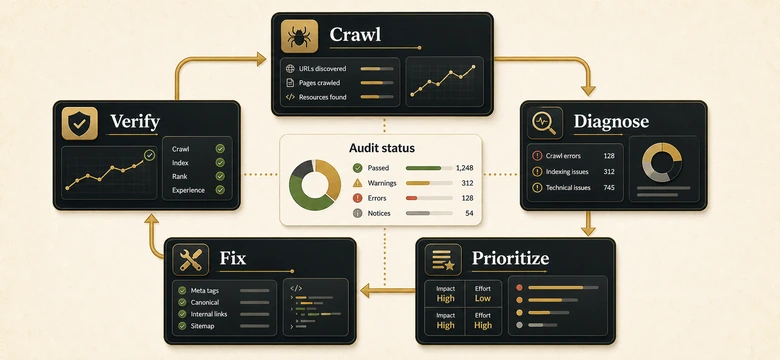
The trouble is that most technical SEO audits produce a 200-line spreadsheet of red flags that nobody ever acts on. A list of problems is not an audit. The audit that moves rankings is the one you finish: crawl, diagnose, prioritize, fix, and verify, in that order, with a clear rule for what to fix first.
This guide walks through that exact process, the tools to use at each stage, an impact-versus-effort model for triaging what you find, and a downloadable audit template you can run on your own B2B site today. For the line-item inventory of every check, our technical SEO checklist for B2B sites is the companion piece. This article is how to actually run the audit.
Direct answer – how do you run a technical SEO audit?
A technical SEO audit is a systematic check of how search engines crawl, render, and index a site, covering crawlability, site architecture, Core Web Vitals, indexation, and structured data. Run it in five stages: crawl the site with a tool like Screaming Frog, diagnose findings against benchmarks in Search Console, prioritize them by impact and effort, fix the highest-impact issues, then verify the fixes and watch for regressions. It checks technical health, not content quality or backlinks, which belong to separate audits.
Key Takeaways
- A technical SEO audit checks how search engines crawl, render, and index your site. It does not judge content quality or backlinks, which are separate audits.
- Run it as a five-stage loop, Crawl, Diagnose, Prioritize, Fix, Verify, so findings turn into shipped fixes instead of an ignored spreadsheet.
- Prioritize every finding by impact versus effort. Indexation and crawl blocks outrank cosmetic issues no matter how many a crawler flags.
- Core Web Vitals give you hard thresholds to audit against: LCP at or under 2.5s, INP at or under 200ms, CLS at or under 0.1.
- B2B sites fail in specific places, gated content, marketing-automation URLs, JS-rendered forms, and CRM embeds, so audit for those, not just the generic list.
What Is a Technical SEO Audit?
A technical SEO audit is a structured review of the infrastructure that lets search engines find, crawl, render, index, and rank a website, covering crawlability, indexation, site architecture, page speed and Core Web Vitals, mobile-first readiness, structured data, and security. It diagnoses why pages underperform for reasons that have nothing to do with the words on the page.
It is worth being precise about scope, because the word “audit” gets stretched to mean everything. A technical audit asks one question: can search engines access and understand this site cleanly? It does not assess whether your content matches search intent, and it does not review your backlink profile. Those are real audits too, just different ones, and a strong B2B SEO strategy treats technical health as the foundation the other two sit on.
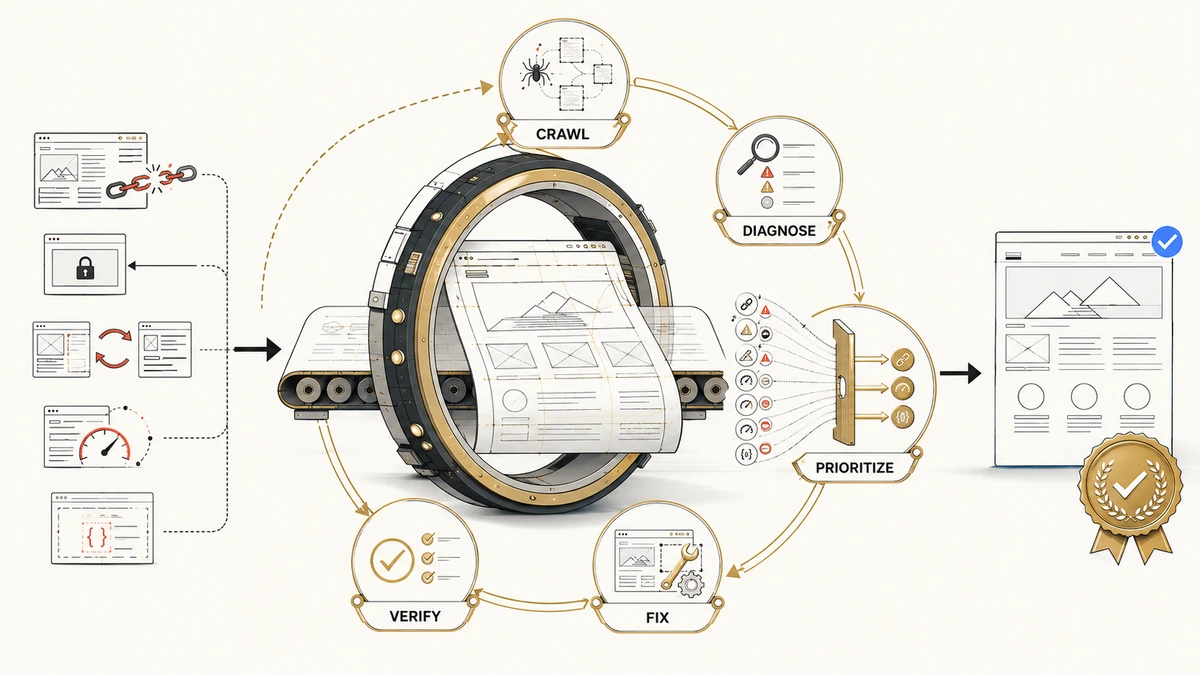
Throughout this guide we use one named method, the Crawl-to-Verify loop: five stages that take you from raw crawl data to confirmed fixes. It is a loop rather than a checklist because a technical site changes every time you publish, redirect, or add a tool, so the audit is something you re-run, not something you finish once.
Technical SEO Audit vs On-Page and Backlink Audits
A technical SEO audit, an on-page or content audit, and a backlink audit answer three different questions, and running the wrong one wastes a week. Use this table to confirm you are auditing the layer that is actually holding rankings back. Online stores add a fourth layer on top of these: the catalog-scale mechanics like faceted URLs, variant duplication, and index bloat that a general crawl never surfaces and a dedicated ecommerce SEO audit is built to catch.
| Audit type | What it checks | What it excludes | Run it when |
|---|---|---|---|
| Technical SEO audit | How engines crawl, render, and index the site: crawlability, architecture, Core Web Vitals, indexation, structured data | Content quality, keyword targeting, backlinks | Rankings stall despite good content; before or after a migration; on a regular cadence |
| On-page / content audit | Whether each page matches search intent, content depth, metadata relevance, internal-link logic | Server, render, and index mechanics; off-site links | Pages rank low for their target terms, or two pages cannibalize one query |
| Backlink audit | Quality, relevance, and toxicity of referring domains; anchor-text profile | On-site technical health and content | Sudden ranking drops, manual-action risk, or a link-building review |
The three overlap at the edges. A page that renders blank in Google’s render queue is a technical problem that looks like a content problem, and a slow page is a technical issue that drags on conversions a content audit would never catch. When intent and depth are the real gap, that work lives in your content strategy for SEO, where mapping pages to buyer intent is the job, not in the crawl.
The Technical SEO Audit Process: The Crawl-to-Verify Loop
To run a technical SEO audit, work through five stages in order: crawl the site, diagnose the findings against benchmarks, prioritize them by impact and effort, fix the highest-impact issues, then verify the fixes held. Skipping the prioritize stage is why most audits stall, the team drowns in a flat list of 300 issues with no signal about which three actually matter.
Workflow · about a day
How to run a technical SEO audit end to end
Take a B2B site from a raw crawl to a prioritized, verified set of technical fixes.
Crawl the site
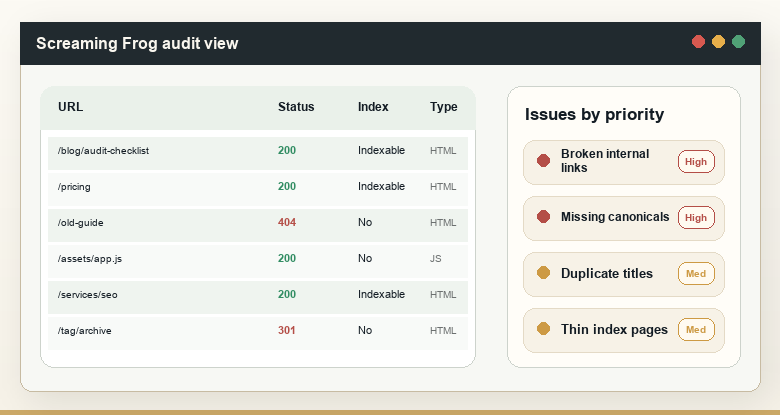
Run Screaming Frog or Sitebulb as Googlebot, with JavaScript rendering on, and export status codes, canonicals, redirects, and indexability for every URL.
Diagnose against benchmarks
Cross-check the crawl with the Search Console Page indexing report, Core Web Vitals data, and a rendered-HTML spot check to separate real problems from noise.
Prioritize by impact and effort
Score each finding by traffic or revenue at risk against the effort to fix it, so indexation blocks rise to the top and cosmetic flags sink.
Fix the highest-impact issues
Assign each fix an owner in dev or marketing, ship the quick wins first, and log the larger items as scoped tickets.
Verify and monitor
Validate fixes in Search Console, re-crawl to confirm, and set a monitor so the same issue cannot quietly return after the next deploy.
Stage 1: Crawl the Site
Crawling means running a desktop crawler over your site the way Googlebot would, to build a complete map of every URL and its technical state. Start with Screaming Frog, free up to 500 URLs and unlimited on a paid licence, or Sitebulb if you want guided explanations. Set the user-agent to Googlebot, turn JavaScript rendering on, and let it finish.
Export everything: status codes, indexability, canonical tags, redirect chains, response times, title and meta length, and orphan candidates. The first pass is about coverage, not judgment. You want one row per URL so the diagnose stage has a complete picture, and you want a benchmark crawl saved so the next audit can show what changed. For a deeper view of which crawlers fit which job, our roundup of the tools that handle crawling, log analysis, and monitoring compares the options.
Stage 2: Diagnose Against Benchmarks
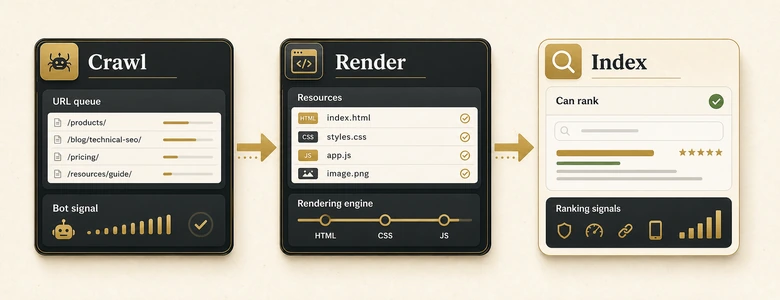
Diagnosing means comparing crawl data against the reports and thresholds that tell you what “healthy” looks like, so you keep the real issues and drop the false alarms. A crawler flags symptoms; Search Console tells you what Google actually did with each page. Open the Page indexing report and reconcile it against your crawl: pages you want indexed that sit in “Crawled, currently not indexed” or “Discovered, currently not indexed” are crawl-budget and quality signals worth chasing.
This is also where the render check matters. Google crawls a page, queues it for rendering when resources allow, then indexes the rendered HTML, so JavaScript-dependent content can be delayed or missed entirely. Use the URL Inspection tool to view the rendered HTML and confirm your key content and links are present. For large sites, Google defines crawl budget as crawl capacity plus crawl demand, which becomes a real constraint past roughly a million pages or on sites that change daily. Product catalogs cross that line routinely, since filters and variants manufacture URLs by the thousand, which is why the technical rules for crawling and indexing an ecommerce catalog at scale get their own playbook.
Page speed gets a hard benchmark from Core Web Vitals, measured at the 75th percentile of real visits. Google’s thresholds are LCP at or under 2.5 seconds, INP at or under 200 milliseconds, and CLS at or under 0.1, with INP having replaced First Input Delay in March 2024. Read these from field data in PageSpeed Insights or the Chrome UX Report, not just lab scores, because lab numbers miss the slow render your real buyers feel.
Stage 3: Prioritize by Impact and Effort
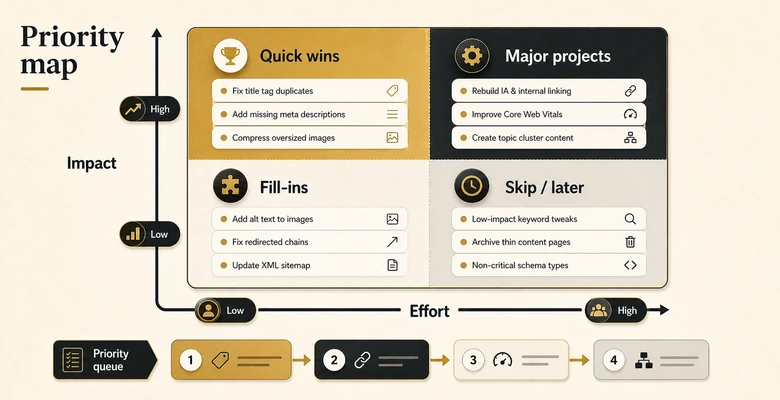
Prioritizing means scoring each finding so the team works the few issues that move rankings before the many that do not. This is the stage every competitor and every tool skips, and it is the difference between an audit that ships and a report that rots. A crawler will happily hand you 300 issues with equal-looking red icons; your job is to rank them.
Fix Priority = (Traffic Impact × Pages Affected) ÷ Fix EffortPlot each finding on an impact-versus-effort grid. High-impact, low-effort issues are quick wins you fix this week. High-impact, high-effort issues are scoped projects you brief into the dev backlog. Low-impact issues wait, regardless of how many a crawler flagged. A single robots.txt line blocking your resources section is a P0 even though it is one row, while 4,000 missing alt attributes are a real but low-priority cleanup.
PRO TIP
Sort by impact before you ever open the full issue list with the client or your boss. Walking in with three prioritized fixes earns more trust than a 40-tab spreadsheet, and it stops the audit from dying in a meeting about whether to fix H1 tags.
Stage 4: Fix the Highest-Impact Issues
Fixing means assigning each prioritized finding an owner and shipping it, which is where most B2B audits break because no one decided whether marketing or engineering owns the work. Crawlability and indexation fixes (robots.txt, canonicals, redirects, sitemaps) usually sit with marketing or SEO. Core Web Vitals, JavaScript rendering, and server response belong to engineering. Name the owner on every row before you hand the audit over. On an online store those crawl and index fixes concentrate on category and filter URLs, so pair the audit with a focused pass on how category pages get indexed and ranked.
Ship the quick wins immediately and scope the rest as tickets with enough context that a developer who has never read your audit can act on them. “INP is 480ms on the demo-request template, caused by a third-party chat script blocking the main thread” is a ticket. “Improve page speed” is not.
Stage 5: Verify and Monitor
Verifying means confirming each fix worked and setting up monitoring so it cannot silently regress. Use the Validate Fix flow in the Search Console Page indexing report, re-crawl the affected URLs, and re-test Core Web Vitals once field data refreshes. A fix you did not verify is a fix you are guessing about. The same standard governs the tracking that measures whether the fix paid off, where a check that never ran in production is not a verification and a green tag status is the analytics equivalent of assuming the deploy went fine.
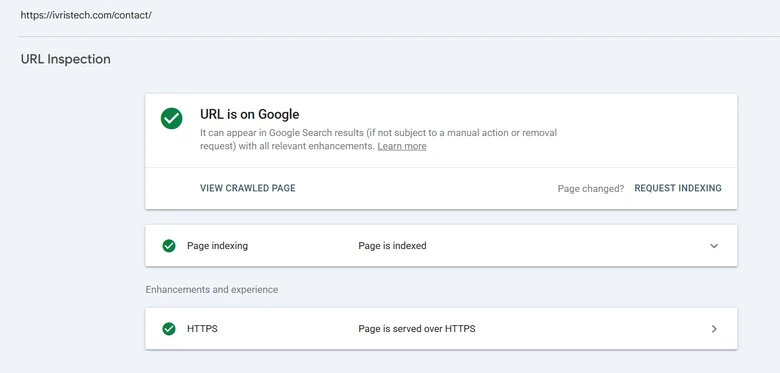
Then close the loop. Schedule a re-crawl on a cadence and watch status codes and indexation between full audits, because the next CMS update or new landing-page tool will reintroduce the same problems. That is why this is the Crawl-to-Verify loop and not a one-time checklist.
The Technical SEO Audit Checklist (With Pass/Fail Thresholds)
This is the working checklist behind the audit: each check paired with why it matters, the tool that finds it, the threshold that decides pass or fail, and a priority tier. Copy it into your own sheet, or download the editable version below, and score every row as you work the five stages. It is the scoresheet competitors describe but never hand over.
| Check | Why it matters | Tool | Pass/fail threshold | Priority |
|---|---|---|---|---|
| Robots.txt access | One Disallow line can hide whole sections from Google | robots.txt Tester, Screaming Frog | No important URL or directory blocked; sitemap referenced | P0 |
| Indexation gap | Pages Google will not index cannot rank | GSC Page indexing report | Indexed count matches the canonical URLs you submitted | P0 |
| Canonical tags | Wrong canonicals split or suppress ranking signals | Screaming Frog, view-source | Each page self-canonical or points to the intended URL | P1 |
| HTTPS and mixed content | Insecure resources break trust and Core Web Vitals | Browser DevTools, crawler | 100% HTTPS, zero mixed-content warnings | P1 |
| Broken internal links | 4xx and 5xx waste crawl budget and lose buyers | Screaming Frog, GSC | Zero internal 4xx or 5xx links | P1 |
| LCP (load) | Slow loads suppress rankings and conversions | PageSpeed Insights, CrUX | At or under 2.5s at the 75th percentile | P1 |
| INP (interactivity) | Sluggish response since INP replaced FID in 2024 | PageSpeed Insights, CrUX | At or under 200ms | P1 |
| CLS (stability) | Form and CRM embeds shift layout and hurt UX | PageSpeed Insights | At or under 0.1 | P2 |
| Mobile-first parity | Google indexes the mobile render of the page | URL Inspection, Mobile-Friendly Test | Mobile DOM holds the same content and links as desktop | P1 |
| JavaScript rendering | Client-side content can be delayed or missed | URL Inspection (rendered HTML) | Critical content and links present in rendered HTML | P1 |
| Redirect chains | Chains leak equity and crawl budget | Screaming Frog | One hop maximum; no loops; no links to redirects | P2 |
| XML sitemap hygiene | Dirty sitemaps waste crawl budget | GSC Sitemaps, crawler | Only indexable 200 canonical URLs; under 50k and 50MB | P2 |
| Orphan pages and depth | Deep or orphaned pages get crawled rarely | Screaming Frog + analytics | Key pages within 3 clicks of home; no orphans | P2 |
| Structured data | Schema powers rich results and AI extraction | Rich Results Test, Schema validator | Key templates emit valid, error-free schema | P2 |
| AI crawler access | Blocking AI bots hides you from AI answers | robots.txt, AI Bot Access Tester | Intentional allow or deny per bot (GPTBot, ClaudeBot, PerplexityBot) | P2 |
The thresholds are the part most checklists omit. “Check your page speed” is advice; “LCP at or under 2.5s at the 75th percentile” is a test you can pass or fail. For the deeper, item-by-item explanation of how to fix each line, including B2B-specific schema types and the quarterly maintenance schedule, work alongside the full technical SEO checklist, which catalogs every check this audit scores.
Tools for Each Stage of the Audit
A technical SEO audit needs a crawler, Search Console, a speed tool, and a validator at minimum, and you can run a credible audit on free tiers alone. The point is matching the tool to the stage rather than buying one platform and hoping it covers everything.
🔧 Sitebulb
📊 Search Console
📊 PageSpeed Insights
🔧 Ahrefs Site Audit
📊 Semrush Site Audit
Use a desktop crawler (Screaming Frog or Sitebulb) for stage one, Search Console and PageSpeed Insights for diagnosis, and a cloud auditor (Ahrefs or Semrush) when you want scheduled re-crawls that handle the verify-and-monitor stage automatically. There is also a newer layer worth auditing: whether AI engines can read you. Our guide to AI SEO tools and GEO platforms covers checking AI-crawler access and citation visibility, the technical groundwork for showing up in ChatGPT and Perplexity answers.
How Often Should You Run a Technical SEO Audit?
Run a full technical SEO audit once or twice a year, a quarterly spot-check on your highest-value pages, and a dedicated audit before and after any migration. Match the depth to the trigger rather than auditing everything every time, which is how audits become busywork nobody repeats.
| Audit mode | When to use it | Scope | Cadence |
|---|---|---|---|
| Full audit | Annual health check, new SEO owner, or rankings stalled with no obvious cause | Every URL, all five stages | Once or twice a year |
| Quarterly spot-check | Keeping high-value pages clean between full audits | Money pages, templates, and new content only | Every quarter |
| Pre-migration audit | Replatforming, redesign, domain or URL change | Redirect map, parity, indexation, before and after launch | Per migration |
| Continuous monitoring | Catching regressions from deploys and new tools | Status codes, indexation, Core Web Vitals alerts | Always on |
The pre-migration case is the one teams regret skipping. A replatform without a verified redirect map and a before-and-after crawl is the single fastest way to erase years of rankings overnight, so treat any migration as a mandatory two-audit event rather than a hopeful launch.
B2B Technical SEO Audit Gotchas Generic Audits Miss
B2B sites break in places a generic audit never looks, because the stack is built for lead capture, not for crawlers. The marketing-automation tools, gated assets, and CRM embeds that run a B2B funnel each introduce a technical failure mode of their own. These are the checks worth adding to the standard list.
The usual offenders are marketing-automation URLs that spawn near-duplicate pages with tracking parameters, gated content stuck behind forms that crawlers never get past, and JavaScript-rendered demo and contact forms whose content sits in the render queue rather than the initial HTML. Multi-subdomain setups (a HubSpot blog on a subdomain, a separate app domain) split authority, and a staging site that ships with Disallow: / or a stray noindex can quietly deindex production after a deploy.
FROM OUR OWN SITE
On ivristech.com, our own audits keep surfacing CLS regressions traced to embedded forms and lazy-loaded images shifting the layout as they pop in. It is the most common B2B Core Web Vitals failure we see, and it almost never shows up until you test the page on a real mid-range phone rather than a fast desktop.
None of these appear on a stock checklist, yet on a B2B site they are often the highest-impact findings in the whole audit. A demo-request page that renders blank to Googlebot is worth more attention than fifty cosmetic warnings, which is exactly why the prioritize stage matters as much as the crawl.
DIY vs Hiring a Technical SEO Audit Service
Run the audit yourself when you have the tools and a few focused hours; hire a technical SEO audit service when the site is large, a migration is at stake, or no one in-house owns technical SEO. The five-stage loop in this guide is genuinely runnable by an in-house marketer, and for most mid-market B2B sites a self-run audit each quarter catches the issues that matter.
Cost scales with site complexity rather than a fixed sticker. Ahrefs’ survey of SEO providers puts agency work near $99 an hour and consultants around $171, so a small-site audit of a few hours and a large enterprise audit of forty-plus hours sit far apart on price. Agency estimates for a standalone technical audit commonly range from roughly $500 to $15,000 depending on scale, though that range is illustrative rather than a published standard.
Outsource when the stakes or the scale outrun your time, not by default. When you do, choosing a partner is its own evaluation, and our rundown of B2B SEO agencies worth shortlisting walks through how to vet one on technical depth rather than retainer size. The right move for many teams is a hybrid: run quarterly spot-checks in-house and bring in specialists for migrations and annual deep audits.
Frequently Asked Questions
A technical SEO audit is a systematic review of how search engines crawl, render, and index a website. It checks crawlability, indexation, site architecture, Core Web Vitals, mobile-first readiness, structured data, and security to find the technical reasons pages underperform, separate from content quality and backlinks, which are assessed in their own audits.
Run it in five stages. Crawl the site with Screaming Frog or Sitebulb, diagnose the findings against the Search Console Page indexing report and Core Web Vitals thresholds, prioritize each issue by impact versus effort, fix the highest-impact items with a named owner, then verify the fixes in Search Console and monitor for regressions.
Cost scales with site size and depth rather than a fixed price. You can run one yourself on free tools, while agency work runs near $99 an hour and consultants around $171, per Ahrefs’ provider survey. Standalone audit projects are commonly quoted from roughly $500 for a small site to $15,000 for a large enterprise crawl.
A focused audit of a small or mid-size B2B site takes about a day of working time, plus crawl time that runs in the background. Large sites with hundreds of thousands of URLs, heavy JavaScript, or international setups can take several days, and the fix-and-verify stages extend over the following weeks as changes ship and get confirmed.
SEO is evolving, not dead. AI Overviews now appear on a large share of informational searches and have cut organic click-through on those queries, per Seer Interactive’s 2026 data, which raises the value of technical health: pages have to be crawlable and renderable to be cited by AI engines at all. A clean technical foundation is now table stakes for both Google and AI search.