
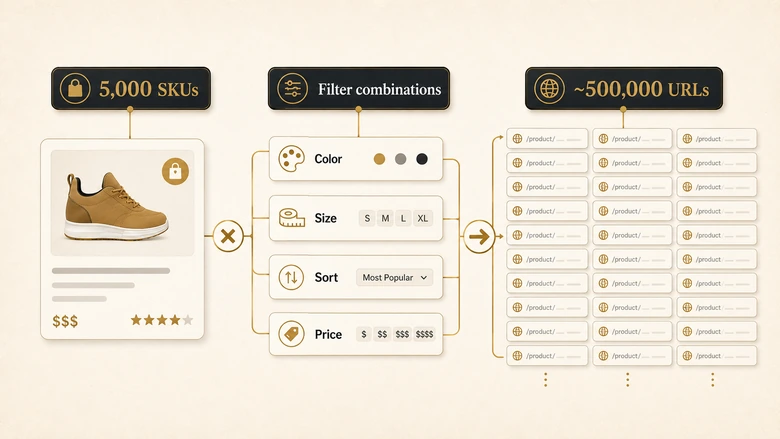
A 5,000-product catalog almost never has 5,000 URLs. Add color and size filters, sort orders, price ranges, and session parameters, and that same catalog can generate hundreds of thousands of crawlable URLs, most of them near-duplicates no shopper ever searches for. This is the gap a generic SEO audit walks straight past. It checks your homepage, your blog, and a handful of templates, then calls the site healthy while Googlebot burns its budget on ?color=blue&sort=price_asc and never reaches the 40 new products you launched last week.
An ecommerce SEO audit is a different job. The stakes are higher, too: organic search is still the largest revenue channel for most stores, and traffic that arrives through it converts. In a 2025 analysis of GA4 data from 94 ecommerce brands, Visibility Labs found that even ChatGPT referral traffic converted 31% higher than non-branded organic search, a reminder that both classic search and AI engines now read your catalog and both reward a clean one. This guide walks the audit end to end, in priority order, with the ecommerce-specific mechanics that decide whether a catalog ranks or quietly rots at the bottom of the index.
Direct answer — What is an ecommerce SEO audit?
An ecommerce SEO audit is a systematic check of how search engines crawl, index, and rank a product catalog, covering crawl budget, faceted navigation, category and product templates, duplicate variants, out-of-stock URLs, and product schema. It extends a standard technical audit with catalog-scale problems a generic checklist skips: thousands of near-duplicate filter URLs, thin manufacturer descriptions, and index bloat. Run it by crawling the full catalog, reconciling crawled-versus-indexed URLs in Search Console, then fixing template-level issues that cascade across every product page at once.
Key Takeaways
- An ecommerce SEO audit checks the same technical foundations as any site, then adds catalog-scale problems generic audits miss: faceted navigation, index bloat, variant duplication, out-of-stock handling, and product schema.
- Faceted and filter navigation is the single biggest source of crawl waste. Google’s own guidance is to block most filter URLs, not index them, and to decide facet by facet which deserve to rank.
- Crawl budget only matters at scale. Google says the guidance is for sites with 1M+ pages updated weekly or 10k+ pages updated daily, which is exactly where large distributor and wholesale catalogs sit.
- Most fixes are template-level. Changing one product template or canonical rule cascades across thousands of pages, so prioritize by impact versus effort, not by the raw count a crawler flags.
- Ship the audit as a repeatable process. Catalogs change daily, so pair continuous monitoring with a full quarterly audit and a hard re-crawl after any replatform.
What Is an Ecommerce SEO Audit?
An ecommerce SEO audit is a structured review of how search engines discover, render, index, and rank the pages of an online store, from the homepage down to individual product URLs. It looks at crawl efficiency, site architecture, category and product templates, duplicate content, structured data, and the technical debt that accumulates when a catalog scales into thousands of SKUs. The output is a prioritized list of fixes, most of them applied at the template level so a single change corrects thousands of pages.
What makes it distinct is the URL math. A brochure site has one URL per page. A store multiplies pages through variants, filters, sort orders, pagination, and internal search, so the audit is as much about which URLs should not exist in the index as which should. That inversion, deciding what to remove, canonicalize, or block, is where most catalog SEO is won or lost, and it barely comes up in a general technical review.
Ecommerce SEO Audit vs a Standard Technical Audit
A standard technical audit and an ecommerce audit share a spine: crawlability, indexation, Core Web Vitals, HTTPS, mobile-first readiness, and schema. If those fundamentals are new to you, they are worth reading in full before you go further, because the ecommerce layer sits on top of them rather than replacing them. The difference is everything that scale introduces. The table below is the boundary, and the rest of this guide lives in the right-hand column.
| Layer | A standard technical audit checks | An ecommerce audit adds |
|---|---|---|
| Crawl & index | Robots.txt, sitemaps, indexation of key pages | Crawl budget waste from filters, index bloat, parameter handling at scale |
| Duplication | Duplicate meta, copied paragraphs, canonical basics | Variant duplication, the same product in multiple categories, thin manufacturer copy |
| Templates | Title/meta patterns, heading structure | Category, product, and pagination templates that repeat across thousands of URLs |
| Structured data | Article, Organization, Breadcrumb, FAQ | Product, Offer, AggregateRating, Review, and Merchant Center feed alignment |
| Lifecycle | Broken links and redirects | Out-of-stock, discontinued, and seasonal URL handling |
| Internal links | Orphan pages, redirect chains | Catalog-scale linking: category hubs, related products, orphan SKUs by the thousand |
The prioritization method carries over cleanly. You still triage every finding by impact versus effort, the same discipline a technical SEO audit uses to turn a raw crawl report into shipped fixes instead of an ignored spreadsheet. On a catalog, that discipline matters more, because a crawler will happily flag 80,000 issues and only four of them move revenue.
The Ecommerce SEO Audit Checklist
Use this checklist as the map for the rest of the audit. Each row is a section below, ordered roughly by how often it decides rankings on a real catalog. Work top to bottom: indexation and crawl problems gate everything underneath them, so there is no point polishing product copy on pages Google cannot afford to crawl.
| # | Audit area | What to check | Common ecommerce failure | Priority |
|---|---|---|---|---|
| 1 | Crawl budget & index bloat | Crawled-vs-indexed ratio, parameter URLs, thin pages in the index | Hundreds of thousands of filter and sort URLs eating crawl budget | High |
| 2 | Faceted & filter navigation | How filters generate URLs; index/canonical/noindex/block decisions | Every filter combination crawlable and indexable | High |
| 3 | Category pages & pagination | Unique category copy, self-canonical paginated pages, crawl depth | Thin category pages; page 1 canonicalized for the whole set | High |
| 4 | Product page templates | Unique titles, descriptions, and meta at template scale | Manufacturer boilerplate copied across the catalog and the web | High |
| 5 | Variants & duplicate content | Variant URL strategy, self-referencing canonicals, cross-category dupes | Color and size variants indexed as separate near-duplicate pages | High |
| 6 | Out-of-stock & discontinued | 301 vs 410 vs keep-with-schema, seasonal handling | Mass 404s, or dead SKUs left indexed forever | Medium |
| 7 | Ecommerce schema | Product, Offer, AggregateRating, Review, Breadcrumb, feed alignment | Missing or invalid product markup; feed and page disagree | Medium |
| 8 | Internal linking at scale | Category hubs, related products, orphan detection, click depth | Thousands of products buried five clicks from the homepage | Medium |
| 9 | Performance at gallery scale | Image weight, lazy-load, JS review overlays, mobile checkout | 10-image galleries and review widgets wrecking LCP and CLS | Medium |
Workflow · about half a day for a first pass
How to run an ecommerce SEO audit: the seven-step sequence
Move from a full catalog crawl to a prioritized, template-level fix list that cascades across every product page.
Crawl the full catalog
Run Screaming Frog or Sitebulb with URL parameters and JavaScript rendering on, so filter, sort, and variant URLs surface instead of hiding behind navigation.
Reconcile crawled versus indexed URLs
In Search Console’s Page indexing report, compare submitted, indexed, and “Crawled – currently not indexed” counts to size your index bloat.
Triage faceted navigation and parameters
Decide per filter type whether to index, canonicalize, noindex, or block in robots.txt, then confirm the current setup matches that decision.
Audit category, pagination, and product templates
Check for thin category copy, self-canonical paginated pages, and unique product titles and descriptions at the template level, not page by page.
Validate ecommerce schema and the product feed
Test Product, Offer, AggregateRating, and Review markup in the Rich Results Test, and confirm it agrees with the Merchant Center feed.
Fix duplicate variants and out-of-stock URLs
Consolidate variant duplication with canonicals, and decide 301 versus 410 versus keep for out-of-stock and discontinued SKUs.
Prioritize template fixes, ship, and verify
Rank findings by impact versus effort, fix at the template level so changes cascade, then re-crawl to confirm the issues cleared.
Audit Crawl Budget and Index Bloat
Crawl budget is the number of URLs Googlebot is willing and able to fetch from your site in a given window, and index bloat is what happens when most of those fetches land on pages you never wanted ranked. On a catalog, the two problems are the same problem: filter and sort URLs multiply faster than Google can keep up, so genuinely new products sit undiscovered while the crawler re-fetches the 900th variation of a sorted category page.
Start by measuring, not guessing. Open Search Console’s Page indexing report and compare the number of URLs you submit in sitemaps against the number indexed, then look hard at the “Crawled – currently not indexed” and “Discovered – currently not indexed” buckets. A healthy store indexes most of what it submits. A bloated one shows tens of thousands of crawled-but-unindexed URLs, which is Google telling you it spent budget on pages it decided were not worth keeping. Cross-check with the Crawl Stats report and, on large catalogs, a log-file sample, using the same crawlability fundamentals, robots.txt rules, XML sitemap hygiene, and log analysis, that the technical SEO checklist covers line by line.
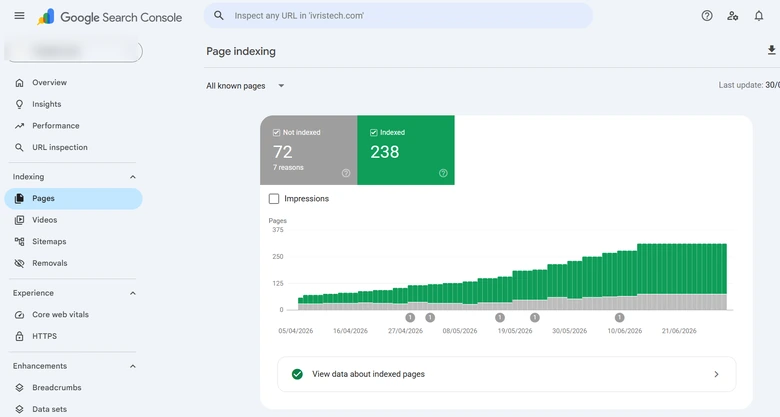
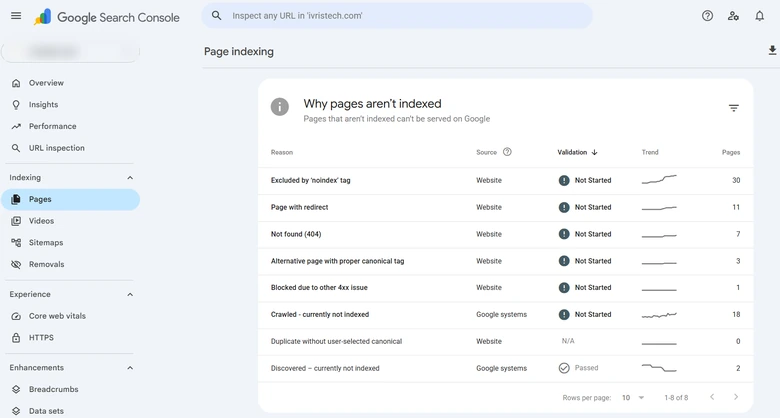
One honest caveat that most audit posts skip: crawl budget is a real constraint only at scale. Google’s guidance is explicit that crawl budget optimization is for large sites, roughly a million-plus pages updated weekly or ten-thousand-plus pages updated daily. That threshold is exactly where big distributor, wholesale, and multi-brand B2B catalogs live, so if you run one of those, this section is where the audit pays off most. If you run a 300-SKU boutique, note the filter URLs, fix them for cleanliness, and spend your energy further down this list.
Fix Faceted and Filter Navigation
Faceted navigation is the filter system that lets shoppers narrow a category by color, size, brand, price, or rating, and each filter it applies usually generates a new URL. Left unmanaged, those URLs combine into what Google calls an infinite URL space: pick three filters from a category with a dozen options each and you have created thousands of crawlable, mostly worthless pages from one page of products. This is the marquee ecommerce SEO problem, and it is why an ecommerce audit exists as its own discipline.
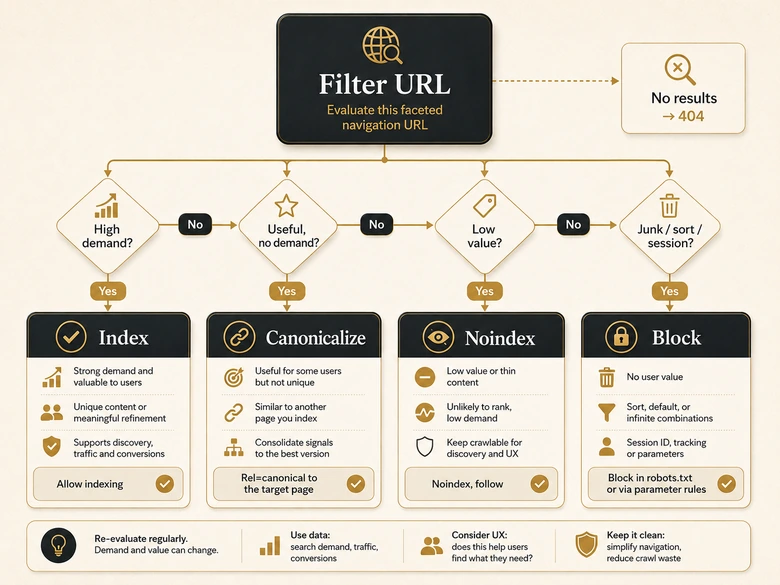
Google’s own position is blunter than most checklists admit. Its documentation on managing faceted navigation URLs recommends disallowing crawling of filter URLs in robots.txt when there is no reason to have them indexed, using the standard & parameter separator, and returning a 404 when a filter combination has no results. The default posture is prevention, not indexing. Your audit’s job is to find the exceptions: the small set of facets that match real search demand and deserve to rank.
IMPORTANT
Blanket-noindexing every filter page is the lazy answer, and it leaves money on the table. The audit win is deciding facet by facet: “waterproof work boots” or “stainless steel fasteners” are real queries worth an indexable landing page, while “sorted by price, page 7” never is.
Turn that judgment into a rule your developers can apply. The decision table below is the framework to audit each facet against, and the control you have over how filters build URLs varies by platform: Shopify appends ?variant= and sort parameters, Adobe Commerce layers on its own filter params, and headless builds do whatever you told them to. How much facet control you get is one of the quieter reasons the platform a B2B catalog runs on shapes its technical SEO ceiling. If the developer cannot explain those platform-specific URL rules before implementation, Shopify API and theme fluency is part of SEO risk control, not a resume flourish.
| URL / filter type | Recommended treatment | Use when |
|---|---|---|
| High-demand facet (e.g. “waterproof boots”) | Index as a static, crawlable landing page with unique copy | The filter matches real, repeatable search demand |
| Useful filter, no search demand | Canonicalize to the parent category | Shoppers use it, but no one searches for that exact combination |
| Low-value combination | Noindex, follow (let links pass, keep it out of the index) | Crawlable is fine, indexable is not |
| Infinite / junk parameters (sort, session, tracking) | Block in robots.txt | There is no scenario where the URL should be crawled |
| Empty filter combination | Return HTTP 404 | The filter set returns zero products |
Audit Category Pages and Pagination
Category pages are the money pages of a catalog, so audit them as landing pages, not as grids. For each primary category, check that it carries genuinely unique copy that helps a buyer choose, ideally 150 words or more of real guidance rather than a stuffed keyword sentence above the fold. Thin, templated category text is one of the most common reasons commercial pages underperform their search demand, because two categories that differ only by product listing look near-identical to Google. Turning a thin category into one that ranks is its own job of copy above and below the grid, metadata, and schema, which is why ecommerce category page SEO gets its own step-by-step playbook.
Pagination is the other half of this section, and the rules changed. Google no longer uses rel="next" and rel="prev", so an audit that still relies on them is auditing a ghost. Google’s ecommerce pagination guidance is to link paginated pages sequentially with real crawlable anchor links and to give each page in the sequence its own self-referencing canonical, not to canonicalize the whole set back to page one. Canonicalizing every page to page one hides the products on pages two and beyond, which is exactly the opposite of what you want.
Two more catalog-specific checks belong here. Confirm your internal search results pages are not indexable, since they generate unlimited thin URLs the same way filters do, and audit crawl depth so no important product sits more than three or four clicks from the homepage. If a bestseller lives on category page nine, Google may never treat it as important, no matter how good the product is.
Audit Product Page Templates
Product pages are where catalog SEO succeeds or fails at volume, so audit the template, not the individual page. The first thing to flag is manufacturer boilerplate: if your product descriptions are the same text the manufacturer ships to every retailer, you are competing for that product with dozens of identical pages, and Google has no reason to pick yours. Rewriting descriptions to be unique and buyer-centric, with real specs, use cases, and answers to buying questions, is the single highest-return content fix on most stores. How much freedom you have to reshape that template in the first place depends on the platform, which is worth weighing when you compare the platforms that give you the most SEO control.
At the template level, check that titles and meta descriptions follow a pattern that stays unique across thousands of SKUs, usually product name plus a differentiator like brand, model, or key spec, rather than a generic suffix that repeats sitewide. Confirm the H1 matches the product, that images carry descriptive alt text, and that the URL is clean and stable. In B2B, add the checks a distributor catalog needs: gated pricing and request-a-quote pages still need indexable, descriptive content above the gate, or they rank for nothing and convert no one.
Handle Variants and Duplicate Content
Variant duplication is the most ecommerce-specific duplicate-content problem there is, and it has no equivalent on a normal site. When one product comes in eight colors and five sizes, the platform can generate forty near-identical URLs that differ only by a swatch. Left indexed separately, they split ranking signals and read as duplicate content. The audit question is simple to state and easy to get wrong: should each variant be its own URL, or should one canonical product page hold them all?
For most catalogs, consolidate. Point variant URLs at a single canonical product page with a self-referencing canonical on the main URL, and let the variant selector switch options client-side without minting a new indexable page for each combination. Keep variants as separate indexable URLs only when they have genuinely distinct demand and content, for example when a color is a common standalone search or when specs and price differ enough to warrant it. The same logic applies to a product that lives in three categories: pick one canonical URL so /tools/drills/ and /deals/drills/ do not fight each other. Once the canonical is settled, the on-page work that actually earns the ranking (unique copy, schema, and real reviews) belongs to ecommerce product page SEO.
PRO TIP
Audit variants at the template level and one canonical rule can fix thousands of URLs at once. That reach is why variant strategy belongs early in the fix list, ahead of hand-editing individual product copy.
Manage Out-of-Stock and Discontinued Products
Out-of-stock and discontinued products need a deliberate URL policy, because the wrong reflex, deleting the page and returning a 404, throws away rankings and backlinks the product spent months earning. The audit should surface every out-of-stock and discontinued URL and check that each one is handled by intent, not by whatever the platform does automatically when inventory hits zero.
Match the treatment to the situation. If a product is temporarily out of stock, keep the page live, keep it indexed, and update the availability in your Offer schema so search engines and shoppers see the real status. If it is discontinued with a clear successor, 301 redirect it to the replacement product. If it is gone with no replacement and no equity worth preserving, a 410 Gone is cleaner than a 404 because it tells Google to drop it deliberately. Seasonal products, common in B2B and retail alike, should usually stay indexed year-round so they hold rankings for the next season rather than restarting from zero.
IMPORTANT
Never let a catalog mass-404 its out-of-stock URLs on autopilot. A single inventory sync can silently delete hundreds of ranking pages overnight, and you will only notice when the traffic is already gone.
Validate Ecommerce Schema and Feed Alignment
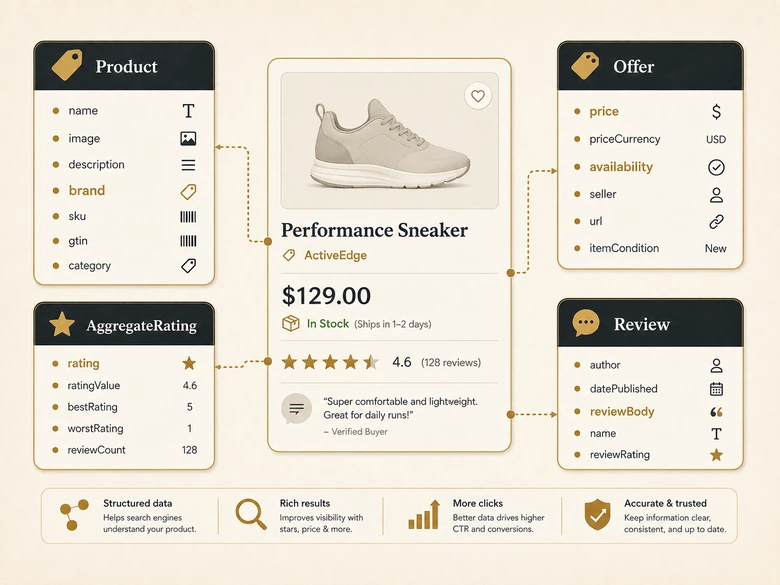
Structured data is how a product page earns rich results, and ecommerce has its own schema types a generic audit never touches. Audit every product template for valid Product structured data, which supports Offer for price and availability, AggregateRating and Review for star ratings, and product variant markup so Google understands which URLs are variations of one parent. Category pages can carry ItemList markup, and every page should include BreadcrumbList so the hierarchy shows in results. Validate each type in the Rich Results Test, since invalid markup earns nothing.
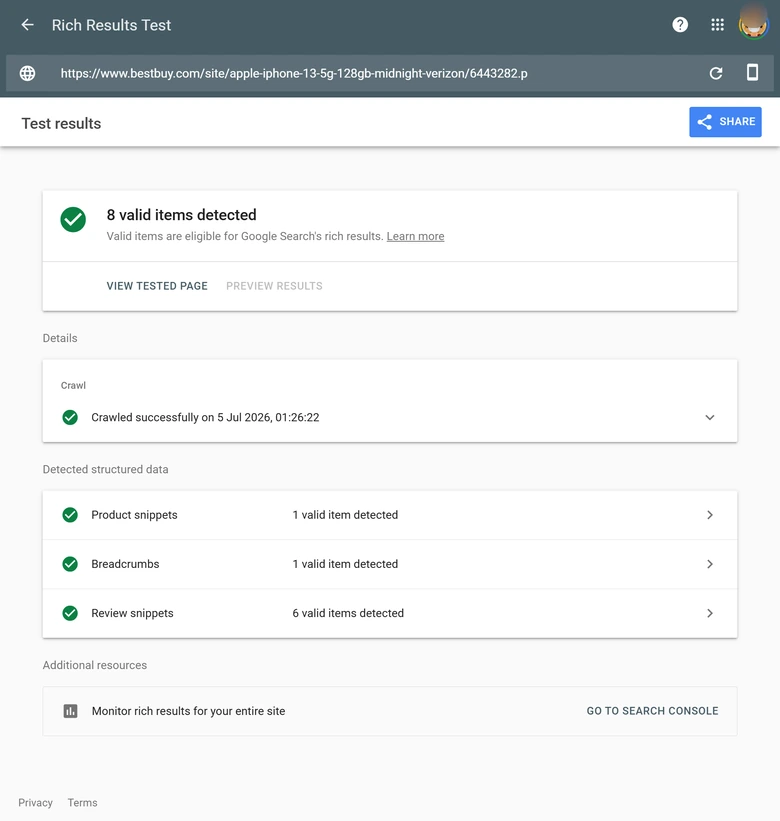
The check that catches real money is feed alignment. Most stores run a product feed into Google Merchant Center for Shopping, and that feed is a second source of truth about price, availability, and titles. When the feed and the on-page schema disagree, for example the page says in stock and the feed says out, you get disapprovals and lost visibility. Because the feed is generated downstream of the systems that run the catalog, this is one place where ERP and PIM integration weighs so heavily when you choose a B2B ecommerce platform: if the data layer is messy, the feed and the schema will be too.
Audit Internal Linking at Catalog Scale
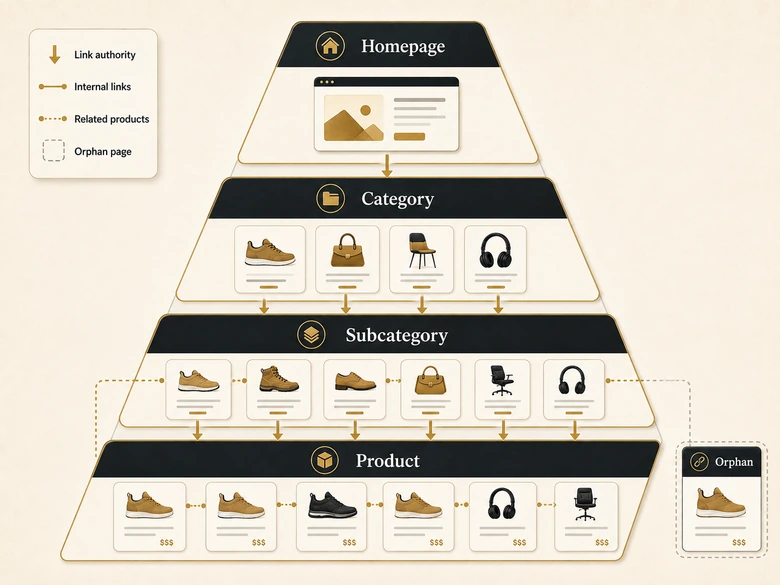
Internal linking on a catalog is an authority-distribution problem, not a navigation nicety. Picture the site as a pyramid: the homepage passes authority to top categories, categories to subcategories, and subcategories to products. Audit that flow and you will usually find two failures, orphan products that no internal link points to, and deep products stranded five or more clicks from the homepage. Both tell Google those pages do not matter, and on a large catalog they can number in the thousands.
Fix the flow with structure that scales. Well-linked category and subcategory hubs are your highest-authority commercial pages, related-product and “frequently bought together” modules spread equity horizontally across a category, and buying guides act as informational spokes that funnel authority and buyers into commercial pages. That last move is where a catalog is still governed by ordinary topic-cluster logic: category hubs are the money pages and guides are the spokes, exactly as a B2B SEO strategy maps clusters to the buyer’s journey. Breadcrumbs, with matching BreadcrumbList schema, reinforce the hierarchy for both users and crawlers.
Check Performance and Core Web Vitals at Scale
Performance is a ranking and conversion factor, and product pages are the heaviest templates on the site, so audit them under real conditions. A single product page can load a ten-image gallery, a review widget, related-product carousels, and cart and tracking scripts, and each one threatens a different Core Web Vital. Test the product and category templates, not just the homepage, and use the standard Core Web Vitals thresholds for LCP, INP, and CLS rather than re-deriving them here.
Three catalog-specific culprits show up again and again. Oversized gallery images inflate LCP, so confirm they are compressed, correctly sized, and lazy-loaded below the fold. Review and rating widgets that inject content after load cause layout shift, so reserve their space to protect CLS. And on mobile, where most catalog traffic and an increasing share of B2B research now happens, audit the full path through to checkout, because a fast product page with a janky cart still loses the sale. Speed here is not vanity: it is one of the B2B ecommerce best practices that moves revenue, not just rankings.
Extra Checks for B2B and Large Distributor Catalogs
B2B and large distributor catalogs add audit checks a consumer store never needs, because the catalogs are bigger, the pricing is often hidden, and the data comes from systems built for operations rather than search. If you run a wholesale, industrial, or multi-brand catalog, treat these as first-class findings, not edge cases.
Start with gated pricing and request-a-quote pages, the defining pattern of B2B ecommerce. Hiding the price is fine; hiding the whole page from search is not. Audit that every quote-gated product still exposes indexable, descriptive content above the gate, real specs, use cases, compatibility, and buying guidance, so the URL can rank even when the price sits behind a login. A product page that shows only “Call for pricing” and a form gives Google nothing to index and a buyer nothing to evaluate.
Then separate the public catalog from the private one. Punch-out and customer-specific catalogs live behind authentication and should be kept out of the index, but many B2B sites accidentally leave only the logged-in experience and no public, crawlable catalog at all. Confirm a public-facing set of category and product pages exists for search, distinct from the account-gated ordering flow, or the store is invisible to everyone who has not already signed a contract.
Scale changes the math on everything else. A catalog with 100,000-plus SKUs makes crawl budget a first-order concern, so segment XML sitemaps by category, keep them clear of noindexed and redirected URLs, and make sure priority products sit shallow in the architecture rather than buried. Watch for thin, spec-only pages generated straight from a PIM: consistent attributes feed schema and the product feed well, but a page that is nothing but a spec table reads as thin content and needs real buying guidance layered on top. Finally, audit for duplicate SKUs spread across brand and sub-brand microsites, a frequent source of self-competition in large distributor groups, and pick one canonical home for each product.
Prioritize and Fix: Turning the Audit Into Shipped Changes
An audit that ends in a 400-row spreadsheet nobody actions is worse than no audit, because it costs time and changes nothing. Rank every finding by impact versus effort and work the high-impact, low-effort quadrant first. On a catalog, that ordering is almost always the same: indexation and crawl-budget fixes outrank cosmetic issues no matter how many the crawler flags, because they decide whether Google can even reach and keep your commercial pages.
The best thing about auditing a catalog is reach. One template fix, one canonical rule, one robots.txt line, and thousands of pages correct themselves at once. Chase individual pages and you will still be editing when the next season’s inventory lands.
Fix at the template and rule level wherever you can, since that is where the cascade lives, and treat per-page fixes as the exception reserved for your highest-value SKUs. After each batch of fixes, re-crawl and re-check the Search Console reports to confirm the issues actually cleared and no regressions crept in. Verification is part of the audit, not an afterthought, because platforms have a habit of reintroducing the exact parameter URLs you just cleaned up.
How Often Should You Run an Ecommerce SEO Audit?
Run a full ecommerce SEO audit at least quarterly, and monitor continuously in between. Catalogs are not static documents; they change every day as products go in and out of stock, prices update, and new SKUs launch, and each of those events can quietly create a crawl or indexation problem. A quarterly deep audit catches structural drift, while lightweight continuous monitoring, an automated crawl plus Search Console alerts, catches the daily regressions before they compound.
Two moments demand an immediate, unscheduled audit no matter when the last one ran. The first is a replatform or major theme change, which almost always reshuffles URLs, canonicals, and parameters, and is the single most common cause of catastrophic ecommerce traffic loss. The second is a sudden drop in indexed pages or organic traffic, which on a catalog usually traces back to exactly the mechanics in this guide: a filter set that started indexing, a canonical rule that flipped, or an inventory sync that 404’d a category. Audit on a cadence, and audit on those triggers, and the catalog stays discoverable as it grows.
Frequently Asked Questions
Crawl the full catalog with a tool like Screaming Frog, then reconcile crawled-versus-indexed URLs in Search Console to size index bloat. Triage faceted navigation, audit category and product templates for thin or duplicate content, validate Product schema and the Merchant Center feed, fix variant and out-of-stock URLs, then prioritize the fixes by impact and ship them at the template level.
Index bloat on a catalog comes mainly from faceted navigation, sort orders, internal search results, and product variants, each of which can generate a new URL. One category with a few filters can spawn thousands of near-duplicate crawlable pages, so Google wastes crawl budget on low-value URLs and may leave genuinely new products undiscovered.
Mostly no. Google recommends blocking most filter URLs from crawling and keeping them out of the index, because they consume crawl resources for little benefit. The exception is the small set of facets that match real search demand, such as “waterproof work boots,” which are worth turning into indexable landing pages with unique content. Decide facet by facet.
Match the fix to the situation. Keep temporarily out-of-stock products indexed and update the availability in Offer schema. Redirect discontinued products with a clear successor using a 301, and use a 410 when a product is gone for good with no replacement. Avoid mass 404s, which throw away the rankings and links the page earned.
The process is the same on any platform; the details differ. On Shopify, watch ?variant= and collection filter URLs and the forced /products/ and /collections/ paths. On WooCommerce, check how your SEO plugin handles product and shop pagination, canonicals, and attribute filters. On both, crawl the catalog, reconcile indexation in Search Console, and audit facets, variants, schema, and templates.