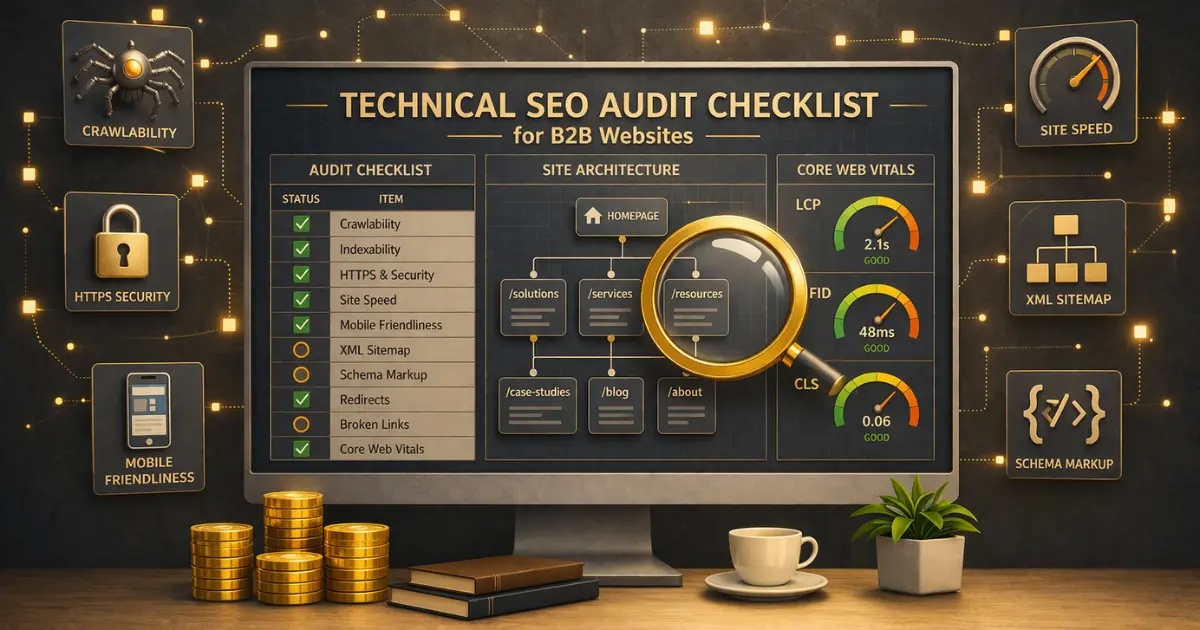
How many pages on your B2B website are invisible to Google right now? If you haven’t run a technical SEO checklist audit recently, the answer might surprise you. Semrush’s analysis of over 50,000 domains found that 70% had pages missing meta descriptions, 41% had duplicate content issues, and 35% had page speed problems. Those aren’t edge cases. They’re the norm.
For B2B websites, technical SEO issues are especially costly. Your buyers are researching solutions for weeks, and if Google can’t crawl, index, or render your pages properly, you’re invisible during the exact window when purchase decisions happen. No amount of content marketing fixes a site that search engines can’t read.
This technical SEO checklist covers every audit item that matters for B2B websites in 2026, organized by priority. Each section includes what to check, which tools to use, and how long the fix typically takes. Work through it top to bottom, or jump to the section your site needs most.
Key Takeaways
- Technical SEO is the foundation that determines whether search engines can find, crawl, index, and rank your pages. Without it, your content and keyword strategy can’t perform.
- Start with crawlability and indexing. If Google can’t access your pages, nothing else matters. Check your robots.txt, XML sitemap, and Google Search Console indexing report first.
- Core Web Vitals (LCP, INP, CLS) are confirmed ranking factors. B2B sites with heavy form embeds and CRM widgets often fail these without realizing it.
- HTTPS, mobile-friendliness, and structured data are table stakes in 2026. If your site still has mixed content warnings or isn’t responsive, fix those before anything else.
- Run a full technical audit quarterly using Screaming Frog or Semrush Site Audit. Technical issues compound over time as pages are added and changed.
What Is a Technical SEO Checklist?
A technical SEO checklist is a structured audit framework that evaluates whether a website meets the technical requirements search engines need to crawl, index, and rank pages effectively. It covers server configuration, site architecture, page speed, mobile usability, structured data, and security, ensuring the infrastructure behind your content is sound.
Think of it this way: on-page SEO is the product. Off-page SEO is the marketing. Technical SEO is the store itself. If the doors are locked, the lights are off, and the shelves are disorganized, it doesn’t matter how good your product is. Nobody can find it.
For B2B websites specifically, technical SEO matters more than many teams realize. B2B sites tend to have gated content behind forms, CRM-embedded pages that load slowly, complex URL structures from marketing automation tools, and JavaScript-heavy elements that search engines struggle to render. This checklist addresses all of those.
1. Crawlability and Indexing (Fix These First)
If search engines can’t access your pages, nothing else on this checklist matters. Start here.
Check Your Robots.txt File
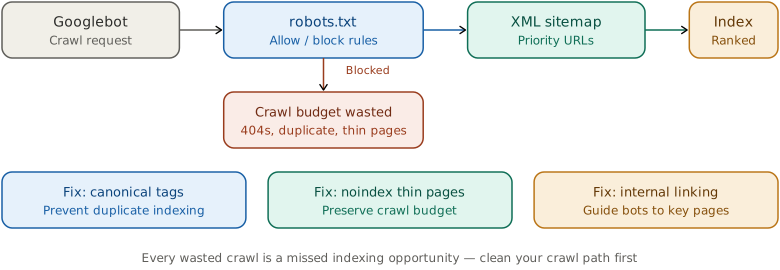
Specifically, your robots.txt file tells search engine crawlers which pages they can and can’t access. A single misconfigured line can block your entire site from Google’s index. Go to yourdomain.com/robots.txt and verify that it isn’t accidentally blocking important pages or directories.
However, common B2B mistakes include: blocking /resources/ directories that contain your best content, blocking /landing-pages/ from HubSpot or Marketo, or using Disallow: / on a staging site that got pushed to production. Also check that your robots.txt includes a reference to your XML sitemap.
2026 update: Review your robots.txt for AI crawlers too. Bots like GPTBot (OpenAI), ClaudeBot (Anthropic), and PerplexityBot are now indexing content for AI search answers. If you block them, your content won’t appear in AI-generated responses. Decide intentionally whether you want AI visibility. Apple is a useful counterexample to treating every AI directive as a crawler block: disallowing Applebot-Extended does not affect Apple Search ranking, while blocking the primary Applebot is a separate discovery decision.
Submit and Verify Your XML Sitemap
Next, your XML sitemap is the roadmap you give to search engines. It lists every page you want indexed. Submit it through Google Search Console (GSC) under Sitemaps. Then check the “Pages” report to see how many pages are indexed vs excluded.
Best practices for B2B sitemaps: include all service pages, blog posts, case studies, and key landing pages. Exclude thank-you pages, internal search results, paginated tag archives, and any page with a noindex tag. Keep your sitemap under 50,000 URLs and 50MB. For larger sites, split into multiple sitemaps with a sitemap index file.
Fix Indexing Issues in Google Search Console
Then, in GSC, go to Pages > Not Indexed. This report shows every page Google has chosen not to index and the reason why. Common issues include:
- Crawled – currently not indexed: Google found the page but didn’t think it was worth indexing. Usually a quality or thin content signal.
- Discovered – currently not indexed: Google knows about the page but hasn’t crawled it yet. Often a crawl budget issue on larger sites.
- Blocked by robots.txt: Your robots.txt is preventing access. Fix immediately if these are pages you want indexed.
- Duplicate without user-selected canonical: Google found duplicates and chose which one to index. Set canonical tags to control this yourself.
PRO TIP
After fixing indexing issues, use GSC’s URL Inspection tool to request re-indexing for each fixed page. Google typically re-crawls within 24-48 hours after a request, compared to waiting days or weeks for a natural re-crawl.
Review Server Log Files
Google Search Console shows you what Google indexed. Server log files show you what Google actually crawled, including the pages it visited and chose not to index. For B2B sites with large resource libraries, parameter-heavy URLs from marketing automation tools, or faceted filtering on product pages, log file analysis reveals where Googlebot wastes crawl budget. The same crawl-versus-index visibility gap also applies on the query side: Ahrefs’ February 2026 study found 46.77% of search queries get anonymized before they reach any Search Console report, and the six recovery workflows for that anonymized share are the query-side equivalent of log analysis.
Indexing checks now need two crawler views: Googlebot crawl limits for search coverage and ChatGPT crawler traffic for AI-answer surfaces that may hit pages differently.
What to look for:
- Crawl frequency by section. Are your most important pages (pillar content, service pages) getting crawled regularly, or is Googlebot spending most of its time on low-value parameter URLs and old campaign landing pages?
- Status code distribution. A high percentage of 301/302/404 responses in logs means Googlebot is hitting redirect chains or dead pages instead of your actual content.
- Bot vs. human ratio. If Googlebot crawls certain sections heavily but humans rarely visit them, those sections may be wasting crawl budget that should go to higher-value pages.
Tools: Screaming Frog Log File Analyzer handles small to mid-size log files for free. For enterprise B2B sites with millions of URLs, Botify or JetOctopus provides continuous log monitoring. Check logs monthly at minimum. If Googlebot spends more than 30% of crawl budget on non-indexable URLs, tighten your robots.txt rules or fix your canonical strategy. Enterprise teams that need this depth of log analysis as a continuous capability typically hire one of the technical SEO specialists like iPullRank and Victorious rather than staffing it internally.
2. Site Architecture and URL Structure
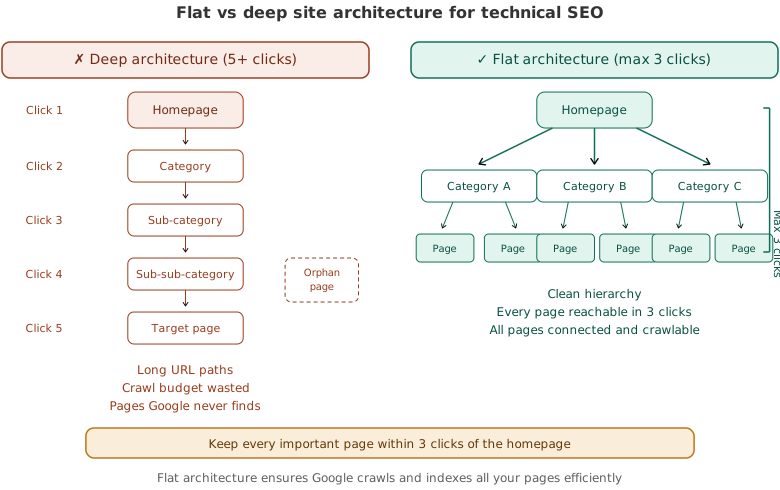
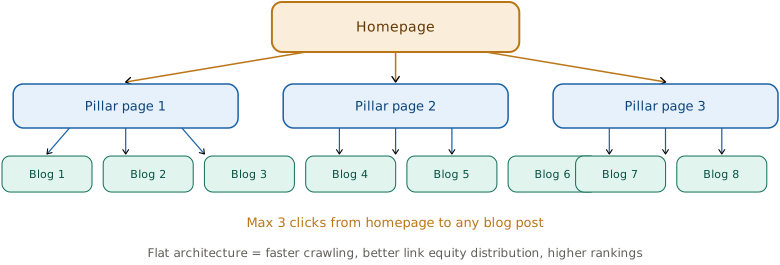
As a result, good site architecture helps both search engines and users find content. For B2B sites, a flat architecture works best: every page should be reachable within three clicks from the homepage. On an online store that math gets harder fast, because filters and categories multiply URLs, and how flat you can keep the structure is partly set by the platform, one reason the ecommerce platform you choose shapes what you can rank.
Keep URLs Clean and Descriptive
Specifically, URLs should be short (3-5 words), descriptive, lowercase, and hyphenated. For example, /lead-scoring-best-practices/ beats /blog/2026/03/article-id-4523-lead-scoring/. Remove dates, IDs, and unnecessary subdirectories from your URL structure. As we covered in our B2B SEO strategy guide, URL structure is a confirmed ranking signal. Shorter URLs correlate with higher rankings.
Implement Canonical Tags
Additionally, canonical tags tell search engines which version of a page is the “official” one. This prevents duplicate content issues from URL parameters, session IDs, tracking codes, or print versions. Every page on your site should have a self-referencing canonical tag: <link rel="canonical" href="https://yourdomain.com/page-slug/" /> On an online store this is where categories get complicated, because filters and sort orders spin up near-duplicate category URLs by the hundred, so deciding which category URLs to index or canonicalize is central to getting them to rank.
B2B-specific issue: marketing automation platforms like HubSpot and Marketo often generate duplicate URLs with tracking parameters. If you’re running campaigns that append ?utm_source= or ?ref= to your URLs, canonical tags prevent Google from treating each parameter variation as a separate page. On an online store the same parameter problem scales into the thousands, because filters and sort orders spin up near-duplicate URLs by the hundred, which is why an ecommerce SEO audit treats faceted navigation as its own discipline. Canonicals only clean up after the fact, though, so the real lever is the crawl-control rules that decide which filter URLs Google is even allowed to fetch before they ever reach the index.
Fix Orphan Pages
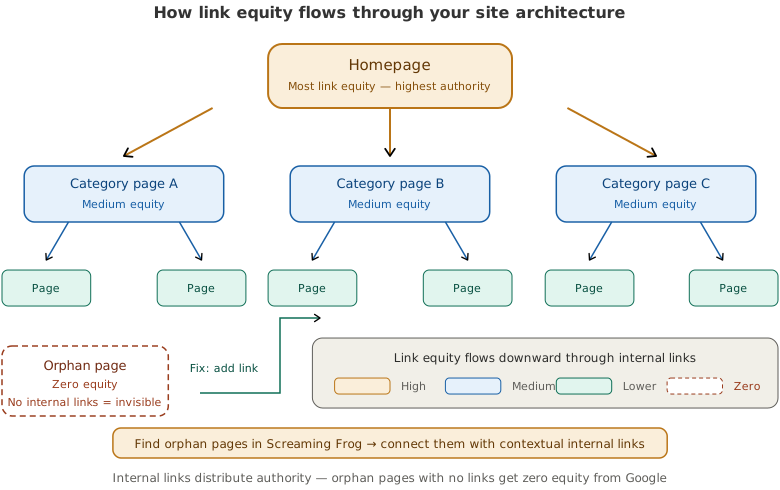
Finally, orphan pages are pages with no internal links pointing to them. Search engines have a hard time finding and prioritizing these pages. Run a crawl with Screaming Frog and compare it against your XML sitemap. Any page in your sitemap that has zero internal links is an orphan and needs to be linked from relevant content.
Multi-region B2B sites: implement hreflang tags. If your company operates separate pages for different countries or languages (e.g., /en-us/ and /en-gb/ versions of service pages), add hreflang tags so Google serves the right version to the right audience. Missing hreflang causes duplicate content issues across regional pages and splits your ranking signals. Use Google’s hreflang documentation for implementation details. Most B2B sites with fewer than 5 regional variants can implement hreflang manually in the sitemap.
3. Page Speed and Core Web Vitals
Meanwhile, page speed is a confirmed Google ranking factor, and it directly affects user experience. Over 50% of users leave a site that takes more than three seconds to load. For B2B sites with long sales cycles, a slow site doesn’t just lose a click. It loses a potential deal.
Measure Core Web Vitals
Google’s three Core Web Vitals are the specific metrics that matter for rankings:
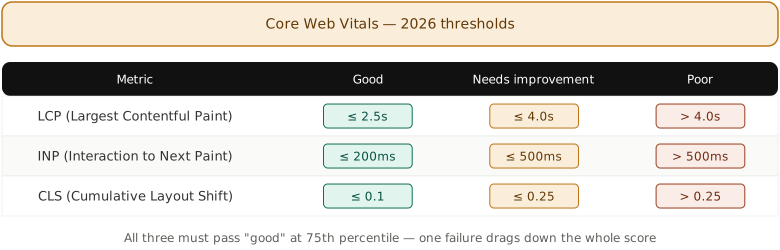
- Largest Contentful Paint (LCP): How long until the main content loads. Target: under 2.5 seconds.
- Interaction to Next Paint (INP): How quickly the page responds to user interactions. Target: under 200ms.
- Cumulative Layout Shift (CLS): How much the page layout shifts during loading. Target: under 0.1.
To get started, test your pages with Google’s PageSpeed Insights and check both mobile and desktop results. For a site-wide view, use the Core Web Vitals report in GSC.
FROM OUR OWN SITE
We reduced CLS from 0.11 to 0 on this site by adding a single metric-matched font fallback in CSS. The fix was three lines: a @font-face declaration with size-adjust: 104.53%, ascent-override: 94.90%, and descent-override: 29.66% matching DM Sans to Arial. Total implementation time was under 10 minutes. CLS problems on B2B sites are often caused by web font loading, not layout shifts from images or ads.
Common Speed Fixes for B2B Sites
Optimize images. Convert to WebP format, set explicit width and height attributes, and lazy-load images below the fold. This alone typically improves LCP by 20-40%.
Minimize third-party scripts. B2B sites are notorious for loading HubSpot tracking, Salesforce chat widgets, Hotjar, Google Tag Manager, and LinkedIn Insight Tag all on every page. Each script adds 100-500ms to load time. Audit your tag manager and defer anything that isn’t essential for initial page render.
Enable caching and CDN. Use browser caching (LiteSpeed Cache, WP Rocket, or W3 Total Cache for WordPress) and a CDN like Cloudflare or Fastly. Caching serves stored versions of your pages instead of rebuilding them on every visit.
Reduce CLS from embedded forms. CRM form embeds (HubSpot forms, Pardot forms) often cause layout shifts as they load after the main content. Set explicit height and width on form containers so the browser reserves the space before the form renders.
4. HTTPS and Security
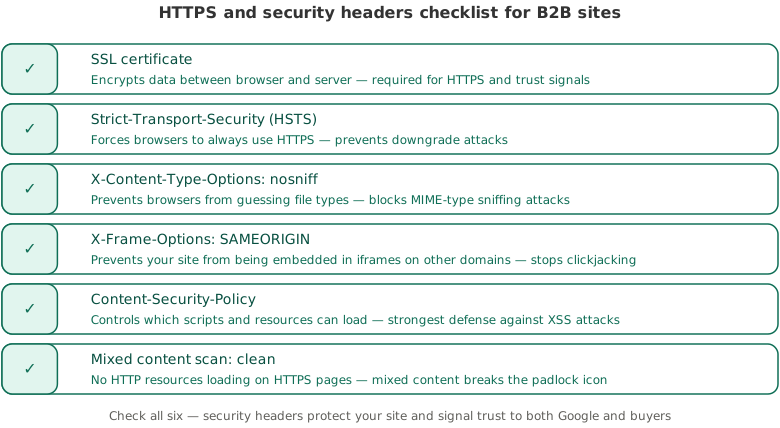
Beyond speed, HTTPS is a ranking signal and a trust signal. Chrome labels non-HTTPS sites as “Not Secure,” which kills trust immediately for B2B buyers evaluating your credibility.
Verify Full HTTPS Implementation
First, check that your SSL certificate is valid and not expired (use SSL Labs’ free test). Then verify that all HTTP URLs 301 redirect to HTTPS. Common issues: mixed content warnings (your page is HTTPS but loads images or scripts over HTTP), expired certificates, and HTTP versions of pages still accessible without redirects.
Set Security Headers
Beyond HTTPS, implement these security headers: Content-Security-Policy (prevents cross-site scripting), X-Frame-Options (prevents clickjacking), and Strict-Transport-Security (forces HTTPS). These don’t directly affect rankings, but they protect your site and build trust with security-conscious B2B buyers who check these things.
5. Mobile-Friendliness
Google uses mobile-first indexing, which means it primarily uses the mobile version of your site for ranking and indexing. Even though B2B research often happens on desktop, the mobile version of your site is what Google evaluates.
Test your pages with Google’s mobile-friendly testing built into PageSpeed Insights. Check specifically for: text that’s too small to read on mobile, tap targets (buttons, links) that are too close together, content wider than the screen requiring horizontal scrolling, and forms that are unusable on mobile devices.
B2B-specific issue: complex comparison tables and pricing grids often break on mobile. Use responsive table CSS or convert wide tables to a card-based layout on small screens. If 70% of your traffic is desktop, it’s tempting to deprioritize mobile. Don’t. Google indexes the mobile version regardless of your traffic split.
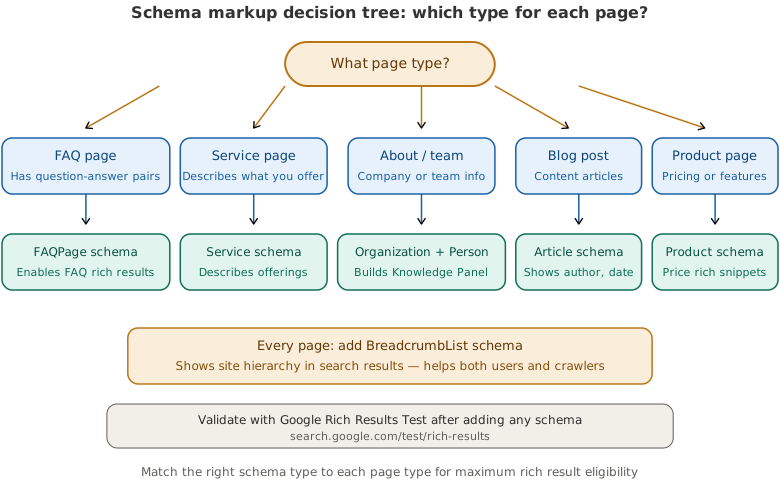
6. Structured Data and Schema Markup
As a result, structured data helps search engines understand what your content is about and can trigger rich results (FAQ dropdowns, how-to steps, breadcrumbs) in search results. Rich results increase click-through rates by 20-30% on average. On an online store the richest of those results come from product markup, which is where product page SEO adds Product, Offer, and AggregateRating schema to show price and review stars directly in the SERP.
Essential Schema Types for B2B Sites
- Article schema: For every blog post. Most SEO plugins (Yoast, Rank Math) add this automatically.
- FAQ schema: For any page with an FAQ section. Triggers expandable Q&A directly in search results. Use Yoast’s FAQ block in WordPress.
- How-To schema: For step-by-step tutorial content. Shows numbered steps in search results.
- Organization schema: Site-wide. Shows your company info, logo, and social profiles in Google’s Knowledge Panel.
- Breadcrumb schema: Shows your site’s navigation path in search results (e.g., Home > Blog > SEO). Helps users understand page context.
Validate your structured data with Google’s Rich Results Test. Fix any errors before moving on. Invalid schema won’t trigger rich results and may confuse Google about your page content. For a location-based business, the LocalBusiness schema and the citation consistency behind it are managed at scale by the local SEO tools that handle schema, listings, and citations rather than fixed by hand on every directory.
IMPORTANT
Don’t add schema markup that doesn’t match your content. Google penalizes misleading structured data. Only add FAQ schema to pages with actual FAQs, How-To schema to pages with actual steps, and Review schema to pages with real reviews. Fake or misleading schema can result in a manual action from Google.
7. Internal Linking and Crawl Depth
Similarly, internal links distribute authority across your site and help search engines discover new pages. For B2B sites running a keyword-driven content strategy, internal linking is what connects your pillar pages to cluster content and tells Google how your topics relate.
Fix Broken Internal Links
For example, broken internal links (404 errors) waste crawl budget and hurt user experience. Run a crawl with Screaming Frog or Semrush Site Audit and fix every broken internal link. Either update the link to the correct URL or set up a 301 redirect from the old URL to the new one. The full set of crawlers and auditors that surface broken links, redirect chains, and orphan pages in a single pass is laid out in our review of the crawlers and site auditors that run these checks at scale.
Reduce Redirect Chains
Additionally, a redirect chain happens when URL A redirects to URL B, which redirects to URL C. Each hop in the chain slows down page load and leaks PageRank. About 12% of websites have redirect chains affecting performance. Fix chains by pointing all redirects directly to the final destination URL. Chains like these rarely show up one at a time, which is why running a structured technical SEO audit surfaces every redirect, broken link, and crawl trap in a single pass instead of one fix at a time.
Ensure Flat Architecture
Every important page should be reachable within three clicks from the homepage. Deep pages (4+ clicks away) get crawled less frequently and accumulate less authority. Use your site’s navigation, footer links, and in-content links to keep your architecture shallow. Audit crawl depth using Screaming Frog’s “Crawl Depth” tab.
8. Content-Level Technical Issues
However, even when your infrastructure is sound, content-level technical issues can suppress your rankings.
Find and Fix Duplicate Content
For instance, duplicate content confuses search engines about which page to rank. Semrush’s research found 41% of websites have internal duplicate content. Common B2B causes: identical content across service pages for different regions, blog posts syndicated to multiple categories generating separate URLs, and HTTP/HTTPS or www/non-www variants that aren’t properly canonicalized.
Fix duplicates by consolidating into one canonical page with 301 redirects from the others. If you need to keep similar pages (like region-specific service pages), make each version at least 30-40% unique.
Eliminate Thin Content
Similarly, pages with very little content (under 300 words with no unique value) can drag down your site’s overall quality signal. Audit your site for thin pages: tag archive pages, empty category pages, auto-generated landing pages, and placeholder pages that were never finished. Either expand them with real content, consolidate them into stronger pages, or noindex them.
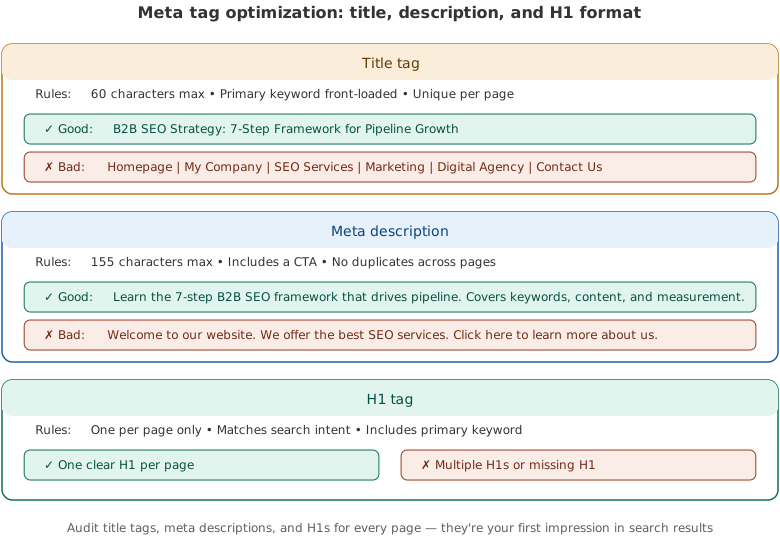
Optimize Meta Tags
Therefore, every indexable page needs a unique title tag (50-60 characters, keyword front-loaded) and meta description (140-155 characters, includes a CTA). Missing or duplicate meta tags are the most common technical SEO issue. Semrush found 70% of sites had pages without meta descriptions. Use Screaming Frog’s “Page Titles” and “Meta Description” tabs to identify missing or duplicate tags across your entire site.
9. Quarterly Audit Schedule
Because of this, technical SEO isn’t a one-time project. Sites change constantly as marketers add landing pages, developers update code, and CMS plugins get updated. Issues compound over time. Set a quarterly audit schedule using this timeline:
| Frequency | What to Audit | Tool | Time |
|---|---|---|---|
| Weekly | GSC errors, indexing status, Core Web Vitals alerts | Google Search Console | 15 min |
| Monthly | Broken links, new 404s, redirect chains, page speed regressions | Screaming Frog or Semrush Site Audit | 1-2 hours |
| Quarterly | Full crawl, duplicate content, thin pages, schema validation, mobile testing, security headers | Screaming Frog + GSC + PageSpeed Insights + SSL Labs | Half day |
| Annually | Site architecture review, URL structure audit, robots.txt + sitemap overhaul, CMS/plugin updates | Full audit stack | 1-2 days |
In our experience, the quarterly full crawl is where you catch the silent killers: redirect chains that grew link by link over three months, canonical tags that a CMS update quietly overrode, and orphan pages from old campaigns that nobody remembered to redirect. These issues rarely trigger alerts. They accumulate slowly, and by the time you notice a ranking drop, they’ve been compounding for weeks. The quarterly crawl is your insurance policy.
After implementing technical SEO for three B2B SaaS clients, we’ve found that the quarterly full crawl is what catches the issues that slowly accumulate. One client’s dev team had accidentally added a noindex tag to their pricing page during a redesign. It went unnoticed for two months and cost them roughly 800 organic visits before a quarterly audit caught it.
Frequently Asked Questions
Technical SEO covers all the behind-the-scenes optimizations that help search engines crawl, index, and rank your website. This includes site speed and Core Web Vitals, HTTPS security, XML sitemaps, robots.txt configuration, canonical tags, structured data markup, mobile-friendliness, internal linking structure, and fixing issues like broken links, redirect chains, and duplicate content.
The 80/20 rule (Pareto Principle) applied to SEO means that roughly 20% of your SEO actions drive 80% of your results. For technical SEO specifically, fixing crawlability issues, page speed problems, and duplicate content typically delivers the biggest ranking improvements. Focus on these high-impact fixes before spending time on minor optimizations.
A 2026 technical SEO checklist should cover crawlability and indexing (robots.txt, sitemap, GSC), site architecture and URL structure, Core Web Vitals (LCP, INP, CLS), HTTPS and security, mobile-first optimization, structured data and schema, internal linking, and content-level technical issues like duplicate content and thin pages. New for 2026: review AI crawler access policies in your robots.txt file.
The four types of SEO are technical SEO (site infrastructure and crawlability), on-page SEO (content optimization and keyword targeting), off-page SEO (backlinks and external authority signals), and local SEO (optimizing for location-based searches). B2B websites primarily need strong technical and on-page SEO, with off-page SEO becoming critical as competition increases for high-value keywords.
Run a basic check weekly in Google Search Console (15 minutes), a broken link and speed scan monthly (1-2 hours), and a full technical audit quarterly (half day). An annual deep audit should review your entire site architecture, URL structure, and CMS configuration. Quarterly audits are the minimum for catching issues before they impact rankings significantly.
Your First Move
Open Google Search Console right now and check two things: your indexing report (Pages > Not Indexed) and your Core Web Vitals report. Those two reports will tell you the biggest technical issues hurting your site today. Fix the indexing blockers first, speed issues second, and then work through the rest of this checklist section by section. If you need help connecting technical SEO to your broader B2B marketing framework, start there for the strategic context.