A store with 8,000 products almost never has 8,000 URLs. Add color, size, and price filters, three sort orders, and a session parameter, and that same catalog can hand a crawler well over a million addresses to fetch, nearly all of them near-duplicates no shopper ever searches for. That gap is the whole problem technical SEO for ecommerce exists to solve, and it is why a generic checklist that passes a blog or a brochure site can still leave a catalog quietly rotting at the bottom of the index.
The stakes climbed in 2026. As AI Overviews swallow more of the results page, a 2026 analysis of Similarweb data found classic organic click share fell between 11 and 23 percentage points year over year across retail verticals, from headphones to greeting cards. When every click is harder to win, the catalog that gets crawled cleanly, rendered fully, and indexed completely takes the clicks that remain, and it feeds the AI engines reading the same pages. This guide covers how each technical system works and how to configure it at catalog scale. It is the build layer; when you need to find what is broken on a specific store, that is a separate job the ecommerce SEO audit walks step by step.
Direct answer — What is technical SEO for ecommerce?
Technical SEO for ecommerce is the work of making sure search engines can crawl, render, index, and serve a large product catalog without wasting crawl budget or indexing duplicate URLs. It spans crawl control, faceted-navigation URLs, JavaScript rendering, canonicalization, pagination, XML sitemaps, and product schema, handled at catalog scale where one template change cascades across thousands of pages. It differs from a generic technical checklist by treating the store as a system, and from an ecommerce SEO audit, which diagnoses a specific site rather than explaining how to build one.
Key Takeaways
- Technical SEO for ecommerce is a scale problem: a catalog with a few thousand products can generate hundreds of thousands of crawlable URLs, so the job is controlling what search engines crawl and index, not just fixing individual pages.
- Crawl budget only becomes a real constraint on large catalogs. Google’s own guidance points at sites with a million-plus pages, or ten thousand-plus pages that change daily, which is exactly where distributors and marketplaces sit.
- Faceted navigation is the biggest source of wasted crawling. The fix is choosing the right directive per URL type: robots.txt to block, noindex to de-index, canonical to consolidate. Each does a different job.
- JavaScript storefronts are the most under-diagnosed risk. Google renders JavaScript in a deferred queue, so product data that only appears after the script runs can be indexed late or not at all.
- Almost every high-value fix is template-level. One canonical rule or one rendering change cascades across every product page, which is why architecture beats page-by-page cleanup.
What makes technical SEO for ecommerce different
Technical SEO for ecommerce is the practice of controlling how search engines crawl, render, index, and serve a product catalog, so every product that should rank can be found and every low-value URL stays out of the way. The difference from ordinary technical SEO is not the list of topics. It is the scale and the way problems multiply.
Three things separate a catalog from a normal website. First, it multiplies URLs: filters, sort orders, and tracking parameters turn one category into thousands of crawlable addresses. Second, it changes constantly, as prices move, stock flips, and products launch and retire every day. Third, it is template-driven, so a single product template or canonical rule governs thousands of pages at once.
Those properties rewrite the job. The generic technical SEO checklist that any site should pass, covering crawlability, HTTPS, mobile rendering, and clean internal links, still applies, and it is the floor rather than the ceiling. Catalog scale adds a second layer on top: deciding which of a million possible URLs deserve to be crawled at all, making sure product data survives JavaScript rendering, and keeping near-duplicate variants from splitting their own ranking signals.
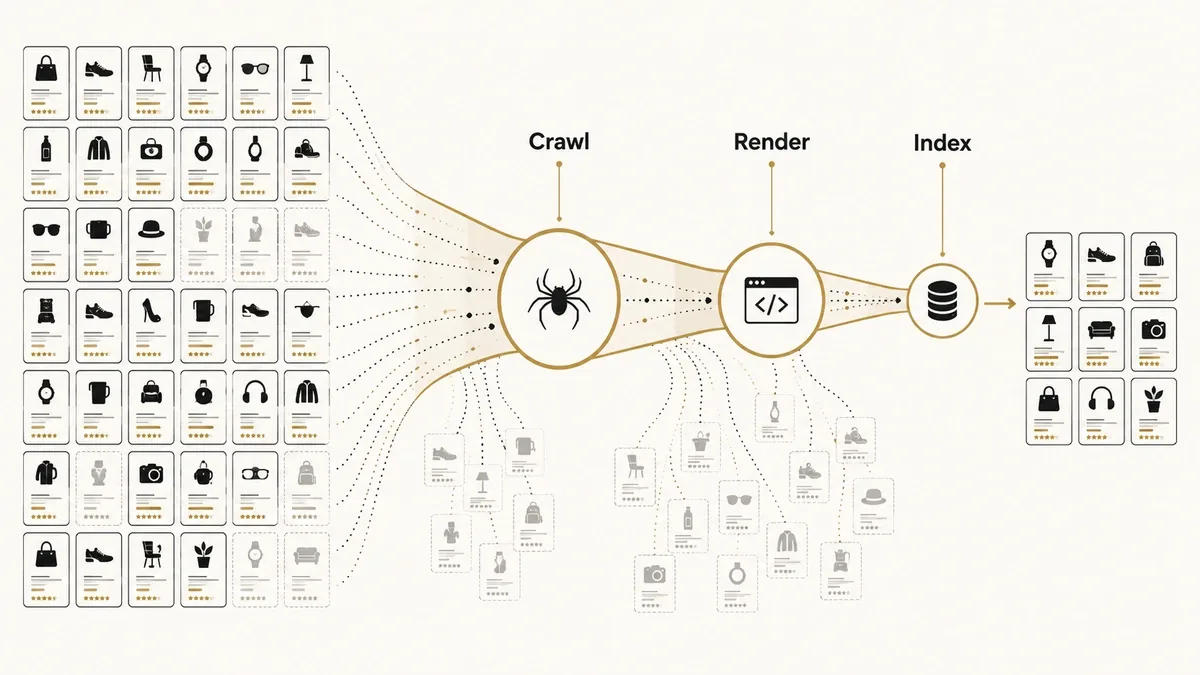
It helps to hold four stages in mind, because every section below maps to one. Search engines crawl your URLs, render the pages to see their content, index what is worth keeping, and serve the best result to a query.
A page that never gets crawled cannot be rendered, and a page that renders empty cannot be indexed. The failures compound in order, which is why you fix them in order.
Crawl budget for large product catalogs
Crawl budget is the number of URLs a search engine is willing and able to fetch from your site in a given window. Google frames it as two forces. Crawl capacity limit is how many simultaneous connections Googlebot will open without straining your server, and it rises or falls with your response times and error rates. Crawl demand is how much Google actually wants your URLs, based on catalog size, update frequency, and quality. The budget is the smaller of the two.
Here is the part most guides skip: crawl budget is not a concern for every store. Google’s guidance aims the advice at sites with more than a million unique pages that change weekly, or more than ten thousand pages that change daily, and calls even those numbers a rough estimate. A 500-product boutique will never feel it. A distributor with 200,000 SKUs, each spawning filter and sort variants, lives inside that constraint every day.
When budget is tight, the failure looks like this: Googlebot burns its fetches on ?sort=price&view=grid and session URLs, and the forty products you launched last week sit undiscovered because the crawler never reached them. Google’s advice is blunt: block low-value URLs so the crawler spends its budget on pages that matter.
You cannot manage what you cannot see, and Search Console’s Crawl Stats report plus your raw server logs are the only honest record of where Googlebot actually spends its time. A log-file analysis shows the exact ratio of crawl hits landing on real products versus junk parameters, and it is how you prove a crawl-waste problem rather than guess at one, using the log analyzers we compare in the technical SEO tool stack.
Crawl Efficiency = Crawl Requests to Indexable URLs ÷ Total Crawl Requests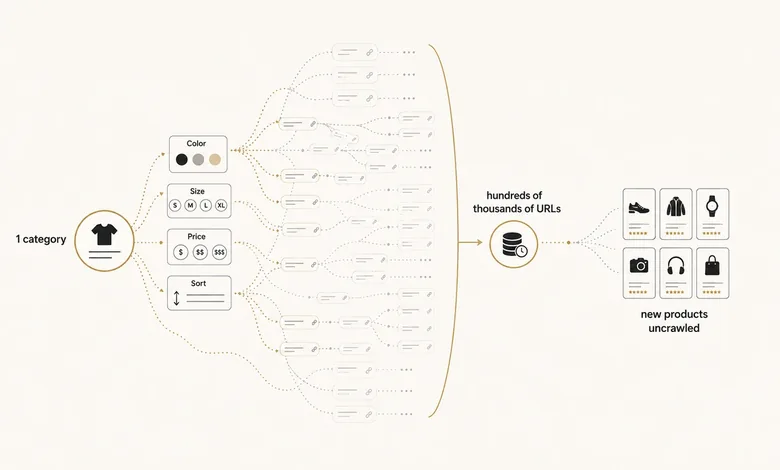
Crawl control: robots.txt vs noindex vs canonical vs nofollow
Crawl control is how you tell search engines which URLs to fetch, which to keep out of the index, and which to ignore, and each tool does a different job. The mistake that sinks catalogs is treating them as interchangeable. A robots.txt disallow stops crawling but does not remove a URL already in the index. A noindex meta tag removes a URL from the index but still gets crawled every time, so it saves nothing on crawl budget. A canonical consolidates ranking signals but is a hint Google can ignore. Confuse them and you get the worst outcome: pages blocked from crawling that stay indexed with no snippet, or noindexed pages that quietly keep eating your budget.
| Directive | What it does | Use when | Avoid when |
|---|---|---|---|
| robots.txt Disallow | Blocks crawling; does not de-index URLs already known | Session, tracking, internal-search, and infinite sort/filter URLs | You need the page de-indexed or its links followed |
| Meta noindex, follow | Keeps the URL crawlable, drops it from the index, passes link equity onward | Thin filter combinations you want discovered but not ranked | Crawl budget is the problem (noindex still gets crawled) |
| rel=canonical | Consolidates ranking signals to a chosen URL; a hint, not a directive | Useful filters and variants that near-duplicate a page you would rather rank | Pages are genuinely unique, or you also block them in robots.txt |
| rel=nofollow on facet links | Discourages crawling a specific link path | Steering crawlers away from infinite filter paths | You expect it to de-index anything (it won’t) |
| 404 / 410 | Removes a URL from the index over time (410 is faster) | Empty filter results and permanently retired SKUs | The product is a temporary stock-out you will refill |
| 301 redirect | Moves the URL and its signals permanently | Replaced or renamed products and merged variants | A product is only out of stock (keep it, update availability) |
The rule of thumb follows the table. Use robots.txt to block URL patterns that should never be crawled, like session IDs, internal search results, and infinite sort-and-filter combinations. Use noindex, follow when a page should be crawled and its links followed but should not rank, such as a thin filter combination. Use a canonical when a filtered or parameter URL is a genuine near-duplicate of a page you would rather rank. Use a 404 or 410 when a URL should disappear, and a 301 when its value should move somewhere permanent.
Deciding which facet falls into which bucket is the judgment call. To see which of your filter URLs are already indexed and eating the decision for you, the crawl-and-reconcile pass is the step that produces the list.
IMPORTANT
Never block a URL in robots.txt and expect that to remove it from Google. A blocked page cannot be crawled, so Google never sees the noindex tag you added, and the URL can linger in results as a bare link. To de-index at scale, keep the page crawlable with a noindex first, confirm it has dropped, then block it in robots.txt to save the crawl budget.
URL architecture and faceted navigation at scale
Site architecture for ecommerce is the way you organize URLs, categories, and internal links so both shoppers and crawlers reach any product in as few clicks as possible. Two decisions carry most of the weight: how URLs are formed, and which filters are allowed to create them. That is why platform-level SEO control belongs in selection, not cleanup.
Start with URL design. Google’s ecommerce guidance is to keep URLs readable and stable, use words over IDs where you can, and stay consistent on case and trailing slashes so one product doesn’t answer to four addresses. A clean path like /tools/cordless-drills/ tells a crawler what the page is; /c?id=88421&ref=nav tells it nothing and invites parameter duplication.
Faceted navigation is where architecture usually breaks. Every filter a shopper clicks can append a parameter, and because filters combine, ten filters do not make ten URLs, they make hundreds or thousands. The build-time decision that saves you later is choosing which filters generate a real, crawlable URL and which run through JavaScript or a POST request that never creates one. Color and size on a headphones category might deserve indexable URLs, because people search for noise-cancelling headphones. A price slider and a sort order should never mint a URL at all.
Depth is the last piece. A product buried eight clicks from the homepage is a product Google rarely crawls and rarely ranks. Keep the important catalog within about three clicks using category hubs, sensible internal links, and breadcrumb trails that also feed BreadcrumbList structured data. Which categories deserve to exist at all is a demand question, not a technical one, and category page SEO is where that demand map turns into crawlable commercial hubs alongside your keyword-to-cluster architecture.
PRO TIP
Before you add a new filter to a category, decide up front whether it should create a crawlable URL. Setting the crawl rule the day you build the filter takes minutes. Retrofitting rules onto a facet system Google has already indexed can take months.
JavaScript rendering and product data
JavaScript rendering is the step where Googlebot executes a page’s JavaScript to see the content a shopper’s browser would show. It matters more for ecommerce than almost any other topic here, because so many modern storefronts build their product data in the browser rather than on the server.
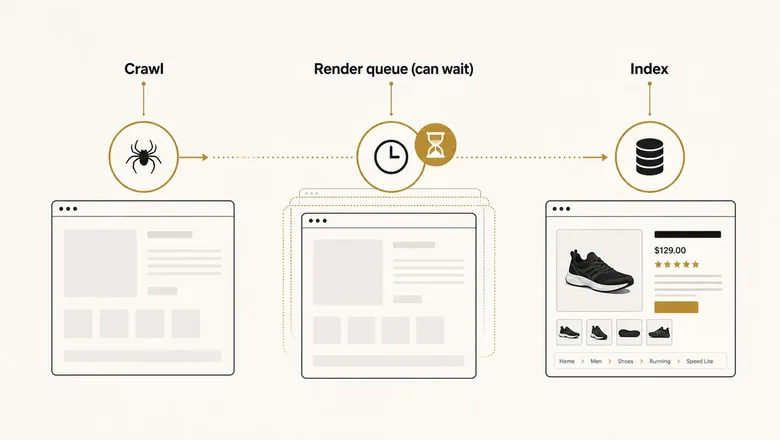
Google processes pages in three phases: it crawls the URL, queues the page for rendering in a headless version of Chrome, then indexes what the rendered HTML contains. The catch is the queue. Google’s own documentation notes a page can wait in the render queue for seconds or considerably longer, so anything that only appears after JavaScript runs is indexed late, if at all. On an app-shell storefront where the initial HTML is an empty frame, Googlebot can crawl a product page and see no price, no description, and no links to other products until rendering catches up.
This is why the rendering strategy is a technical SEO decision, not only an engineering one. Server-side rendering (SSR) sends complete HTML on the first response, so crawlers and AI engines see the product immediately. Client-side rendering (CSR) leaves everything to the browser and puts you at the mercy of the render queue. Dynamic rendering and prerendering sit in between, serving a pre-built HTML snapshot to bots. For a large catalog that changes often, SSR or prerendering of the critical product templates and category templates is the safer default, and it is why the rendering approach belongs in the platform decision itself, next to the tradeoffs in our B2B ecommerce platform comparison.
You don’t have to guess whether rendering is a problem. The URL Inspection tool in Search Console shows the actual rendered HTML Google sees, and comparing that to your raw page source tells you exactly what depends on JavaScript. On Shopify Hydrogen or other headless storefronts, experienced Shopify developers need to own rendering, canonical, and structured-data decisions before launch.
Workflow · 15 min
How to check whether Googlebot renders your product pages
A five-step check that shows whether your product data survives JavaScript rendering, using only Chrome and Search Console.
View the raw page source
Open a product page and press Ctrl+U. Note whether the price, description, and links to other products are present in the HTML, or missing.
Compare the rendered DOM
Open the same page in Chrome DevTools, Elements tab. Content that appears here but not in the raw source is JavaScript-dependent.
Inspect what Google rendered
Run the URL through Search Console’s URL Inspection tool and open View Crawled Page to see the HTML Google actually rendered.
Confirm product data and links appear
Check that the title, price, availability, and internal links are in the rendered HTML. Missing links or prices mean Google may index the page thin.
Watch the Page indexing report
Look for product URLs sitting in Crawled – currently not indexed, a common symptom of rendering gaps, and re-check after every template deploy.
Canonicalization and duplicate content at scale
A canonical tag tells search engines which version of a duplicate or near-duplicate URL is the one to index and rank. On a catalog, canonicals do quiet, heavy lifting, and getting the defaults right prevents whole classes of duplicate-content problems.
Start with self-referencing canonicals. Every indexable page should name itself as canonical by default, so that tracking parameters and reordered query strings all point back to the clean URL. Without that baseline, /drill?ref=email and /drill?ref=ad become separate pages competing with the original.
Product variants are the harder case. When a red shirt and a blue shirt live on separate URLs but share the same description and reviews, pointing the variants at a single main product consolidates their signals. When each variant has real search demand and unique content, they can stand alone. There is no universal answer, and because a canonical is a hint rather than an order, Google can overrule a choice it finds unconvincing, so the pages you consolidate should genuinely be near-duplicates.
Duplicate descriptions are the most common catalog-wide version of this. A store that pulls manufacturer copy verbatim ends up with thousands of pages carrying text that also appears on a hundred competitor sites. That is a content problem with a technical footprint: the pages compete with each other and with everyone else selling the same SKU. The template-level fix is a system for unique, structured product content; the page-by-page craft of writing it belongs to product-page SEO.
Pagination, sitemaps, and indexation management
Pagination and XML sitemaps are the two systems that show search engines how your catalog is structured and which URLs to prioritize. Both are easy to misconfigure in ways that hide products from the index.
Pagination first. Google stopped using rel="next" and rel="prev" as indexing signals years ago, which changed the rules. Each page of a category (page 1, page 2, page 3) should carry a self-referencing canonical, not a canonical pointing back to page 1, because collapsing them to page 1 tells Google the deeper pages do not exist and the products listed only there fall out of discovery. Paginated pages need real crawlable links, and if you use infinite scroll, it has to be backed by paginated URLs a crawler can reach without scrolling.
XML sitemaps and indexation states
XML sitemaps are your direct line to the index. On a large catalog, split them: one set for products, one for categories, and further segments if it helps, all referenced from a sitemap index. Segmenting turns the sitemap into a monitoring tool, because Search Console reports indexed-versus-submitted per file, and a product sitemap sitting at 60% indexed points straight at the problem area. Generate them dynamically so they list only indexable, canonical URLs and drop products the moment they 404 or retire.
Two indexation states are worth knowing by name. Discovered – currently not indexed usually means a crawl-budget or priority problem: Google knows the URL but has not fetched it. Crawled – currently not indexed is a quality or duplication signal: Google fetched the page and chose not to keep it. They call for different fixes, and telling them apart saves you from optimizing crawl budget when the real issue is thin, duplicate product pages.
If you sell across regions, hreflang is the last piece. A US and a UK storefront selling the same catalog in different currencies need reciprocal hreflang annotations so Google serves the right version and does not treat them as duplicates. Missing or one-directional hreflang is one of the most common technical faults on international stores.
Core Web Vitals at the template level
Core Web Vitals are Google’s three measured signals for how a page loads, responds, and stays visually stable: Largest Contentful Paint, Interaction to Next Paint, and Cumulative Layout Shift. Google’s targets are an LCP under 2.5 seconds, an INP under 200 milliseconds, and a CLS under 0.1, measured at the 75th percentile of real visits.
The ecommerce move is to fix them at the template level, not the page. Because one product template renders thousands of URLs, a single improvement to that template cascades across the whole catalog, which is the highest-return performance work you can do. Chasing individual page scores is how teams lose weeks.
On product pages, LCP is almost always the main product image, so it needs a modern format like WebP or AVIF, sized responsively with srcset, and given loading priority instead of being lazy-loaded. Below-the-fold gallery images and related-product carousels should lazy-load so they do not compete for that first paint. INP is usually strangled by JavaScript, and on a store the JavaScript comes from apps: review widgets, live chat, personalization, pop-ups, and a stack of analytics tags. Each one adds main-thread work, and the fix is auditing which apps earn their weight. CLS comes from images and embeds without reserved space and from banners that inject after load, so set explicit width and height on every image and reserve space for anything dynamic.
The measurement tools and the pass-or-fail thresholds for each metric are the same for any site, and the generic side of that work lives in our technical SEO audit process. What changes for ecommerce is the reach: you are tuning a handful of templates that each stand in for thousands of pages.
Structured data for ecommerce at scale
Ecommerce structured data is markup that tells search engines a page is a product, with a price, availability, and rating attached. Done right, it makes products eligible for rich results and gives AI engines clean, machine-readable facts to quote.
Three types carry most catalogs. Product with a nested Offer supplies name, price, priceCurrency, and availability. AggregateRating and Review expose star ratings that can show in results and lift click-through. BreadcrumbList mirrors your category path. Use JSON-LD, which Google recommends and which sits in the page head without tangling your templates.
The scale principle applies here too: structured data belongs in the template, generated from the same data that renders the visible page, never hand-written per product. Hand-coding guarantees drift, and schema that claims a price or an in-stock status the page does not show is worse than no schema, because Google can treat the mismatch as untrustworthy and pull eligibility. Keep the markup wired to live inventory so the price in the JSON-LD always matches the price on the page.
One caution on scope. Google has retired several rich-result types over the years, so treat schema as an eligibility and AI-citation asset rather than a guaranteed visual upgrade. Reconciling your product schema against the Merchant Center feed that powers shopping surfaces is its own diagnostic step, and it belongs with the rest of your audit work rather than here.
Frequently Asked Questions
Yes. It shares the same foundations as any site, then adds catalog-scale problems a generic checklist skips: URL multiplication from facets, JavaScript-rendered product data, variant duplication, and crawl budget. The core difference is that fixes are template-level, so one change cascades across thousands of product URLs at once.
Decide, filter by filter, which URLs deserve to be crawled and indexed. Block infinite sort and session parameters in robots.txt, noindex thin filter combinations, canonicalize useful-but-duplicate filters, and keep only high-demand facets as indexable pages. The goal is controlling the crawl surface, not indexing every combination.
It can. Google renders JavaScript in a deferred queue, so product data that appears only after the script runs may be indexed late or thin. Server-side rendering or prerendering the product and category templates puts price, description, and links in the first HTML response, which removes the risk.
Crawl budget is how many URLs a search engine will fetch from your site in a period. Google aims the concern at sites over a million pages, or over ten thousand that change daily. Small catalogs rarely hit it; large distributors and marketplaces live inside it every day.
There is no fixed limit, but Google indexes what it can crawl, render, and judge worth keeping. Wasting crawl budget on filter and sort URLs, or shipping JavaScript-dependent pages that render thin, both shrink how much of your real catalog gets indexed.