A product page can rank for one product. A category page can rank for the whole head term that sits above it, which is why ecommerce category page SEO is the highest-return work most stores start and never finish. “Running shoes,” “stainless steel fasteners,” “standing desks” — those are category queries, and the page Google shows for them is almost never a single product. It’s a collection page. Optimize it well and one URL earns rankings for dozens of commercial variations at once.
Most stores don’t. They obsess over product-page copy and blog content, then leave the category layer as a bare grid with a keyword in the title tag and nothing else. The data backs up how common that is: a 2025 Baymard Institute benchmark found 58% of desktop stores and 78% of mobile stores have “poor to mediocre” product-list UX. A page that important, left that unfinished, is the clearest opportunity on most catalogs.
This guide is the category-layer playbook: what a category page should rank for versus a product page, how to structure content around the grid without burying products, which filters deserve to become their own indexable pages, how to handle pagination and hierarchy, the schema that actually applies, and how to fix the thin and duplicate categories that hold a catalog back. It assumes the crawl and index foundations underneath are already sound, the groundwork a technical SEO audit puts in place before any on-page work pays off.
Direct answer — What is ecommerce category page SEO?
Ecommerce category page SEO is the practice of optimizing collection pages, the pages that list the products in a category, so they rank for broad, high-intent commercial keywords. It covers the H1 and intro copy above the product grid, supporting content below it, title tags and meta descriptions, which filter URLs become indexable landing pages, pagination and canonicals, breadcrumbs and internal links, and category schema like ItemList and BreadcrumbList. Category pages target head terms such as “running shoes,” while product pages target long-tail terms like a specific model, so the two are optimized for different queries.
Key Takeaways
- Category pages are a store’s highest-value commercial pages because they rank for broad head terms that product pages can’t. Treat them as landing pages, not as a grid with a title tag.
- Split the intent: category pages own broad, transactional queries (“men’s waterproof boots”), product pages own specific long-tail ones (a single model and size). Optimizing both for the same term wastes effort.
- Put a short, genuinely useful intro above the product grid and keep products visible. Google says category pages need “very little” text, so a keyword wall in the footer is mostly wasted work.
- Only a small set of high-demand filters deserve to be indexable category pages. The rest should be canonicalized, noindexed, or blocked, and that call is made facet by facet.
- Category-specific structured data is ItemList, CollectionPage, and BreadcrumbList. Product schema belongs on product pages, not on the category page itself.
What Is Ecommerce Category Page SEO?
Ecommerce category page SEO is the work of optimizing collection pages so search engines rank them for the broad, commercial keywords that describe a group of products. A category page lists everything in a category, “women’s trail running shoes” or “M8 hex bolts,” and sits between the homepage and individual products in the site hierarchy. Optimizing it means shaping the copy, metadata, URL, internal links, and schema so the page matches how buyers search at the moment they’re ready to compare and buy.
The reason this matters more than most store owners assume is intent and reach. Head terms carry the volume and the commercial intent, and only a category page can satisfy them, because a searcher for “running shoes” wants a selection, not one shoe. Baymard’s benchmark shows how much room there is to win here: most stores score poorly on the exact pages that should be their strongest earners. A category page treated as a landing page, with a clear purpose and content that helps a buyer choose, beats a category page treated as a product dump every time.
Category Pages vs Product Pages: What Each Should Rank For
Category pages and product pages are optimized for different searches, and confusing the two is the most common category-SEO mistake. A category page targets broad, high-volume commercial terms and should read as a curated selection with buying guidance. A product page targets specific, long-tail terms, one model, one SKU, and should go deep on that single item. Point both at the same keyword and they compete with each other, which splits ranking signals and usually sinks both.
| Dimension | Category page (collection) | Product page |
|---|---|---|
| Ranks for | Broad head terms: “men’s hiking boots” | Long-tail terms: “Salomon Quest 4 GTX size 11” |
| Search intent | Comparison, still choosing | Specific, ready to buy one item |
| Volume | High, the bulk of category demand | Lower per URL, but many URLs |
| Primary content | Selection, filters, buying guidance | Specs, images, reviews, price, variants |
| Key schema | ItemList, CollectionPage, BreadcrumbList | Product, Offer, AggregateRating, Review |
| Wins on | Structure, relevance, internal links | Unique copy, reviews, availability |
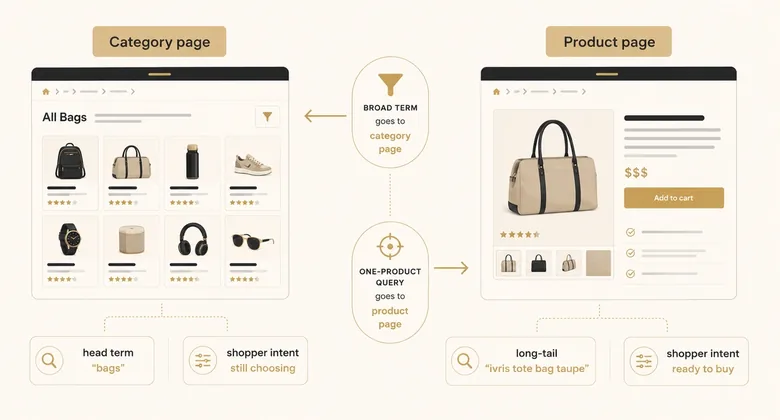
Use this as a routing rule. If a keyword implies a set of options, it belongs to a category or subcategory page. If it names one product, it belongs to that product page. Product-page optimization is its own discipline with its own mechanics, covered separately in the ecommerce cluster, so this guide stays on the category layer and treats products only as the things a category links to and organizes.
Find the Head Terms Each Category Should Own
Category page SEO starts with keyword research, because you can’t optimize a category for a term until you know which term it should win. For each category, find the broadest commercial keyword with real volume that matches the products in it, then confirm no sibling category or product page already targets that same term. A keyword tool earns its place here: pull the head terms, their search volume, and the long-tail variations buyers actually type, then assign one primary term to each category so two pages never chase the same query.
Granularity is the other half of the research, and it’s one of the highest-return moves in ecommerce SEO. When a slice of a category has its own repeatable search demand, “men’s waterproof hiking boots” inside “men’s hiking boots,” it deserves a dedicated subcategory page rather than living as a filter. Each long-tail subcategory targets a specific query with commercial intent and light competition, so a store that builds them well can rank for a long tail of buyer searches its competitors leave on filter URLs. The limit is demand: build a subcategory when people search for it, not just because the products can be grouped that way, or you create a thin page you’ll clean up later.
📊 Semrush Keyword Magic
🔧 Screaming Frog
🔧 Rich Results Test
📊 Google Search Console
Workflow · about two hours per category template
How to optimize an ecommerce category page: the six-step sequence
Turn a bare product grid into a category page that ranks for its head term, working template-first so the fixes cascade across every category.
Map the head term to the page
Find the single broad, commercial keyword the category should own with a keyword tool, and confirm no product page or sibling category already targets it.
Structure content around the grid
Write a short H1 and a 50-to-100-word intro above the products, and add genuinely useful buying guidance below the grid without burying the products.
Write the title tag and meta description
Front-load the head term in a unique title tag, drop the brand name unless it adds demand, and write a meta description that sells the selection.
Decide filter and pagination handling
Index only high-demand filter URLs as landing pages, canonicalize or noindex the rest, and give each paginated page a self-referencing canonical.
Add breadcrumbs, links, and schema
Add a breadcrumb trail, link to subcategories and top products from the copy, and mark up the page with BreadcrumbList and ItemList.
Fix thin and duplicate categories, then verify
Consolidate near-duplicate categories, noindex empty ones, then re-crawl and check the category ranks and indexes as intended.
Structure Category Content Above and Below the Product Grid
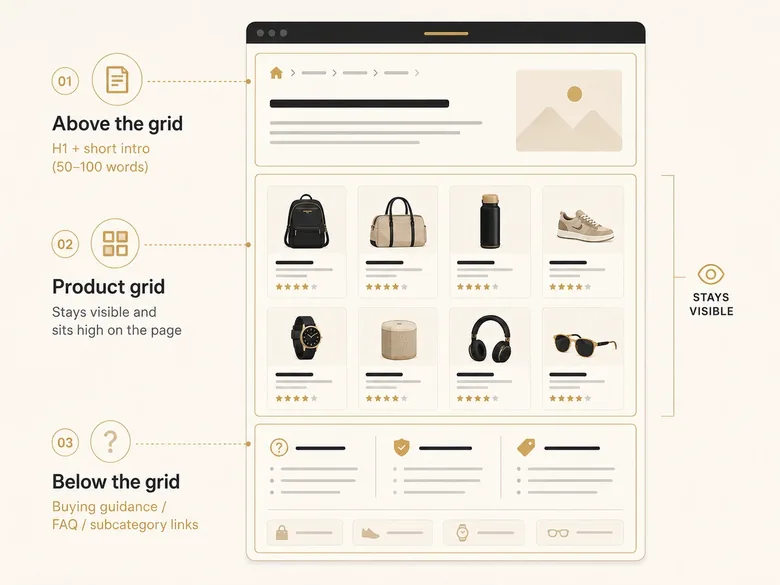
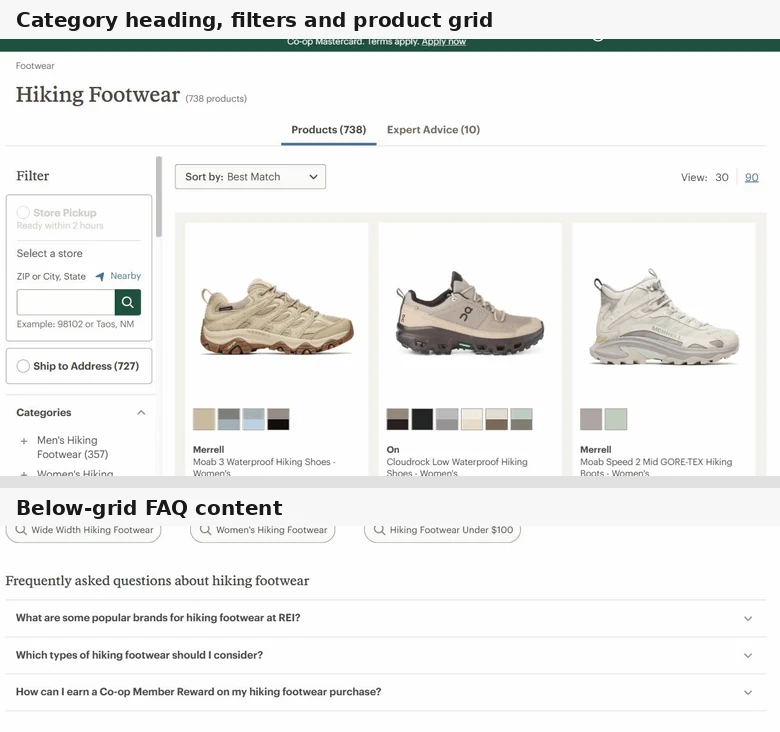
Category page content works best in two layers: a short block above the product grid and a longer block below it. The layout decision matters because it settles a real tension. Buyers want to see products immediately, and search engines want enough text to understand what the page is about. Split the content and you serve both, instead of choosing one at the expense of the other.
Above the grid: H1 and a short intro
Above the product grid, keep it tight: one clear H1 that front-loads the category’s head term, and an intro of roughly 50 to 100 words that tells a buyer what’s in the category and how to choose. That’s it. The products should still be the first thing a visitor sees on desktop and after a short scroll on mobile. Pushing the grid below a wall of introductory copy is the single most common way stores hurt both conversions and rankings at once.
Below the grid: useful guidance, not a keyword wall
Below the grid is where longer content belongs: a buying guide, answers to common questions, links to subcategories, and context that helps someone decide. The discipline here is that it must be genuinely useful, because Google is clear that a category page needs surprisingly little text. As Google’s John Mueller put it, “you have to have some information on a page so that we understand what the topic is. But that’s generally very little information, and in many cases we understand that from the products that you have listed anyway.”
The 500-word keyword paragraph stuffed under the grid is mostly wasted effort. If your product names already say “waterproof leather work boots,” Google understands the page. Add content only where it answers a real buying question the products alone don’t.
A concrete example helps. Under a “kids’ running shoes” category, useful below-grid content answers questions like how to measure a child’s foot and how often the shoes need replacing, and links to the width and age-range subcategories. That’s content a shopper actually wants and Google can read. Restating “we sell the best kids’ running shoes at great prices” three times over is neither useful nor a ranking signal.
PRO TIP
Write category copy as an FAQ or a short buyer’s guide, not a paragraph of repeated keywords. “How do I choose a size?” or “Steel vs titanium: which lasts longer?” earns its place below the grid; a restated category name three times does not.
Write Category Titles and Meta Descriptions That Earn the Click
Title tags and meta descriptions are where category pages win or lose the click, so write them for the head term and the buyer, not for a template. Front-load the category’s primary keyword in the title tag, ideally in the first few words, and keep each one unique across the catalog. A pattern like “[Category] + [modifier or benefit] + [brand]” scales, as long as the modifier changes enough that two categories never share the same title.
Two habits separate strong category titles from weak ones. First, drop your own brand name from the front of the title unless the brand itself drives search demand, since it eats characters that a modifier like “waterproof” or “wholesale” could use to catch a long-tail variation. Second, treat the meta description as ad copy for the selection: name the range, the price advantage, or the choice on offer, and keep it under about 155 characters so it isn’t truncated. Category pages can also earn star ratings in the results when review data is present, which lifts click-through, but the rating markup belongs on the products, not faked onto the category.
Here’s the difference in practice. A default template might output “Boots | ShopName” on every boot category, which is generic and duplicated across the catalog. Worked titles read “Men’s Waterproof Work Boots | Free 2-Day Shipping” for one and “Women’s Insulated Snow Boots | Sizes 5-12” for another: each leads with its head term, each is unique, each gives a reason to click. Apply that discipline at the template level and you fix hundreds of near-duplicate titles in a single change.
Turn High-Demand Filters Into Indexable Category Pages
Faceted navigation, the filters that let shoppers narrow a category by color, size, brand, or price, is where category SEO meets crawl control. Each filter usually generates a new URL, and a category with a handful of filters can spin up thousands of near-duplicate pages. The category-SEO question inside that larger problem is narrow and worth answering precisely: which of those filter URLs deserve to become their own indexable category pages, and which should be kept out of the index.
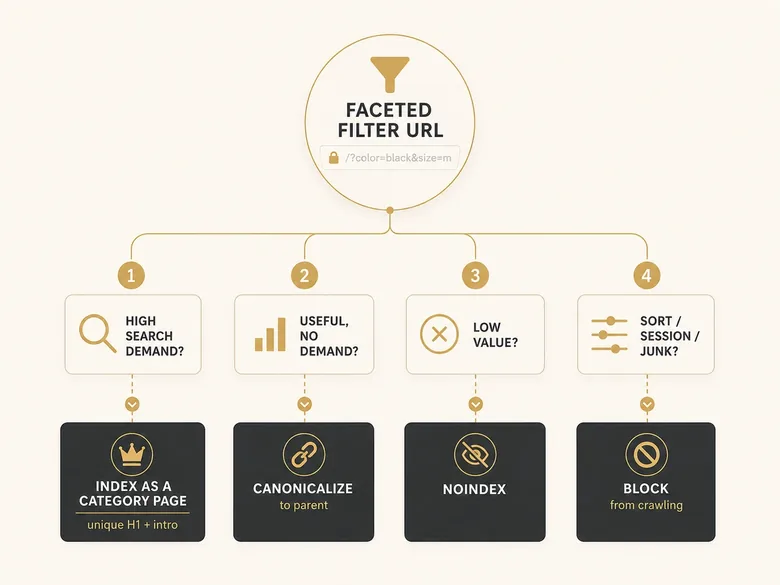
Make the call facet by facet. A filter combination that matches real, repeatable search demand, “waterproof work boots” or “stainless steel M6 bolts,” is worth promoting to a static, crawlable landing page with its own H1, intro, and title. A useful filter that nobody searches for should canonicalize to the parent category. Low-value combinations get noindex, and pure junk like sort orders and session parameters gets blocked from crawling entirely. Google’s own guidance is to disallow crawling of filter URLs when there’s no reason to index them, so the default is prevention and the indexable facets are the deliberate exceptions.
How much control you get over how filters build URLs depends on the platform. Shopify appends its own filter and sort parameters, Adobe Commerce layers on others, and a headless build does whatever you configured, so the platform a catalog runs on shapes how cleanly you can turn facets into landing pages. The deeper mechanics, the parameter rules, the noindex-versus-block decisions at scale, and how they interact with crawl budget, are the same ones an ecommerce SEO audit works through facet by facet across the whole catalog, so this guide summarizes the category-page slice and leaves the full framework there.
Handle Category Pagination Without Losing Products
Pagination decides whether Google reaches the products on page two and beyond, so audit it as a discovery problem. When a category spans multiple pages, give each paginated page its own self-referencing canonical rather than canonicalizing the whole set back to page one. Canonicalizing everything to page one tells Google to ignore pages two onward, which hides most of the catalog behind the first screen of results.
The old signals are gone, so don’t rely on them. Google no longer uses rel="next" and rel="prev", and its current ecommerce pagination guidance is to link paginated pages with real crawlable anchor links so Googlebot can walk the sequence. If you offer a “view all” page that loads reasonably fast, it can serve as the canonical for the set, but never at the cost of a slow, heavy page. Two more checks belong here: keep internal search-results pages out of the index, since they generate thin URLs the same way filters do, and confirm no important product sits more than three or four clicks from the homepage.
Build Breadcrumbs, Hierarchy, and Internal Links
Internal linking is how a category page earns and passes authority, so build the hierarchy deliberately instead of leaving it to the theme. The structure that works is a pyramid: the homepage links to top categories, categories link to subcategories, and subcategories link to products. Google recommends exactly this, adding that if category pages don’t link directly to the products in them, Googlebot might never find those products by crawling alone. That makes technical SEO for ecommerce partly an internal-linking problem, not only a crawl-settings problem.
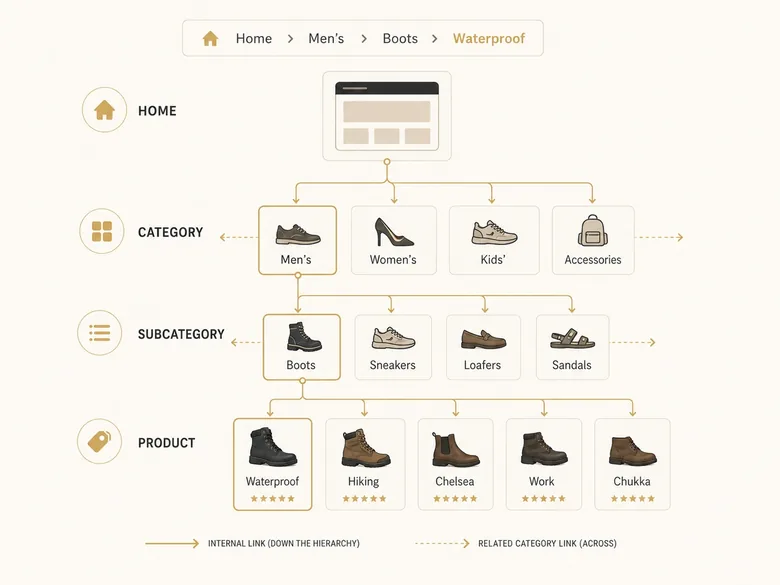
Start with breadcrumbs. A breadcrumb trail (Home › Men’s › Boots › Waterproof) reinforces the hierarchy for users and crawlers, and with BreadcrumbList markup it can show as a clean path in the results. Then link outward from the category copy itself: point to the most relevant subcategories and a few top products, and add contextual links from related categories and from blog buying guides that feed the category. Those guides are the informational spokes that funnel authority into the commercial hub, the same cluster logic a B2B SEO strategy uses to map content to each stage of the buyer’s journey. Well-linked category and subcategory pages are the highest-authority commercial pages on the site, so they deserve the most internal links pointing at them.
Add Category Page Schema: ItemList, CollectionPage, and Breadcrumb
Structured data on a category page uses different types than a product page, and getting that boundary right prevents invalid markup. The category-relevant types are BreadcrumbList for the hierarchy, ItemList to describe the ordered set of products on the page, and CollectionPage to identify the page as a curated collection. Product, Offer, and Review schema belong on individual product pages, so don’t copy them onto the category page, and don’t fake an AggregateRating for the whole category. That boundary is also why product page SEO needs its own schema and review work instead of being handled inside the category template.
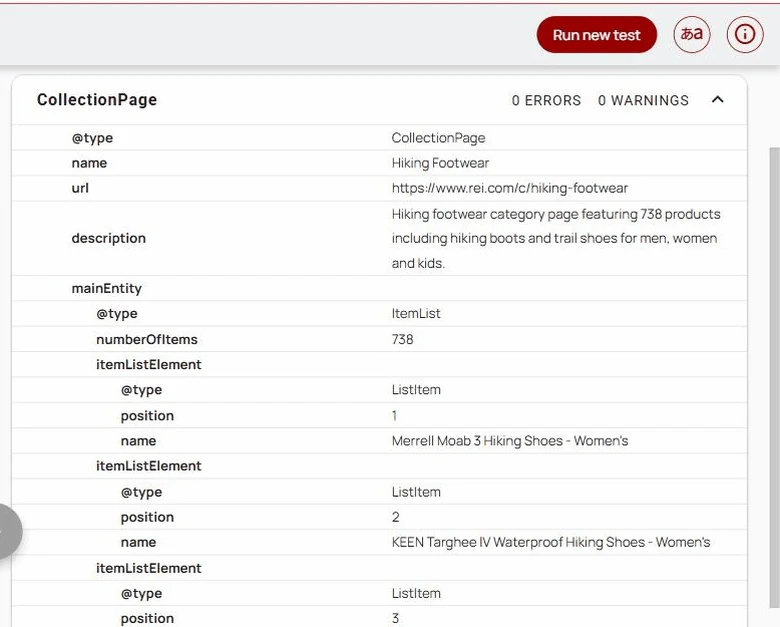
Validate Google-supported rich-result types in the Rich Results Test, and validate generic Schema.org types such as ItemList and CollectionPage in the Schema Markup Validator before you ship them, because invalid markup earns nothing. Keep the schema honest to what’s on the page: the ItemList should reflect the products actually shown, and the breadcrumb should match the real navigational path. If the catalog also feeds Google Merchant Center, keep the on-page signals and the feed consistent, the same alignment discipline that decides whether product markup and the Shopping feed agree across the wider catalog.
Fix Thin, Empty, and Duplicate Category Pages
Thin, empty, and duplicate categories are the failure modes that quietly cap a catalog’s rankings, so hunt them down as part of every category audit. A thin category is one with almost no products and no reason to exist as its own page; an empty one lists nothing at all, often seasonally; a duplicate is two categories so similar that they compete for the same query. Each sends Google a weak or confusing signal, and at scale they drag down the categories you actually care about.
IMPORTANT
Category cannibalization is common and easy to miss: “cheap running shoes” and “budget running shoes” as two separate categories will split rankings and often leave both stuck on page two. Pick one canonical category per query and consolidate or redirect the other.
Match the fix to the problem. Consolidate near-duplicate categories into one stronger page and redirect the loser. Noindex categories that are genuinely thin but need to stay live for navigation, and keep seasonal categories indexed year-round so they hold rankings for the next season rather than restarting from zero. Empty categories with no products and no future should return a clear signal rather than an indexable dead end. The through-line is that a category page has to justify itself: if it doesn’t serve a distinct query with a real selection, it shouldn’t be competing for one. Baymard’s finding that many product-list pages are “downright harmful” to shoppers is the usability side of the same problem, and it usually travels with the SEO side.
Category Page SEO for B2B and Large Catalogs
B2B and large distributor catalogs add category-page problems a small store never sees, because the catalogs are bigger, pricing is often gated, and the data comes from systems built for operations rather than search. On a catalog with tens of thousands of SKUs, category and subcategory pages are the only realistic way to rank, so their structure carries even more weight. Study how the best B2B ecommerce examples organize deep category navigation before you rebuild your own.
Two issues dominate. First, gated or quote-based categories still need indexable, descriptive content above the gate, or they rank for nothing; hiding the price is fine, hiding the whole category from search is not. Second, PIM-driven category pages that are nothing but an auto-generated spec grid read as thin, so they need a layer of real buying guidance on top. Getting these right is part of the wider B2B ecommerce best practices that decide whether a distributor catalog converts the traffic its category pages earn, rather than leaking it at the last step.
Scale changes the rest. A catalog with tens of thousands of SKUs makes category pagination and faceted duplication first-order problems, so segment category sitemaps, keep priority categories shallow in the architecture, and watch for one product sitting under several category paths that then compete. Distributor groups that run brand and sub-brand microsites often duplicate whole category trees across them, which is self-competition at scale. Pick one canonical home for each category and point the rest at it, or the group quietly splits its own rankings. Those controls vary sharply by platform, so ecommerce platform SEO fit should include category URL, canonical, and faceted-navigation control before migration.
Frequently Asked Questions
There’s no magic word count. Google says category pages need “very little” text and often understands the page from the product names alone. A short 50-to-100-word intro above the grid plus targeted buying guidance below it beats a 500-word keyword paragraph. Add words only where they answer a real buying question.
They’re the opposite of pointless. Category pages are usually a store’s highest-value commercial pages because they rank for broad head terms that individual product pages can’t. A well-structured category page can rank for dozens of buyer queries at once, which is why neglecting the category layer leaves the most money on the table.
Split it. Put a short H1 and a 50-to-100-word intro above the product grid so buyers still see products immediately, then place longer buying guidance, FAQs, and subcategory links below the grid. Avoid burying products under a wall of intro text or hiding a keyword block in the footer where users never look.
Yes. Core category and subcategory pages are priority pages and should be indexed and internally linked. Only noindex the exceptions: thin categories with almost no products, empty ones, near-duplicate categories, and low-demand filter combinations. High-demand filter URLs are the reverse case and are worth making indexable landing pages.
Use BreadcrumbList for the hierarchy and ItemList or CollectionPage to describe the set of products listed. Product, Offer, and Review schema belong on individual product pages, not on the category page, and you shouldn’t add an AggregateRating for the whole category. Validate everything in Google’s Rich Results Test before publishing.