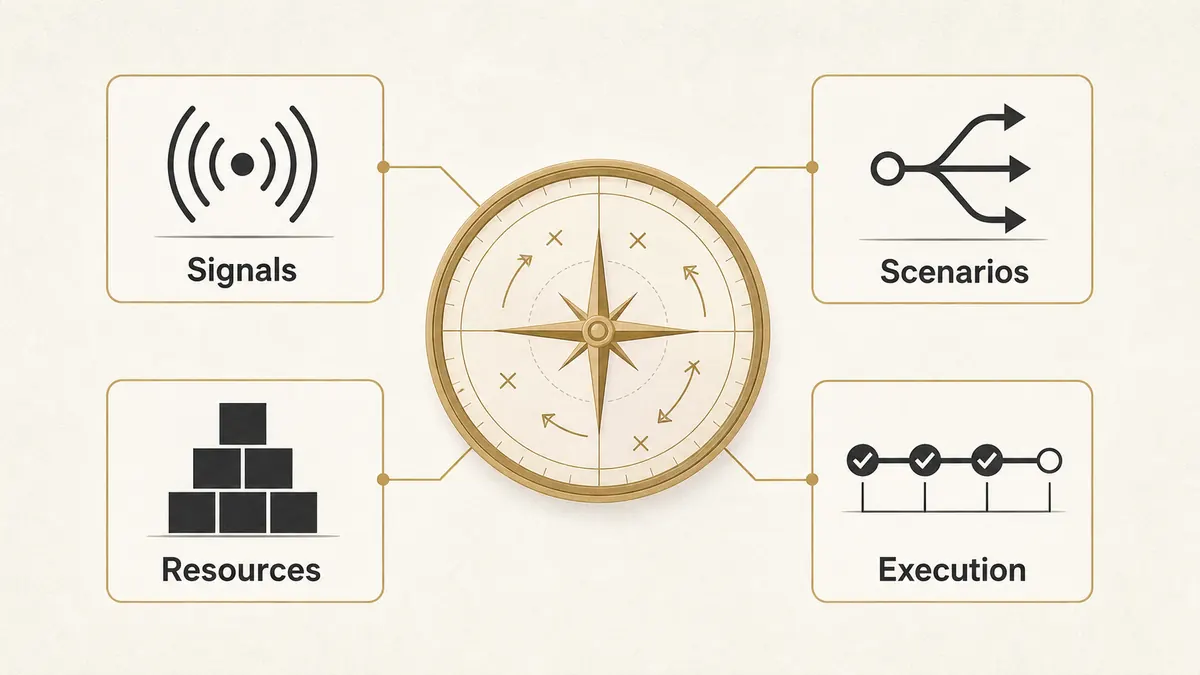
AI for strategic planning is useful only when leaders treat it as a decision system, not a shortcut for writing a prettier strategy document. The real gain is not that a model can summarize market reports faster. It is that leadership teams can compare scenarios, spot weak signals, pressure-test assumptions, and turn the plan into measurable execution faster than a quarterly planning cycle allows.
Direct answer – How can leaders use AI for strategic planning?
Leaders can use AI for strategic planning by applying it to seven jobs: market sensing, customer insight, risk detection, scenario planning, resource allocation, team decision support, and strategy execution monitoring. AI should not replace leadership judgment. It should widen the evidence base, expose trade-offs, and keep execution signals visible after the plan is approved.
Key Takeaways
- AI helps strategy work most when it is tied to a real planning question: where to compete, what to fund, what to stop, and which risks need action.
- The safest starting point is decision support, not autonomous decision-making. Leaders still own priorities, ethics, budgets, and accountability.
- Use AI across the full strategy cycle: external signals, customer data, scenario modeling, resource trade-offs, and execution monitoring.
- Governance matters because AI can make a weak assumption look more precise than it is. Every AI-assisted plan needs human review, source checks, and decision rights.
- Leadership AI literacy is now a strategy skill, not a technical side project.
The SERP for this topic is already telling us what searchers want. Google’s AI Overview frames AI as a planning aid, not a replacement. McKinsey appears near the top with a strategy-development view that positions AI as a researcher, interpreter, thought partner, simulator, and communicator across the strategy cycle. Course pages also rank because executives are not only asking “what can AI do?” They are asking whether their leadership team is ready to use it.
That is the gap the original guest draft did not fully close. It listed seven useful ideas, but it did not show how a leader would actually put AI into the planning process without creating a governance problem. The stronger IVRIS version is more direct: AI belongs in strategy where it improves the quality, speed, and visibility of decisions.
| Planning job | Where AI helps | Where leaders stay accountable |
|---|---|---|
| Market sensing | Scan customer, competitor, and industry signals faster | Decide which signals are material enough to affect strategy |
| Scenario planning | Model possible demand, cost, and capacity changes | Choose the scenario thresholds that trigger action |
| Resource allocation | Compare trade-offs across budget, people, and time | Make the hard calls on what to fund, pause, or stop |
| Execution monitoring | Detect drift from goals and surface early warnings | Intervene before the strategy becomes a reporting ritual |
What AI for strategic planning actually means
AI for strategic planning means using artificial intelligence to improve how leaders gather evidence, compare options, test assumptions, allocate resources, and monitor execution. It is not the same as asking ChatGPT to “write a strategy.” That output might be useful as a starting draft, but it is not strategy until a leadership team has chosen priorities, trade-offs, owners, and measures.
McKinsey’s strategy-development framework is useful here because it does not place AI in one narrow planning task. It shows AI assisting across the work of designing strategy and mobilizing the organization: research, interpretation, thought partnership, simulation, communication, initiative translation, and resource reallocation.
That framing is important for business leaders. AI can make strategic planning faster, but speed is not the whole point. The better goal is to reduce blind spots. A good AI-assisted planning process helps leaders ask better questions before they lock in the annual plan.
Use AI as a planning co-pilot, not as the strategist. AI can summarize, compare, model, and flag patterns. It cannot own context, board expectations, culture, customer promises, or risk appetite. Those remain leadership work.
7 ways leaders can use AI for strategic planning
The seven uses below keep the useful core of the guest draft, but they tighten it into an executive workflow. Each use should answer one planning question and produce one artifact your leadership team can review.
1. Use AI to understand market trends
Strategic planning starts with the outside world. AI can help leaders scan earnings calls, analyst notes, customer reviews, search behavior, social discussion, sales call transcripts, and competitor messaging. The goal is not to collect more data. The goal is to see which signals are changing fast enough to matter.
A retail team planning its next product line, for example, can use AI to compare sales history against customer language, regional demand shifts, and competitor launches. A B2B company can use the same pattern to spot when buyers start asking about a new requirement before it appears in formal RFPs.
The leadership artifact should be a signal map: what is rising, what is fading, what is uncertain, and what decision each signal could affect. This is where AI improves the front end of planning because it can process more weak signals than a human team can review manually.
2. Use AI to improve customer understanding
Customer strategy often fails because leaders rely on aggregated dashboards that hide the reason behind the number. AI can analyze support tickets, win-loss notes, product feedback, NPS comments, call transcripts, and renewal risks to find recurring customer themes.
That matters because a dip in engagement can mean different things. Customers may want faster support, clearer onboarding, better pricing logic, fewer handoffs, or more personal communication. AI can cluster the evidence, but leaders need to decide which customer problem is strategic enough to fund.
For go-to-market teams, this connects directly to the way IVRIS thinks about a B2B marketing framework: the planning model has to turn customer understanding into segments, messages, channels, and KPIs. AI helps make the inputs sharper, but the framework still turns those inputs into a plan.
3. Use AI to support risk management
Every strategic plan carries risk. A new market can underperform. A product launch can miss timing. A vendor can fail. A regulation can change the economics of a channel. AI helps leaders detect risk earlier by comparing current signals against historical patterns and external data.
The useful output is not a long risk register. It is a short list of decision-relevant risks with triggers. If customer demand falls below a threshold, what changes? If supplier cost rises 12%, what gets paused? If a competitor enters the segment, which defensive move is already approved?
This is also where governance matters. McKinsey’s 2025 State of AI survey found that 88% of respondents report regular AI use in at least one business function, but only about one-third say their companies have begun scaling AI programs. That gap is a warning: AI use is common, but disciplined operating models are still catching up.
4. Use AI to strengthen scenario planning
Scenario planning is where AI becomes especially useful. Leaders can ask models to compare demand cases, pricing changes, hiring plans, supply constraints, competitor moves, churn scenarios, and cash-flow pressure. The model does not make the decision. It helps the team see how sensitive the plan is to different assumptions.
A manufacturer considering added capacity might model what happens if demand rises 20%, if energy costs increase, if lead times stretch, or if one large customer delays orders. A SaaS company might test what happens when churn improves, sales cycle length increases, or paid acquisition costs rise.
Simple scenario prompt: Given our current goal, base-case assumptions, constraints, and risk triggers, compare three scenarios: expected, downside, and upside. For each one, show the decision we should make now, the metric to watch, and the threshold that would change the plan.
5. Use AI to improve resource allocation
Strategy becomes real when leaders decide where money, people, and time go. AI can help compare initiatives by expected impact, effort, risk, capacity, and dependency. It can also expose where teams are funding too many “important” projects that all depend on the same people.
This is similar to the prioritization discipline behind business process improvement. Most companies do not fail because they have no opportunities. They fail because they pick too many, fund them halfway, and never stop the work that no longer supports the strategy.
The right output is a resource-allocation table that shows each initiative, strategic objective, owner, cost, capacity requirement, expected outcome, risk level, and stop/pause condition. AI can prepare the comparison. Leaders decide what gets funded.
6. Use AI to enhance team decision-making
Strategic planning is rarely a solo exercise. Finance, marketing, sales, operations, product, and customer teams see different parts of the business. AI can help by giving everyone a shared evidence base before the room turns into opinion trading.
For example, before a quarterly planning meeting, AI can summarize the key arguments for each option, identify the assumptions behind them, and show where teams disagree because they are using different data. That gives the leadership team a cleaner starting point.
Formal learning can help here, especially for senior teams that need shared language. The guest draft pointed to an AI for business leaders program, and the placement makes sense when the article is framed around leadership judgment rather than tool use. Executive AI literacy is becoming part of how leadership teams make better strategic calls.
7. Use AI to monitor strategy execution
A plan that is not monitored becomes theater. AI can track whether the work that follows the plan is actually moving the indicators leaders chose: pipeline quality, customer retention, product adoption, margin, cycle time, budget variance, or hiring progress.
This is where AI connects planning to operations. A weekly leadership dashboard can flag initiatives that are drifting from target, detect bottlenecks, summarize owner updates, and suggest which issue needs executive attention. The point is not another dashboard. The point is an earlier warning system.
The same idea sits behind AI agents in RevOps, where AI systems watch pipeline and customer signals continuously instead of waiting for a quarterly review. Strategy teams can apply the same pattern at the company level: watch the signals, escalate exceptions, and keep humans responsible for the actual decision.
Where AI should not replace leadership judgment
AI is tempting because it can make uncertain decisions feel clean. That is also the danger. A model can produce a confident answer from incomplete context, biased inputs, stale assumptions, or data that was never meant to answer the question being asked.
Leaders should keep four areas human-owned:
- Purpose: AI can compare options, but it cannot decide what the organization exists to protect or pursue.
- Trade-offs: AI can show consequences, but leaders choose which trade-offs are acceptable.
- Ethics: AI can flag policy risks, but accountability for customer, employee, and social impact stays with people.
- Commitment: AI can help write the plan, but leaders have to make the choices visible and fund them.
McKinsey’s workplace AI report makes the leadership problem plain: almost all companies invest in AI, but only 1% believe they are mature. The obstacle is not only employee readiness. It is whether leaders steer the change with enough clarity.
A practical AI strategic planning workflow
If you want to use AI in the next planning cycle, do not start with a tool rollout. Start with one strategic question and one decision meeting.
Start here: Pick one decision that matters this quarter. Examples: which market to enter, which customer segment to prioritize, which process to automate, which product bet to fund, or which cost line to protect.
Step 1: Define the decision
Write the decision in one sentence. “Should we expand into healthcare?” is better than “build a growth strategy.” The sharper the question, the more useful the AI output becomes.
Step 2: Feed the model clean inputs
Give AI the planning context: objectives, constraints, customer segments, current metrics, known risks, and source documents. Do not ask it to invent missing data. Ask it to identify what is missing.
Step 3: Ask for options, not one answer
Require at least three options: conservative, balanced, and aggressive. For each option, ask for assumptions, benefits, risks, required resources, and the first metric that would prove the option is failing.
Step 4: Run a human review
Have the leadership team challenge the assumptions before discussing preference. This keeps the meeting from becoming a debate over the most polished AI output.
Step 5: Turn the decision into execution signals
Every approved strategy needs owners, milestones, operating metrics, review cadence, and stop conditions. If the plan requires workflow changes, connect it to business process automation services only after the process has been redesigned on paper.
How to measure whether AI improved the planning process
Do not measure AI strategy work by how many prompts the team ran. Measure whether the planning process became clearer, faster, and more connected to execution.
| Metric | What it tells you | Good sign |
|---|---|---|
| Planning cycle time | Whether evidence gathering and synthesis became faster | Leadership reviews options sooner without skipping diligence |
| Assumption quality | Whether the plan names what must be true | Each initiative has explicit risk triggers and source notes |
| Decision clarity | Whether the team knows what was chosen and rejected | The plan includes stop/pause conditions, not only goals |
| Execution drift | Whether leaders see plan slippage earlier | Issues surface before quarterly review meetings |
This is why strategy matters more than access to AI tools. In its value-gap research, BCG reported that only 5% of firms are AI-future built, while 35% are scaling and beginning to generate value. More access without clearer strategy just creates faster confusion.
That is the leadership lesson. AI can strengthen planning, but only if leaders use it to make choices clearer.
Your first move
Take the strategy your team is already debating and turn it into one AI-assisted decision exercise. Ask the model to summarize the evidence, list assumptions, compare three scenarios, and name what would change the recommendation. Then have the leadership team challenge the output before anyone chooses a path.
If the conversation gets sharper, AI has earned a place in the planning process. If the conversation gets vaguer, the team is using AI to decorate uncertainty instead of reducing it.
Frequently Asked Questions
AI is used in strategic planning to gather market signals, analyze customer data, compare scenarios, identify risks, prioritize resources, and monitor execution. The strongest use case is decision support. AI helps leaders see options and trade-offs faster, but leaders still own judgment, ethics, priorities, and accountability.
AI can draft parts of a strategic plan, summarize evidence, and compare options, but it should not create the final strategy alone. A real strategic plan needs human choices about goals, trade-offs, risk appetite, culture, budget, owners, and timing. Use AI to prepare the decision, not to own it.
The biggest risk is false confidence. AI can produce a polished recommendation from weak data, biased inputs, or assumptions that have not been checked. Leaders should require sources, compare multiple scenarios, document assumptions, and review decisions with the people who understand customers, operations, finance, and risk.
Business leaders should first learn where AI is reliable, where it fails, and how to connect AI output to business decisions. They do not need to code before using AI in strategy, but they do need enough literacy to set guardrails, ask better questions, verify sources, and assign accountability.