Your team just spent 11 hours this week copying data between systems, chasing approvals over email, and re-entering the same invoice three different times. Nobody planned it that way, but that’s how manual processes compound. And it’s exactly why business process automation services have become a priority for B2B operations teams. According to McKinsey research, operations centers that automate manual and repetitive tasks reduce costs by 30-60% while improving delivery quality.
The problem isn’t that B2B companies don’t believe in automation. It’s that they try to automate everything at once, pick the wrong processes, or get stuck comparing platforms before they’ve even mapped what needs fixing. After helping teams audit and automate workflows across finance, HR, and customer operations, we’ve found that the companies that win start small, start smart, and build from there.
This guide breaks down what business process automation services actually include, which processes to automate first for the biggest ROI, and how to evaluate whether you need tools, a service provider, or both.
Key Takeaways
- Business process automation services use technology (RPA, AI, and workflow engines) to replace manual, repetitive tasks across departments like finance, HR, and operations.
- Start by automating high-volume, rule-based processes like invoice processing, employee onboarding, and data entry before moving to complex workflows.
- The best BPA approach for mid-market companies combines self-service tools (like n8n, Make, or Zapier) with targeted service providers for high-complexity processes.
- Track cycle time reduction, error rates, and cost per transaction, not just “number of processes automated,” to measure real impact.
What Are Business Process Automation Services?
Business process automation (BPA) services are solutions that use software to execute recurring business tasks with minimal human intervention. These services combine workflow engines, robotic process automation (RPA), artificial intelligence, and integration platforms to move work through a defined process from start to finish.
In practical terms, BPA replaces the manual glue that holds fragmented systems together. Instead of an employee copying data from an email into a spreadsheet, then forwarding it to another team for approval, then entering the approved data into a CRM, automation handles the entire chain. The employee only steps in when a judgment call is needed.
Business process automation services fall into three broad categories. Managed automation services are where an external provider runs your automated workflows end-to-end. Platform-based solutions give you the tools to build and manage automations in-house. Hybrid models combine both, with a provider handling complex integrations while your team manages day-to-day workflows.
BPA vs. RPA vs. BPM: What’s the Difference?
These three acronyms get confused constantly, so let’s clear it up. RPA (Robotic Process Automation) handles a single task or a short sequence: a bot that copies data from an email into your CRM, for example. BPA (Business Process Automation) orchestrates an entire workflow across multiple systems and people, including the decision points and handoffs. BPM (Business Process Management) is the discipline of analyzing, modeling, and improving processes, and automation is just one tool within BPM.
Think of it this way: RPA is the individual worker, BPA is the assembly line, and BPM is the factory manager redesigning the floor plan. Most mid-market B2B companies need all three working together, but they should start with BPA as the organizing layer.
7 Business Processes to Automate First
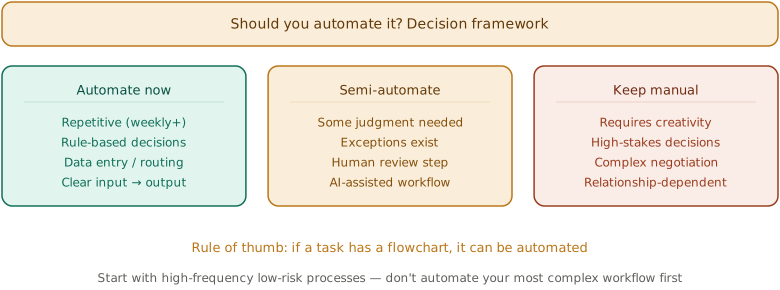
Not every process is worth automating on day one. The highest-ROI targets share three traits: they’re high-volume (happening dozens or hundreds of times per week), rule-based (following predictable if/then logic), and cross-system (requiring data to move between tools). Here are the seven processes that consistently deliver the fastest payback. That prioritization becomes sharper when leaders use strategic planning with AI to connect workflow choice to margin, risk, and capacity.
1. Invoice Processing and Accounts Payable
Invoice processing is the single most automated business process worldwide, and for good reason. A typical mid-market company processes 500-5,000 invoices per month. Each one requires data extraction, validation against purchase orders, approval routing, and payment scheduling. Done manually, this takes 10-15 minutes per invoice. Automated, it takes seconds.
Modern BPA tools use optical character recognition (OCR) and AI to extract data from invoices regardless of format (PDF, email, paper scan). The system matches line items against purchase orders, flags discrepancies for review, routes approvals to the right person based on amount thresholds, and schedules payment. Your AP team only touches the 5-10% of invoices that have exceptions.
PRO TIP
Don’t try to achieve 100% straight-through processing on day one. Aim for 70-80% automation with human review on exceptions. As the system learns from corrections, your straight-through rate will climb naturally over 3-6 months.
2. Employee Onboarding
Every new hire triggers 15-30 discrete tasks across HR, IT, facilities, and their hiring manager. Document collection, equipment provisioning, system access requests, training enrollment, benefits enrollment, and introductions all need to happen in a specific sequence. When any step gets missed, the new employee starts behind.
Automating onboarding means building a workflow that fires on day zero (when the offer is signed) and sequences every task to the right person with the right deadline. IT gets the laptop order immediately. HR sends the paperwork digitally. The manager receives a checklist. The new hire gets a welcome sequence with exactly what they need before day one.
3. Data Entry and Migration Between Systems
If your team regularly copies information from one system to another (CRM to ERP, email to project management tool, spreadsheet to database) that’s a process screaming for automation. Manual data entry is both time-expensive and error-prone, with studies showing that human error accounts for the majority of data quality issues in business operations.
Integration platforms like n8n, Make, or Zapier connect your existing tools through APIs and move data automatically based on triggers. When a deal closes in your CRM, the customer record populates in your billing system. When a support ticket is resolved, the outcome logs in your knowledge base. No copying, no pasting, no mistakes.
4. Approval Workflows
Purchase requisitions, expense reports, time-off requests, contract reviews, content approvals: every organization runs dozens of approval workflows. Most of them follow the same pattern: someone submits a request, it routes to a manager, the manager approves or rejects, and the result triggers the next action.
When these live in email or Slack messages, they get buried, forgotten, or bottlenecked by a single approver who’s traveling. Automated approval workflows route requests based on rules (amount thresholds, department, request type), send reminders on deadlines, escalate stalled approvals, and maintain a complete audit trail. Average approval time drops from days to hours.
5. Customer Service Ticket Routing
When a customer submits a support request, someone has to read it, determine the category and priority, and assign it to the right agent or team. This triage step adds 15-30 minutes of delay to every ticket and creates inconsistency in how issues are prioritized.
AI-powered ticket routing reads the incoming request, classifies it by category and sentiment, assigns a priority score, and routes it to the agent with the right skills and available capacity. The result: faster first response times, more consistent prioritization, and agents who spend their time solving problems instead of sorting them. Your AI agents in RevOps strategy should include customer service automation as a high-priority use case.
6. Report Generation and Distribution
Every Monday morning, someone pulls data from three different dashboards, copies numbers into a slide deck, and emails it to the leadership team. Every month-end, finance builds the same reports from the same sources with the same formatting. This is pure automation territory.
Automated reporting pulls data from connected sources on a schedule, formats it according to your template, and distributes it to the right recipients. Dashboards can update in real time. Monthly financial reports can auto-generate with flagged anomalies. Weekly SaaS marketing metrics summaries can land in your inbox without anyone touching a spreadsheet.
7. Lead Scoring and Routing
When a new lead enters your CRM, it needs to be scored based on fit and intent signals, then routed to the right sales rep based on territory, industry, or deal size. Manual scoring is slow and inconsistent. By the time a hot lead gets assigned, they’ve already talked to a competitor.
Automated lead scoring assigns point values based on demographic fit (company size, industry, role) and behavioral signals (pages visited, content downloaded, email engagement). When a lead crosses the threshold, it routes to the assigned rep with full context. Speed-to-lead drops from hours to minutes, and your MQL-to-SQL handoff becomes consistent across every rep.
How to Choose Between BPA Tools and Service Providers
This is where most companies get stuck. Should you buy a platform and build automations in-house, or hire a provider to manage everything? The answer depends on three factors.
Build In-House When…
You have a technical team (even one person) who can dedicate 10-20 hours per week to automation. Your processes are relatively straightforward and involve common SaaS tools with good API support. Your budget is under $2,000/month. Tools like n8n (self-hosted, open source), Make, or Zapier let you build sophisticated workflows without writing code. Power Automate works well if you’re already in the Microsoft ecosystem. Marketing teams usually start here too, wiring a first marketing automation workflow in the same low-code tools before handing anything to a provider.
Hire a Service Provider When…
Your processes are complex, involving legacy systems without APIs, regulated data handling, or multi-department orchestration. You need to automate at scale (50+ workflows) and don’t have internal capacity to build and maintain them. Your automation requires custom AI models for document processing or decision-making. Service providers like UiPath, Automation Anywhere, or specialized BPO firms handle the infrastructure, integration, and ongoing management.
Go Hybrid When…
You have some internal capability but also face complex processes that need expert help. The hybrid model is the most common approach for mid-market B2B companies. Your team handles the simpler integrations and workflows in-house using a low-code platform, while a provider manages the complex, high-volume automations that require specialized skills.
Evaluating Business Process Automation Services: What to Look For
If you decide to work with a BPA service provider, here’s the evaluation framework we recommend. Skip the feature comparison matrices and focus on these six factors that actually predict success.
Process Expertise Over Platform Expertise
The best providers understand your business processes deeply, not just the technology. A provider who has automated accounts payable for 20 companies in your industry will deliver faster results than a generalist who knows the platform inside out but has never touched your type of workflow. For the underlying discipline that makes process expertise valuable in the first place, see our business process improvement playbook.
Integration Depth
Ask how they connect with your specific stack. Pre-built connectors for your CRM, ERP, and HRIS matter more than a list of 500 generic integrations. Check whether they support real-time data sync or batch processing, and whether they can handle your data formats without manual transformation.
Exception Handling Design
Every automated process will encounter edge cases. The quality of a BPA implementation is measured by how it handles the 10-20% of transactions that don’t fit the happy path. Ask providers to walk through their exception handling for your specific processes. If they can’t articulate it clearly, they haven’t thought about it enough. FORM’s AI-powered POSM detection is a field-execution example: a flagged display becomes valuable only when the workflow assigns the exception, records the correction, and verifies the outcome.
IMPORTANT
Request a pilot on one process before committing to a full engagement. A 4-6 week pilot on a single workflow (like invoice processing or employee onboarding) will tell you more about a provider’s capability than any proposal or demo. Set specific success metrics before the pilot starts: target cycle time, error rate, and throughput.
Scalability Without Rebuilding
Your processes will change. Regulations shift, teams reorganize, tools get replaced. The provider’s platform should let you modify workflows without starting over. Ask about their change management process: how long does it take to add a new approval step, change a routing rule, or connect a new system?
Transparent Pricing
BPA pricing models vary wildly. Some charge per automation, some per transaction, some per user, and some combine all three. Get a clear picture of total cost at your expected volume, including implementation, training, maintenance, and scaling costs. A platform that costs $500/month at your pilot volume but $15,000/month at production volume isn’t actually affordable.
Measurable Outcomes in the Contract
The strongest providers tie their pricing to outcomes: cycle time reduction, error rate targets, or throughput guarantees. If a provider won’t commit to measurable results, that’s a signal they’re selling technology, not transformation. The reported reduction in Google’s HCLTech engagement adds a second requirement: state whether automation-driven productivity lowers fees, narrows scope, or triggers a commercial review.
Tools for Business Process Automation
The right tool depends on your complexity level and internal technical capacity.
For small teams and simple workflows: Zapier connects 6,000+ apps with a no-code interface. Best for straightforward trigger-action automations. Make (formerly Integromat) offers more complex multi-step workflows with visual design. Both work well for teams without a developer.
For technical teams and complex workflows: n8n is open-source and self-hostable, giving you full control over data and unlimited workflows. Power Automate integrates deeply with Microsoft 365 and Dynamics. Both require some technical skill but offer far more flexibility than no-code options.
For enterprise-grade automation: UiPath and Automation Anywhere are the market leaders in RPA with strong AI capabilities for document processing and decision automation. Pega and Appian offer full BPM platforms with built-in automation. These carry higher price tags ($50,000+ annually) but handle the complexity that smaller tools can’t.
For process orchestration: Kissflow and ProcessMaker provide low-code BPM platforms that let business analysts build and modify workflows without deep developer support. These sit between the simplicity of Zapier and the power of UiPath, making them strong options for mid-market companies that need more than basic integrations but less than enterprise RPA.
How to Measure BPA Success
“We automated 47 processes” is not a success metric. Here’s what actually matters, tied to the outcomes your CFO and COO care about.
Efficiency Metrics
Cycle time reduction: How long does the process take now versus before automation? Invoice processing that dropped from 12 minutes to 45 seconds is a clear win. Throughput increase: How many transactions can you handle with the same headcount? If your AP team processed 2,000 invoices/month and now handles 4,000 without adding staff, that’s measurable capacity gain.
Quality Metrics
Error rate: Track errors per 1,000 transactions before and after automation. Manual data entry typically runs 1-5% error rates. Automated processes should target under 0.1%. Compliance adherence: For regulated processes, measure the percentage of transactions that pass audit requirements without manual remediation.
Financial Metrics
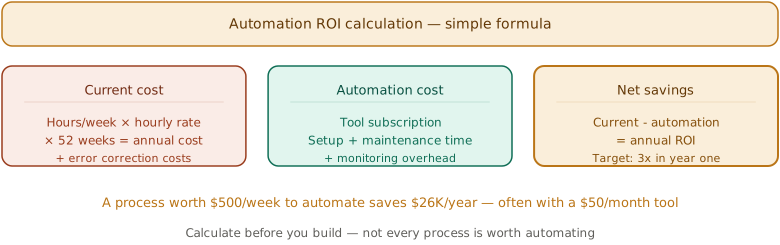
Cost per transaction: Divide total process cost (labor + tools + overhead) by transaction volume. This is the clearest measure of ROI. Payback period: Most BPA implementations should pay back within 6-12 months. If the projected payback exceeds 18 months, either the process selection or the solution is wrong.
5 Mistakes That Derail Business Process Automation
We’ve seen these patterns derail automation projects at companies across every B2B marketing and operations vertical. Avoiding them is half the battle.
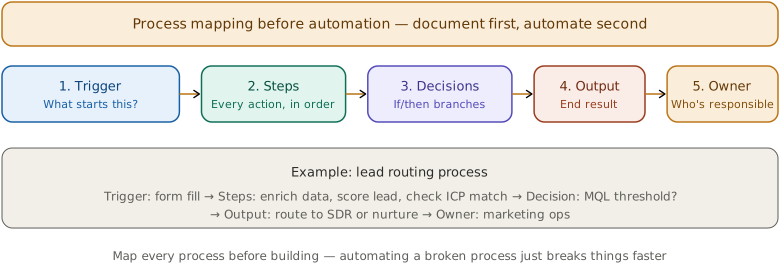
Automating a Broken Process
If your current process has unnecessary steps, unclear ownership, or contradictory rules, automating it just makes a bad process run faster. Map and fix the process first, then automate the improved version. As one operations lead told us: “We automated our expense approval workflow and discovered we were routing every expense through three managers when one was sufficient. Fixing the process saved more time than automating it.”
Starting With the Most Complex Process
Pick a quick win for your first automation. An invoice approval workflow or a data sync between two systems gives your team a fast success that builds confidence and buy-in. Don’t start with your most complex, cross-departmental workflow. That’s a month-three project, not week one.
Ignoring Change Management
Automation changes how people work. If your AP team has been processing invoices manually for five years, they need to understand what changes, what stays the same, and why the change benefits them. Research from Kissflow shows that 29% of organizations encounter employee training and resistance issues during automation implementation. Skip the training and communication, and you’ll get resistance, workarounds, and a tool nobody trusts.
Over-Investing in Technology
A $200,000 enterprise RPA platform is overkill if you’re automating 10 workflows between standard SaaS tools. Match the tool to the problem. Many mid-market B2B companies can automate their first 5-10 processes with tools that cost under $1,000/month and scale up only when the complexity demands it.
Not Maintaining Automations
Automated workflows aren’t set-and-forget. When a connected app updates its API, a team restructures, or a process changes, your automations need updating. Build a review cadence (quarterly for critical workflows, semi-annually for everything else) and assign clear ownership for each automation. Your RevOps practices should include automation governance as a core responsibility.
Frequently Asked Questions
A common example is automated invoice processing. When a vendor sends an invoice via email, the BPA system extracts the data using OCR, validates it against the purchase order in your ERP, routes it to the correct approver based on amount and department, sends reminders if approval stalls, and schedules payment once approved. The entire cycle runs in minutes instead of days, with human involvement only for exceptions and disputes.
Costs range widely based on complexity. Self-service tools like Zapier or Make cost $20-500/month. Mid-tier platforms like n8n (self-hosted) or Power Automate run $500-3,000/month. Enterprise RPA platforms like UiPath start at $50,000+ annually. Managed BPA service providers typically charge $3,000-15,000/month depending on the number of processes and transaction volume. Most mid-market B2B companies spend $1,000-5,000/month on a combination of tools and limited provider support (as of 2026).
RPA automates individual tasks using software bots, like copying data from one screen to another. BPA automates entire end-to-end workflows across multiple systems, people, and decision points. RPA is a tool that often sits within a broader BPA implementation. Think of RPA as the hands doing the work and BPA as the brain coordinating what gets done, when, and by whom.
Simple automations (connecting two apps with a data sync) take hours to days. Medium-complexity workflows (like automated onboarding or approval routing) take 2-4 weeks. Complex, multi-system automations involving custom integrations and AI take 2-4 months. A realistic timeline for automating your first 5-7 processes is 3-6 months, including process mapping, tool selection, implementation, testing, and training.
Yes, and often more immediately than large enterprises. Small businesses feel the pain of manual processes more acutely because every hour of employee time is a larger percentage of total capacity. A five-person team that saves 10 hours per week through automation effectively gains a quarter of an additional employee. Low-code tools like Zapier and Make have made BPA accessible at price points that work for businesses of any size.