Most lists of the best technical SEO tools mix three different product categories into one ranking and call it a day. A keyword tracker, an all-in-one marketing suite, and a desktop crawler do not solve the same problem, and treating them as interchangeable is how teams end up paying enterprise prices for a job a free tool already does. This guide separates the technical SEO tools that crawl, audit, analyze logs, and monitor a site from the marketing suites that happen to include a site-audit tab.
Technical SEO tools are software that crawl, audit, and monitor a website’s infrastructure so search engines and AI engines can find, render, and index every page that matters. They answer the questions content tools cannot: can Googlebot reach this URL, is the rendered HTML what we expect, where is crawl budget actually going, and what broke on the site overnight.
Below are 12 tools vetted against five criteria, grouped by the job they actually do, each with real Q2 2026 pricing, honest pros and cons, and a verdict on who it fits. After the reviews you get a comparison table, a pricing-tier breakdown, a decision framework for matching a tool to your site, and the buying mistakes that push teams into the wrong tier. Updated Q2 2026.
Key Takeaways
- The category splits into four jobs: crawling, auditing, log file analysis, and continuous monitoring. Most teams need two tools that cover different jobs, not one tool that claims all four.
- Screaming Frog (from £199/year as of Q2 2026) is still the default desktop crawler, and Google Search Console (free) is the baseline every site should run before paying for anything.
- Enterprise crawl and log platforms (Botify, Lumar, OnCrawl) are quote-gated and typically run five to six figures a year; JetOctopus publishes the lowest entry point at the cloud tier, from €383/month as of Q2 2026.
- Crawl budget only becomes a real constraint above roughly one million pages, per Google Search Central. Below that, a desktop crawler beats an enterprise platform on both cost and speed.
- Crawlability is now the AI-search battleground too: GPTBot already appears in 4.5% of sites’ robots.txt files, per the HTTP Archive Web Almanac, so the tools that surface crawl and render issues decide whether AI engines can read you at all.
What Technical SEO Tools Do (and What They Don’t)
A technical SEO tool inspects the parts of a website that determine whether search engines can crawl, render, index, and trust its pages. That covers crawlability and indexation, site architecture and internal links, page speed and Core Web Vitals, structured data, rendering of JavaScript, and the server-side signals (status codes, redirects, log files) that never appear in a content editor. These are the same checks in our technical SEO checklist, and the tools below are what automate that checklist at scale instead of by hand.
What these tools do not do is keyword research, rank tracking, or content writing. That distinction matters when you read a generic “best SEO tools” roundup. Moz Pro, Ubersuggest, and most all-in-one platforms are built around keyword and rank data with a technical audit bolted on, which is why they are excluded from this list. If keyword discovery is the job, that belongs to a different tool class covered in our guide to B2B keyword research, and the technical layer sits underneath a wider B2B SEO strategy rather than replacing it.
The other thing technical SEO tools clarify is scale. Google’s own guidance says crawl budget is a concern mainly for “large sites (1 million+ unique pages)” or medium sites with very rapidly changing content, per Google Search Central. Most B2B sites are nowhere near that, which means the right tool is usually a crawler, not a six-figure platform. Buy for the site you have, not the site you imagine.
Crawlers vs. Auditors vs. Log Analyzers vs. Monitors
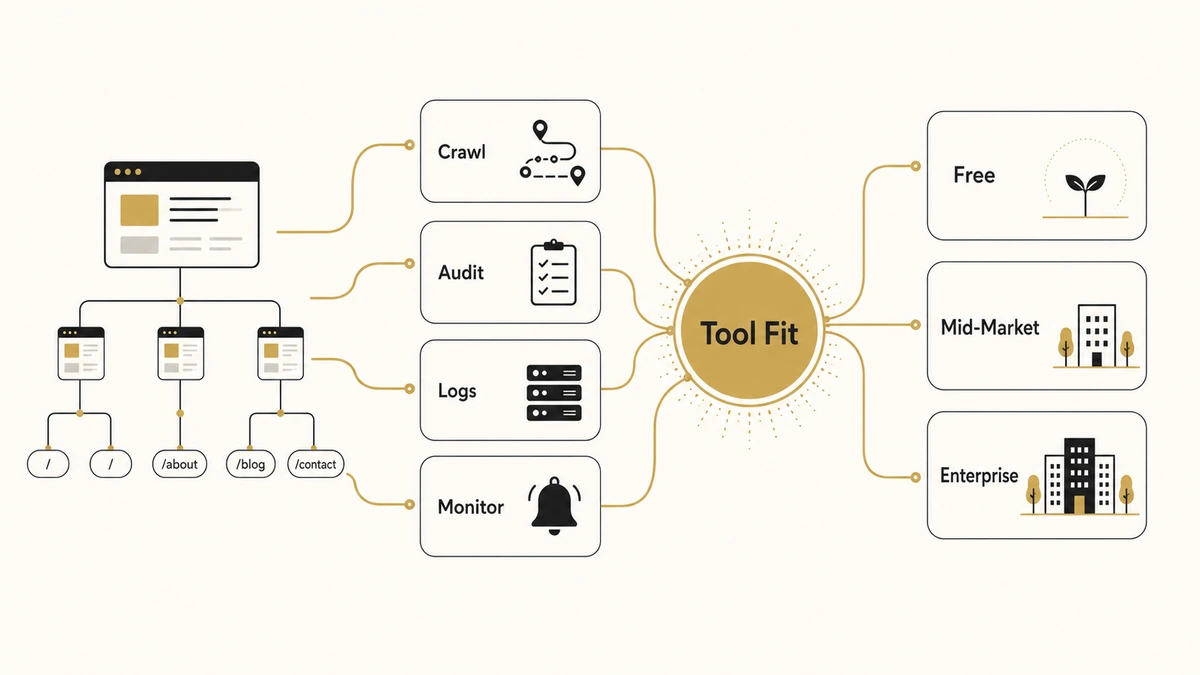
The fastest way to pick a tool is to name the job first. The category breaks into four, and the best stacks pair one tool from two different boxes rather than buying a single tool that markets itself as all four.
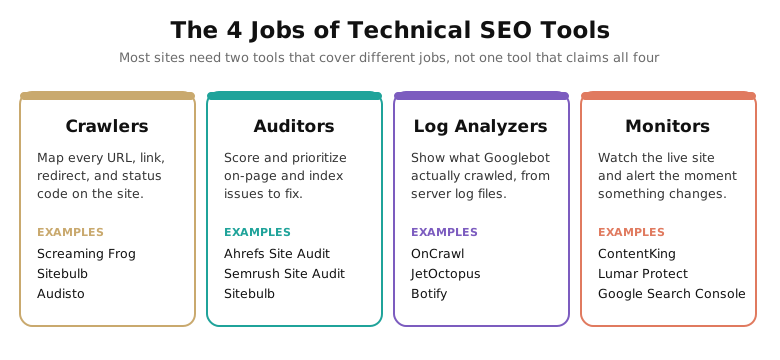
Crawlers map every URL, link, redirect, and status code on a site the way a search engine would, and hand you the raw data. Auditors take that crawl and score it, sorting issues by severity so a non-specialist knows what to fix first. Log analyzers read your server logs to show what Googlebot actually requested, which is the only way to see real crawl behaviour rather than a simulation. Monitors watch the live site continuously and alert you the moment a deploy strips a canonical tag or a noindex slips into production.
JavaScript rendering cuts across all four. Google processes JS-heavy pages in a deferred queue, where rendering “can take longer” than the initial crawl, per Google Search Central. A crawler that cannot render JavaScript will report a page as empty when the content loads client-side, so rendering support is a hard requirement if your site is built on React, Vue, or a similar framework. The same crawl-and-render visibility is what gets pages into AI answers, which is why it overlaps with getting cited in Google AI Overviews.
How We Chose These 12 Tools
Every tool below had to clear five criteria. Tools that failed even one were left off, no matter how well-known.
1. A genuine technical-SEO core. The tool’s primary job is crawling, auditing, log analysis, or monitoring, not keyword or rank tracking with an audit feature attached.
2. Active use by working technical SEOs. The tool shows up in real audit workflows and conference talks, not just in affiliate roundups.
3. Maintained in 2026. Active development, current crawler, and support for modern requirements like JavaScript rendering and Core Web Vitals.
4. A distinct job or tier. Each pick covers a different site size, budget, or capability rather than duplicating another tool on the list.
5. A verifiable pricing posture. Either published pricing, or a transparent quote model whose ballpark is documented in public data. We tag every figure as of Q2 2026 so a refresh can find it later.
FREE AND BUDGET ALTERNATIVES WORTH KNOWING
Two tools sit just off the main list. Bing Webmaster Tools is free, mirrors much of Search Console for Bing and ChatGPT search, and supports IndexNow for instant submission. SEO PowerSuite WebSite Auditor is a one-time-fee desktop crawler (no subscription) that suits freelancers who want an owned tool rather than a recurring bill. Neither makes the 12, but both earn a place in a lean stack.
The 12 Best Technical SEO Tools in 2026
Each tool gets the same structure: what it is, who it is best for, the standout that separates it from the rest, and a starting price as of Q2 2026. The order runs roughly from the broadest, most-used tools to the specialist enterprise platforms. Match the tool to the job and the site size you actually have.
1. Screaming Frog SEO Spider: Best Overall Desktop Crawler
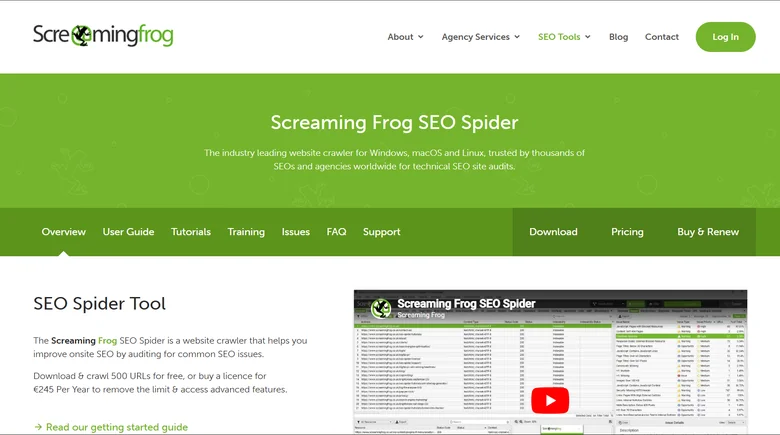
Screaming Frog is the tool nearly every technical SEO buys first. It is a desktop crawler that gives you total control over crawl configuration and pulls back granular data on titles, status codes, redirects, canonicals, hreflang, and custom extractions via XPath or regex. It connects directly to the Search Console, Analytics, and PageSpeed APIs, so a single crawl can blend your own data with Google’s. The separate Log File Analyser handles server logs for the crawl-behaviour side.
Best for: Consultants, in-house specialists, and agencies auditing sites up to a few hundred thousand URLs. It is the standard first tool, and the crawl half of any technical SEO audit.
Standout: Custom extraction and total crawl control at a flat annual price, with no per-URL metering.
Starting price (as of Q2 2026): Free up to 500 URLs; the paid licence is £199/year for unlimited crawling. The Log File Analyser is a separate £99/year (free up to 1,000 log events).
2. Sitebulb: Best for Audit Explanations
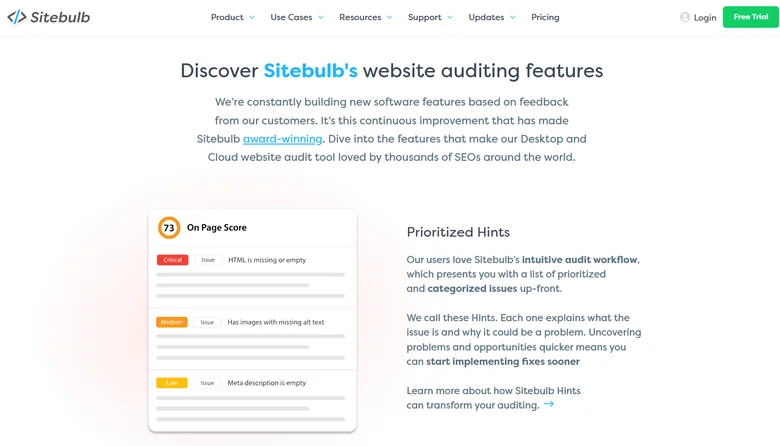
Where Screaming Frog hands you raw data, Sitebulb hands you a verdict. Its “Hints” system flags every issue, scores it by severity, and explains in plain language why the issue matters and how to fix it. The visual crawl maps make site architecture problems obvious at a glance. That teaching layer makes Sitebulb the better choice when the person reading the audit is not a full-time technical SEO, or when the audit has to be presented to a client or a developer who needs the “why.”
Best for: Agencies and in-house teams that want guided, presentation-ready audits rather than a raw export to interpret themselves.
Standout: Prioritized Hints with explanations, plus crawl-map visualizations that turn architecture issues into a picture.
Starting price (as of Q2 2026): Lite from $18/mo for solo audits; Pro at $42/mo for agency client work (most popular tier); Sitebulb Cloud from $125/mo for multi-user teams (as of Q2 2026). A full-feature free trial is available.
3. Ahrefs Site Audit: Best for Combined Backlink and Technical Work
Ahrefs Site Audit is the technical module inside the wider Ahrefs suite, and its appeal is the combination. You get a cloud-based, scheduled crawler with a health-score trend and clear issue reports, sitting next to the strongest commercial backlink index and keyword research data on the market. For a team that wants one subscription covering technical audits, link analysis, and keyword research, the bundle is the value, even though you are paying for the whole platform rather than a technical-only tool.
Best for: Teams that want one platform for technical audits plus backlink and keyword data, and will use all three.
Standout: Site Audit data sitting beside the largest commercial backlink index, with scheduled cloud crawls and health-score history.
Starting price (as of Q2 2026): The Lite plan is $129/month and includes Site Audit; a $29/month Starter plan and a free Webmaster Tools audit for verified sites also exist. Enterprise starts around $1,499/month.
4. Semrush Site Audit: Best for All-in-One Marketing Teams
Semrush Site Audit is the technical tab in the broadest marketing suite on this list. The audit itself is solid, covering crawlability, internal linking, Core Web Vitals, and structured data, but the reason teams choose it is the surrounding 50-plus tools spanning keyword research, paid search, content, and social. If your marketing team already lives in Semrush, running the site audit there avoids buying and learning a second platform, and keeps the technical work inside the same workflow as the rest of your SEO program. The Business tier audits up to one million pages a month, which covers most B2B sites comfortably. Semrush also sells a separate Local add-on for map-pack tracking and listings, the local-search jobs a technical crawler leaves out, which we rank against eight alternatives in our guide to the local-search tools and reseller programs we cover separately.
Best for: Marketing teams and agencies that want a single subscription across SEO, PPC, and content, with technical audit included.
Standout: Breadth. The audit is one module of an all-in-one suite, useful when you want one login for everything.
Starting price (as of Q2 2026): The Pro plan is $139.95/month, Guru is $249.95/month, and Business is $499.95/month (list pricing as of Q2 2026). A seven-day free trial is available. Semrush Pro now includes MCP Access for connecting Semrush data to AI assistants (verified Q2 2026).
5. Google Search Console: Best Free Baseline
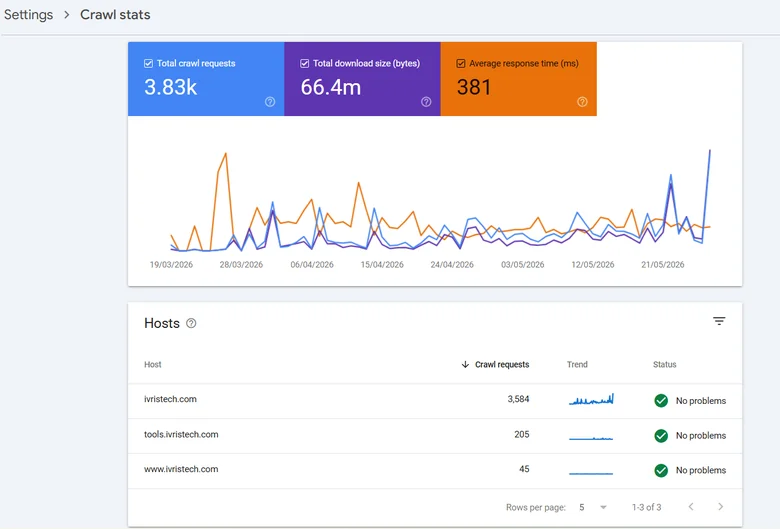
No third-party tool can replace Search Console, because it is the only source of Google’s actual crawl and index data for your site. The URL Inspection tool shows exactly how Google sees a page, Crawl Stats reveal request volume and response codes straight from the index, and the Pages report tells you precisely which URLs are indexed and which are excluded, with reasons. It only covers sites you verify and own, and it reports rather than prioritizes, but it is non-negotiable and it is free. Pair it with Google Analytics for the traffic side of the same picture. On a catalog those same Crawl Stats and index reports are where you spot budget leaking into filter URLs, which is the first thing controlling crawl and indexation on a large catalog sets out to fix.
Best for: Every site. This is the baseline layer beneath any other tool you buy.
Standout: Ground-truth crawl, index, and Core Web Vitals data directly from Google, available nowhere else.
Starting price (as of Q2 2026): Free for all verified site owners.
6. JetOctopus: Best Value Cloud Crawler and Log Analyzer
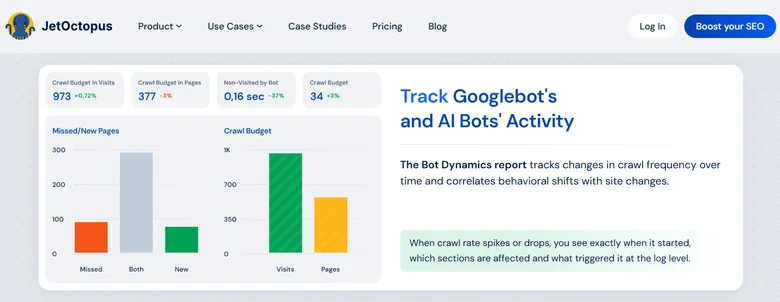
JetOctopus is the value pick for teams that have outgrown a desktop crawler. It combines large-scale cloud crawling and server log analysis in one tool, with a flat base of one million crawled pages and one million log lines a month, and it handles sites in the millions of URLs without depending on your laptop’s memory. It does most of what Botify and OnCrawl do at a fraction of the price, and it publishes that price, which is rare at this tier. The brand is smaller, so expect fewer tutorials than the household names carry.
Best for: Large-site SEO teams that need crawling plus log analysis at scale without an enterprise quote process.
Standout: Integrated crawler, log analyzer, and Search Console data at enterprise volumes for a published, mid-four-figure price.
Starting price (as of Q2 2026): From €383/month billed annually for the Standard plan (one million pages plus one million log lines), expandable as needed. A free trial covers 10,000 URLs.
7. Lumar (formerly DeepCrawl): Best for Enterprise Crawl Automation
Lumar, the platform that spent years as DeepCrawl, is a mature enterprise cloud crawler built for automation. Its strength is fitting crawl checks into engineering workflows: the Protect product can test staging or pre-production builds and catch SEO regressions before a deploy ships, rather than after rankings drop. In 2026 it has added accessibility monitoring and AI-search optimization features. The trade-off is the usual enterprise one, a sales-led process with no public pricing, which makes it overkill for a small site.
Best for: Enterprise SEO and engineering teams that want crawl and quality checks wired into their release pipeline.
Standout: Automation and pre-deploy monitoring that catch regressions in staging before they reach production.
Starting price (as of Q2 2026): Custom enterprise pricing, quote on request. Lumar does not publish list prices.
8. Botify: Best for Enterprise Scale and Activation
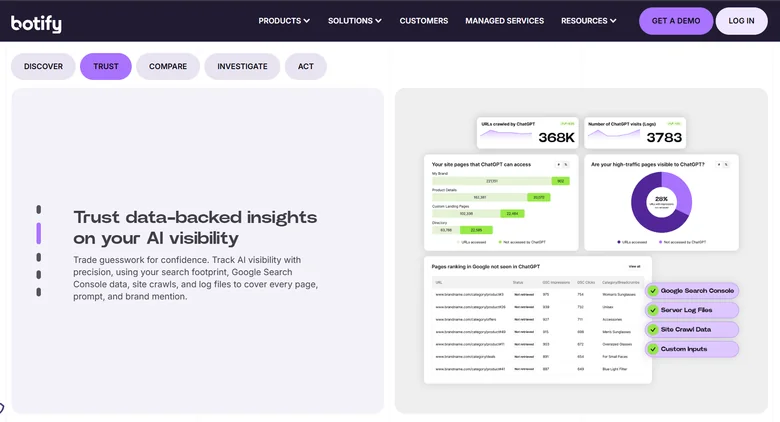
Botify is the platform large enterprises and big-catalog ecommerce sites call when they have millions of URLs and a budget to match. It unifies crawl, log analysis, Search Console data, and what it calls Activation, which pushes fixes live rather than only reporting them. It is the most capable tool here at true scale, and increasingly positioned around AI-search visibility. It is also the most expensive and the most sales-gated, with a heavy implementation that assumes a dedicated team. The B2B teams that need this depth often hire it out instead, which is why technical specialists feature in our review of B2B SEO agencies.
Best for: Large enterprises and ecommerce sites with millions of URLs and the resources to run a full platform.
Standout: Crawl, logs, analytics, and automated Activation at a scale no other tool here matches.
Starting price (as of Q2 2026): Custom enterprise pricing, quote on request. Industry-benchmark estimates put mid-size deployments around $75,000 to $150,000/year, with large deals higher (per Vendr and TrustRadius data, as of Q2 2026).
9. OnCrawl: Best for Log File Analysis and Data Science
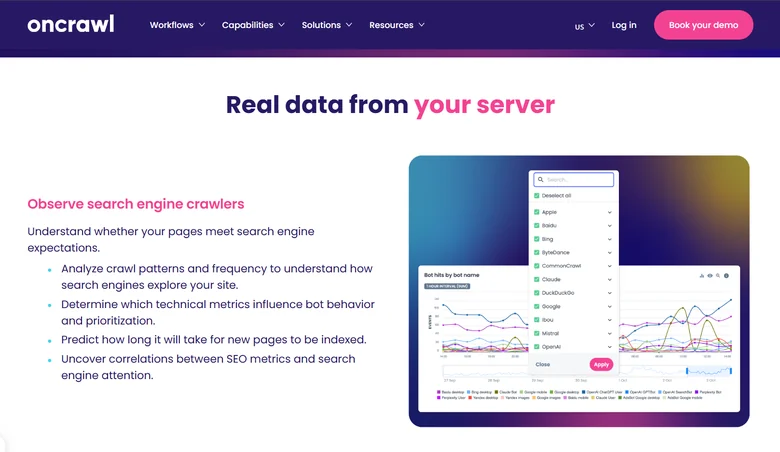
OnCrawl is the pick when log files and data analysis are the point. It pairs crawling with strong log analysis and a data-science bent: custom segmentation, crawl-over-time comparisons, and exports to BigQuery for teams that want to model crawl behaviour against rankings themselves. It rewards a more analytical user, and its quota-token pricing scales with crawl volume, so costs track usage rather than a flat seat. The interface is less hand-holding than Sitebulb, which is fine for the data-literate audience it targets. Whichever crawler you settle on, the export only earns its keep inside a repeatable audit process that ranks findings by impact before anyone touches a fix.
Best for: Mid-market and enterprise technical SEOs who want log analysis plus crawl data to model and export.
Standout: Log analysis with custom segmentation and BigQuery export for teams doing their own analysis.
Starting price (as of Q2 2026): Custom, quote-based, with monthly crawl quotas. Industry-benchmark estimates average around $25,000/year (per Vendr and TrustRadius data, as of Q2 2026).
10. ContentKing by Conductor: Best for Continuous Real-Time Monitoring
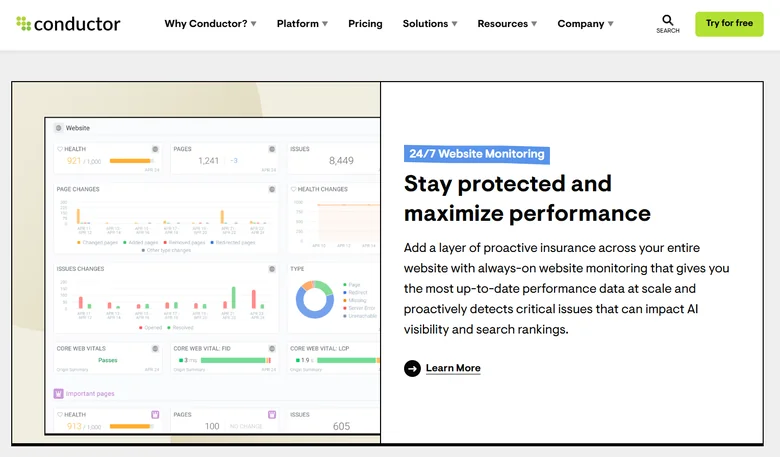
ContentKing, now part of Conductor, does the job the on-demand tools cannot: it watches your site continuously and tells you the moment something changes. It recrawls pages on a tight cycle and alerts within minutes by email, Slack, or in-app when a title rewrites, a canonical drops, or a noindex appears. Its change-tracking changelog shows exactly what changed and when, and it now tracks AI-crawler activity from ChatGPT, Gemini, and Claude. It is monitoring, not a deep audit configurator, so it complements a crawler rather than replacing one. Watching how AI crawlers hit your site is one half of the picture; confirming whether those engines actually cite you in their answers is the other, and that second job belongs to the GEO platforms that measure AI citations. When you would rather a team run both the monitoring and the citation-earning work, an SEO agency that has folded in LLM visibility covers the whole job in one engagement.
Best for: Enterprise teams on large, frequently changing sites that need to catch regressions the moment a deploy ships them.
Standout: Near-real-time change detection and alerting, now aware of AI crawlers as well as Googlebot.
Starting price (as of Q2 2026): Custom, quote-based, with a three-week free trial. Industry-benchmark estimates run roughly $26,800 to $45,000/year (per Vendr and TrustRadius data, as of Q2 2026).
11. Ryte: Best for Technical SEO Plus Content Quality
Ryte blends technical SEO with content quality and website-experience checks, and it is widely used in European and DACH-market teams. Its technical side still covers crawl-budget management, indexability, structured data, Core Web Vitals, and SEO A/B testing, so it has not drifted into generic site-audit territory. One disclosure matters: Semrush acquired Ryte in July 2024, so it now sits inside the same company as the Semrush Site Audit listed above. It still ships as a standalone, branded product, but factor the ownership in if you are comparing the two.
Best for: European mid-market and enterprise teams that want technical SEO and content quality monitored together.
Standout: Website-quality management that combines technical SEO, content, and accessibility in one platform.
Starting price (as of Q2 2026): Custom, quote-based, priced on monthly sessions and feature set. Ryte does not publish list prices.
12. Audisto: Best for Large-Site Crawl Depth and Link Structure
Audisto is the specialist’s structural crawler. It is engineered for very large, technically demanding crawls (millions of URLs and tens of millions of links per run) and its signature is internal link-graph analysis, scoring every URL with PageRank, CheiRank, and a 2D-rank measure of link equity. That makes it the tool for diagnosing site-architecture and internal-linking problems at scale that lighter crawlers gloss over. The interface is sparse and built for experts, and the feature set is narrow by design: pure crawl and monitoring, no keyword or backlink suite attached.
Best for: Technical specialists and large enterprises needing deep crawls plus internal-link-equity analysis.
Standout: PageRank-style internal link scoring at very high URL volumes, with transparent published pricing rare at this tier.
Starting price (as of Q2 2026): Crawler from €355/month and Monitoring from €649/month (Monitoring includes the Crawler tier), each at 100,000 HTML pages per crawl, business users only, prices ex. VAT.
Technical SEO Tools Comparison Table
The table below lines up all 12 tools on the dimensions buyers actually weigh: the job they are best for, starting price as of Q2 2026, whether a free tier or trial exists, the standout capability, and a one-line verdict.
| Tool | Best For | Starting Price (Q2 2026) | Free Tier / Trial | Standout | Verdict |
|---|---|---|---|---|---|
| Screaming Frog | Overall desktop crawling | £199/yr (free to 500 URLs) | Yes, free tier | Custom extraction, total control | The default first tool |
| Sitebulb | Audit explanations | $18/mo (Lite) / $42/mo (Pro, most popular) / from $125/mo (Cloud) | Yes, free trial | Prioritized Hints + crawl maps | Best for guided audits |
| Ahrefs Site Audit | Audit plus backlinks | $129/mo (Lite) | Yes, Webmaster Tools | Audit beside top backlink index | Best if you use the whole suite |
| Semrush Site Audit | All-in-one teams | $139/mo (Pro), or $117.33/mo billed annually | Yes, 7-day trial | One login for all of marketing | Best if you already use Semrush |
| Google Search Console | Free baseline | Free | Free | Google’s real crawl/index data | Mandatory for every site |
| JetOctopus | Value crawl + logs at scale | €383/mo (annual) | Yes, 10k-URL trial | Crawl + logs, published price | Best value large-site tool |
| Lumar | Enterprise automation | Custom quote | Demo | Pre-deploy regression checks | Best for dev-pipeline crawling |
| Botify | Enterprise scale | Custom (~$75k-$150k/yr est.) | Demo | Crawl + logs + Activation | Best at true enterprise scale |
| OnCrawl | Log analysis + data science | Custom (~$25k/yr est.) | Demo | Segmentation + BigQuery export | Best for analytical teams |
| ContentKing | Real-time monitoring | Custom (~$26.8k-$45k/yr est.) | Yes, 3-week trial | Near-real-time change alerts | Best for continuous monitoring |
| Ryte | Technical + content quality | Custom quote | Limited free entry | Tech SEO + content + UX in one | Best for EU quality monitoring |
| Audisto | Large-site link structure | From ~€355/mo (Crawler) / €649/mo (Monitoring), ex. VAT | Demo | PageRank-style link scoring | Best for deep structural audits |
Technical SEO Tool Pricing Benchmarks for 2026
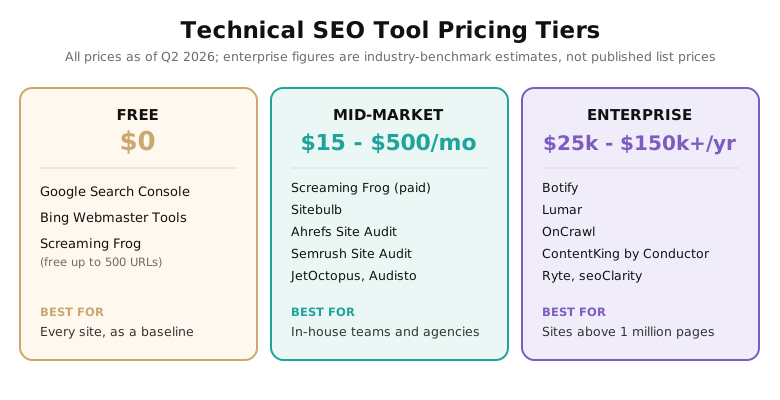
Pricing for technical SEO tools splits into three tiers, and the right tier is set by your site size and the job you need done, not by the biggest number your budget allows. The same “best tools by job” logic applies across categories, the way it does in our roundup of lead generation tools.
Free Tier: $0 (as of Q2 2026)
Google Search Console, Bing Webmaster Tools, and the free 500-URL tier of Screaming Frog cover more than most small sites realize. Search Console gives you Google’s real index data, Bing’s tool adds IndexNow and Bing and ChatGPT search coverage, and a 500-URL crawl is enough to audit a small marketing site end to end. Every site should run this tier before paying for anything, and many sites under a few hundred pages never need to leave it.
Mid-Market Tier: $15 to $500 per Month (as of Q2 2026)
This is where most in-house teams and agencies land. Screaming Frog’s paid licence (£199/year), Sitebulb ($18-$42/month for desktop, from $125/month for Cloud), Ahrefs ($129/month), Semrush ($139/month Pro, or $117.33/month billed annually), JetOctopus (€383/month), and Audisto (from €355/month for the Crawler tier, €649/month for Monitoring, ex. VAT) all sit here. The split is between owned desktop crawlers with a flat fee and cloud platforms that bill monthly and crawl at larger scale. A common, sensible stack is one desktop crawler plus Search Console, with a suite subscription only if the team also needs keyword and backlink data.
Enterprise Tier: $25,000 to $150,000+ per Year (as of Q2 2026)
Botify, Lumar, OnCrawl, ContentKing, Ryte, and seoClarity occupy the quote-gated top tier. None publishes a flat list price; the figures here are industry-benchmark estimates drawn from public procurement data such as Vendr and TrustRadius reviews, as of Q2 2026. This tier earns its cost only above roughly one million pages or when continuous monitoring and log analysis become daily operational needs. Below that scale, the mid-market tier does the same core job for a fraction of the price.
IMPORTANT
Enterprise technical SEO tools rarely publish pricing, and the quote depends on crawl volume, log volume, and contract length. Before a sales call, get your URL count and monthly log-line volume in hand, ask for the annual figure (not the monthly headline), and ask what happens to the price when you exceed your crawl quota. The vendors that will not give a starting range until the second call are telling you the price tracks perceived budget, not scope.
How to Choose a Technical SEO Tool
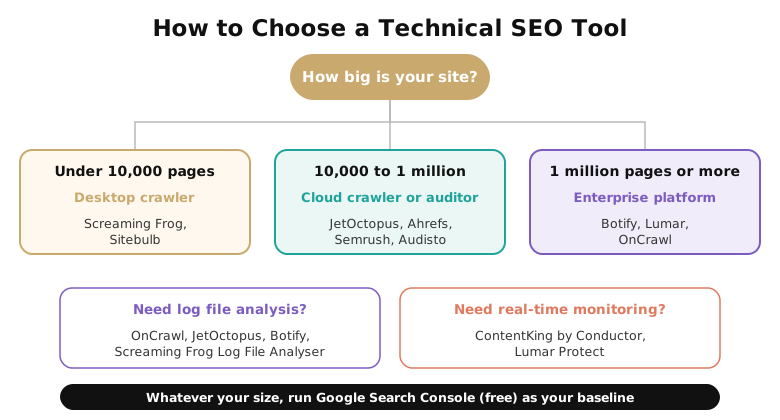
Choosing a technical SEO tool is a four-question exercise. Answer them in order and the shortlist narrows itself.
1. How Big Is Your Site?
Site size decides the tier. Under 10,000 pages, a desktop crawler like Screaming Frog or Sitebulb does everything you need. Between 10,000 and a million pages, a cloud crawler or auditor (JetOctopus, Ahrefs, Semrush, or Audisto) handles the scale without straining a laptop. Above a million pages, an enterprise platform (Botify, Lumar, or OnCrawl) earns its cost. Whatever the size, Search Console runs underneath as the free baseline.
2. Do You Need Log File Analysis?
Log analysis is the only way to see what Googlebot actually crawled rather than what a tool simulates. If crawl budget, orphan pages, or wasted crawl on parameter URLs are live problems, you need it, and that points to OnCrawl, JetOctopus, Botify, or the Screaming Frog Log File Analyser. If your site is small and crawl budget is not a constraint, skip it.
3. Do You Need On-Demand Audits or Continuous Monitoring?
A crawler audits when you run it. A monitor watches all the time. If a deploy has ever quietly shipped a noindex tag or stripped a canonical, continuous monitoring (ContentKing, or Lumar’s Protect) pays for itself the first time it catches a regression within minutes instead of at the next quarterly crawl.
4. Standalone Tool or All-in-One Suite?
If you want the best dedicated crawler and audit experience, buy a standalone tool. If you would rather have one subscription covering technical audits alongside keyword research, rank tracking, and backlinks, Ahrefs or Semrush makes sense, and ties into a wider content strategy as well as the technical layer.
QUICK VERDICTS BY USE CASE
Best free option: Google Search Console. Best for a solo consultant or small site: Screaming Frog. Best for client-facing agency audits: Sitebulb. Best value at scale: JetOctopus. Best for true enterprise scale: Botify. Best for log file analysis: OnCrawl. Best for real-time monitoring: ContentKing. Best for internal-link structure: Audisto.
5 Mistakes Teams Make Buying Technical SEO Tools
1. Buying an Enterprise Platform a Crawler Would Cover
The most expensive mistake is paying five or six figures for an enterprise platform when a £199/year crawler would do the job. Crawl budget only becomes a real constraint above roughly a million pages, per Google’s own guidance, so a mid-market site running Botify is usually buying capacity it will never use. Size the tool to the site.
2. Skipping Search Console Because It’s Free
Teams that spend on a paid suite sometimes treat Search Console as an afterthought, which is backwards. It is the only tool showing Google’s actual crawl and index decisions for your pages. No paid crawler can replicate that data, because it comes from inside Google’s index.
3. Expecting One Tool to Do All Four Jobs
Crawling, auditing, log analysis, and monitoring are different jobs, and a tool that markets all four usually does one or two well and the rest thinly. The stronger pattern is two tools from different boxes: a crawler plus Search Console for most teams, or a cloud crawler plus a monitor for larger sites.
4. Ignoring JavaScript Rendering
If your site renders content with JavaScript and your crawler does not execute it, every audit understates what Google sees and misses, because Google renders in a deferred queue rather than instantly. Confirm the tool renders JavaScript before trusting a single crawl of a modern framework site.
5. Chasing Audit Scores Instead of Crawl and Index Fixes
A rising health score feels like progress, but the issues that move rankings are crawlability and indexation, not a tidy 98/100. The same care applies to the broken links and redirect chains a crawler surfaces, which is also where a link building program quietly leaks equity. Fix what stops Google from reaching and indexing pages first; chase the score later, if ever.
Frequently Asked Questions
The strongest stack pairs Google Search Console (free, Google’s real index data) with a dedicated crawler. Screaming Frog is the default desktop crawler, Sitebulb is best for guided audits, and JetOctopus, Botify, or OnCrawl handle enterprise scale and log analysis. Most teams need two tools that cover different jobs, not a single all-in-one.
Technical SEO tools are software that crawl, audit, and monitor a website’s infrastructure so search engines can find, render, and index its pages. They check crawlability, site architecture, page speed, structured data, and server logs. They differ from keyword and rank-tracking tools, which target content and visibility rather than the underlying technical health a crawler and auditor inspect.
An SEO crawler is a tool that systematically browses a website the way a search engine does, following links to map every URL and recording titles, status codes, redirects, canonicals, and other technical signals. Screaming Frog, Sitebulb, and Audisto are crawlers. The crawl output is what auditors then score and prioritize into a fix list.
Google Search Console is the essential free tool, giving you Google’s real crawl and index data. Bing Webmaster Tools adds Bing and ChatGPT search coverage plus IndexNow. Screaming Frog crawls up to 500 URLs free, enough to audit a small site. Together these three cover most technical needs for sites under a few hundred pages at no cost.
Your Next Step
Start with the free tier today. Verify your site in Google Search Console, open the Crawl Stats and Pages reports, and run a free Screaming Frog crawl of up to 500 URLs. Those two steps surface the crawlability and indexation issues that matter most, before you spend a cent. If the crawl hits the 500-URL ceiling or you need log analysis, use the decision tree above to pick the tier that matches your site size, and buy the one tool that closes the gap you actually have.