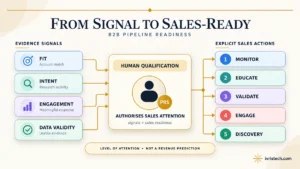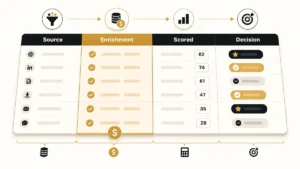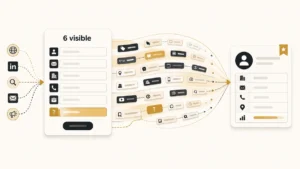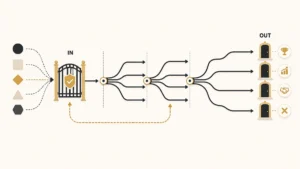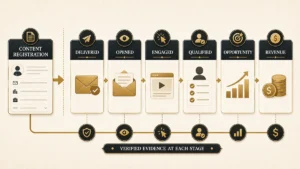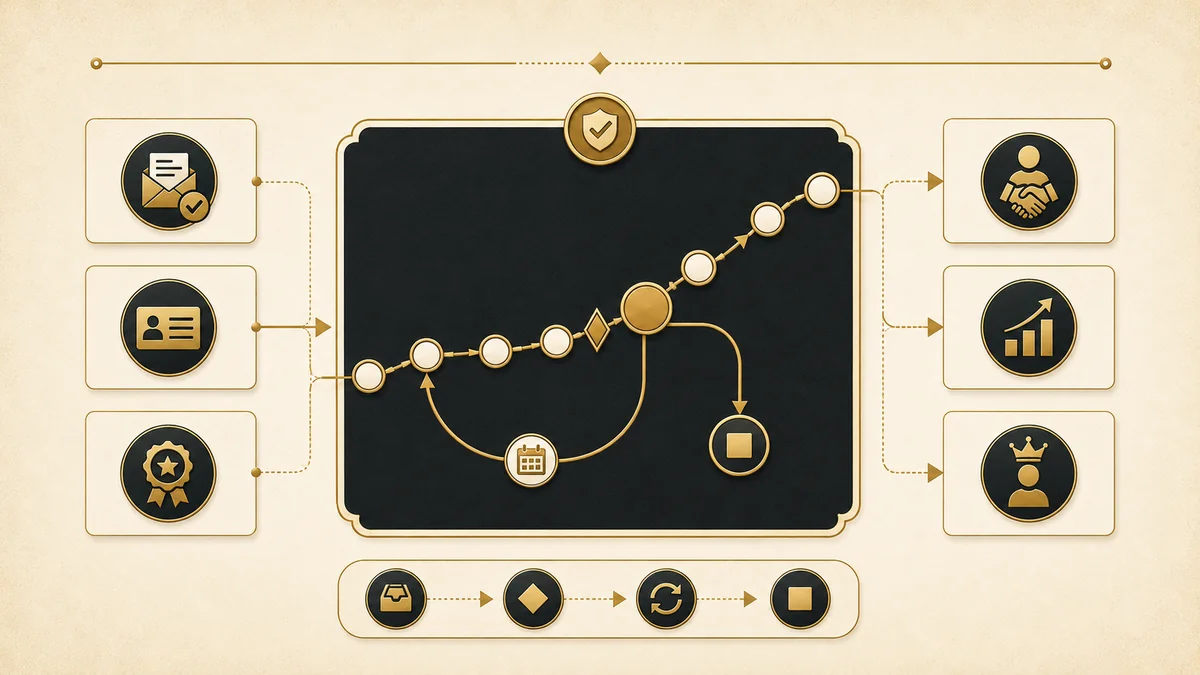
Marketing teams have never been more confident about lead quality. In HubSpot’s 2026 State of Marketing survey of more than 1,500 marketers, 93.8% said their lead quality improved over the past year. In the same survey, 27.6% named sales-marketing alignment as a top challenge. Both things are true at once, and that combination tells you where the problem actually sits.
It isn’t the leads. It’s the definitions. When marketing and sales can’t agree on what a record is at any given moment, every number downstream becomes an argument. The lead lifecycle is the model that settles it: a shared set of stages, each with a written entry rule, a written exit rule, and one name attached to it.
Most published lifecycle models draw the thing as a single arrow pointing right. Real pipelines don’t behave that way. Leads get handed over and pushed back. They go quiet and come back nine months later. The two stages that account for that behaviour are the two stages almost every CRM ships without.
Direct answer — What is the lead lifecycle?
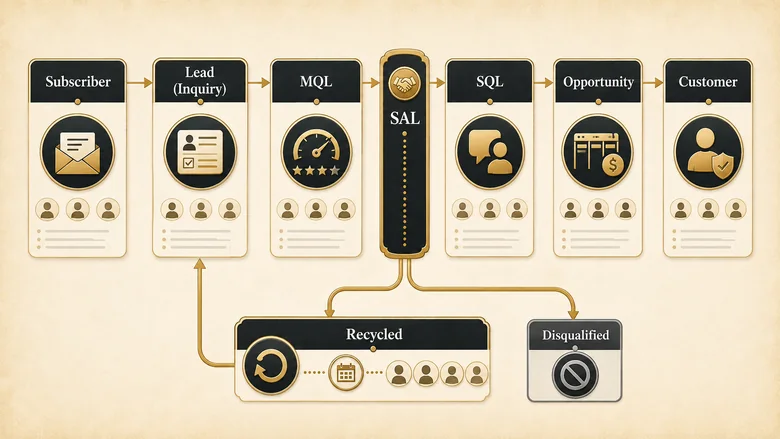
The lead lifecycle is the ordered set of stages a record moves through from first contact to closed customer: Subscriber, Lead, Marketing Qualified Lead, Sales Accepted Lead, Sales Qualified Lead, Opportunity, and Customer. Each stage needs one entry trigger, one exit trigger, and one owner. Two states most CRM defaults leave out are Sales Accepted Lead, the acceptance gate, and Recycled, the return path. A lifecycle stage is not the same thing as a lead status.
Key Takeaways
- A lifecycle stage is only real if it has a written entry trigger, a written exit trigger, and exactly one owner. Anything short of that is a picklist value, not a stage.
- Sales Accepted Lead is the acceptance gate. Without it you cannot measure whether sales actually took the leads marketing sent, only whether marketing sent them.
- Recycled is a stage, not a failure. Records that leave the pipeline and come back need somewhere to live, or they get deleted, re-created as duplicates, or quietly left in MQL forever.
- Lifecycle stage, lead status, and deal stage are three separate fields answering three separate questions. Conflating any two of them is the most common reporting break we see.
- HubSpot’s default lifecycle property moves forward only. Setting an earlier stage by hand clears the stage-entry date behind it, which is how backwards movement destroys your velocity reporting.
What is the lead lifecycle?
The lead lifecycle is the sequence of states a single record passes through on its way from stranger to customer, with rules governing every transition. It is a data model first and a reporting model second. The stages exist so that two teams looking at the same record on the same day describe it the same way.
That distinguishes it from a funnel. A funnel is a volume model: it counts how many people are at each depth and where the drop-offs happen, which is what the six-stage B2B funnel is built to show you. The lifecycle is a record-state model: it tells you what one specific contact is right now, who is responsible for them, and what has to be true before they move. You need both, but they answer different questions and they should live in different reports.
The canonical chain has seven forward stages plus two off-ramps:
- Subscriber: opted in to hear from you, nothing more
- Lead (Inquiry): gave you contact details through a real conversion
- Marketing Qualified Lead (MQL): met marketing’s fit and intent bar
- Sales Accepted Lead (SAL): sales looked at it and agreed to work it
- Sales Qualified Lead (SQL): a real conversation confirmed need, timing, and authority
- Opportunity: an active deal is attached to the record
- Customer: the deal closed won
- Recycled: left the pipeline for a reason that will expire
- Disqualified: left the pipeline for a reason that won’t
Seven of those nine appear somewhere in most vendor documentation. The two that keep going missing, SAL and Recycled, are the two doing the hardest work.
Lifecycle stage vs lead status vs deal stage
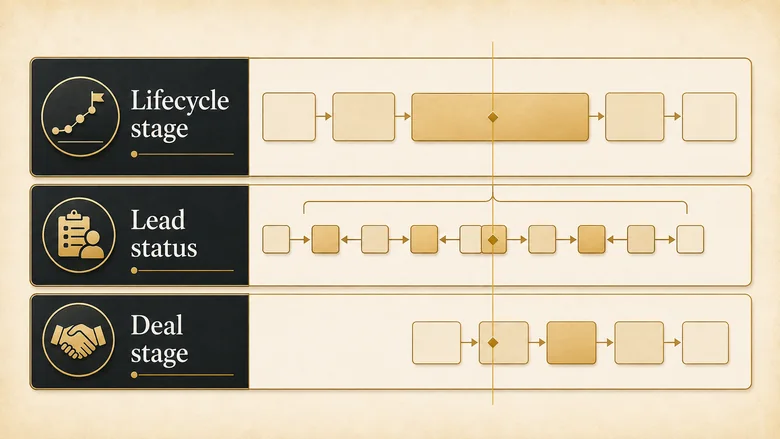
Three fields get used interchangeably in most CRMs, and they are not interchangeable. Lifecycle stage tracks how far a record has travelled. Lead status tracks what a rep is currently doing about it. Deal stage tracks the progress of a specific transaction. A contact can sit in one lifecycle stage while their lead status changes five times in a week.
HubSpot’s documentation is explicit that lead status describes sub-stages within the Sales Qualified Lead lifecycle stage. That nesting is the part teams miss. Lead status isn’t a parallel ladder, it’s a zoom level.
| Lifecycle stage | Lead status | Deal stage | |
|---|---|---|---|
| Question it answers | How far has this record travelled? | What is a rep doing about it right now? | How far along is this transaction? |
| Direction of travel | Forward, with defined off-ramps | Back and forth, freely | Forward, or closed lost |
| Who edits it | Automation, from a written rule | The rep, manually | The deal owner |
| Lives on | The person or company record | The person record | The deal or opportunity record |
| Example values | MQL, SAL, SQL, Opportunity | New, Attempted, Connected, Bad timing | Discovery, Proposal, Negotiation |
| What breaks if you conflate it | Stage-entry dates get overwritten, so velocity reporting is fiction | Reps stop updating it because it fights automation | Won deals leave the contact stuck at SQL |
Get this separation wrong and the symptom is always the same: someone builds a dashboard, the numbers don’t reconcile with the rep’s own view of their week, and everyone stops trusting the report.
The marketing-owned stages: Subscriber, Lead, and MQL
Marketing owns the first three stages outright. Nobody in sales should be able to move a record into or out of them, and marketing should not be able to move a record past MQL. That boundary is the whole point of the model.
Subscriber
A subscriber has opted in to hear from you and done nothing else. Entry trigger: a newsletter or blog subscription with no other conversion attached. Exit trigger: any conversion that hands over more than an email address. Owner: marketing. No clock runs here, and that’s deliberate.
The mistake is treating subscribers as pipeline. They aren’t. Counting them in top-of-funnel volume reports is how a database of 40,000 newsletter readers turns into a forecast nobody believes.
Lead (Inquiry)
A lead has converted on something real: a form, a demo request, a content download, a pricing page enquiry with contact details attached. Entry trigger: first non-subscription conversion. Exit trigger: passing the MQL bar, or failing validation. Owner: marketing. The clock that runs is data hygiene, not follow-up.
This is where the record gets checked before it gets scored. Scoring a lead whose email bounces and whose company name is “asdf” produces a confident number attached to nothing, which is why a validation gate belongs ahead of the scoring model rather than after it.
Marketing Qualified Lead (MQL)
An MQL has cleared marketing’s combined fit and intent threshold. Entry trigger: the score or rule set crossing a written line. Exit trigger: sales accepting or rejecting it. Owner: marketing, right up to the handover. The clock starts here and it is the most important one in the model.
The threshold has to be written down as a number or a rule, not held as a judgment. Where that line sits, and how the fit and intent dimensions combine to reach it, is what a scoring model exists to make explicit.
Two teams can run identical scoring mechanics and still disagree violently about MQLs, because they weighted different signals. Agreeing on the specific criteria and point values behind the threshold is what stops the monthly argument about whether the leads were any good.
IMPORTANT
An MQL definition that lives in someone’s head is not a definition. If you can’t produce the rule as a sentence with a number in it, sales is right to reject the leads.
The sales-owned stages: SAL, SQL, Opportunity, and Customer
Sales owns everything from acceptance onward. The handover point is the single most contested line in B2B revenue, which is exactly why it needs its own stage rather than an assumed transition.
Sales Accepted Lead (SAL)
A SAL is an MQL that sales has reviewed and agreed to work. Entry trigger: an explicit accept action by the assigned rep. Exit trigger: qualification into SQL, or a rejection with a reason code. Owner: the assigned rep. The clock is the acceptance SLA, usually measured in hours.
The stage is a decision point, not a waiting room. What sales is actually agreeing to, and the criteria that make an accept or reject defensible, is the substance of the sales accepted lead definition and the SLA that sits under it.
Acceptance also can’t happen until someone specific owns the record, which makes assignment a hard dependency rather than an afterthought. If a lead lands in a queue with no owner, the acceptance clock is running against nobody, and routing rules are what put a name on the record before that clock starts.
Sales Qualified Lead (SQL)
An SQL has had a real qualifying conversation that confirmed need, timing, budget, and authority. Entry trigger: a completed discovery or qualification call. Exit trigger: an opportunity being created, or a return to recycled. Owner: the rep. The clock is time-to-qualify.
SAL and SQL get collapsed into one stage constantly, and it costs you the only diagnostic that tells you whether a lead-quality complaint is real. If acceptance is high but qualification is low, the leads are fine and the conversations aren’t. Reversed, and marketing’s bar is too low. The difference between an MQL and an SQL is where most teams start untangling this.
Opportunity
An opportunity exists when a deal record is attached to the contact and being actively worked. Entry trigger: deal creation. Exit trigger: closed won or closed lost. Owner: the deal owner. The clock is sales cycle length.
This is the stage where lifecycle and deal stage start running in parallel, and where the two fields must stop trying to do each other’s job. The contact stays at Opportunity while the deal moves through discovery, proposal, and negotiation on its own field.
Customer
A customer has at least one closed-won deal. Entry trigger: first deal closing won. Exit trigger: none, in most models. Owner: account management or customer success. The clock is renewal.
Note what happens on a second purchase: the lifecycle stage doesn’t change, because the record already travelled that far. Expansion belongs to the deal object, not the lifecycle field. Trying to model upsell as a lifecycle stage is how teams end up with a “Repeat Customer” value that breaks every cohort report they own.
The acceptance gate: why SAL is the stage most models skip
SAL comes from the SiriusDecisions Demand Waterfall, now part of Forrester, which formalised the idea that a lead handed to sales and a lead taken by sales are two different events worth measuring separately. Forrester’s own guidance on why sales rejects marketing qualified leads lists seven reasons, and only one of them is “does not meet MQL definition.” The other six are bandwidth, incomplete contact information, misassignment, inaccurate data, already engaged, and other.
That distribution is the argument for the stage. If six of seven rejection reasons have nothing to do with lead quality, then a model with no acceptance step is throwing away the diagnosis and keeping only the blame.
What the gate produces is one number:
MQL Acceptance Rate = SALs Accepted ÷ MQLs DeliveredTrack it by source, by segment, and by rep, and the conversation changes from “your leads are bad” to “leads from this campaign get accepted 80% of the time and leads from that one get accepted 20% of the time.” One of those conversations is actionable.
The gate also gives the response clock somewhere to stop. An acceptance SLA measured in hours only means something if there’s a field that records the moment acceptance happened, which is the same reason speed to lead is measured to first meaningful contact rather than to first automated email.
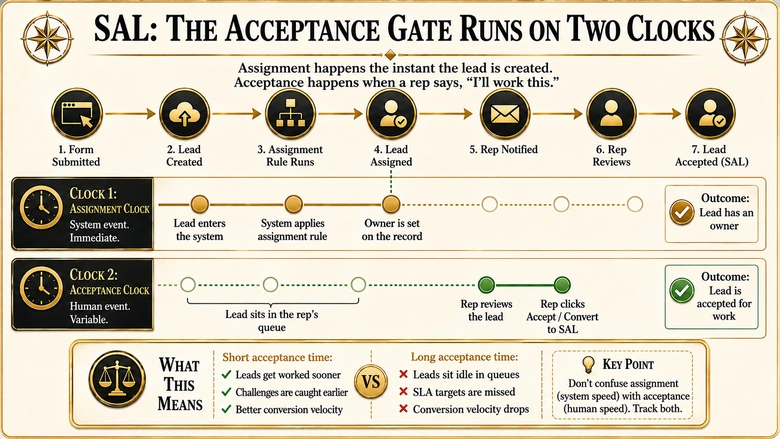
Data from Influ2’s benchmark of 105 companies puts the scale of the problem plainly: 53% of companies have a broken handover, which they define as sales following up with fewer than 35% of the prospects marketing engaged. You cannot find yourself in that 53% without an acceptance stage, because without one there’s no field that records the difference between sent and taken.
The return path: recycled is a stage, not a failure
Here’s the part of the model almost nobody publishes. A lead that goes nowhere has to end up somewhere, and “somewhere” cannot be the stage it was already in. If your only options are forward or nothing, rejected MQLs stay MQLs, and your MQL count inflates every month with records no human will ever touch again.
Recycled and Disqualified are different states with different economics, and the test between them is simple: will the reason expire? Bad timing expires. Wrong company size doesn’t.
When to recycle a lead
Recycle when the rejection reason is temporary and the record is still a genuine fit. Budget frozen until next quarter, evaluating a competitor’s renewal, champion just changed jobs, no bandwidth on the rep’s side. Entry trigger: rejection with an expiring reason code. Exit trigger: a re-engagement signal, or a date-based return to MQL review. Owner: marketing takes it back.
Recycled records need a return date, not just a label. A recycle bucket with no scheduled review is a delete key with extra steps. The date decides when to look again; the rejection reason decides what the track actually sends while the clock runs, which is why one generic re-engagement drip wastes the most useful field on the record.
When to disqualify instead
Disqualify when the reason is structural: outside your ICP, a student doing research, a competitor, a country you don’t sell into, a role with no path to authority. Entry trigger: rejection with a permanent reason code. Exit trigger: none. Owner: nobody, by design.
Disqualified records should be suppressed from scoring entirely, not just filtered out of reports. Points accumulating on a record that will never be worked is exactly the noise that negative scoring rules exist to strip out.
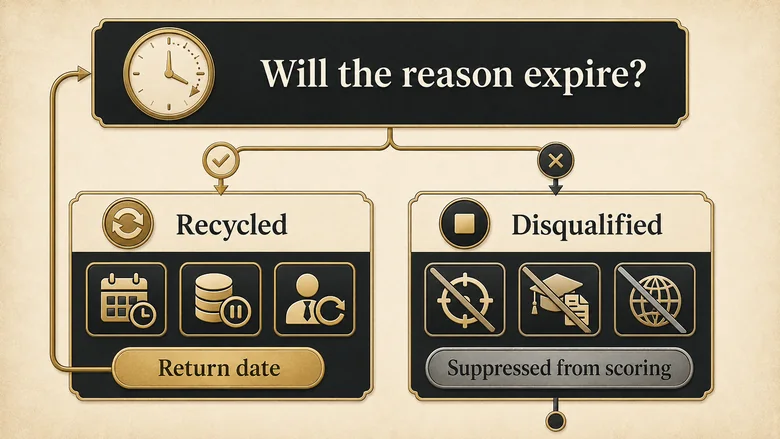
If the reason a lead was rejected will expire, it belongs in Recycled with a return date. If it won’t, it belongs in Disqualified with no return date. Anything else belongs in neither.
Adobe treats this as standard practice in Marketo Engage, where both Sales Accepted and Recycled are first-class parts of the lifecycle model rather than bolt-ons. It’s telling that the platform built specifically for lifecycle management includes both stages, and the CRMs built around deals mostly don’t.
Mapping the model to your CRM
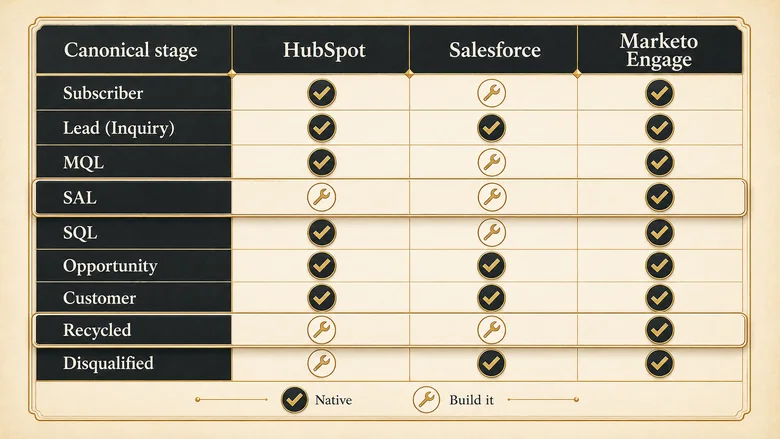
The canonical model is vendor-neutral on purpose. Your CRM will implement some of it natively and leave you to build the rest with custom values and automation, and the gap between what ships and what you need is exactly where stage automation earns its keep or quietly makes things worse.
Two constraints to design around before you build anything. First, HubSpot’s default lifecycle stage property can only be moved forward by HubSpot tools, and manually setting an earlier stage clears the “Became a [stage] date” property behind it. That means every backwards move by hand silently destroys the timestamps your velocity reporting depends on. Second, Salesforce splits the lifecycle across objects: convertLead() turns a Lead into an Account, a Contact, and optionally an Opportunity, and requires you to nominate a Converted Status value up front. A step backwards after conversion isn’t a field edit, it’s a different object.
The Lead Lifecycle Stage Definition Matrix
This is the table to copy into your own documentation. Every row is a stage; every column is a question you have to answer before that stage is real.
| Stage | What it means | Entry trigger | Exit trigger | Owner | Clock that runs |
|---|---|---|---|---|---|
| Subscriber | Opted in, no other conversion | Newsletter or blog subscription | Any non-subscription conversion | Marketing | None |
| Lead (Inquiry) | Handed over real contact details | First non-subscription conversion | Clears or fails the MQL bar | Marketing | Data validation |
| MQL | Met marketing’s fit and intent bar | Score or rule set crosses a written line | Sales accepts or rejects | Marketing | Handover SLA |
| SAL | Sales agreed to work it | Explicit accept by the assigned rep | Qualified to SQL, or rejected with a reason | Assigned rep | Acceptance SLA (hours) |
| SQL | Qualifying conversation confirmed the deal is real | Completed discovery or qualification call | Opportunity created, or recycled | Rep | Time to qualify |
| Opportunity | An active deal is attached | Deal record created | Closed won or closed lost | Deal owner | Sales cycle length |
| Customer | At least one closed-won deal | First deal closes won | None in most models | Account management | Renewal |
| Recycled | Left the pipeline for a reason that will expire | Rejection with an expiring reason code | Re-engagement signal or scheduled review date | Marketing | Return date |
| Disqualified | Left the pipeline for a reason that won’t expire | Rejection with a permanent reason code | None | Nobody, by design | None |
Suggested citation: IVRIS Tech, “Lead Lifecycle Stage Definition Matrix,” 2026. https://ivristech.com/lead-lifecycle-stages/
What each platform gives you natively
| Canonical stage | HubSpot default | Salesforce | Marketo Engage |
|---|---|---|---|
| Subscriber | Subscriber | No Lead record yet, or Lead with Status = Open – Not Contacted | Known or Engaged |
| Lead (Inquiry) | Lead | Lead, Status = Open – Not Contacted | Inquiry |
| MQL | Marketing Qualified Lead | Custom Rating or Status value on the Lead | Marketing Qualified Lead |
| SAL | Not included, build it | Lead, Status = Working – Contacted (by convention) | Sales Accepted Lead |
| SQL | Sales Qualified Lead | Custom Qualified status on the Lead | Sales Qualified Lead |
| Opportunity | Opportunity | Opportunity object, after conversion | Opportunity |
| Customer | Customer | Account with a closed-won Opportunity | Customer |
| Recycled | Not included, build it | Custom Lead Status value | Recycled |
| Disqualified | Other, or a custom value | Lead, Status = Closed – Not Converted | Disqualified |
HubSpot also ships Evangelist and Other, which the canonical model doesn’t need. Evangelist is an advocacy attribute rather than a pipeline position, and Other is a bin. Both are fine to keep and bad to report on.
PRO TIP
Before adding a custom lifecycle value, check whether the thing you’re modelling changes over time or is simply true. States belong in lifecycle stage. Attributes belong in their own field.
Workflow · 45 min
How to define your lead lifecycle stages: one working session
Produces a written stage model both teams have signed off on, ready to build in your CRM. Run it with one marketing owner and one sales owner in the room.
List only the stages you will actually report on
Write the stages down on one line. Delete any stage you cannot name a report for. Fewer stages that are trusted beat more stages that are guessed.
Write one entry trigger per stage
State the single event or threshold that puts a record into the stage. If it takes more than one sentence, the stage is doing two jobs and needs splitting.
Write one exit trigger per stage
State what has to be true for the record to leave. Every stage except the terminal ones needs both a forward exit and a rejection exit.
Name one owner per stage
Put a team or a role against each stage, never two. Shared ownership of a stage means nobody is accountable for the records sitting in it.
Set the clock for each stage
Decide what gets timed and what the target is. Start with the handover SLA and the acceptance SLA; add the rest once those two are reliable.
Agree the recycle-versus-disqualify rule
Build your rejection reason picklist and mark each reason as expiring or permanent. Expiring reasons route to Recycled with a return date; permanent reasons route to Disqualified.
Map each stage to a native CRM field
Match every stage to a real field value in your CRM and flag the ones you have to build. Confirm which transitions automation will own before you write a single workflow.
Frequently Asked Questions
The lifecycle of a lead is the ordered set of stages the record passes through from first contact to closed customer: Subscriber, Lead, MQL, SAL, SQL, Opportunity, and Customer. Rejected records move to Recycled if the rejection reason expires, or Disqualified if it does not. Each stage carries its own entry rule, exit rule, and owner.
The seven forward lead stages are Subscriber, Lead or Inquiry, Marketing Qualified Lead, Sales Accepted Lead, Sales Qualified Lead, Opportunity, and Customer. Two off-ramp stages handle records that leave the pipeline: Recycled for temporary rejection reasons and Disqualified for permanent ones. HubSpot’s defaults omit both SAL and Recycled.
The customer lifecycle is usually given as reach, acquisition, conversion, retention, and loyalty. It is a different model from the lead lifecycle: the customer lifecycle describes marketing phases across the whole relationship, while the lead lifecycle describes the state of one CRM record. Use the lead lifecycle for pipeline reporting.
Lead to order describes the full chain from initial enquiry through to a booked order, joining the lead lifecycle to fulfilment and billing. It extends past Customer into quote, order, invoice, and delivery. In B2B software the equivalent term is usually lead to cash, and it spans CRM and ERP rather than CRM alone.
Salesforce has no single lifecycle stage field. Pre-sale states live on the Lead object’s Status picklist, and conversion moves the record onto Account, Contact, and optionally Opportunity. SAL and Recycled are modelled as Lead Status values by convention, so you build those two stages rather than inherit them.