
Your scoring model says a lead is hot, so sales calls. The prospect turns out to be a student writing a thesis, a competitor pulling your pricing, or a buyer who stopped opening your emails four months ago. The score went up and never came back down, because most B2B models only know how to add points.
Negative lead scoring fixes that. Negative lead scoring is the practice of subtracting points for attributes and behaviors that predict a lead will not convert, so poor-fit and disengaged contacts fall below the sales threshold instead of sitting at the top of the queue. It is the half of the model that keeps the other half honest. Across B2B, only about 13% of marketing-qualified leads ever convert to sales-qualified leads, and 2025 benchmarks put the MQL-to-SQL range at 10 to 15%. A model that cannot subtract ships most of that 87% straight to a rep.
Direct answer – negative lead scoring best practices
Negative lead scoring subtracts points for attributes and behaviors that predict non-conversion, so poor-fit and disengaged leads drop below the sales threshold. Best practices: bound every deduction so no single soft penalty exceeds your MQL threshold; let soft penalties decay and reverse on re-engagement while hard suppressors like competitor domains and hard bounces floor the score permanently; run separate suppress and recycle lines; and audit suppressed leads quarterly to catch false negatives.
Key Takeaways
- Negative lead scoring subtracts points for poor-fit and disengaged signals so weak leads fall below the sales threshold instead of inflating it.
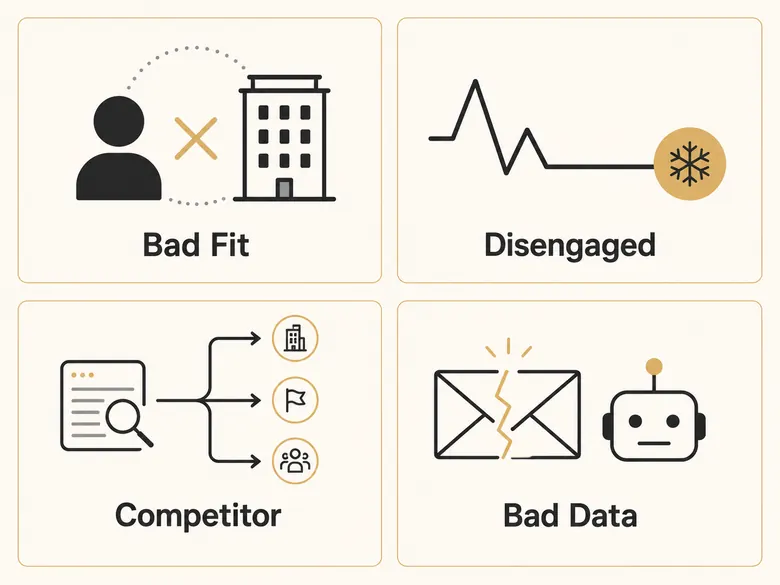
- The signals fall into four categories: bad-fit firmographics, disengagement, competitor and research-only traffic, and spam or bad data.
- Deductions must be bounded. No single soft penalty should exceed your MQL threshold, or one stale signal buries a genuinely good lead.
- Penalties should decay and reverse. A 30-day inactivity hit should fade when the lead re-engages; only hard signals like a competitor domain or hard bounce floor the score for good.
- Suppression and recycling are two different floors: a low line to stop routing a lead, and a higher line to let it earn its way back.
When to Apply Each Negative Action
- Use a soft penalty when the signal is recoverable: inactivity, a single unsubscribe, a careers-page visit. Keep it bounded and let it decay and reverse on re-engagement.
- Use a hard suppressor when the signal is near-certain and durable: a competitor domain, a hard bounce, or a spam complaint. Set it large enough that no positive engagement lifts the lead back above the line.
- Use suppression (pull from active routing, keep the record) when a real lead’s score drops below the suppress line, and a separate higher recycle line to let it earn its way back.
- Use a hard-exclude when no future behavior changes what the lead is: confirmed competitor, bot, or hard-bouncing address. Remove it from the routing pool entirely.
- Avoid suppressing your highest-value segments automatically. Route them to a human review queue, because a penalty correct 90% of the time still mislabels one lead in ten.
What Is Negative Lead Scoring?
Negative lead scoring is the practice of deducting points from a lead’s score for traits and actions that predict non-conversion, lowering the priority of poor-fit and disengaged contacts so they drop below the sales handoff line. It runs alongside positive scoring as one model with two directions: points go up for fit and intent, and down for the signals that contradict them.
It is easy to confuse with disqualification, but they are not the same. Disqualification is binary, a hard reject for a lead that is fake, undeliverable, or categorically out of market, and it belongs at the validation gate that runs before any score is calculated. Negative scoring is a gradient applied to real, reachable leads who are simply weak, or right but not ready.
Negative Scoring vs Disqualification vs Suppression
Three actions get blurred together, and the blur is why pipelines clog. Disqualification removes a lead at the gate. Negative scoring lowers a real lead’s priority by a measured amount. Suppression is what you do once the score drops far enough: you pull the lead out of active routing without deleting it. Keeping them distinct lets you treat a competitor’s email address differently from a buyer who simply went quiet for a month.
Why Positive-Only Models Inflate Your Pipeline
When scores only rise, every webinar signup, content download, and pricing-page visit adds weight that never comes off. A tire-kicker who attended three webinars outscores a perfect-fit buyer who quietly compared two pages and left. Sales learns the score means nothing, ignores it, and falls back on gut feel. Negative scoring is the correction that makes the number reflect who is actually worth a call.
The 4 Categories of Negative Lead Scoring Attributes
B2B negative scoring attributes fall into four categories: bad-fit firmographics, disengagement and cold activity, competitor and research-only traffic, and spam or bad data. Each one predicts non-conversion for a different reason, and each needs a different size of deduction.
| Category | What it signals | Example signals | Typical deduction band |
|---|---|---|---|
| Bad-fit firmographics | Wrong company or wrong person | Out-of-ICP title, wrong company size, wrong industry | -10 to -20 |
| Disengagement & cold activity | Fading or lost interest | No opens in 30 days, inactivity 60+ days, unsubscribe | -10 to -20 |
| Competitor & research-only | Looking, not buying | Competitor domain, careers-only visits, personal email | -8 to -30 |
| Spam & bad data | System noise, not a buyer | Hard bounce, disposable address, fake form data | -20 to -25 |
The four categories also map to where the signal is detected, which matters when you build the rules in a CRM. Firmographic negatives come from enrichment data, disengagement from your marketing automation, research-only signals from web and email behavior, and bad-data signals from verification tools. Those firmographic negatives read from the same firmographic fields used for positive fit, just scored in the other direction.
Disqualification and Bad-Fit Firmographics
Bad-fit firmographic signals show the lead does not match your ideal customer profile, no matter how engaged they look. These deductions are sticky: a 20-person company stays too small until it grows.
- Job title outside your buyer persona (student, intern, freelancer, job seeker)
- Company size above or below your served range
- Industry you do not sell into
- Geography where you do not operate or support
- Department with no budget authority for your category
Disengagement and Cold Activity
Disengagement signals show a lead who once raised a hand has gone quiet. These deductions should be gentle and reversible, because quiet is not the same as gone. The signals shift by model: in product-led SaaS, declining product usage scores as a negative even though it looks like engagement on the surface.
- No email opens or clicks in 30 days
- No website activity in 60 or more days
- Unsubscribed from your email program
- Marked a message as spam
- Stopped opening or attending event invitations
Competitor and Research-Only Traffic
Some contacts interact with your assets for reasons other than buying. They are researching, job-hunting, or sizing you up as a vendor to beat. The heaviest negative in most models lives here.
- Email domain matches a known competitor
- Visits only your careers or jobs pages
- Personal or free email address on a B2B form
- Academic or research address on a commercial inquiry
- Analyst or media domain with no buying role
Spam and Bad Data
The last category is not really about people. It is system noise: bad records that pollute the model and waste sends. B2B marketing data decays about 22.5% a year as people change jobs and companies, so even a clean list rots into this category over time.
- Email hard-bounces on send
- Disposable or role-based address (info@, test@, no-reply@)
- Gibberish or placeholder names and form fields
- Name and email domain that do not match
- Duplicate submissions with conflicting data
Negative Lead Scoring Weight Table: Signals and Point Deductions
A negative lead scoring model assigns a point deduction to each disqualifying signal, weighted by how strongly that signal predicts a lead will not buy. The values below are illustrative starting points. Calibrate them against your own closed-lost data, because the right deduction is the one that matches how often a signal actually kills a deal. Closing those leads out rather than letting them go quiet pays twice, because those same closed-lost records are the negative training examples a predictive model cannot run without, and one major platform will not build a model at all until forty of them exist. The size-based rows here, where a sub-floor revenue band costs points, are just the lowest band encoded as an ordered first-match rule, so one query can apply that deduction to every account at once.
| Signal | Category | Point deduction | Detection method |
|---|---|---|---|
| Out-of-ICP job title (student, intern, freelancer) | Bad-fit firmographic | -20 | Form field + enrichment |
| Company size outside served range | Bad-fit firmographic | -10 | Enrichment (employee count) |
| Non-target industry | Bad-fit firmographic | -10 | Enrichment (NAICS / SIC) |
| Unserved or unsupported geography | Bad-fit firmographic | -10 | Form field + IP / enrichment |
| No email engagement in 30 days | Disengagement | -10 per month | Marketing automation |
| No site activity in 60+ days | Disengagement | -15 | Web analytics last-seen |
| Unsubscribed from email | Disengagement | -20 | ESP unsubscribe event |
| Competitor email domain | Competitor / research-only | -30 (hard suppressor) | Domain match vs list |
| Careers-page-only visits | Competitor / research-only | -8 | Page-path analytics |
| Personal or free email on B2B form | Competitor / research-only | -15 | Domain-type check |
| Spam complaint | Spam & bad data | -25 | ESP feedback loop |
| Email hard bounce | Spam & bad data | -25 (suppress) | Email verification |
| Disposable or role-based address | Spam & bad data | -20 | Verification API |
| Fake or placeholder form data | Spam & bad data | -20 | Form validation |
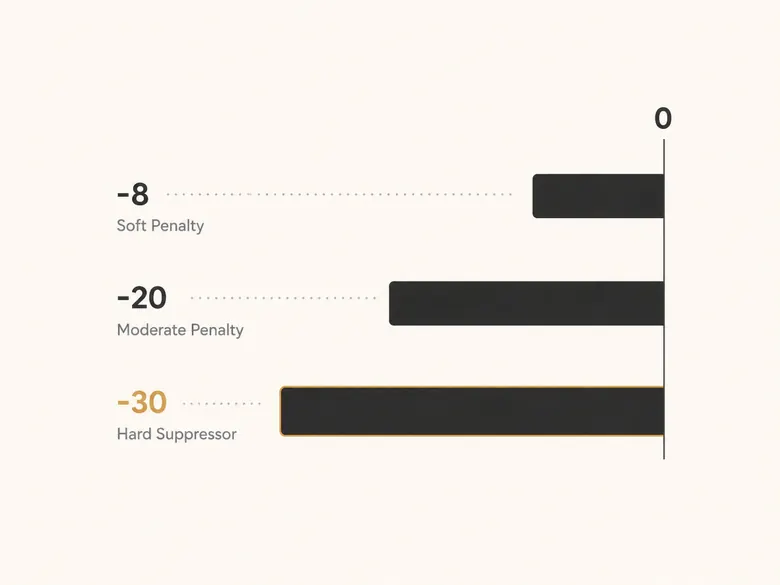
Read the magnitude as a probability of non-conversion. A -8 careers-page visit nudges a lead down the queue. A -30 competitor domain or a -25 hard bounce takes it out of play. Soft signals shave points and can recover; hard signals floor the score and rarely should.
How Big Should a Deduction Be?
Bound your deductions. No single soft negative should exceed the MQL threshold that the positive criteria build a lead up to, or one stale signal will bury a genuinely good lead under points it can never climb out of. The exception is the hard suppressor, covered next, which is built to floor the score on purpose.
Hard Suppressors vs Soft Penalties
A soft penalty trims priority and fades over time: inactivity, a single unsubscribe, a careers-page visit. A hard suppressor is a near-instant disqualifier dressed as a deduction: a competitor domain, a hard bounce, a spam complaint. Set hard suppressors large enough that no amount of positive engagement lifts the lead back above the line. The enrichment and verification tools that populate the detection column are what make these rules fire automatically instead of by hand.
Negative Score Decay and Velocity
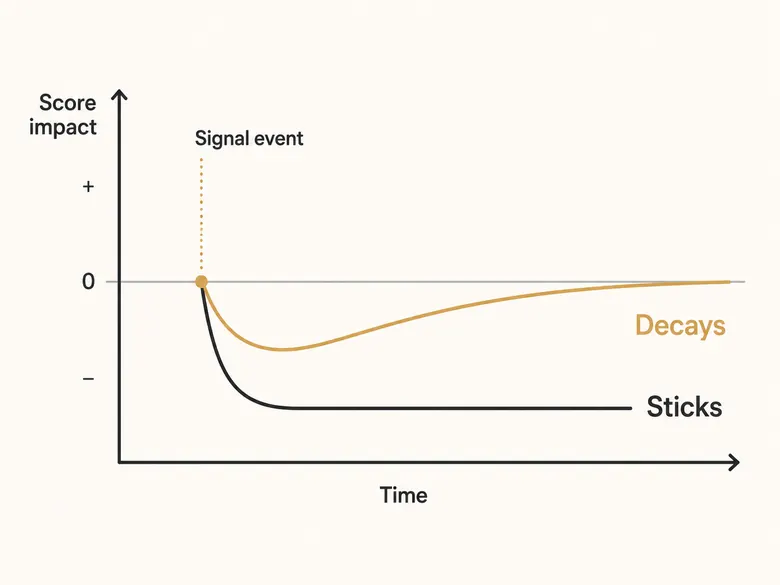
Negative score decay is the rule that fades a penalty over time, so a lead is not punished forever for a single old signal such as one ignored email or a quiet month. Positive scores already decay in most models, where fading intent pulls down a stale lead, following the recalibration cadence that keeps a positive model honest. The negative side needs its own decay logic, and it runs in two directions.
A soft penalty should fade on its own and reverse when the lead comes back. If a 30-day inactivity hit cost a lead 10 points, re-engagement should return them. A hard suppressor should not fade at all, because a competitor domain is still a competitor next quarter.
Decayed penalty = Original penalty × (1 - Days elapsed ÷ Penalty window)| Signal type | Decays? | Window | Reverses on re-engagement? |
|---|---|---|---|
| Inactivity / no engagement | Yes | 30 to 60 days | Yes |
| Unsubscribe | Partly | Until re-opt-in | Yes, on re-subscribe |
| Bad-fit firmographic | No | Until the data changes | Only if the data changes |
| Competitor domain / hard bounce / spam | No | Permanent floor | No |
Penalties That Expire vs Penalties That Stick
Decide for every negative whether it expires or sticks. Disengagement expires; people get busy and come back. Bad-fit firmographics stick until the underlying data changes, because a small company is still too small next month unless it grows. Hard suppressors stick permanently. Writing this down per signal is what stops a model from either forgiving real problems or punishing temporary ones.
Negative Velocity: Clustered Signals Score Worse
Velocity is the speed at which negatives arrive. An unsubscribe, a hard bounce, and a competitor-domain match in the same week is a different story from the same three spread across a year. Cluster them in a tight window and the combined signal is worth more than the sum of its parts, because coordinated negatives usually mean the lead was never real or never interested.
Suppression and Recycling Thresholds
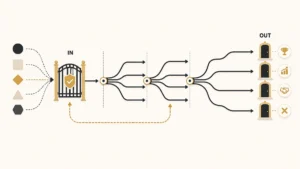
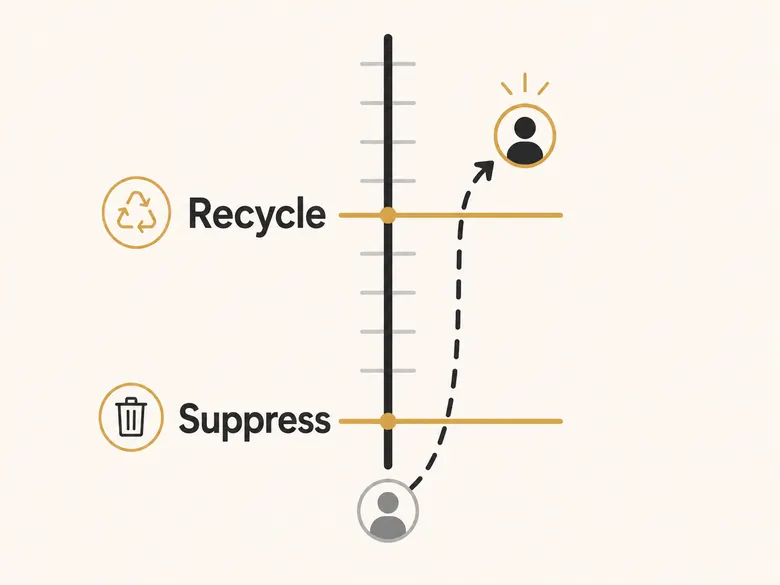
A suppression threshold is the score below which a lead is pulled from active routing; a recycling threshold is the higher score at which a suppressed lead re-enters a warming sequence. Running two separate lines, not one, keeps leads from flapping back and forth across a single cutoff every time a score wobbles by a point.
The gap between the two lines is hysteresis borrowed from engineering: suppress at one level, then require a clearly higher level before you reactivate. These floors sit underneath the MQL-to-SQL handoff line. Negative scoring decides who drops out of the running, while the positive thresholds decide who graduates.
| Score band | State | Action | Owner |
|---|---|---|---|
| Above the MQL line | Active | Route to sales | Sales |
| Between recycle and suppress lines | Holding | Keep warming, no routing | Marketing |
| Below the suppress line | Suppressed | Stop routing, pause outreach | Marketing ops |
| Competitor, bot, or hard bounce | Excluded | Remove from active database | RevOps |
The Recycle Loop
A suppressed lead is not a dead lead. A buyer who went quiet for two months might return, open three emails, and book a demo. Set the recycle line high enough that re-entry means real renewed intent, not a single accidental click. When a lead crosses it, route them back into an active sequence and let the positive signals rebuild the score. The cleanest moment to re-examine the whole suppressed pile in bulk is the quarterly classification reset, when every account is re-scored on fit and intent together instead of waiting for each one to trip a recycle rule on its own.
When to Hard-Exclude Instead of Suppress
Some leads should leave the routing pool entirely. A confirmed competitor, a hard-bouncing address, or an obvious bot does not deserve a recycle path, because no future behavior changes what they are. Hard-exclude these rather than suppressing them, so they never resurface in a list pull or burn a rep’s time on a quarterly re-engagement sweep.
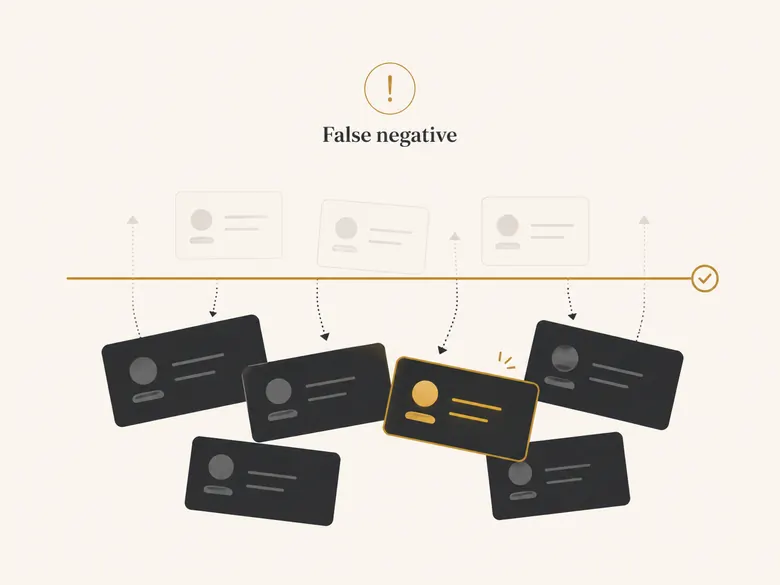
False-Negative Traps: When Negative Scoring Kills Good Leads
A false negative in lead scoring is a real buyer who gets suppressed by a penalty that did not actually predict non-conversion. This is the real risk of negative scoring, and it is why deductions have to be bounded and audited. Over-penalize, and you quietly bury the exact people you wanted. The distinction matters when you start counting funnel leakage too, because a correct rejection is the rule working and only the false negatives count as recoverable loss, which is why the rejection rate is a useless target and the audited reject sample is not.
The traps are predictable. A founder of a 12-person company uses a Gmail address because that is how small teams operate. A buyer at a company you flagged as a competitor is actually evaluating you as a partner. A serious prospect on a six-month enterprise cycle goes dark for 60 days during budget season. Each one trips a rule that was right on average and wrong here.
IMPORTANT
A penalty that is correct 90% of the time still mislabels one lead in ten. For your highest-value segments, route suppressed leads to a human review queue instead of deleting them outright.
The Personal-Email Trap
Penalizing personal email addresses is reasonable on average and dangerous for specific segments. Founders, very small teams, and buyers in regions with strict privacy norms routinely use personal addresses for real work. Keep the personal-email deduction small, and never let it alone push a lead under the suppress line.
The Competitor-Domain Trap
A competitor domain is the heaviest common negative and the easiest to get wrong. The list catches partners, resellers, job seekers, consultants, and your own employees testing forms. Maintain the competitor list by hand, review it quarterly, and treat a single domain match as a flag for review rather than an automatic permanent exclusion when the account otherwise looks like a buyer.
Audit Suppressed Leads Quarterly
The only way to catch false negatives is to look for them. Once a quarter, pull a sample of suppressed leads and check two numbers: how many later converted somewhere else, and how many a rep manually rescued. A rising rescue rate means a rule is too aggressive. This audit is the negative-scoring equivalent of checking your false positives, and almost nobody does it.
How to Set Up Negative Lead Scoring in HubSpot and Salesforce
To set up negative lead scoring, create a score property in your CRM, define the point-deduction rules for each negative signal, and route any lead below the suppression threshold out of the active queue. The mechanics differ between platforms because one subtracts points natively and the other does not.
Workflow · 15 min
How to set up negative lead scoring in your CRM
Add point-deduction rules to your lead score property and route low-scoring leads out of active routing.
Create the score property
Open or create the lead score property that holds the combined positive and negative total for each lead.
Add the negative criteria
Add a deduction rule for each signal in your weight table: out-of-ICP title, inactivity, unsubscribe, competitor domain, hard bounce, and the rest.
Set decay and reversal
Configure soft penalties to fade and reverse on re-engagement, and leave hard suppressors permanent.
Define the suppress and recycle lines
Set the score below which a lead leaves routing, and the higher score at which a suppressed lead returns to a warming sequence.
Automate the routing
Build a workflow or Flow that moves sub-threshold leads out of the active queue and recycles them when they climb back above the line.
Negative Scoring in HubSpot
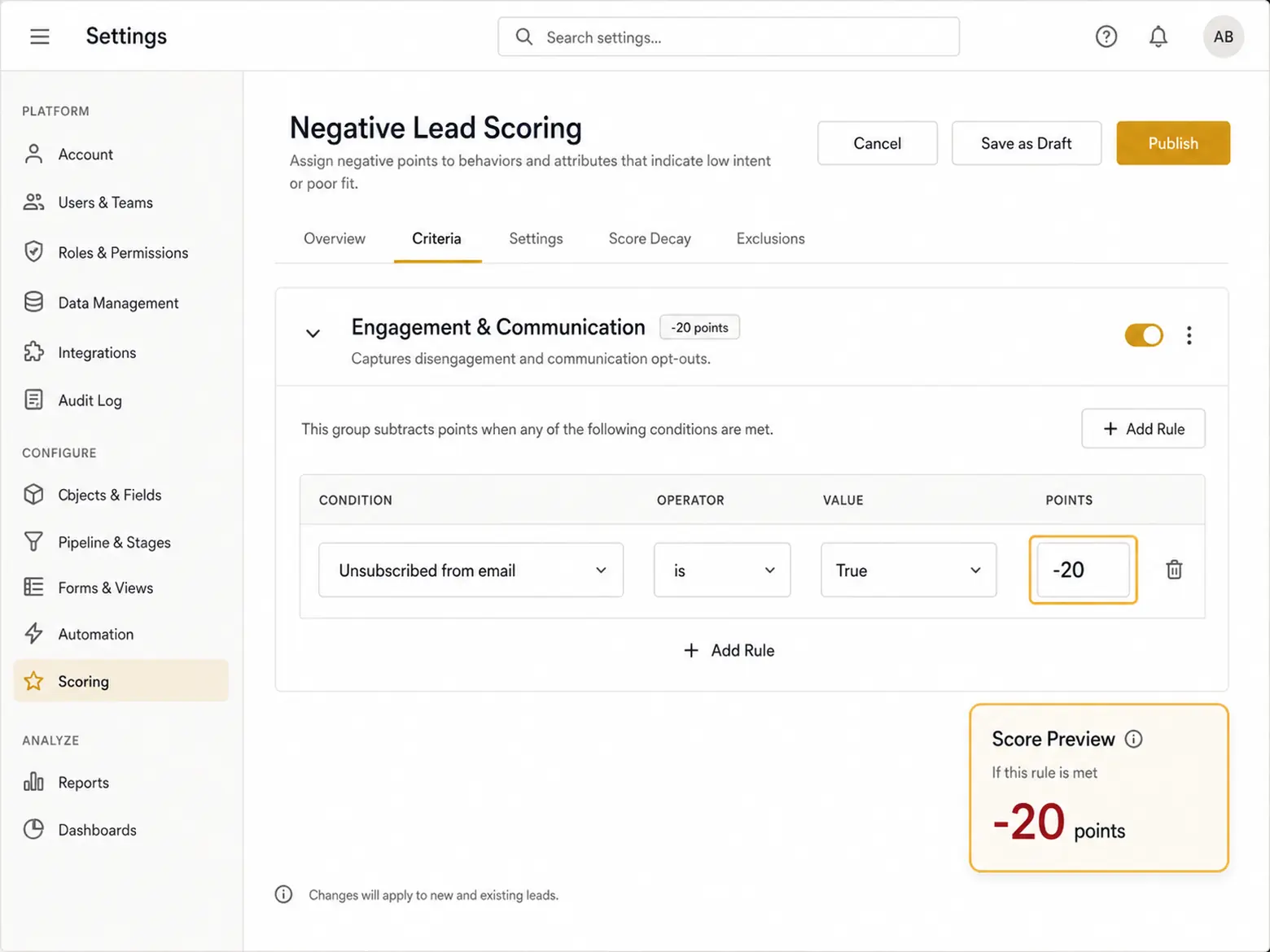
HubSpot’s manual score property supports subtraction directly. In the score editor you add negative criteria the same way you add positive ones, and HubSpot lets you assign negative point values to lower a lead’s score (as of Q2 2026). One caveat: HubSpot’s manual score behavior around a zero floor is configuration-dependent and version-dependent, so confirm whether your portal lets scores go negative before you rely on it.
Negative Scoring in Salesforce Einstein
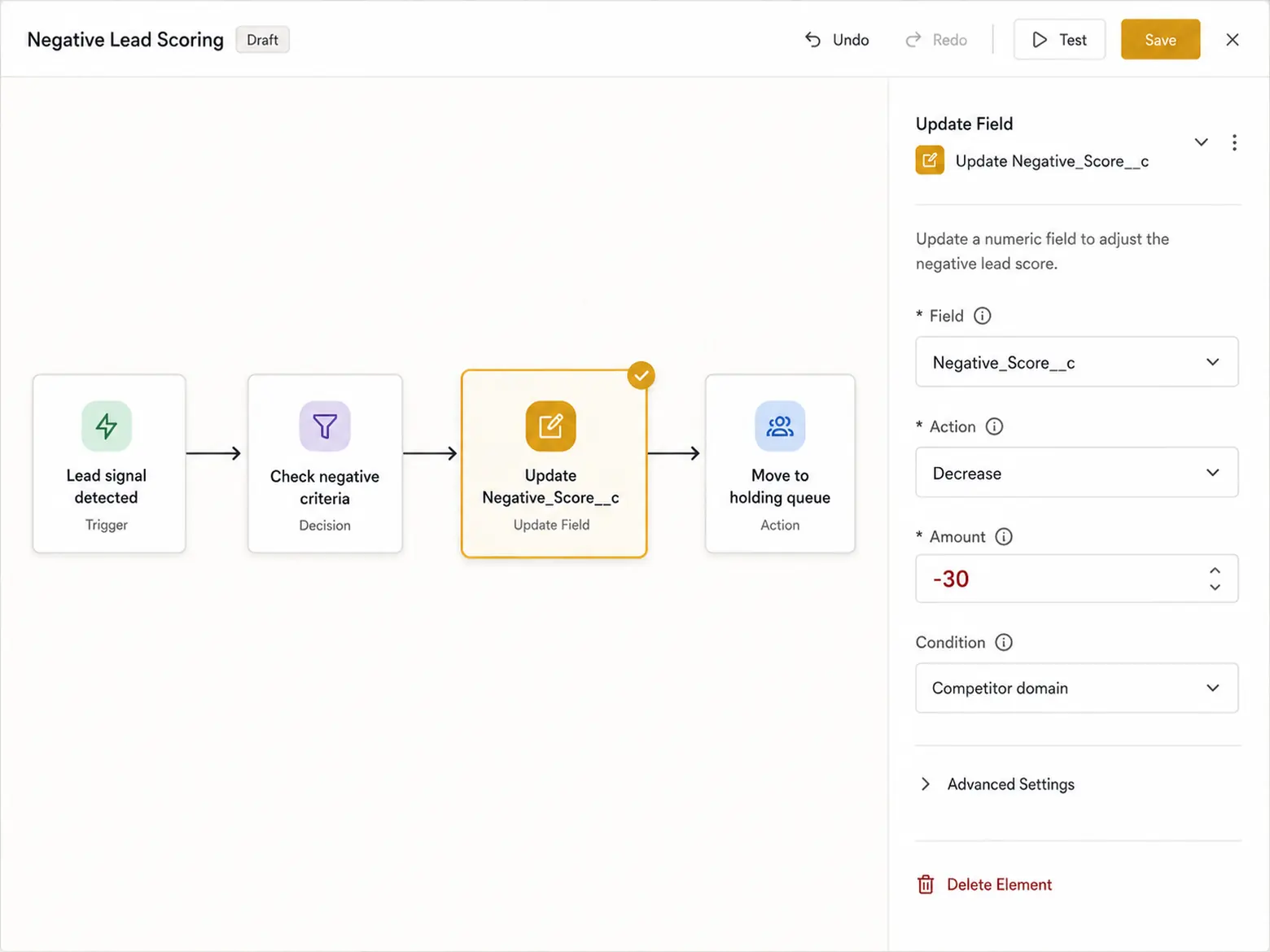
Salesforce works differently. Einstein Lead Scoring is predictive and does not expose simple subtraction rules; it learns from historical conversions instead. To apply explicit negative rules in Salesforce you build a custom score field and decrement it with a Flow or Apex trigger when a negative signal fires. Treat Einstein’s model as the positive engine and your custom field as the negative overlay.
HubSpot vs Salesforce: Capability at a Glance
| Capability | HubSpot | Salesforce |
|---|---|---|
| Native point subtraction | Yes, in the manual score property | No, Einstein is predictive only |
| How to add negatives | Negative criteria in the score editor | Custom score field + Flow or Apex |
| Score floor behavior | Configurable, version-dependent | Defined by your custom field logic |
| Decay over time | Workflow re-scores on inactivity | Flow re-scores on inactivity |
| Routing sub-threshold leads | Workflow moves to a holding list | Flow or assignment rule reroutes |
Routing Suppressed Leads
The rules only matter if the score changes what happens next. In both platforms, a workflow in HubSpot or a Flow in Salesforce watches the score and moves any lead below the suppress line off the active routing list and into a holding or warming state. Without that automation the deductions are cosmetic.
Frequently Asked Questions
Bound every deduction so no single soft penalty exceeds your MQL threshold, let soft penalties decay and reverse on re-engagement while hard suppressors floor the score permanently, run separate suppress and recycle thresholds, calibrate point values against your closed-lost data, and audit suppressed leads quarterly to catch real buyers wrongly penalized.
Negative attributes are traits and behaviors that predict a lead will not convert, so a scoring model subtracts points for them. They fall into four groups: bad-fit firmographics, disengagement, competitor or research-only activity, and spam or bad data. Examples include out-of-ICP job titles, unsubscribes, competitor email domains, and hard bounces.
In HubSpot, open the manual lead score property and add negative criteria alongside your positive ones; HubSpot lets you assign negative point values to lower a score. Add a rule for each negative signal, then build a workflow that moves any lead below your suppression threshold off the active routing list.
A common rule subtracts 30 points when a lead’s email domain matches a known competitor, flooring the score as a hard suppressor. A softer example subtracts 10 points after 30 days with no email engagement, a penalty that should fade and reverse once the lead re-engages.
Keep deductions bounded. No single soft negative should exceed your MQL threshold, or one stale signal can bury a good lead. Soft signals like inactivity warrant 8 to 20 points; hard suppressors like a competitor domain, hard bounce, or spam complaint can floor the score. Always calibrate against your closed-lost data.
Negative lead scoring is a reversible gradient that lowers a real lead’s priority by a set number of points. Disqualification is a binary reject for a lead that is fake, undeliverable, or out of market, and it happens earlier at the validation gate. One ranks the lead; the other removes it.