Updated Q3 2026. This guide reflects current B2B enrichment workflows, CRM controls, and data-governance practices.
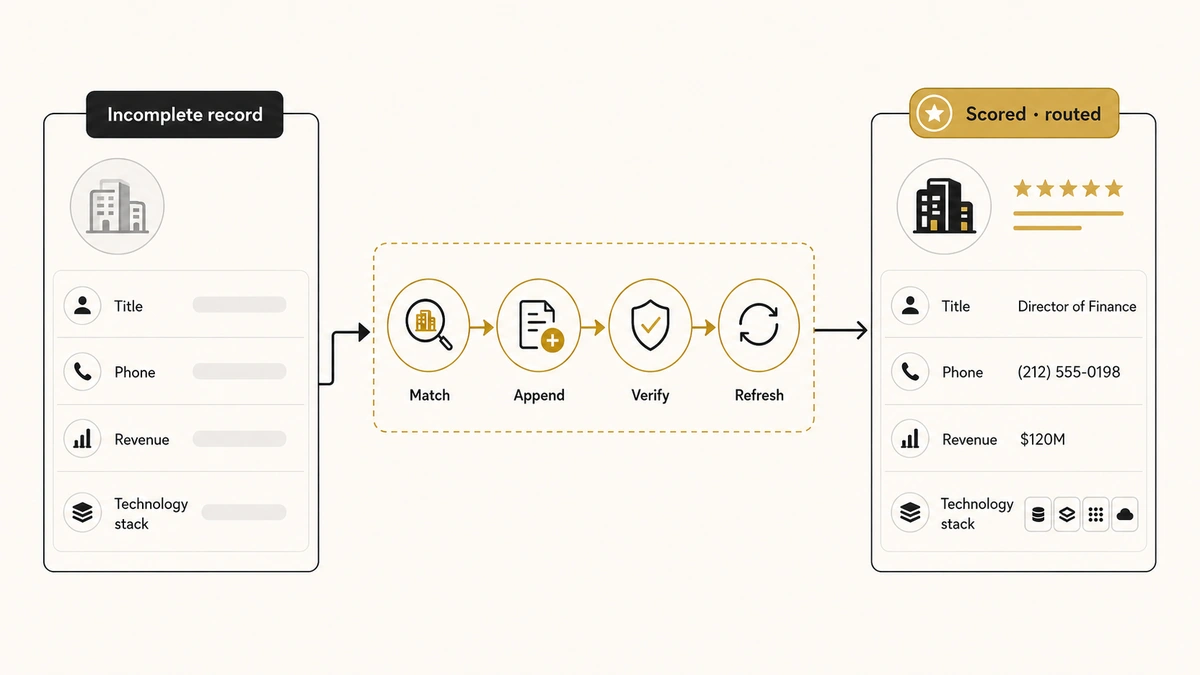
Your CRM can look full and still be nearly useless. A contact record with a name and work email does not tell marketing whether the account fits the ICP, does not tell sales who owns the buying decision, and does not tell RevOps where the lead should be routed. The missing context is the problem. Contact data enrichment techniques fill those gaps by adding verified company, role, technology, location, and intent information to records your team already owns.
The common mistake is treating enrichment as a one-time database purchase. Good B2B data enrichment is an operating process: match the right record, append only useful fields, verify confidence, protect trusted values, trigger the next action, and refresh fields when they become stale. That process sits inside wider RevOps data-governance practices, because more fields do not improve revenue operations unless every field has a purpose and an owner.
Direct answer — What is B2B data enrichment?
B2B data enrichment is the process of completing, correcting, and updating contact or company records with first-party data, public business sources, commercial databases, APIs, multi-provider waterfalls, and AI-assisted research. A reliable workflow starts with a clean identifier, adds only decision-useful fields, verifies confidence, protects manually curated values, and writes the result back to the CRM so routing, scoring, segmentation, and outreach improve automatically.
Key Takeaways
- Enrichment adds context; cleansing fixes errors. Clean and deduplicate the record before paying to append more information.
- The highest-value fields are decision fields. Job title, seniority, company size, industry, territory, technology stack, and buying signals should change what your team does next.
- One provider rarely fills every field. A controlled waterfall can improve coverage, but every additional source adds cost, conflict, and governance work.
- Real-time and batch enrichment solve different jobs. Use real-time enrichment for new inbound leads and batch enrichment for CRM cleanups or campaign lists.
- Accuracy and consent matter more than record depth. Collect only relevant data, document its source, respect objections, and refresh fields according to how quickly they change.
What Is B2B Data Enrichment?
B2B data enrichment is the process of improving an existing contact, lead, account, or company record by adding missing information, correcting stale values, and attaching verified context from other sources. A raw record might contain only an email address and company name. An enriched version can include job title, seniority, department, LinkedIn URL, employee range, industry, country, revenue band, technologies used, funding stage, and recent buying signals.
The phrase contact data enrichment usually refers to person-level information such as role, work email, direct phone, seniority, department, and professional profile. Company or account enrichment adds firmographic and technographic information about the organization. Lead enrichment is the broader operational use of those fields to qualify, score, route, segment, and personalize a lead.
Current CRM products show how broad enrichment has become. HubSpot’s official documentation lists contact fields such as job title, seniority, location, and LinkedIn URL, plus company fields such as employee range, annual revenue, technologies, funding, and social profiles. It also distinguishes automatic enrichment that fills empty values from manual enrichment that can overwrite existing ones. That distinction is important because enrichment should not silently replace trusted human-entered data.
Data Enrichment vs Cleansing, Validation, and Lead Scoring
Data enrichment, cleansing, validation, and scoring improve the same revenue database, but they do different jobs. Mixing them together produces workflows that add more information without making the underlying record reliable.
| Process | What it does | Example | Use it when |
|---|---|---|---|
| Data cleansing | Removes duplicates, corrects formatting, and standardizes values | Changing “U.S.A.”, “United States,” and “US” to one country value | The database contains inconsistent or duplicate records |
| Data validation | Checks whether a field or record is real, reachable, and plausible | Verifying that an email is deliverable and the company domain exists | You need a pass/fail quality gate before sales action |
| Data enrichment | Adds missing context or updates stale fields | Appending seniority, employee band, industry, and technology stack | The record is valid but too incomplete for a decision |
| Lead scoring | Assigns value to attributes and behaviors | Adding points for VP seniority, target industry, and a demo request | You need to prioritize records after the data is available |
Enrichment should happen before scoring, because a score is only as reliable as the fields feeding it. It should also respect the pass/fail checks in your lead-validation gate. A verified work email does not prove ICP fit, and a perfect company match does not prove that the contact is still employed there. Enrichment also describes who an account is and what it uses, not when it is in-market — that buying-timing signal is what intent data adds.
What Data Should You Enrich?
The right enrichment fields are the ones that alter a downstream decision. Before enrichment runs, collapsing duplicate records into one makes sure you enrich the surviving record instead of three competing copies of it. Every extra property creates storage, mapping, maintenance, privacy, and conflict-resolution work, so “collect everything” is not a strategy.
| Data category | Typical fields | Revenue use | Refresh sensitivity |
|---|---|---|---|
| Contact identity | Full name, work email, direct phone, LinkedIn URL | Reachability, deduplication, identity matching | Medium |
| Role and authority | Job title, department, seniority, function | Buying-committee mapping, routing, personalization | High |
| Firmographic | Industry, employee range, revenue band, HQ, ownership | ICP fit, territory, segmentation, account tiers | Medium |
| Technographic | CRM, cloud platform, analytics, marketing stack | Integration fit, replacement campaigns, use-case messaging | Medium to high |
| Corporate events | Funding, hiring, expansion, merger, leadership change | Timing, trigger-based outreach, account prioritization | High |
| Behavior and intent | Page visits, product usage, content activity, third-party intent | Lead scoring, nurture, sales alerts | Very high |
| Operational metadata | Source, confidence, enriched date, provider, consent status | Auditability, refresh rules, conflict resolution | Must update with every enrichment |
Start with three to five fields tied to a measurable problem. A routing project might need country, employee range, industry, and account owner. A scoring project may need seniority, department, technology stack, and engagement signals. The lead-scoring criteria should determine which fields deserve enrichment spend, rather than allowing a vendor’s available field list to define your model.
Where B2B Enrichment Data Comes From
B2B enrichment sources fall into five groups. Strong programs combine them, but they do not treat every source as equally reliable.
First-Party Data
First-party data comes from your own forms, product, sales activity, support history, events, billing system, and marketing engagement. It is usually the most contextually useful source because the person or account interacted directly with your company. It can still be wrong, incomplete, or outdated, so capture time and source must remain visible.
Public Business Sources
Public sources include company websites, official registries, press releases, careers pages, public professional profiles, product documentation, and security or integration pages. They are useful for verifying company identity, leadership, hiring, locations, products, and technologies. Public availability does not remove the need for lawful, fair, and purpose-limited processing.
Commercial B2B Databases
Commercial providers match an email, domain, name, or profile URL against maintained business datasets. They are useful for standardized contact and company fields at scale. Coverage, update frequency, geographic strength, confidence rules, licensing, and compliance support differ by provider.
CRM and Application Data
Your CRM, marketing automation platform, customer-data platform, and sales tools already hold lifecycle, ownership, campaign, activity, and pipeline fields. Enrichment often requires joining those internal attributes with an external provider rather than treating the CRM as a passive destination. The system-of-record decision becomes important when the business operates more than one platform, which is one reason the HubSpot-versus-Salesforce choice affects enrichment architecture as well as sales workflow.
AI-Assisted Web Research
AI research can classify information that does not exist as a clean database field, such as whether a company sells to healthcare, has an enterprise security page, recently opened a new market, or appears to use a particular go-to-market motion. Clay describes this difference as research rather than lookup: a provider returns a stored field, while a research agent reads current sources and returns a structured conclusion with evidence. AI-generated enrichment should retain its source evidence and confidence because the output contains judgment.
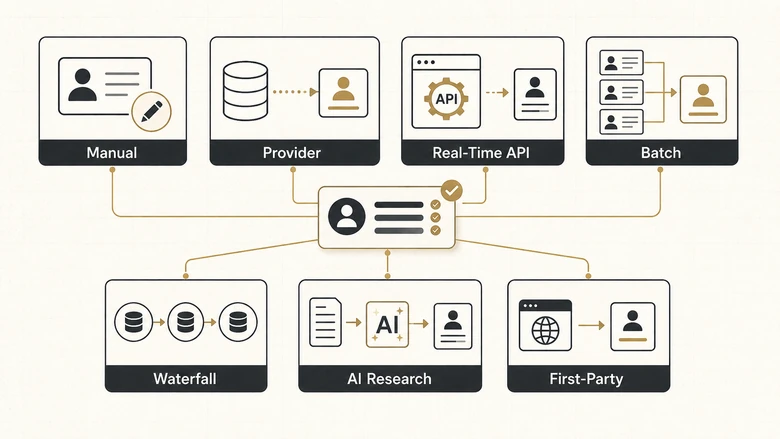
7 Contact Data Enrichment Techniques for B2B Teams
The best contact data enrichment technique depends on volume, urgency, field complexity, and the cost of a wrong value. Most teams need more than one method.
1. Manual Research for High-Value Accounts
Manual enrichment means a researcher verifies or adds information using official company sources and public professional information. It is slow, but it is appropriate for strategic accounts, senior executives, complex buying committees, or fields requiring judgment.
Use manual research for information such as reporting relationships, regional responsibility, product focus, current strategic initiatives, and whether a person appears to own the problem your offer solves. Store the source URL and checked date. Do not write an interpretation into a CRM field as though it were an objective fact. That rule holds for machine-generated scores as much as for human notes, and keeping derived judgements separate from observed fact is what lets anyone reconstruct, months later, what a value in that field was ever supposed to mean.
2. Single-Provider Database Matching
A single-provider lookup sends a stable identifier, such as a work email or company domain, to one commercial database and receives standardized fields. This is the simplest automated technique and often the right starting point for common fields.
Use it when one provider has strong coverage in your target market and the cost of a missed record is low. Test a representative sample before connecting the provider to every form and CRM object. Match rate alone is not enough; inspect accuracy, conflict rate, geographic coverage, and the percentage of returned values that your workflows actually use.
3. Real-Time API Enrichment
Real-time enrichment runs as a new lead, contact, or account enters the system. The workflow passes an identifier to an API, receives enriched fields, validates them, and writes the approved values before routing or scoring.
This technique is useful for demo requests, product signups, event registrations, chat conversations, and other moments where a fast response matters. Apollo and HubSpot both document real-time or automatic enrichment for new and existing CRM records. Real-time automation should fail gracefully: when no match is found, the lead must still enter a visible exception path rather than disappear.
4. Batch Enrichment for Existing CRM Records
Batch enrichment updates a selected set of records at once. It is the practical choice for a legacy CRM cleanup, a purchased event list, a territory redesign, a campaign audience, or a database migration.
Begin with deduplication and field normalization. Export or snapshot the original values, test a small batch, compare changes, and approve overwrite rules before running the full job. Batch enrichment should write an enriched date, provider, confidence level, and prior value so the team can investigate errors.
5. Waterfall Enrichment Across Multiple Providers
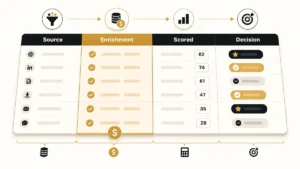
Waterfall enrichment queries providers in a defined order until a field is found or the sequence ends. It can improve coverage for work emails, direct phones, firmographics, technologies, and other fields where providers have different strengths. Coverage is only half the decision, because the order you choose sets what each match costs, and a provider sitting fourth in the chain works a much harder residue than the same provider sitting first.
The order matters. Start with the source offering the best combination of accuracy, cost, region, and licensing for that field. Stop after a verified result so later providers do not spend credits or overwrite a higher-confidence value. Clay’s official documentation describes waterfall enrichment as sequentially checking multiple sources to fill a requested data point. A waterfall is a coverage strategy, not permission to ignore source quality or conflicting answers.
6. AI Classification and Last-Mile Research
AI enrichment converts unstructured public information into a controlled category, summary, or evidence-backed flag. Examples include classifying a company’s business model, checking whether a security page exists, summarizing a product line, identifying a likely target vertical, or detecting a trigger such as active hiring.
Use AI for fields that require reading and interpretation, not for critical identifiers that a verified provider can return directly. Require a restricted output schema, source URLs, a confidence threshold, and human review for high-impact decisions. The same caution applies to the AI tools discussed in our B2B AI marketing tools comparison: the output becomes operational only after the workflow defines where machine judgment is acceptable.
7. First-Party Behavioral and Product Enrichment
This technique adds context from the prospect’s relationship with your business: pages viewed, product events, trial status, content downloads, support interactions, campaign responses, opportunity history, and account engagement.
First-party behavior is especially valuable because it shows what the person or account did with your company, not only who they are. Keep identity, consent, and retention rules clear. A behavior signal should also decay or expire when it no longer reflects current intent.
How the B2B Data Enrichment Workflow Works
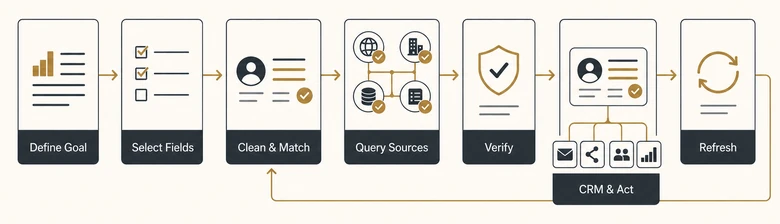
A reliable enrichment process has seven stages. The work is not complete when a provider returns a value; it is complete when the value produces a controlled business action.
Step 1: Define the Business Decision
Start with the downstream decision: routing, qualification, personalization, territory, scoring, reporting, or account prioritization. Write the rule before selecting fields. “Route companies with more than 500 employees to enterprise sales” is a usable requirement. “Make the CRM more complete” is not.
Step 2: Select the Minimum Required Fields
Choose the smallest field set that supports the decision. Define the format, allowed values, refresh interval, authoritative source, and whether the field can be overwritten. Separate objective fields, such as employee band, from inferred fields, such as likely buying motion.
Step 3: Clean and Match the Record
Normalize company names, domains, countries, and identifiers. Deduplicate records before enrichment. Use a stable match key whenever possible, such as a normalized business email, company domain, CRM ID, or verified professional profile URL. Those same keys are what lead-to-account matching leans on to attach a record to the right account, so a clean key here pays off twice. Company names are the hardest of those to normalise, because the order of the steps changes the result — strip punctuation after the legal form and Ltd. never matches Ltd, so it is worth being deliberate about which rules to apply, and in which order.
Step 4: Query Sources in a Defined Order
Call internal data, a primary provider, a secondary provider, or an AI research step according to the field. Define stop conditions, cost limits, timeouts, retries, and exception handling. Waterfalls should be field-specific rather than one universal sequence for every record.
Step 5: Validate and Resolve Conflicts
Check formatting, plausibility, recency, and source confidence. When two sources disagree, follow a documented hierarchy. A recent official company page may outrank a database record for leadership, while a verified commercial provider may outrank a scraped directory for a work email.
Step 6: Write Back and Trigger the Next Action
Update only approved fields, preserve prior values, and record the source and timestamp. Then route, score, segment, notify, or personalize. Enrichment supports the MQL-to-SQL handoff when the new fields are tied to clear acceptance and routing rules instead of becoming unused CRM decoration.
Step 7: Monitor and Refresh
Track failures, conflicts, changes, and business outcomes. Refresh job title and intent more often than year founded or headquarters country. Scheduled enrichment is useful, but every field should have a refresh reason rather than one blanket monthly job.
A Contact Data Enrichment Example
Consider a demo form that asks for work email and first name. The raw record is intentionally short because fewer fields reduce form friction. Enrichment runs after submission.
| Stage | Record | Decision enabled |
|---|---|---|
| Raw submission | Asha, asha@northstar.example | None beyond basic identity |
| Company match | Northstar Systems, 800–1,000 employees, UK, cybersecurity | Enterprise segment and territory |
| Contact enrichment | VP Revenue Operations, executive seniority, LinkedIn URL | Buying-role and owner routing |
| Technographic enrichment | Salesforce, Marketo, Snowflake | Integration relevance and messaging |
| First-party enrichment | Pricing page viewed twice, attended RevOps webinar | Higher intent and faster follow-up |
| Operational result | Enterprise score, routed to UK strategic accounts, personalized brief created | Specific next action |
The value is not the number of populated fields. The value is that the record moved from an unrouteable email address to a defensible sales action. The data also makes the later score explainable, because the user can see which facts produced the result.
Where Enriched Data Creates Revenue Value
Lead Routing
Country, region, employee size, product, account tier, and ownership data determine which team receives a lead. Enrichment can reduce manual triage, but only when the routing rules are maintained and exceptions are visible. That second condition is the one teams discover late, because making those exceptions visible is a design decision, not a default: a missing field with no fallback branch produces a record that looks routed and is not.
Lead Scoring and Qualification
Firmographic, role, technology, and behavior fields create a more complete score. Enrichment supplies the evidence; scoring assigns the weight. Keep those two functions separate so a provider change does not silently rewrite the business model.
Segmentation and Personalization
Industry, use case, department, installed technology, and company event data support more relevant lists and messages. Personalization should reflect a meaningful business difference, not merely insert more fields into a template.
Account-Based Marketing
Account enrichment helps marketing map subsidiaries, locations, buying roles, technologies, and trigger events. This creates a shared account view for advertising, content, outbound, and sales follow-up.
CRM Reporting and Forecasting
Complete, standardized fields make segmentation and reports more reliable. They do not fix a poorly defined lifecycle, which is why enrichment belongs alongside the process and data-hygiene guidance in RevOps best practices, not as a substitute for it.
AI and Automation
AI systems use CRM fields to classify, summarize, recommend, and act. Missing or contradictory data creates bad routing and confident but irrelevant outputs. Enrichment can improve the input layer, while the automation and platform decisions covered in RevOps software selection determine how those fields move through the stack.
How to Measure Data Enrichment Quality
Measure enrichment as a data-quality and workflow program, not as a count of fields purchased.
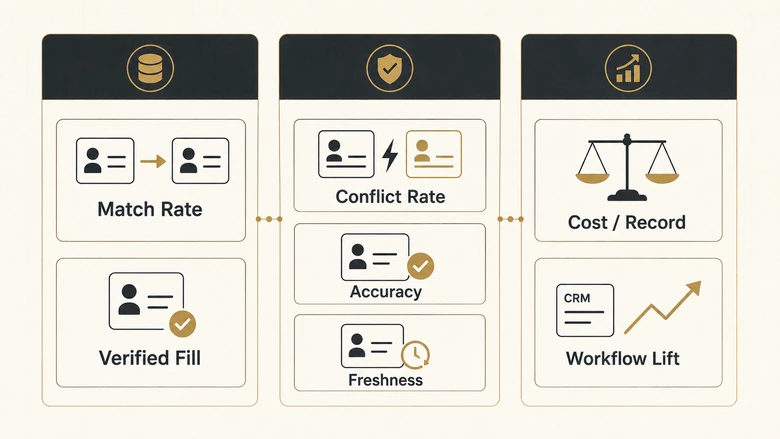
| Metric | Formula or test | What it reveals |
|---|---|---|
| Match rate | Matched records ÷ submitted records | Provider coverage for your identifiers and market |
| Verified fill rate | Approved new field values ÷ eligible missing fields | Usable coverage after quality checks |
| Conflict rate | Records with source disagreement ÷ matched records | How often the workflow needs resolution |
| Accuracy sample | Correct values in a manual audit ÷ audited values | Estimated field reliability |
| Freshness | Records within field refresh SLA ÷ active records | Whether the database remains current |
| Cost per verified record | Total enrichment cost ÷ records passing quality rules | Real economics beyond provider credits |
| Workflow lift | Change in routing time, acceptance rate, reply rate, or conversion | Whether enrichment improved the intended business result |
Cost per verified enriched record = Total enrichment cost ÷ Records that pass quality rulesA provider can have a high match rate and still produce a poor verified fill rate. That happens when returned values are stale, low-confidence, badly formatted, or irrelevant to the business decision. Audit by field and region because one global average can hide weak coverage in an important market.
Data Privacy and Governance Rules
Contact data enrichment processes personal and company information, so the workflow needs a documented purpose, lawful basis where required, source controls, retention rules, and a way to respect objections.
The GDPR’s core principles require personal data to be processed lawfully and transparently, collected for specified purposes, limited to what is necessary, and kept accurate where needed. Those principles argue against collecting every available contact attribute simply because a provider can return it.
For direct marketing, the UK Information Commissioner’s Office advises organizations to plan for data protection from the start, collect information fairly, explain how it will be used, and respect a person’s right to object or opt out. Its guidance was updated in April 2026 and remains a useful operational reference for teams using enriched contact data in outreach.
Use these controls:
- Document why each enriched field is necessary.
- Store source, timestamp, confidence, and applicable consent or objection status.
- Prevent automated jobs from overwriting contract, ownership, lifecycle, or manually verified fields without approval.
- Separate objective data from AI inference.
- Restrict sensitive attributes and avoid enrichment that creates unfair or irrelevant profiling.
- Provide deletion, correction, suppression, and opt-out processes.
- Review provider contracts, subprocessors, geographic coverage, and permitted uses.
IMPORTANT
Publicly visible information is not automatically unrestricted marketing data. The lawful use of enriched contact information depends on jurisdiction, purpose, transparency, the channel used, and the person’s rights. Treat this section as an operating checklist, not legal advice.
Common B2B Data Enrichment Mistakes
1. Enriching before cleansing. The workflow spends credits on duplicates and attaches data to the wrong record because identifiers were not normalized first.
2. Collecting fields with no downstream rule. The CRM becomes wider, slower, and harder to govern while sales behavior remains unchanged.
3. Using one source for every field and country. Providers differ by data type, region, update process, and licensing. A strong US email provider may be weak for European mobile numbers or technographics.
4. Overwriting trusted values automatically. A provider should not erase a manually verified title, account owner, lifecycle stage, or contract field without a clear hierarchy and audit trail.
5. Measuring match rate instead of accuracy. A returned value is not necessarily a correct or useful value.
6. Treating AI inference as verified fact. A model classification should be labeled as inferred, linked to evidence, and reviewed when it affects a high-value decision.
7. Ignoring field decay. Titles, employment, technologies, intent, and funding signals change at different speeds. One annual refresh schedule cannot keep every field reliable.
8. Buying tools before designing the workflow. A provider cannot define your ICP, routing model, scoring thresholds, overwrite rules, or data ownership. Use the wider lead-generation tools landscape only after the operational requirement is clear.
When to Use a Data Enrichment Tool
Use a data enrichment tool when the same fields must be found repeatedly, the source and permitted use are clear, and the result can be validated. Manual research is better for a small number of strategic records or judgment-heavy questions. A single database works for standardized fields. A waterfall fits fragmented coverage. AI research fits evidence-backed classification.
Do not choose a tool from a generic “largest database” claim. Run a sample of your own records and compare:
- verified fill rate by field;
- accuracy by region and segment;
- source transparency and auditability;
- CRM mapping and overwrite controls;
- batch, real-time, and scheduled enrichment options;
- cost per verified record;
- support for objections, suppression, and deletion;
- the ability to preserve manually curated fields.
This guide intentionally does not rank enrichment vendors. A separate commercial comparison should own queries such as “best data enrichment tools,” “lead enrichment tools,” and “data enrichment providers.” Keeping the tool list separate prevents this informational page from competing with a buyer-intent article. That comparison now exists, and its first finding is that almost every vendor publishes a coverage figure without saying what population it was measured against, which is exactly the kind of judgment a buyer-intent page has to make and this one should not.
Frequently Asked Questions
Data enrichment is the process of adding missing context, correcting stale values, or attaching verified attributes to an existing record. In B2B systems, enrichment commonly adds contact, firmographic, technographic, location, and intent information so teams can route, score, segment, report on, and engage records more accurately.
A demo form may collect only a name and work email. Enrichment can match the company domain, add industry, employee range, country, job title, seniority, LinkedIn URL, technology stack, and recent engagement. Those fields can then route the lead to the right territory and support a more accurate qualification score.
Lead enrichment is the operational use of additional contact, company, and behavior data to make a lead record actionable. It fills information gaps after capture so marketing and sales can determine fit, identify the buyer’s role, personalize the next message, score the lead, and route it without unnecessary manual research.
Lead list enrichment is a batch process that appends or updates fields across a CSV, event list, campaign audience, or CRM segment. The list should be deduplicated and normalized first. A controlled job then matches records, adds approved values, records the source and timestamp, and sends exceptions to review.
Define the business decision, choose the minimum required fields, clean identifiers, query approved internal or external sources, validate returned values, resolve conflicts, and write approved data back with source and timestamp. Trigger the intended routing, scoring, segmentation, or personalization action, then refresh each field according to its decay rate.
Data cleansing fixes what is wrong inside an existing record, such as duplicates, misspellings, or inconsistent formats. Data enrichment adds context that is missing, such as seniority, company size, or technology stack. Clean first, then enrich, because adding fields to duplicated or mismatched records makes the database more expensive, not more reliable.
Waterfall enrichment sends the same field request through several providers in a defined order until one returns an acceptable result. It improves coverage when providers have different strengths. The workflow needs stop conditions, field-level source priorities, verification rules, and cost limits so later sources do not overwrite better data or waste credits.
The best data enrichment tool is the one that returns accurate, permitted, and useful fields for your regions and workflows at a reasonable cost per verified record. Test providers with your own sample. Compare field-level accuracy, CRM controls, refresh options, source transparency, compliance support, and how well each result improves the intended business action.
Your First Move
Pick one broken revenue decision, not the whole database. Choose a workflow such as routing inbound demo requests, identifying enterprise accounts, or improving a scoring model. Define the four or five fields required, clean a representative sample, and test one enrichment source against a manual truth set.
Approve the workflow only when the enriched fields are accurate enough, traceable, protected by overwrite rules, and connected to a real next step. Contact data enrichment works when a better record produces a better decision. Without that link, it is only a more expensive CRM.