Every inbound lead your forms capture is a bet that your CRM can answer one question fast: which account does this person belong to? When the answer is wrong, or slow, the damage stays quiet but compounds. Duplicate records stack up, two reps work the same company, and your account-based programs spend budget targeting logos sales already owns.
Lead-to-account matching is the layer that answers that question. It reads like plumbing, and it is, but the accuracy of that plumbing decides whether ownership, routing, and reporting hold together or slowly come apart. Gartner puts the average cost of poor data quality at $12.9 million a year per organization, and mismatched leads are one of the least-audited lines in that bill.
Most guides on this topic are written by the vendors selling matching engines, so they stop at the benefits. This one goes into the actual methods, the confidence thresholds nobody publishes, and the edge cases that quietly break matching in production.
Direct answer — What is lead-to-account matching?
Lead-to-account matching is the process of linking each incoming lead to the correct existing account in your CRM, using signals like email domain, company name, and website. CRMs such as Salesforce store leads and accounts as separate objects with no native relationship, so a matching layer decides which account a lead belongs to. It relies on three methods, exact, domain, and fuzzy matching, and its accuracy drives ownership, routing, ABM targeting, and duplicate prevention.
Key Takeaways
- Lead-to-account matching links a lead to its account. Deduplication merges duplicate records. They are related but not the same job.
- Three methods do the work: exact (identical values), domain (email or web domain), and fuzzy (approximate name similarity). Each trades precision against recall.
- Confidence thresholds are the part vendors skip. Auto-match only on strong agreement, route the ambiguous middle to a review queue, and refuse weak matches.
- Free email domains, subsidiaries, franchises, multi-domain firms, and rebrands are where matching silently fails. Plan a rule for each.
- A wrong match is worse than no match: it hands a lead to the wrong owner and pollutes account-level reporting for months.
- Native CRM matching handles duplicates within an object, not lead-to-account association. That gap is why dedicated engines exist.
What is lead-to-account matching?
Lead-to-account matching is the process of associating an inbound lead with the existing account it belongs to, so the lead inherits that account’s owner, territory, and history. In practice it compares fields on the lead, usually email domain, company name, and website, against every account in the CRM, then writes a link when it finds the right one.
The reason it needs to exist is structural. In Salesforce and most B2B CRMs, leads and accounts are separate objects with no built-in relationship between them. A lead named “Priya at Acme” and the existing “Acme Corporation” account do not know about each other until something connects them. Matching is that something. Without it, a rep working the Acme account has no idea a fresh Acme lead just landed in the queue, so that lead never becomes pipeline a rep will accept and own.
This is the same operation attribution people call identity resolution. If you have read our breakdown of the account-matching step that decides whether any ABM measurement holds up, this is the transactional, real-time version of it: not stitching a journey after the fact, but deciding ownership the moment a form is submitted. It’s the same data-quality dependency an AI-driven ABM motion quietly runs on, because confident-but-wrong matching produces targeting that is confident and wrong.
What matching compares: the signals
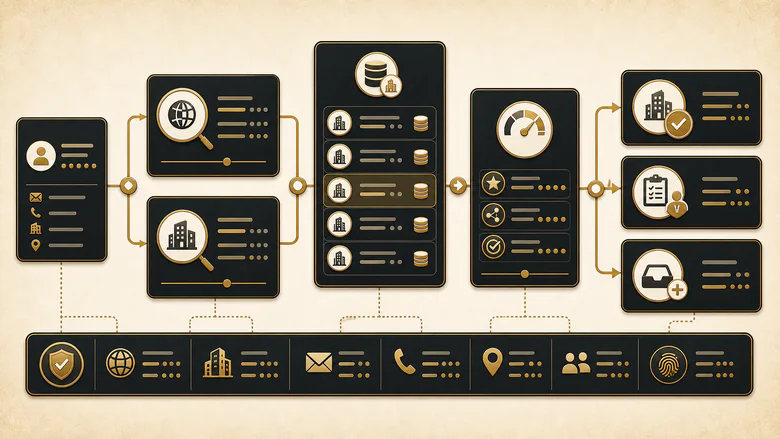
Matching signals are the data points an engine compares to decide which account a lead belongs to, and they fall into two groups: deterministic signals that identify a company almost on their own, and softer signals that only add confidence in combination.
The deterministic signals are the email domain, the website domain, and any stored company identifier such as a DUNS number or a CRM account ID. When one of those agrees, you can usually match with high confidence. The softer signals, company name, IP address, phone area code, mailing address, and enrichment-appended fields like industry or employee count, are individually weak and easy to fake, so they earn their keep as tie-breakers rather than primary keys.
The practical rule is to rank your signals and match on the strongest available one first. A corporate email domain beats a typed company name every time, because the name is free text a user can misspell while the domain is structural. When the strong signals are missing, which is common on gated-content forms filled out with a personal address, matching falls back to the soft signals plus enrichment, and confidence drops accordingly.
Exact, domain, and fuzzy matching: the three methods
Three matching methods carry almost all real-world lead-to-account matching, and every serious engine combines them rather than picking one. The difference between a clean CRM and a messy one is usually how deliberately these three are layered and thresholded. Here is how they compare on the axes that actually decide accuracy.
| Dimension | Exact match | Domain match | Fuzzy match |
|---|---|---|---|
| Matches on | Identical normalized values (company name, domain) | Email or web domain mapped to an account domain | Approximate string similarity on company name |
| Precision / recall | High precision, low recall | High precision, medium recall | Tunable recall, lower precision |
| False-positive risk | Very low | Low, spikes on shared or free domains | Moderate to high without a threshold |
| Best for | Clean, enriched records | The default first pass for B2B email | Name variants, typos, missing domains, list imports |
| Failure mode | Misses anything not byte-identical (“Acme Inc” vs “Acme, Inc.”) | Free domains, subsidiaries on a parent domain, multi-domain firms | Short or common names collide (Delta the airline vs Delta the brand) |
| Confidence guidance | Safe to auto-match | Auto-match corporate domains, review free ones | Auto-match only above a tuned threshold, queue the rest |

Exact matching
Exact matching links records only when a chosen field is identical after normalization. Normalization is the quiet hero here: it strips legal suffixes, casing, punctuation, and whitespace so “ACME, INC.” and “Acme Inc” resolve to the same key before comparison, which is why it pays to standardize and enrich records before matching runs. Get normalization wrong and exact matching becomes uselessly strict.
Its strength is that a true exact match is almost never a false positive. Its weakness is recall: real inbound data is rarely identical to what’s already stored, so exact matching alone leaves most leads unmatched. Treat it as the high-confidence first pass, not the whole system.
Domain matching
Domain matching maps the lead’s email or website domain to an account that carries the same domain. For B2B, this is the workhorse, because a corporate email domain is a strong, cheap signal of employer. When someone from priya@acme.com submits a form, matching to the Acme account is usually correct on the first try.
The trouble starts with domains that don’t map cleanly to one company. Free providers like gmail.com and outlook.com belong to no employer. Large enterprises run several legitimate domains, and subsidiaries may sit on a parent’s domain or their own. Domain matching is high precision until it meets these cases, which is exactly why it can’t run unsupervised.
Fuzzy matching
Fuzzy matching links records when strings are similar but not identical, scoring how close two company names are and matching above a threshold. It’s what catches “Microsoft Corporation, Inc.” against an account stored as “Microsoft,” or a form filled in as “int’l business machines” against “IBM.” The mechanics come from string-distance algorithms: edit distance such as Levenshtein for typos, Jaro-Winkler for names that agree at the start, and phonetic encoders like Soundex or Metaphone for sound-alike spellings.
Fuzzy matching is the method with the widest reach and the sharpest downside. Loosen the threshold and recall climbs, but so do false positives, because short names and common words start colliding. The algorithm choice and threshold tuning are a topic of their own, and the fuzzy string matching guide in this cluster is where that math lives; here the point is narrower. Fuzzy matching earns auto-match rights only above a similarity score you’ve tuned on your own data, and everything below that belongs in a human review queue.
Match confidence and thresholds
Match confidence is a score that expresses how strongly the available signals agree that a lead belongs to a given account. This is the layer that separates a matching system you can trust from one that quietly creates bad links, and it’s the single thing almost every vendor page leaves out. A match is not a yes-or-no event. It’s a probability you choose to act on at a cutoff.
The discipline is to grade matches into three bands and act differently on each, rather than forcing every lead into matched-or-not. Before you tune any of it, the records have to be clean, because a threshold set on dirty data is a threshold set on sand.
| Match confidence | What it means | Recommended action |
|---|---|---|
| High | Multiple independent signals agree (corporate domain plus normalized name) | Auto-match and write the account link |
| Medium | One strong signal, with another weak, missing, or conflicting | Route to a review queue for a human decision |
| Low | Only a weak signal, or a fuzzy score below threshold | Do not match; hold as unmatched or create-new per policy |
To tune the cutoff, you need to measure two things most teams never calculate. Precision tells you how many of your matches are correct. Recall tells you how many of the matches that should exist you actually made. They pull against each other: a stricter threshold raises precision and drops recall.
Precision = correct matches ÷ total matches madeRecall = correct matches ÷ matches that should exist
PRO TIP
Start strict. Set your auto-match threshold high, send everything else to a review queue, and watch what humans approve for a month. Their decisions are your training set for loosening the threshold safely.
The edge cases that break matching
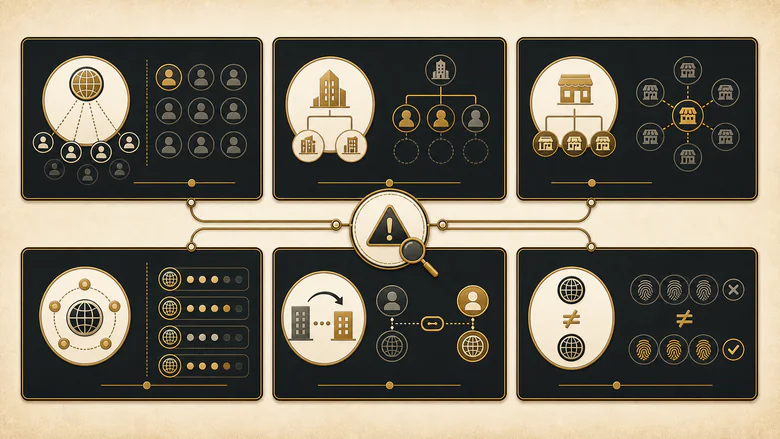
Edge cases are where lead-to-account matching stops being tidy, and they’re the reason a system that tested well at launch drifts over time. Each of the cases below has a right answer, but only if you decide it in advance rather than discovering it in a misrouted deal. This is also where a wrong match does real harm, so a periodic trace of where submitted leads actually landed is the honest way to catch failures the dashboard hides.
| Edge case | Why it breaks matching | Recommended rule |
|---|---|---|
| Free email domains | gmail.com or outlook.com map to no single employer | Never match on a free domain; fall back to name plus enrichment |
| Subsidiaries and parents | A child company may share or differ from the parent domain | Match to the legal entity, then resolve hierarchy separately |
| Franchises | Many locations, one brand, many or shared domains | Match to the location account if it exists, else the brand |
| Multi-domain companies | One firm runs acme.com, acme.co.uk, acme.io | Keep a domain alias list on the account |
| Mergers, acquisitions, rebrands | Domain or name changed after the record was created | Re-run matching on a schedule; retain old domains as aliases |
| Homographs | Same string, different companies (Delta, Apollo, Phoenix) | Require a second signal before matching short or common names |
The rebrand row is the one that quietly ages every CRM. Company and contact data never sits still: the typical worker stays in a given job only about four years, and firms merge, rename, and change domains, so a match that was correct at capture won’t stay correct on its own. Matching is not a one-time job at the point of entry; it’s a rule set you re-run as the world underneath it moves.
How matching accuracy drives ownership, ABM, and duplicate prevention
Matching accuracy is not a data-hygiene nicety; it’s the input that four downstream systems silently depend on. When the match is right, ownership, speed, ABM, and deduplication all work. When it’s wrong, each of them fails in a way that looks like a different problem.
Ownership and speed. A correct match is what lets routing assign a lead to the rep who already owns the account, instead of dropping it into a round-robin where it waits. That wait is expensive: Harvard Business Review’s audit of inbound response found the average firm took more than a day to reply, long after buyer intent had cooled, and later lead-response research has consistently shown the odds of qualifying a lead drop sharply once the first hour passes. Matching is the step that makes instant, correct assignment possible, and it settles ownership before the response clock even starts.
Ownership is a different question from stage. Whether a lead is sales-ready and who should own the account are two separate decisions, and matching only settles the second. A lead can match cleanly to an account and still not be ready for sales, which is why the line between a marketing-qualified and sales-qualified lead stays a scoring question, not a matching one. Conflating them is how teams end up routing junk to owners fast.
ABM. Account-based programs run entirely on the assumption that leads are correctly attached to their accounts. Coverage, engagement, and influence reporting all roll up by account, so a mismatch doesn’t just lose one record, it distorts the account view a campaign is optimized against. In ABM, a wrong match doesn’t cost you one lead, it quietly biases every number the program is steered by.
IMPORTANT
Deduplication is not lead-to-account matching. Matching links a lead to an account; deduplication finds and merges records that represent the same entity. Good matching prevents many duplicates from forming, but merge logic, survivorship rules, and merge governance are a separate discipline covered in the lead deduplication guide.
Duplicate prevention. Strong matching is the cheapest duplicate prevention you have, because a lead that’s correctly linked to an existing account doesn’t spawn a second, near-identical account. The merge decisions that clean up the duplicates that do form, which record survives and which fields win, sit downstream in deduplication, and that governance deserves its own treatment rather than being bolted onto a matching rule.
Native CRM matching versus dedicated engines
Native CRM matching handles duplicate detection inside a single object, but it does not natively link leads to accounts. This is the distinction that decides whether you can rely on what Salesforce ships or need a dedicated engine. Salesforce’s standard and custom matching rules compare records within the Lead object or within Accounts to flag duplicates. They are not built to associate a Lead with the correct Account, because those are different objects with no native relationship.
For a low-volume, clean-data operation on a tight budget, native duplicate rules plus manual account lookup can be enough. Once volume climbs, ABM enters the picture, or account hierarchies get complex, the manual gap becomes the bottleneck, and dedicated engines fill it across Salesforce, HubSpot, and Marketo with real domain and fuzzy matching, alias lists, hierarchy handling, and tie-breakers. The routing platforms below bundle lead-to-account matching as their foundation.
| Consideration | Native CRM matching | Dedicated matching engine |
|---|---|---|
| Lead-to-account link | Not native; leads and accounts are separate objects | Purpose-built to create and maintain the link |
| Matching methods | Exact and duplicate rules within one object | Exact, domain, and fuzzy with tunable thresholds |
| Edge-case handling | Manual | Alias lists, hierarchy, tie-breakers |
| Best for | Low volume, clean data, tight budget | Higher volume, ABM, complex hierarchies |
My blunt take: if you run ABM or route more than a trickle of inbound, native matching alone will cost you more in misrouted and duplicated leads than an engine costs to license. If you don’t, don’t over-buy. A well-normalized domain-match rule plus a review queue covers a surprising amount of ground before you need to spend. Comparing the routing platforms that bundle matching is the next step once you’ve outgrown native.
How to set up lead-to-account matching
To set up lead-to-account matching, work from clean data outward to routing, in this order. Each step depends on the one before it, and skipping the thresholding step is the most common reason a rollout produces confident, wrong matches.
- Normalize your account data first. Standardize company names and domains, strip legal suffixes, and record known domain aliases on each account. Matching quality is capped by the quality of what you match against.
- Define the match rules by method. Layer exact, then domain, then fuzzy, so cheap high-confidence signals resolve first and fuzzy only handles what’s left.
- Set confidence thresholds. Decide the score that earns an auto-match, the band that goes to a review queue, and the floor below which you refuse to match.
- Write rules for the edge cases. Handle free email domains, subsidiaries, franchises, multi-domain firms, and homographs explicitly, before they reach production.
- Connect matching to routing and ownership. A matched lead should flow to the account owner; the assignment logic that acts on the match lives in the routing rules and models that turn a match into an owned lead.
- Monitor precision and re-run on a schedule. Track auto-match precision, sample the review queue, and re-run matching periodically so rebrands and job changes don’t quietly rot your links.
Frequently Asked Questions
Lead-to-account matching links each incoming lead to the correct existing account in your CRM using signals like email domain, company name, and website. Because CRMs store leads and accounts as separate objects, this matching layer decides which account a lead belongs to, so it inherits the right owner, territory, and history.
A lead-to-account matching solution is software that automatically compares inbound leads to your accounts and writes the link, using exact, domain, and fuzzy matching with tunable confidence thresholds. Dedicated engines like LeanData, LeadAngel, and Chili Piper add alias lists, hierarchy handling, and tie-breakers that native CRM duplicate rules do not provide.
There is no single standard rule; the common default is a domain match, linking the lead’s corporate email domain to an account with the same domain. In practice, teams layer exact matching for identical values, domain matching as the main pass, and fuzzy matching for name variants, each governed by its own confidence threshold.
A lead is an individual person or inquiry; an account is the company they belong to. In most CRMs the two are separate objects with no automatic connection, so lead-to-account matching creates the relationship, letting a lead roll up to the account’s owner, activity history, and account-based reporting.