Search lead routing software today and Google returns ten results. Nine of them are published by companies that sell one of the tools being compared. The tenth is a Reddit thread, and Google ranks it third.
That is not an accident of the algorithm. It is what a search result looks like when buyers cannot find a neutral source and go looking for strangers instead. Every ranked comparison on that page scores its own product first or near the top, and the prices several of them quote for their competitors are already wrong.
So this guide does something different. It compares only products that solve the same job, states what we could verify against each vendor’s own current documentation, and marks the fields we could not verify rather than quietly scoring them zero. There is no universal winner here, because the evidence does not support one.
Direct answer — What is the best lead routing software?
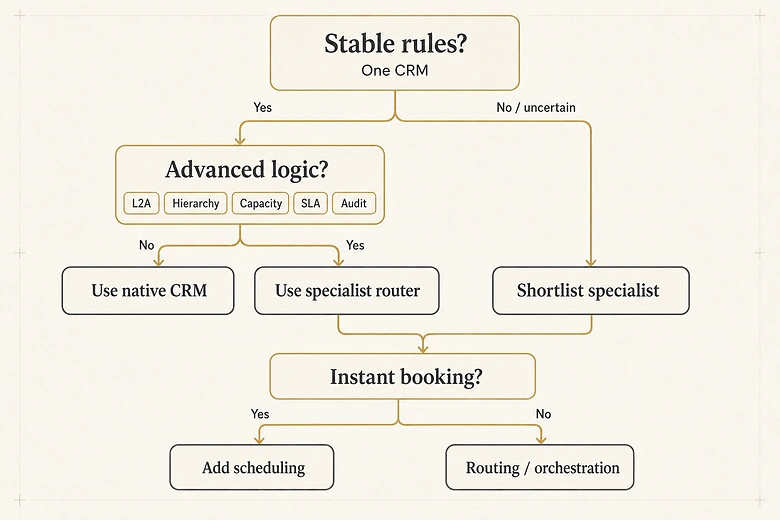
There is no single best lead routing software, because the category contains four different products. Native CRM rules in HubSpot or Salesforce handle stable, deterministic assignment. Specialist routers such as LeanData, Traction Complete, Distribution Engine and LeadAngel handle account matching, hierarchy, capacity and audit. Chili Piper, RevenueHero and Calendly Routing handle form-to-calendar booking. ZoomInfo Operations handles routing that depends on identity and data quality. Choose the category first, then compare inside it.
Key Takeaways
- Four product categories hide behind one keyword. Comparing a scheduling tool with an enterprise router is not a comparison, it is a category error.
- Routing complexity, not lead volume, decides when native CRM rules stop being enough. Ten named accounts with contested ownership can justify a specialist; thousands of identical inbound leads may not.
- “Salesforce cannot match leads to accounts” is false. Salesforce activates a standard leads-on-accounts matching rule with Account Engagement Advanced or Premium.
- Salesforce’s real native constraint is narrower and more specific: only one lead assignment rule can be active at a time, so all routing logic lives in a single ordered rule.
- Price transparency runs backwards in this category. The two cheapest documented Salesforce routers publish exact prices; the enterprise platforms publish none.
- We publish an evidence-coverage percentage for every product, and NV means not publicly verified, never “not supported”.
What counts as lead routing software
Lead routing software is any system that decides which person, team or queue should own an incoming lead, then makes that assignment happen automatically. The disagreement starts immediately after that sentence, because four very different product types all satisfy it.
Lead distribution is usually a synonym for routing in a B2B context. It carries a second meaning in the lead-broker market, where distribution means selling or allocating purchased leads among competing buyers. Ping-post and lead-resale platforms answer a genuinely different question and sit outside this guide.
| Category | What it actually is | Use when | Avoid when |
|---|---|---|---|
| Native CRM rules | Assignment built from the CRM’s own rules, workflows and territories | Rules are deterministic and stable inside one CRM | You need fuzzy matching, live capacity or a readable decision log |
| Specialist router | A product whose core job is matching, routing and orchestration across objects | Ownership is contested, hierarchies matter, rules change often | A single ordered rule already covers every case you have |
| Inbound conversion router | Qualifies a form submission and books a meeting on the spot | The routing decision ends in a calendar invitation | Most routed records never lead to an immediate meeting |
| RevOps data platform | Enrichment, identity and data quality, with routing as one capability | The routing problem is really a data problem | Your CRM data is already clean and matched |
Where routing begins and where it ends
Routing has a beginning and an end, and both boundaries matter when you scope a purchase. It begins after capture and validation, which is the job of the databases and capture tools that create the record in the first place. It ends at accepted ownership, after which the work belongs to the sequencing and engagement layer rather than to a router.
Buying a router to fix a problem that lives outside those boundaries is the most expensive mistake in this category, and it is a common one. Dirty inbound data and reps who quietly ignore assigned leads both look identical to a routing failure when you are staring at a dashboard. The lead routing pillar maps the full chain of stages, models and failure states, which is the fastest way to work out which problem you actually have before you shop for a product.

Why almost every list you find is written by a vendor
We audited the live results for this keyword on 24 July 2026 and recorded who publishes them. Of the ten organic results, seven are owned by a company selling a routing, scheduling or data product. Two are community threads. Google’s AI Overview sits above all of it, naming category winners drawn from those same vendor pages.
Vendor authorship does not make a page useless. It changes what the page can prove. A vendor comparison is excellent for discovering which products exist and what the argued differentiators are. It is not an independent source about a rival, and the prices it quotes for that rival age fast.
A competitor’s blog post is now the most visible public pricing page for at least two enterprise routing platforms, because those platforms stopped publishing their own.
Three biases repeat across the ranked pages. Self-ranking, where the publisher places its own product first. Category selection, where a scheduling vendor defines routing around the booking moment and a data vendor defines it around identity. And freshness decay, where a table that was accurate at publication silently becomes wrong.
The most instructive example is the page currently ranking first. Its own product page no longer leads with lead routing at all. The headline reads “More than a lead distribution software”, and the positioning underneath it is “Agent infrastructure for go-to-market”. The top result for this keyword has moved on from the category the keyword describes.
When native CRM routing is genuinely enough
Native CRM routing is sufficient when one system holds every field the rules need, the rules are deterministic, territories are stable, assignment does not depend on live availability, and an administrator can test and maintain the logic. That describes a large share of B2B teams, and most comparison pages have a commercial reason not to say so. Test the third condition hardest, because territory stability is the condition that fails first: employee counts and industry codes are rewritten by enrichment between planning cycles, not during them.
What is true is that native capability is fragmented and edition-dependent. What is false is the flat claim that native CRMs cannot match leads to accounts. Reading the standard rule’s published matching equation tells you exactly which leads the native rule will fail on, and it is a narrower set than either the vendors or the sceptics claim.
What Salesforce actually does, and its one real limit
Salesforce documents lead assignment rules across Group, Essentials, Professional, Enterprise, Performance, Unlimited and Developer editions. It documents account territory assignment through Enterprise Territory Management. It documents cross-object matching in Data 360. And it activates a standard matching rule for leads on accounts with, in Salesforce’s own words, “the purchase of Account Engagement Advanced or Premium edition”.
The genuine constraint is narrower and more useful to know: only one lead assignment rule can be active at a time. Every branch of your routing logic has to live inside that single rule as ordered entries, evaluated top down, with the first match winning. Teams outgrow Salesforce native routing when that single ordered list becomes something no one is willing to edit on a Friday, not when lead volume crosses a threshold.
What HubSpot actually does
HubSpot’s rotate-record-to-owner workflow action assigns enrolled records equally within a selected team or between specified users. It requires Sales Hub or Service Hub Professional or Enterprise, and HubSpot documents several behaviours worth knowing before you design around it.
- Assignment counts reset if you add or remove owners from the action after the workflow is live.
- Only one object rotates at a time; concurrent records retry rather than distribute simultaneously.
- Only primary team members are included in the rotation.
- Owners must be paid, activated users.
- Behaviour may be unreliable if the HubSpot owner property syncs to Salesforce.
Balanced rotation plus conditional workflows covers straightforward assignment well. Public documentation does not establish fuzzy lead-to-account matching, parent-child hierarchy logic or specialist-grade routing audit as a single native module. If you are still choosing between the two platforms underneath the routing question, the trade-offs between the two CRMs shape far more than assignment.
IMPORTANT
Lead volume is not a valid threshold for buying a specialist router, and any guide that gives you one (“switch above 50 leads a week”) is inventing it. Ten high-value named accounts with contested ownership can justify a specialist. Thousands of homogeneous inbound leads can route natively forever. On HubSpot the honest threshold is a capability line rather than a volume one, since weighting, capacity caps and availability awareness are absent at every tier, so the real question is whether your routing depends on facts about the rep or only on facts about the record.
How we evaluated these tools
We scored what is publicly verifiable, not what we believe about each product. Capability claims come from the vendor’s own current documentation, pricing, security and integration pages. Review platforms were used only to surface recurring implementation themes, never as proof that a feature exists.
Every field in the rubric is coded one of three ways. Y means a current official public source directly supports it. P means the evidence is partial, or the capability is edition, add-on or implementation dependent. NV means not verified publicly in this research. NV is not a negative score, it is an open question you should put to the vendor.
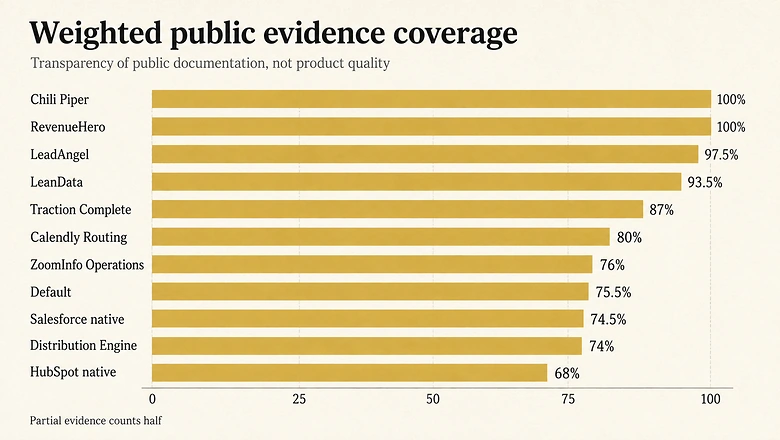
Evidence coverage % = Σ(criterion weight × factor) ÷ 100, where Y = 1.0, P = 0.5, NV = 0The ten weighted criteria are routing logic (18%), account matching and hierarchy (14%), CRM and integration depth (12%), availability and SLA (10%), auditability and testing (10%), data quality and deduplication (8%), scheduling (8%), security and governance (8%), implementation (7%) and pricing transparency (5%). Weights sum to 100, so the weighted total reads directly as a percentage.
What the coverage percentage does not measure
Read that percentage carefully. It measures how much of the buying framework a vendor lets the public check. It does not measure product quality. A vendor can raise its coverage by publishing better documentation without changing the product at all, and a low score often reflects a sales team that prefers discovery calls to a pricing page. Routing quality also depends on the data arriving at the rule, which is why the validation criteria applied before assignment often matter more than the router itself.
What we did not do. We ran no hands-on test. We did not measure latency, reliability, support quality or implementation difficulty. We did not review security reports, only the vendors’ public statements about them. So this guide does not rank products, and it carries no star ratings.
Lead routing software comparison matrix
Products are grouped by category, and never ranked against each other across categories. Evidence coverage and confidence appear beside every row so a confident-looking claim built on thin evidence cannot pass as certainty.
| Product | Category | Primary CRM | L2A / hierarchy | Availability & SLA | Audit log | Scheduling | Pricing status | Evidence coverage | Confidence |
|---|---|---|---|---|---|---|---|---|---|
| HubSpot native | Native CRM rules | HubSpot | NV | Partial | Partial | Partial | Bundled in Pro/Enterprise | 68.0% | Medium |
| Salesforce native | Native CRM rules | Salesforce | Yes, edition-gated | NV | Partial | NV | Edition dependent | 74.5% | Medium |
| LeanData | Specialist router | Salesforce, Dynamics 365 | Yes | Yes | Yes | Yes | Custom, not published | 93.5% | High |
| Traction Complete | Specialist router | Salesforce | Yes | Yes | Yes | NV | Custom, not published | 87.0% | High |
| Distribution Engine | Specialist router | Salesforce | NV | Yes | Yes | Partial | Published, per user | 74.0% | Medium |
| LeadAngel | Specialist router | Salesforce, HubSpot, Dynamics 365 | Yes | Yes | Yes | Yes | Custom, not published | 97.5% | High |
| Chili Piper | Inbound conversion | Salesforce, HubSpot | Yes | Yes | Yes | Yes | Published, platform + seats | 100.0% | High |
| RevenueHero | Inbound conversion | Salesforce, HubSpot | Yes | Yes | Yes | Yes | Published, platform + seats | 100.0% | High |
| Calendly Routing | Inbound conversion | HubSpot, Salesforce on Enterprise | Partial, owner lookup | Yes | Partial | Yes | Published, per seat | 80.0% | High |
| ZoomInfo Operations | RevOps data platform | Salesforce and others | Yes | Partial | Partial | NV | Consumption credits | 76.0% | Medium |
| Default | Data platform, watchlist | Multi-system | Partial | Partial | Yes | Yes | Not published | 75.5% | Low |
Comparison based on publicly verifiable official vendor documentation, checked 24 July 2026. NV means not verified publicly, not absent. Coverage percentages are IVRIS calculations using the formula above, and measure evidence transparency rather than product quality.
Check the primary sources yourself rather than taking the table on trust:
🔧 Traction Complete
🔧 Distribution Engine
🔧 LeadAngel
🎯 Chili Piper
🎯 RevenueHero
🎯 Calendly Routing
📊 ZoomInfo Operations
Best native CRM routing, for teams with stable rules
HubSpot native workflows: best for HubSpot-centric SMB teams
68.0% evidence coverage, medium confidence. Rotate-record-to-owner plus conditional workflows will carry a team that routes on form fields, owner availability by team, and simple round robin. Gates to check first: are you on Professional or Enterprise, does every routing field live in HubSpot, and can you tolerate one-object-at-a-time rotation. Not publicly verified: fuzzy account matching, hierarchy logic, dedicated routing audit trail.
Salesforce native rules: best for teams with stable territories
74.5% evidence coverage, medium confidence. Assignment rules, duplicate and matching rules, Enterprise Territory Management and Data 360 cross-object matching together solve more than most comparison pages admit. Gates to check first: which edition you hold, whether Account Engagement Advanced or Premium is in scope for leads-on-accounts matching, and whether one active assignment rule can hold your logic. Not publicly verified: native live-capacity routing, SLA timers, routing-specific decision logs.
Best specialist routing and orchestration tools
LeanData: best for Salesforce-centric enterprise routing
93.5% evidence coverage, high confidence. Strong documented evidence across matching, any-object routing, auditability and governance. Its official Microsoft Dynamics 365 product page also retires the “LeanData is Salesforce only” line that several ranking pages still repeat. Pricing is custom and was removed from the site, so budget discovery happens on a call. Not publicly verified: numeric price, minimums, contract terms.
Traction Complete: best for Salesforce-native matching and hierarchy
87.0% evidence coverage, high confidence. Everything runs inside your Salesforce org via the Salesforce AgentExchange listing. Documented: any-object matching and routing across leads, contacts, accounts and custom objects; four round-robin types including weighted, capped and availability-based; SLA auto-reassignment; and a visual history log that audits routing results step by step. Not publicly verified: pricing, scheduling depth.
Distribution Engine: best for mid-market Salesforce availability routing
74.0% evidence coverage, medium confidence. The most transparent contract terms of the Salesforce specialists: Starter at $20, Advanced at $35 and Unlimited at $55 per user per month, with a five-licence minimum and a 30-day trial (as of Q3 2026). Real-time availability and self-service rule maintenance are its centre of gravity. Not publicly verified: fuzzy lead-to-account matching or enrichment, which it does not claim.
LeadAngel: best for cross-CRM specialist routing
97.5% evidence coverage, high confidence. The broadest official feature coverage in this review, spanning routing, lead-to-account matching, deduplication, calendar scheduling, live SDR-to-AE handoff and reporting, across Salesforce, HubSpot and Dynamics 365. One caution: its published matching-accuracy figure carries no public methodology, sample or test period, so treat it as a vendor claim and ask how it was measured. Not publicly verified: pricing. If routing sits inside a wider tooling decision, our survey of the RevOps stack places these routers next to the adjacent categories.
Best inbound routing and scheduling tools
These three exist to compress the gap between a form submission and a booked meeting. Judge them on that job. Response speed is where their value concentrates, and the evidence on how fast a first response actually has to be is more contested than the vendor pages suggest. Speed is not the only axis they separate on, though. Scored against scheduling-weighted criteria rather than routing ones, the three diverge again on what each documents about qualifying a lead before the calendar renders.
Chili Piper: best for form-to-calendar at scale
100.0% evidence coverage, high confidence. The only product here with every rubric field publicly documented. Routing & Scheduling starts at $1,250 per month, billed as $15,000 per year, including 15 seats, with additional seats at $45 per seat per month (as of Q3 2026). The Experiences tier runs $3,500 per month with 30 seats. Multi-year commitments discount 15%, 25% and 40% at two, three and four years. Worth knowing: the standalone ChiliCal product is $12 per user per month but carries a 200-seat minimum.
RevenueHero: best for transparent entry pricing
100.0% evidence coverage, high confidence. Inbound Essentials starts at a $79 platform fee plus $25 per user per month (as of Q3 2026), with Outbound and Lite plan families priced separately and add-ons for spam prevention and native enrichment at $30 per month each. Its Salesforce integration is documented as one-way, reading core and custom objects and writing meeting data back, which is an implementation detail worth confirming in a demo.
Calendly Routing: best for teams already standardised on Calendly
80.0% evidence coverage, high confidence. Here the edition gate is the whole story. Teams at $16 per seat per month annually gets you “qualify and route leads”. Salesforce owner lookup and routing by Salesforce assignment are Enterprise features, and Enterprise starts at $15,000 per year (as of Q3 2026). The Standard plan at $10 has no routing at all. Buying Teams and expecting Salesforce-aware routing is the most common and most expensive mistake in this row.
Best data-led platform, when routing is really a data problem
ZoomInfo Operations: best for identity and enrichment-led motions
76.0% evidence coverage, medium confidence. It matches leads to accounts in real time using domain matching, company hierarchies and subsidiary relationships, and its documentation instructs teams to deduplicate before matching. Commercially it is free to start with consumption credits based on usage, which makes entry easy and total cost hard to forecast. Choose it when the routing failure you are solving is really an identity failure.
Default: a watchlist entry, not a category winner
75.5% evidence coverage, low confidence. Its current pages document deterministic matching, routing, scheduling, versioned assignment logs and reversible actions. Confidence is low for a reason that has nothing to do with capability: the company has repositioned toward agent infrastructure, publishes no pricing, and its packaging has moved more than once. Revalidate before shortlisting.
Also ranking for this keyword, and why they sit outside the matrix
Two of these are named as category winners by Google’s own AI Overview, so leaving them unmentioned would be a gap rather than a standard. They sit outside the graded matrix because they were not part of the coded evidence set, not because their evidence is weaker. In two cases it is stronger.
- Kubaru. A Salesforce AppExchange-native assignment app, and the most price-transparent product we found anywhere in this category: $20 per user per month with all features included, licensed only for administrators and assignment recipients rather than every Salesforce user, with a 30-day AppExchange trial (as of Q3 2026). If Distribution Engine is on your list, this belongs beside it.
- Cal.com. Open source and self-hostable, with attribute-based host assignment, routing analytics and Salesforce owner lookup. Routing forms sit in the Organizations plan at $37 per user per month (as of Q3 2026).
- Zeeg, Orderry and ClickPoint. Scheduling-led and lead-management products that rank on this term. Their routing evidence is thinner than the three inbound tools already covered.
- Privyr. Buys both paid slots on this search result. It targets a mobile-first, SMB and WhatsApp-led sales motion rather than a CRM-object routing problem.
- Ping-post and lead-resale platforms. Excluded deliberately. Allocating purchased leads among competing buyers is a different market with different economics.
What lead routing software actually costs
Six of the products here publish a real number. Five do not. That split is not random, and it does not run the way buyers expect.
| Product | Published entry price (as of Q3 2026) | Minimums and gotchas | Source |
|---|---|---|---|
| Kubaru | $20 per user / month | Licence only admins and assignment recipients; 30-day trial | Pricing page |
| Distribution Engine | $20 / $35 / $55 per user / month | Five-licence minimum; 30-day trial | Pricing FAQ |
| RevenueHero | $79 platform + $25 per user / month | Separate Inbound, Outbound and Lite families; paid add-ons | Pricing page |
| Calendly | $16 per seat / month (Teams) | Salesforce routing is Enterprise-only, from $15,000 / year | Pricing page |
| Cal.com | $37 per user / month (Organizations) | Self-hosting available; open source | Routing page |
| Chili Piper | $1,250 / month, or $15,000 / year | 15 seats included, then $45 per seat; ChiliCal needs 200 seats | Pricing calculator |
| ZoomInfo Operations | Free to start, consumption credits | Contract economics not publicly inspectable | Product page |
| LeanData, Traction Complete, LeadAngel, Default | Not published | Custom quote; budget discovery happens on a call | Example |
The vendors who publish prices are the cheap ones
Notice the inversion. The two cheapest Salesforce-native routers on this page publish exact per-user prices, minimums and trial terms. The enterprise platforms publish nothing. LeanData previously published pricing and has since removed it, with the result that the most visible public pricing pages for LeanData and Distribution Engine are now blog posts written by Kubaru, a direct competitor. Buyers are pricing these platforms off their rivals’ marketing.
Transparent pricing is a procurement convenience, not evidence of lower total cost. A published $20 seat price with a five-licence minimum can still cost less or more than a custom quote once implementation, admin time and add-ons are counted.
PRO TIP
Ask every custom-priced vendor the same three questions in writing: what is the billing unit, what is the contract minimum, and what is excluded from the base platform. Answers you cannot get in writing before a demo rarely improve after one.
How to shortlist without a vendor doing it for you
The single change that improves a routing evaluation most is refusing to score any product until you know which products are even eligible. Requirements first, gates second, scores last.
Workflow · 2 hours
How to build a defensible lead routing shortlist
A five-step sequence that produces a shortlist you can defend to finance, using the same evidence standard for every vendor.
Write your must-have gates
List the non-negotiables: CRM, objects to route, matching type, hierarchy, availability or capacity, scheduling, security and data residency, budget. Mark each Must, Should or Could.
Exclude anything that fails a Must
Drop every vendor that fails a Must gate or cannot show official documentation proving it. Do this before you look at any feature table.
Score only the survivors, on identical anchors
Score the remaining vendors 0 to 3 against the same rubric, applying the same proof standard to each. Leave a field blank rather than guessing it.
Report coverage and score separately
Publish the evidence-coverage percentage beside every score. Never convert an unverified field to zero unless the vendor confirms the capability is absent.
Run a scripted proof of concept
Send the same five test records through each finalist: a clean match, an ambiguous match, a subsidiary, an unavailable owner and a deliberate rule conflict. Compare the decision logs, not the demos.
That last step is where shortlists are actually decided. Before you run it, work out what your current routing already does wrong, because a proof of concept that reproduces your existing blind spots proves nothing. The routing audit method traces real submissions through every handoff to find the leads that went missing rather than the rules that look correct.
What the feature tables leave out
Feature checklists are good at presence and bad at consequence. Four things decide whether routing survives contact with a real quarter, and none of them fit in a tick box.
Auditability. A table can say a product routes leads while hiding whether an operator can reconstruct why a specific record went where it went, test a rule change safely, or roll one back. This deserves its own weighted criterion, which is why it carries 10% in our rubric. Whether you can test a rule change safely is also worth establishing before go-live rather than after, which is the job a derived pre-launch test set does.
Ownership of the rules. Ask who edits routing logic after go-live. If the honest answer is one administrator with tribal knowledge, no product will save you.
Failure behaviour. What happens when the matched owner is on leave, the enrichment call times out, or two rules match at once? Fallback and SLA reassignment are where routing quietly leaks pipeline.
Acceptance, not assignment. Routing does not end when the owner field changes; it ends when a human accepts and works the record. Measuring only assignment hides the leads that were routed perfectly and then ignored, which is the gap the sales accepted lead stage exists to close. Assignment is a system event; acceptance is a human decision, and only one of them shows up in pipeline.
Download the vendor evaluation scorecard
Every judgement on this page is built into a free, editable workbook so you can run the evaluation against your own requirements rather than inherit ours. It is deliberately public: no gate, no email wall, and a source ledger you can check line by line.
The workbook carries a Read Me with the method and definitions, the ten-criterion rubric with editable weights and 0-3 scoring anchors, a must/should/could requirements checklist with proof and sign-off fields, a vendor-by-criterion sheet showing the Y/P/NV evidence status and the exact source location behind each cell, a formula-driven summary that recalculates evidence coverage and confidence as you edit, the use-case shortlist with its compatibility gates, the full source ledger with direct URLs and checked dates, and a revision log.
Change the weights. That is the point. A team routing ten named accounts should not carry the same weighting as a team routing four thousand inbound forms, and a scorecard you cannot re-weight is someone else’s opinion wearing a spreadsheet.
If you would rather have the routing design mapped before you sit through vendor demos, that is work IVRIS can help with; the routing design and implementation options are here once you have the method in hand. The method comes first, on purpose. You should be able to reproduce every number on this page before anyone offers to run it for you.
Frequently Asked Questions
There is no meaningful free standalone router for B2B teams. The closest options are routing already bundled into a CRM you pay for, ZoomInfo Operations which is free to start on consumption credits, and Cal.com, which is open source and self-hostable though its routing forms sit in a paid Organizations plan.
Yes. Salesforce documents lead assignment rules, duplicate and matching rules, Enterprise Territory Management and Data 360 cross-object matching. The practical constraint is that only one lead assignment rule can be active at a time, so all routing logic lives in a single ordered rule evaluated top down.
Yes, through the rotate-record-to-owner workflow action on Sales Hub or Service Hub Professional and Enterprise. It distributes records equally within a team or named users. Note that only primary team members are included, one object rotates at a time, and assignment counts reset if you change the owner list.
In B2B they usually mean the same thing: deciding which internal rep or queue owns a lead. Lead distribution has a second meaning in the lead-broker market, where it means allocating or selling purchased leads among competing buyer companies. Those are different products with different economics.
Published prices run from $20 per user per month for Salesforce-native routers to $15,000 per year for Chili Piper’s Routing and Scheduling tier or Calendly Enterprise (as of Q3 2026). Several enterprise platforms publish no pricing at all and quote only after a discovery call.
NV means not verified publicly. We could not find current official documentation supporting that field at the time of checking. It is not a finding that the capability is missing. Treat every NV cell as a question to put to the vendor in writing before you sign.
Methodology, sources and revision history
Evidence was drawn from vendor product, pricing, security, integration and help documentation, plus Salesforce and HubSpot official help articles, all checked on 24 July 2026. Review-platform themes were consulted only to surface recurring implementation friction and were never used to establish that a capability exists. The full source ledger, with exact page locations and checked dates, ships inside the downloadable scorecard.
Limitations. No hands-on testing was performed. Public documentation can establish that a feature exists but not how well it works, how fast it runs, or how hard it is to implement. Security certification statements were read, not audited. Published list prices exclude onboarding, negotiated discounts and usage overages.
Update triggers. This page is rechecked quarterly, and immediately on any pricing or packaging change, acquisition or rebrand, major CRM integration launch or removal, security certification change, or a vendor correction supported by primary evidence.
Suggested citation. IVRIS, Best Lead Routing Software for B2B Teams, public-source comparison checked 24 July 2026.
Revision history. 24 July 2026, first publication. Corrections supported by an official public source are welcome and are logged here rather than negotiated.