You already picked your revenue brackets and the points each one earns. That decision lives in your approved band-to-points table, and it is settled. This article is the next step: encoding that table as first-match rules so the same logic scores every record in SQL, Python, or pandas, not just one spreadsheet.
First-match logic, also called first-matching-condition scoring, evaluates your revenue bands in priority order and stops at the first rule that fits. Order the rules wrong and your best-fit accounts quietly score like your smallest ones. Order them right and one rule set scores a spreadsheet, a warehouse table, and a Python job identically.
This is an implementation reference, not a guide to choosing brackets. How many bands to use and how much each one is worth are part of a wider set of scoring criteria and signal weights; here, the table is a given. The job is encoding it so it runs the same way everywhere, then proving it does with a test.
Direct answer – how to design scoring rules based on revenue bands
Design scoring rules for revenue bands as a first-match rule set: list each band once in priority order, highest band first, with a lower bound, an upper bound, and a score. Evaluation stops at the first rule that matches, so order is what decides the score. Check missing revenue first and score it 0; set each band’s lower bound equal to the previous band’s upper bound so no figure matches two bands. Implement the same ordered logic with SQL CASE WHEN or Python if/elif.
Key Takeaways
- First-match logic evaluates revenue bands in priority order and stops at the first rule that matches, so rule order decides the score.
- Order the rules most-restrictive first, with the highest revenue band at the top. Put a low band first and a large account silently takes the wrong score.
- Use
pandas.cutwhen your bands are clean, non-overlapping numeric bins. Use orderedif/elif, SQLCASE WHEN, ornumpy.selectwhen precedence, overlaps, or unknowns matter. - Parse enrichment strings like “$1M–$5M” down to a numeric lower bound before scoring.
- Score missing or unparseable revenue as 0 and flag it for enrichment, never as your lowest band.
Choosing how to evaluate your revenue bands
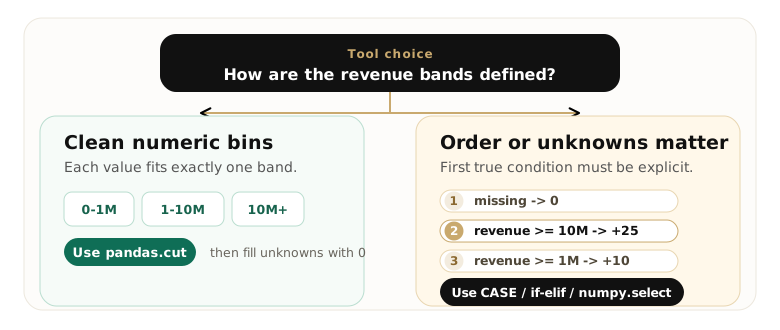
- Use first-match evaluation when each account belongs to exactly one revenue band and you want one score per record. Order the rules most-restrictive first, highest band at the top, and the first true rule wins. This is the SQL
CASE WHENand Pythonif/elifdefault. - Use all-match evaluation when a revenue signal should stack with other criteria rather than stand alone, so every true rule adds its own points and the total is the sum. For mutually exclusive revenue bands, though, all-match collapses back to first-match, so first-match is the cleaner fit.
- Avoid unordered or overlapping bands when two rules can both match one revenue figure. Sort bands by priority and set each band’s lower bound equal to the previous band’s upper bound so the edges meet without overlapping; otherwise first-match returns a defensible answer that is still not the one you meant.
What first-match logic means in revenue band scoring
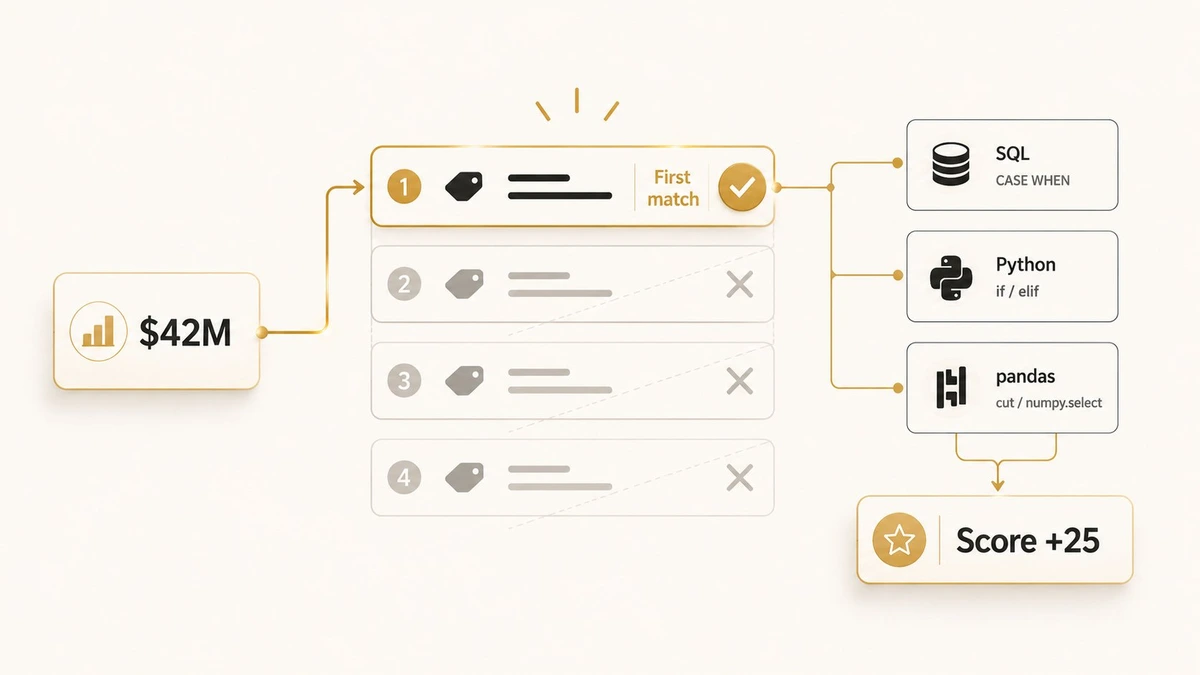
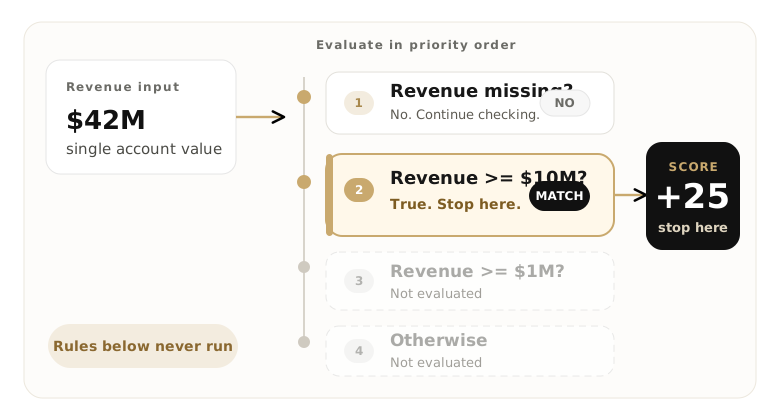
First-match logic is a rule-evaluation pattern that checks revenue conditions in priority order and assigns the score of the first rule that evaluates true, ignoring every rule below it. The first match wins; the rest never run.
That “stop at the first hit” behavior is why order is the whole game. Checking revenue >= 1,000,000 before revenue >= 10,000,000 means a $42M account satisfies the $1M rule first and scores as your emerging band, never reaching the sweet-spot rule that should have caught it. List the most restrictive band first and the bug disappears.
You already use this pattern even if you have not named it. A SQL CASE WHEN returns the first branch that is true. A Salesforce or HubSpot lead-routing rule assigns the first matching condition. Power Query, numpy.select, and a plain chain of if/elif all resolve the same way. Revenue banding is the cleanest place to see it, because the bands are ordered numbers with no overlap once you sort them. The same first-match discipline governs text cleanup, where normalisation rules resolve in a fixed order too and swapping two of them quietly changes which company records match.
Build an ordered revenue-band rule table
An ordered rule table lists each revenue band once, sorted by priority, with a lower bound, an upper bound, a score, and a defined behavior for unknown values. Everything downstream reads from this one table, so it is the artifact to get right.
Here is the canonical table this article uses in every example that follows. It is a mid-market rubric: a sweet-spot band scores the most, an emerging band scores less, anything below the floor loses points, and missing revenue scores zero and gets flagged.
| Priority | Lower bound | Upper bound | Band | Score | Unknown behavior |
|---|---|---|---|---|---|
| 1 | $10,000,000 | none | Sweet spot | +25 | n/a |
| 2 | $1,000,000 | < $10,000,000 | Emerging | +10 | n/a |
| 3 | $0 | < $1,000,000 | Below floor | −10 | n/a |
| catch-all | missing / unparseable | n/a | Unknown | 0 | score 0, flag for enrichment |
The below-floor band scores −10, a deduction rather than a zero. Whether too-small accounts should lose points or merely earn none is a negative-scoring policy call; this table just encodes whatever you have already decided. Notice the bounds: each band stops exactly where the next begins, so no revenue figure can match two bands.
In plain English the rule reads top to bottom: if revenue is missing, score 0; otherwise if it is at least $10M, score 25; otherwise if it is at least $1M, score 10; otherwise score −10. That ordering is the pseudocode, almost verbatim.
function score(revenue):
    if revenue is missing      -> 0     # unknown, flag for enrichment
    if revenue >= 10,000,000   -> 25    # sweet spot
    if revenue >= 1,000,000    -> 10    # emerging
    otherwise                  -> -10   # below ICP floor
Algorithm for scoring companies based on revenue brackets
The algorithm for scoring companies based on revenue brackets is a five-step first-match procedure: sort the brackets highest to lowest, handle missing revenue first, then return the score of the first bracket whose lower bound the company’s revenue clears. Written as steps, it is the same logic every implementation in this article encodes.
- Sort the brackets in descending order by lower bound, most restrictive first, with the highest revenue bracket at the top.
- Handle missing or unparseable revenue first. Return 0 and flag the record for enrichment before any numeric comparison runs.
- Walk the brackets top to bottom and test whether revenue is greater than or equal to each bracket’s lower bound.
- Return the score of the first bracket that matches and stop; no lower bracket is evaluated once one matches.
- Fall through to the below-floor score only if no positive bracket matched.
That is the whole algorithm: order, guard, first match, stop. It is deterministic, runs in a single pass, and returns the same score for a record whether it executes in a spreadsheet, a SQL warehouse, or a Python job. The one thing it depends on is the bracket rubric it reads.
The three-band table above is a compact mid-market example. The reference rubric below spans the full B2B revenue range, from below $1M to $200M+, so you can lift the bracket edges that match your ideal customer profile rather than invent them:
| Priority | Revenue bracket | Band | Example score |
|---|---|---|---|
| 1 | $200,000,000 and above | Strategic / enterprise | +20 |
| 2 | $50,000,000 – $199,999,999 | Large | +30 |
| 3 | $10,000,000 – $49,999,999 | Core / sweet spot | +40 |
| 4 | $1,000,000 – $9,999,999 | Emerging | +15 |
| 5 | $0 – $999,999 | Below ICP floor | −10 |
| catch-all | missing / unparseable | Unknown | 0 |
Notice the sweet spot scores highest, not the largest bracket: for many mid-market sellers the $200M+ accounts carry procurement cycles and service demands that make them slower to close, so the rubric peaks at the core band and steps down on either side. Set your own peak where your win rate actually peaks. The bracket-to-points decision itself (how many bands, and what each is worth) belongs to assigning points to revenue ranges; this article takes the rubric as given and runs the algorithm over it. The SQL, Python, and spreadsheet implementations below use the compact three-band table for readability; to score the full range, extend the same ordered conditions with the brackets above.
Implement first-match rules in SQL (CASE WHEN)
To score revenue bands in SQL, write a CASE expression whose WHEN branches are ordered most-restrictive first; SQL returns the first branch that evaluates true. Put the unknown check at the top so a NULL never falls through to your lowest band.
SELECT
    company,
    revenue,
    CASE
        WHEN revenue IS NULL     THEN 0     -- unknown: score 0, flag for enrichment
        WHEN revenue >= 10000000 THEN 25    -- sweet spot
        WHEN revenue >= 1000000  THEN 10    -- emerging
        ELSE -10                            -- below ICP floor
    END AS revenue_score
FROM accounts;
Run that against the five sample accounts and the result matches the rule table exactly: NovaSoft and Orbit Labs score 25, Bridgeline scores 10, Tindale scores −10, and Halvorsen, whose revenue is NULL, scores 0. The WHEN revenue IS NULL line is doing real work. Without it, NULL fails every numeric comparison, slides past them into ELSE, and a missing revenue gets scored −10 as if the company were tiny.
Order is the other trap. Move the revenue >= 1000000 branch above revenue >= 10000000 and every account over $10M matches the $1M branch first and scores 10 instead of 25. PostgreSQL’s documentation is blunt about why: once a branch is true, “the remainder of the CASE expression is not processed”. The same CASE WHEN pattern also handles your other revenue metrics, like conversion and win rates computed straight in SQL, so the ordering reflex is worth building once.
Map revenue bands to scores in Python
To map revenue bands to scores in Python, write the same priority-ordered conditions as a chain of if/elif that returns the first match. Check for a missing value first, because comparing None with a number raises a TypeError in Python 3.
def revenue_score(revenue):
    if revenue is None:            # unknown: handle before any comparison
        return 0
    if revenue >= 10_000_000:      # sweet spot
        return 25
    if revenue >= 1_000_000:       # emerging
        return 10
    return -10                     # below ICP floor
That function is the rule table translated line for line, and it returns 25, 25, 10, −10, and 0 across the five sample accounts. For a whole DataFrame you have two good options and one to use with care.
import pandas as pd
import numpy as np

df = pd.DataFrame({
    "company": ["NovaSoft", "Orbit Labs", "Bridgeline", "Tindale", "Halvorsen"],
    "revenue": [42_000_000, 150_000_000, 6_200_000, 480_000, None],
})
pandas.cut for clean, non-overlapping bins
pandas.cut is the most Pythonic way to bucket a numeric column, and it is the method the AI Overview reaches for first. Define the bin edges, the label for each bin, and let pandas assign every row at once, as the official pandas.cut reference documents.
bins   = [0, 1_000_000, 10_000_000, np.inf]
labels = [-10, 10, 25]

df["score"] = pd.cut(df["revenue"], bins=bins, labels=labels, right=False)
df["score"] = df["score"].astype("float").fillna(0).astype(int)   # NaN -> unknown -> 0
This is the right tool when your bands are clean, non-overlapping numeric ranges, which revenue bands usually are. The catch is that pd.cut returns NaN for anything outside the bins, including missing revenue, so you finish with .fillna(0) to land unknowns in the score-0 bucket on purpose rather than by accident.
numpy.select when precedence and unknowns matter
When the rules can overlap, need an explicit order, or have to handle missing values inline, numpy.select mirrors first-match logic directly. The NumPy docs describe it as choosing each value “using the first true condition”, which is exactly the behavior you want.
conditions = [
    df["revenue"].isna(),         # unknown, checked first
    df["revenue"] >= 10_000_000,  # sweet spot
    df["revenue"] >= 1_000_000,   # emerging
]
choices = [0, 25, 10]
df["score"] = np.select(conditions, choices, default=-10)   # default is "below floor"
Putting df["revenue"].isna() first is the vectorized version of the if revenue is None guard, and default=-10 is the ELSE. In a DataFrame the missing value arrives as NaN, not None, so the guard is .isna() here and is None in the scalar function. Same intent, different spelling per context. Reach for numpy.select when “first match wins” has to be obvious in the code, which is exactly when precedence is load-bearing.
Score revenue brackets in a spreadsheet (IFS and VLOOKUP)
To run the same first-match algorithm in Excel or Google Sheets, use an IFS function that lists the brackets most-restrictive first, or a VLOOKUP approximate match against a sorted bracket table. Both return one score per row without a macro.
IFS is the closest spreadsheet equivalent of the SQL CASE WHEN: it evaluates conditions left to right and returns the first that is true, so the ordering rule is identical.
=IFS(A2="", 0, A2>=10000000, 25, A2>=1000000, 10, TRUE, -10)Here A2 holds the company’s revenue. The first test catches a blank cell and scores it 0 so a missing value never falls through to the below-floor band. The TRUE at the end is the catch-all that returns −10, exactly like the SQL ELSE.
VLOOKUP with its last argument set to TRUE does the same job against a sorted table, which is easier to maintain when the brackets change often:
=VLOOKUP(A2, $E$2:$F$5, 2, TRUE)With the lower bounds and scores listed in E2:F5 in ascending order, approximate-match VLOOKUP returns the score for the largest lower bound that is less than or equal to the revenue, which is the same “first bracket that fits” result the algorithm defines. One caveat the code guards against for you but a sheet does not: a blank revenue cell reads as 0 and lands in your bottom band, so screen for empty cells first. The full spreadsheet build, including a downloadable workbook, lives in assigning points to revenue ranges.
Parse and normalize revenue-band strings (“0–1 million”, “$1M–$5M”)
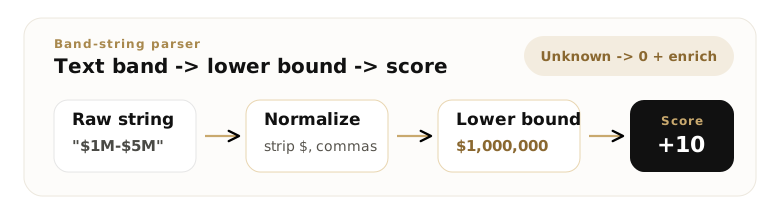
To handle a revenue-band string, parse it down to its numeric lower bound, attach the right multiplier, and treat anything you cannot read as missing. Enrichment tools rarely hand you a clean integer; revenue arrives as text like “0–1 million”, “$1M–$5M”, “$100M+”, or “Unknown”, and a first-match rule needs a number.
The lower bound is enough because the bands are contiguous: for scoring, a record in the “$1M–$5M” band is a record at $1M. Pull the first number, attach its unit, and send unreadable values to the unknown bucket.
import re

UNIT = {"k": 1e3, "thousand": 1e3, "m": 1e6, "mm": 1e6,
        "million": 1e6, "b": 1e9, "bn": 1e9, "billion": 1e9}

def parse_band_lower_bound(raw):
    if raw is None:
        return None
    t = str(raw).strip().lower()
    if t in {"", "unknown", "n/a", "na", "none", "not available"}:
        return None
    t = t.replace(",", "").replace("$", "").replace("usd", "")
    tokens = [(float(n), u) for n, u in re.findall(r"(\d+(?:\.\d+)?)\s*([a-z]+)?", t) if n]
    if not tokens:
        return None
    trailing = next((u for _, u in reversed(tokens) if u in UNIT), None)
    low_val, low_unit = tokens[0]
    return low_val * UNIT.get(low_unit or trailing, 1)
One subtlety trips up naive parsers: in “1–5 million” the word “million” applies to both ends, so the lower bound is $1,000,000, not $1. This parser handles it by letting the first number inherit the last unit in the string when it has none of its own. Run it across a realistic mix and every string lands in the right band:
| Raw band string | Parsed lower bound | Score |
|---|---|---|
| “0–1 million” | $0 | −10 |
| “$1M–$5M” | $1,000,000 | +10 |
| “$10M–$50M” | $10,000,000 | +25 |
| “$100M+” | $100,000,000 | +25 |
| “$500K–$1M” | $500,000 | −10 |
| “1–5 million” | $1,000,000 | +10 |
| “Unknown” | (none) | 0 |
The two rows that should hold your attention are the ones that return None: “Unknown” and an empty cell. Both score 0, not −10, which is the whole point of the next section.
Handle missing, unknown, and overlapping bands
Three edge cases break revenue-band scoring in production: missing revenue, unparseable values, and overlapping bands. Each has a defined answer, and each belongs in the rule rather than in a cleanup pass afterward.
Missing and unknown revenue score 0, not your lowest band. A company you have no revenue for is unknown, not small. Scoring it −10 punishes an account that might be your best lead; scoring it 0 keeps it neutral and flags it for enrichment. This matters at scale because B2B data goes stale fast: contact and account records decay at about 22.5% a year, so a real share of your revenue fields are blank or wrong at any moment. It is also why pd.cut needs that trailing .fillna(0): its NaN is the unknown bucket, and leaving it as NaN means the account silently has no score at all.
Overlapping bands are a definition bug, not a runtime one. If two bands can both match a value, first-match logic still returns an answer, just not always the one you meant. The fix lives in the table: set each band’s lower bound equal to the previous band’s upper bound, so the edges meet without overlapping. A value of exactly $10,000,000 then belongs to one band by rule, and >= in descending order puts it cleanly in the sweet spot.
This is the real divide between the tools. pandas.cut assumes clean, non-overlapping bins, which forces the table to be well-formed before it will run. Ordered if/elif, CASE WHEN, and numpy.select will happily evaluate overlapping rules in priority order, which is what you want when precedence is deliberate. Pick the tool that matches whether your bands are guaranteed clean or intentionally ordered.
Test the rules against expected output
To trust a scoring rule, run it against a small set of records whose scores you already know and compare the result to an expected table. Five accounts, one per band plus an unknown, are enough to catch an ordering bug or a NULL leak.
Every implementation above, the SQL CASE WHEN, the Python if/elif, pandas.cut, and numpy.select, was run against these same five records and produced identical output:
| Company | Revenue | Band | Score |
|---|---|---|---|
| NovaSoft | $42,000,000 | Sweet spot | +25 |
| Orbit Labs | $150,000,000 | Sweet spot | +25 |
| Bridgeline | $6,200,000 | Emerging | +10 |
| Tindale | $480,000 | Below floor | −10 |
| Halvorsen | (missing) | Unknown | 0 |
Bake that table into an assertion so a future edit cannot drift the rules without the test failing:
records  = [("NovaSoft", 42_000_000), ("Orbit Labs", 150_000_000),
            ("Bridgeline", 6_200_000), ("Tindale", 480_000), ("Halvorsen", None)]
expected = [25, 25, 10, -10, 0]

assert [revenue_score(rev) for _, rev in records] == expected   # raises if a rule drifts
That agreement across four implementations is the reason to keep one canonical rule table: the SQL in your warehouse, the pandas job in your pipeline, and the spreadsheet on a rep’s laptop all score an account the same way, and a change to the table re-scores every one of them from the same source of truth. Once each record has its band score, that number is one input into a wider account-fit rubric that routes the account to sales, marketing follow-up, or decline.
How revenue-bracket scoring fits a B2B lead scoring model
Revenue-bracket scoring produces one number: a firmographic fit signal. In a full model it sits next to the other fit and intent signals, and it should never qualify a lead on its own. The revenue score earns an account a closer look; behavior is what makes it sales-ready.
Slot the band score in as the company-size input of a wider model. A practical ceiling is to let firmographic fit, revenue included, account for 30–40% of the maximum possible score, leaving the rest for behavioral intent. That keeps a perfect-size account that has never engaged from clearing your threshold on size alone. The full signal set, point values, and MQL/SQL thresholds live in the B2B lead scoring criteria model, where revenue is one firmographic signal among twelve.
Because the algorithm reads from a single ordered rubric, the firmographic score stays identical whether it runs in your CRM, a warehouse query, or a rep’s spreadsheet, so the number that feeds the model is one you can defend to sales. When you are ready to set the point values themselves, assigning points to revenue ranges covers how many brackets to use and how to size each one.
Frequently Asked Questions
First matching condition scoring rules for revenue bands evaluate a set of revenue ranges in priority order and assign the score of the first range a company falls into, ignoring the rest. Ordered most-restrictive first, they turn a band-to-points table into logic that runs the same way in SQL, Python, or a spreadsheet.
Use pandas.cut when your bands are clean, non-overlapping numeric bins; it is concise and forces a well-formed table. Use SQL CASE WHEN, ordered if/elif, or numpy.select when precedence matters, bands can overlap, or you need explicit control over how missing values score. Both can produce the same scores.
Score unknown or missing revenue as 0 and flag the record for enrichment. A blank revenue field means you lack data, not that the company is small, so scoring it as your lowest band penalizes an account that could be a strong fit. Keep it neutral until enrichment fills the value, then re-score it.
Because first-match logic stops at the first true rule. If a low band like “at least $1M” is checked before “at least $10M”, a $40M account matches the $1M rule first and takes the wrong score. Listing bands from most restrictive to least restrictive guarantees each account hits its correct band.
Lowercase the string, strip the currency symbol and commas, then use a regular expression to pull the first number and its unit (K, M, or B) and multiply out to the numeric lower bound. Map text like “unknown” or an empty value to None so it scores as unknown rather than zero dollars.
Use first-match evaluation when each company falls into one revenue band: list the bands in priority order and the first true rule sets the score. Use all-match when a revenue signal should add points alongside other criteria. Because revenue bands are mutually exclusive, first-match is the standard choice for scoring them.
Sort the revenue brackets from highest to lowest, score missing revenue as 0 first, then return the points of the first bracket whose lower bound the company’s revenue clears and stop. It is a first-match algorithm: deterministic, single-pass, and identical whether you run it in SQL, Python, or a spreadsheet with IFS or VLOOKUP.