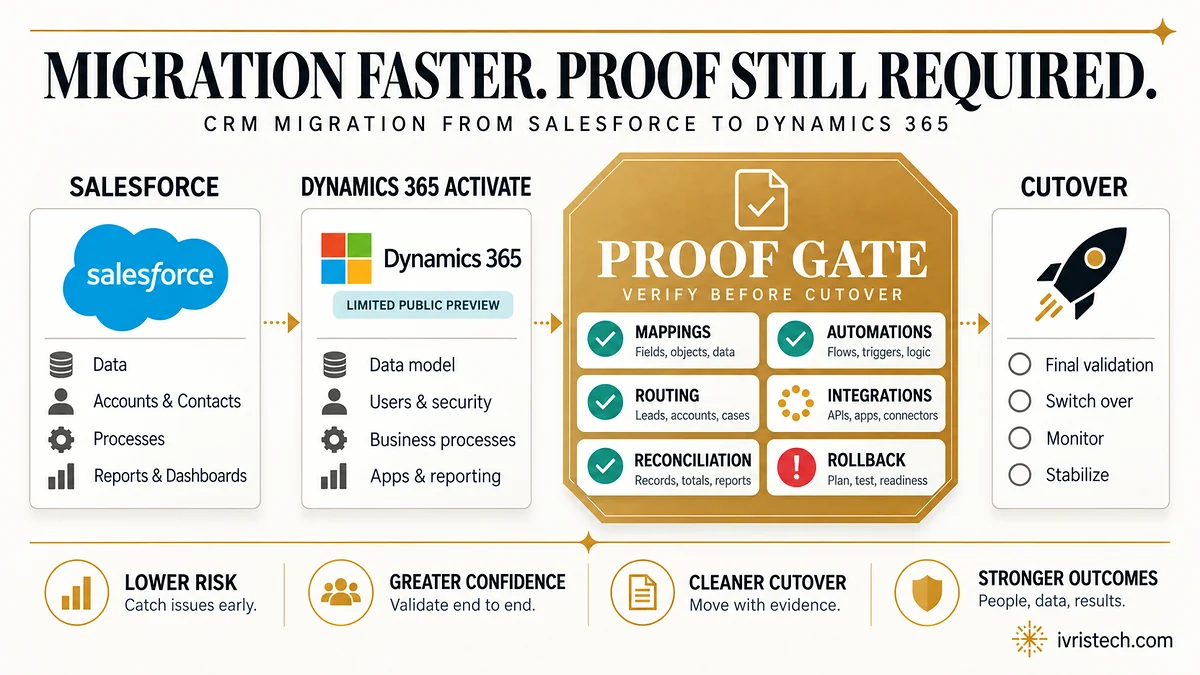
Microsoft introduced Dynamics 365 Activate on September 9, 2026, starting with a Salesforce-to-Dynamics 365 migration scenario. Microsoft describes that scenario as a public preview; its Partner Center announcement and partner tooling page use the narrower label limited public preview.
In the current Salesforce scenario, Activate analyzes the source CRM environment, surfaces data, process, customization and dependency issues, produces migration recommendations, and supports automated migration execution with built-in guardrails. Microsoft says early engagements have processed more than six billion data records. That is vendor-reported processing volume, not evidence of migration accuracy or ROI.
For RevOps, that distinction is the story. AI can compress discovery and migration work, but a safe cutover still has to prove field and object mappings, automations, routing, integrations, reconciled counts, acceptance criteria and rollback before the old CRM stops being the system of record.
Direct answer — what is Dynamics 365 Activate?
Dynamics 365 Activate is Microsoft’s AI-assisted Dynamics 365 implementation and migration tooling. Its first public-preview scenario is Salesforce to Dynamics 365, with discovery analysis, migration recommendations and automated migration execution with guardrails. Broader CRM and ERP scenarios, plus agentic mapping and test sampling, are planned. The preview can accelerate migration work; it does not replace RevOps acceptance testing before cutover.
Key Takeaways
- Salesforce-to-Dynamics 365 is the first public-preview migration scenario; Microsoft partner pages call access a limited public preview.
- Current functions include environment analysis, recommendations and automated migration execution with guardrails.
- Additional CRM/ERP scenarios plus agentic mapping and test sampling are planned, not current preview functions.
- The six-billion-record figure is Microsoft-reported processing volume, not an independent success or ROI benchmark.
What Dynamics 365 Activate actually does in preview
Microsoft’s launch says Activate can analyze requirements, generate configurations and migrate data. The Salesforce preview is more specific: discovery examines data, entities, processes, customizations and dependencies, then surfaces priorities, risks and decisions about what should be preserved, simplified, redesigned or left behind.
For migration, Microsoft’s Dynamics 365 partner tools page says Activate takes approved discovery decisions and source context, then produces migrated Dynamics 365 data, recommendations, execution results and context for testing and deployment. Microsoft also says the experience includes built-in guardrails and Microsoft hosting.
The boundary matters. Salesforce is the first migration scenario. Microsoft says additional CRM and ERP scenarios will follow and that ERP capabilities are coming later in 2026. It separately lists agentic mapping and test sampling, natural-language migration guidance and executive assessment summaries as planned capabilities. Those roadmap items should not be written into today’s preview as if they are already live.
The migration gap is proof, not discovery
Launch coverage largely focuses on migration friction: custom fields, workflows, code and integrations are expensive to understand before a team can decide what to move. Activate targets that burden. The harder RevOps question starts after the blueprint exists: what evidence makes a mapping or configuration safe to accept?
A generated explanation is not an observed result. A workflow can look correct while a field changed shape, an integration user lost permission or a routing value arrives too late. That is why our automation QA framework separates “configured” from “verified”: the setting says what should happen; a test record shows what did.
Our read: Activate can compress discovery and execution. It does not lower the evidence standard for accepting the result. That follows the same line as our earlier reporting on CRM AI decision delegation: a recommendation becoming easier to produce does not make verification optional.
Six controls RevOps should require before cutover
- Mapping ledger. Freeze every object, field, transformation and association decision, then sample real records on both sides.
- Automation parity tests. For each workflow, document the trigger, conditions, actions and expected writes, then run synthetic records through the target system. A screenshot of the configuration is not a pass.
- Routing coverage. Derive test cases from every rule, overlap and fallback path, then compare expected and actual owners across each ingestion channel. Our lead routing testing method treats coverage as something that can be measured rather than inferred from a handful of clean test leads.
- Integration contract tests. Recheck endpoints, authentication, integration-user permissions, payload fields, error handling and downstream writes.
- Source-to-target reconciliation. Set accepted variances before the load, then reconcile record and association counts by object rather than relying on one grand total. The same principle behind checkpoint-by-checkpoint CRM reconciliation applies here: a total only tells you that something differs; adjacent checkpoints tell you where.
- Acceptance and rollback gates. Define who can approve cutover, which defects block it, when the delta load freezes, and the exact time rollback expires. Our CRM migration sequence treats rollback as time-limited because new-system writes start creating data that never existed in the source.
These controls do not assume Activate is unreliable. They make reliability testable. The question is whether the target system reproduces the business behavior the team agreed to preserve.
AI changes who does the work, not who owns the risk
Microsoft frames the partner benefit as spending less time on discovery and analysis and more on methodology, architecture and change management. That still leaves the operational owner accountable for defining an acceptable migration.
The early evidence needs the same discipline. Microsoft’s six-billion-record figure shows processing scale, not success rate. Comcast and Ziwi Pets comments in Microsoft’s launch are early customer evidence, not independent proof that Activate reduces defects or produces a particular return.
For a preview evaluation, start with a bounded slice and freeze the acceptance matrix before Activate produces recommendations. Pass criteria written after the output invite rationalization. The control should exist before the recommendation does.
Frequently Asked Questions
No. Microsoft announced the Salesforce-to-Dynamics 365 scenario as a public preview on September 9, 2026. Microsoft Partner Center and the Dynamics 365 partner-tools page use the more specific wording “limited public preview.” Teams should verify eligibility and access with Microsoft or their implementation partner rather than treating Activate as generally available.
Not in the migration scenario Microsoft has put into preview. Salesforce-to-Dynamics 365 is the first supported source scenario. Microsoft says additional CRM and ERP migration scenarios will follow and says ERP capabilities are coming later in 2026. That roadmap should be kept separate from what teams can use in the current Salesforce preview.
Microsoft says discovery context carries into testing and deployment, but it lists agentic mapping and test sampling among planned capabilities. The current preview should therefore not be described as automatically proving migration acceptance. RevOps still needs its own expected results, test cases, reconciliation thresholds, defect classes and named cutover approvers.
Start with the object model and field mappings, because every automation and report sits on top of them. Then validate workflows, routing, integrations and source-to-target counts with written expected outcomes. Finish by setting defect thresholds, cutover authority and a rollback deadline before users begin writing new production data into Dynamics 365.