The lead routing rule that broke your quarter was probably not wrong. It was in the wrong position.
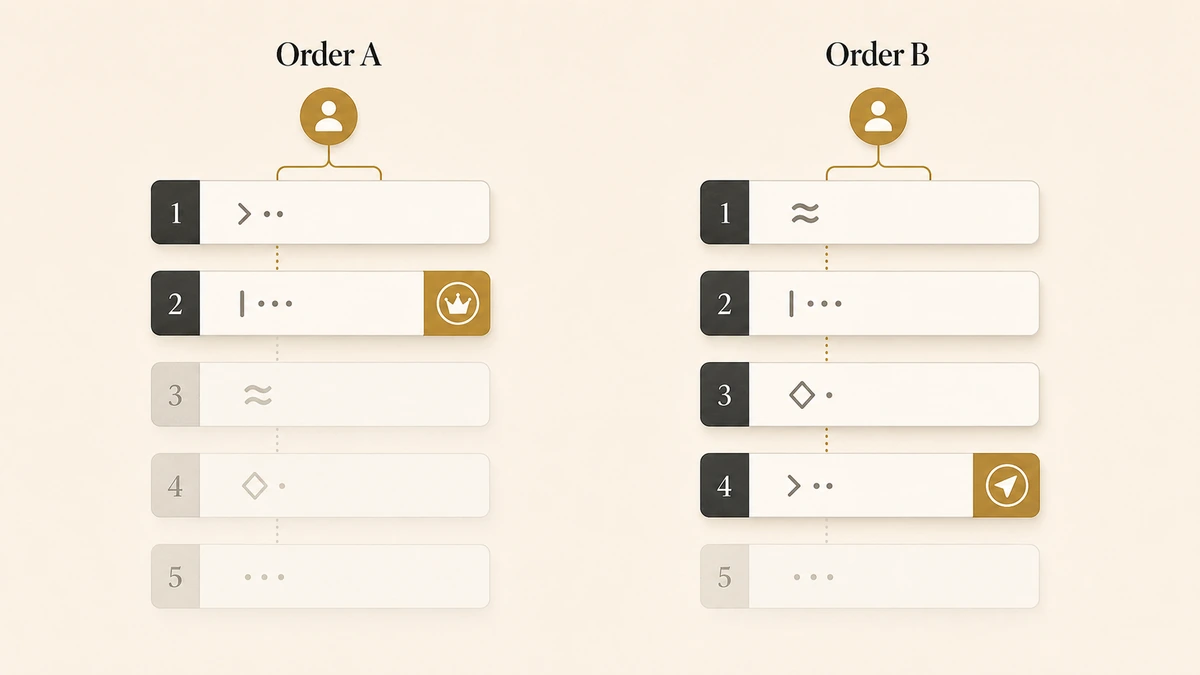
That distinction matters because of how every major CRM reads lead routing rules. Salesforce, HubSpot and Microsoft Dynamics 365 all walk the list from the top, stop at the first rule the record satisfies, and never look at the rest. Dynamics puts it in one sentence: if a record meets the conditions of a rule, that rule is applied and no other rule is considered. A well-written enterprise rule sitting below a broad geography rule will never fire, and nothing in the interface tells you.
Most guides hand you a list of routing strategies and a reminder to keep your data clean. This one treats the rule set as an artifact you author, order, verify and maintain.
Direct answer — what are lead routing rules?
Lead routing rules are the ordered conditions a CRM evaluates to decide who owns an inbound lead. Each rule pairs a condition set, such as territory, segment, product or account status, with an assignment action. Salesforce, HubSpot and Dynamics all evaluate rules from the top and stop at the first match, so position changes the outcome. A complete rule set ends in a catch-all that always matches, and every path terminates at a named owner with a clock on it.
Key Takeaways
- All three major CRMs use first-match evaluation, and all three default the order to the sequence rules were created in, which is never the order your logic needs.
- A rule that can never fire is invisible in the UI. You find shadowed rules by testing pairs of rules for overlap, not by reading the list.
- The catch-all is not the leftover bucket. It is the only rule guaranteed to run, so it needs a named owner, a reason code and an acceptance clock.
- Some records should be refused, not routed. A governed hold queue beats a rule that guesses at a partner conflict.
- Every platform has a documented ceiling: 3,000 rule entries in Salesforce, 20 branches per HubSpot if/then, 10 conditions per Dynamics rule.
What are lead routing rules?
Lead routing rules are the ordered conditions a CRM evaluates to decide which person or queue takes ownership of an inbound record. Each rule joins a condition set to an assignment action, and the set is evaluated in sequence until something matches.
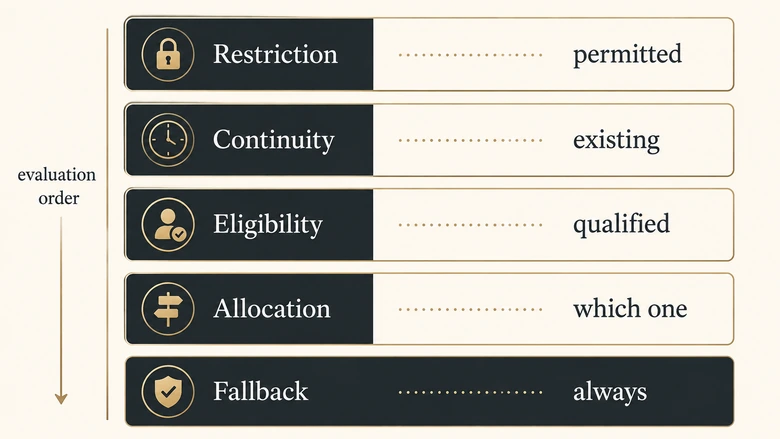
The five classes of routing rule
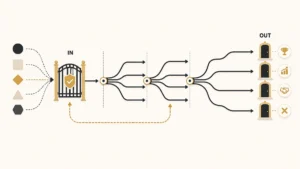
The word “rule” gets stretched across five different jobs, and mixing them is where rule sets start to rot. A rule deciding who is allowed to own a record does something structurally different from a rule deciding which eligible rep gets it next. Separating the classes tells you the order before you argue about it.
| Rule class | What it decides | Evaluated against | Use when | Avoid when |
|---|---|---|---|---|
| Restriction | Whether anyone may own it at all | Legal, contractual, data-residency constraints | Regulated products, partner-registered accounts | Never skip. This class always sits first |
| Continuity | Whether an owner already exists | Account, opportunity and hierarchy lookups | An existing relationship should keep the record | The prior owner has left or the opportunity is stale |
| Eligibility | Who is qualified to own it | Territory, product, language, skill, availability | Coverage genuinely differs by rep | Every rep can handle every lead |
| Allocation | Which eligible rep gets this one | An algorithm, not a condition | Two or more reps are equally eligible | Using it as a substitute for eligibility |
| Fallback | What happens when nothing above matched | Nothing. It matches unconditionally | Always. Exactly one, always last | Never omit it, and never let it be a queue nobody watches |
Scoring belongs to none of these. A score ranks eligible leads so a rep knows what to work first; it does not decide who is allowed to own the record. Push a scoring model into the eligibility layer and ownership starts changing every time the weights are retuned. Keep ranking downstream of ownership.
These classes are a way of ordering rules, not the routing models themselves. For the models, the capture-to-acceptance chain and the canonical precedence ladder the classes expand into, the pillar on how lead routing works end to end is the reference this page assumes you have read.
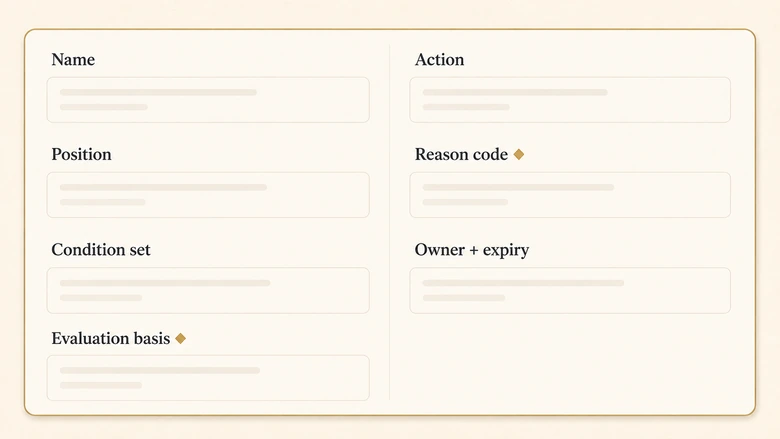
Anatomy of one routing rule
A routing rule is complete when someone who did not build it can read one row and predict the outcome. Most rule sets fail that test because they store two of the seven things a rule needs.
| Field | What it holds | Why the rule breaks without it |
|---|---|---|
| Name | Verb and object, such as “Route EMEA enterprise to named AE” | Names like “Rule 7 copy” make the list unreviewable within a quarter |
| Position | An explicit integer you chose | Every platform defaults position to creation order, which encodes no logic |
| Condition set | Fields, operators and the AND/OR grouping | Loose grouping is the biggest source of accidental overlap |
| Evaluation basis | Whether each field is on the record, looked up, or computed at run time | A lookup that is empty at the moment of evaluation fails silently |
| Action | A named user, a queue, or a pool plus an allocation algorithm | “Sales team” is not an action. A queue with no acceptance clock is a parking bay |
| Reason code | A short constant written to the record when this rule fires | Without it you cannot tell a correct match from a fallback after the fact |
| Owner and expiry | Who maintains the rule, and the date it must be re-justified | Rules outlive the territory, campaign or person that created them |
Evaluation basis is the field people skip
A condition on Country reads a value that arrived with the form. A condition on the parent account’s tier reads a value that has to be resolved first, so it depends on whether the match to an existing account has already run when the routing rule fires. Same rule text, completely different behaviour.
Territory conditions carry the same trap in another shape. A territory derived from a postal code at submission behaves nothing like one derived from a firmographic lookup an hour later, and how you define territory as a routing dimension decides which of the two you are testing against.
IMPORTANT
Write the reason code before you write the condition. If you cannot name the outcome in one constant, such as EMEA_ENTERPRISE_NAMED, the rule is doing more than one job and should be two rules.
Rule order is the logic, not the housekeeping
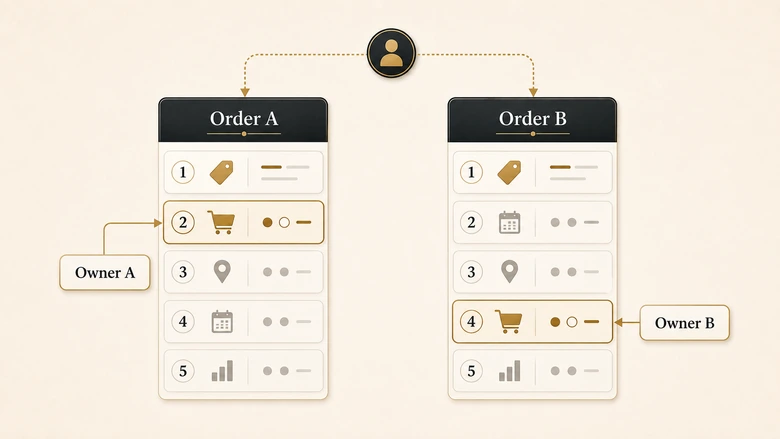
Order is not a presentation choice. In a first-match system the position of a rule is part of its condition, because every rule implicitly carries “and none of the rules above me matched.” Three platforms document this in near-identical language.
| Platform | Documented evaluation | Default order | When nothing matches |
|---|---|---|---|
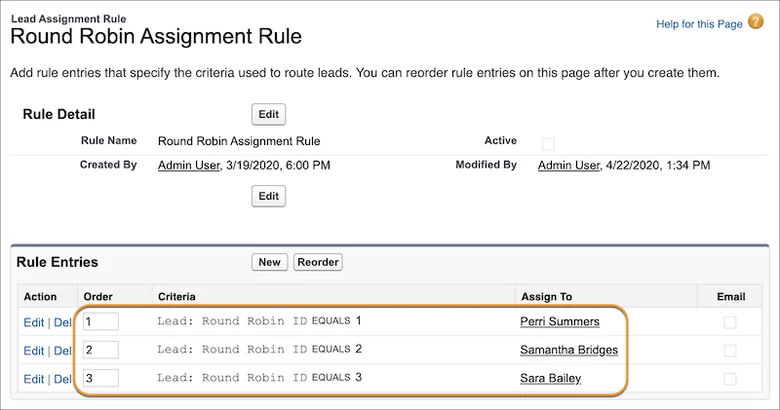
| Salesforce | Rule entries are read in order; the first matching entry assigns the record | Entry order you set, but assignment runs after duplicate rules and after the record is saved | Default Lead Owner |
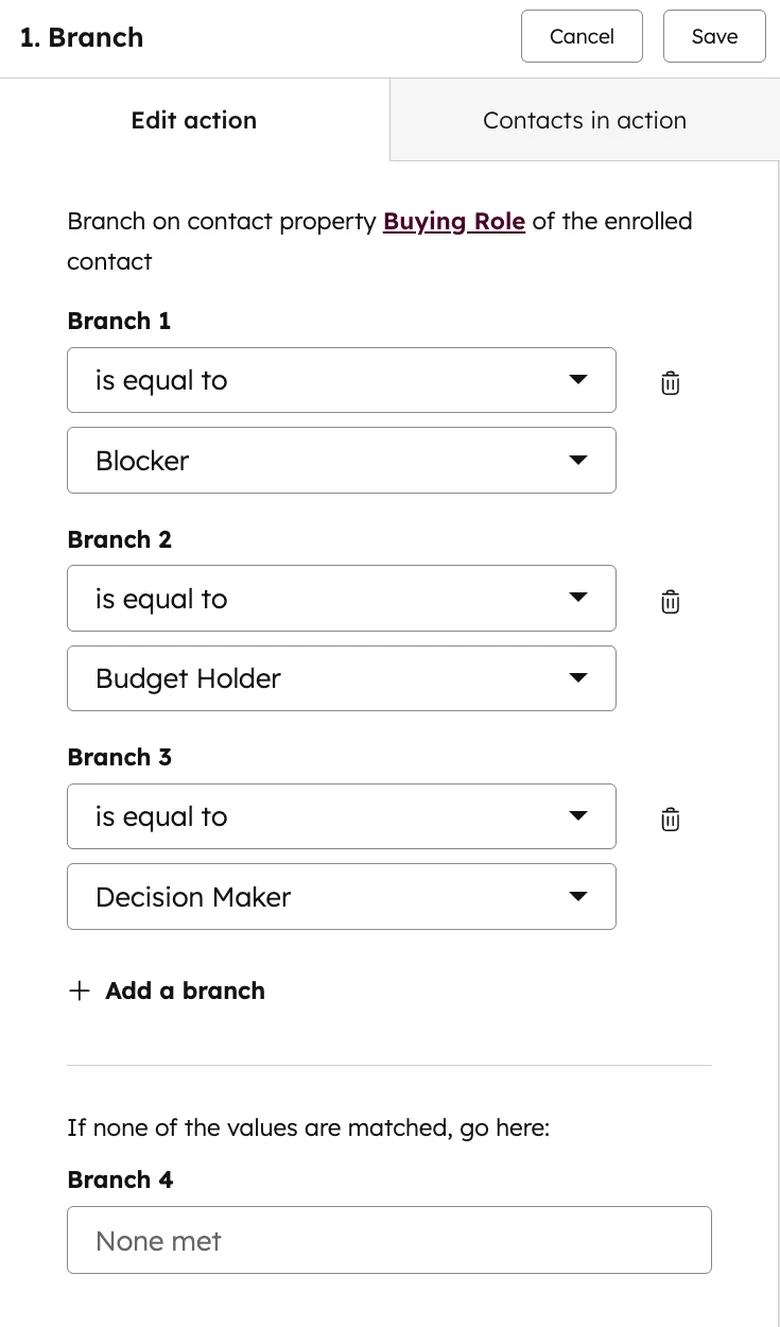
| HubSpot | Records are evaluated against each branch in the order the branches are stacked, and are not evaluated against later branches once one matches | The order branches were added | The “None met” path |
| Microsoft Dynamics 365 | Rules are applied in the order listed, starting from the top; once one matches, no other rule is considered | Creation date, newest at the bottom | Record left unassigned and marked overdue |
Platform behaviour verified against vendor documentation on 12 August 2026. Re-check before you build.
Read the default-order column again, because it is the quiet problem. Microsoft’s own guidance says rules are listed in the order they were created, newest at the bottom. HubSpot stacks branches as you add them. Neither default has anything to do with your logic, so a rule set nobody has deliberately ordered runs in the order somebody happened to build things in.
The authoring rule is short: specific before general. A rule matching three conditions goes above a rule matching one of the same three. Restriction and continuity rules go above eligibility rules, because ownership that already exists should not be overridden by a territory boundary. The fallback goes last, alone.
There is a second order underneath yours
In Salesforce, assignment rules run at step 9 of the documented order of execution: after duplicate rules, after the record is saved, after all after-triggers, and before auto-response and workflow rules. A duplicate rule that blocks the save means your routing rules never run at all, and any field your conditions depend on has to be populated before step 9, not by a workflow at step 11. The Salesforce setup and firing sequence is where that plays out in practice.
HubSpot’s model looks different and behaves the same way, which is why its documentation tells you to keep branch criteria unique and non-overlapping. If you are building there, the HubSpot routing guide covers how the tiers change what you can express.
Find the shadowed rules before they find you
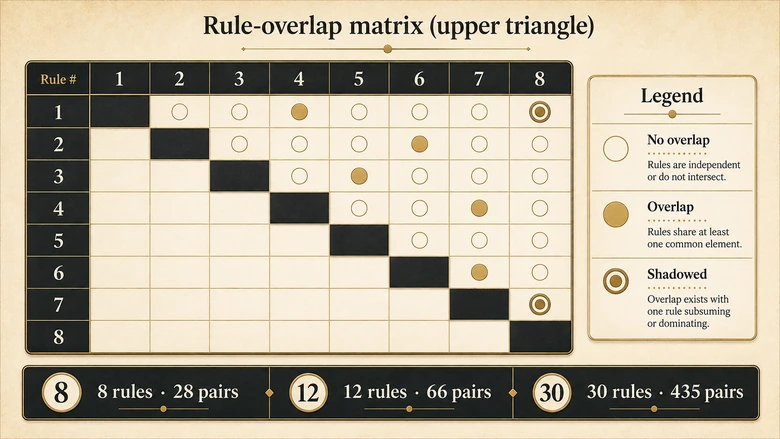
A shadowed rule can never fire, because a rule above it matches everything it would have matched. It renders normally, reports as active, and produces nothing. Rule sets accumulate these quietly: someone adds an enterprise carve-out below the geography rule that already catches enterprise leads, and the carve-out is dead on arrival.
Three questions that resolve any pair
You cannot find shadowed rules by reading the list top to bottom, because each one looks correct in isolation. You find them by comparing rules in pairs.
- Can one record satisfy both? If no, they are mutually exclusive and the order between them is irrelevant. Mark the pair closed.
- If yes, is that the outcome you want? The higher rule wins. Write down the owner it produces and check it against what the business expects.
- Can any record satisfy the lower rule and not the higher one? If no, the lower rule is fully shadowed. Delete it or move it up.
Pairs grow as n(n−1)/2, so a 12-rule set has 66 pairs and a 30-rule set has 435. That number is the honest measure of how much complexity you have taken on, and it is why a spreadsheet beats a whiteboard past about ten rules.
Build the rule set in one sitting
Workflow · 2 hours
How to build a lead routing rule set
A working session that turns a set of routing intentions into an ordered, non-overlapping rule table with a terminal fallback and a maintenance owner.
List the decisions before the rules
Write the ownership outcomes the business needs, one line each, in plain language. Do not open the CRM yet. Anything you cannot state as an outcome is not ready to be a rule.
Write each rule as one complete row
Fill all seven fields: name, position, condition set, evaluation basis, action, reason code, owner and expiry. Leave the position column blank for now.
Sort by class, then by specificity
Group rows into restriction, continuity, eligibility and allocation. Inside each group, put the rule with more conditions above the rule with fewer. Now number the positions.
Test every pair for overlap
Run the three pair questions across all n(n−1)/2 combinations. Delete fully shadowed rules and record every partial overlap you decided to keep, with the reason.
Design the catch-all last
Add one unconditional final rule with a named human owner, a reason code and an acceptance clock. Confirm it cannot route back into any pool that can itself fail to match.
Name what the rules must refuse
List the record types that go to a hold queue instead of an owner, such as partner conflicts and hierarchy disputes. Give each an exit criterion and a maximum dwell time.
Version it and set the expiry dates
Save the table with a version number and date, assign a maintainer per rule, and put every expiry date in a calendar. Then hand the table to the pre-launch test.
Step seven hands off deliberately. The rule table is the input to a coverage-derived test run, and the pre-launch routing test turns your rule count and overlap pairs into the minimum number of test records the change requires.
The catch-all is the only rule guaranteed to run
Every other rule in the set is conditional. The catch-all is not, which makes it the one rule whose behaviour you can predict with certainty and the one most teams design last.
What a designed catch-all has that a default does not
All three platforms give unmatched records a passive default. Salesforce hands the record to the Default Lead Owner, HubSpot sends it down the “None met” path, Dynamics leaves it unassigned and marks it overdue. None of those is a decision; they are places a record waits.
- A named human, not a role, not a distribution list, not “Sales Ops”. Someone whose name is on the record.
- A reason code that distinguishes “no rule matched” from “a rule matched and the owner was inactive”. Those are different bugs.
- An acceptance clock, because a queue-owned record has been delivered and has not been accepted, and the two look identical in a routing report.
- Non-recursive termination. The catch-all must not route into a pool that can itself produce no match, or the record loops while every dashboard shows activity.
Round robin into a small named pool is usually right for the allocation half of a catch-all, but only once eligibility is settled above it. Rotation is an allocation mechanism, and the four rotation models and where each one fails matter more here than anywhere else, because this branch runs on the records your logic did not anticipate.
PRO TIP
Track catch-all volume as a percentage of routed records and watch the trend, not the level. A stable 3% is a working exception path. A 3% that becomes 9% after a territory change means a rule above it stopped matching, and the catch-all is absorbing the failure silently.
The hold queue: what your rules must refuse to decide
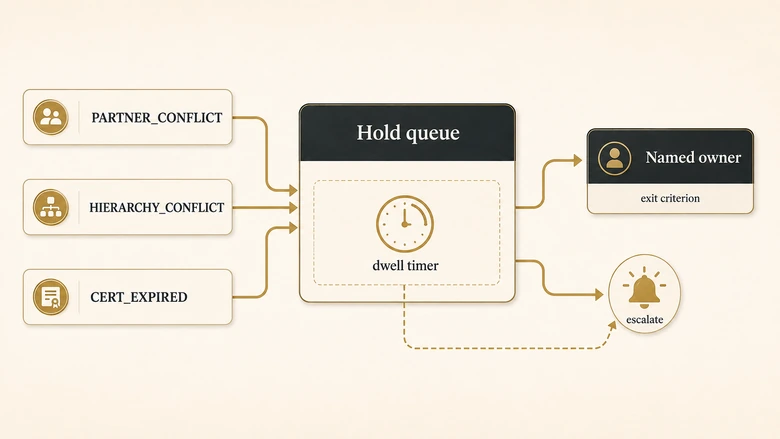
Some records should not be routed by a rule at all, and encoding a guess about them is worse than admitting the rule set cannot decide. A partner registers a deal on an account your direct team already works. A subsidiary matches one territory while the global parent sits with a different owner. A record arrives for a regulated product where the eligible rep list depends on a certification that expired last week.
A hold queue is a deliberate refusal with a reason code attached, and it is not the catch-all. The catch-all handles records the rules did not anticipate. The hold queue handles records the rules anticipated perfectly well and were told not to assign. The mechanism exists in real routing tools, which suggests the need is common: LeanData uses a “Hold from Routing” field that keeps a record out of assignment for a defined window before releasing it, so a record seeing heavy activity is not routed twice.
Four properties that stop it becoming a graveyard
- An entry reason from a closed list, so you can count how often each conflict type occurs instead of discovering it anecdotally.
- A named human owner of the queue itself, distinct from whoever eventually takes the record.
- A maximum dwell time with an escalation, measured from entry and not from the last touch.
- An exit criterion in writing, so releasing a record is a decision someone can review rather than a judgement nobody recorded.
The test for whether something belongs in a hold rather than a rule: if two reasonable people on your team would assign the record differently and both could defend it, a rule will pick one arbitrarily and hide the disagreement. Route it to a human.
What breaks when the rule list grows
Rule sets do not fail at a rule count. They fail when maintaining the set costs more than the precision it buys, and that crossover is easier to see if you know where the hard ceilings sit.
| Platform | Documented ceiling | What the vendor recommends near it |
|---|---|---|
| Salesforce | One active assignment rule per object; up to 3,000 rule entries, of which 300 may be formula entries | Consolidate entries; move logic needing more than one active rule into Flow |
| HubSpot | Up to 20 unique branches in a single if/then | Keep branch criteria unique and non-overlapping; split across workflows |
| Microsoft Dynamics 365 | 10 conditions per assignment rule; 5 conditions for seller matching | Use dynamic attributes to collapse repeated conditions, and move conditions into the segment |
Ceilings verified against vendor documentation on 12 August 2026.
The Dynamics guidance is the interesting one. Microsoft states that the system limits condition counts to keep rules running efficiently, then shows how to collapse four country conditions into a single dynamic attribute matching a lead’s country against the seller’s. That is a vendor telling you the rule list is the wrong structure past a certain size, and a lookup table is the right one.
The three failures that arrive with scale
Sprawl across surfaces. Routing logic stops living in one rule set and spreads into workflows, validation rules, integration field mappings and a Slack alert nobody documented. The symptom is that no single screen answers “why did this lead go there”, which is the point at which a transaction-level routing audit becomes the only way to get a straight answer.
Latency you did not budget for. Evaluation is not free. Dynamics warns that its work assignment runs on a pooling mechanism, so there can be a delay between a record meeting a rule’s conditions and being assigned. Any rule set feeding a five-minute response target has to account for evaluation time inside that window.
Silent bypass. Records created through an API do not automatically run the active assignment rule in Salesforce; the AssignmentRuleHeader has to be specified on the create or update call for the rule to apply. The rules can be flawless while an integration added last month writes leads straight past them.
The baseline holdout test
Complex rule sets are almost never measured against the thing they replaced. The cheapest way to find out whether yours earns its maintenance cost is a holdout: route a small randomly selected slice of eligible inbound, around 5%, by plain round robin into the full eligible pool, then compare acceptance rate, time to first action and conversion against the rule-routed remainder over a full sales cycle.
Exclude anything covered by a restriction or continuity rule, because routing a partner-registered account into a rotation to satisfy an experiment is not a trade worth making. And accept that at typical B2B volumes the result is directional rather than statistically clean; you are looking for a large gap, not a p-value. If the holdout performs the same, your precision is costing more than it returns.
When a rule list should become a table
Three signals say the list structure has run out: more than roughly 25 rules on one object, edits more than once a month, or the same field appearing in more than half of them. All three point the same way, which is to replace repeated conditions with a lookup table the rules read from. One rule reading a territory-to-owner table beats forty territory rules, and the table can be maintained by someone without admin rights.
Download the routing decision-tree worksheet
The worksheet is the artifact the workflow above produces. It holds the rule table with all seven fields per row, an overlap grid that flags shadowed pairs as you fill it in, a fallback completeness check, a hold-queue register with dwell timers, and a version log with expiry dates. Its output column is shaped to feed the pre-launch test plan, so the rule table you finish here becomes the input to test-case derivation rather than something you retype.
Frequently Asked Questions
A complete example reads: position 4, name “Route EMEA enterprise to named AE”, conditions Country in EMEA list AND Employees over 1,000 AND Account owner is empty, action assign to the EMEA enterprise pool by round robin, reason code EMEA_ENT_RR, owner RevOps, expires 30 June 2027. Anything shorter is an intention, not a rule.
Specific before general, and by class: restriction rules first, then continuity, then eligibility, then allocation, with a single unconditional fallback last. Because Salesforce, HubSpot and Dynamics all stop at the first match, a broad rule placed above a narrow one permanently prevents the narrow one from firing.
Each platform has a passive default: Salesforce assigns the Default Lead Owner, HubSpot sends the record down the “None met” path, and Dynamics leaves it unassigned and marks it overdue. Replace that default with a designed catch-all that has a named owner, a distinct reason code and an acceptance clock on it.
The count matters less than the overlap pairs it creates, since pairs grow as n(n−1)/2. Past roughly 25 rules on one object, or when the same field appears in more than half of them, replace the repeated conditions with a lookup table that one rule reads from.
Routing rules is the platform-neutral term for the whole ordered decision set, covering eligibility, allocation and fallback. Assignment rules is the specific Salesforce and Dynamics feature name for the object that writes the owner. Most teams use them interchangeably, which is fine until a vendor doc means only the narrower feature.
Methodology and sources
Platform behaviour on this page comes from vendor documentation read directly on 12 August 2026, not from secondary summaries. Salesforce evaluation position is from the published order of execution; the AssignmentRuleHeader behaviour is from the SOAP API developer guide; the rule-entry ceilings are from the Salesforce Help article on assignment, auto-response and escalation rule limits. HubSpot branch evaluation and the 20-branch limit are from the if/then branches documentation. The Dynamics 365 first-match wording, creation-order default, 10-condition limit and pooling-delay note are from the Microsoft Learn assignment-rule guide, last revised 15 June 2026.
Response-time evidence is deliberately not re-argued here. Vendor behaviour changes between releases, so treat both tables as dated snapshots and re-check the linked documentation before building against them.