Celigo made Ora generally available on September 2, 2026, after a six-month beta. In Celigo CTO Scott Henderson’s GA announcement, Ora is positioned as the natural-language interface to the whole Celigo platform rather than a sidecar assistant.
The scope is unusually broad. Celigo says Ora can build flows and connections, write mappings and JavaScript, diagnose failures, and work with users, tokens, and environments. Henderson separately says the six-month beta covered more than 16,800 conversations. Celigo’s launch release reports nearly a quarter million messages since beta and says one in two active builders now work with Ora. Those are different adoption measures, not interchangeable counts.
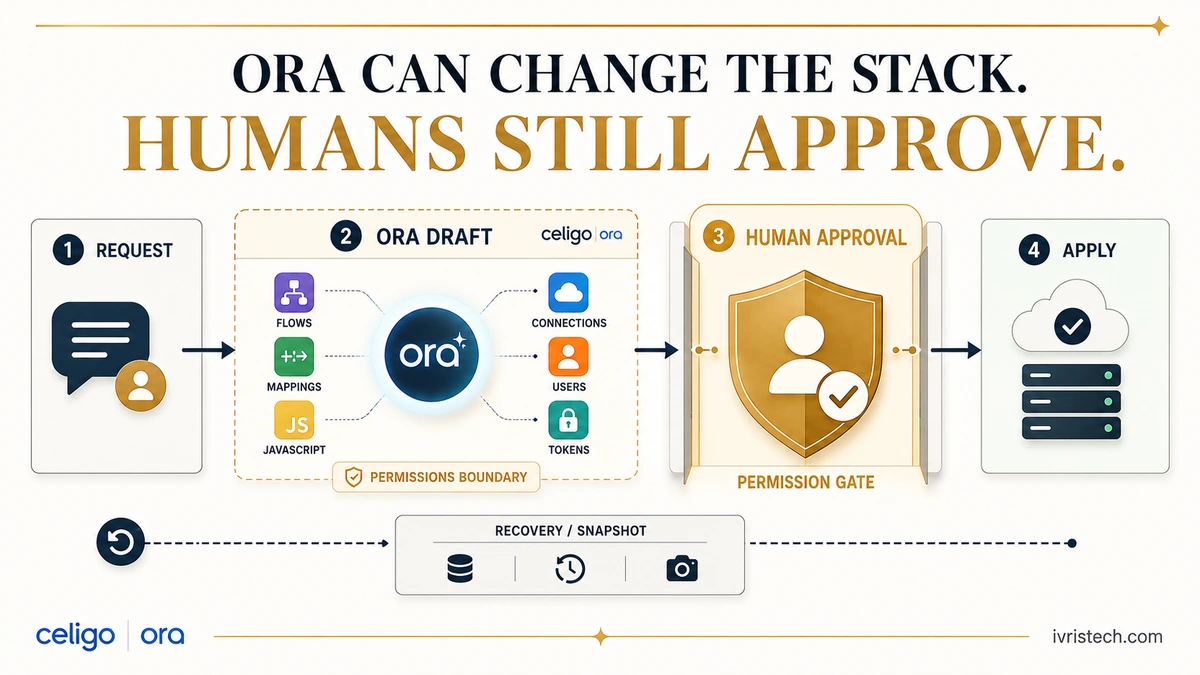
Our read: the important change is not that an iPaaS now has a chat interface. It is that the interface can operate across configuration, code, credentials, users, and lifecycle workflows. That makes human approval, inherited permissions, and recovery design the real control surface for B2B operations teams.
Direct answer — what changed with Celigo Ora GA?
Celigo Ora became generally available on September 2, 2026. It can create and modify integration resources across an account, including flows, connections, mappings, scripts, APIs, users, and some token and environment workflows. Celigo stages configuration changes as drafts for explicit approval and limits Ora to the user’s existing permissions. The catch: approval is not an automatic rollback mechanism.
Key Takeaways
- Celigo Ora moved from a six-month beta to general availability on September 2, 2026.
- Ora can create or modify flows, connections, mappings, JavaScript, APIs, user access, and other account resources when the user’s permissions allow it.
- Celigo stages configuration changes for review and requires explicit approval before applying them.
- Ora inherits existing account and integration permissions; it does not receive a separate permission set.
- Celigo documents no automatic Ora snapshot or built-in rollback for configuration edits, so teams still need deliberate lifecycle controls for production changes.
What Celigo Ora Actually Controls
Celigo’s Ora overview describes resource management across flows, exports, imports, connections, scripts and hooks, APIs, mappings, filters, Handlebars templates, and JavaScript. Its practical prompt library goes further: Ora can create or clone connections, change which connection a flow uses, add routers, clone flows, modify import mappings, update scripts, create MCP servers, and manage account-level settings when the operator has permission. Some support pages still carry beta wording from before September 2; Celigo’s dated GA announcement controls the current status.
Ora can also list users and roles, disable inactive users, rotate an on-premise agent token, and create a scoped API token when permitted. Celigo’s permission table matters: standard Manage users can edit integrations and connections, but account API-token management is reserved for owners and administrators. Ora inherits that boundary.
Environment work is concrete but should not be overstated. Celigo says Ora can manage environments, and its prompt examples show pulling integration changes from a related environment while excluding credentials and schedules. That supports an environment-level operator framing, not a claim that every environment administration action is delegable.
Human Approval Is the Control Boundary
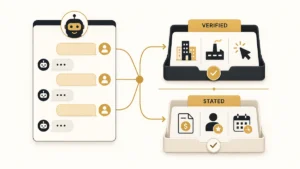
Celigo’s current Help Center is explicit about configuration changes: when Ora makes a change, it stages the result as a draft and applies nothing until the user approves it. The default interaction mode assumes the user wants execution; saying “don’t make changes yet” switches Ora into planning. Audit logs can record Ora as the source alongside UI, API, CLI, MCP, and other surfaces.
Ora can also run flows, retry errors, and perform other operational tasks within the user’s permissions. Celigo is clearest about approval for configuration changes and staged retry-data fixes, so teams should not assume every operational action necessarily presents the same approval card.
In our earlier reporting on governed workflow authority for AI, the practical question was how to separate read, draft, submit, and approve rights. Ora makes that model concrete at the integration layer: inherited permissions decide what the agent can reach, while staged approval decides whether a proposed configuration change becomes real.
The Hidden Catch: Approval Is Not Rollback
Celigo documents an important production limitation. Ora does not automatically take a snapshot before modifying a resource, and its Ora workflow has no built-in rollback for configuration changes after approval. Celigo recommends cloning a critical integration, testing Ora’s changes there, and then using Integration Lifecycle Management to merge approved changes back.
Celigo does have recovery tooling: Integration Lifecycle Management supports snapshots and reverts, and Ora examples include using those features. The point is narrower: an approval card is a change-control gate, not a recovery plan. High-impact production changes still need a deliberate snapshot, clone, or ILM path.
What B2B Ops Teams Should Do Now
Map Ora authority to job roles. Review Monitor, Manage, Admin, and Owner access, including account-level rights over users, tokens, and environments.
Separate configuration from operations. Document which actions stage a change, which Ora can execute under existing permissions, and which still require a second reviewer.
Require a recovery path. For critical integrations, use snapshots or clones before approving Ora-generated configuration. Audit history explains what changed; revisions provide a route back.
Audit the source, not just the person. Celigo audit logs can distinguish Ora from UI, API, CLI, and MCP activity, letting teams compare agent-driven changes with human configuration.
Ora’s GA is a useful marker for where enterprise integration software is going. The agent is no longer confined to explaining a mapping or drafting code. It can work across the environment that runs the automation. The corresponding governance question is therefore no longer “can the model answer correctly?” It is “what can this identity change, what must a human approve, and how do we recover after approval?”
Frequently Asked Questions
Celigo made Ora generally available on September 2, 2026, after a six-month beta. Celigo CTO Scott Henderson said the beta covered more than 16,800 conversations. A separate Celigo launch release reported nearly a quarter million messages since beta, so those figures should be treated as different measures.
Yes for configuration changes: Celigo’s Help Center says Ora stages changes as drafts and applies them only after explicit approval. Its error-management documentation also stages corrected retry data for review. Celigo’s documentation is less explicit that every operational action, such as running a flow, uses the identical approval-card process.
Celigo documents Ora workflows for listing and disabling users, rotating agent or connection credentials, creating scoped API tokens when permitted, and moving integration changes between related environments. These actions remain constrained by the operator’s Celigo role and environment or integration scope; Ora does not receive independent permissions.
Ora does not automatically snapshot a resource before changing it, and Celigo says there is no built-in Ora rollback for configuration changes. Celigo’s separate Integration Lifecycle Management supports snapshots and reverts, and Ora can work with those revision features. Critical production changes therefore need a deliberate recovery workflow.