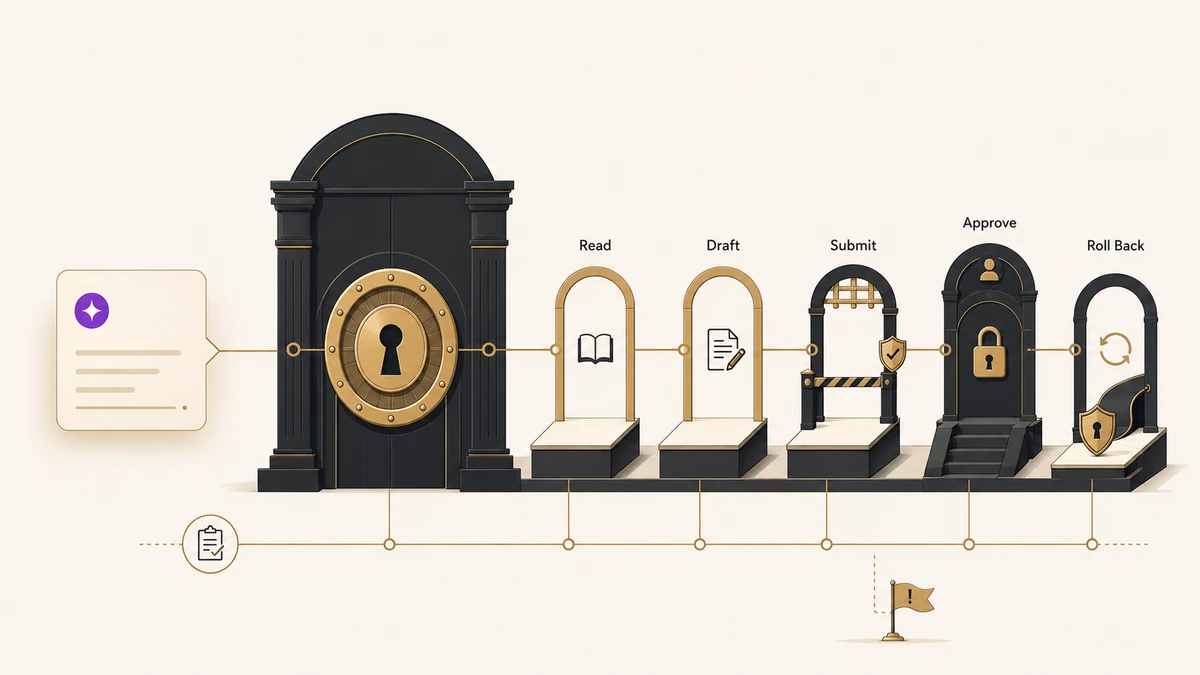
Pipefy has launched Process-as-Tool, an architecture that lets AI assistants initiate, execute, and complete governed business processes from a conversation. Pipefy’s June 11 announcement says assistants including Claude, Codex, Gemini, and Copilot can call configured Pipefy workflows while preserving approvals, required fields, escalation logic, compliance controls, and audit trails.
The architecture uses two Model Context Protocol components. Pipefy’s MCP Server lets external assistants execute approved Pipefy processes. Its MCP Client lets Pipefy AI agents call external corporate tools. Pipefy says it serves more than 4,000 customers across over 150 countries.
Our read: Process-as-Tool matters because it gives AI governed authority, not simply access to information. The search results explain how a conversation can trigger a workflow. The ranking gap is the buyer question underneath it: which actions should an assistant be allowed to take, and who is accountable when the process goes wrong?
Key Takeaways
- Pipefy Process-as-Tool lets Claude, Codex, Gemini, Copilot, and other assistants execute configured business processes through conversation.
- The MCP Server exposes approved Pipefy processes to external assistants; the MCP Client lets Pipefy agents call external tools.
- Approvals, required fields, escalation logic, compliance rules, and audit trails remain part of the process.
- Pipefy says it has more than 4,000 customers in over 150 countries.
- Before connecting an assistant, teams need an authority matrix covering allowed processes, write actions, approvals, exceptions, and rollback.
What Pipefy Process-as-Tool Changes
Most enterprise AI connections begin with data access. An assistant can retrieve a record, summarize a document, or answer a question. Process-as-Tool moves from retrieval into execution. A user can ask an assistant to start an onboarding request, route a purchase approval, or complete another configured process without opening Pipefy.
The important word is configured. Pipefy says the assistant works inside an existing process with its rules intact. Required fields still have to be completed. Approvals still apply. Escalations and compliance controls remain visible. The assistant becomes a new way to invoke the process rather than a replacement for the process itself. Pipefy’s product update gives the clearest short definition of the MCP Server and MCP Client roles.
CityBiz’s coverage describes the conversational workflow benefit. That benefit is real, but it becomes valuable only when the assistant’s authority is narrower than the employee’s request.
Access Is Not Authority
An AI assistant with read access can expose sensitive information. An assistant with process authority can also create obligations, approve spend, change records, notify people, and move work into the next operational stage. The governance standard has to rise with that power. Obsidian Security’s $85 million agent-security bet turns that higher standard into a buyer test for inventory, least privilege, and execution-time blocking.
This is the same question raised by headless AI marketing infrastructure: which identity requested the action, which tools could the agent use, who approved the action, and how can the team reconstruct or reverse it? Process-as-Tool gives companies a useful answer at the workflow layer, but the customer still decides how much authority to expose. ZoomInfo’s Amazon Quick Suite connector makes the data-side version of that question concrete: verified context still needs permissioned use. Barndoor’s per-agent identity model makes the actor itself explicit by attaching permissions, credentials, activity, and spend to one governed record.
A process that is safe for a human manager is not automatically safe for an assistant. Humans carry context that may not appear in the workflow definition. They know when a request looks unusual, when a policy exception is justified, or when a field contains misleading information. An AI-connected process needs those judgment points translated into explicit controls.
The Authority Matrix Teams Should Build First
List the processes an assistant may start. Begin with reversible, low-risk workflows such as drafting a request or collecting information. Keep financial approval, employee status changes, and customer commitments outside the first pilot.
Separate read, draft, submit, and approve rights. Do not grant a single broad permission called “process access.” An assistant may be allowed to read a request and draft fields while a human retains submission or approval authority.
Define mandatory approval points. High-impact actions should pause for a named human role. Salesforce Headless 360 raised the same RevOps accountability problem when agents gained the ability to update systems without opening the application. Celigo Ora’s staged approval model makes that boundary concrete at the iPaaS layer: configuration changes are drafted for review before they are applied.
Design exception and rollback paths. Teams need to know what happens when the assistant lacks information, reaches a policy conflict, or completes the wrong action. Audit history is useful after the fact; rollback and escalation rules reduce the damage before it spreads.
Measure authority quality. Track successful completions, human interventions, policy exceptions, reversals, and time saved. A workflow that runs quickly but frequently needs correction should not receive broader authority.
Pipefy’s launch gives companies a practical way to let assistants act through controlled workflows. That is a stronger enterprise proposition than giving a model unrestricted tool access. It also makes governance a design task before deployment, not an audit task after an assistant has already acted. As our coverage of ZoomInfo data inside Codex noted, faster handoffs move good and bad assumptions alike. Process authority deserves an even tighter test.
Frequently Asked Questions
Process-as-Tool is Pipefy’s architecture for letting AI assistants initiate, execute, and complete configured business processes through conversation. The assistant calls the workflow while Pipefy keeps the process rules, approvals, required fields, escalations, compliance controls, and audit trail in place.
Pipefy names Claude, Codex, Gemini, and Copilot as examples of assistants that can initiate and execute configured processes. The connection uses Pipefy’s MCP Server, so other compatible assistants may also be able to call approved workflows as the ecosystem develops.
The MCP Server lets external AI assistants call and execute configured Pipefy processes. The MCP Client works in the other direction, allowing Pipefy AI agents to use external corporate tools. Together, they connect conversational assistants with governed processes and the systems those processes need.
Build an authority matrix before connecting an assistant. Define which processes it can start, which fields it may write, where human approval is mandatory, how exceptions escalate, and how actions can be reversed. Start with low-risk, reversible processes and expand authority only after measuring errors and interventions.