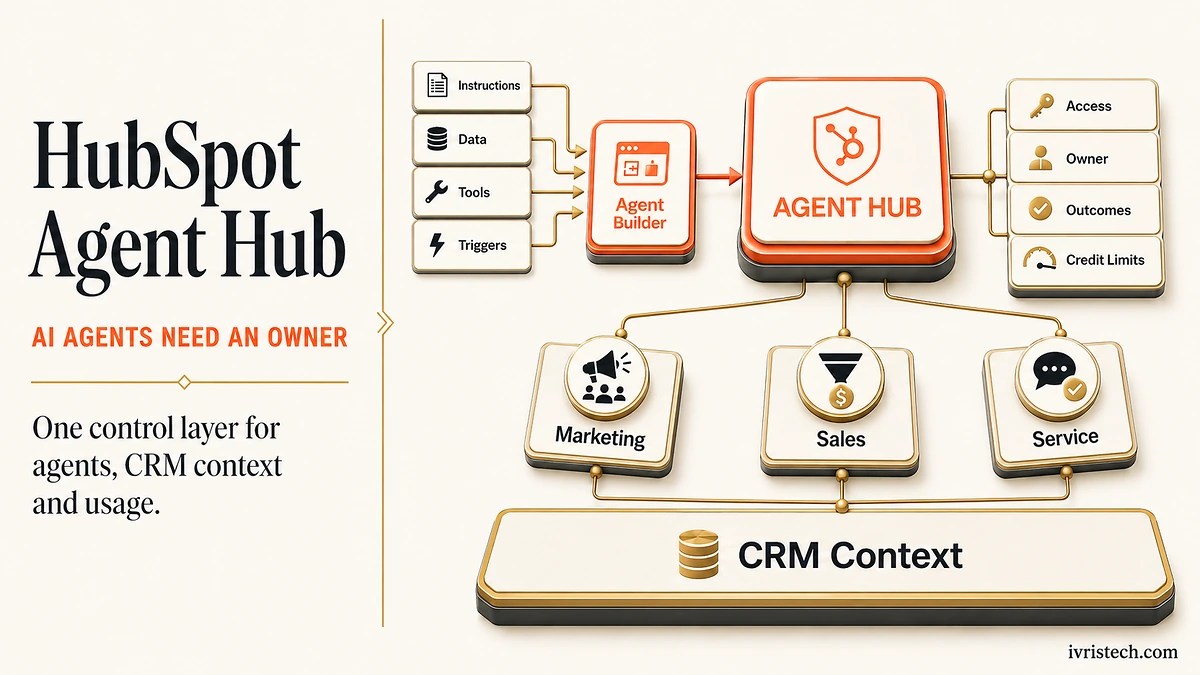
HubSpot launched Agent Hub and Agent Builder in public beta on July 23, 2026 for Professional and Enterprise customers. Agent Hub gives marketing, sales, and service teams one place to see active agents, monitor performance, activate available agents, and organize outcomes around go-to-market goals.
Agent Builder is the construction layer. Teams can describe an agent or automation in natural language, connect workflows, custom agents, and triggers on one canvas, and ground the work in HubSpot data such as contact records, deal history, call transcripts, and buying signals. HubSpot says Ignite Reading used it to reduce a 15-to-20-minute district-calendar task to seconds, saving more than 350 hours a year.
Our read: this is not mainly another no-code AI builder. It turns agent operations into a RevOps responsibility. Shared CRM context can stop sales, service, and marketing agents from acting on different versions of the customer, but centralization also raises the cost of weak permissions, unclear ownership, untested instructions, and uncapped usage.
Direct answer – What are HubSpot Agent Hub and Agent Builder?
HubSpot Agent Hub is a central workspace for managing AI agents across marketing, sales, and service. Agent Builder lets Professional and Enterprise customers create custom agents and automations with natural-language instructions and shared CRM context. The launch matters because it centralizes status, access, performance, and credit controls, making agent governance an operating job rather than a collection of isolated experiments.
Key Takeaways
- HubSpot opened Agent Hub and Agent Builder in public beta on July 23, 2026 for Professional and Enterprise customers.
- Agent Hub centralizes agent status, activation, performance, marketplace access, and outcomes across the go-to-market organization.
- Agent Builder combines custom agents, workflows, triggers, HubSpot data, and external systems on one canvas.
- HubSpot says Ignite Reading saves more than 350 hours annually with a custom district-calendar agent.
- All agents consume HubSpot Credits from July 23, so teams need permissions, test cases, owners, and monthly run limits before scaling.
What HubSpot Actually Shipped
Agent Hub is a management surface, not a single agent. It shows what is running, what has not been activated, and how agents perform against goals such as building demand, winning deals, serving customers, and scaling growth. It also brings Agent Builder and Agent Marketplace into the same workspace.
Agent Builder lets teams create agents and automations together. Runs can start on a schedule, after a contact update, through a webhook, or from a third-party integration. The builder can use CRM records, files, knowledge vaults, and supported external systems, then pass the output into a broader workflow. That moves HubSpot’s AI story beyond the inline insights introduced in the rebuilt Smart CRM Index.
The product direction matches the operating model in our AI agents for RevOps framework: the agent is useful only when it has defined inputs, approved tools, a measurable outcome, and a human owner. Agent Hub supplies the shared control surface, but the customer still has to design those controls.
Why This Is a Governance Launch, Not Just a Builder
Shared context solves a real problem. A prospecting agent should know when the same account has an open support complaint, and a service agent should not treat a renewal-risk customer like a generic ticket. HubSpot is using the CRM as the common context layer so agents can work from the same customer history.
The hidden catch is blast radius. An agent that can update records, create assets, trigger workflows, or call an external system can propagate a bad instruction faster than a human operator. HubSpot’s Agent Builder documentation supports owner-only, everyone, and custom team access, with separate run and edit rights. It also says some tasks require additional product permissions, such as edit-and-publish access for landing pages.
That makes access design part of the launch plan. A sound RevOps governance model should name an owner for every agent, separate people who can edit from people who can run it, and define which data, tools, and production actions the agent is allowed to touch.
The Cost Catch: Credits and Run Limits
Agent Hub is included for Professional and Enterprise customers, but custom-agent execution is not unlimited. HubSpot says all agents began consuming HubSpot Credits on July 23. Its documentation also warns that estimated credit use can differ from actual run costs because complexity varies.
Admins can review estimated credits in the agent inbox, CRM cards, and Agent Builder, then set a monthly run limit for each agent. That control matters because natural-language building lowers the barrier to creating agents faster than finance teams can model their aggregate usage. The earlier move toward outcome-based Breeze pricing reduced risk for two packaged agents; custom agents bring the budgeting question back at the run level.
For buyers comparing HubSpot and Salesforce as AI operating systems, the relevant number is no longer only subscription price. It is the combined cost of agent runs, governance time, implementation, failed actions, and the data work required to keep outputs reliable.
What RevOps Teams Should Do Before Scaling
- Start with one bounded job. Choose a repetitive task with a known correct answer, stable inputs, and a measurable time or revenue outcome.
- Separate run and edit access. Let a small owner group change instructions, tools, and knowledge sources. Give broader teams run-only access where appropriate.
- Test the failure cases. Use incomplete records, conflicting instructions, stale properties, missing permissions, and an unavailable integration before publishing the agent.
- Set a monthly run limit. Review the estimated credit range, choose a cap, and assign someone to investigate unusual consumption before raising it.
- Review outcomes, not activity. Track qualified records, resolved work, time saved, error rates, reversals, and human escalations. A high run count is not evidence of value.
This is the important part: Agent Hub can centralize visibility, but it cannot decide what good governance means for your company. The launch gives RevOps a place to manage agents. It also gives RevOps fewer excuses for letting them operate without owners, limits, and evidence.
Frequently Asked Questions
HubSpot Agent Hub is a central workspace for discovering, activating, monitoring, and managing AI agents across marketing, sales, and service. It shows agent status and performance, provides access to Agent Builder and Agent Marketplace, and organizes agent outcomes around go-to-market goals.
Agent Builder lets teams create custom agents and automations on one canvas using natural-language instructions. Agents can use HubSpot CRM data, knowledge sources, workflows, webhooks, schedules, and supported integrations. Teams can test an agent, control access, review estimated credit use, and publish it into broader processes.
HubSpot says Agent Hub and Agent Builder are available in public beta to Professional and Enterprise customers. Creating and customizing agents requires Super Admin or Breeze Studio permission, while additional permissions may be required for specific actions. Administrators can also restrict who may run or edit each agent.
Yes. HubSpot says all agents consume HubSpot Credits from July 23, 2026. Estimated costs appear in Agent Builder and other agent surfaces, but actual use can vary. Administrators can set monthly run limits for individual agents to reduce the risk of unexpected credit consumption.