QuoteIQ said in a September 14, 2026 launch announcement distributed to news sites that its new QuoteIQ MCP connector exposes 134 tools across 21 areas of the CRM to ChatGPT, Claude, Grok, and other MCP-compatible assistants. The company says those tools can reach live customer records, estimates, invoices, unpaid balances, schedules, jobs, tasks, pipelines, analytics, and inventory.
The 134-tool count is still a company claim. IVRIS could not find a public QuoteIQ MCP catalog that enumerates all 134 tools. QuoteIQ’s help center does corroborate the underlying product surfaces and currently describes its built-in AI Autopilot as 55 tools across 13 categories. The two counts are not directly comparable without an MCP catalog.
The more interesting story is architectural. QuoteIQ already had an AI assistant inside the CRM. MCP lets the interaction layer move outside it. For B2B RevOps, CRM, and marketing-automation teams, that raises a narrower question than “is CRM dead?”: when an external assistant can read records and prepare or execute governed actions, how much of the CRM interface still needs to be the place where daily work happens?
Direct answer — what does QuoteIQ MCP change about CRM architecture?
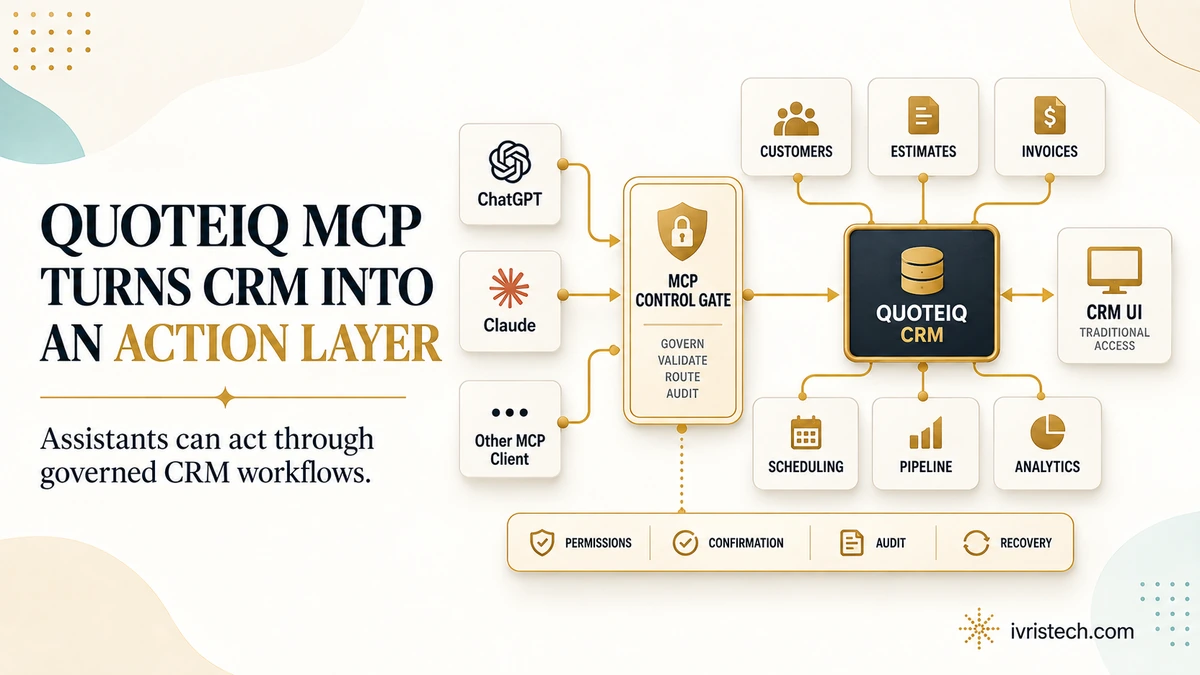
QuoteIQ MCP moves the conversational front end outside the CRM while keeping QuoteIQ as the system holding records, permissions, plan limits, and business actions. QuoteIQ says the connector exposes 134 tools across 21 areas. The interface does not disappear, but routine work can increasingly start in ChatGPT, Claude, Grok, or another MCP client instead of inside QuoteIQ.
Key Takeaways
- QuoteIQ says its September 14 MCP launch exposes 134 tools across 21 CRM areas to compatible external AI assistants.
- The company announcement names customer lookup, estimates, invoices, balances, scheduling, jobs, tasks, pipelines, analytics, and inventory; QuoteIQ’s help center confirms those underlying modules exist.
- QuoteIQ says changes are previewed or confirmed, requests enter an audit trail, completed changes can be undone, and OAuth separates read and write permissions. Those launch-specific controls are not yet documented in a public MCP reference.
- The connector is advertised across all plans, but available tools still follow each plan’s features. Pipelines and inventory, for example, are Elite/Max features in QuoteIQ’s current plan documentation.
What QuoteIQ Actually Launched
The launch is more than a read-only connector. QuoteIQ says an assistant can find customers, prepare estimates and invoices, inspect unpaid balances, book jobs, create reminders, manage pipeline activity, analyze the business, and monitor inventory. QuoteIQ’s current platform overview confirms those underlying CRM modules exist and lists 40,000+ users; no MCP adoption figure has been published.
QuoteIQ also says the connector uses OAuth, separates read and write permissions, honors existing account permissions, and can be disconnected at any time. Its user-permissions documentation already shows granular controls for calendars, deals, invoices, inventory, and automation. What is missing is a public map from those controls to the 134 MCP tools.
Plan boundaries matter too. The launch says MCP is included across all QuoteIQ subscription plans, but it also says the available tool set follows the features in the subscriber’s plan. QuoteIQ’s current pricing documentation places Pipelines & Deals and Inventory Management on Elite and Max. “All plans” therefore does not mean every account gets every action.
Is the CRM Interface Becoming Optional?
For routine work, parts of it are. The important distinction is between the CRM as a system of record and the CRM as a user interface. MCP does not remove the database, business rules, permissions, billing state, or workflow logic. It gives another client a standardized way to call them.
That pattern is already visible at larger vendors. Salesforce Headless 360 exposed CRM capabilities beyond the browser UI, while Klaviyo Headless moved marketing actions into external AI clients. QuoteIQ matters because a smaller vertical CRM is adopting the same separation between the system of record and the assistant used to operate it.
Our read: the CRM interface becomes optional for well-bounded, conversational workflows before it becomes optional for administration. Configuration, permission design, exception handling, bulk review, troubleshooting, and audit inspection still benefit from a dedicated product surface. The likely shift is not “no CRM UI.” It is “the CRM UI is no longer the only front end.”
The Hidden Catch: The Control Contract Is Still Mostly a Company Claim
QuoteIQ says AI-prepared changes are previewed before application, requests are logged, completed changes can be undone, and existing permissions remain enforced. Those are the right control categories, but QuoteIQ has not published a public MCP reference showing which actions are writable, which require confirmation, what “undo” covers, or how the audit record identifies the actor.
The external assistant adds another control layer. Claude supports remote MCP connectors and tool approvals, while ChatGPT workspace agents support custom MCPs and write approvals. Effective authority can therefore depend on both QuoteIQ and the AI client. QuoteIQ has not published a client-by-client action matrix.
What B2B RevOps and CRM Teams Should Test
- Map the action surface. Ask for the exact tool catalog, not only the number 134. Separate reads, drafts, writes, sends, financial actions, and deletes.
- Test permission inheritance. Connect users with different QuoteIQ roles and confirm the assistant cannot exceed the source account’s authority.
- Verify approval by client. Check whether ChatGPT, Claude, and other clients present the same confirmation boundary for the same write.
- Prove audit and recovery. Record who initiated the request, which tool ran, which records changed, and whether the specific action can be reversed.
QuoteIQ’s announcement is useful because it makes the architecture easy to see: an external assistant can become the conversational workspace while the CRM remains the governed action and record layer underneath. The next evidence point is not another tool-count headline. It is a public 134-tool catalog showing the permission, confirmation, audit, and recovery behavior of each tool.
Frequently Asked Questions
QuoteIQ MCP is the company’s September 14, 2026 connector for letting MCP-compatible AI assistants work with QuoteIQ data and actions. QuoteIQ says it exposes 134 tools across 21 CRM areas, allowing users to work through an external conversational client while QuoteIQ remains the underlying business system.
QuoteIQ says the connector works with ChatGPT, Claude, Grok, and other MCP-compatible assistants. Claude and ChatGPT both support MCP-based custom connections, but their availability, approval settings, and organizational controls differ. QuoteIQ has not yet published a public client-by-client matrix showing identical behavior across all supported assistants.
No public QuoteIQ MCP catalog was available in IVRIS’s September 14 review. The 134-tool and 21-area figures come from QuoteIQ’s launch announcement. QuoteIQ’s own help center corroborates many underlying CRM areas, including customers, estimates, invoices, scheduling, tasks, pipelines, analytics, inventory, and granular user permissions.
Not entirely. MCP can make an external assistant the front end for routine lookups and governed actions, but the CRM still owns records, permissions, workflows, plan entitlements, administration, and audit functions. The practical shift is that the CRM interface becomes one operating surface among several rather than the only place work starts.